
Storm control
storm-control broadcast level 10 raises two questions: ten percent of what, and over how long. The switch counts one traffic type, broadcast, multicast or unicast, over a fixed one-second interval against the port's bandwidth. When it exceeds the level, all traffic of that kind is dropped for the next interval, and by default the port neither shuts down nor sends a trap. A falling threshold sets when it resumes.
By Arif, founder of Daveth · Updated
The full 5 min walkthrough is in Daveth Pro (Network). See what the plan opens
What this page answers
What does storm control do when the threshold is exceeded?
By default it drops all traffic of that type for the next one-second interval. It does not shut the port down and sends no trap unless configured to. Read it in “What the port does when the level is reached”
How does storm control measure traffic?
It counts the packets of one type, broadcast, multicast or unicast, received in a one-second interval and compares the count with the suppression level, each type on its own. Read it in “What is actually counted”
What is the storm control falling threshold?
The second number in storm-control level, bps or pps. The port blocks at the rising threshold and stays blocked until the rate drops below the falling threshold. Read it in “Two numbers, and what one number does”
Ten percent of what?
You type storm-control broadcast level 10. Two questions decide whether that does what you meant, and neither is about syntax: ten percent of what, and measured over how long.
A LAN storm occurs when packets flood the LAN, creating excessive traffic and degrading network performance. Storm control prevents traffic on a LAN from being disrupted by a broadcast, multicast, or unicast storm on one of the physical interfaces.
What is actually counted
The switch counts the number of packets of a specified type received within the 1-second time interval and compares the measurement with a predefined suppression-level threshold.
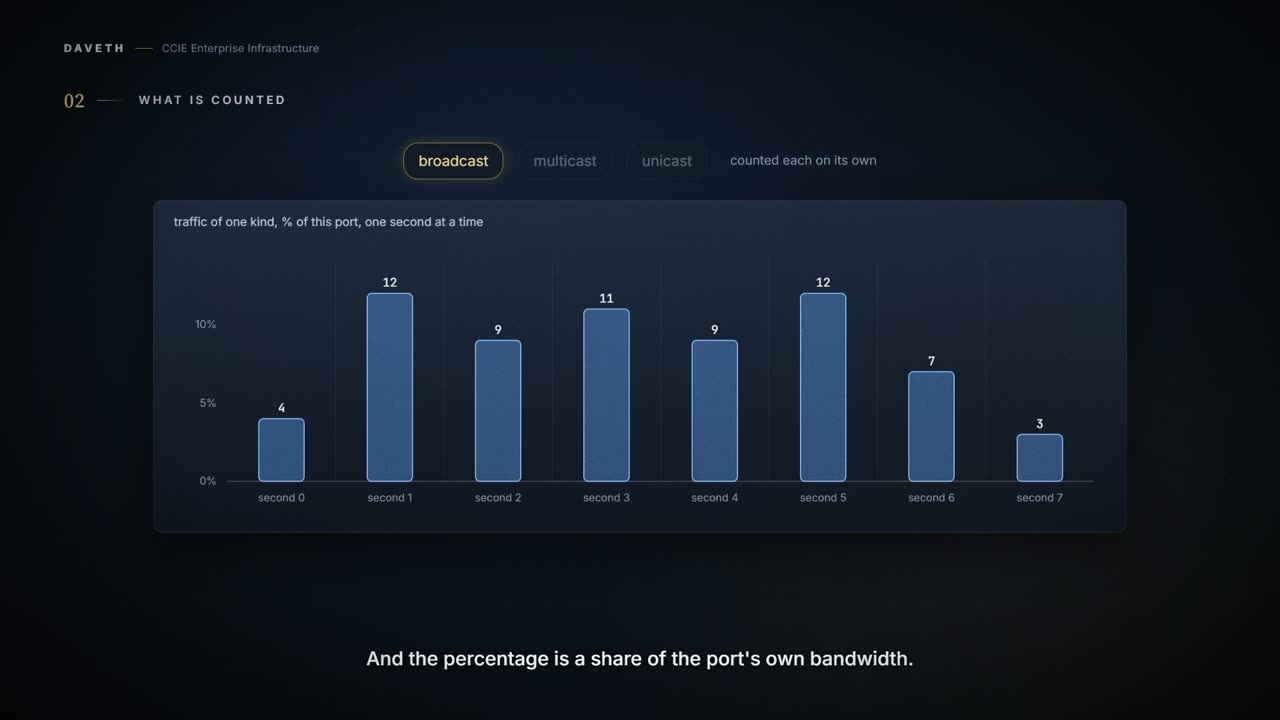
So the window is one second, fixed, and what is counted is one traffic type: broadcast, multicast or unicast, each on its own. A port can be dropping broadcast while it forwards multicast normally. And the percentage is measured against the port itself:
And be clear what it is measuring, because the name suggests more intelligence than is on offer. This counts traffic of one type against a level. It does not look at what the traffic is, where it came from, or whether anybody meant harm by it. A busy, entirely legitimate second looks identical to an attack, and gets treated identically.
Bandwidth as a percentage of the total available bandwidth of the port that can be used by the broadcast, multicast, or unicast traffic
Notice what that means when you copy a working line from a 1 Gb access port to a 10 Gb uplink. The same 10 is 100 Mb/s on one and 1 Gb/s on the other. The number moved with the port; your intent did not.
Because packets do not arrive at uniform intervals, the 1-second time interval during which traffic activity is measured can affect the behavior of storm control.
Traffic that averages under the level can still cross it in a single second. Bursts are judged one second at a time.
What the port does when the level is reached
Gi1/0/1 has storm-control broadcast level 10 and nothing else. PC1's NIC starts flooding broadcast. What do you expect the port to do? Most engineers answer "shut down". Step 1 of the walk asks it.
When the amount of specified traffic exceeds the threshold, all traffic of that kind is dropped for the next time period. The default is to filter out the traffic and not to send traps.
Neither shutdown nor a trap. The port stays up, drops broadcast in the second after each crossing, and sends no trap. Both of the actions people expect are keywords you add:
Select the shutdown keyword to error-disable the port during a storm. Select the trap keyword to generate an SNMP trap when a storm is detected. By default, storm control is disabled.
So there are two layers of quiet to get through: the feature is off until you configure it, and once configured it sends no trap until you ask for one. Step 3 of the walk adds action trap: the same drops, and now a trap when the storm is detected. The walk counts one per block, when the block starts; that count is this course's reading, not the guide's.
Two numbers, and what one number does
How many numbers did you configure? The syntax takes two for each form:
The syntax, from the guide. Percentage, bits per second, or packets per second; the second number in each is the falling level.
storm-control {broadcast | multicast | unicast} level
  {level [level-low] | bps bps [bps-low] | pps pps [pps-low]}
The port blocks traffic when the rising threshold is reached. The port remains blocked until the traffic rate drops below the falling threshold (if one is specified) and then resumes normal forwarding. If you do not configure a falling suppression level, it is set to the rising suppression level.
One number, then, means the level that ends a block is the level that started it.
This course's reading, not a quotation: apply the guide's rule second by second to the same traffic, and the two configurations differ like this. With level 10 alone, PC1's broadcast crosses 10 in seconds 1, 3 and 5, and the port blocks seconds 2, 4 and 6: three short blocks. With level 10.00 8.00, the block starts at second 2 and holds until the rate drops below 8: seconds 2 to 6, one block. Steps 1 and 2 of the walk.
So a falling level does not make the port recover sooner. It makes it recover once, and later. That trades repeated short drops for one longer one.
A pump switches on when the water reaches one level and off again only when it has dropped to a lower one. Set those two levels close together and the pump spends its life starting and stopping. Put a gap between them and it runs longer, less often. The gap is not there to make it more responsive; it is there to stop it thrashing.
Where the pump stops: a pump keeps running until the level falls. This port makes a fresh decision every second, against that second's traffic only, which is why a flow that averages comfortably under your level can still be filtered in the second it bursts.
So what goes on Gi1/0/1, if you want the one longer block and a record that it happened?
This course's configuration, in the guide's syntax.
SW1# configure terminal
SW1(config)# interface gigabitethernet1/0/1
SW1(config-if)# storm-control broadcast level 10.00 8.00
SW1(config-if)# storm-control action trap
SW1(config-if)# end
Use bps or pps when you want the same absolute limit whatever the port speed. On a switch with 1 Gb and 10 Gb ports, that is usually what you mean.
Continue the lesson
The whole lesson, with its drawings and its questions. 7 more sections after the ones above.