
DHCP snooping and option 82
DHCP snooping does two jobs: it filters untrusted DHCP messages, and it builds the binding table that Dynamic ARP Inspection and IP Source Guard depend on. Every interface starts untrusted, including the uplink to the DHCP server, and trusted means exempt from checks, not secure. Enable it on Friday without trusting that uplink and clients fail one by one, as their leases come up for renewal.
By Arif, founder of Daveth · Updated
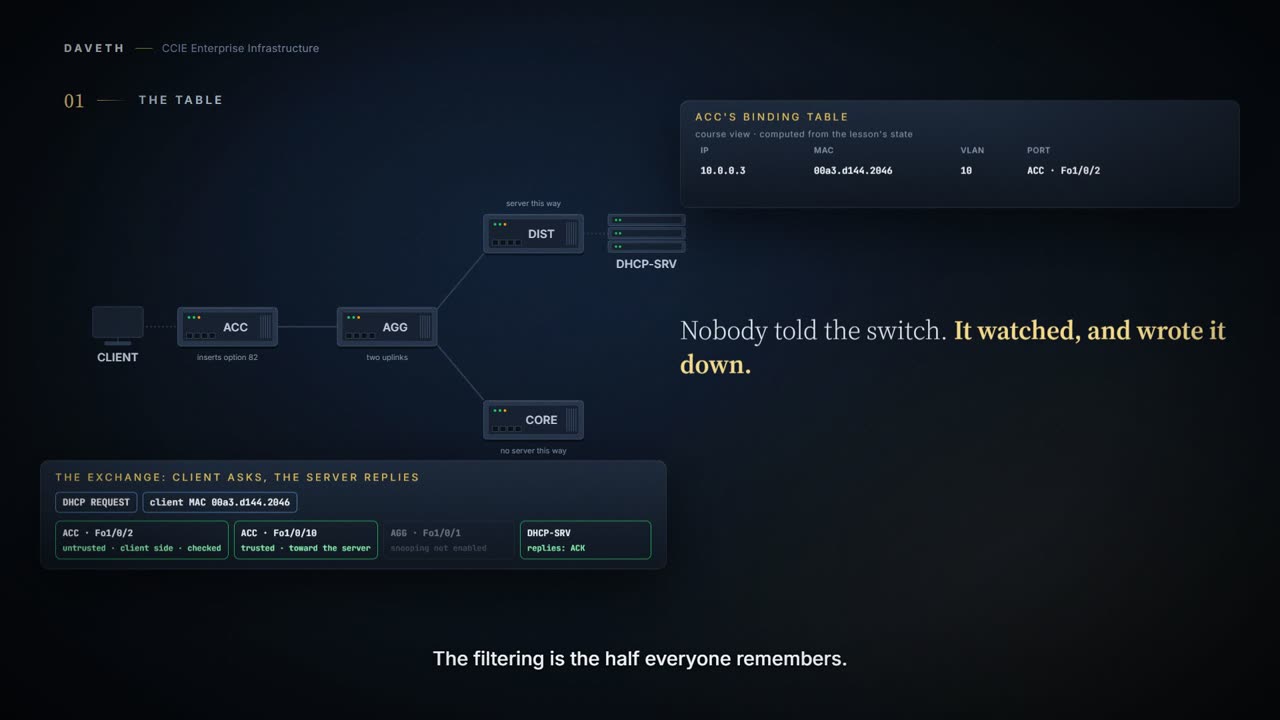
The full 4 min walkthrough is in Daveth Pro (Network). See what the plan opens
What this page answers
What does DHCP snooping do?
It filters untrusted DHCP messages and builds a binding table of the leases it sees: MAC address, IP address, lease, VLAN and interface, which Dynamic ARP Inspection and IP Source Guard rely on. Read it in “The half you already know, and the half this block depends on”
Which ports are trusted for DHCP snooping by default?
None. By default the switch considers all interfaces untrusted, including the uplink carrying replies from the DHCP server, which must be trusted explicitly. Read it in “Every interface starts untrusted — including the one you need”
Why do clients fail gradually after enabling DHCP snooping?
Existing leases are still valid, so nothing fails until each client's renewal comes due; if the server's replies arrive on an untrusted port, renewals fail a few at a time over the following days. Read it in “The failure that waits until Friday”
Start with the output rather than the feature
This course's output: computed from this scenario, laid out like Cisco's published sample of show ip dhcp snooping binding.
ACC# show ip dhcp snooping binding
MacAddress         IpAddress       Lease(sec) Type          VLAN Interface
------------------ --------------- ---------- ------------- ---- --------------------
00a3.d144.2046     10.0.0.3        86400      dhcp-snooping 10   Fo1/0/2
! one host, one address, one port, and nobody typed any of it
Total number of bindings: 1
The switch was not told any of that. It watched a DHCP exchange and wrote down what it saw.
That table is why this lesson comes first in the block. Two features you are about to meet, Dynamic ARP Inspection and IP Source Guard, have no independent source of truth about which host owns which address. They read this. Delete it and they are still enabled, still configured, and no longer protecting anything.
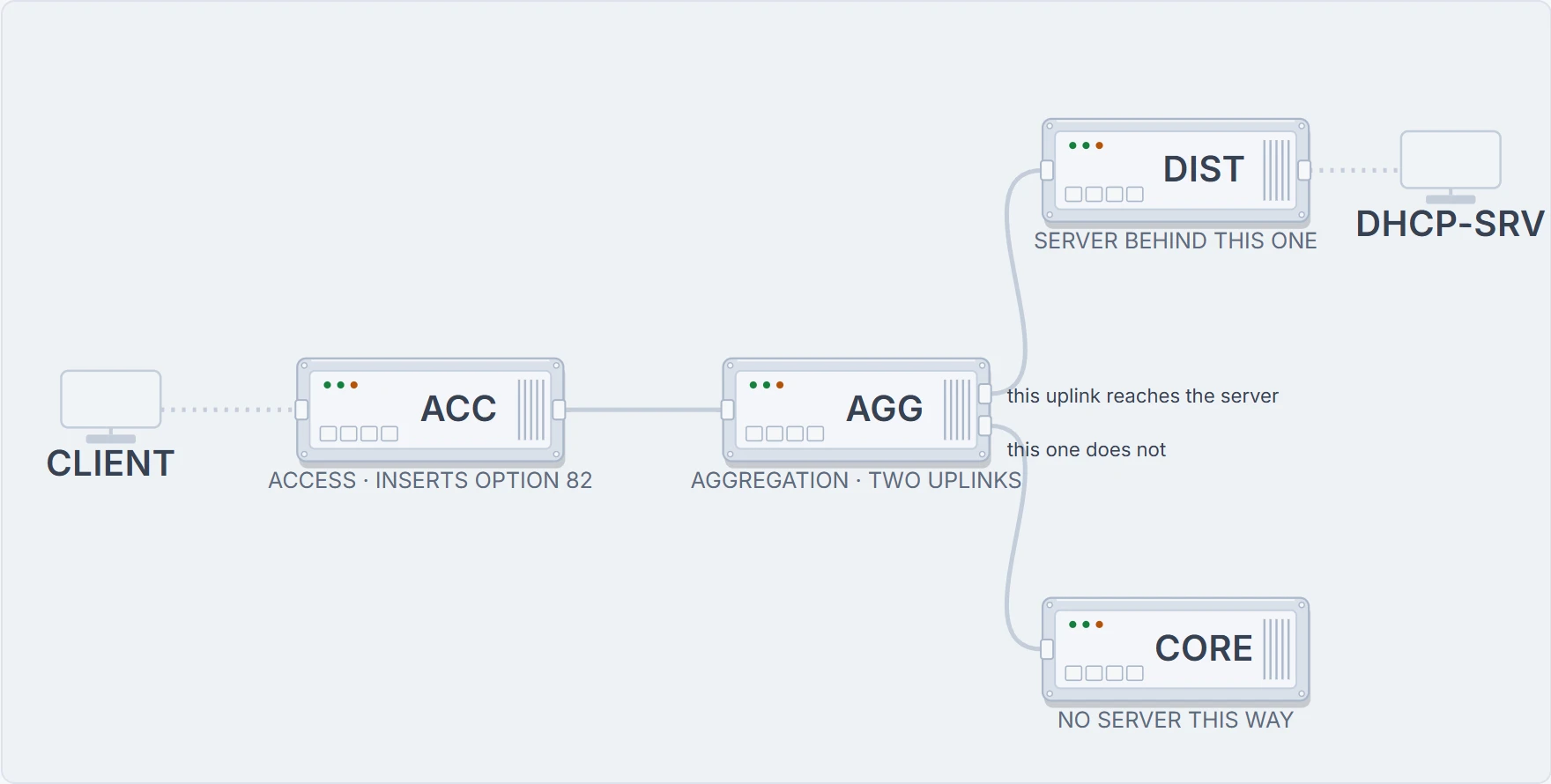
State 1 The path a DHCP message has to take
Which interfaces on it need to be trusted, and which must not be?
The half you already know, and the half this block depends on
DHCP snooping is a DHCP security feature that provides network security by filtering untrusted DHCP messages and by building and maintaining a DHCP snooping binding database, also referred to as a DHCP snooping binding table.
Filtering and building. The filtering is the part everyone remembers, because it is the part with an attacker in the story. The building is the part the rest of this block depends on.
The documentation also offers a metaphor: "DHCP snooping acts like a firewall between untrusted hosts and DHCP servers." Hold that one at arm's length. It is accurate about placement and misleading about scope. DHCP snooping does not filter your data traffic. It inspects DHCP messages. A host can still send whatever it likes with a forged source address, and snooping will not look at it.
So if you take one correction from this page, take this one. DHCP snooping is a filter whose most important output is a database.
Every interface starts untrusted: including the one you need
By default, the switch considers all interfaces untrusted. Read that again with your own access switch in mind. All interfaces. The uplink carrying replies from the DHCP server is an interface. It starts untrusted too.
And an untrusted interface is not merely unprivileged: it is where the checks apply: An untrusted DHCP message is a message that is received through an untrusted interface. The word points the opposite way from intuition. Trusted means exempt from checks, not verified and not secure. You will meet that exact inversion again in the next lesson, because DAI uses the same model.
Which gives the rule the whole design turns on: For DHCP snooping to function properly, all DHCP servers must be connected to the switch through trusted interfaces, as untrusted DHCP messages will be forwarded only to trusted interfaces. Trust everything on the path towards the server. Trust nothing facing a user.
ACC# configure terminal
ACC(config)# ip dhcp snooping
ACC(config)# ip dhcp snooping vlan 10
ACC(config)# interface FortyGigabitEthernet1/0/10
ACC(config-if)# ip dhcp snooping trust
ACC(config-if)# interface FortyGigabitEthernet1/0/2
ACC(config-if)# ip dhcp snooping limit rate 10
ACC(config-if)# end
The documentation is explicit that the global step is not optional: You must globally enable DHCP snooping on the switch. The rate limit is per interface, here on the port facing the client, and the 17.9 defaults table lists it as none configured, so nothing is limited until you say so.
A sourcing note, carried from the written lesson. The 17.9 Catalyst 9300 IP Addressing chapter describes this feature and its defaults but prints no configuration task block. Every command and every CLI output on this page therefore comes from the Catalyst 9000 DHCP snooping support document, named in the sources. The valid range for limit rate is not stated on either page and is not guessed here.
Four drops, or really four questions
The documentation lists the conditions under which a packet is discarded. As a list they blur together. Read them instead as four separate questions the switch is asking, because each one catches a different lie.
Is this a server message arriving from somewhere a server should not be?: A packet from a DHCP server, such as a DHCPOFFER, DHCPACK, DHCPNAK, or DHCPLEASEQUERY packet, is received from outside the network or firewall. This is the rogue-server case, and it is the one you already knew.
Does the frame agree with itself?: the switch compares the source MAC address and the DHCP client hardware address, and If the addresses match (the default), the switch forwards the packet. Note (the default): this check is on unless you turn it off. A client whose Ethernet source address disagrees with the hardware address inside its own DHCP payload is claiming to be two devices at once.
Does this release match the binding I am holding?: a DHCPRELEASE or DHCPDECLINE "that has a MAC address in the DHCP snooping binding database, but the interface information in the binding database does not match the interface on which the message was received." Ask what that stops. If any port could release any lease, a host could tear down its neighbour's address from across the VLAN. The table is already earning its keep.
Is a relay agent telling me something it has no business telling me?: the relay agent forwards a packet that includes option-82 information to an untrusted port. Sit with that last one. It will cost you an outage in about four hundred words.
The failure that waits until Friday
That is the finished configuration. Here is how the first attempt at it tends to go.
You enable snooping on VLAN 10 at four on a Friday afternoon. Nothing breaks. You go home. Clients begin failing over the weekend, a few at a time, in no pattern anyone can see. By Monday it looks like a hardware problem.
Why is the failure gradual? Because existing leases were still valid when you made the change. Nothing needed the DHCP server until each client's renewal timer came due, and those timers are spread across the day. A configuration cause with a delayed, staggered symptom almost always means an existing state stayed valid at change time, and for DHCP that state is the lease.
State 2 Where the reply stops
The client can still ask. What happens to the answer?
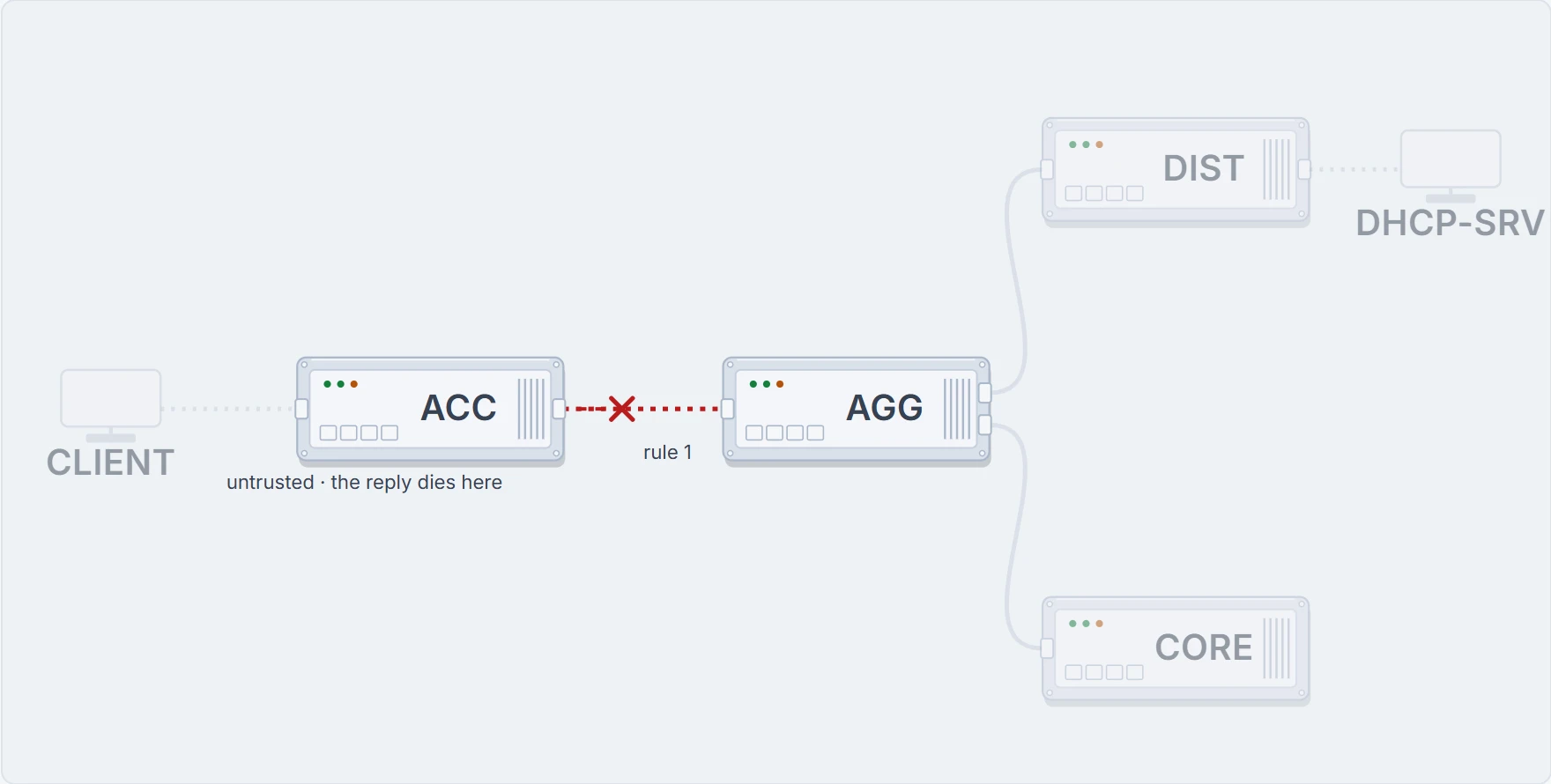
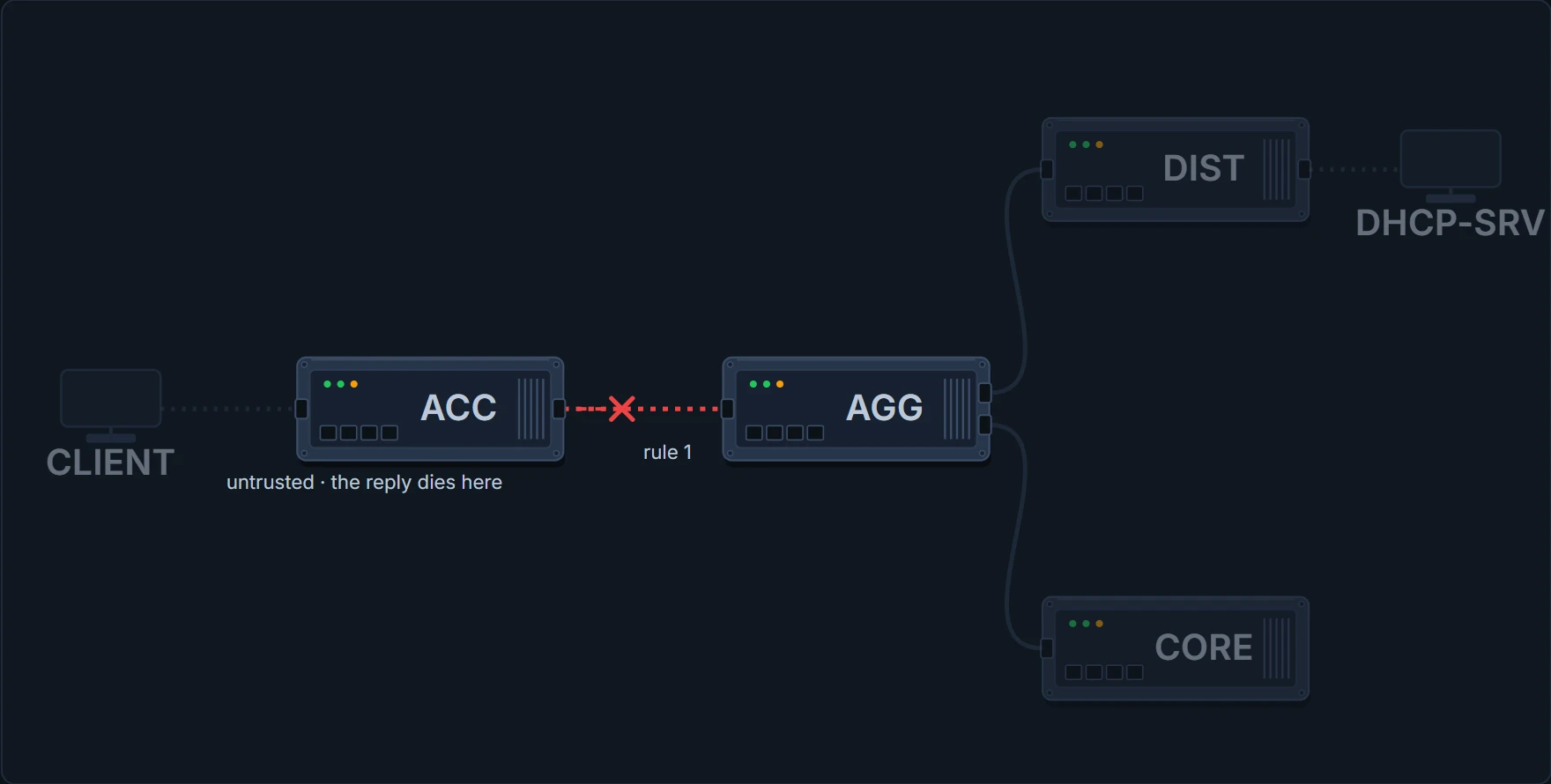
Here is the whole exchange, message by message. Cisco's published sample of neither command on this page has a field for a dropped packet, which is why the two readings after this one look healthy:
Computed from the state, where each message of the exchange stopped. No command prints this.
DISCOVER  delivered  client > acc > agg > dist > srv
OFFER     dropped at acc Fo1/0/10 by rule 1: an OFFER arrived on an untrusted interface
REQUEST   never sent: the exchange stopped before this
ACK       never sent: the exchange stopped before this
So what does the binding table say while that is happening?
This course's output: computed from this scenario, laid out like Cisco's published sample of show ip dhcp snooping binding.
ACC# show ip dhcp snooping binding
MacAddress         IpAddress       Lease(sec) Type          VLAN Interface
------------------ --------------- ---------- ------------- ---- --------------------
00a3.d144.2046     10.0.0.3        86400      dhcp-snooping 10   Fo1/0/2
Total number of bindings: 1
! one row, unchanged, while renewals are being dropped a hop away
A lease outlives the change that broke renewals, so the row written before the change is still sitting there. The table looks healthy, the feature reports itself enabled and operational, and DHCP is broken.
Which is why the first evidence to reach for is not the binding table. It is the trust column in show ip dhcp snooping. A client that still works proves nothing, since it may simply be holding a lease. The uplink's trust flag is the claim actually under test.
Is the interface those replies arrive on trusted?
This course's output: computed from this scenario, laid out like Cisco's published sample of show ip dhcp snooping.
ACC# show ip dhcp snooping
Switch DHCP snooping is enabled
Switch DHCP gleaning is disabled
DHCP snooping is configured on following VLANs:
10
DHCP snooping is operational on following VLANs:
10
! and this line says the feature really is running, which is why the outage is real
DHCP snooping is configured on the following L3 Interfaces:

Insertion of option 82 is enabled
   circuit-id default format: vlan-mod-port
   remote-id: 00a3.d144.1a80 (MAC)
Option 82 on untrusted port is not allowed
Verification of hwaddr field is enabled
Verification of giaddr field is enabled
DHCP snooping trust/rate is configured on the following Interfaces:

Interface                    Trusted     Allow option    Rate limit (pps)
-----------------------        -------     ------------    ----------------
Fo1/0/2                      no          no              10
Custom circuit-ids:
Fo1/0/10                     no          no              unlimited
! this is the row the whole outage is in
Custom circuit-ids:
Before you read on, find the two lines in that output that are not saying the same thing. configured on following VLANs and operational on following VLANs are separate lines because they can differ. Configured is what you typed. Operational is what the switch is actually doing. When those two lists disagree, the configuration is present and the feature is not running on the missing VLANs, and every downstream feature on those VLANs is validating against nothing.
And the bad instinct worth naming: disabling DHCP snooping to prove it is the cause. It will restore service, which feels like confirmation. On a network already running DAI it also removes the binding table that ARP inspection depends on, converting a DHCP problem into a much larger one. Change the trust flag, not the feature.
ACC# configure terminal
ACC(config)# interface FortyGigabitEthernet1/0/10
ACC(config-if)# ip dhcp snooping trust
ACC(config-if)# end
Does the exchange complete now?
Computed from the state, where each message of the exchange stopped. No command prints this.
DISCOVER  delivered  client > acc > agg > dist > srv
OFFER     delivered  srv > dist > agg > acc > client
REQUEST   delivered  client > acc > agg > dist > srv
ACK       delivered  srv > dist > agg > acc > client
No switch prints that reading. What you can read on one is the table: verify the repair by confirming a new binding appears after a client renews. Connectivity returning is weaker evidence: the client may have been served by something you did not intend to be serving it.
Continue the lesson
The whole lesson, with its drawings and its questions. 5 more sections after the ones above.