
Console, VTY, SSH and SCP
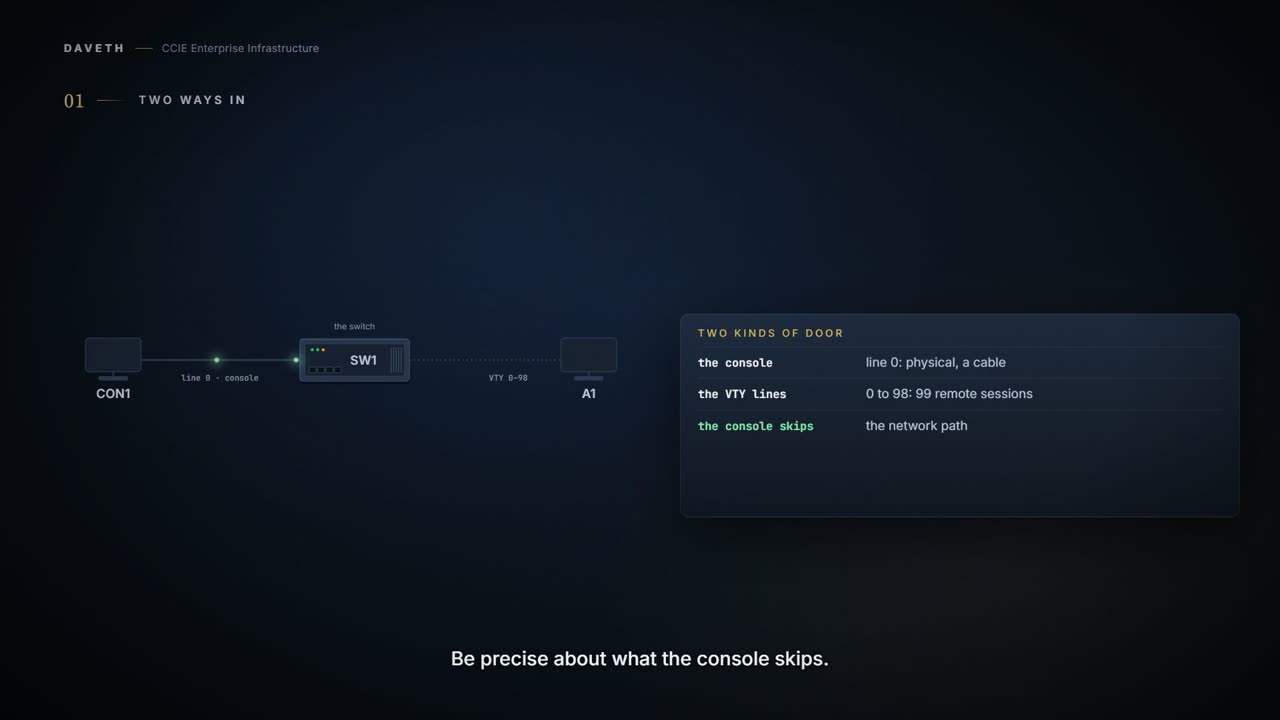
There are two ways into a switch: the console, physical, and the VTY lines, remote, 0 to 98. The remote way should speak SSH, which encrypts what Telnet sends in the clear. No command turns SSH on: generating an RSA key pair with crypto key generate rsa does, and that needs a hostname and domain name first. SCP needs SSH plus AAA, and privilege level 15.
By Arif, founder of Daveth · Updated
The full 9 min walkthrough is in Daveth Pro (Network). See what the plan opens
What this page answers
How do you enable SSH on a Cisco switch?
Configure a hostname and ip domain name, then generate an RSA key pair with crypto key generate rsa. The key pair automatically enables SSH; there is no separate command. Read it in “The command that enables SSH”
What does SCP need on a Cisco switch?
SSH, authentication and authorization, and AAA so the device can check the user's privilege level. SCP allows only users at privilege level 15 to copy files. Read it in “SCP needs more than SSH”
How many VTY lines does a Catalyst switch have?
Line configuration covers the console, line 0, and the VTY lines, 0 to 98: 99 possible remote sessions. Read it in “Two ways in”
Two ways in
4.1.b decided who may log in. This is about how they arrive. How many ways into a switch are there?
Enters line configuration mode, and configures the console port (line 0) or the VTY lines (line 0 to 98). There are 99 possible sessions on a command-capable device.
Two kinds of door. The console is physical: someone at the device with a cable. The VTY lines are remote, reachable from anywhere the switch is, 99 of them. Everything below is about making the remote door safe without losing the physical one.
And be precise about what the physical one skips, because people over-read it. The console bypasses the network path. It does not bypass the login rules, so whatever 4.1.b decided about who may log in still applies to somebody standing at the device with a cable in their hand.
The 99 is this platform's number, not a fact about routers. Another guide, another device, another count. Read the range your own device reports rather than carrying a figure from a page that was describing something else.
The console is also the door of last resort, and the guide is blunt about what the last resort costs when password recovery is disabled:
With password recovery disabled, you can still interrupt the boot process and change the password, but the configuration file (config.text) and the VLAN database file (vlan.dat) are deleted.
Why Telnet is not one of the answers
Which protocol should the remote door speak?
Secure Shell (SSH) is a protocol that provides a secure, remote connection to a device. SSH provides more security for remote connections than Telnet does by providing strong encryption when a device is authenticated. This software release supports SSH Version 2 (SSHv2).
Read the chapter with one caution. Its own notes, next to the SSHv2 statement above, say this:
Unless otherwise noted, the term “SSH” denotes “SSH Version 1” only.
Treat version claims on that page with care. This lesson makes none beyond the quoted SSHv2 line.
The Secure Shell (SSH) Server feature enables an SSH client to make a secure, encrypted connection to a Cisco device. The Secure Shell (SSH) Integrated Client feature is an application that runs over the SSH protocol to provide device authentication and encryption.
Server: things connect to this switch. Client: this switch connects out. Which one is running on the switch in front of you? You usually want the first and should know you have the second.
The command that enables SSH
Before reading on, guess its name. Plenty of features are turned on by a command that names them: ip dhcp snooping, ipv6 mld snooping. What is the SSH one? Step 2 of the walk asks it.
For SSH to work, the switch needs an Rivest, Shamir, and Adleman (RSA) public/private key pair.
This key pair automatically enables SSH and remote authentication when the crypto key generate rsa command is entered in global configuration mode.
No command turns SSH on. The key is the on-switch. SSH turns itself on as a side effect of a cryptographic operation, which is why searching a configuration for the line that enabled it finds nothing.
It runs the other way too:
To delete the RSA key pair, use the crypto key zeroize rsa global configuration command. Once you delete the RSA key pair, you automatically disable the SSH server.
So deleting or replacing the key is an access-control action, not a maintenance task.
The dependency chain
Why would a key need a hostname? Step 1 of the walk tries without one:
Configure a hostname and host domain for your device by using the hostname and ip domain name commands in global configuration mode. When generating the RSA key pair, the message No host name specified might appear. If it does, you must configure a hostname by using the hostname command in global configuration mode. When generating the RSA key pair, the message No domain specified might appear. If it does, you must configure an IP domain name by using the ip domain name command in global configuration mode. We recommend that a minimum modulus size of 1024 bits.
This course's configuration, in the order the guide gives. Configuration only.
Switch(config)# hostname SW1
SW1(config)# ip domain name example.com
SW1(config)# crypto key generate rsa
Three commands, and the third silently turns on remote access. The guide recommends at least a 1024-bit modulus when it prompts; this course uses 2048. Notice which one you would have expected to be the enabling step.
Which cuts the other way too, and it is the faster way to find out what SSH rests on. Take the key away and remote access goes with it, because the thing you were relying on was never a line about protocols or a username; it was a key that one command created and one command can remove.
SCP needs more than SSH
If SCP rides SSH, what else could it need?
This is the same with Secure Copy Protocol (SCP), which relies on SSH for its secure transport. Configure Secure Shell (SSH), authentication, and authorization on the device. In addition, SCP requires authentication, authorization, and accounting (AAA) to be configured to ensure that the device can determine whether a user has the correct privilege level. SCP allows only users with a privilege level of 15 to copy a file in the Cisco IOS File System (Cisco IFS) to and from a device by using the copy command. The minimum required value for the privilege-level argument is 15. A privilege level of less than 15 results in the connection closing.
Continue the lesson
The whole lesson, with its drawings and its questions. The rest of this section and 6 more after it.