
What Is Networking
A network is what lets people post messages, make calls, search and download from their devices. Users know what it lets them do; network engineers learn how it does it. Homes and companies use similar networking technology, and an enterprise network is the same idea at a larger size, built so a company's employees can communicate.
By Arif, founder of Daveth · Updated
The full 7 min walkthrough is in Daveth Pro (Network). See what the plan opens
What this page answers
What is networking?
The technology that connects devices so their users can communicate: post messages, make calls, search, listen to music and download apps. Users see what a network lets them do; engineers learn how it works underneath. Read it in “Two ways to see a network”
Two ways to see a network
Many people know networks from one side: as users. They know what a network lets them do, and nothing about how. Some don't think of "the network" at all. They post messages, make calls, search for things, listen to music and download apps, and never wonder how their device is connected.
Maya was one of them until yesterday. Then she was handed the office network, because she once fixed the printer. (It's a traditional way into networking: fix one printer, and you own everything with a cable.) This morning she clicks Staff portal, the company's internal web page, and it appears. As a user, that's the whole story. As the person now looking after the network, it's a question: what just happened?
Nobody opens a staff portal and whispers, "Beautiful network today." A good network is usually noticed only when it stops being good.
This course is about the other side, the side of the network engineer who builds networks: how networks do their job. And the job fits in one line. A network moves data from one device to another. The sentence is short. The network's paperwork is not, and the rest of the course is about how that job gets done, and how to build the company networks that do it.
A lift in an office building works the same way. Passengers press a button and expect their floor. The lift engineer thinks about the motor, the cables and the controller that make the button work. A network has the same two sides: users see the button, engineers learn what's behind it. (The comparison stops there: a lift is one machine, and a network is many separate devices and links sharing the work.)
Networks at home
Start at home. Here are two ways a home can have a high-speed connection to the Internet:
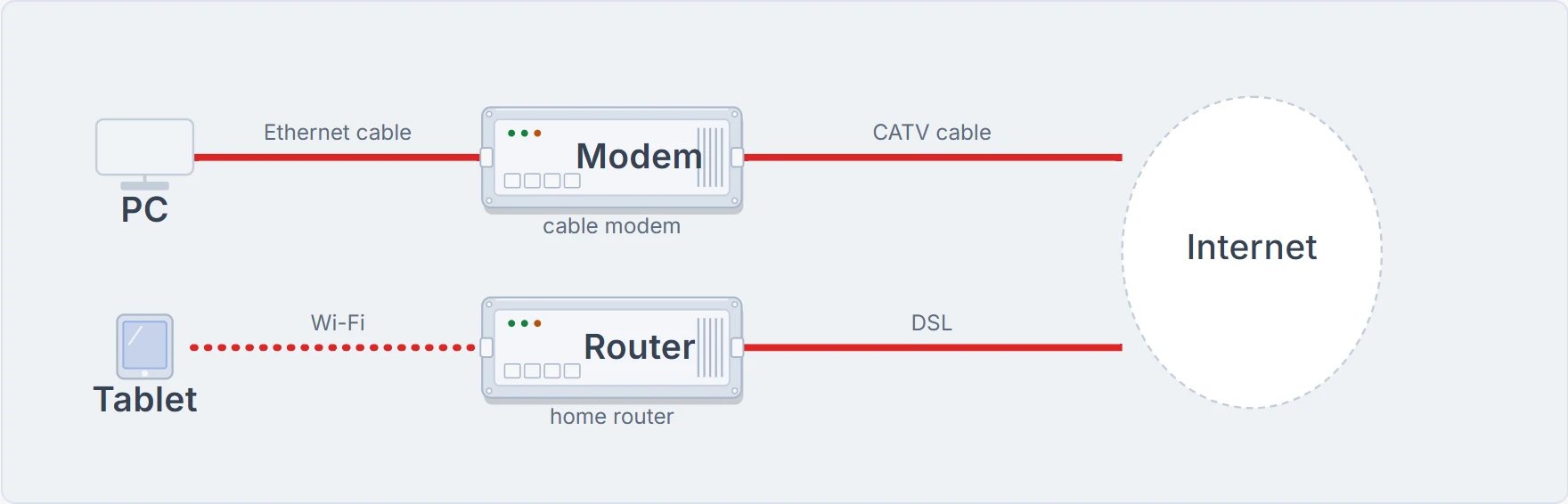
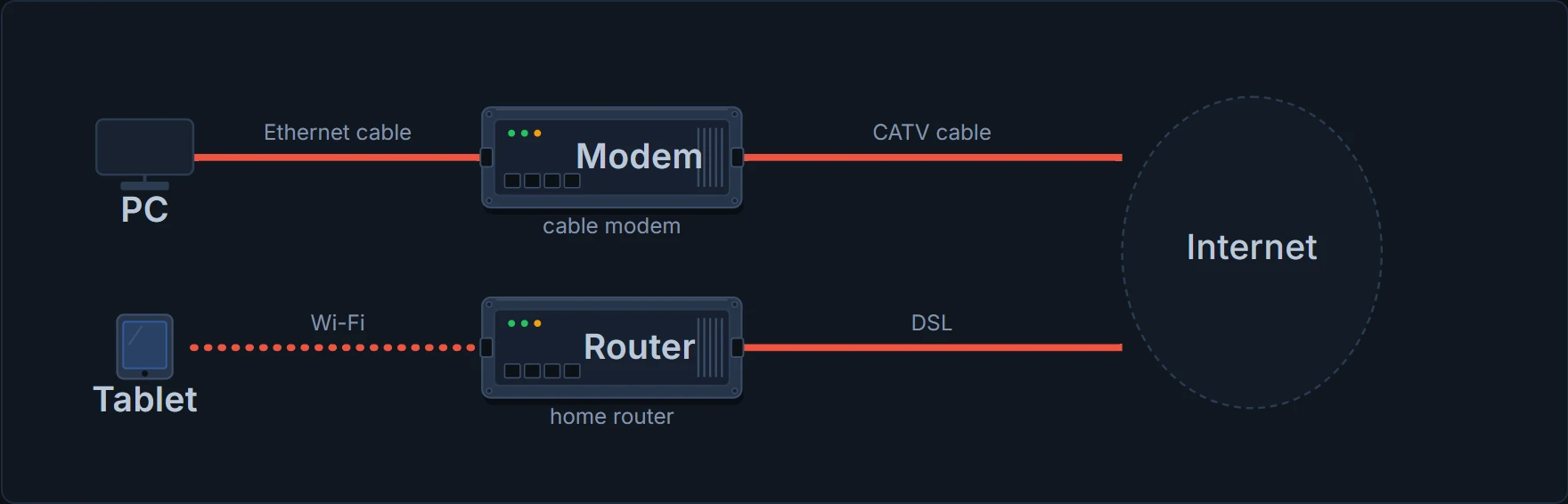
Cable Internet, the top row. The PC connects to a cable modem, the box that joins the home to the cable TV line, with an Ethernet cable, the everyday network cable. The cable modem connects to the cable TV (CATV) socket in the wall, with a round coaxial cable: the same kind of cable that connects a TV. The service is on all the time, so you can just sit down and start sending email, browsing websites or making Internet phone calls.
So yes, the Internet and the cartoons come in on the same kind of cable.
Wi-Fi and DSL, the bottom row. The tablet uses no cable at all: it uses Wi-Fi, also called a wireless LAN. LAN is short for local-area network: a network of devices close together, in the same room or the same building. Its Wi-Fi goes to the home router, the box that joins the home network to the Internet. The router reaches the Internet with a different technology, DSL (digital subscriber line).
So Wi-Fi is one link: tablet to router. It isn't the Internet, and it isn't the whole trip. Full Wi-Fi bars only tell you the tablet hears a strong radio signal. They don't prove the router's DSL link works, or anything beyond it.
Full Wi-Fi bars mean the waiter reached your table. They don't prove the kitchen is open.
The drawing also keeps the Internet apart from both homes. A home network is one small network. The Internet joins an enormous number of networks together, which is why "network" and "Internet" aren't two names for the same thing.
A home network and the Internet are a bit like a driveway and the public roads. Your driveway is small and private, the roads join places right across the country, and your driveway meets them at one spot. (The shape is what carries over: networks carry data, not cars.)
Two homes, two different sets of links, and the same job underneath: moving data between the device in the house and the one it's talking to.
When a home network is used for business, it often goes by another name: a SOHO network, for small office/home office. The technology is the same. The desk might be the kitchen table.
Enterprise networks
Homes and companies use similar networking technology, at a different size. In IT, a company is often called an enterprise, so a network that one company builds so its employees can communicate is called an enterprise network.
The difference is mostly one of size, a bit like the plumbing in a flat and the plumbing in an office tower: the same pipes and taps, far more of them, and someone whose job it is to look after them. (Just the scale carries over: data isn't water.)
People at a company or a school know they use its network for many tasks. Here are two ways they meet it. A desk PC connects through an Ethernet cable to a socket in the wall, and from there, out of sight, to a network switch such as SW1. A laptop joins over Wi-Fi, say in a meeting room.
Continue the lesson
The whole lesson, with its drawings and its questions. The rest of this section and 2 more after it.