
Address Resolution Protocol (ARP)
When a host or router wraps an IP packet in an Ethernet frame, it knows everything for the header except the next device's MAC address. ARP fills that blank: a broadcast ARP Request asks the owner of an IP address to answer, and the owner sends a unicast ARP Reply with its MAC address. ARP always asks about the next device, not the final one.
By Arif, founder of Daveth · Updated
The full 6 min walkthrough is in Daveth Pro (Network). See what the plan opens
What this page answers
What is ARP (Address Resolution Protocol)?
The protocol that finds the MAC address that goes with an IP address on the same LAN. The ARP Request, sent as a broadcast, asks the device with that IP address to reply; the ARP Reply, a unicast, gives the MAC address. Read it in “Asking the LAN”
Does a host ARP for the destination or for the default gateway?
For the next device the frame goes to. That is the destination itself only when it is on the same LAN; for anything else, the host asks for its default gateway's MAC address. Read it in “Who ARP asks about”
The one blank in the frame
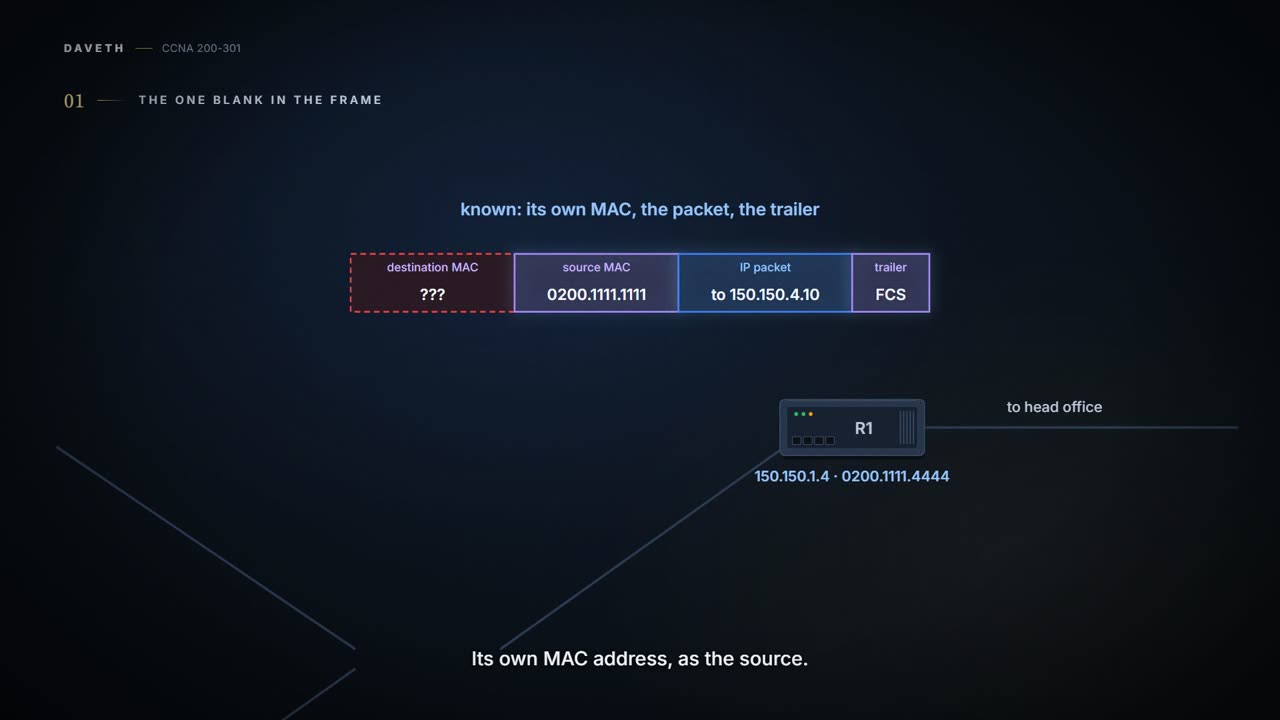
01.6 left Maya's PC holding a packet for the portal server, 150.150.4.10. It has already decided where the packet goes next: to R1, its default gateway, at 150.150.1.4. Now it has to wrap the packet in an Ethernet frame for the office LAN, as 01.4 showed.
Whenever a host or router puts an IP packet into a new Ethernet frame, it knows every important fact it needs for the header, except one: the destination MAC address. A host knows the IP address of the next device, which is either another host or its default gateway. A router knows the route it's using, which lists the next router's IP address; on the last link, where the subnet is connected, the next device is the destination itself. But neither knows those neighbouring devices' MAC addresses beforehand.
Just like when you send a parcel through your office's post room: the label says head office, but you just walk it down the corridor to the post room. The packet names the faraway destination. The frame only has to reach the next device on this LAN. (Where it stops: you know where the post room is. Maya's PC knows R1's IP address, but not yet its MAC, and the MAC is what the frame needs.)
ARP, the Address Resolution Protocol, fills in the blank. It's how any host or router on a LAN learns, dynamically (when it needs to, with nobody typing it in), the MAC address of another host or router on the same LAN. In short, ARP maps an IP address to a MAC address.
Maya's PC knows exactly who's next: R1. It just doesn't have R1's MAC for the frame yet.
Asking the LAN
ARP has two messages. The ARP Request says, in effect, "if this is your IP address, please reply with your MAC address." The ARP Reply lists both that IP address and the matching MAC address.
Maya's PC sends its request as a broadcast: an Ethernet frame addressed to the whole LAN, so each device on the office Ethernet receives it and processes it. The device that owns the IP address being asked about answers. Its reply is a unicast: a frame addressed to one device, the one that asked. In the drawing below, all three plug into the office switch, which passes the broadcast on to each of its other ports; the switch doesn't answer ARP itself. And R1 doesn't pass the broadcast on to its other links: a router doesn't forward a LAN broadcast, so the question stays on the office Ethernet.
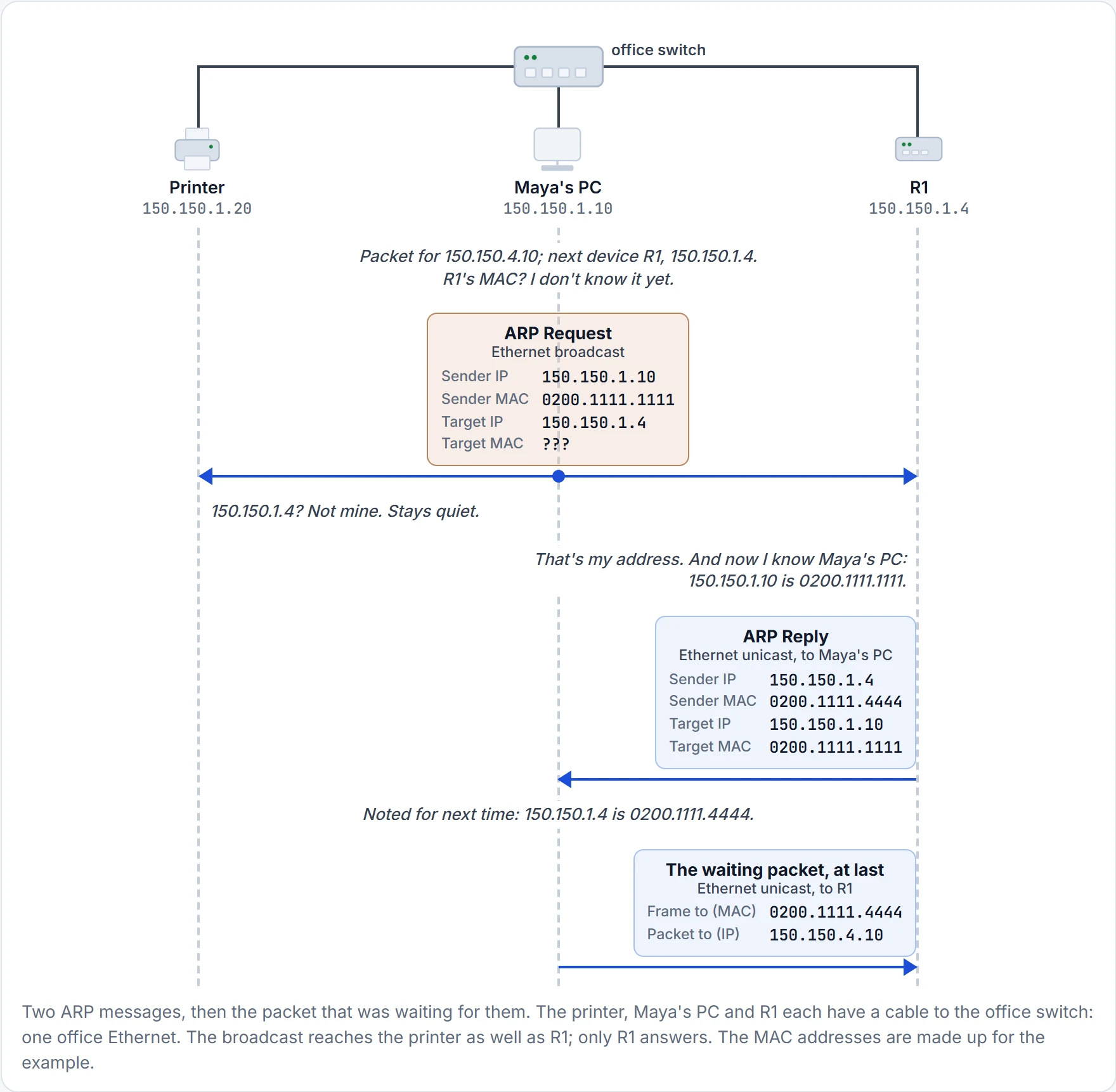
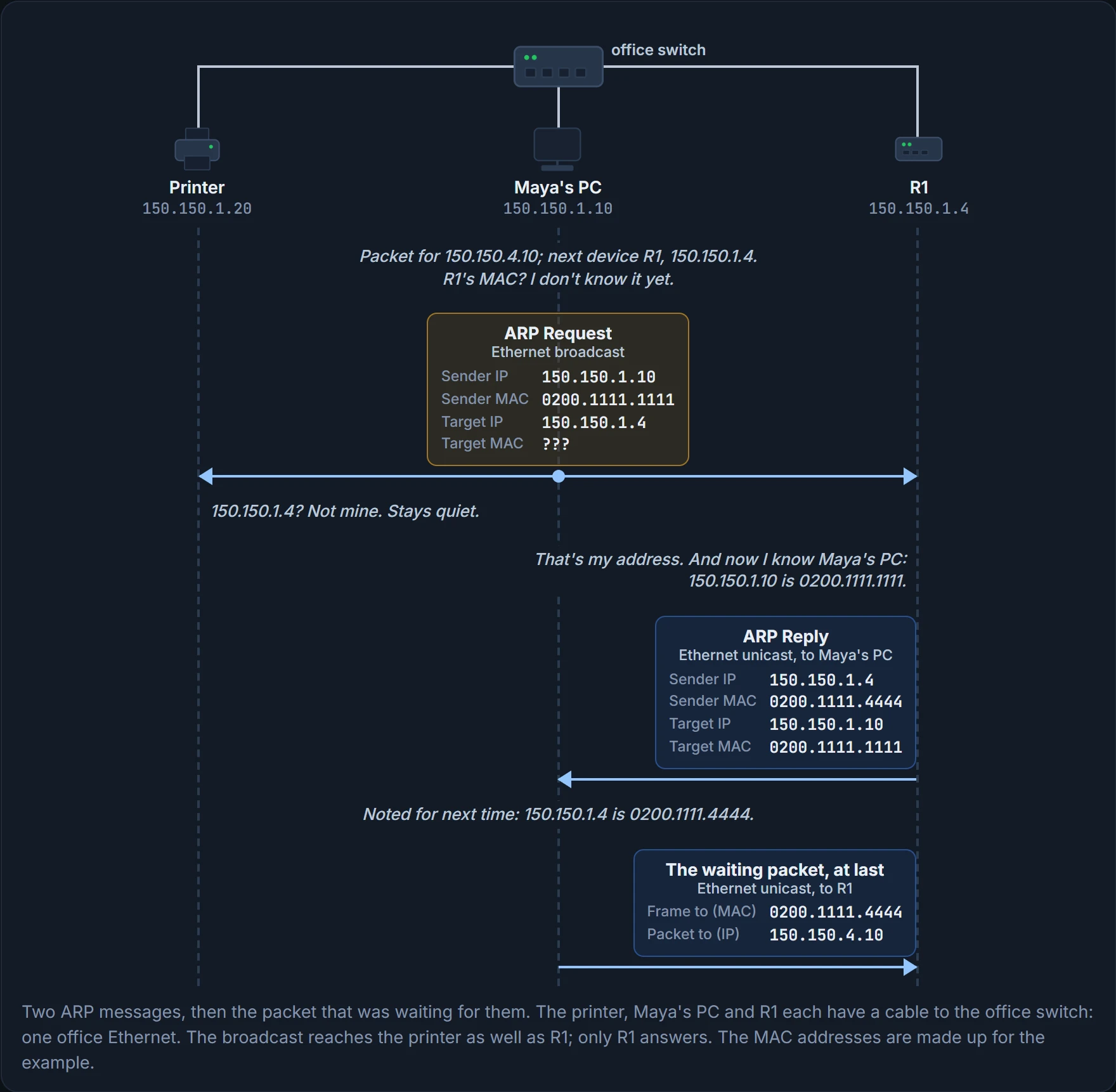
Each ARP message has sender fields, the IP and MAC addresses of the device sending it, and target fields, for the device it's aimed at: in the request, the device being asked; in the reply, the one that asked. In the request, the target MAC is the blank, the "???". In the reply, R1 puts its own addresses in the sender fields, and Maya's in the target fields.
If you've ever shouted up the stairs, "Mum? If you're up there, shout back!", you've sent a broadcast. Everyone in the house hears it, and Mum is the one who answers. (Where it stops: at home, everyone hears the answer too. R1's reply goes to Maya's PC alone.)
The printer heard the question. The printer wisely kept quiet.
Look at what else that exchange did. Maya's request carried her PC's own IP and MAC in its sender fields, so R1 learned them from the request, while Maya's PC learned R1's from the reply. One question and one answer, and both ends know each other.
Notice what ARP didn't need, too: a server that stores the answers. It asks the LAN itself.
Who ARP asks about
ARP asks about the next device, the one the frame is going to. That's the packet's final destination only when the destination is on the same LAN. It follows straight from 01.6: a host sends to another host in its own group directly, and to its default gateway for everything else.
| Who's sending, and where the packet's going | ARP asks about | The frame goes to |
|---|---|---|
| Maya's PC → the printer, 150.150.1.20 | 150.150.1.20 (the printer itself) | the printer |
| Maya's PC → the portal server, 150.150.4.10 | 150.150.1.4 (R1, the default gateway) | R1 |
| R3 → the portal server, 150.150.4.10 | 150.150.4.10 (the server itself) | the portal server, 0200.2222.2222 |
The second row is the one people get wrong. The packet is for the portal server, but the server isn't on the office Ethernet, so Maya's PC has no reason to ask for its MAC. ARP learns about devices on the same LAN, and the server isn't there to hear the question.
The packet still wants the portal server. This frame only needs R1.
Routers do the same for each Ethernet link they send on. When Maya's packet reaches head office, R3 has to put it in a new Ethernet frame for the server. If R3 doesn't already have the server's MAC in its cache, it broadcasts its own ARP Request about 150.150.4.10, and the server replies, in a unicast straight back to R3, with its MAC address, 0200.2222.2222. Then R3 can send the packet.
Maya's PC wrote down R1's MAC. R3 keeps its own notes. There's no shared office address book.
Continue the lesson
The whole lesson, with its drawings and its questions. 2 more sections after the ones above.