
TCP/IP and OSI Networking Models
TCP/IP has five layers, and each one serves the layer above it: the application layer gives services to programs such as web browsers, and the transport layer, with TCP and UDP, serves the application layer. OSI's seven layers sit beside TCP/IP's five, and engineers still use OSI's numbers, so HTTP gets called a Layer 7 protocol.
By Arif, founder of Daveth · Updated
The full 8 min walkthrough is in Daveth Pro (Network). See what the plan opens
What this page answers
What is the OSI model?
A seven-layer networking model from the ISO that lost to TCP/IP in the marketplace. Nobody runs it now, but its layer numbers are still used everywhere: TCP/IP's bottom four layers use OSI's names, and its application layer is called Layer 7. Read it in the lesson
What are the layers of the TCP/IP model?
Five: application, transport, network, data link and physical. Each layer provides services to the one above it, as TCP gives HTTP error recovery, and matching layers on two computers talk through that layer's header. Read it in “Two ways layers work together”
The application layer
Start at the top. Application layer protocols provide services to the application software on a computer, the programs people use. The application layer doesn't define the application itself. It defines services the application needs, and it's the interface between the software on a computer and the network.
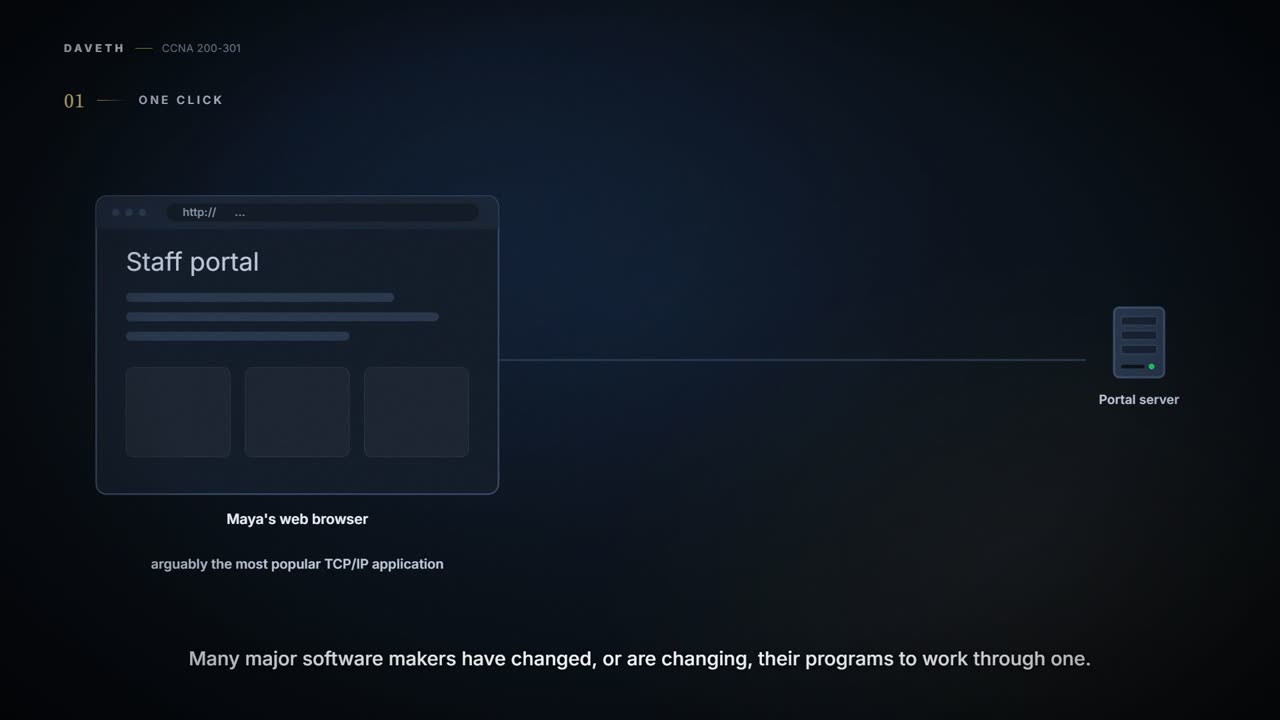
The web shows how. The web browser is arguably the most popular TCP/IP application today, and many major software makers have changed, or are changing, their programs to work through one. Using it is easy: open the browser, choose a website, and the page appears. What happens underneath?
Take Maya's morning. Her browser asks the staff portal's web server, the software that hands out the portal's pages, for its home page. The server knows its default page is in a file called home.htm. It sends that file back, and Maya's browser displays it.
The rules for that exchange are an application layer protocol: HTTP, the Hypertext Transfer Protocol. It didn't exist until Tim Berners-Lee created the first web browser and web server in the early 1990s, and gave HTTP a way for a browser to ask for files and for a server to send their contents back. It's also why the full version of most web addresses, called URLs (Uniform Resource Locators) or URIs, begins with http: it means HTTP is used to transfer the pages.
In plain words, HTTP is the language a browser and a web server agree to speak. It works much like a bakery counter: you ask for one sourdough by name, and you get either "here you are" or "sorry, sold out". (Where it stops: the server bakes nothing new; it sends a file it already has.)
Protocols generally keep their own information in a header: a part of a message set aside for that protocol. HTTP's exchange has three kinds of message:
- The request. Maya's browser sends a message whose HTTP header says GET home.htm: get this file. If a request names no file, the server sends its default page.
- The reply. The server's first message begins with an HTTP header holding a return code. 200 means OK. The same message carries the first part of the file.
- The rest of the file. Further messages carry more of home.htm with no HTTP header at all. Repeating the same header in every message would only waste space.
HTTP defines other return codes, so the server can tell the browser whether a request worked. Ask for a page the server doesn't have, and the code is 404, not found. Most browsers show a message such as "page not found" rather than the number.
404 may be networking's best-known number, and it's an apology.
The transport layer
One layer down is the transport layer. It has fewer protocols than the application layer, and the two most commonly used are TCP, the Transmission Control Protocol, and UDP, the User Datagram Protocol. Transport protocols provide services to the application layer protocols just above them.
One of TCP's services shows how. What if Maya's GET request, or the reply carrying the page, were lost on the way? Either way, the page wouldn't appear. Many application protocols probably want delivery they can count on, so TCP's creators built in error recovery: noticing data that didn't arrive, and getting it sent again. TCP does it with acknowledgments, where the receiver tells the sender what it has received.
Numbered pages work the same way. Send a long letter as several envelopes, number the pages, and if page 2 is missing the reader knows exactly which page to ask for.
Here is the portal's reply again, with TCP underneath:
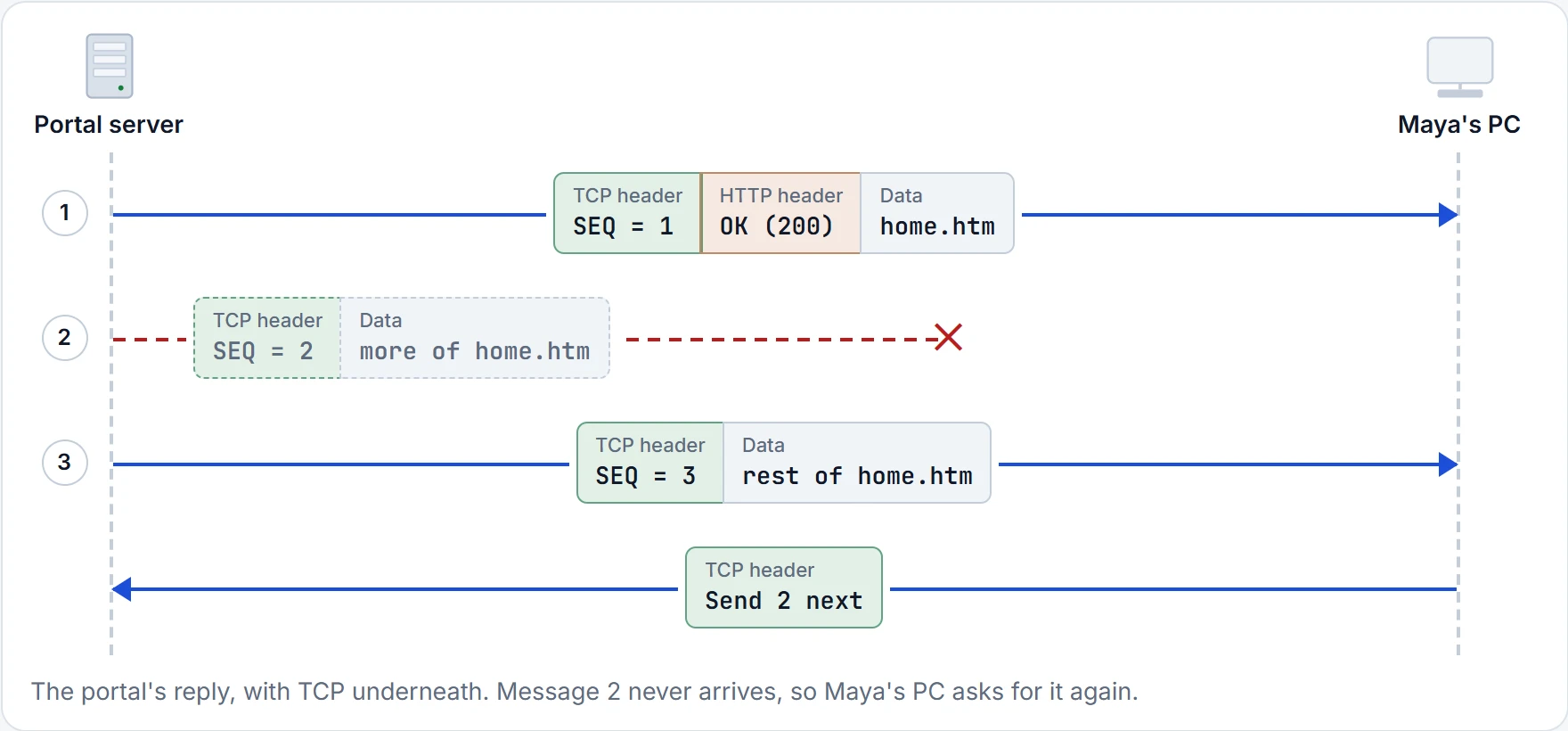
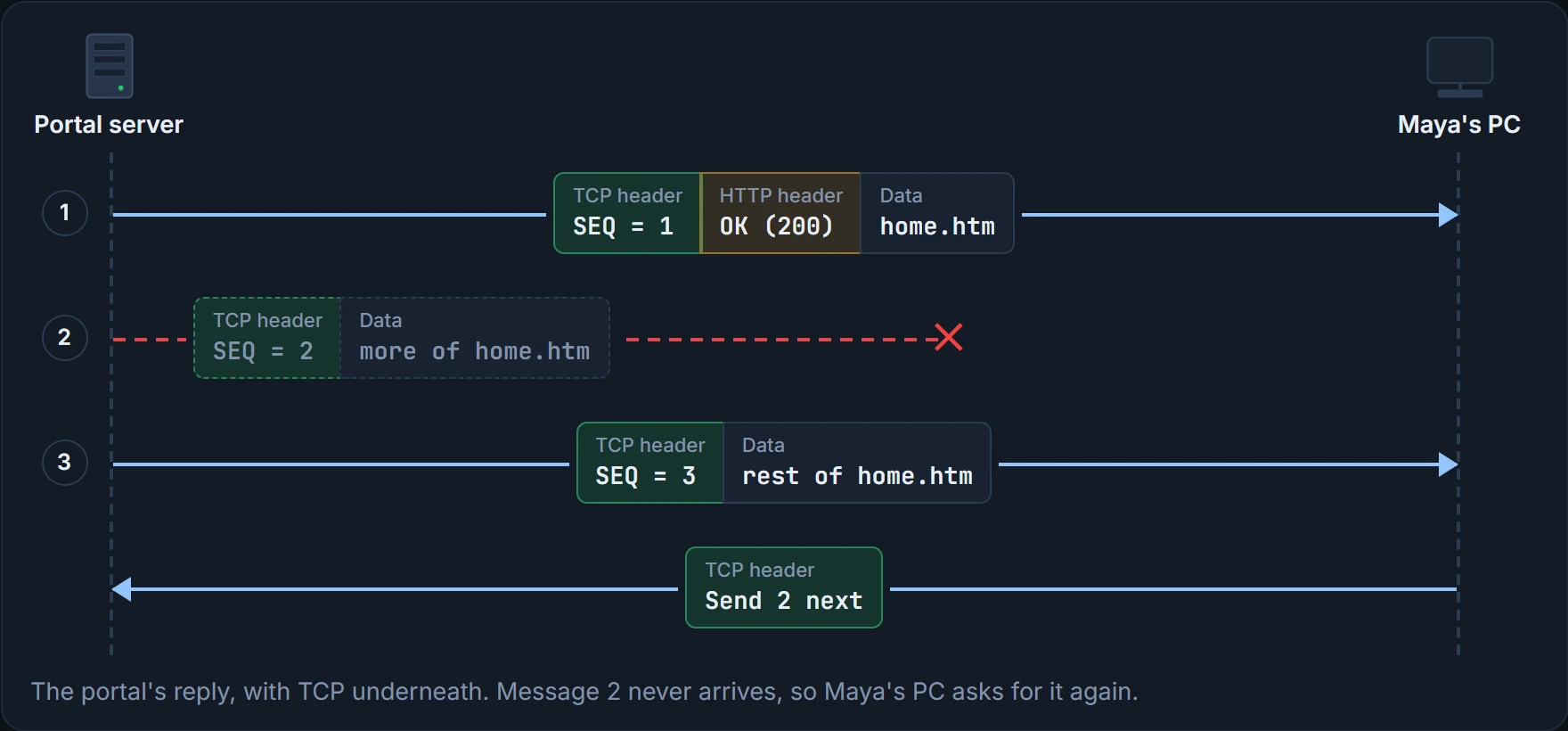
Each message now carries a TCP header as well as the HTTP header or data, holding a sequence number (SEQ): a number that marks each message's place in the order. Message 2 (SEQ = 2) is lost. Maya's PC receives 1 and 3, sees that 2 is missing, and sends a TCP message back asking the server to send 2 next. That "Send 2 next" is an acknowledgment: it tells the server what arrived, and what to send next. (TCP calls each of its messages a segment; 01.4 sorts out the names of messages at each layer.)
Two ways layers work together
That one exchange shows both ways the layers of a model work together:
- Adjacent-layer interaction, down, on one computer: here, HTTP wants error recovery, so it uses the layer just below it, TCP, to provide it.
- In a workshop, one desk prepares a job and hands it to the desk that does the next part. Adjacent-layer interaction is that handoff, inside one computer.
- Same-layer interaction, across, between two computers: here, the server's TCP set sequence numbers 1, 2 and 3 in its header, and the TCP on Maya's PC read them and reacted.
- Two accountants in distant offices who use the same invoice layout can read each other's invoices, even though a courier carries the paper. Same-layer interaction is that shared layout; the courier is everything underneath.
HTTP asked for delivery. It did not also volunteer to solder the cable.
In general terms:
| Interaction | What it means |
|---|---|
| Same-layer, on different computers | The two computers use a protocol to communicate with the same layer on the other computer. The protocol defines a header that says what each computer wants to do. |
| Adjacent-layer, on the same computer | One layer provides a service to the layer just above it. The software or hardware for the higher layer asks the next lower layer to do the job. |
Same-layer interaction doesn't mean a separate cable between the two TCPs. The TCP header is sent in the same messages as HTTP's header and the data. The "conversation" is the two ends following the same protocol.
Nobody needs to run a second cable from Maya's desk to the server for it.
The OSI model
01.2 told the story: OSI lost to TCP/IP. At one point many people thought OSI would win, and computers everywhere would be running OSI instead of TCP/IP. It didn't. OSI no longer exists as a model you could use instead of TCP/IP, although some of the original protocols it referred to are still around.
So why learn it? For its words. In the years when many people expected OSI to take over, mostly the late 1980s and early 1990s, many vendors and protocol documents started using OSI's terms, and those terms are still used today. You'll never need to work with a computer that runs OSI, but you do need its vocabulary.
OSI did not win the deployment. It kept the naming rights.
The two models are alike in the basics. OSI has layers, each defining a set of typical networking functions, and each referring to protocols and standards. In some cases, where a standard already existed, OSI referred to it rather than writing a new one: it refers to the IEEE's Ethernet standards, just as TCP/IP does. Today OSI can serve as a standard to compare other models against:
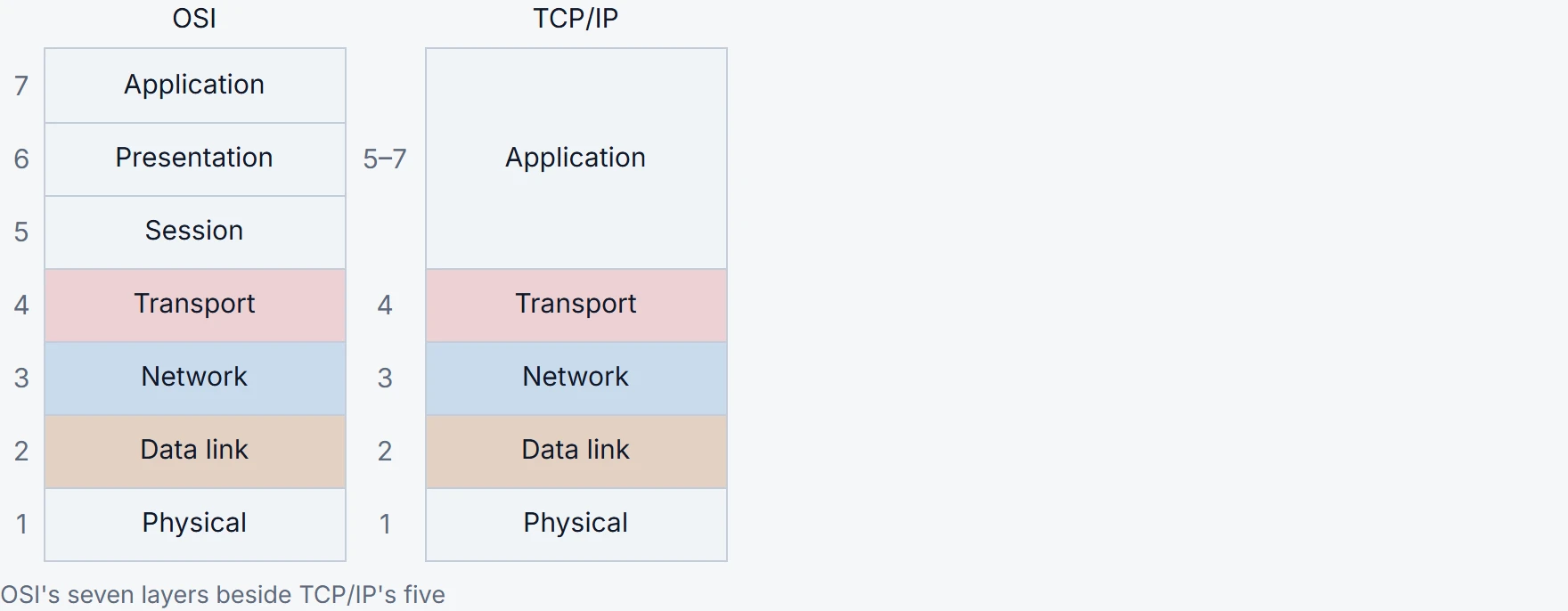
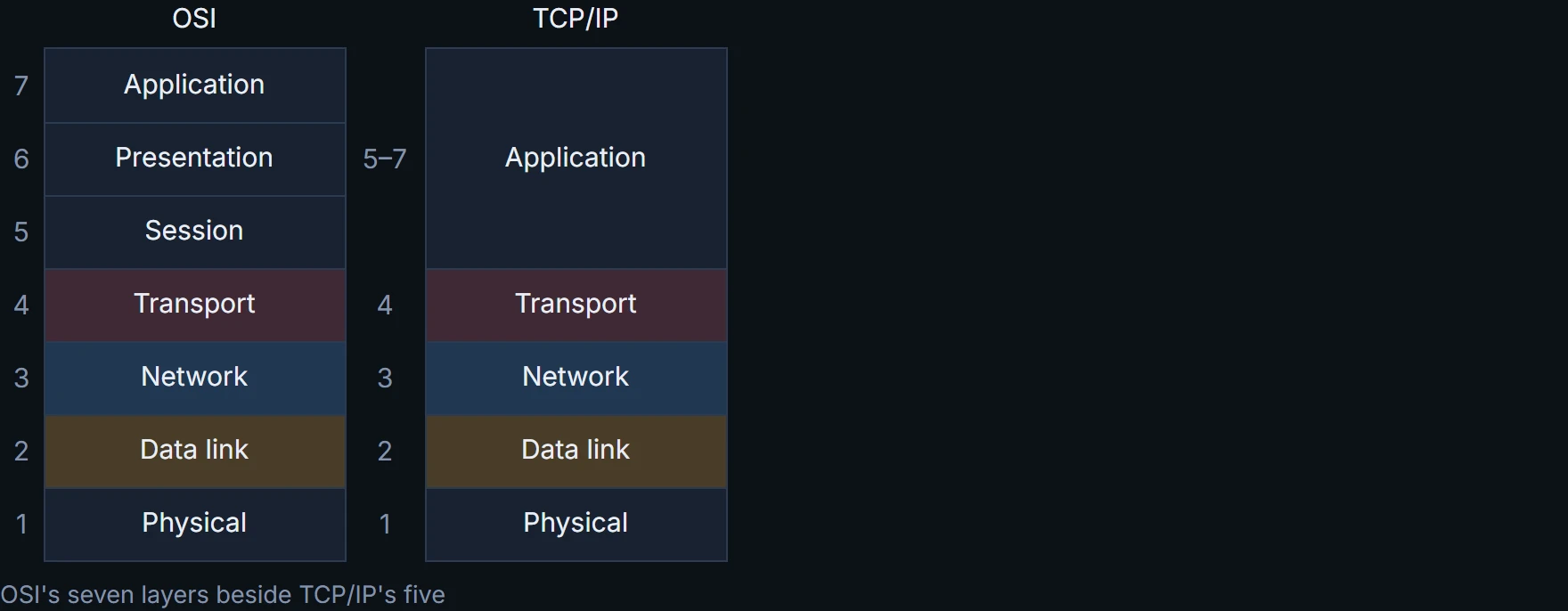
The bottom four layers of today's TCP/IP model use exactly OSI's names, and their functions generally match. So when you talk about networks or read documentation, treat them as the same in name, in number and in meaning. Everyday layer numbers are OSI's, used even on TCP/IP networks.
Because people use OSI's numbers, an application layer protocol such as HTTP gets called a "Layer 7 protocol". At the top, TCP/IP's application layer does the work that OSI splits three ways: session (5), presentation (6) and application (7). Most of the time nobody minds the difference, so you'll also see "Layer 5–7 protocol". OSI's top three layers are names for kinds of work, not extra boxes on the network.
OSI and TCP/IP are two maps of the same building. One marks five areas; the other splits the top floor into three rooms and numbers everything. The building didn't grow any new floors because you picked up the second map.
For CCNA, know this mapping: TCP/IP's five layers against OSI's seven, and "Layer 7" meaning TCP/IP's application layer.
The interactive lesson
The whole lesson, with its drawings and its questions. Free with a Daveth account.