
ICMP, Ping, DNS and Common TCP/IP Applications
A computer cannot send a packet to a name, so before a browser can reach portal.example.com, DNS turns the name into an IP address. Then TCP and HTTP fetch the page, which is really several files. When something seems wrong, ping tests basic IP connectivity using ICMP, without depending on any application.
By Arif, founder of Daveth · Updated
The full 7 min walkthrough is in Daveth Pro (Network). See what the plan opens
What this page answers
What is DNS?
The Domain Name System: the client/server method TCP/IP uses to find the IP address that goes with a hostname. A DNS server holds names and their addresses; a host asks it, using UDP port 53, and can cache the answer. Read it in “Names instead of numbers”
What is a recursive DNS server?
A DNS server that, asked for a name it does not know, asks other DNS servers on the host's behalf instead of turning the request away, then caches what it learns. Read it in “When the DNS server doesn't know”
What is ICMP, and how does ping use it?
Ping tests basic IP connectivity without depending on any application, and it works by sending ICMP, the Internet Control Message Protocol: an echo request that the other host answers with an echo reply. Read it in the lesson
Names instead of numbers
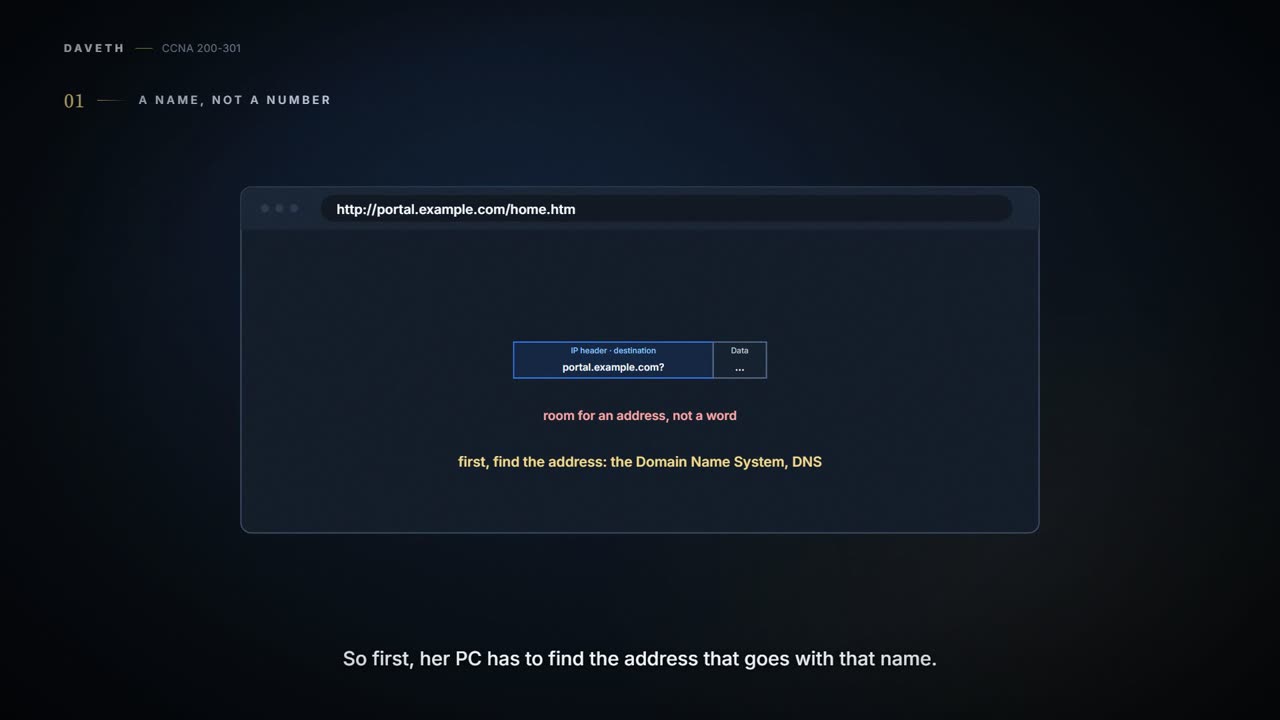
Nobody wants to type 150.150.4.10 to reach the staff portal, and nobody remembers the addresses of the websites they visit. So TCP/IP lets people use hostnames, like portal.example.com, and protocols quietly work out the rest.
But a computer can't send a packet to a name. The IP header has room for an address, not a word (01.6). So before Maya's PC can talk to portal.example.com, it has to find the IP address that goes with that name. The method TCP/IP uses is the Domain Name System, DNS.
DNS is client/server. A DNS server holds names and their matching addresses; it's run by the networking staff. The DNS client is built into almost every device that uses TCP/IP, and it simply asks: "what's the IP address for this name?" The server replies with the address, and the client then sends its packets to that address.
It's basically like the contacts on your phone: you tap "Mum", and the phone dials the number for you. (Where it stops: your contacts live on your phone. DNS asks a server somewhere else on the network.)
The routers along the way don't treat DNS specially. A DNS request is just another IP packet, routed by its destination address, which is the DNS server's.
And DNS is more than a couple of messages: it also sets the rules for the names people use every day, like www.example.com, and it's a worldwide system of DNS servers. No single DNS server knows all the names; they work together, passing questions on until one that knows the answer supplies the address.
No DNS server knows the whole world's names by heart. They know who to ask.
The address in the browser
The World Wide Web is all the web servers connected to the Internet, plus all the hosts with web browsers. A web server is software, running on a computer, that stores web pages. A web browser (also called a web client, because it gets a service from a server) connects to a web server and shows its pages. For that to work, the browser has to know which server, which page and which protocol; find the server's IP address from its name, typically using DNS; and request the page, which is really several files. And for online shopping and anything else that moves sensitive financial data, the transfer has to be secure.
You tell the browser what you want with a URI, a Uniform Resource Identifier: either by typing it in the address bar, or by clicking a link, which points to a URI. Many people call it a URL or a web address; URI is the correct formal term, and the groups that set web and TCP/IP standards have been standardising on it. Most browsers can show you the URI hidden behind a link, often when you hover over it. Maya types this one:


So in Maya's URI, the protocol is HTTP (the Hypertext Transfer Protocol, the web's own protocol), the server is portal.example.com, and the page is home.htm, the same page 01.3 fetched.
Loading the page
Here's everything Maya's PC sends and receives, in order, from the moment she presses Enter. Watch the destination addresses: two conversations, with two different servers.
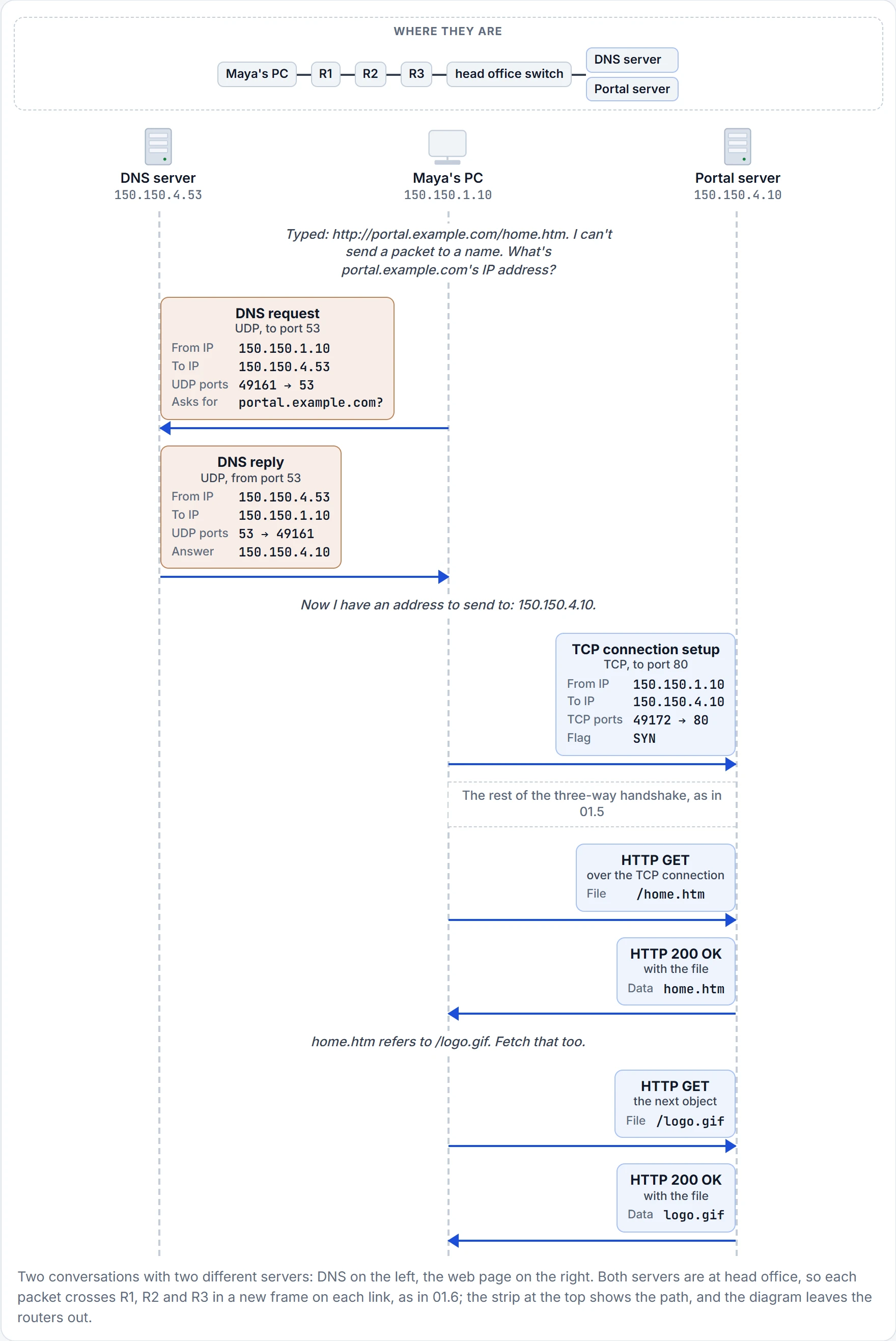
The DNS request goes to the DNS server, 150.150.4.53, not to the portal. It uses a UDP header, with destination port 53, DNS's well-known port. (UDP is fine here: if a lookup fails, the user just tries again.) (Maya's PC typically learned the DNS server's address automatically, through a protocol called DHCP.) The DNS reply comes back from source port 53, because the DNS server sent it, and it carries the answer: portal.example.com is 150.150.4.10.
DNS found the address. It didn't fetch a single byte of the page.
Now the web part can start. Maya's PC opens a new TCP connection to the address it just learned, 150.150.4.10, with destination port 80, the well-known port for HTTP. The first segment has the SYN flag set, as in 01.5's three-way handshake. HTTP uses TCP, so web traffic gets TCP's error recovery. The portal's messages back to Maya's browser come from source port 80, to her port 49172.
HTTP was created specifically to transfer files between web servers and web clients. Once the connection is up, the browser asks for the page with an HTTP GET request, naming the file. If the server decides to send it, it replies with return code 200, which means OK, along with the file's contents. If it doesn't have the file, it replies with 404, "file not found"; browsers usually show you "page not found" rather than the number.
And one page is rarely one file. A web page typically comes as several files, called objects: the text, the images, perhaps an advert or a video. The browser gets the first file, reads it, finds references to other URIs inside, and asks for each of those too, all over one (or possibly more) TCP connection.
It acts kind of like a recipe card: you fetch the card first, read it, and then fetch each ingredient it lists. (Where it stops: the browser does the fetching by itself, one GET per object, and you don't see the list.)
Maya asked for one page. The page brought friends.
When the DNS server doesn't know
DNS answers get remembered. A host can cache the result of a DNS request, so for a while it doesn't need to ask again. The DNS server can cache results too. A company's DNS server wouldn't normally be set up with the names of other organisations' servers, so for outside names it relies on what it has cached, or on asking for help.
Say Maya visits an outside website, www.example.org, and the company DNS server hasn't got the answer. It doesn't turn her request away. Instead it acts as a recursive DNS server: it asks other DNS servers in turn until it finds the one that knows.
- Maya's PC sends its DNS request to the DNS server it knows, the company's.
- The company DNS server asks a root DNS server, where these lookups begin. The root doesn't supply the address, but it gives the address of another DNS server: the one for the .org top-level domain (TLD). (A domain is a group of names: example.org is a domain inside .org.)
- It asks the .org TLD DNS server. That one doesn't know the address either, but it knows which DNS server is the authoritative one for example.org, the one responsible for its names, and gives its address.
- It asks the authoritative DNS server for example.org, which supplies the address of www.example.org.
- The company DNS server sends the reply back to Maya's PC.
Picture yourself asking the office receptionist for a restaurant's number. She doesn't know it, so she rings the directory service, which says "ask the restaurants' association". The association says "ask the restaurant's own office", and the office gives her the number, which she passes on to you. (Where it stops: the root and TLD servers don't give an answer at all, only the address of the next DNS server to ask.)
Continue the lesson
The whole lesson, with its drawings and its questions. 4 more sections after the ones above.