
IPv4 Fundamentals and the IPv4 Header
IP's two most important jobs are addressing and routing. An IPv4 address is four numbers separated by dots, and addresses come in groups, like postal codes. A host sends a packet straight to a device in its own group, and to its default gateway, a router on the same LAN, for everything else; each router then forwards it one hop nearer.
By Arif, founder of Daveth · Updated
The full 9 min walkthrough is in Daveth Pro (Network). See what the plan opens
What this page answers
What is IP (Internet Protocol)?
The network layer's main protocol. Its two most important jobs are addressing and routing: giving every device an address, and getting each packet from the source host to the destination host across many kinds of links. Read it in “IP and the postal service”
What is a default gateway?
A router on the same LAN that a host sends packets to when the destination is not in its own address group. Maya's PC sends a packet for another site to R1, its default gateway, and R1 routes it on. Read it in “Routing, step by step”
What is in the IPv4 packet header?
The fields routers read to deliver the packet, above all the source and destination IP addresses. The lesson goes through the header field by field. Read it in the lesson
IP and the postal service
The network layer has only a few protocols, and one big one: the Internet Protocol, IP. (The name TCP/IP is simply its two most common protocols, TCP and IP, with a slash between them.) IP's two most important jobs are addressing and routing, and the easiest way into both is the post.
If you've ever posted a letter, you've done the easy half. A letter to a friend across town and one to a friend across the country go in the same postbox; you don't treat them differently. The postal service does. The local letter might just go onto another van. The far one goes to a post office, then another, and another, each one deciding where to send it next, using vans, lorries and planes.
The sender expects the letter to arrive most of the time, and doesn't need to know the route it takes. The postal service didn't write the letter, but it has to know about addresses and postal codes, and it has to deliver.
The layers split the same way. The application and transport layers are the sender: they work the same whether the two computers share a LAN or sit on opposite sides of the Internet, and they ask the layer below to deliver. The network layer and the layers under it are the postal service: they have to understand the physical network to deliver the data.
And IP works much like the post. Each host should have a different IP address, the way each house, flat and business has its own postal address. IP groups addresses too, the way postal codes group nearby addresses. And IP defines routing, so that devices called routers can act like post offices, passing each packet on towards its destination.
IP addresses and routers
An IPv4 address is four numbers separated by dots, like 150.150.1.10. That style is called dotted-decimal notation, or DDN.
Addresses come in groups. In Maya's company, every address that starts 150.150.1 is on the office Ethernet, and every address that starts 150.150.4 is on the head office Ethernet. That grouping is the postal-code idea again, and it turns out to matter a great deal for routing.
A router is a device that connects the parts of a network together, to route, or forward, IP packets towards their destination. It does the post office's job: it receives packets on its interfaces (its network connections), decides where each one goes by looking at the packet's destination IP address, and sends it out another interface.
Any device with an IP address on a TCP/IP network is called an IP host, whatever its size. Maya's PC is one; so is the portal server. When Maya's PC sends the server a packet, its IP header carries two addresses: the source, Maya's own, and the destination, the server's.
The basic idea of routing takes three sentences. Maya's PC sends the packet to a nearby router on the same LAN, just as you drop a letter in the nearest postbox; it doesn't need to know anything about the network beyond. That router compares the destination address with the routes it knows and forwards the packet to the next router. Each router repeats the same logic until the last one delivers it. That forwarding is IP routing, and IP gets more attention in CCNA than any other protocol.
The link underneath
IP decides where a packet goes; it doesn't move the bits itself. That's the job of the two layers under it. The physical layer is the cabling and the energy, such as electrical signals, that flows over it. The rules for sending data over a cable live in the data-link layer, which gives the network layer a service: when IP decides to send a packet to the next router or host, the data link carries it across that one link.
01.4 showed how: the sender wraps the IP packet in an Ethernet header and trailer, making a frame, and transmits it; the receiver takes the bits, rebuilds the frame and unwraps the packet. When a diagram draws an Ethernet LAN as a simple line, there are real cables and switches underneath that it isn't showing.
So the two lower layers do two different jobs: physically sending the data, and the rules for using the physical medium. They work together closely; some standards define both. In TCP/IP they sit together as the link layer, which covers every variety of Ethernet, and wireless LANs too.
Routing, step by step
Two versions of IP exist, IPv4 and IPv6, with the same kinds of jobs but different details. On this page, "IP" means IPv4. IP's job is to route packets from the source host to the destination host, end to end, even across many different kinds of links: LANs, and WAN links, the links between sites. It leaves the physical transmission to the layers below and deals with the logical side.
Hosts and routers do it together. Here is Maya's PC sending a packet to the portal server at head office. (01.5 used short made-up addresses to keep the ports readable; this page uses a fuller plan, with one address group per link.)
The host: send it to the default gateway
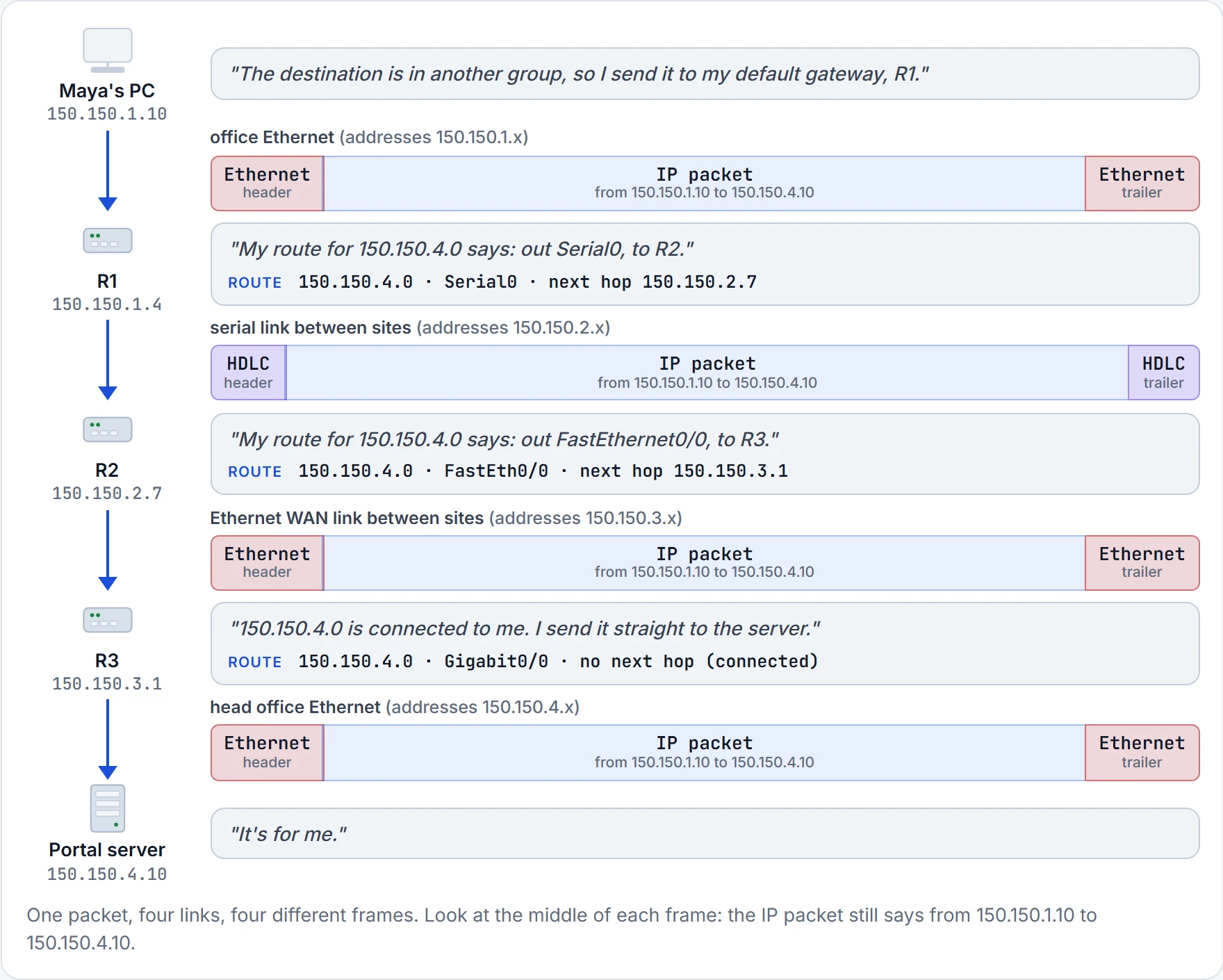
Maya's PC starts. It sees that the server's address, 150.150.4.10, isn't in its own group, so it sends the packet to a device whose job is to know where to route data: a nearby router on the same LAN, called its default router, or default gateway. For Maya's PC that's R1, at 150.150.1.4, the address of R1's interface on the office Ethernet (a router has an address on each interface). To get the packet to R1, it puts it inside a frame addressed with data-link addresses, R1's own Ethernet address, called its MAC address.
Hosts generally use a simple two-way choice. Destination in my own group, like a colleague's PC on the same office Ethernet? Send it straight there, no router needed. Anywhere else? Send it to the default gateway.
R1 gets the packet first. R1 is not allowed to claim it and say, "Ah, a message for me." The destination still says head office.
The routers: follow the routing table
Every router keeps an IP routing table, a list of address groups (IP networks and subnets), each with directions: the interface to send out of, and possibly the next hop, the next router's address. When a packet arrives, the router compares its destination IP address with the table, finds the route that best matches it, and follows that route's directions. (Choosing the route is sometimes called path selection. The same term is also used for how a routing protocol picks the best of several competing routes to one destination.)
It's basically like driving towards a big motorway junction. Signs for nearby towns tell you which exit to take for each one; you don't need a sign for every street. The routing table is the signs, and each link is a road. (Where it stops: a driver can ignore a sign and take the scenic route. A router just follows its table.)
R1's table says 150.150.4.0 is out Serial0, next hop R2. R2's says out FastEthernet0/0, next hop R3. R3 is the last router, and its route has no next hop at all: that subnet is connected to R3 directly, so R3 sends the packet straight to the server.
A new frame on every link
The routing logic ignores the physical details, but the bits still have to travel. So at every step, the network layer hands the packet to the data-link layer, which wraps it in a frame for that link. The packet goes end to end; each frame only makes a smaller part of the trip. When a frame arrives, a router works through four steps:
- Check the frame for errors, using the FCS, a field in the trailer; if there are errors, discard the frame.
- Discard the old data-link header and trailer, leaving the IP packet.
- Match the packet's destination IP address against the routing table. The best-matching route gives the interface to send out of, and possibly the next hop.
- Wrap the packet in a new data-link header and trailer suited to that interface, and forward the frame.
That's why the figure shows a different frame on each link: Ethernet on the office LAN, HDLC (a data-link protocol for serial links) between R1 and R2, then Ethernet on the Ethernet WAN link and on the head office LAN. (Serial0, FastEthernet0/0 and Gigabit0/0 are the names of the routers' interfaces.)
Look at the addresses in those frames. R1 takes Maya's frame in the first place because its destination MAC address is R1's own. And when R2 builds the new Ethernet frame for the link to R3, the header has R2's MAC address as the source and R3's as the destination: a new link, so new data-link addresses, while the IP addresses inside stay the same.
You can think of it as a long rail trip with changes. The passenger (the IP packet) stays the same all the way; at each station they get off one train (the frame) and onto the next, which only runs to the following station. (Where it stops: routers do change a few small fields in the IP header on the way, as the header section below shows.)
New local ride, same faraway address.
One thing is still missing. To build each new frame, a host or router needs the next device's data-link address. On a LAN, a protocol called ARP finds it; R3, for example, would use ARP once to learn the portal server's MAC address. ARP is the next topic, 01.7.
Continue the lesson
The whole lesson, with its drawings and its questions. 4 more sections after the ones above.