
TCP and UDP
TCP and UDP are TCP/IP's two transport protocols, and the key difference fits in one sentence: TCP provides a wide variety of services to applications, such as error recovery and flow control, and UDP does not. Both use port numbers to hand each message to the right application. UDP's header is 8 bytes, TCP's 20.
By Arif, founder of Daveth · Updated
The full 10 min walkthrough is in Daveth Pro (Network). See what the plan opens
What this page answers
What is the difference between TCP and UDP?
TCP provides a wide variety of services to applications, including error recovery and flow control, and sets up a connection first; UDP does not. Neither does routing, which is IP's job, or encryption. Read it in “Two protocols, one layer”
What is in the TCP header?
Twenty bytes: source and destination ports, sequence and acknowledgment numbers, offset, flag bits, window, checksum and urgent pointer. Everything beyond the ports and checksum is there for services UDP does not offer. Read it in “The TCP header”
What is in the UDP header?
Only 8 bytes: source port, destination port, length and checksum. It is small because UDP has less work to do than TCP. Read it in “The TCP header”
What is the TCP three-way handshake?
The three messages two ends exchange before TCP sends any application data, agreeing which port numbers they use and where each side starts numbering. Read it in “Opening and closing a connection”
Two protocols, one layer
The transport layer is Layer 4, a number borrowed from OSI, as 01.3 showed. OSI's Layer 4 defines several functions, the most important being error recovery and flow control, and TCP/IP's transport protocols provide the same kinds of features. Its two main protocols are TCP and UDP, and the key difference between them fits in one sentence: TCP provides a wide variety of services to applications, and UDP doesn't. TCP is defined in RFC 793. Neither of them does routing (that's IP's job) or encryption.
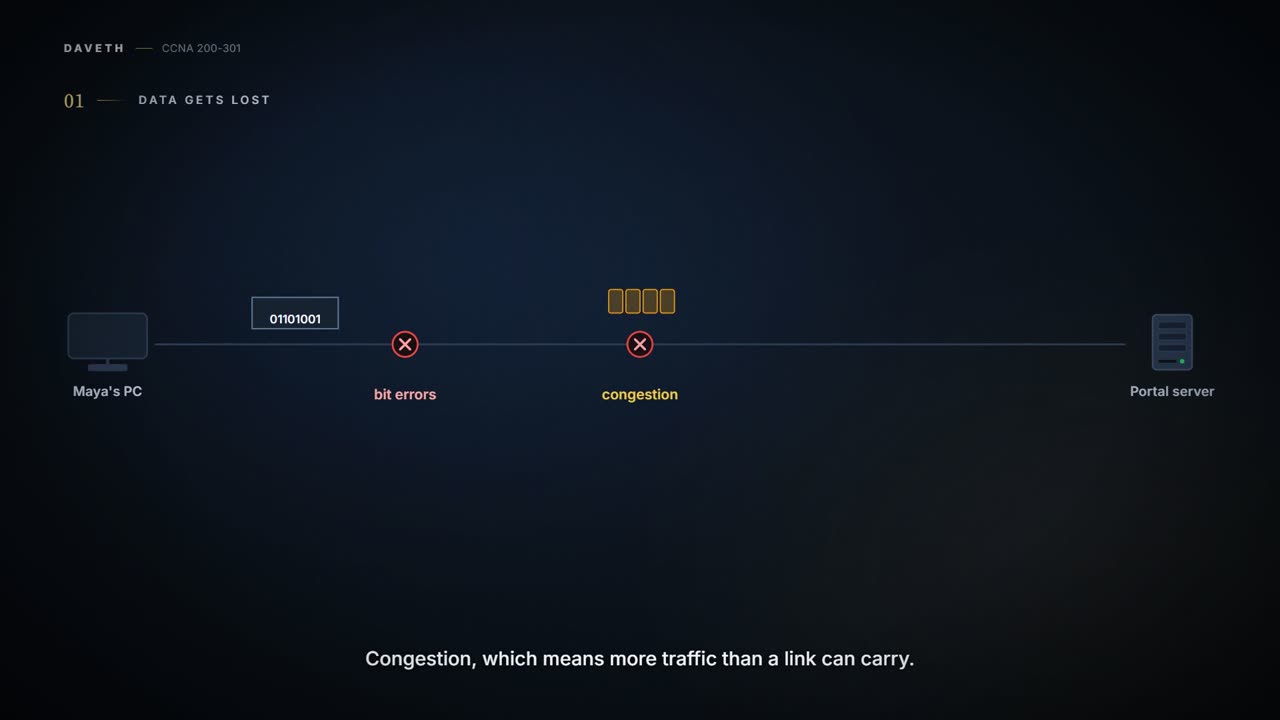
Why would an application want services? Because data does get lost. Packets can be thrown away along the way for many reasons: bit errors, congestion (more traffic than a link can carry), or no known way to the destination. Most data-link protocols notice errors, called error detection, but then simply discard the damaged frame. So something has to notice the loss and send the data again, which is error recovery. TCP does that, and helps avoid congestion with flow control. UDP does neither. That's why many application protocols choose TCP.
Don't read that as "UDP is worse". Fewer services means a smaller header, so fewer bytes of overhead (extra bytes that aren't the application's data). UDP doesn't slow a transfer down in cases where TCP can deliberately slow it. And some applications, notably voice and video over IP, don't need error recovery, so they use UDP.
A file is happy to wait for page 2. Your conversation is not keen to pause while the network finds Tuesday's syllable.
Here are the transport layer's main features. TCP does all five; UDP does only the first:
| Feature, and what it does | TCP | UDP |
|---|---|---|
| Multiplexing using portsThe receiving computer picks the right application by port number. | Yes | Yes |
| Error recovery (reliability)Numbering and acknowledging data, and resending what goes missing. | Yes | No |
| Flow control using windowingThe receiver limits how much the sender may send before an acknowledgment, protecting buffer space and routing devices from being overloaded with traffic. | Yes | No |
| Connection establishment and terminationSetting up the port numbers and the numbering before data, and closing afterwards. | Yes | No |
| Ordered data transfer and segmentationA stream of bytes cut into segments, handed over at the far end in the same order. | Yes | No |
An application typically picks one by what it needs. TCP's services cost something: error recovery uses more bandwidth (more of the link's capacity) and more processing (more work for the computer). UDP uses less of both.
A registered parcel and a postcard make a decent comparison. The parcel needs a signature and gets tracked, and if it goes missing, you find out and send another; the postcard just goes. Neither is better: it depends what you're sending. (The comparison stops at the service: a UDP message still carries ports and a checksum, a number the receiver uses to spot damaged data, which a postcard doesn't.)
One more thing about TCP's place. It works at the two endpoints, the computers at each end of the conversation, and relies on IP for delivery across the network, routing (choosing the path) included. Whether the two computers share one Ethernet or sit on opposite sides of the Internet, TCP does its job the same way.
Which application gets the data
A computer runs many applications at once. When data arrives, it has to decide which application gets it. TCP and UDP both solve this the same way, and it's called multiplexing.
Say three messages arrive at the portal server from Maya's PC. They come from the same computer, so the addresses can't tell them apart. Two of them are TCP, so "TCP or UDP?" can't either. What does: a port number, a number in the TCP or UDP header that stands for one application. Each message carries a different destination port, and the server hands each to the application listening on that port.
"It reached the server" isn't enough information for the server. It has three applications open.
A block of flats works the same way. The street address gets a letter to the building; the flat number gets it to the right flat inside. The IP address is the street address; the port is the flat number. (Where it stops: a flat number stays fixed, while a client's port is borrowed and handed back.)
The full identity of one end of a conversation is called a socket, and it has three parts: an IP address, a transport protocol and a port number. The staff portal's web server, for example, is (10.1.1.2, TCP, 80), because web servers use well-known port 80 by default. Maya's browser picks any port that's free on her PC, say 49152. Here are three conversations running at the same time:
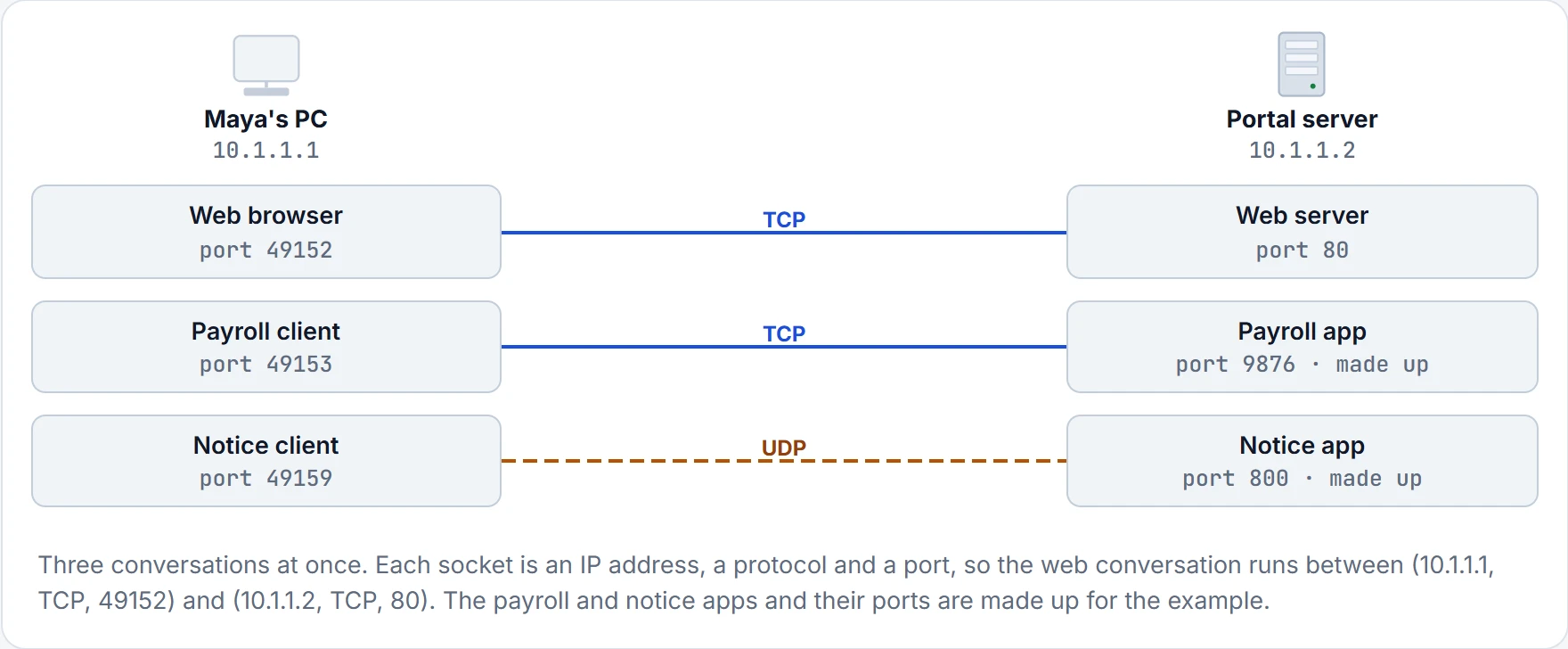
A socket on one computer should be unique, so each pair of sockets identifies one conversation between two computers. That's how several applications can talk at once, to the same computer or to different ones, and each still gets its own data.
IANA, the organisation that also manages IP address allocation worldwide, divides port numbers into three ranges, set out in RFC 6335:
- Well-known (system) ports, 0–1023: assigned by IANA, with a strict review for new ones.
- User (registered) ports, 1024–49151: assigned by IANA, with a less strict review.
- Ephemeral (dynamic, private) ports, 49152–65535: not assigned at all; a client application borrows one for as long as it needs it.
In the figure above, 80 and 800 are well-known ports, and 9876 is a user port.
Servers listen (wait for clients to connect) on a well-known or user port, and they have to: a client can only ask for a service if it knows the port beforehand. Clients use dynamic ports. A server uses the same port for every connection, so 100 browsers on one computer could all connect to one web server on port 80. The server still has only one socket, and so only one port number, 80. It tells them apart by each client's source port, and replies to that port. The same goes for UDP.
A shop with one counter and a numbered-ticket system is the everyday version: one counter for everybody, and each customer's ticket number tells the staff whose order is whose. (Where it stops: a server can serve many clients at the same moment.)
The TCP header
Here is TCP's header beside UDP's. You don't need to memorise the fields, but the rest of the page refers to several of them. Look at the size difference, and at the fields they share:
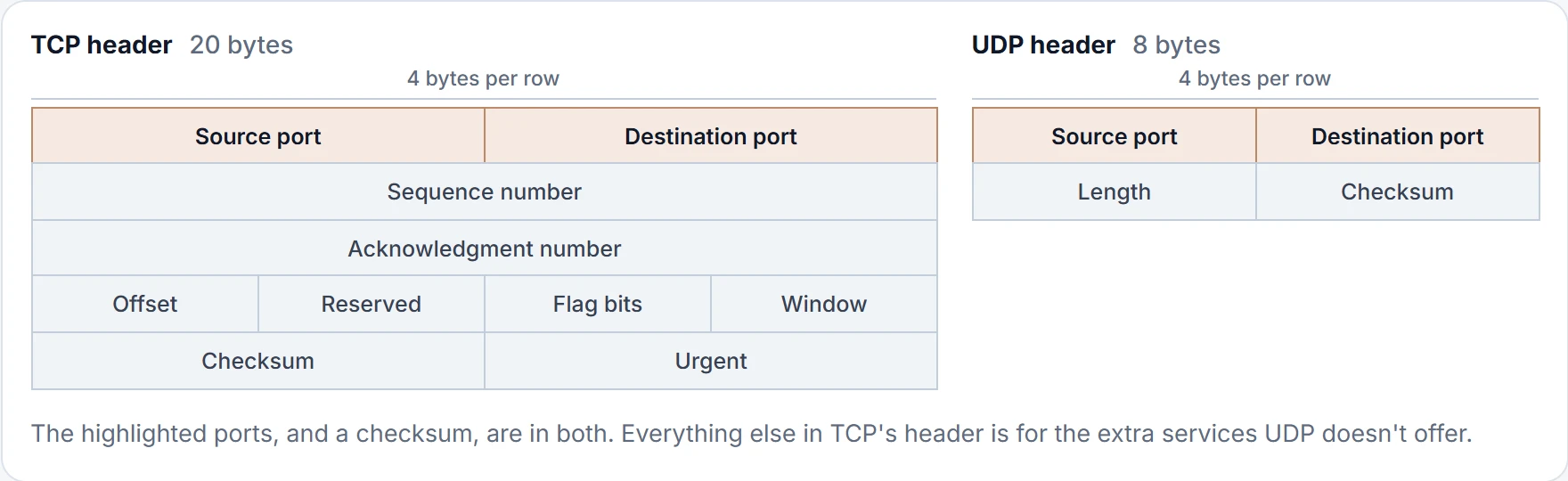
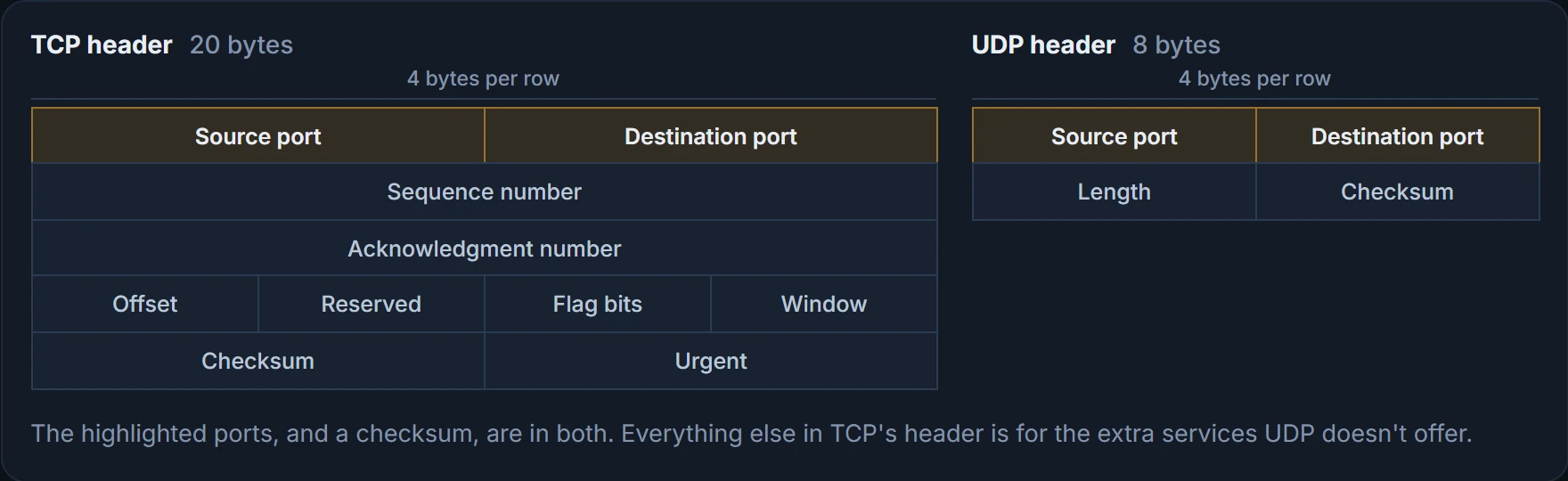
The message TCP creates, its header followed by any application data, is a TCP segment. The general OSI name from 01.4 works too: a Layer 4 PDU, or L4PDU.
Opening and closing a connection
Before TCP sends any application data, the two ends set up a connection. In plain words, they agree which port numbers they're using and where each side starts numbering. It takes three messages, so it's called the three-way handshake. This is a new connection, so Maya's browser borrows a fresh port for it, 49155:
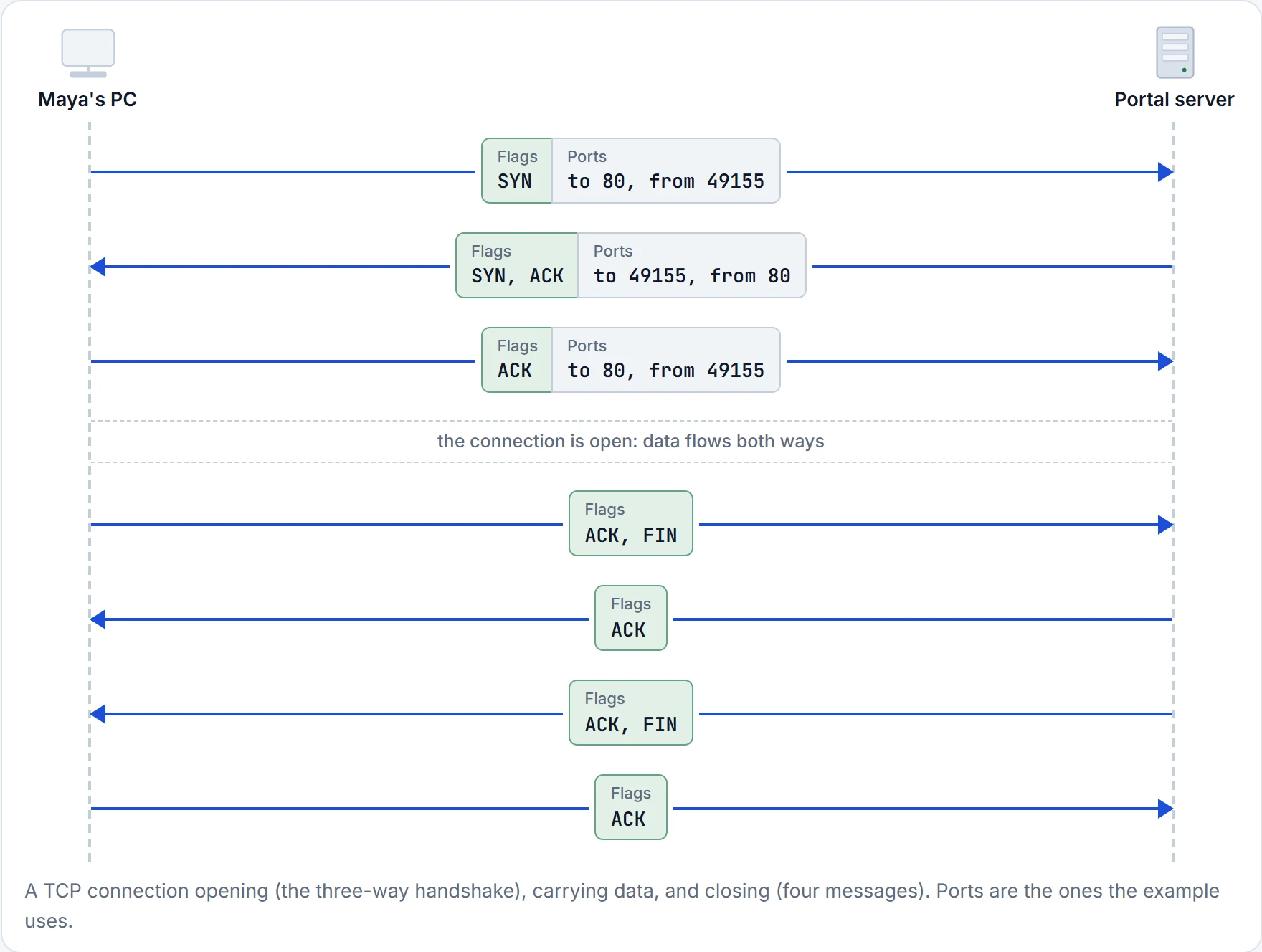
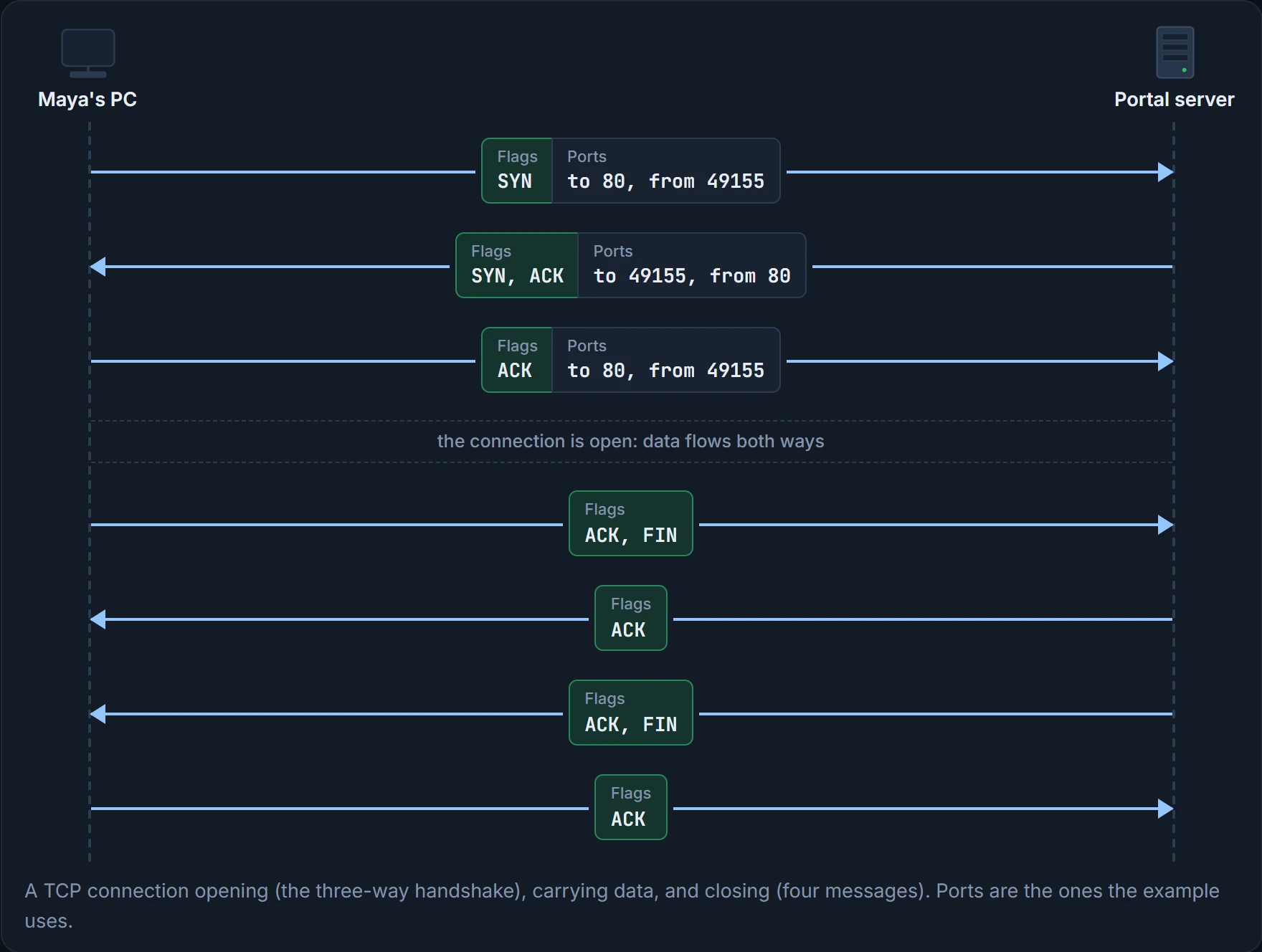
Two things to notice. First, the ports swap round: messages to the server go to port 80 from 49155, and the replies go the other way. Second, only the ports appear in TCP's header. The IP addresses are already in the IP header, and "TCP" is implied: the IP header's Protocol field says a TCP header comes next (01.6 looks at the IP header). So the ports are the only part of each socket TCP has to carry.
The handshake is signalled by two flags, single bits in the TCP header: SYN, which means "synchronize the sequence numbers", and ACK, which says the message is acknowledging something. Don't mix the ACK flag up with "ACK = 2000" in the diagrams further down: that's the number in the Acknowledgment field. The close uses a third, FIN, short for finished. It takes four messages, because the server first tells its application the connection is closing and waits for it. Meanwhile it sends a plain ACK, so Maya's PC doesn't keep repeating its FIN.
It's a phone call, really. "Hello?" "Hello, I can hear you." "Great, I can hear you too." Then the talking. And at the end: "I'm done." "OK." "I'm done too." "OK, bye." (Where it stops: the handshake also agrees starting numbers, which no caller does.)
Three hellos sounds very social. It's really two computers getting their notebooks on the same page.
TCP sets up and ends connections; UDP doesn't. The general terms for the two styles are:
- Connection-oriented protocol: one that needs an exchange of messages before data transfer begins, or that has a required pre-established correlation between the two ends. TCP is one.
- Connectionless protocol: one that needs neither. UDP is one.
The phone call is connection-oriented; dropping a postcard in the post box is connectionless.
Continue the lesson
The whole lesson, with its drawings and its questions. 4 more sections after the ones above.