
EIGRP topology table
The routing table lists the paths a router uses; the EIGRP topology table lists every path a neighbour told it about, including backups. On each via line, the first number in brackets is this router's cost to the destination through that neighbour, and the second is what the neighbour advertised, its reported distance. Plain show lists only feasible paths; all-links shows them all.
By Arif, founder of Daveth · Updated
The full 5 min walkthrough is in Daveth Pro (Network). See what the plan opens
What this page answers
What do the two numbers in the EIGRP topology table mean?
The first is the EIGRP metric representing this router's cost to the destination through that neighbour. The second is the metric the neighbour advertised: its reported distance. Read it in “What makes a path feasible”
What does show ip eigrp topology all-links show?
All entries in the topology table, including paths that are not feasible successors. Without all-links, a path that fails the feasibility condition is stored but not shown. Read it in “What all-links adds”
What is the difference between the EIGRP topology table and the routing table?
The routing table is the list of paths the router is actually using. The topology table is EIGRP's list of every path a neighbour has told it about, including those it is not using. Read it in “One path on the screen”
One path on the screen
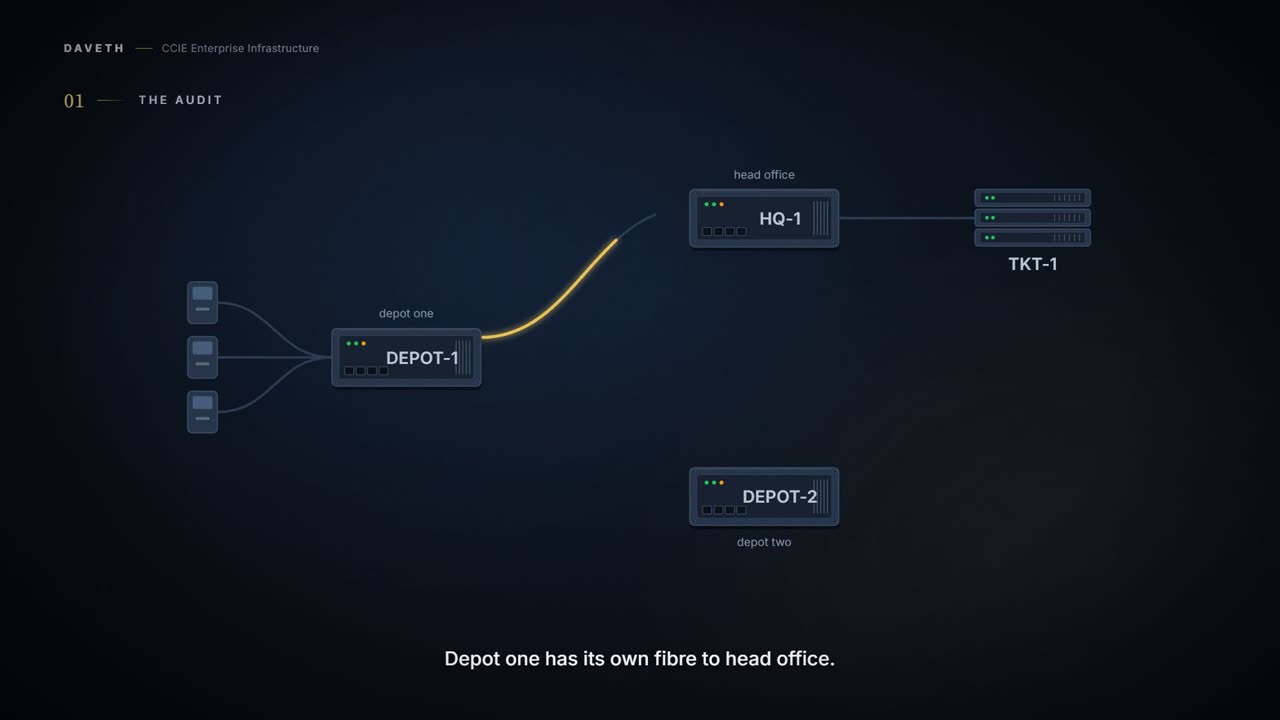
A city bus company runs two depots and a head office. Every ticket machine in DEPOT-1's yard needs the ticketing servers at head office, 10.40.1.0/24. DEPOT-1 has its own fibre to HQ-1, and a short fibre to DEPOT-2 next door, which has its own fibre to HQ-1 too. An auditor is checking DEPOT-1 for a backup path.
EIGRP keeps two lists. The routing table is the list of paths a router is actually using. The topology table is EIGRP's list of every path a neighbor has told it about, including the ones it isn't using.
Use the show ip eigrp topology command to display topology entries, feasible and nonfeasible paths, metrics, and states.
Read the middle of that sentence: feasible and nonfeasible paths. The table holds both kinds. A feasible path is one that passes EIGRP's safety test, and the next section spells that test out.
So what does show ip eigrp topology, with no keyword, list on DEPOT-1?
Computed from the state: the default view, what show ip eigrp topology with no keyword would list. No command prints it in this form.
state   prefix              FD    successors
  via           next hop   cost/reported  iface  role
passive 10.40.1.0/24        3072  1
  via HQ-1      10.0.1.2   3072/2816      Gi0/1  successor
passive 2001:db8:40:1::/64  3072  1
  via HQ-1      FE80::1:2  3072/2816      Gi0/1  successor
Look at the via lines: one path, through HQ-1 on Gi0/1. The auditor writes no backup path in the report. Before you agree with that, remember that DEPOT-2 is up as a neighbor and DEPOT-2 advertises the same prefix.
If this command is used without any of the optional keywords, only topology entries with feasible successors are displayed and only feasible paths are shown.
That sentence does two separate things. It leaves out entries that have no feasible successor. And inside the entries it does print, it leaves out every path that isn't feasible. DEPOT-2's path is the second kind.
Nothing on the screen says a path was left out. For a command whose whole job is showing you things, it's remarkably discreet.
What makes a path feasible
So what is the test, and what do the two numbers on a via line mean?
The page explains the pair of numbers in brackets under show eigrp address-family topology, the entry just before this command:
The first number is the EIGRP metric that represents the cost to the destination. The second number is the EIGRP metric that this peer advertised.
The second number is the reported distance: the neighbor's own cost to the ticketing servers, the number it told DEPOT-1. The first is DEPOT-1's cost if it went through that neighbor.
Feasible distance. The feasible distance is the best metric to reach the destination or the best metric that was known when the route became active. If the reported distance of the device is less than the feasible distance, the feasibility condition is met and that route becomes a feasible successor.
The feasible distance, or FD, is the best cost DEPOT-1 knows. Here it's 3072, through HQ-1. Now run the test on DEPOT-2: it reported 3072. Is 3072 less than 3072? No. So DEPOT-2's path fails the test by two words in the rule: less than.
Read that once more, because the numbers are identical and the answer is still no. The test is strictly less than. Equal is not less than, and almost does not pass it either. Nothing about that path is bad; it simply does not clear a bar that was set deliberately tight.
And the tightness is the point. A path that is merely as good as your current one cannot be proved loop-free by this test, so EIGRP declines to keep it as a spare rather than keeping it and hoping.
After the software determines that it has a feasible successor, the software need not send a query for that destination.
Why does passing matter? A feasible successor is a spare path that DEPOT-1 can switch to without asking anyone. Without one, DEPOT-1 has to send a query, which means asking its neighbors for a path and waiting. You'll watch that happen in two sections.
Number of successors. This number corresponds to the number of next hops in the IP routing table. Next-hop address that advertises the passive route.
Notice what the successors count measures: next hops in the routing table. A successor is a path the router is using right now. The count says nothing about spares.
Which is why the answer is not in show ip route, however natural it feels to look there. That command reports what the router is doing. Whether a spare exists is a different question, asked of a different table, and the routing table will answer the question you did ask perfectly happily without ever mentioning that it was not the one you meant.
Indicates that no EIGRP computations are being performed for this route. Indicates that EIGRP computations are being performed for this route.
In plain words, passive means the route is settled, and active means EIGRP is still working it out.
What all-links adds
How does the auditor see the rest of what DEPOT-1 stored?
Displays all entries in the EIGRP topology table (including nonfeasible-successor sources). The all-links keyword displays all paths, whether feasible or not, and the detail-links keyword displays additional details about these paths.
Computed from the state: the all-links view, at the same moment. No command prints it in this form.
state   prefix              FD    successors
  via           next hop   cost/reported  iface  role
passive 10.40.1.0/24        3072  1
  via HQ-1      10.0.1.2   3072/2816      Gi0/1  successor
  via DEPOT-2   10.0.3.2   3328/3072      Gi0/2  not feasible
passive 2001:db8:40:1::/64  3072  1
  via HQ-1      FE80::1:2  3072/2816      Gi0/1  successor
  via DEPOT-2   FE80::3:2  3328/3072      Gi0/2  not feasible
Look at the second via line: DEPOT-2 on Gi0/2, 3328/3072, not feasible. It was stored the whole time. The honest finding isn't no backup path; it's a backup path that can't take over without a query. That's a different finding, and it leads to a different conversation with the bus company.
Proves: The default view proves what this router can switch to without asking anyone: the successors and any feasible successors. Does not prove: that no other path exists. A path that failed the feasibility condition is stored and not listed, and nothing on the screen says so.
Proves: all-links proves every path this router has stored for the prefix, feasible or not. Does not prove: that any of those paths forwards traffic. Only the successors are next hops in the routing table.
So never conclude a path is absent from the default output alone. That view was never answering is there another path?
Does the page's own all-links sample list a path that the plain command would leave out?
From elsewhere: the page's all-links sample. The names, numbers and addresses come from elsewhere, not from this scenario.
Device# show ip eigrp topology all-links
EIGRP-IPv4 Topology Table for AS(1)/ID(10.0.0.1)
Codes: P - Passive, A - Active, U - Update, Q - Query, R - Reply,
       r - reply Status, s - sia Status
P 172.16.1.0/24, 1 successors, FD is 409600, serno 14
        via 10.10.1.2 (409600/128256), Ethernet0/0
        via 10.1.4.3 (2586111744/2585599744), Serial3/0, serno 18
Read it the same way you read DEPOT-1. The FD is 409600, and the second path reported 2585599744, nowhere near less. That path is listed only because of the keyword.
Watch for serno 14 and serno 18 on those lines. This is everything the page says about that field:
Serial number.
And what does the page's sample of the plain command, with no keyword, print?
From elsewhere: the page's default sample. The names, numbers and addresses come from elsewhere, not from this scenario.
Device# show ip eigrp topology
EIGRP-IPv4 Topology Table for AS(1)/ID(10.0.0.1)
Codes: P - Passive, A - Active, U - Update, Q - Query, R - Reply,
       r - Reply status, s - sia status
P 172.16.1.0/24, 1 successors, FD is 409600
        via 192.0.2.1 (409600/128256), Ethernet0/0
Both samples carry the same header, AS(1)/ID(10.0.0.1), but their next hops differ, so they don't show one moment. Read each on its own.
By this course's reading, a successor counts as a feasible path in the default view. The page's default sample prints an entry with one successor and no other path, so the path in use is listed.
Continue the lesson
The whole lesson, with its drawings and its questions. 5 more sections after the ones above.