
Stuck-in-active
One subnet loses its path, and three minutes later a working adjacency three hops away is torn down. That is not a bug: every step is EIGRP doing what it was designed to do. A route with no feasible successor goes active, and a query goes to all neighbours on all interfaces. The router waits for every reply, so one slow router far away stalls the rest.
By Arif, founder of Daveth · Updated
The full 6 min walkthrough is in Daveth Pro (Network). See what the plan opens
What this page answers
What causes EIGRP stuck in active?
A router that lost its successor, with no feasible successor, goes active and queries all neighbours, which may query theirs. It must receive every reply; one router that does not answer leaves everyone upstream waiting until the adjacency is reset. Read it in “Two routers, one event, completely different experiences of it”
Who does an EIGRP router send queries to?
All neighbours on all interfaces: not only the ones that looked promising or that carried the prefix. Read it in “Asking is not a small thing”
One subnet, and an entire adjacency
The thing that broke is here. The router that gets hurt is three hops away, and it did nothing wrong.
One subnet loses its path. Three minutes later, 23 routes are gone and a working neighbour relationship has been torn down and built again from zero on a router that never carried that subnet.
Now stop and ask yourself: is that a bug? It is not. Every step you are about to see is the protocol doing exactly what it was designed to do. Put those correct steps one behind the other and this is what comes out of the far end. That is the whole lesson. Not a fault. A queue of reasonable decisions.
State 1 Six routers, nothing wrong with any of them
One of these links is slow and one of these routers has a busy control plane. Neither is a fault. Which do you think will matter?
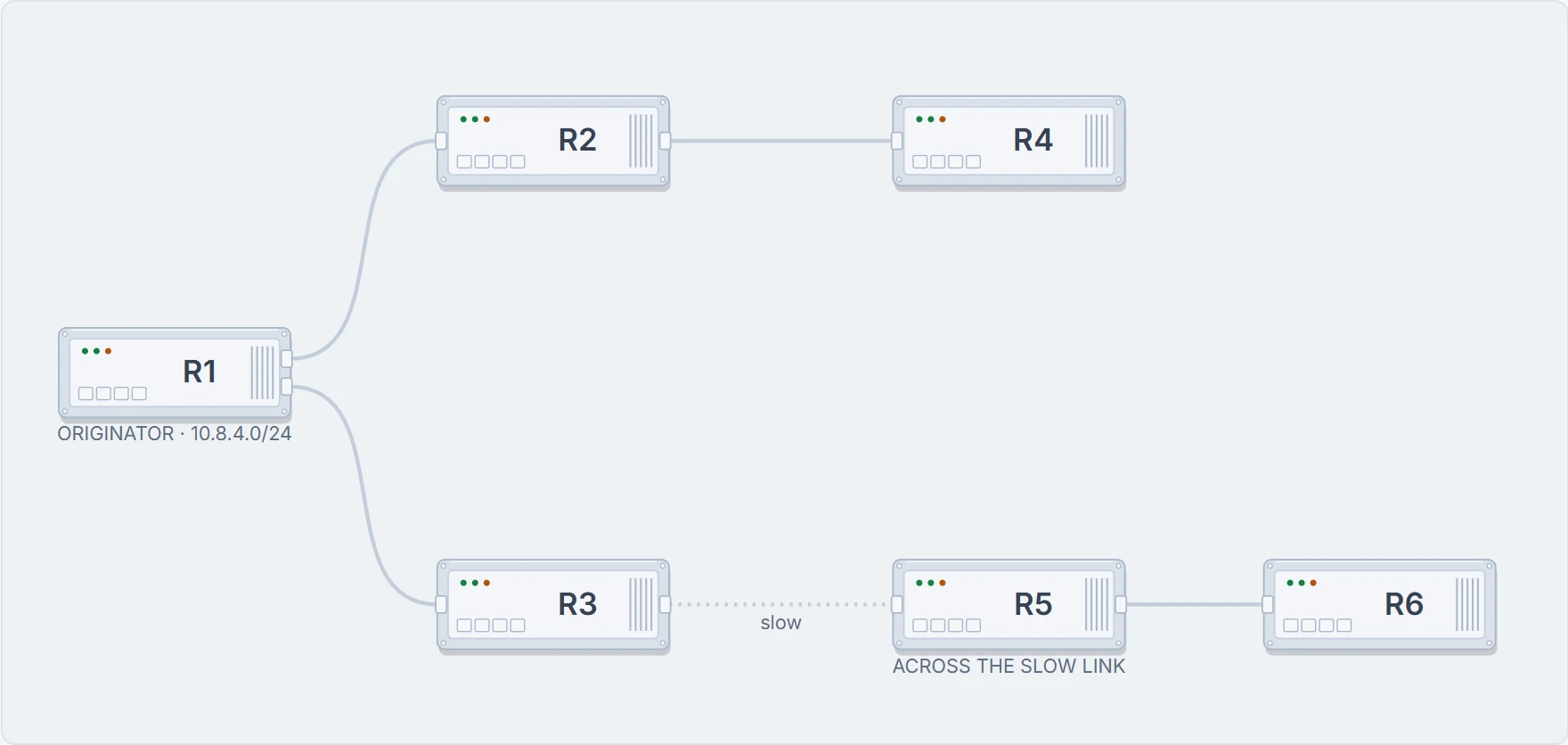
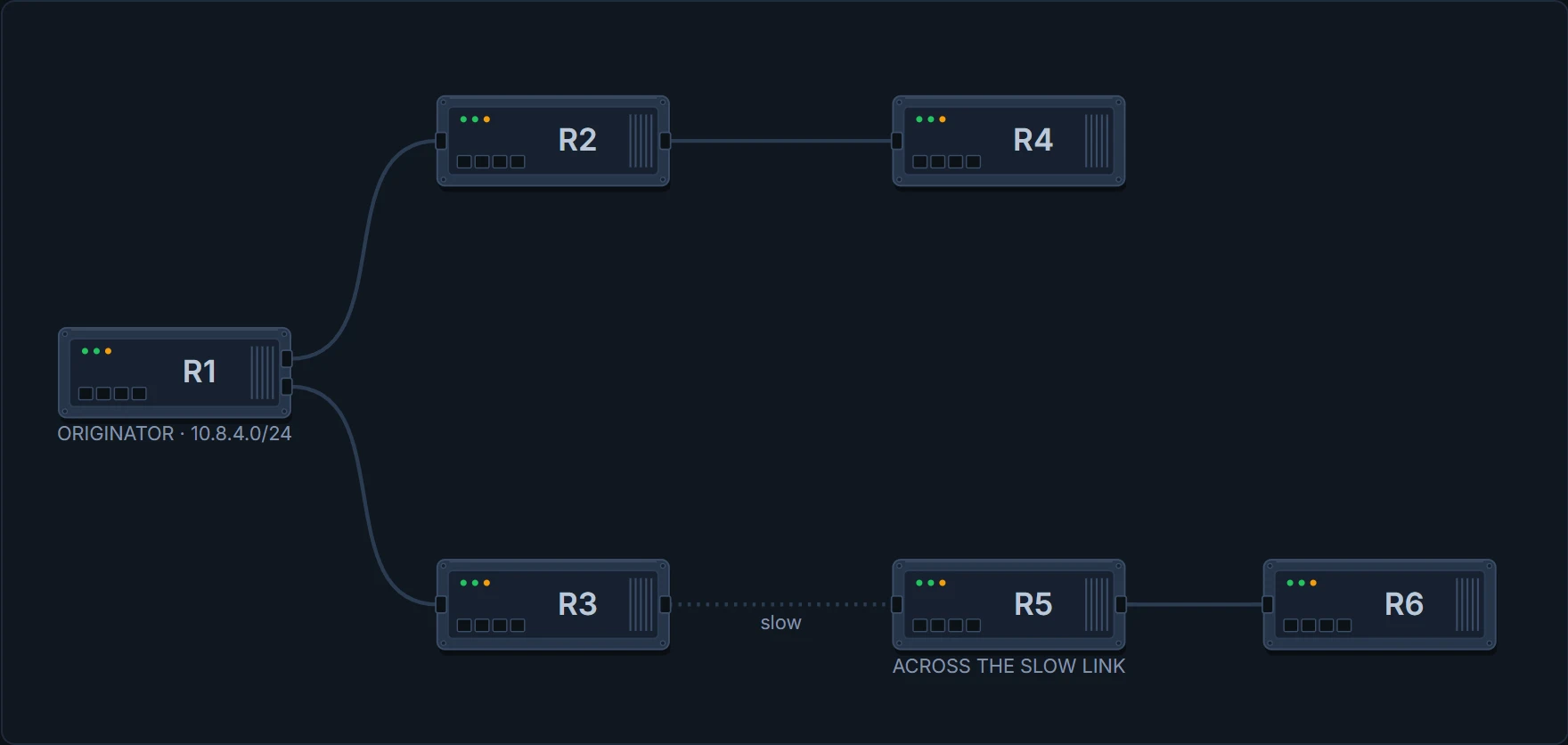
Nothing here is logged, nothing is down, and on an ordinary day neither of those properties has any consequence at all.
Asking is not a small thing
R1's successor for 10.8.4.0/24 goes away, and there is no feasible successor sitting behind it. From 1.3.b.i, active means one thing and one thing only: I have lost my path, and nothing I can see right now is something I can prove will not loop.
So R1 cannot just pick a neighbour and hope. It has to stop and ask. Before you look at who it asks, guess.
A QUERY is sent to all neighbors on all interfaces. Not the ones that looked promising. Not the ones with the prefix in their topology table. Everyone.
Now here is the half that hurts. For every neighbour it asked, R1 sets a reply status flag. One flag, one neighbour, one answer owed. And R1 cannot come out of active until every last flag is cleared.
Every flag, or you wait. There is no majority here and there is no good enough. However many neighbours have already answered, one that still owes you a reply holds the whole thing open.
Put your office head on for a second. A file goes round for sign-off and it needs every department on it. They all sign inside the hour except one, and that one person has gone to lunch. The file is not nearly approved. It is not approved. It sits there, you sit there with it, and every signature you did collect is worth nothing today.
That is exactly a reply status flag, and the comparison stops there. A person comes back from lunch. This router has a clock running, and what happens when the clock finishes is decided by the protocol, not by anybody being reasonable. So what is R1 waiting on the moment its queries go out?
R1# show ip eigrp topology active
EIGRP-IPv4 Topology Table for AS(100)
Codes: A - Active, r - reply Status, s - sia Status

A  10.8.4.0/24, 2 replies, active 0:00, query-origin: Local origin
! active, and the clock has started
        r  via 10.1.12.2
! R2, at 10.1.12.2: one flag per neighbour queried, and this is the thing that cannot be hurried
        r  via 10.1.13.2
        ! and R3, at 10.1.13.2: nobody has answered yet
State 2 Where the query went
Six routers, one prefix, one router's successor. How many of them are involved?
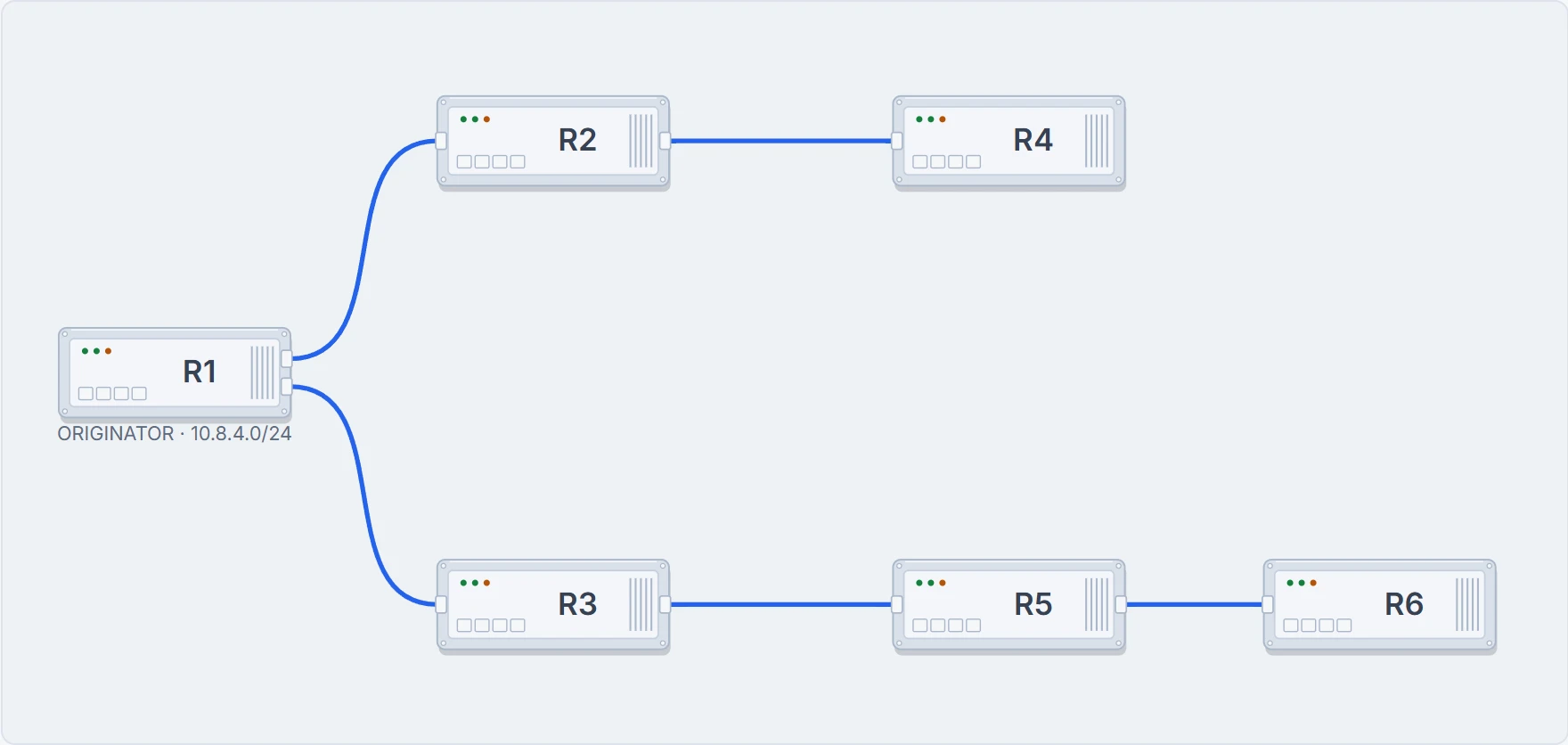
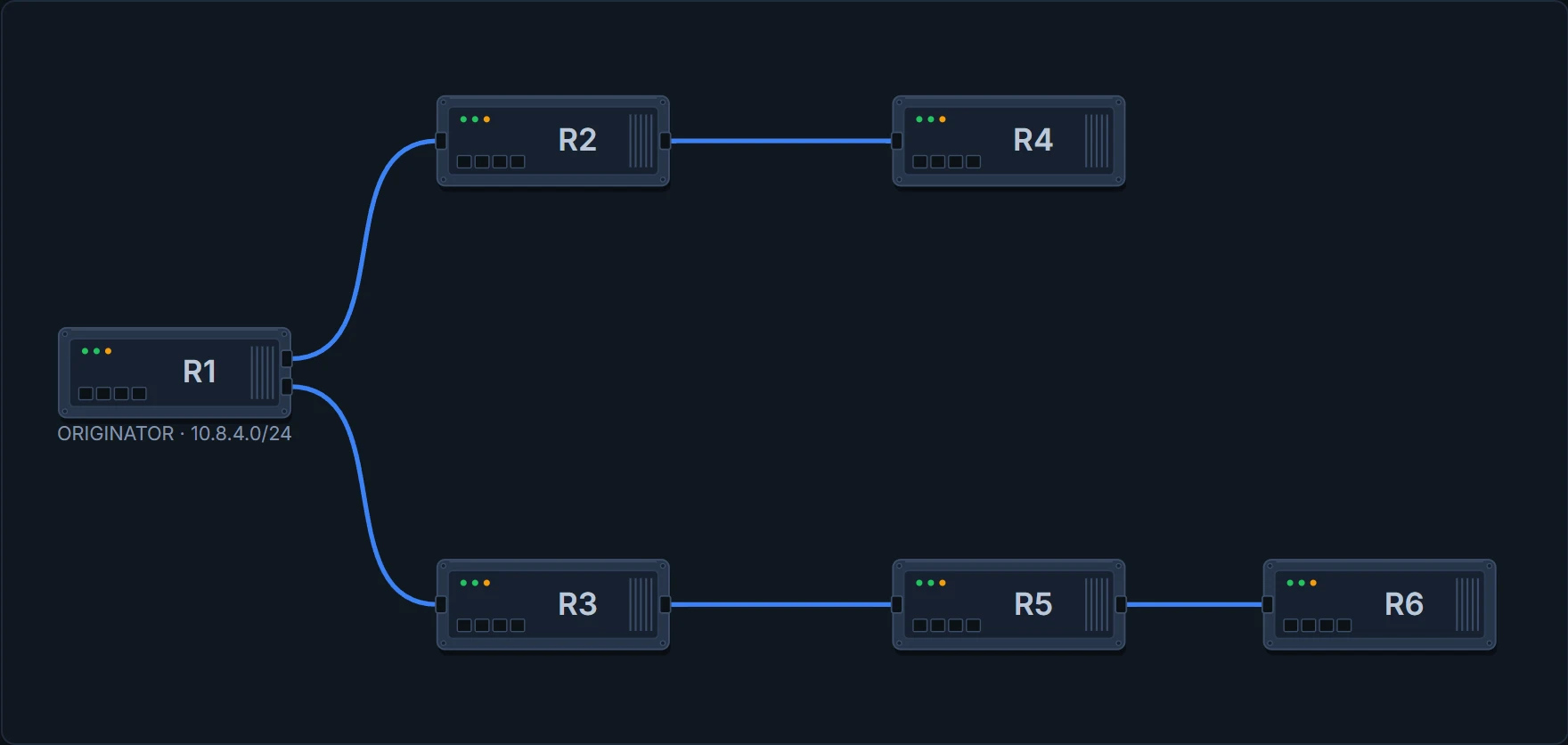
All of them. A neighbour that has no feasible successor goes active itself and queries its own neighbours, and cannot answer until it has been answered. The query travels outward, router to router, and the replies have to come all the way back.
The wait is collective, and its length is set by the slowest participant in a tree whose edges you cannot see.
One thing to be precise about. What is said above holds for the router that starts the query, which is the router this page is following. There is a second case, with a split-horizon qualifier on it, for a different transition; 1.3.c.i works through how the two fit together. It narrows the scope a little and changes nothing in the argument here.
Two routers, one event, completely different experiences of it
R4 had a feasible successor, so it replied at once, R2 replied to R1, and that flag cleared. Half the domain finished the event in a moment. R6 replied to R5 too.
And R5 has not answered R3.
State 3 One branch done, one branch waiting
R1 is still active. How far is R1 from anything that has gone wrong?
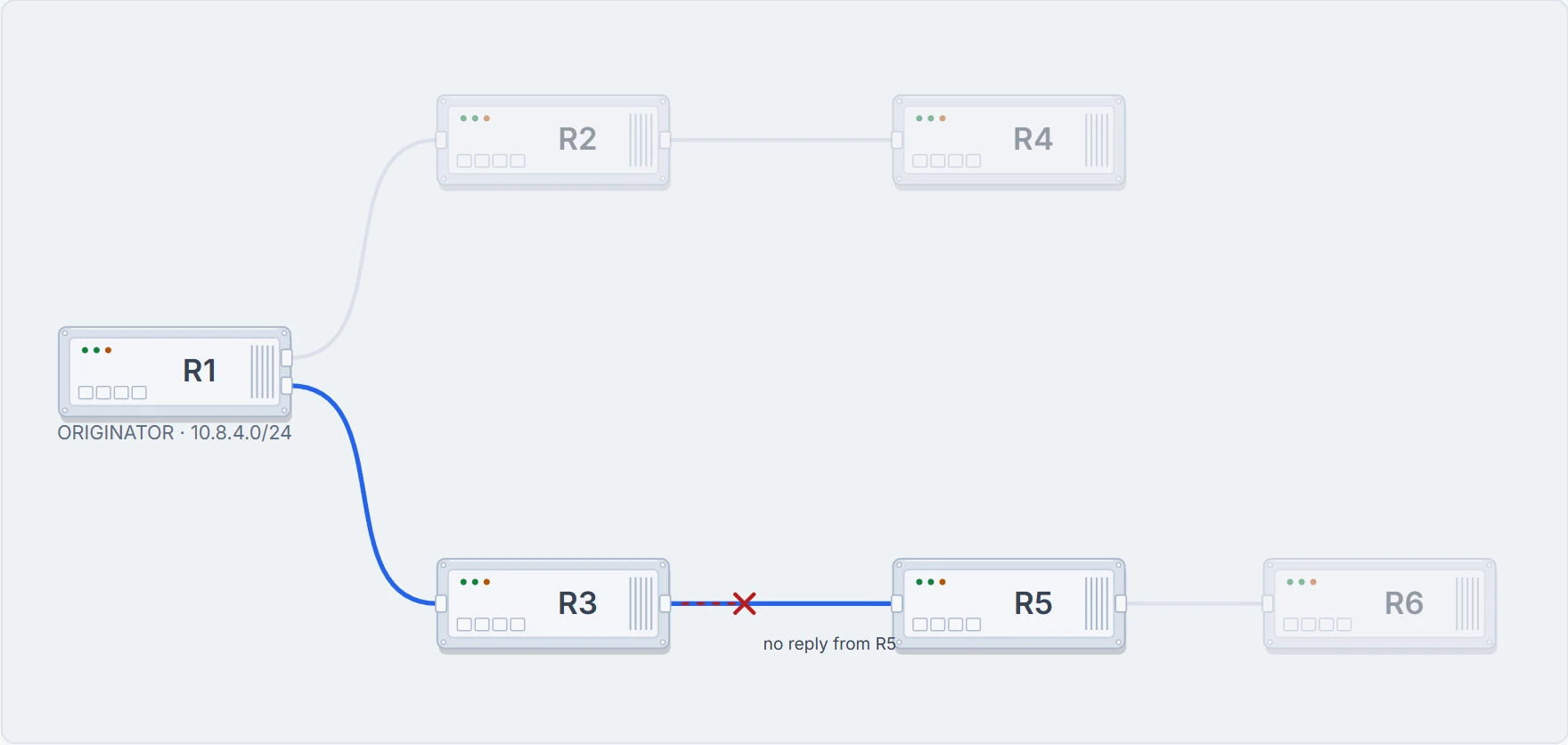
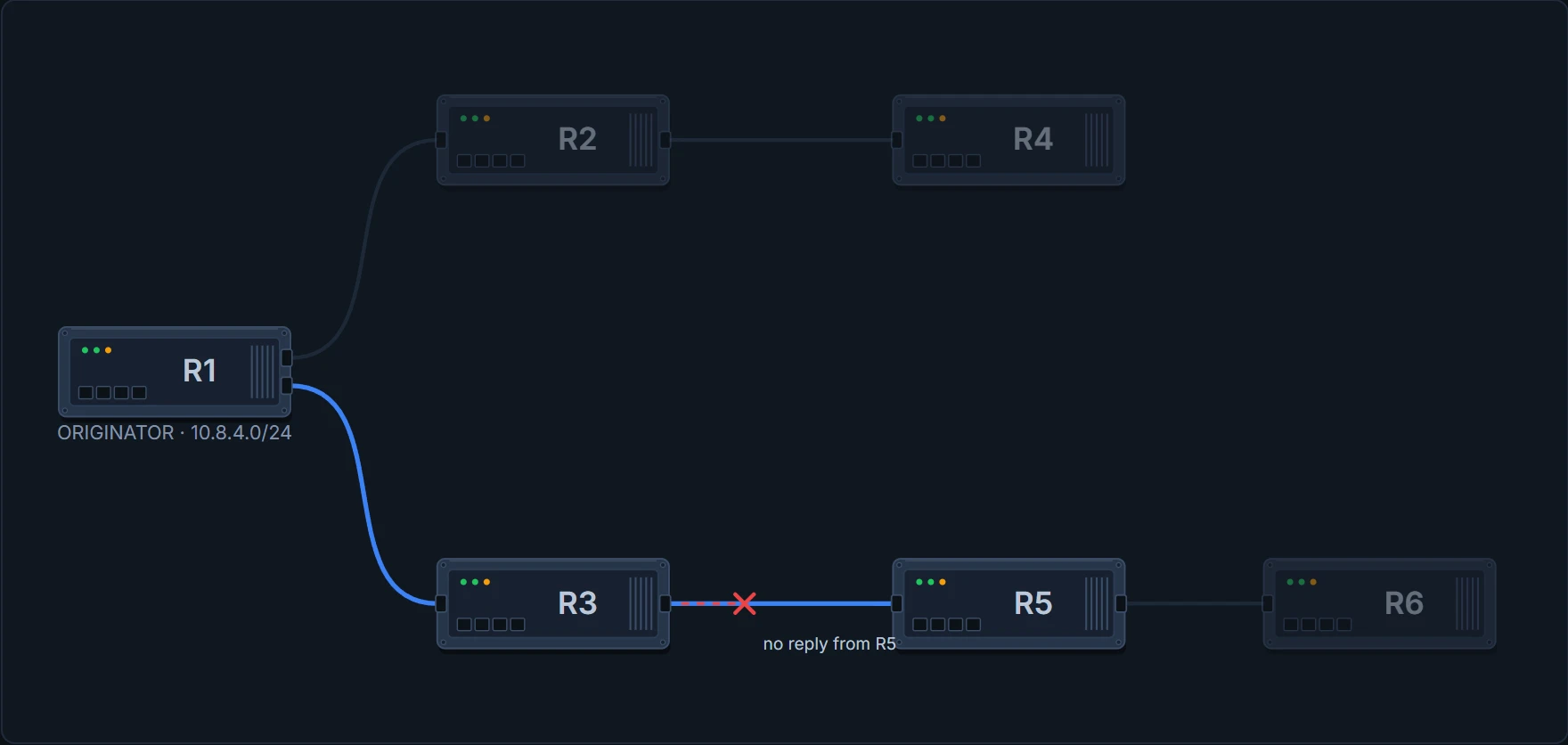
Three routers. Nothing on R1 has failed, nothing on R3 has failed, and both of them are stuck waiting on R5, a router R1 is not even adjacent to.
And this is the real problem the protocol has to solve. A neighbour has gone quiet. Is it busy, or is it dead? Because those two look identical from here, and they need opposite treatment. Wait for ever and the network never converges. Give up on a router that is halfway through the maths and you have thrown away a perfectly good neighbour.
So halfway through, at 90 seconds, R1 sends an SIA-QUERY. This is the tap on the shoulder. Are you still there, or have you gone?
R3 answers. Now look carefully at what that answer is, because most people read it wrong.
It is not the route. It does not say here is your path. It says: your question reached me, I am still working on it, do not give up on me yet. And when it says that, the clock goes back to the beginning.
The router that says I am still working gets more time. The router that says nothing gets none. That is the entire deal. Silence is the only thing that is punished here.
So at 1:30 the two routers are in completely different positions. How long does each of them have left?
R1# show ip eigrp topology active
EIGRP-IPv4 Topology Table for AS(100)
Codes: A - Active, r - reply Status, s - sia Status

A  10.8.4.0/24, 1 replies, active 0:00, query-origin: Local origin
! R3 answered, so the clock went back to the start: R1 has the full 180 seconds again
        rs via 10.1.13.2
R3# show ip eigrp topology active
EIGRP-IPv4 Topology Table for AS(100)
Codes: A - Active, r - reply Status, s - sia Status
A 10.8.4.0/24, 1 replies, active 1:30, query-origin: Successor Origin
! and R3 has had nothing, so its timer has run the whole time: 90 of its 180 seconds are left
rs via 10.1.35.2But you cannot keep saying it. Three taps on the shoulder, three answers, and that is your lot. You may say I am still working 3 times. Say it a fourth time and nobody is listening any more.
Proves: which destinations are active on this router, how long each one has been active, and which neighbours still owe it an answer. That is the reply status flags, made visible. Catch this while it is still running and this is the command that names the router everybody is waiting on.
Does not prove: that anything is wrong at all. Active is normal. A route goes active any time it loses its successor with no feasible successor behind it, and it clears the moment the answers come in. Active for a while is normal. Stuck is the part worth investigating, and the only thing separating the two is how long. So an active route in one snapshot tells you nothing. The same route still active when you look again tells you everything.
Continue the lesson
The whole lesson, with its drawings and its questions. 5 more sections after the ones above.