
Packages and shared libraries: dynamic linking, version pinning, source builds and GLIBCXX errors
Most Linux programs load glibc and other shared libraries from the system each time they start. A program records the glibc version of each function it was built against, so a build from a newer system asks for functions an older system does not have. ldd shows which library file each name resolves to.
What this page answers
What does GLIBC version not found mean?
The program was compiled on a system with a newer glibc and asks for a function version the machine it was copied to does not have. glibc is a shared library loaded from the system, not copied into the program. Read it in “Copied, and it won't start”
How does Linux find a program's shared libraries?
The dynamic linker searches in a fixed order and takes the first match: folders in LD_LIBRARY_PATH, the program's own RUNPATH, the ldconfig cache built from /etc/ld.so.conf.d/, and then /lib and /usr/lib. Read it in “How programs find libraries”
Copied, and it won't start
You built llama-server on your Ubuntu 24.04 workstation. It runs perfectly. You copy it to the team's GPU server, which runs Ubuntu 22.04, and try it there:
ml@gpu-server:~$ ./llama-server -m model.gguf
./llama-server: /lib/x86_64-linux-gnu/libc.so.6: version `GLIBC_2.38' not found (required by ./llama-server)
ml@gpu-server:~$ ldd --version | head -1
ldd (Ubuntu GLIBC 2.35-0ubuntu3.10) 2.35
Outputs on this page are realistic examples. Commands, library names and error messages are real.
The file copied fine, and it's the same processor type. What is it complaining about?
- The file was damaged while copying
- It needs a newer version of the system's C library than this server has
- The server blocks programs built elsewhere
Answer. Nearly every Linux program uses glibc, the C library that provides basics like opening files and handling text. It isn't copied into the program. It's a shared library, loaded from the system each time the program starts. When you compile on a system, the program records the glibc version of each function it uses. Ubuntu 24.04 has glibc 2.39, so your build asked for a 2.38 function. The 22.04 server's glibc is 2.35, which simply doesn't have it.
Newer glibc runs older programs fine; older glibc can't run newer ones. So build on the oldest system you need to support (or in a container of it), or build on the server itself. The rest of this lesson is about shared libraries like this one: how they're found, installed, versioned and kept stable.
How programs find libraries
A program lists the libraries it needs by name, like libcudart.so.12 (the CUDA runtime, version 12). When it starts, a small helper called the dynamic linker (ld.so) finds each one and loads it. ldd shows the result:
$ ldd /opt/llama/bin/llama-server | grep -E "cudart|cublas|stdc|libc\."
        libcudart.so.12 => /usr/local/cuda-12.8/lib64/libcudart.so.12 (0x00007f3a1c000000)
        libcublas.so.12 => /usr/local/cuda-12.8/lib64/libcublas.so.12 (0x00007f3a14000000)
        libstdc++.so.6 => /lib/x86_64-linux-gnu/libstdc++.so.6 (0x00007f3a13c00000)
        libc.so.6 => /lib/x86_64-linux-gnu/libc.so.6 (0x00007f3a13800000)
The linker searches in a fixed order and takes the first match. First, the folders in the LD_LIBRARY_PATH environment variable. Then folders baked into the program itself when it was built, called its RUNPATH (often $ORIGIN/../lib, meaning “the lib folder next to my own folder”). Then a cache of known libraries, built by ldconfig from the folders listed in /etc/ld.so.conf.d/. Finally the standard folders, /lib and /usr/lib.
The program was built against CUDA 12.8.
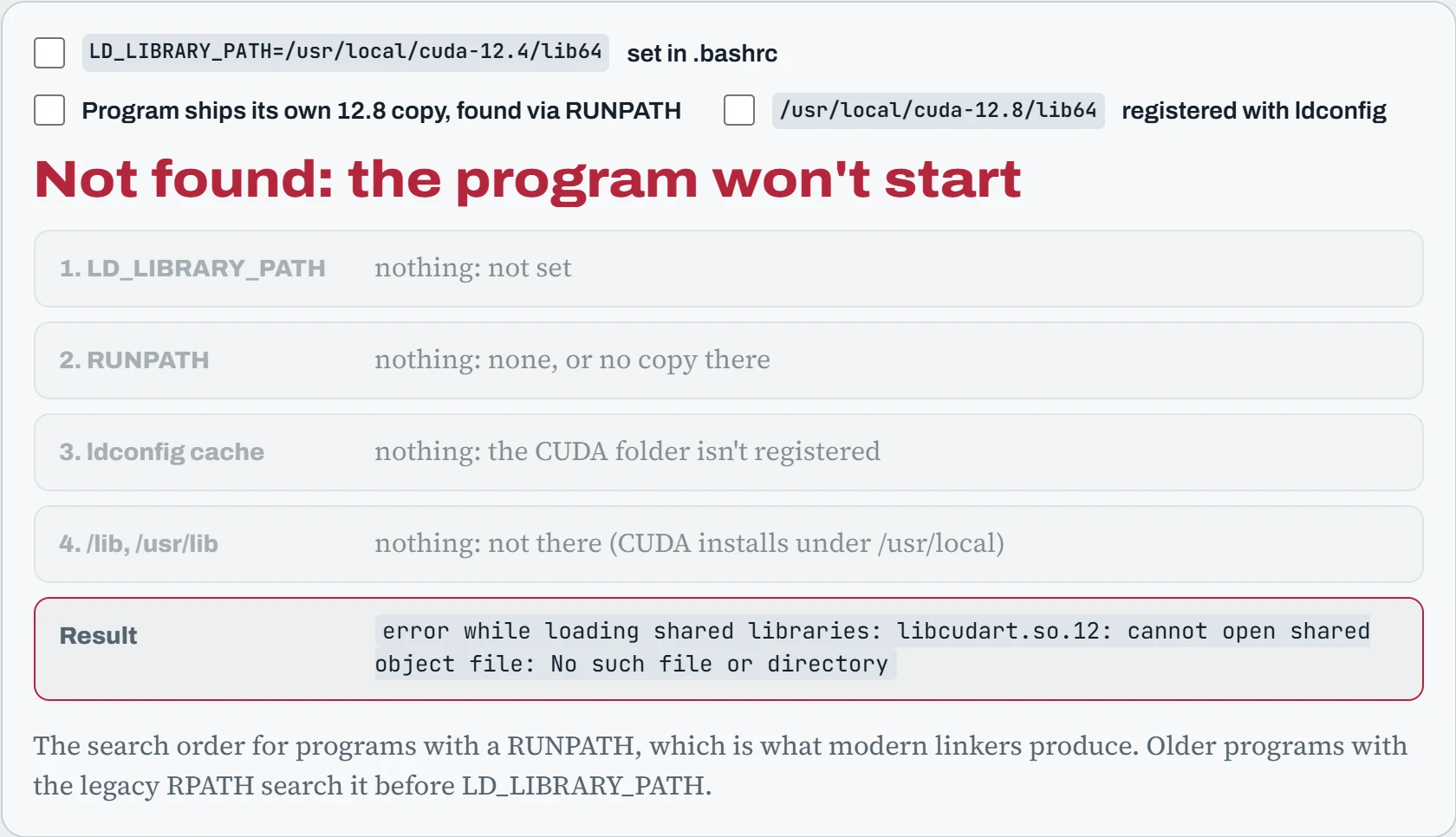
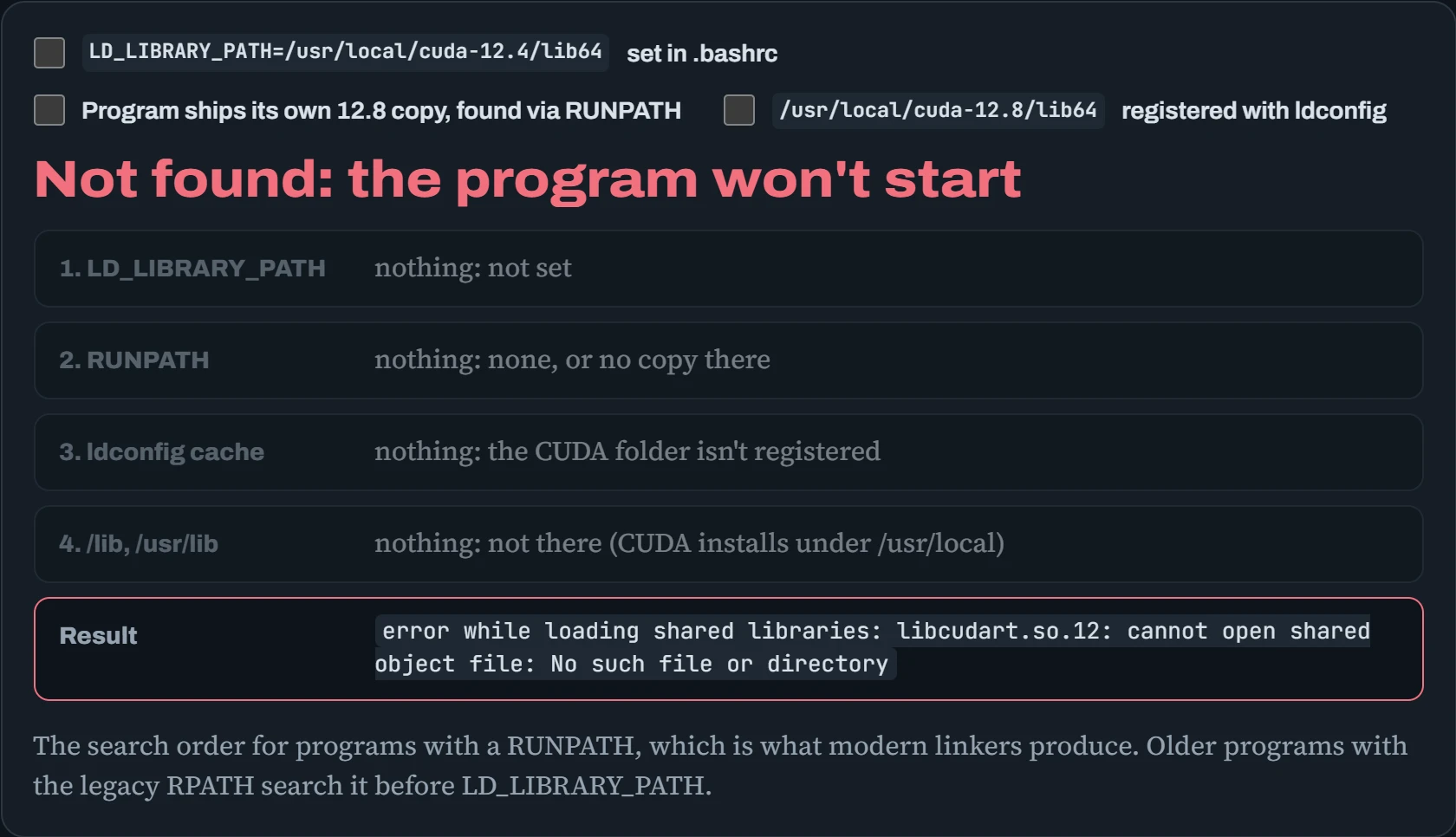
Notice the first place in that order. LD_LIBRARY_PATH is checked before everything else, so a setting meant for one old project quietly changes which libraries every program loads. That's why it's a last resort. The clean ways to make a library findable are to register its folder with ldconfig (a one-line file in /etc/ld.so.conf.d/, then sudo ldconfig), or for a program to carry a RUNPATH to its own copies.
Predict. Your .bashrc has LD_LIBRARY_PATH=/usr/local/cuda-11.8/lib64 from an old project. You install a new program that ships its own CUDA 12 libraries in its RUNPATH, and it fails with undefined symbol. Why, when its own libraries are right there?
Answer. For any library name found in both places, LD_LIBRARY_PATH wins over RUNPATH. Some of the program's libraries got loaded from the old 11.8 folder, and they lack functions the program (or its other, newer libraries) expect. The mismatch shows up as undefined symbol. It's a well-known cause of strange import errors in PyTorch, too.
Run LD_DEBUG=libs ./program 2>&1 | grep -i cuda to watch exactly where each library came from. Then remove the global LD_LIBRARY_PATH, and set it only for the one program that really needs it.
Package managers and trust
A package manager installs software together with everything it depends on, and can remove it cleanly later. Debian and Ubuntu use apt (with the lower-level dpkg), and RHEL and its rebuilds use dnf (with rpm). Packages come from repositories, and AI machines usually add a few third-party ones, like NVIDIA's for CUDA and Docker's for Docker:
$ wget https://developer.download.nvidia.com/compute/cuda/repos/ubuntu2404/x86_64/cuda-keyring_1.1-1_all.deb
$ sudo dpkg -i cuda-keyring_1.1-1_all.deb && sudo apt update
$ sudo apt install cuda-toolkit-12-8
$ cat /etc/apt/sources.list.d/docker.list
deb [arch=amd64 signed-by=/etc/apt/keyrings/docker.asc] https://download.docker.com/linux/ubuntu noble stable
$ dpkg -S /usr/lib/x86_64-linux-gnu/libnvidia-ml.so.1      # which package owns this file?
libnvidia-compute-580:amd64: /usr/lib/x86_64-linux-gnu/libnvidia-ml.so.1
The interesting part is signed-by. Anyone could run a server that pretends to be Docker's. So each repository signs its list of packages, and apt checks that signature against a key you chose to trust when you added the repository. The diagram shows the chain. Read it left to right, with the key feeding into the check:
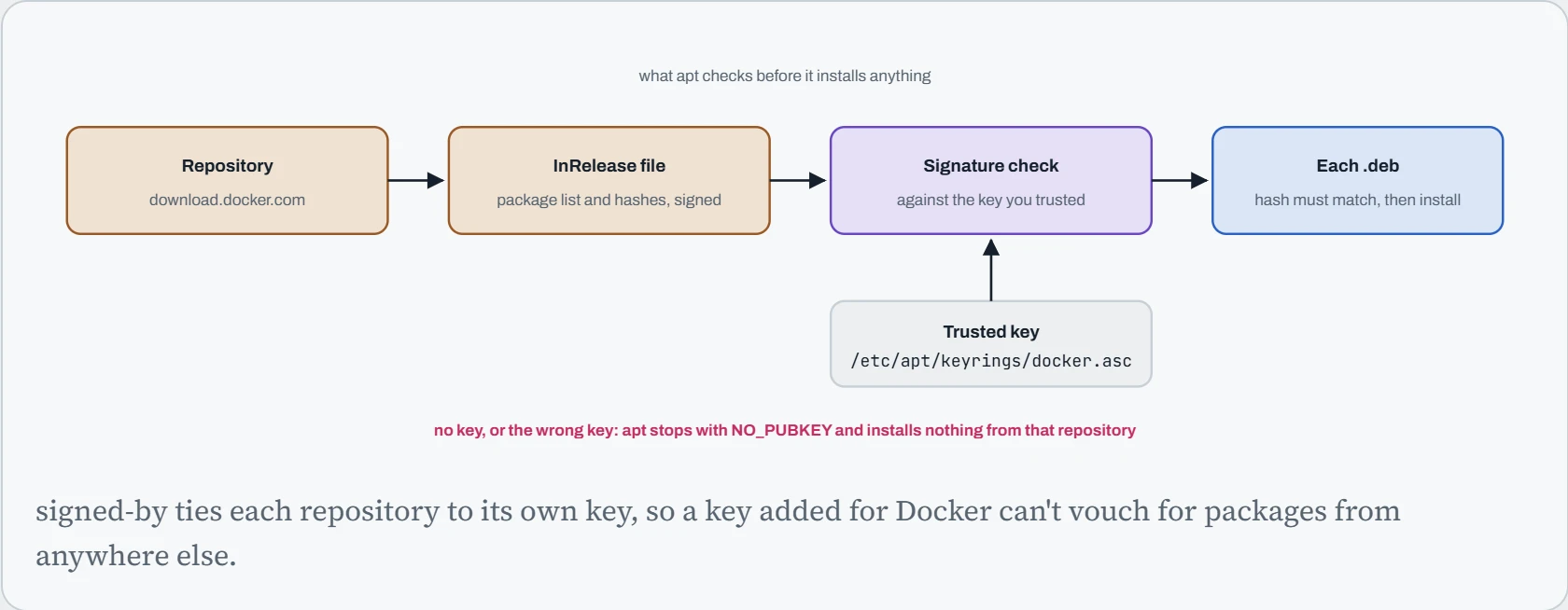
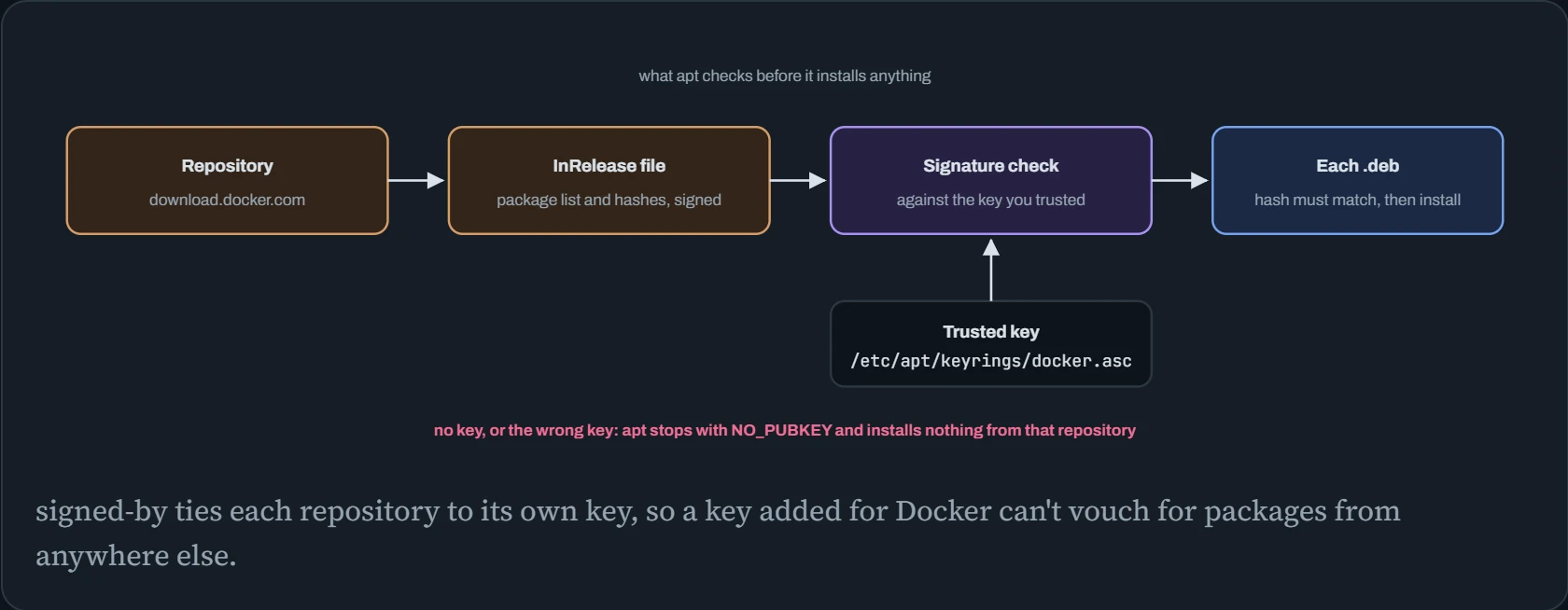
That's why install guides ask you to download a key file first, and why you should only add keys and repositories from the vendor's own documentation. A repository you add can replace any package on the system, so trusting one is a real decision. Old guides that use apt-key add trust a key for every repository; the signed-by style above is the modern, safer one.
Keeping versions still
A working GPU server is a carefully matched set: kernel, NVIDIA driver, CUDA toolkit, and the frameworks on top. An automatic upgrade of any one of them can break the set. So on GPU machines you usually hold the critical packages, and upgrade them on purpose, after a snapshot:
$ sudo apt-mark hold nvidia-driver-580 linux-image-generic linux-headers-generic
$ apt-mark showhold
linux-headers-generic
linux-image-generic
nvidia-driver-580
$ cat /etc/apt/apt.conf.d/51-gpu-no-auto        # keep unattended-upgrades away from the GPU stack
Unattended-Upgrade::Package-Blacklist {
    "nvidia-";
    "libnvidia-";
    "cuda-";
};
$ sudo dnf versionlock add kernel nvidia-driver   # the RHEL equivalent (dnf versionlock plugin)
unattended-upgrades is the Ubuntu service that installs security updates by itself each night. It's good for most packages and risky for the GPU stack, for the reason in the next card. The safe routine: snapshot, upgrade the held packages together during a quiet window, reboot, and run the five-step check from Down the Lab before giving the machine back to users.
Predict. Overnight, unattended-upgrades updated the NVIDIA driver packages. Nobody rebooted. In the morning, nvidia-smi prints Failed to initialize NVML: Driver/library version mismatch, but last night's training run is still going fine. What happened?
Answer. The driver has two halves. The kernel module was loaded at boot and stays in memory until a reboot, still the old version. The user-space libraries, like libnvidia-ml.so that nvidia-smi uses, are files on disk, and those were replaced with the new version. New programs load new libraries, which refuse to talk to the old module. The running job loaded the old libraries before the upgrade, so it carries on.
A reboot (after the job ends) loads the matching module and fixes it. To avoid the surprise, keep the driver out of unattended upgrades and update it on purpose. cat /proc/driver/nvidia/version shows the loaded module's version, to compare with the installed packages.
Building from source
Sometimes there's no package, or you need a build tuned for your GPU. Most modern C and C++ projects use CMake, which writes build instructions, and Ninja or make, which follow them. Here's llama.cpp built with CUDA, only for the GPU generation you have (8.9, an RTX 4090 or L40S), and with ccache, which remembers compiled pieces so a rebuild after a small change takes seconds:
$ git clone https://github.com/ggml-org/llama.cpp && cd llama.cpp
$ cmake -B build -G Ninja -DGGML_CUDA=ON -DCMAKE_CUDA_ARCHITECTURES=89 \
      -DCMAKE_C_COMPILER_LAUNCHER=ccache -DCMAKE_CXX_COMPILER_LAUNCHER=ccache
$ cmake --build build -j 16
[312/312] Linking CXX executable bin/llama-server
$ ls build/bin | head -3
llama-bench
llama-cli
llama-server
The -j 16 runs 16 compile jobs at once. More is faster until memory runs out: CUDA files can need several GB each to compile, so on a machine with many cores and modest RAM, keep it lower (Down the Path simulates exactly this). Compiler versions matter too. CUDA's nvcc only accepts host compilers up to a certain GCC version, and refuses newer ones with unsupported GNU version. That's where multiple compilers side by side come in, in the next section.
Continue the lesson
The whole lesson, with its drawings and its questions. 4 more sections after the ones above.