
Linux for AI: the GPU driver path, distribution choice and lab bring-up
A driver that installs cleanly but never starts usually has no NVIDIA hardware to talk to. Inside a VirtualBox VM, lspci shows only a virtual graphics device, because the real card stays with Windows. AI work runs on Linux because drivers, clusters, cloud images and containers are all built for it first.
What this page answers
Why is my GPU not detected in a Linux virtual machine?
lspci inside the VM lists only a virtual graphics device, such as VMware SVGA II. The real card stays with the host, so the NVIDIA driver installs but has no NVIDIA hardware to talk to and never starts. Read it in “Driver installed, no GPU”
Why does AI run on Linux?
GPU makers write and test their data-centre drivers for Linux first, the fastest supercomputers and training clusters run it, cloud GPU servers boot it, and containers are a Linux kernel feature. Even Docker on a Mac runs a small Linux virtual machine. Read it in “Why AI runs on Linux”
Driver installed, no GPU
You have a Windows gaming PC with an RTX 4090. To learn Linux safely, you install Ubuntu in VirtualBox, install the NVIDIA driver inside it (the install finishes without errors), and reboot the VM:
ml@ubuntu-vm:~$ nvidia-smi
NVIDIA-SMI has failed because it couldn't communicate with the NVIDIA driver. Make sure that the latest NVIDIA driver is installed and running.
ml@ubuntu-vm:~$ lspci | grep -i -E "vga|3d|nvidia"
00:02.0 VGA compatible controller: VMware SVGA II Adapter
Outputs on this page are realistic examples. Commands, device names and error messages are real.
The GPU works perfectly in Windows. What's wrong inside the VM?
- The Linux driver version doesn't match the Windows one
- The VM can't see the GPU at all: it has a pretend graphics card
- The CUDA toolkit isn't installed yet
Answer. lspci lists every device plugged into the machine's PCI bus, the internal connector for graphics cards and other devices. Inside the VM, the only graphics device is a virtual one, “VMware SVGA II”, which VirtualBox pretends to have so the VM can draw a desktop. The RTX 4090 stays with Windows. The NVIDIA driver installed fine, but it has no NVIDIA hardware to talk to, so it never starts.
Ordinary desktop VMs (VirtualBox, VMware Workstation, Hyper-V's default setup) don't give the guest your GPU. The GPU has to reach Linux some other way: Linux running directly on the machine, WSL2, a VM with the GPU passed through, or a cloud machine. Which one fits you is what the next sections are about.
How AI runs on a computer
Before going further, it's worth seeing what “running an AI model” physically means, because every chapter of this course builds on it. A model is not a program in the usual sense. It's a file of numbers. Llama 3.1 8B, for example, is about 8 billion numbers, each stored in 2 bytes, so around 16 GB on disk, usually split into a few files:
$ ls -lh ~/.cache/huggingface/hub/models--meta-llama--Llama-3.1-8B-Instruct/snapshots/*/
-rw-r--r-- 1 ml ml 4.7G model-00001-of-00004.safetensors
-rw-r--r-- 1 ml ml 4.7G model-00002-of-00004.safetensors
-rw-r--r-- 1 ml ml 4.6G model-00003-of-00004.safetensors
-rw-r--r-- 1 ml ml 1.1G model-00004-of-00004.safetensors
-rw-r--r-- 1 ml ml  855 config.json
-rw-r--r-- 1 ml ml 8.7M tokenizer.json
Running the model means doing arithmetic with those numbers: mostly multiplying and adding, billions of times for every word it writes. A small program (PyTorch, llama.cpp and similar) knows the order to do the arithmetic in. Everything else in an AI machine exists to move those numbers to the right place fast enough. Here's the journey, numbered in order:
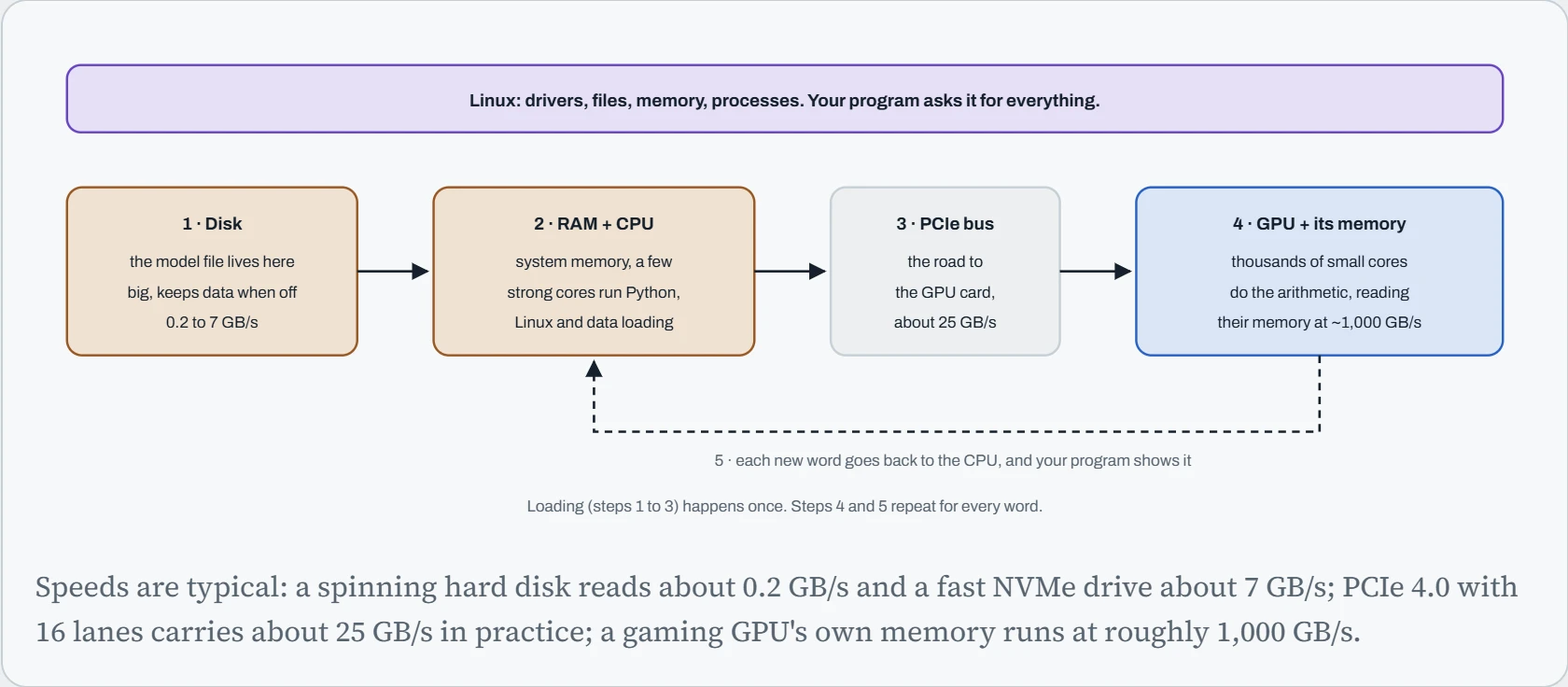
Two things stand out. The parts get faster from left to right, by a lot: the GPU's own memory is hundreds of times faster than a hard disk. And the slow parts only matter at loading time, while the fast part matters for every single word. That's why the course spends so much time on GPU memory: once a model is loaded, how fast it runs is mostly decided there (Down the Bits works that out). Linux sits over all of it, because your program can't touch any hardware directly. It asks Linux to read the file, to give it memory, and, through the GPU driver, to copy the numbers to the card.
Loading time still matters in practice: it decides how long you wait every time you start a model or a server restarts.
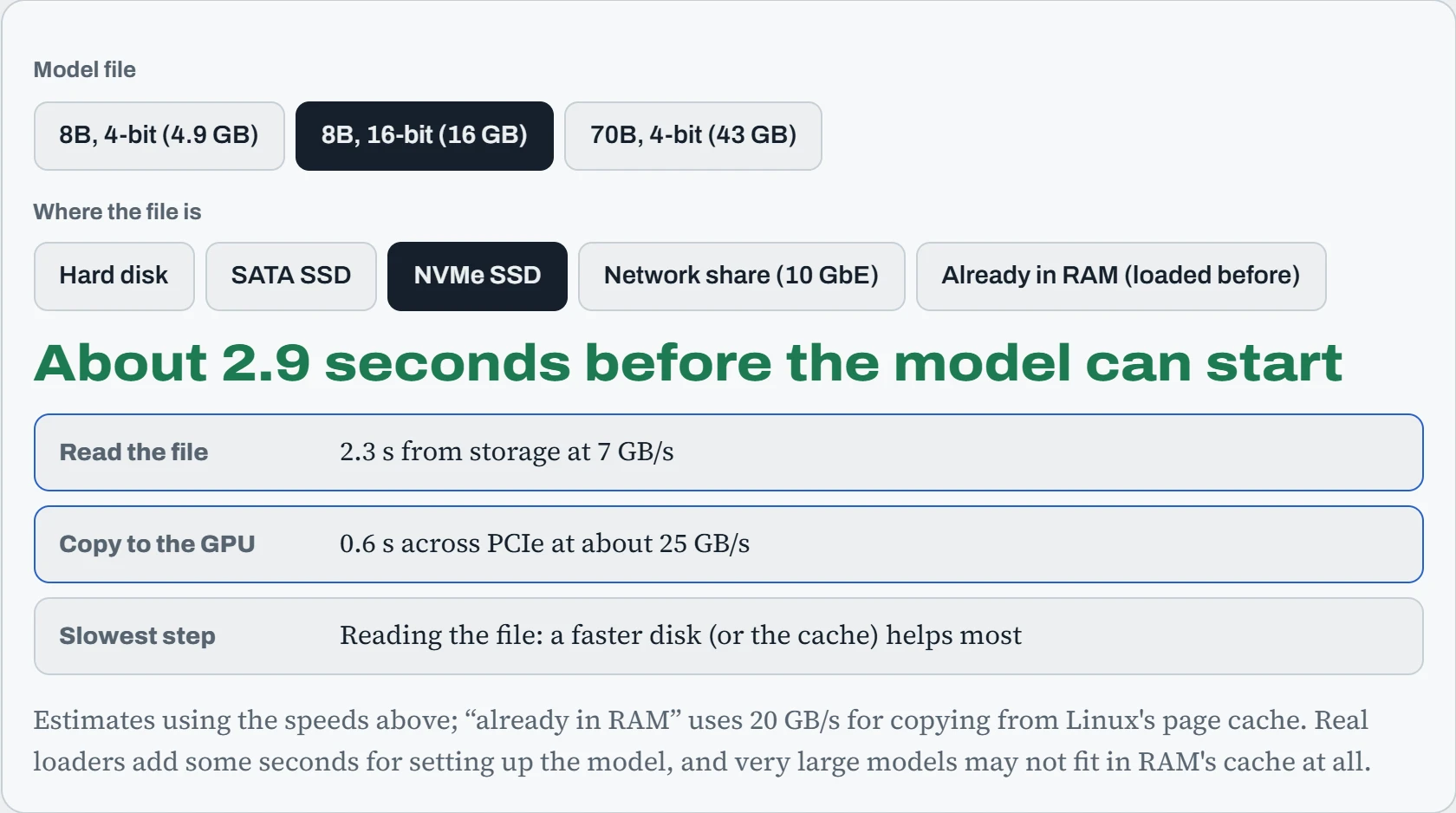
The 16 GB model from a hard disk: about a minute and a half before the first word, nearly all of it spent reading the disk. On NVMe it's a few seconds. Already in RAM is what happens the second time you start a model: Linux keeps recently read files in spare memory, so the disk is skipped entirely. That one detail explains why the first start of the day is slow and the rest are quick, and it's why a fast disk for models is one of the cheapest upgrades for an AI machine.
Predict. Your machine has 32 GB of RAM. You use the 16 GB model all morning, then spend an hour processing a 40 GB dataset, then start the model again. Is it fast to load, like the second start, or slow, like the first?
Answer. Probably slow again. Linux's file cache only uses memory nobody else needs, and it keeps the most recently used files. Reading 40 GB of dataset pushed the model's 16 GB out of the 32 GB of RAM, so the next start reads the disk again.
This is normal and harmless: cached files are always given up instantly when programs need memory. But it means “loading is fast” depends on what else the machine did in between. Down the Load shows how to see this cache with free -h.
Why AI runs on Linux
Nearly all serious AI work happens on Linux, for practical reasons rather than fashion. GPU makers write and test their data-centre drivers for Linux first. Every one of the world's 500 fastest supercomputers runs Linux, and AI training clusters grew out of that world, with its schedulers, fast networks and shared file systems. Cloud GPU servers boot Linux images. And containers, the way almost all AI software is now shipped, are a Linux kernel feature.
That last point is easy to miss, so here's evidence. On a Mac or Windows laptop, Docker quietly runs a small Linux virtual machine, because containers need a Linux kernel underneath:
macbook$ docker info --format '{{.OSType}} / {{.KernelVersion}} / {{.OperatingSystem}}'
linux / 6.10.14-linuxkit / Docker Desktop
So even people who never “use Linux” are running it under the hood. Learning it directly removes a layer of mystery: the error messages, the file paths, and the GPU setup all come from Linux, wherever you happen to be sitting. And the same skills carry from a laptop to a thousand-GPU cluster, because it's the same operating system all the way up.
How the GPU reaches your code
Each way of getting a Linux lab hands the GPU to Linux differently, or not at all. That decides what works: CUDA, GPUs inside Docker, how fast it runs, and how easily you can undo a mistake. Green rows are good news, amber rows are limits, red rows are deal-breakers for GPU work.
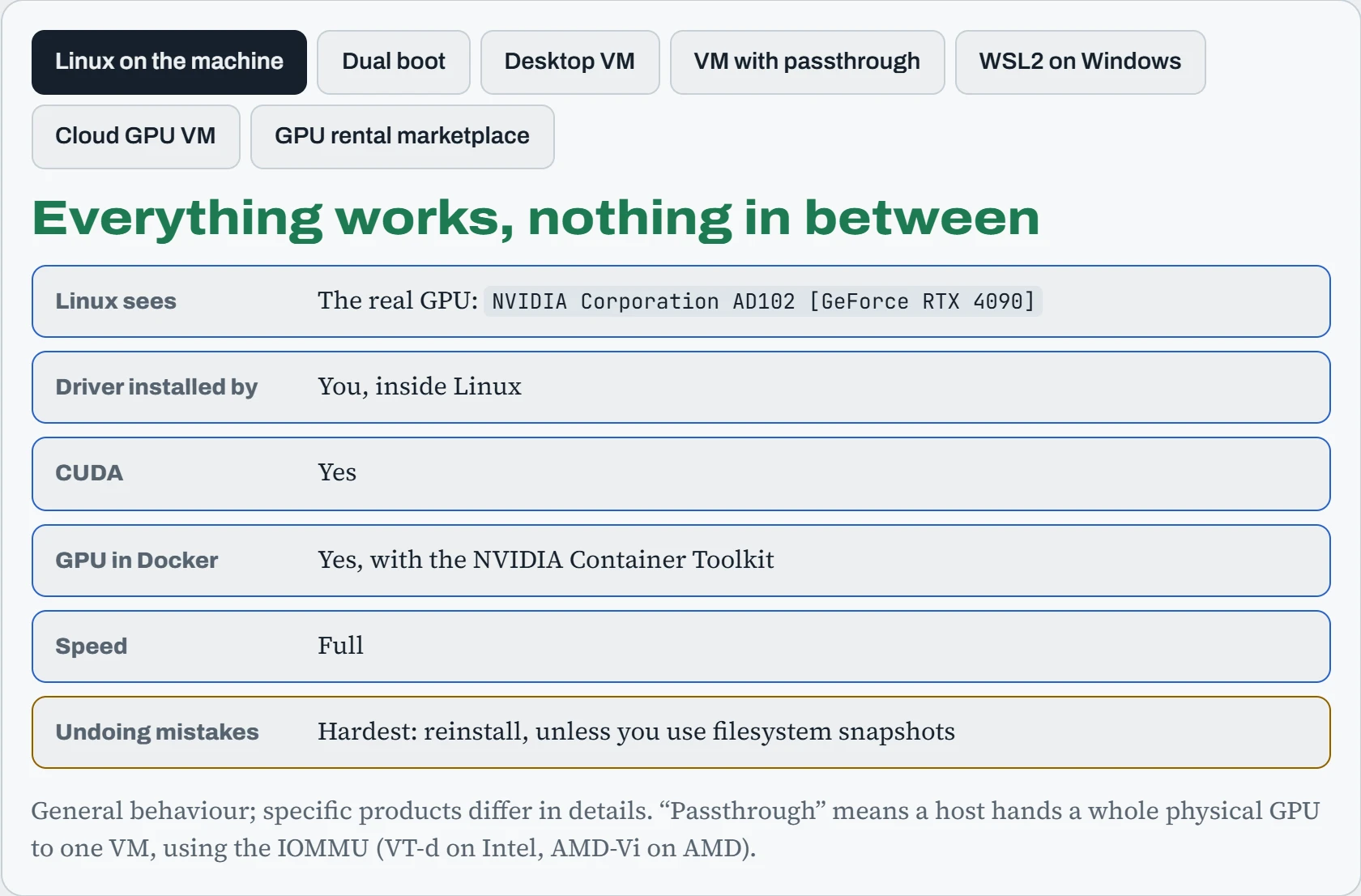
A useful way to see it: either Linux talks to the real GPU (bare metal, dual boot, passthrough, cloud), or it talks to a stand-in. WSL2's stand-in is a clever one: a channel called /dev/dxg that forwards GPU work to the Windows driver, so CUDA works. A desktop VM's stand-in is just a picture-drawing device, so CUDA can't work. For learning the shell, any of them will do. For the GPU chapters of this course, pick one where CUDA works.
Predict. You run WSL2, and your 40 GB dataset sits in C:\data. Your training script reads it from /mnt/c/data, which works. Is that a good setup?
Answer. It works, but it's slow. /mnt/c is the Windows drive shared into the Linux VM through a file-sharing protocol, and every file read crosses that boundary. With many small files, loading can be several times slower than it should be.
Copy the dataset into the Linux side, for example ~/data, which lives on WSL's own Linux disk. The GPU work is fast either way. It's the data loading that suffers, and data loading is often the real bottleneck (see Down the Dataset).
Continue the lesson
The whole lesson, with its drawings and its questions. 5 more sections after the ones above.