
Processes and signals: graceful shutdown, keeping jobs alive, limits and the OOM killer
A launcher like torchrun starts one worker per GPU, and the workers hold the memory. A signal goes to exactly one process, and SIGKILL ends it with no chance to tidy up, so the workers become orphans and keep running. SIGTERM is the polite request a program can catch and handle.
What this page answers
Why is GPU memory still used after killing a training job?
kill -9 hit only the launcher. Its workers, which hold the GPU memory, were never told to stop, became orphans adopted by systemd, and are still running. Read it in “Killed, but still on the GPU”
What is the difference between SIGTERM and SIGKILL?
SIGTERM, signal 15, is the polite request to stop, sent by kill, docker stop, systemd, Kubernetes and Slurm, and a program can catch it. SIGKILL, signal 9, cannot be caught, and nothing gets saved. Read it in “Signals and graceful stops”
Killed, but still on the GPU
A two-GPU training run started with torchrun is misbehaving, so you kill it hard. Then you check the GPUs:
$ pgrep -f torchrun
41000
$ kill -9 41000
$ nvidia-smi --query-compute-apps=pid,used_memory --format=csv,noheader
41010, 71204 MiB
41011, 71188 MiB
Outputs on this page are realistic examples. Commands, signal behaviour and error messages are real.
The process you killed is gone. So why are both GPUs still full?
- GPU memory takes a few minutes to be released
- You killed only the launcher; the two workers are separate processes, still running
- nvidia-smi is showing out-of-date information
Answer. torchrun is a launcher. It starts one worker process per GPU, and those workers are what hold the GPU memory. A signal goes to exactly one process, and -9 (SIGKILL) kills it on the spot, with no chance to tidy up. So the launcher never told its workers to stop. They became orphans, adopted by systemd, and they're still running:
$ ps -o pid,ppid,stat,cmd -p 41010,41011
    PID    PPID STAT CMD
  41010       1 Rl   /usr/bin/python3 -u train.py --config big.yaml
  41011       1 Rl   /usr/bin/python3 -u train.py --config big.yaml
Their parent is now PID 1. A plain kill 41000 (SIGTERM, the polite request) would have let torchrun shut its workers down properly. Now you have to stop them yourself: kill 41010 41011.
Processes come in families
Every process has a number (its PID) and a parent, the process that started it (its PPID). Your shell starts torchrun, torchrun starts the workers, and each worker's data loader starts helper processes to prepare batches. Processes started together from one command also share a process group, and that matters for signals: Ctrl+c in a terminal sends SIGINT to the whole group in the foreground, while kill PID reaches just one process.
Here's a small training job's family. Blue is still running normally, grey has exited, amber was killed outright, and red is an orphan still holding a GPU.
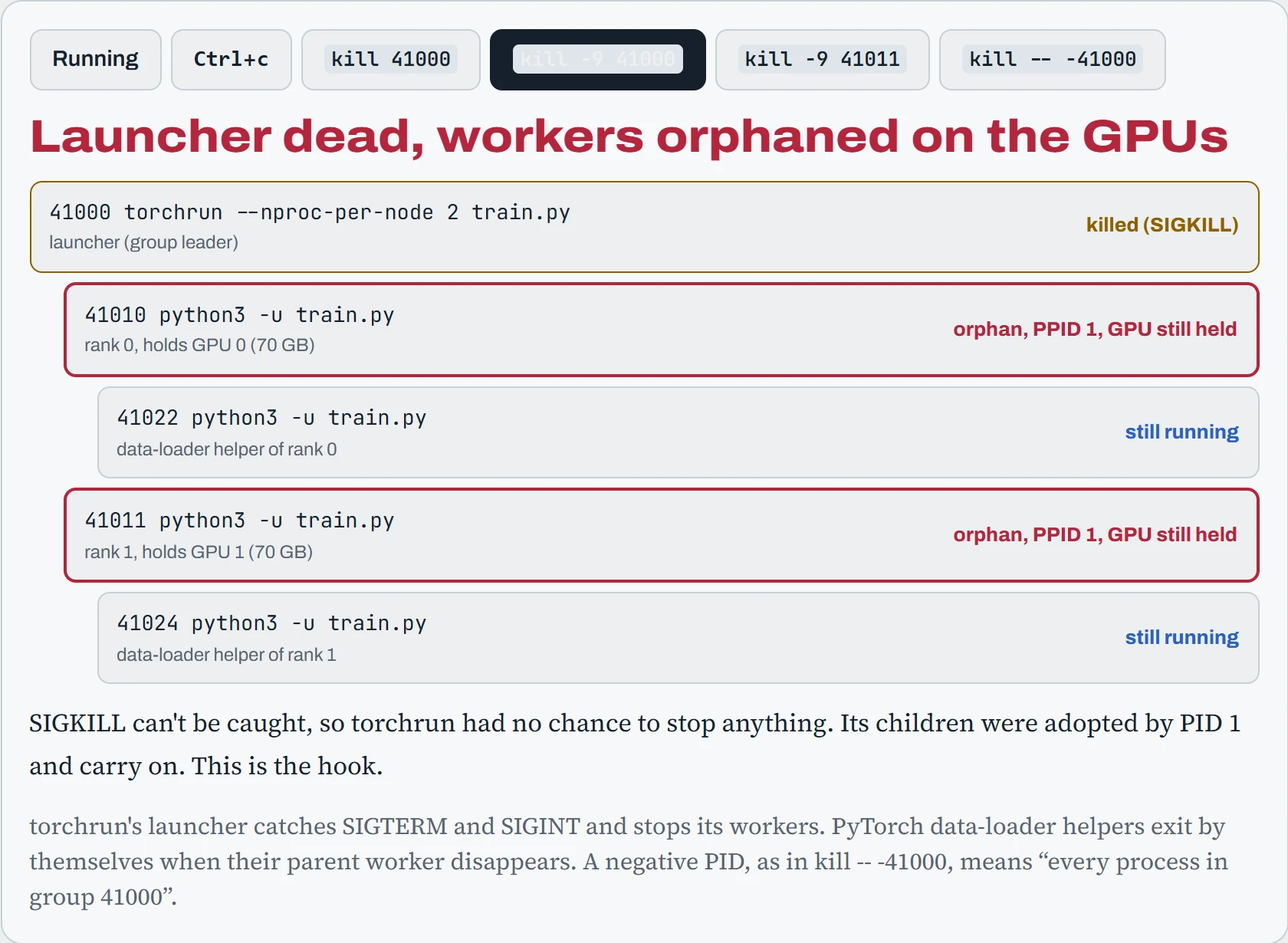
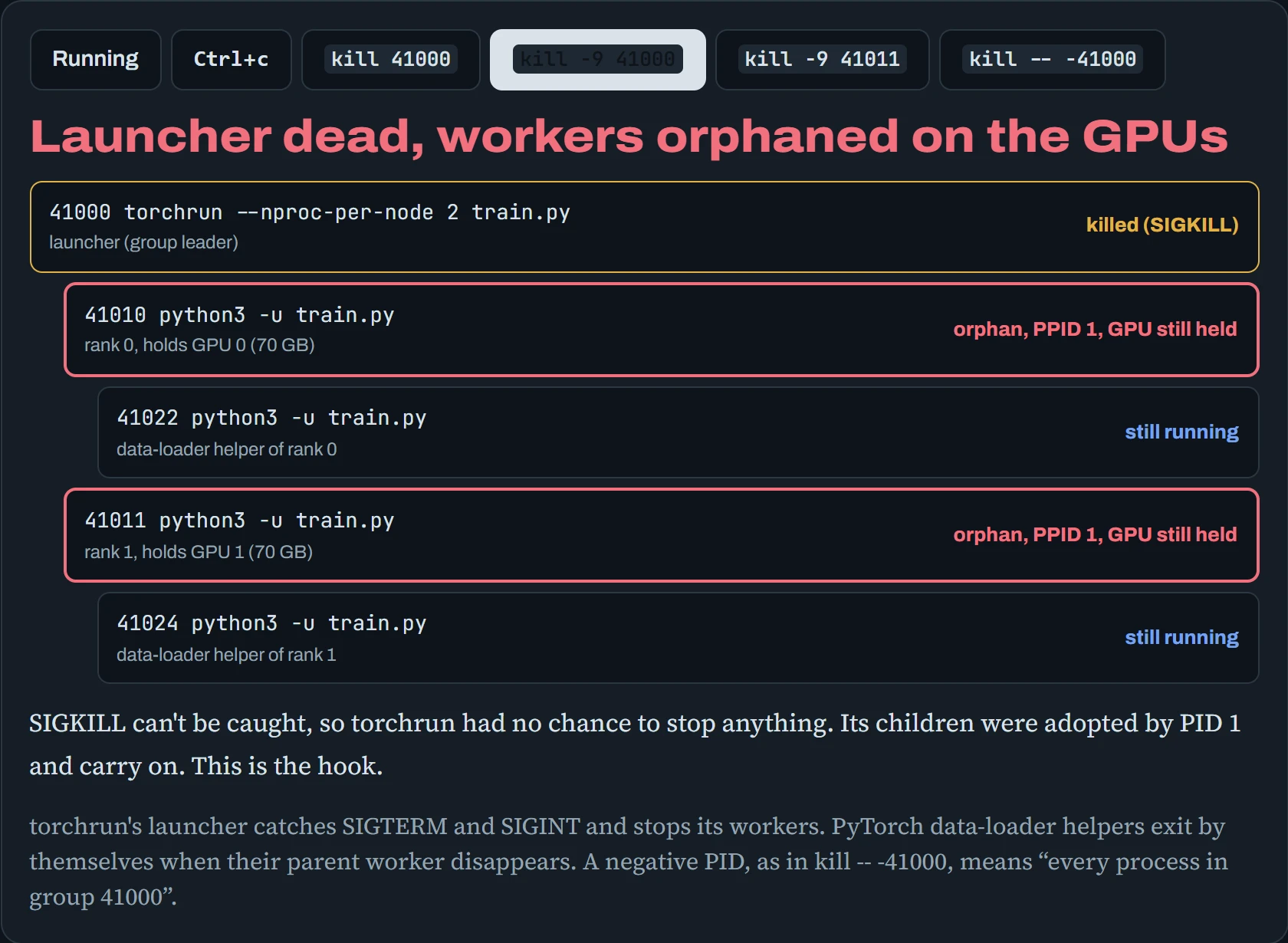
The lesson is to stop the top of the family politely, and let it handle its children. Reach for -9 only when the polite way has failed, and then think about the whole family, or signal the whole process group at once. Every process also has a state, shown in the STAT column of ps: R is running, S is sleeping (waiting for something, the normal state), D is stuck waiting on disk or network (Down the Load), T is stopped, and Z is a zombie.
Predict. ps shows four entries marked <defunct> with state Z under your long-running data job. You try kill -9 on them, and nothing changes. Are they wasting memory, and how do you get rid of them?
Answer. They're zombies: processes that have already finished, but whose parent hasn't yet collected their exit code. All that's left is a tiny entry in the process table, so they use no real memory. You can't kill them, because they're already dead.
They disappear when the parent collects them, or when the parent itself exits (then PID 1 adopts and collects them). A few are harmless. Thousands mean the parent has a bug, and restarting the parent is the fix.
Looking at processes
htop and btop are the friendly live views: press F5 in htop for a family tree. For scripts and precise answers, ps and pgrep do the job, and every process also has a folder under /proc that the kernel fills with live facts about it:
$ ps -u ml -o pid,ppid,pgid,stat,etime,rss,cmd --forest | head -6
    PID    PPID    PGID STAT     ELAPSED      RSS CMD
  40990   40980   40990 Ss      03:12:44     5120 -bash
  41000   40990   41000 Sl+     03:11:02    98304  \_ torchrun --nproc-per-node 2 train.py
  41010   41000   41000 Rl+     03:10:58 43204812      \_ python3 -u train.py
  41022   41010   41000 S+      03:10:41  6396412      |   \_ python3 -u train.py
  41011   41000   41000 Rl+     03:10:58 42901248      \_ python3 -u train.py
$ grep -E "State|Threads|VmRSS" /proc/41010/status
State:  R (running)
Threads:        87
VmRSS:  43204812 kB
$ tr '\0' '\n' < /proc/41010/environ | grep CUDA_VISIBLE
CUDA_VISIBLE_DEVICES=0,1
Read the first output like a family tree (RSS is memory in use, in KB, so about 41 GB for each worker). The \_ lines are children, PPID names each parent, and every member of the job shares PGID 41000, the group torchrun leads. The + in STAT means “in the terminal's foreground group”, the lowercase l means many threads (87 here: PyTorch uses lots). /proc/PID/ also has cwd (the folder it's working in), cmdline, fd/ (its open files, which lsof -p PID lists more readably) and environ, its environment variables at start-up. That last one answers “which GPUs was this process told to use?” without guessing.
Signals and graceful stops
A signal is a numbered message from the kernel to a process. Most can be caught: the program runs its own code when the signal arrives. If it doesn't, the default action happens, usually ending the process. Two signals can never be caught: SIGKILL and SIGSTOP. The ones that matter for AI work:
| Signal | Number | Sent by | Meaning |
|---|---|---|---|
| SIGINT | 2 | Ctrl+c | Interrupt. Python turns it into KeyboardInterrupt. |
| SIGTERM | 15 | kill, docker stop, systemd, Kubernetes, Slurm | Please stop. The polite request, and the one to handle. |
| SIGKILL | 9 | kill -9, the OOM killer, the end of a grace period | Stop now. Can't be caught; nothing gets saved. |
| SIGHUP | 1 | A closed terminal or SSH connection | Your terminal is gone (Down the Repo). |
| SIGUSR1 | 10 | You, or Slurm with --signal | No fixed meaning: often “save a checkpoint now”. |
| SIGSTOP / SIGCONT | 19 / 18 | kill -STOP, Ctrl+z (SIGTSTP) | Pause and resume. |
The important pattern is what every orchestrator does when it needs your machine back. Kubernetes evicting a pod, a cloud reclaiming a spot instance, Slurm hitting a time limit, docker stop, systemctl stop: all send SIGTERM, wait a grace period, then send SIGKILL. Your training code should catch SIGTERM, finish the current step, save a checkpoint and exit. The safe way is to set a flag in the handler and check it in the training loop:
import signal, sys

stop = False
def on_term(signum, frame):
    global stop
    stop = True                       # just note it; the loop decides when
signal.signal(signal.SIGTERM, on_term)

for step in range(start_step, total_steps):
    train_step()
    if stop:
        save_checkpoint(step)         # write to a temp name, then rename
        sys.exit(0)
Whether it works depends on simple arithmetic. In the worst case, the signal arrives just as a step starts, so you need one full step plus one checkpoint save to fit inside the grace period.
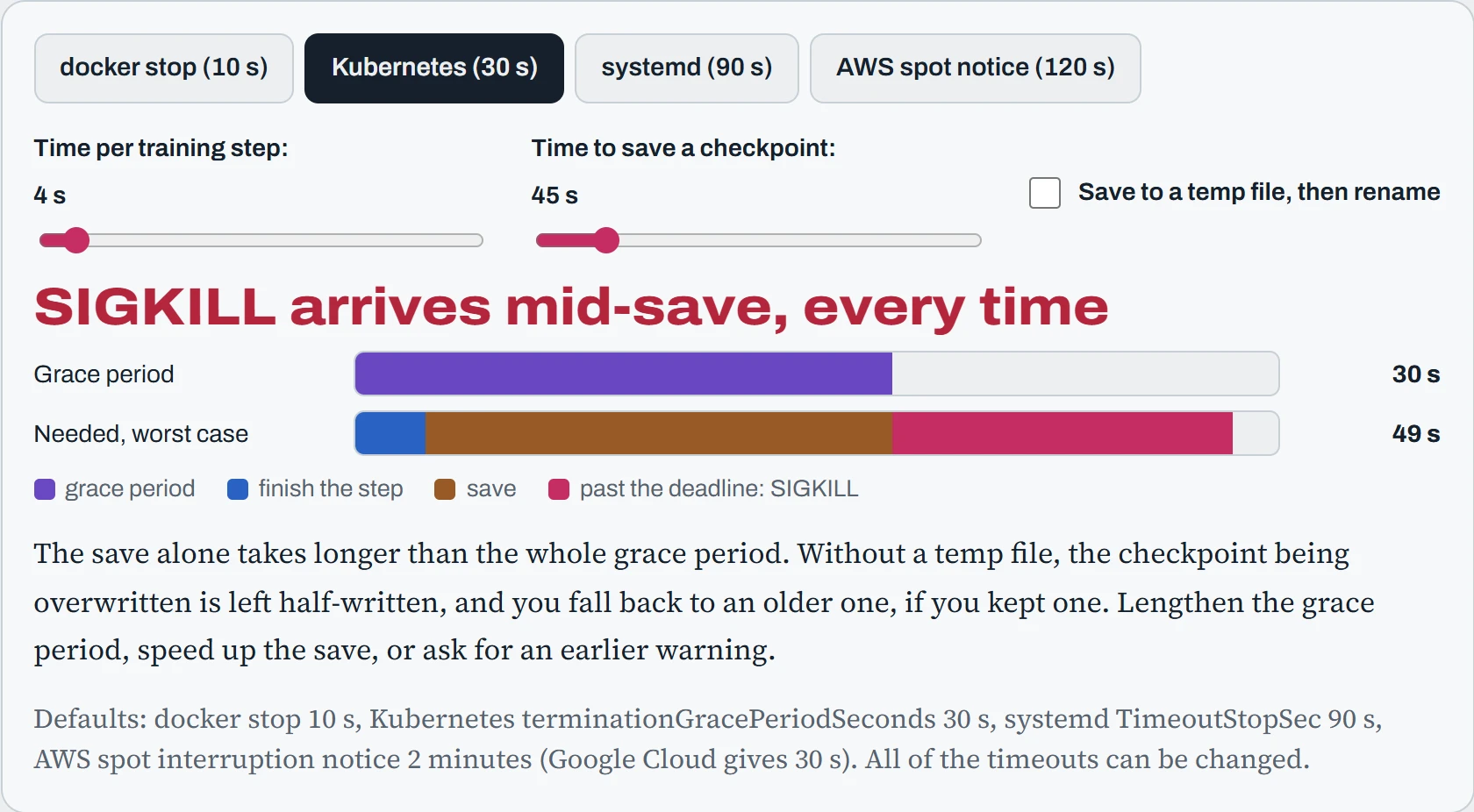
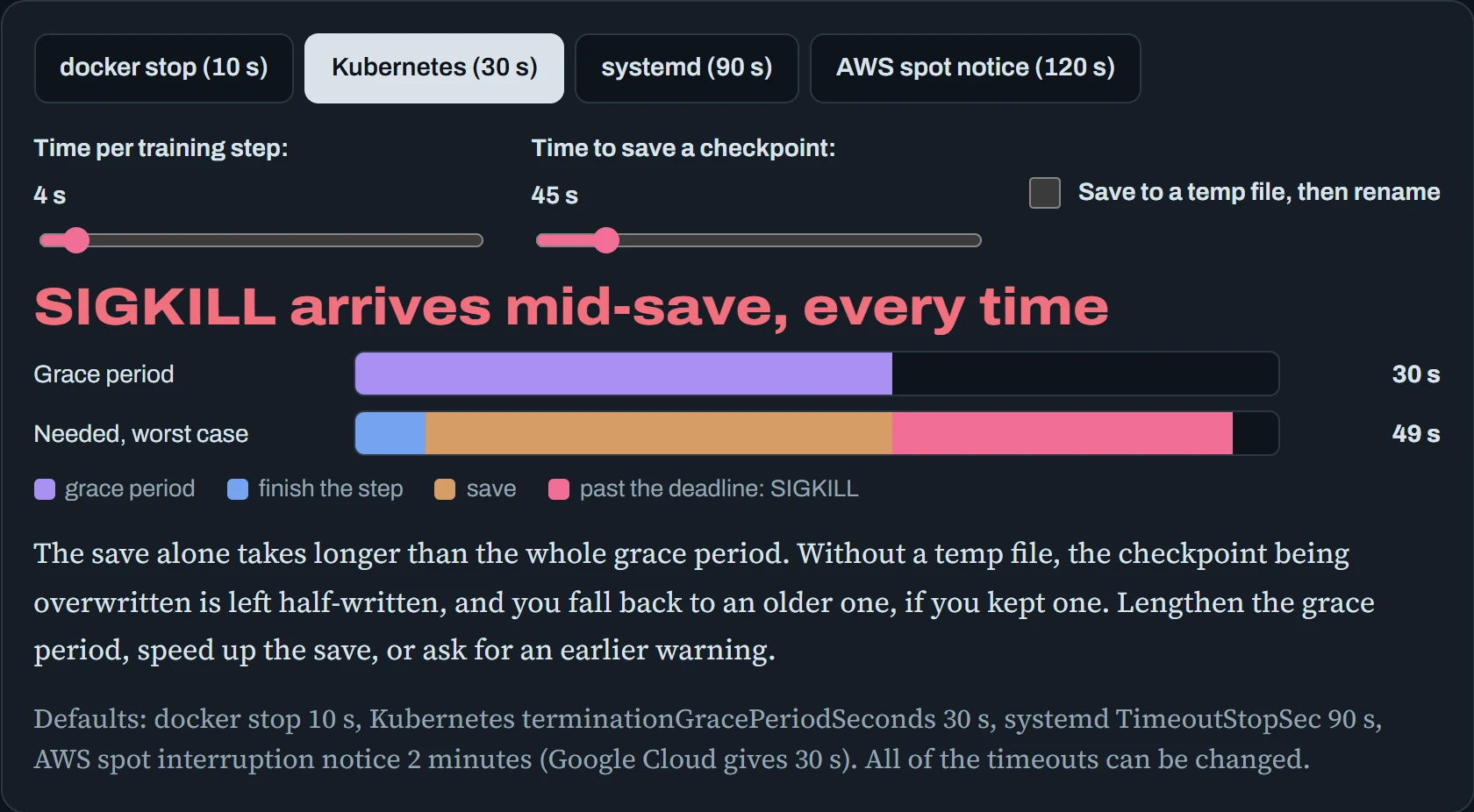
With the defaults, a 45-second save simply doesn't fit in Kubernetes' 30 seconds. There are three ways out: make the grace period longer (it's a setting everywhere), make the save faster (save only what's needed, or let each GPU write its own piece in parallel), or get an earlier warning. Slurm's --signal=USR1@120 sends SIGUSR1 two minutes before the time limit, exactly for this. And always write checkpoints safely: if the kill lands mid-save, writing to a temporary name and renaming at the end means the previous checkpoint survives intact.
Predict. A container starts with CMD ["bash", "run.sh"], and run.sh ends with python train.py. Your Python code handles SIGTERM perfectly. You run docker stop. Does Python get the SIGTERM?
Answer. No. docker stop sends SIGTERM to the container's first process, PID 1, which is bash. bash doesn't pass it on to the python it's waiting for, and as PID 1 it doesn't even die from it. Ten seconds later Docker sends SIGKILL, and Python never gets the chance to save.
End the script with exec python train.py, so Python replaces bash and becomes PID 1 itself. Or run the container with --init, which adds a tiny init process that forwards signals properly.
Continue the lesson
The whole lesson, with its drawings and its questions. 5 more sections after the ones above.