
Hardware discovery and boot: kernel modules, DKMS, kernel parameters, BMC and Resizable BAR
Before the CPU can talk to a card, the firmware must give it windows into the address space, called BARs, and an A100's is 128 GB. With Above 4G Decoding off, the window gets nothing: the card appears on the bus but the driver refuses it. Drivers load as kernel modules, and nouveau must be kept off NVIDIA cards.
What this page answers
Why does lspci show my GPUs but nvidia-smi does not?
An A100's BAR1 window is 128 GB, too big for the area below 4 GB. With the firmware setting usually called Above 4G Decoding off, BAR1 gets nothing and the driver refuses the card. Turn it on in the BIOS and reboot. Read it in “Four GPUs on the bus, none in nvidia-smi”
How do I stop nouveau from taking the NVIDIA GPU?
Blacklist the nouveau module in a file under /etc/modprobe.d/, then rebuild the initramfs, because the initramfs carries its own copy of the module list. Read it in “Kernels and modules”
Four GPUs on the bus, none in nvidia-smi
A new server arrives with four A100 GPUs. You install Ubuntu and the NVIDIA driver, reboot, and check:
$ lspci | grep -i nvidia
41:00.0 3D controller: NVIDIA Corporation GA100 [A100 PCIe 80GB] (rev a1)
42:00.0 3D controller: NVIDIA Corporation GA100 [A100 PCIe 80GB] (rev a1)
c1:00.0 3D controller: NVIDIA Corporation GA100 [A100 PCIe 80GB] (rev a1)
c2:00.0 3D controller: NVIDIA Corporation GA100 [A100 PCIe 80GB] (rev a1)
$ nvidia-smi
No devices were found
$ sudo dmesg | grep -i -A1 nvrm | head -4
NVRM: This PCI I/O region assigned to your NVIDIA device is invalid:
NVRM: BAR1 is 0M @ 0x0 (PCI:0000:41:00.0)
Outputs on this page are realistic examples. Kernel parameters, files, commands and firmware settings are real, but their names vary a little between vendors.
Linux can see all four cards on the PCIe bus, and the driver is installed. Yet the driver can't use any of them. What's missing?
- The driver doesn't support A100s
- The firmware didn't give the GPUs their memory windows
- The GPUs are faulty
Answer. Before the CPU can talk to a card, the firmware has to give the card some windows into the computer's address space. These are ranges of addresses that, when the CPU reads or writes them, actually reach the card. They're called BARs (base address registers). An A100's big window, BAR1, is 128 GB. That's far too big to fit in the small area below 4 GB where old 32-bit hardware has to live.
A firmware setting usually called Above 4G Decoding lets the firmware place big windows higher up. It's off here, so BAR1 got nothing (“0M @ 0x0”), and the driver refuses the card. Turn the setting on in the BIOS, reboot, and all four GPUs appear. The mechanism section lets you play with these windows. First, the whole chain they belong to.
From power button to your service
Booting is a relay race. Each runner does its job, then hands over to the next one, and each can drop the baton in its own way. First the firmware (UEFI) checks and sets up the hardware. Then a small loader (shim, then GRUB) picks a kernel and starts it with its options. The kernel unpacks a tiny temporary system, the initramfs, which holds just enough drivers to find and mount the real disk. Then systemd starts every service, ending with yours, like a model server.
The stages run left to right, in the order they happen.
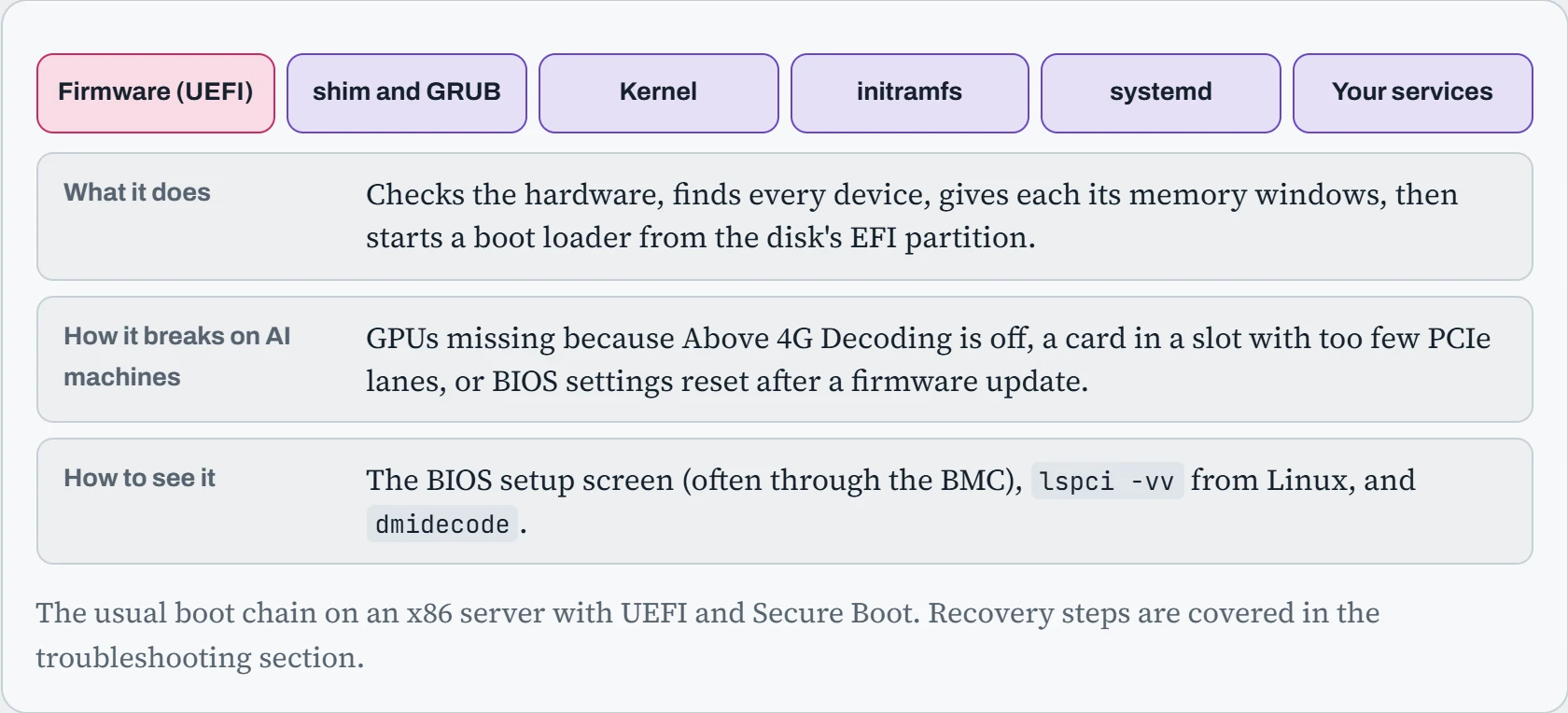
The pattern to remember: problems from the firmware stage show up as missing hardware (the hook). Problems in GRUB and the kernel options show up as wrong behaviour, like no huge pages or no IOMMU. Problems with the initramfs or kernel modules show up as missing drivers, sometimes even a machine that won't finish booting. Knowing which stage owns a symptom halves the search.
Predict. You create /etc/modprobe.d/blacklist-nouveau.conf and reboot, but lsmod still shows nouveau loaded. Which stage of the chain ignored your file?
Answer. The initramfs. It loads graphics drivers early, before the real disk with your new file is even mounted, and it carries its own copy of the module settings from when it was built. Your file only reaches it after sudo update-initramfs -u rebuilds it.
The general lesson: anything that has to happen very early in boot, like blacklisting drivers, early module options or disk encryption, lives inside the initramfs. Change those settings, and you have to rebuild it, or the change waits silently until some later update rebuilds it for you.
Taking a hardware inventory
Before tuning anything, write down what the machine actually is. Linux has a tool for every part, and together they make a hardware report you'll want every time something goes wrong:
$ lscpu | grep -E "Model name|Socket|Core|NUMA node[0-9]"
Model name:            AMD EPYC 9354 32-Core Processor
Socket(s):             2
Core(s) per socket:    32
NUMA node0 CPU(s):     0-31,64-95
NUMA node1 CPU(s):     32-63,96-127
$ for d in /sys/bus/pci/devices/*; do
    [ "$(cat $d/vendor)" = "0x10de" ] && echo "$(basename $d)  NUMA node $(cat $d/numa_node)"; done
0000:41:00.0  NUMA node 0
0000:c1:00.0  NUMA node 1
$ sudo dmidecode -t memory | grep -E "^\s+(Size|Speed): [0-9]" | sort | uniq -c
     24 	Size: 64 GB
     24 	Speed: 4800 MT/s
Read that like a doctor's chart. Two sockets with 32 cores each. Each GPU is attached to a specific socket: the one at bus address 41:00.0 belongs to NUMA node 0, and the one at c1:00.0 to node 1. That's the map behind the pinning in Down the Profiler. And there are 24 sticks of 64 GB at 4,800 MT/s: if one were missing, a whole memory channel would be empty, and memory speed would quietly drop.
The rest of the kit: lspci -nn for every PCIe device, lsblk and nvme list for disks, lshw -short for a summary, lstopo for a drawing of the whole layout, and sensors for temperatures. Save the output of all of them when a server arrives. When it misbehaves later, comparing against that first report often shows the problem at once.
Kernels and modules
The kernel is the core of Linux that talks to hardware. Ubuntu offers a few kinds: the generic kernel that ships with a release, and the HWE (hardware enablement) kernel, a newer version that supports newer hardware. Most drivers aren't built into the kernel itself. They're modules: separate pieces loaded when needed. lsmod lists what's loaded, modinfo describes a module, and modprobe loads one.
For GPU machines, one module needs keeping out of the way. Linux includes nouveau, an open-source driver for NVIDIA cards. If it grabs the GPU first, NVIDIA's driver can't. You stop it by blacklisting it, then rebuilding the initramfs, because the initramfs carries its own copy of the module list:
$ lsmod | grep -E "^(nvidia|nouveau)"
nouveau              3096576  1
$ printf "blacklist nouveau\noptions nouveau modeset=0\n" | sudo tee /etc/modprobe.d/blacklist-nouveau.conf
$ sudo update-initramfs -u && sudo reboot
$ lsmod | grep -E "^(nvidia|nouveau)"
nvidia_uvm           2076672  0
nvidia_drm            131072  0
nvidia             104071168  2 nvidia_uvm,…
NVIDIA's modules are built for one kernel version at a time. Install a new kernel, and something must rebuild them. That's DKMS's job, and when it fails, or Secure Boot rejects the result, the GPU is gone after the next reboot. Down the CUDA Stack covers that “seam” in depth. The habit that prevents most of it: after any kernel update, check dkms status before rebooting.
Kernel parameters
Some kernel settings can only be chosen at boot, before anything else runs. They're passed as kernel parameters on the kernel's command line, which GRUB builds from the file /etc/default/grub. AI machines often need a few: turning on the IOMMU (the hardware that controls which device can access which memory, needed to pass a GPU to a virtual machine), reserving huge pages (big blocks of memory, set aside at boot), or changing how the kernel shuffles memory between sockets.
The builder writes the line to put in /etc/default/grub, the commands to apply it, and how to check that it worked after the reboot.
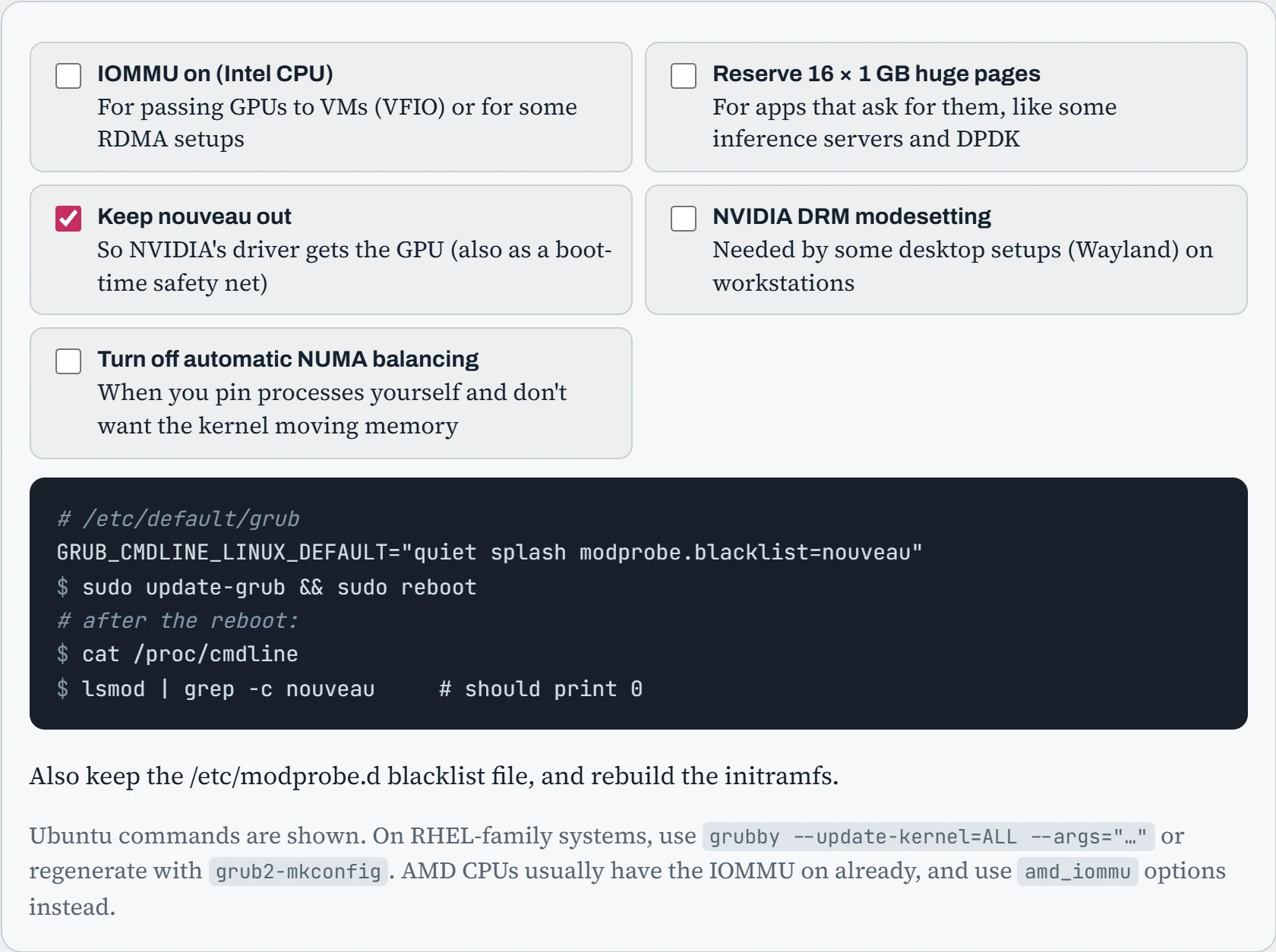
Two habits make this safe. Edit the file, never the generated grub.cfg, which is overwritten on every kernel update. And always check /proc/cmdline after the reboot: it shows exactly what the running kernel was given, so it's the only proof the change took effect.
Settings that don't need a reboot live in /proc/sys and are changed with sysctl. Put them in a file under /etc/sysctl.d/ so they survive restarts, then load them with sudo sysctl --system. AI servers commonly adjust a handful: vm.swappiness (how eagerly memory is moved to swap), network buffer sizes for fast links, and vm.max_map_count for programs that map very many files into memory.
Predict. You reserve 16 × 1 GB huge pages on a server with 256 GB of RAM. After the reboot, free -g shows 16 GB less available than before, even though nothing is using huge pages yet. Is that a bug?
Answer. No, it's the point. Huge pages reserved at boot are set aside as whole 1 GB blocks before memory gets broken up, and normal programs can't use them. They count as in use from the moment the machine starts, until a program that asks for huge pages takes them.
That's why you reserve only what an application will really use, and check with grep Huge /proc/meminfo that HugePages_Free goes down when it starts. Reserving huge pages “just in case” simply makes the machine 16 GB smaller.
Firmware settings and remote control
A few firmware (BIOS/UEFI) settings matter a lot for GPU servers, and they're easy to miss because they live outside Linux. Names vary by vendor, but the ideas are the same:
| Setting | What it does | For AI servers |
|---|---|---|
| Above 4G Decoding | Lets the firmware place devices' memory windows above the 4 GB mark | On. Data centre GPUs need it, or they can't be used (the hook) |
| Resizable BAR | Lets the CPU see a GPU's whole memory through one big window | On for consumer cards where supported. Needs Above 4G Decoding |
| IOMMU / VT-d / AMD-Vi | Hardware control over which device may access which memory | On if you pass GPUs into VMs. Pair with the kernel parameter |
| Power profile | Trades CPU speed for power saving | “Performance” for training nodes, so CPUs don't slow the data path |
| Secure Boot | Only starts signed bootloaders and kernel modules | Fine if you sign NVIDIA's modules (Down the CUDA Stack). Otherwise it blocks them |
Servers also have a small computer of their own, the BMC (baseboard management controller), with its own network port. It works even when the main system is off or frozen. Through it you can read sensors, see the screen, change BIOS settings and power-cycle the machine, all remotely. It speaks two languages: the older IPMI, and the newer Redfish, a web API:
$ ipmitool -I lanplus -H gpu17-bmc -U admin -E sdr type Temperature | head -3
CPU1 Temp        | 01h | ok  |  3.1 | 61 degrees C
GPU1 Temp        | 32h | ok  | 41.1 | 58 degrees C
$ ipmitool -I lanplus -H gpu17-bmc -U admin -E chassis power cycle
$ curl -s -k -u admin https://gpu17-bmc/redfish/v1/Systems/1 | jq '.PowerState, .BiosVersion'
"On"
"2.3.4"
$ fwupdmgr get-updates                       # firmware updates for supported devices, from within Linux
Treat the BMC as the most sensitive port on the server, because it can do anything to the machine. Put BMCs on their own separate management network, change the default passwords, and keep their firmware updated. Then, when a server hangs at 3 a.m., you can power-cycle it from bed instead of from the data centre.
Continue the lesson
The whole lesson, with its drawings and its questions. 4 more sections after the ones above.