
Getting in: console, vty, Telnet, SSH, HTTP(S)
Before you can fix a ticket you have to get in. The console needs a cable, drivers, a terminal program and a line that is enabled. The vty lines, five by default, take Telnet or SSH, and each check is one line of configuration: the login method, transport input, an access-class. SSH adds its own needs, from a K9 image and a domain name to RSA keys.
By Arif, founder of Daveth · Updated
The full 18 min walkthrough is in Daveth Pro (Network). See what the plan opens
What this page answers
Why does SSH to a Cisco router fail?
Something from SSH's recipe is missing: a K9 image, a hostname and ip domain-name, RSA keys from crypto key generate rsa, at least one local username and password, or transport input ssh on the lines. If any one is missing, the connection fails. Read it in “SSH: everything Telnet needs, and more”
What is the difference between exec and exec-timeout?
exec enables a line and no exec disables it. exec-timeout sets the inactivity timer: exec-timeout 5 0 logs you out after 5 minutes of inactivity. Read it in “The timer and the switch”
How do you restrict which hosts can reach the vty lines?
Apply an ACL to the lines with access-class name in for IPv4, and ipv6 access-class name in for IPv6: one list per family, both on the vty lines. Remember the list's implicit deny. Read it in “Telnet: the vty lines, check by check”
How far did it get?
You can manage a router through its console line, when you have physical access or go through an access server, and through its vty lines, the virtual terminal lines that give you remote access with Telnet or SSH. Whichever you use, sooner or later you'll have to troubleshoot getting in before you can troubleshoot whatever the ticket was actually about. You might need to solve one issue to get to the next.
So here's the shape of the problem. For the console: a cable with the right drivers, a terminal program on the right port with the right settings, and a line that's switched on. For Telnet and SSH: a path to the router, nothing in that path blocking the port, the list on the lines letting your address in, a free line, the line allowing your protocol, SSH having what it needs, and the line running an EXEC at all, the command session a login lands in. Then the login itself: no password, a line password, a username in the router's local database, or AAA, a server deciding who you are.
Those are things to check, not an order the router is known to follow, and this lesson keeps them that way. So when a login fails, the first question is how far it got, not whether the password was right.
Two of these you've met. The access-list lesson built the kind of list that decides who may reach the vty lines. The AAA lesson put HQ-C1's vty lines under login authentication VTY_ACCESS, with SRV1 asked first. Neither is taught again here. What's new is everything around them.
The console: a cable, a program, a line
The console port is the default, out-of-the-box way into a router or switch. It's also where you go when everything remote has failed, so it pays to be quick here.
Start with the hardware, and check your device's own documents for what it needs. Newer devices use a mini-USB console port, with drivers required on the PC; older devices use the serial-to-RJ45 rollover cable; and a PC without a serial port needs a USB-to-serial cable, plus the right drivers to use it. The vendor provides USB console drivers for various operating systems: get the verified ones from there.
Then the terminal program. It usually lists several COM ports, the PC's serial ports, and knowing which one is yours isn't easy: it's trial and error. If you're not sure, find the COM port numbers in the operating system the program runs on; on Windows, that's Device Manager. Then the settings. The device defaults are 9600 baud, 8 data bits, 1 stop bit and no parity.
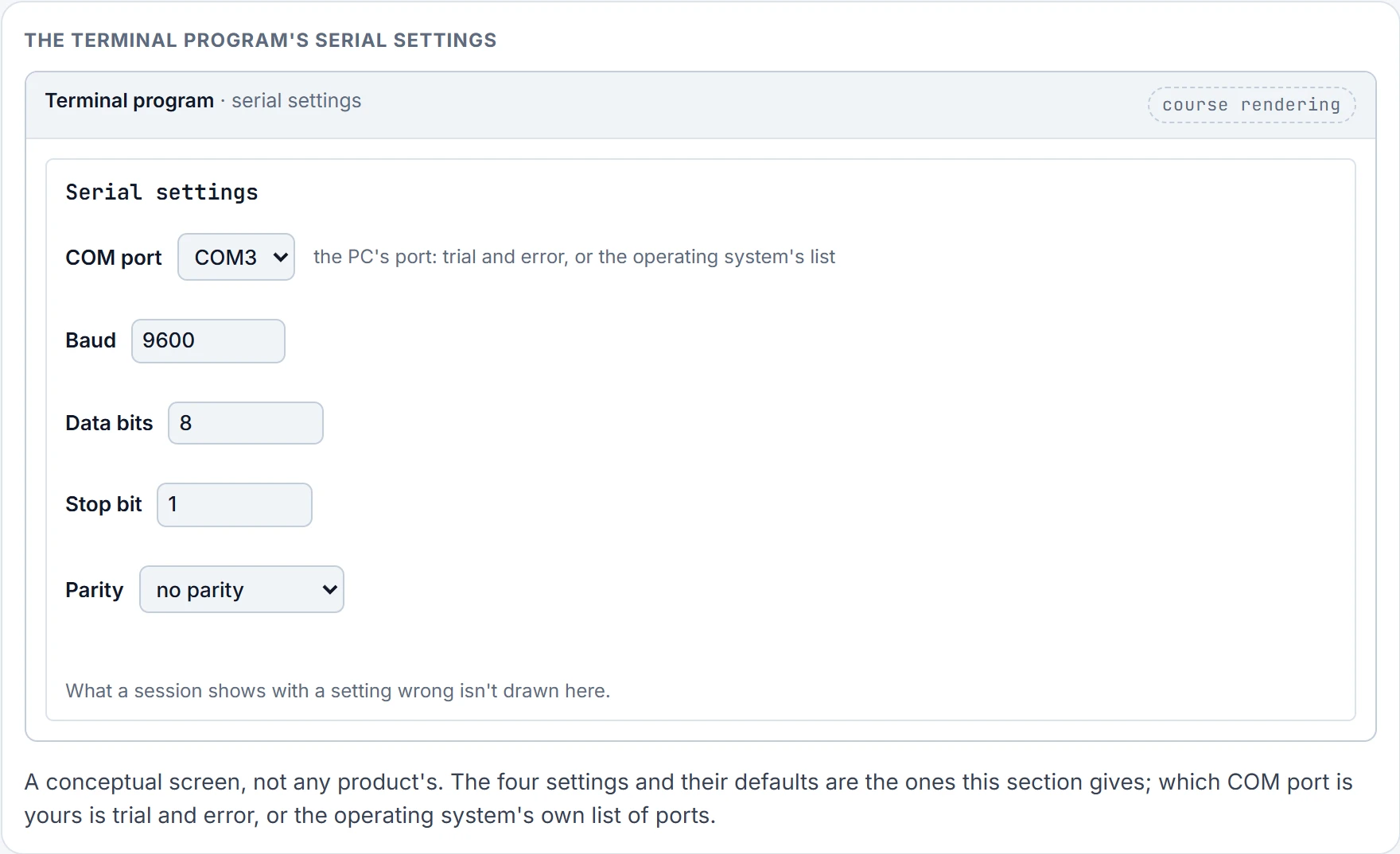
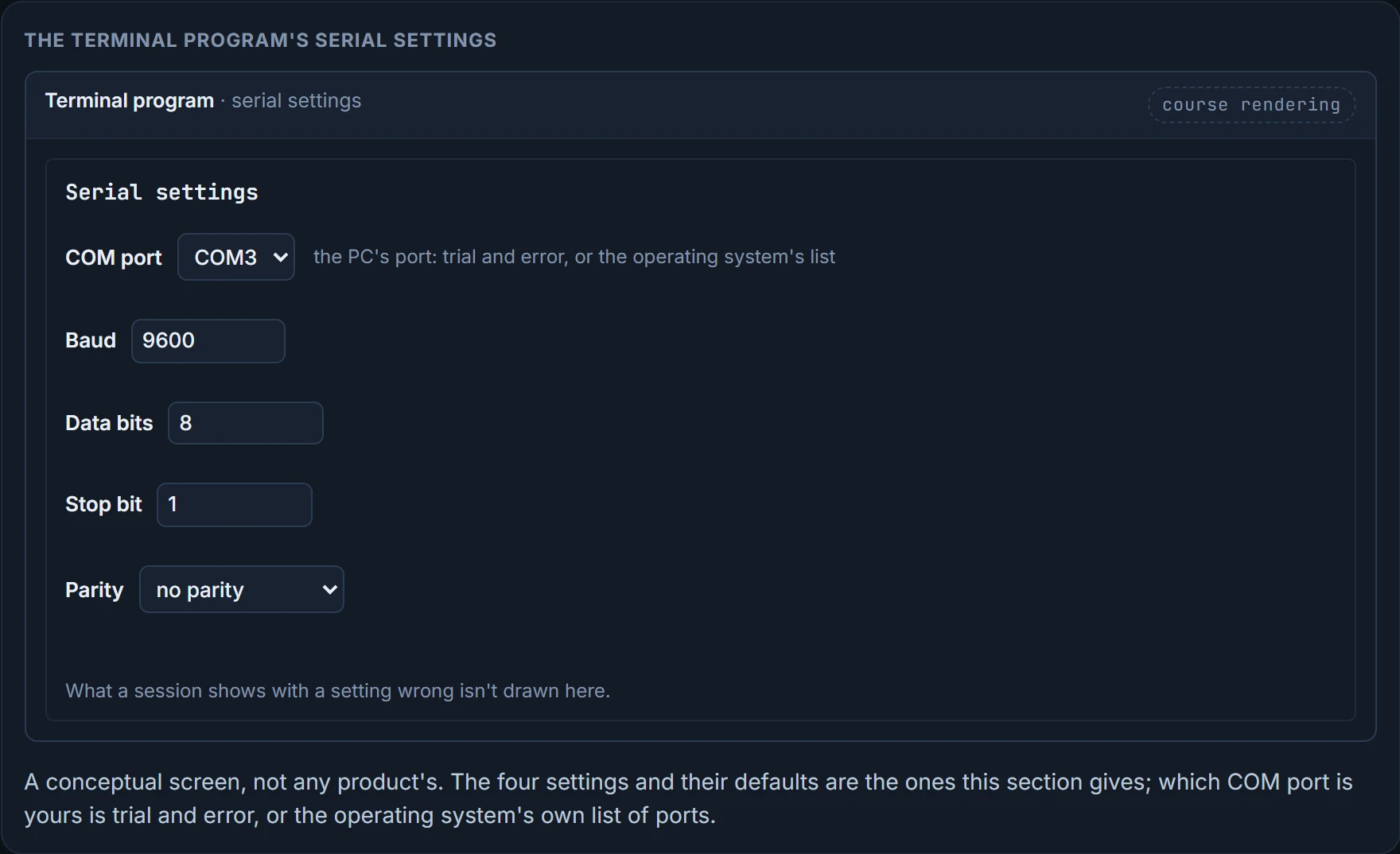
Treat a console that shows nothing usable the same way, whatever it shows, and work through it in this section's order: the cable and drivers, the COM port, the four settings, then the line.
Now the line, line con 0. A line password works only with the login command beside it, and neither login nor a line password is configured by default; so out of the box, no authentication is required on the console. login enables password checking at login, and the line password is case sensitive: "Secret" isn't "secret". If you'd rather have usernames, a username and password must exist in the local database and the line needs login local. And if an AAA server does the asking, a method list has to be applied with login authentication {default | list_name} in line console configuration mode. That's the AAA lesson's command, and its sample put it on the console as well as the vty lines.
One more console item, and it isn't about getting in. If syslog messages, the router's own event messages, keep scrolling over what you type, so you can't see your own command, enable logging synchronous on the console line. With it, unsolicited messages and debug output appear after the prompt for your input comes back, instead of in the middle of your typing. That's the line the AAA lesson's sample had under line con 0 and left for this one.
We haven't confirmed what a console session shows with one of the four settings wrong, which is why this section treats every unusable screen alike. Nor have we confirmed logging synchronous on a router: its description here is a switch's.
The timer and the switch
The console list has one more item, and it's the one that bites people who already know all of the above. Is the line enabled?
Two commands look almost the same and do very different things, on the console and on the vty lines. exec is used to enable or disable the line: exec in line configuration mode enables it, and no exec disables it. exec-timeout is used to control the inactivity timer: exec-timeout 5 0 logs you out automatically after 5 minutes of inactivity. EXEC access is allowed by default.
Now the slip. An engineer on R1's console means to type no exec-timeout under line vty 0 4, types no exec, and presses Enter. A minute later, from R2, someone runs telnet 10.0.123.1, R1's address.
No. The line is disabled, so there's nothing on it to ask for a password. Here's what R2 prints:
R2#telnet 10.0.123.1
Trying 10.0.123.1 ... Open
[Connection to 10.0.123.1 closed by foreign host]
Look at the middle line. "Open." Something at 10.0.123.1 accepted the connection, and then R1 closed it, with no prompt in between. With no exec on the line, remote connections aren't allowed. So "Open" proves R2 reached R1 and that Telnet wasn't blocked on the way. It doesn't prove the line works, and here it doesn't.
The console version of the same slip is quieter still. Type no exec on line con 0 when you meant no exec-timeout and you've disabled the line: the console no longer responds when you connect to it. A console that says nothing at all, with the right cable, the right port and 9600, 8, 1 and no parity, has one more suspect.
Two commands, one word apart, and only one of them is a timer.
We haven't confirmed what no exec-timeout puts back, or what exec-timeout 0 0 means on these routers.
Telnet: the vty lines, check by check
Most devices are administered remotely through the vty lines, and those support Telnet and SSH. By default there are five vty lines on routers and switches, numbered 0 to 4, and some devices have more. Telnet isn't recommended: everything between the management station and the router travels in plaintext, so anyone who captures the packets can read all of it. With SSH the packets are encrypted, and captured packets aren't readable. Most of this section applies to SSH as well, and the next one adds what's extra.
Sort the Telnet checks by where an attempt stops, and they get much shorter to carry.
Outside the router. Can you reach its address? Test it with ping. A reply proves the address answers from where you pinged; it proves nothing about port 23 or the lines. And is anything in the path, an ACL on a router or a firewall, blocking TCP port 23? Telnet uses port 23, and if it's blocked you won't get a Telnet session.
The lines' own list. Is there an ACL on the vty lines saying which management stations, by IP address, may get in? Here SW1's list 1 lets in only 192.168.1.11:
SW1# show run | section line vty
line vty 0 4
 access-class 1 in
 password cisco
 login
DSW1# show ip access-lists 1
Standard IP access list 1
 10 permit 192.168.1.11 (4 matches)
 20 deny any (7 matches)
Notice the last line. It's an explicit deny any, added on purpose so the list counts the refused attempts: seven of them here. Add the log keyword to the end of that explicit deny and you also get a log message naming the address that was refused, like this one:
%SEC-6-IPACCESSLOGS: list 1 denied 10.1.12.2 1 packet.
A refusal by this list happens before anybody is asked for a password: the attempt from 10.1.12.2 is counted, logged, and never sees a prompt. show ip access-lists proves which entries matched and how often, and with an explicit deny, how many were refused. It doesn't name who was refused unless the deny has log, and it says nothing about IPv6. show run | section line vty proves what the lines carry: the list's name, the password, the login method. It doesn't prove the list exists or lets you in, or that a line is free.
The command that puts an IPv4 list on the lines is access-class acl_name {in | out}, as in access-class 1 in above, and for IPv6 it's ipv6 access-class acl_name {in | out}: one list per family, both on the vty lines. ipv6 access-class filters incoming and outgoing connections to and from the device by an IPv6 ACL, as in line vty 0 4 then ipv6 access-class acl1 in, and it's similar to access-class except that the IPv6 ACLs are defined by a name.
For IPv4 there's one difference to know. Not all commands that accept a numbered access list will accept a named one, and the vty lines are the standing example: vty uses only numbered access lists. For the exam, the syntax above is the answer; a numbered list works whichever way that falls, so this lesson's IPv4 lists on the lines are numbered. And a line with both lists judges an IPv4 attempt by the IPv4 list only and an IPv6 attempt by the IPv6 list only; a family with no list on the line isn't filtered. That's this lesson's working rule.
The login. Is the line set to ask for credentials? By default it is: the login command tells the line to prompt for the line password.
SW1# show run | section line vty
line vty 0 4
 login
To check users against the local database instead, the line needs login local; to check them through AAA, login authentication {default | list_name}. Because login is on by default, a password is required, and if none is set the user gets the error message "Password required, but none set". With login local or AAA, you're asked for a username and a password, and if that pair isn't stored in the database, the login is invalid and fails.
The protocol. Are the right transport protocols defined for the line? By default Telnet and SSH are allowed, and other supported protocols typically are as well; transport input changes which ones the line accepts. The AAA lesson's sample had transport input all on its vty lines. You can check what a line allows with show line vty line_number | include Allowed; here Telnet and SSH are allowed in both directions:
SW1# show line vty 0 | include Allowed
Allowed input transports are telnet ssh.
Allowed output transports are telnet ssh.
That output proves what line 0 accepts and may start. It doesn't prove anything about the other lines, the list, or the login.
One to read for yourself. SW1 again, at a different moment, with no list on its lines but a password on them. An engineer Telnets in and gets "Password required, but none set". At the same moment, show users on SW1 prints this:
SW1# show users
 Line User Host(s) Idle Location
* 0 con 0 idle 00:00:00
 1 vty 0 idle 00:00:42 10.1.1.2
 2 vty 1 idle 00:00:48 10.1.10.1
 3 vty 2 idle 00:00:55 10.1.20.1
 4 vty 3 idle 00:00:47 10.1.23.3
 5 vty 4 idle 00:00:41 10.1.43.4
A free line. Every vty line is taken. Whatever the number, once all of them have established connections, a new connection isn't made: here there's one console connection and five vty connections, on lines 0 to 4. The next device that tries Telnet is refused, and it receives "Password required, but none set", even though that isn't technically the issue. The router says "password" to someone who has one, about a line they never got. show users proves which lines are in use and where each session came from. It doesn't tell you why a new attempt failed, or which protocol a session uses.
To free one by hand, use clear line followed by the number printed before vty, not the vty number after it. So which number clears 10.1.20.1's session? 3. Type clear line 2 and you've cleared 10.1.10.1 instead.
After you're in. Connected remotely and seeing no syslog messages? Type terminal monitor in privileged EXEC mode; terminal no monitor turns it off. It lasts only for that session: terminal settings are set locally and don't remain in effect after the session ends, so you type it each time. And logging synchronous belongs on your line here too: for a remote session that's a vty line, and the command works on a virtual terminal line as it does on the console.
The figure puts all of this in one place. For each attempt, say where you think it stops, which check refuses it, and what the client is told.
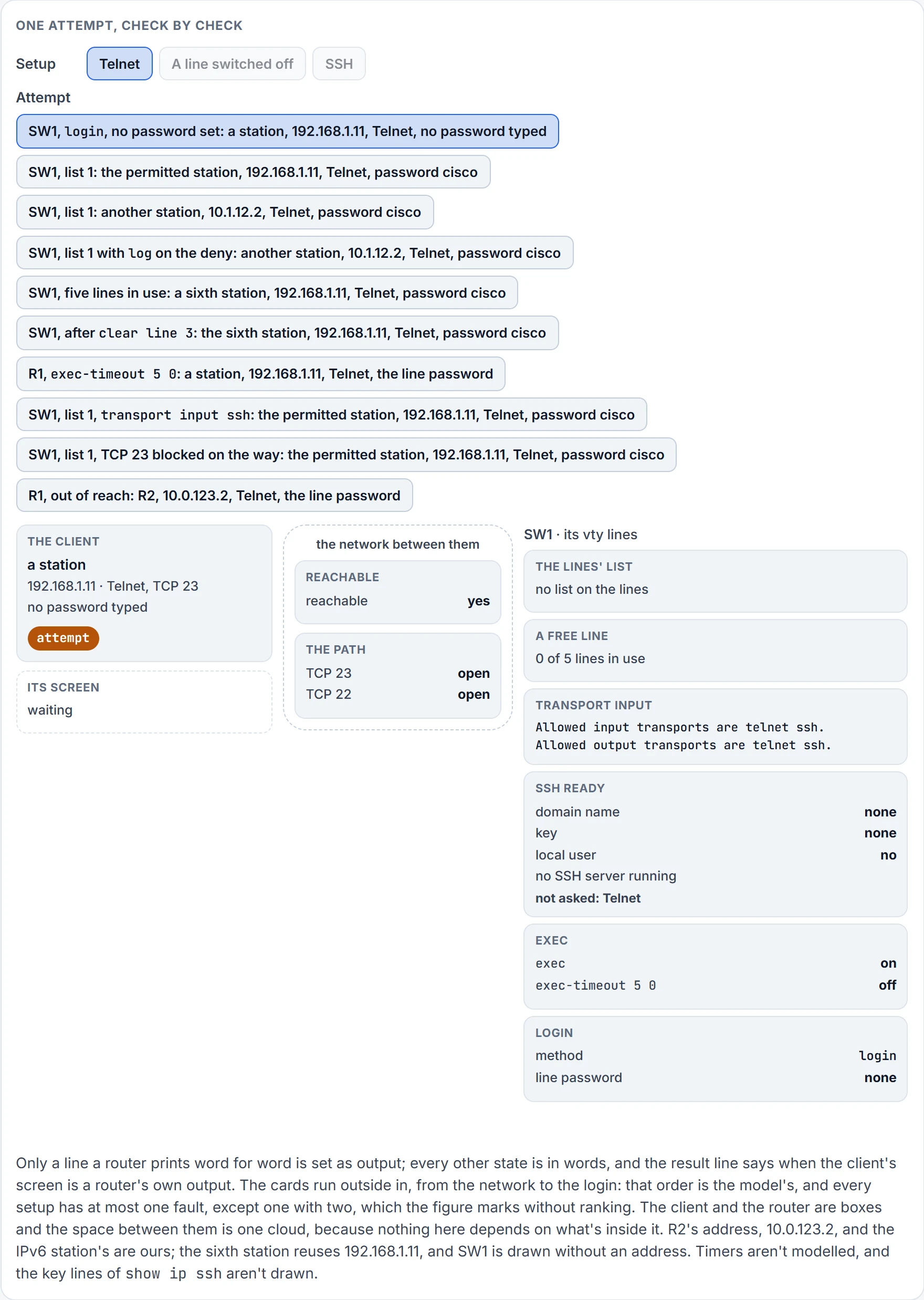
Step 1 of 9 Ready: a station (192.168.1.11) opens Telnet to SW1, no password typed.
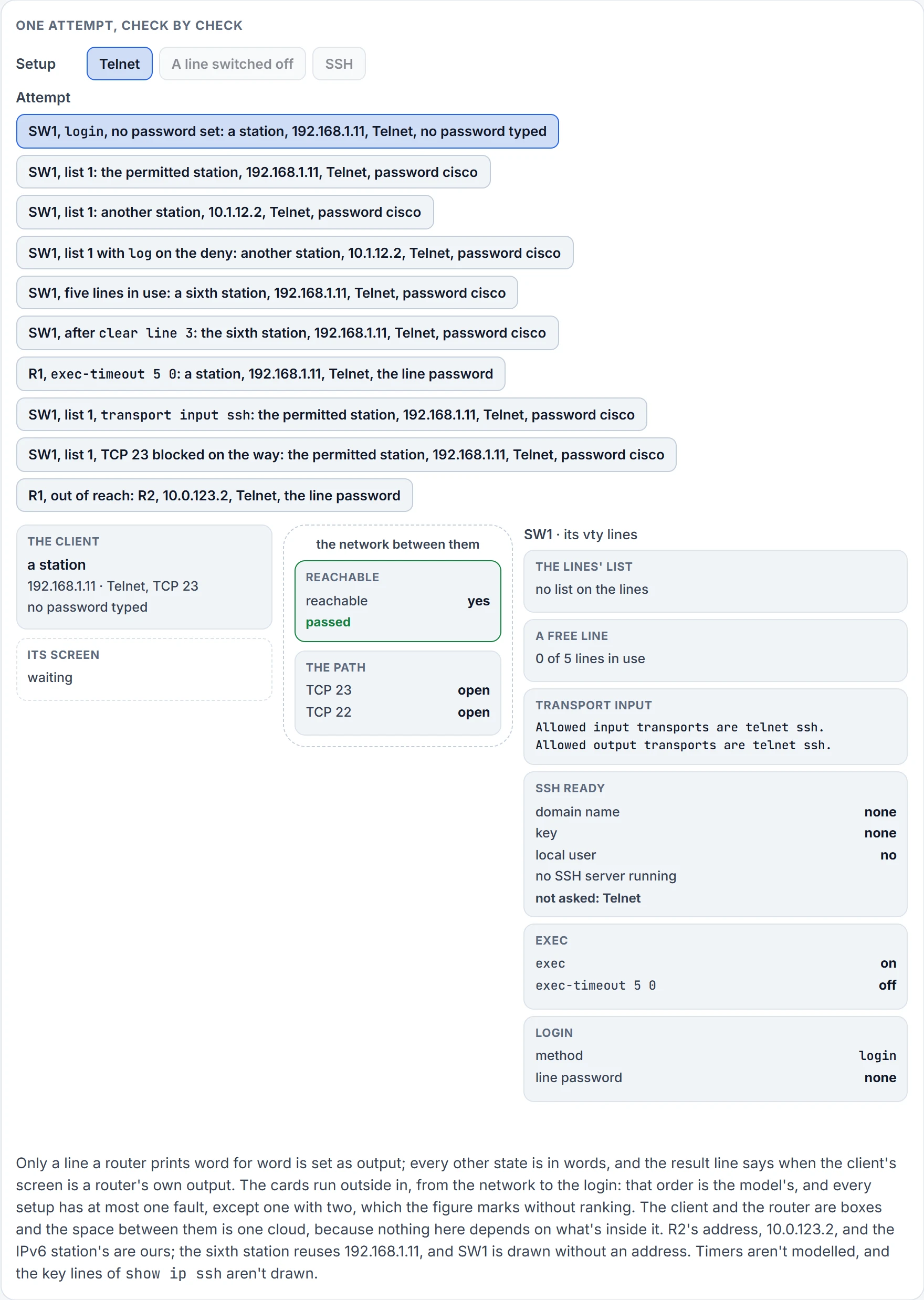
Step 2 of 9 SW1 can be reached from 192.168.1.11.
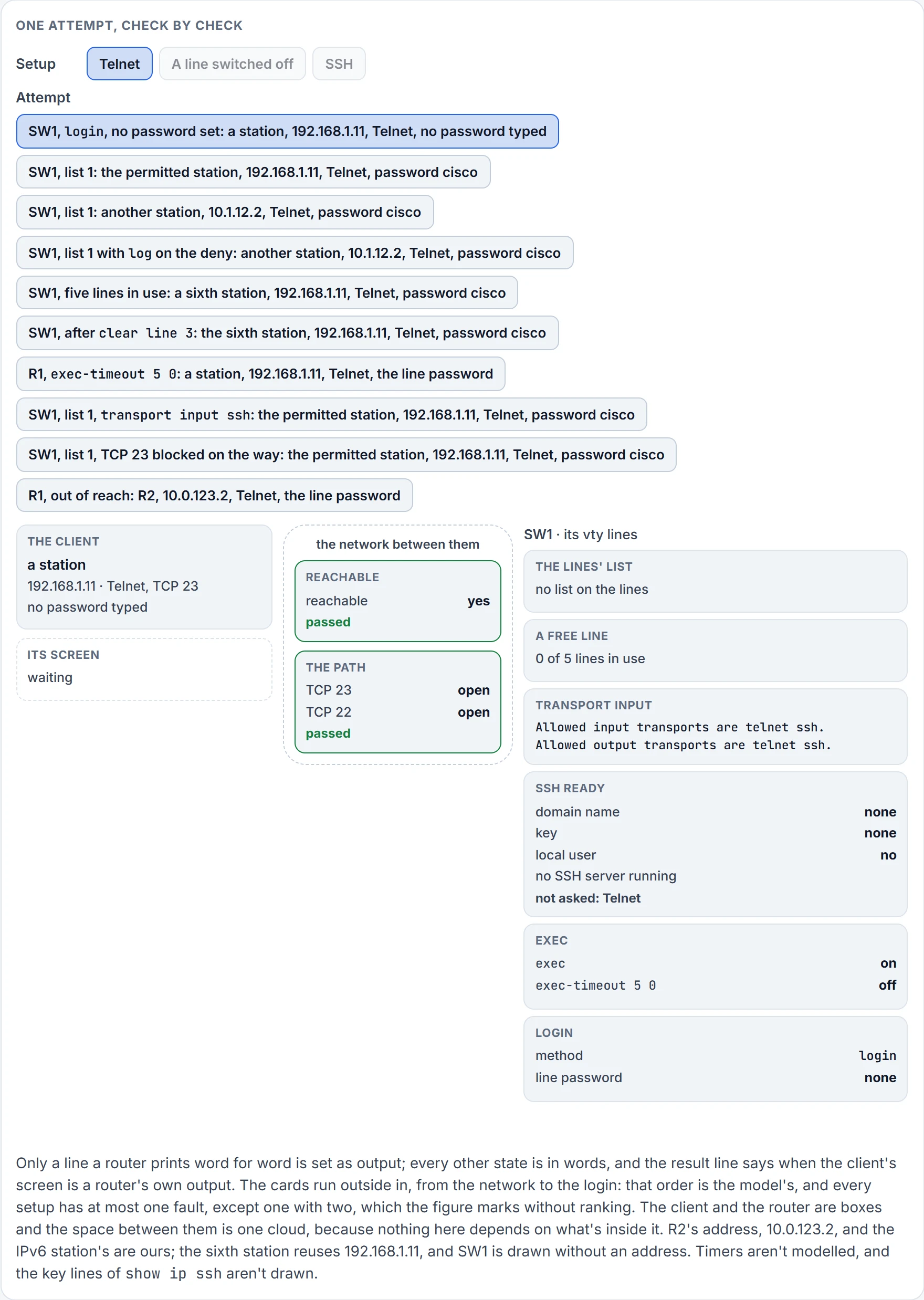
Step 3 of 9 Nothing on the way blocks TCP 23.
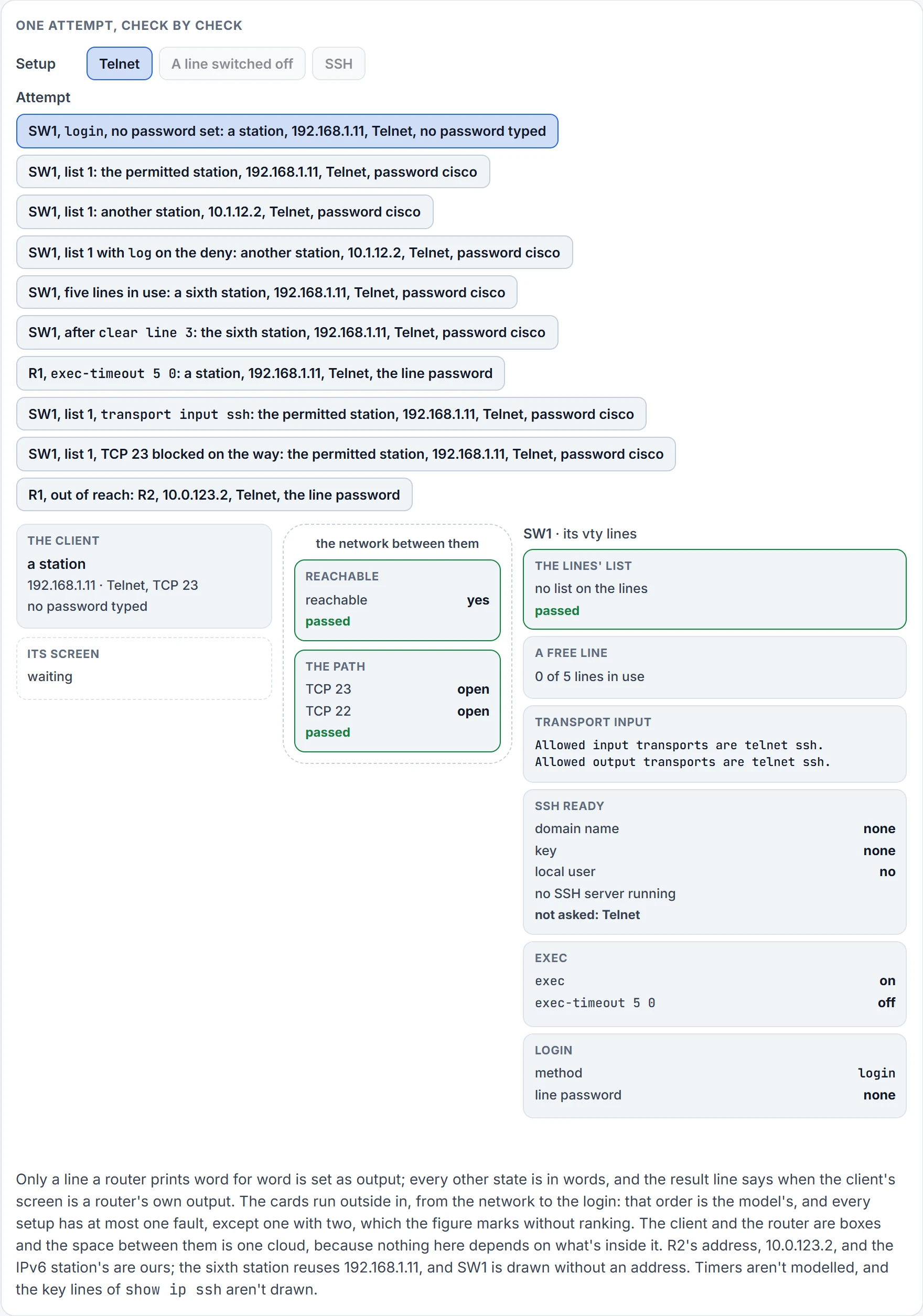
Step 4 of 9 No list on the lines.
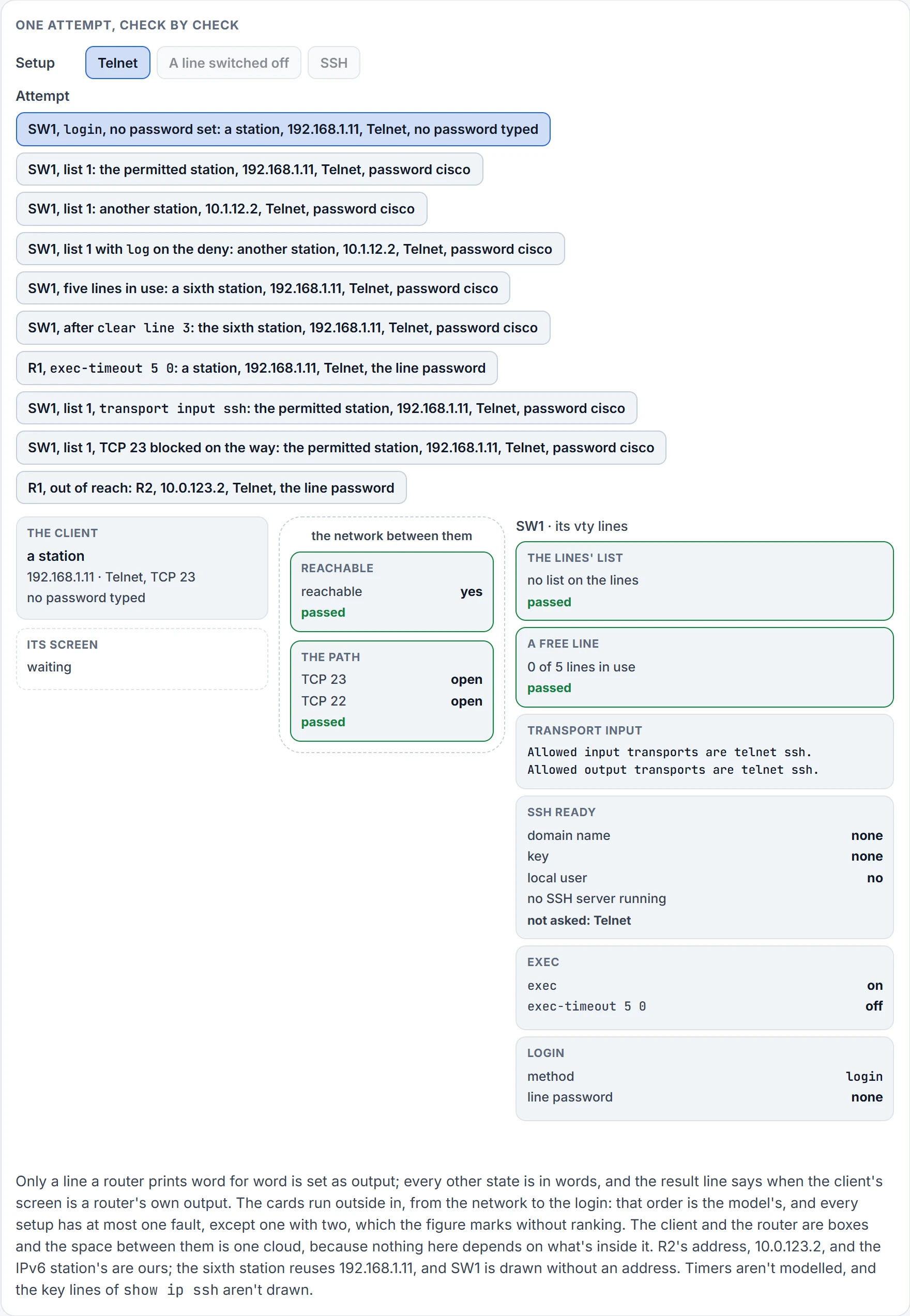
Step 5 of 9 0 of 5 vty lines in use: one is free.
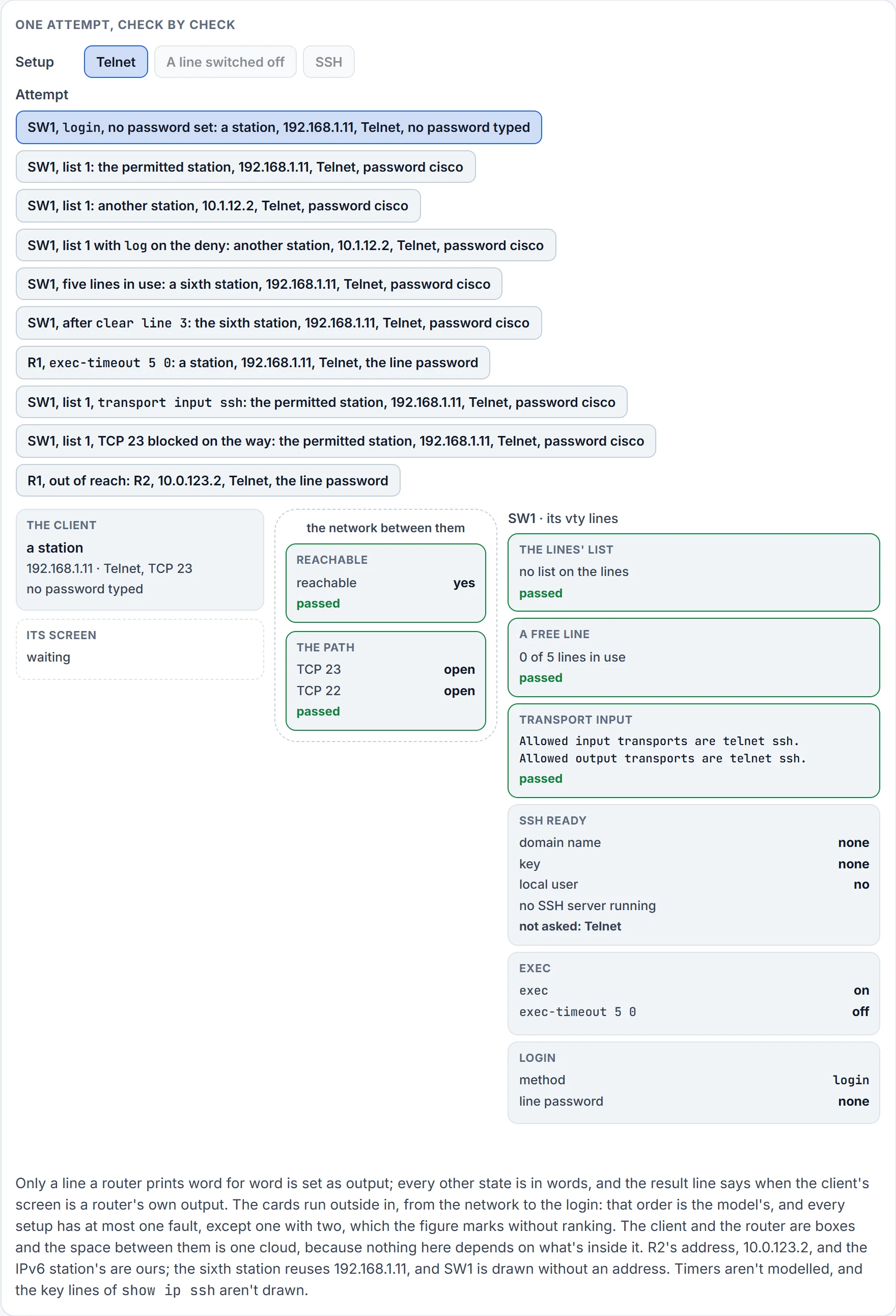
Step 6 of 9 The line allows Telnet in.
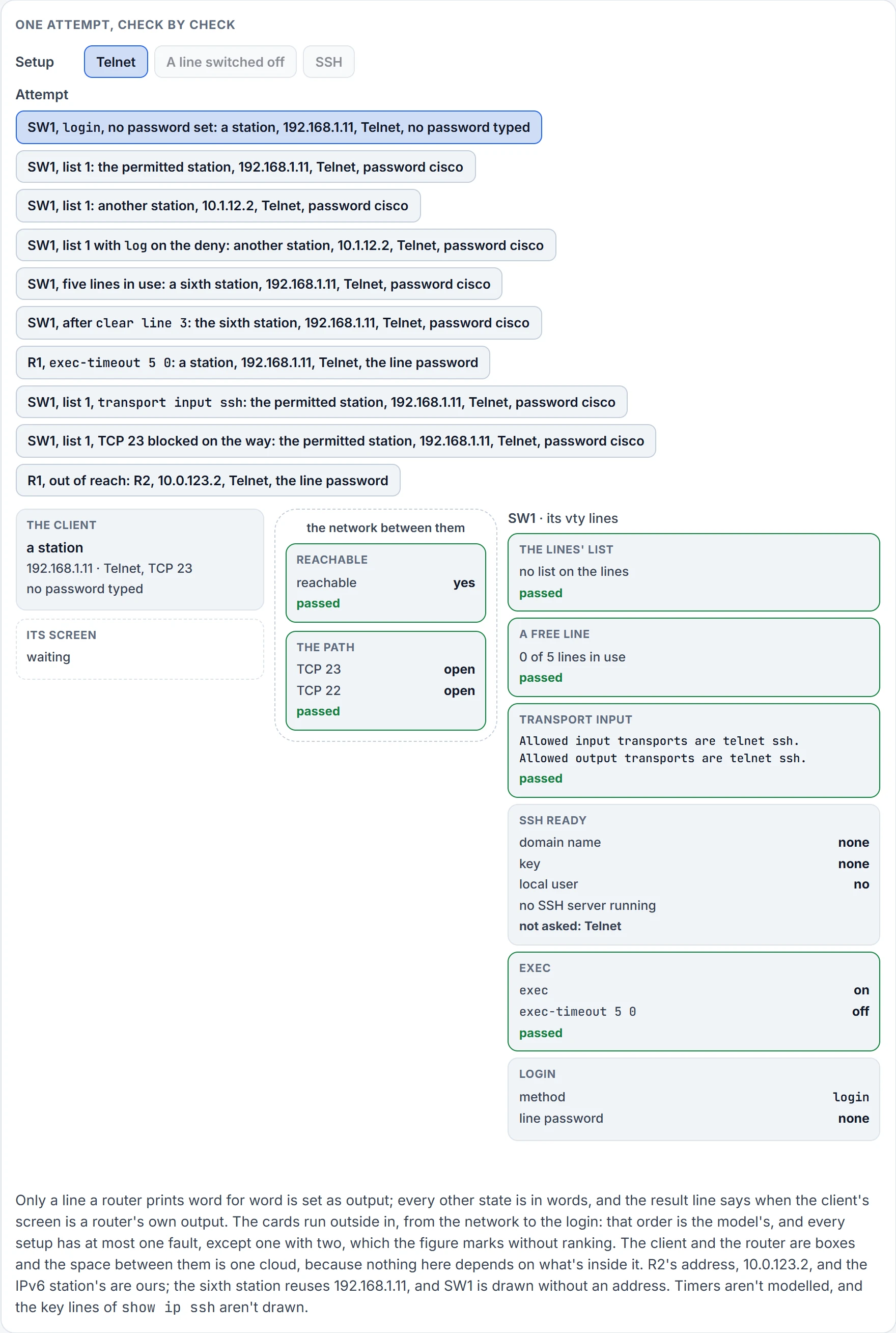
Step 7 of 9 The line runs an EXEC.
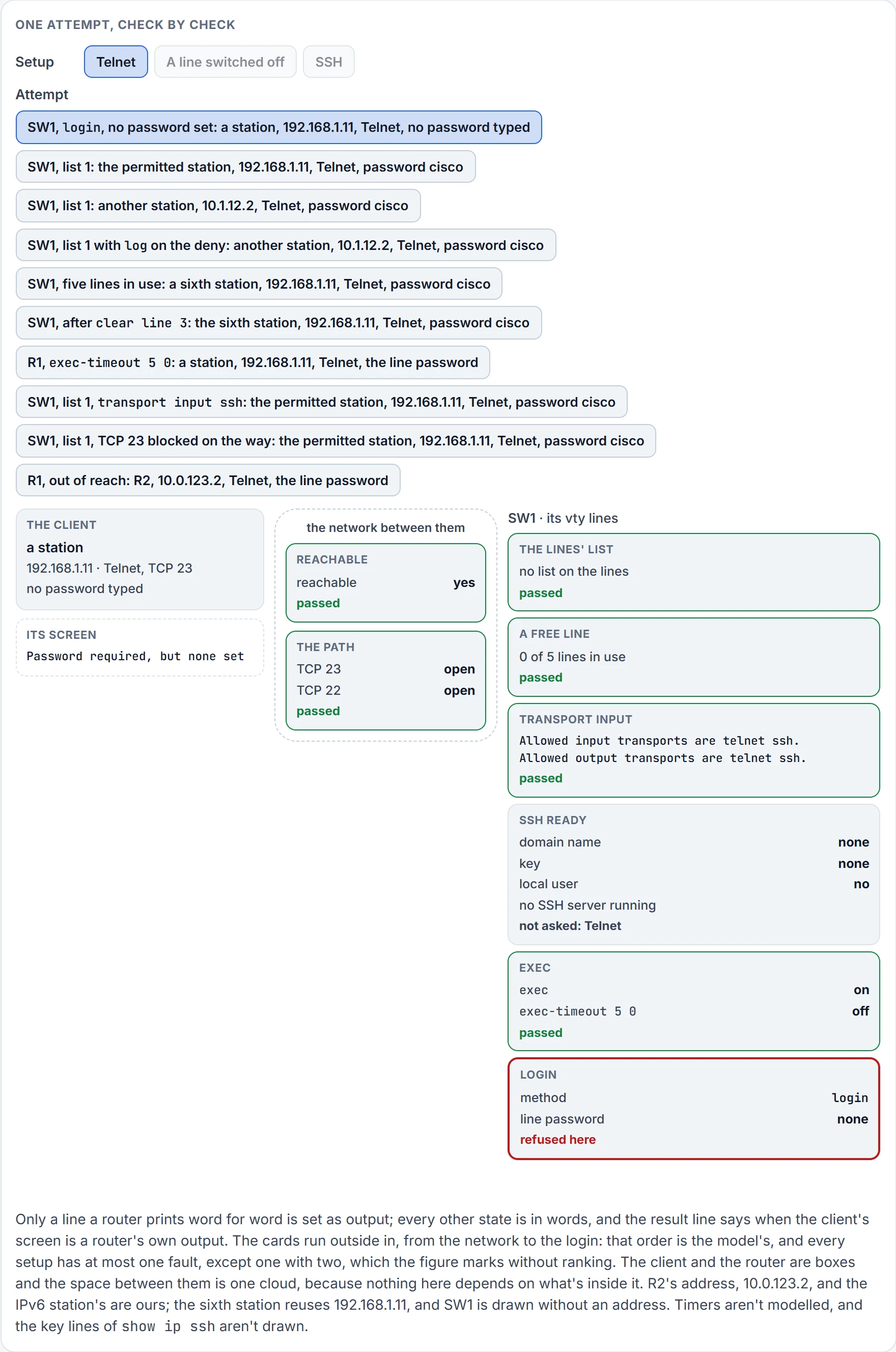
Step 8 of 9 login asks for the line password, and none is set.
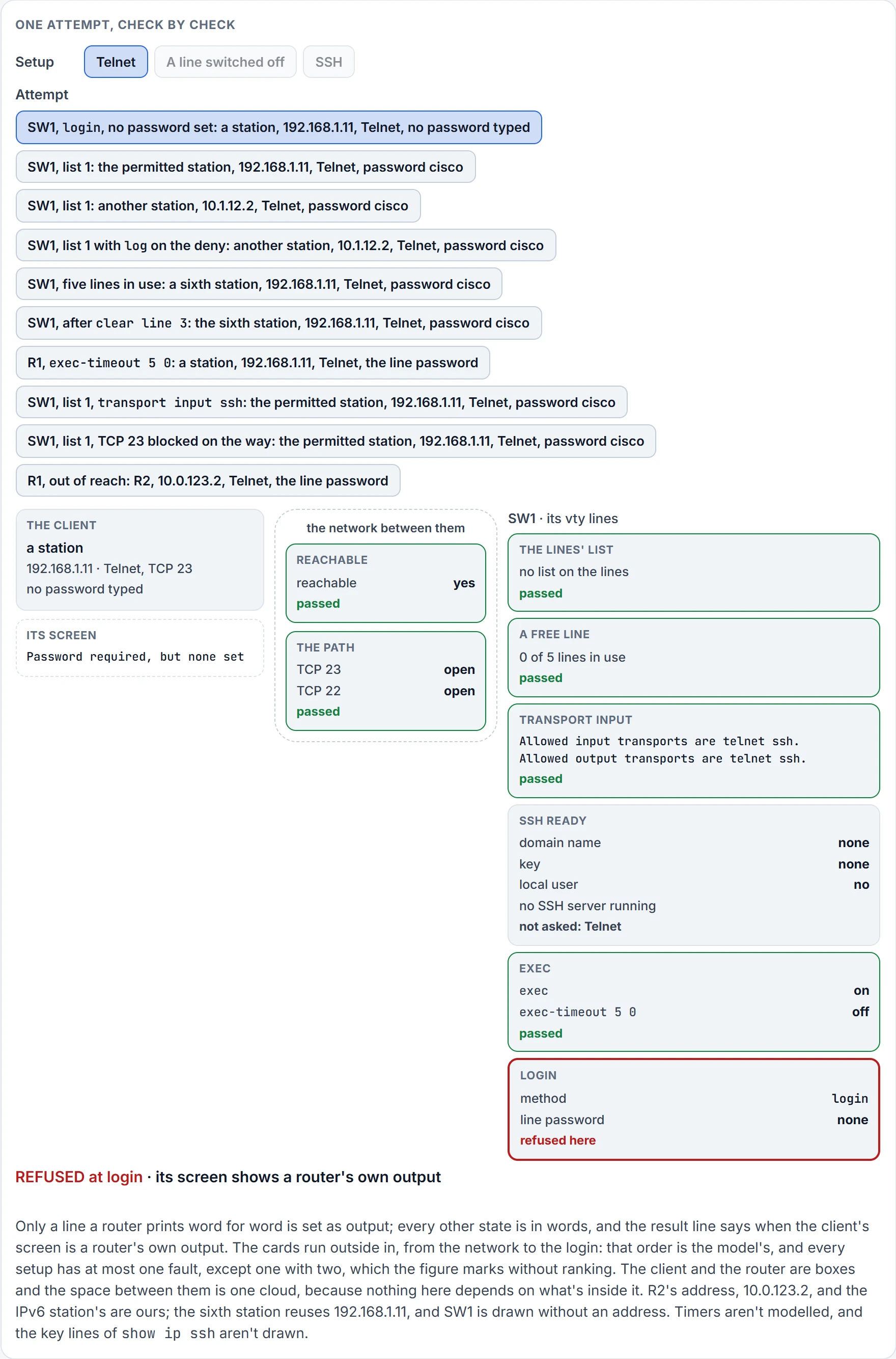
Step 9 of 9 Refused at login.
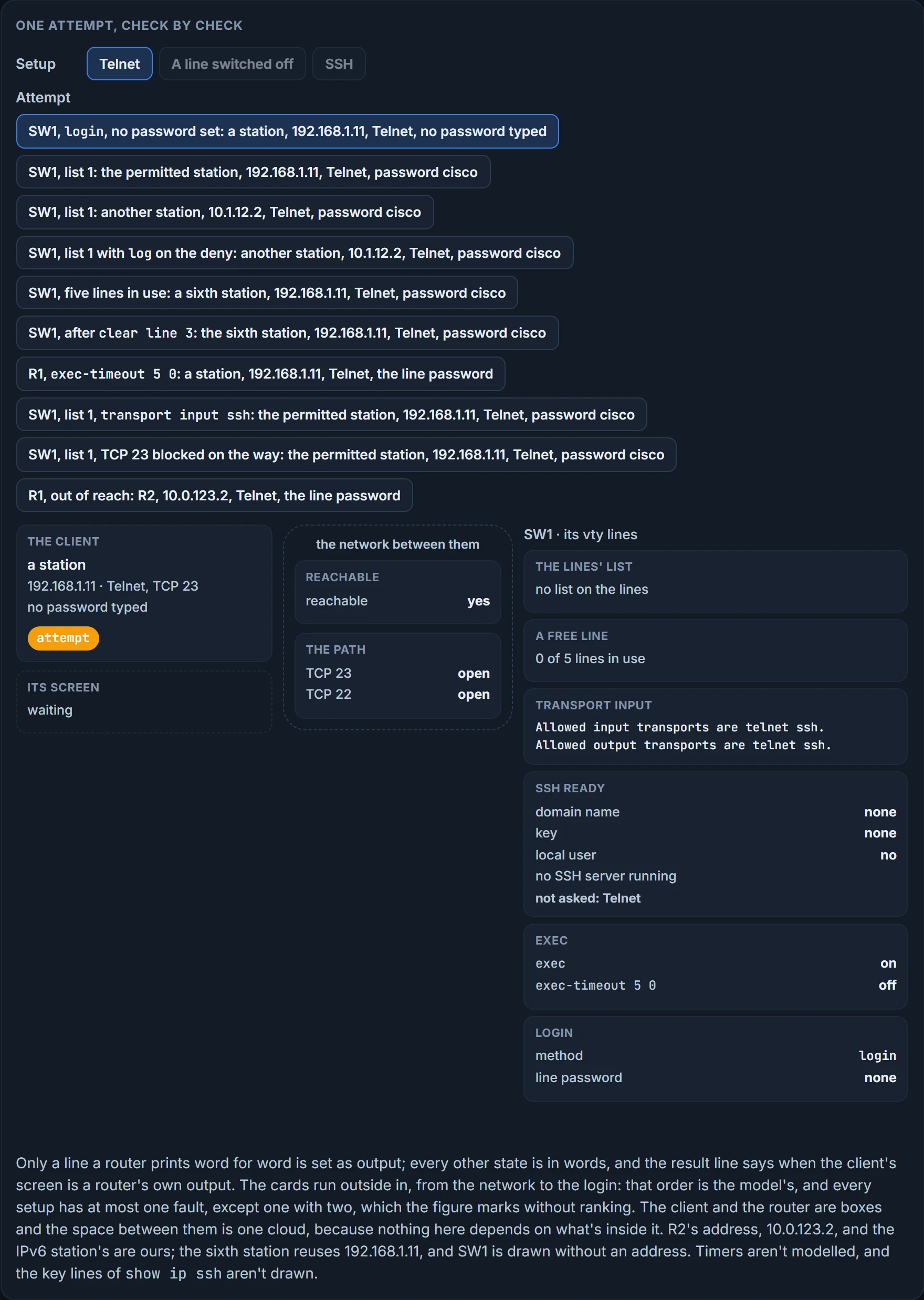
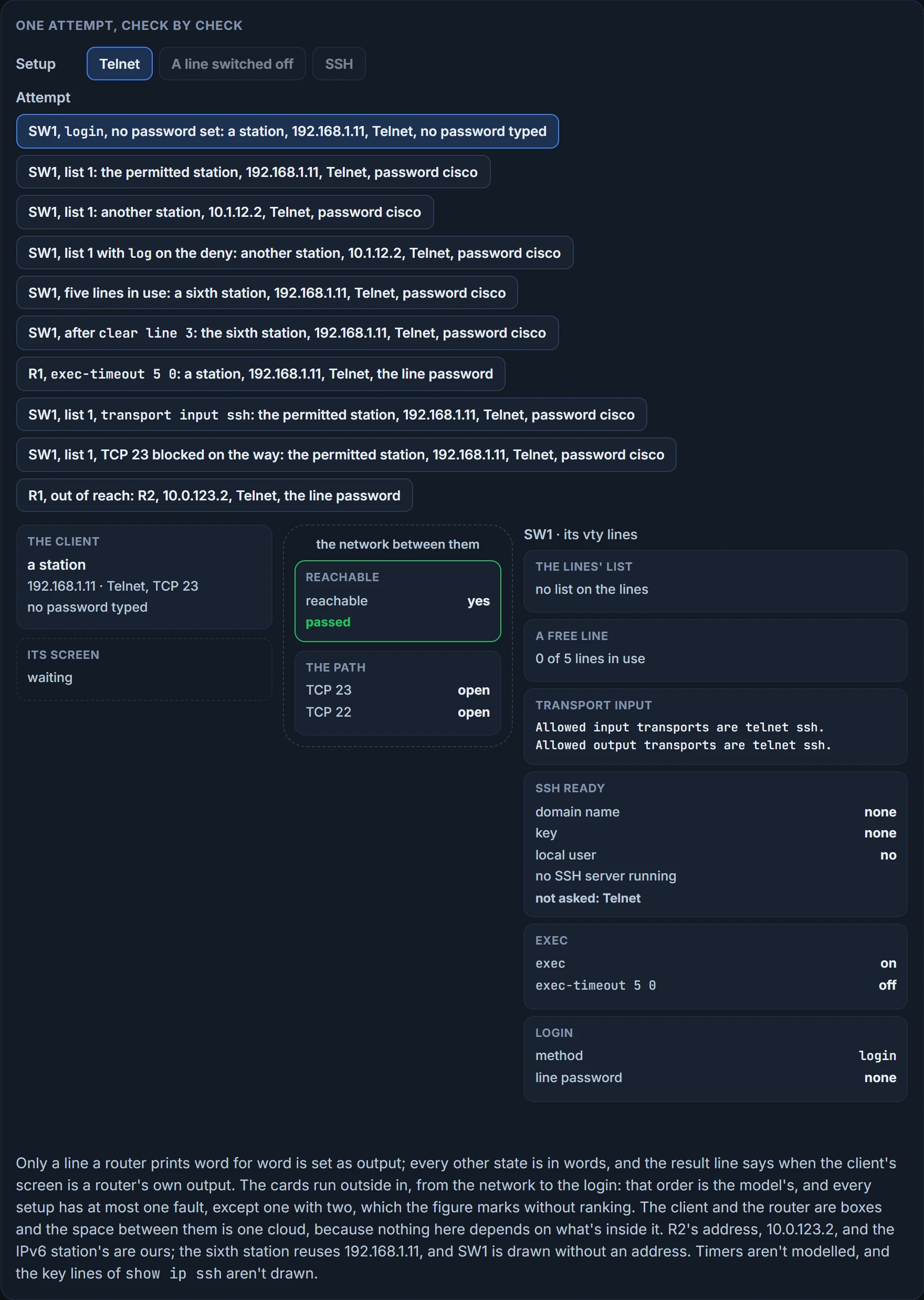
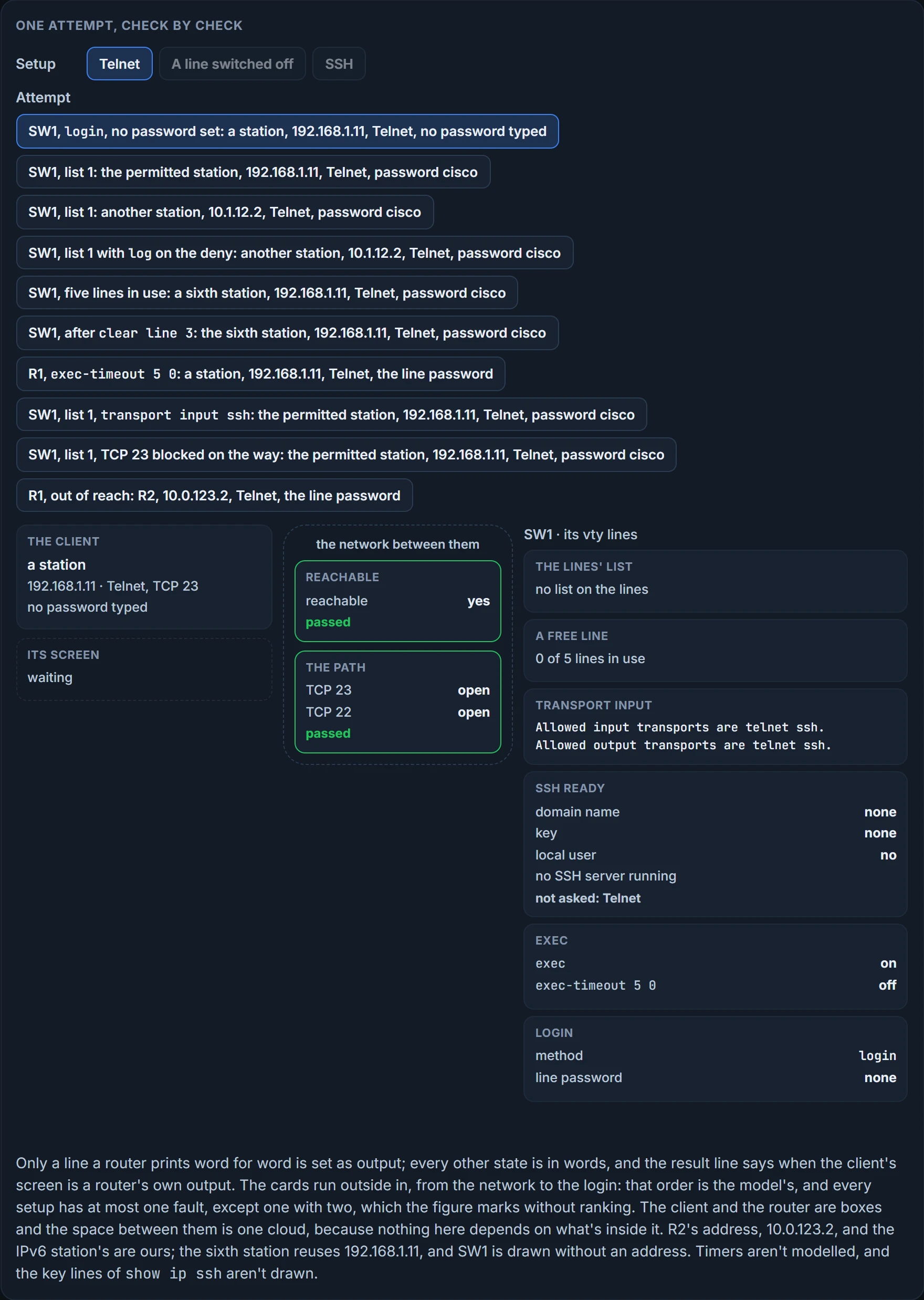
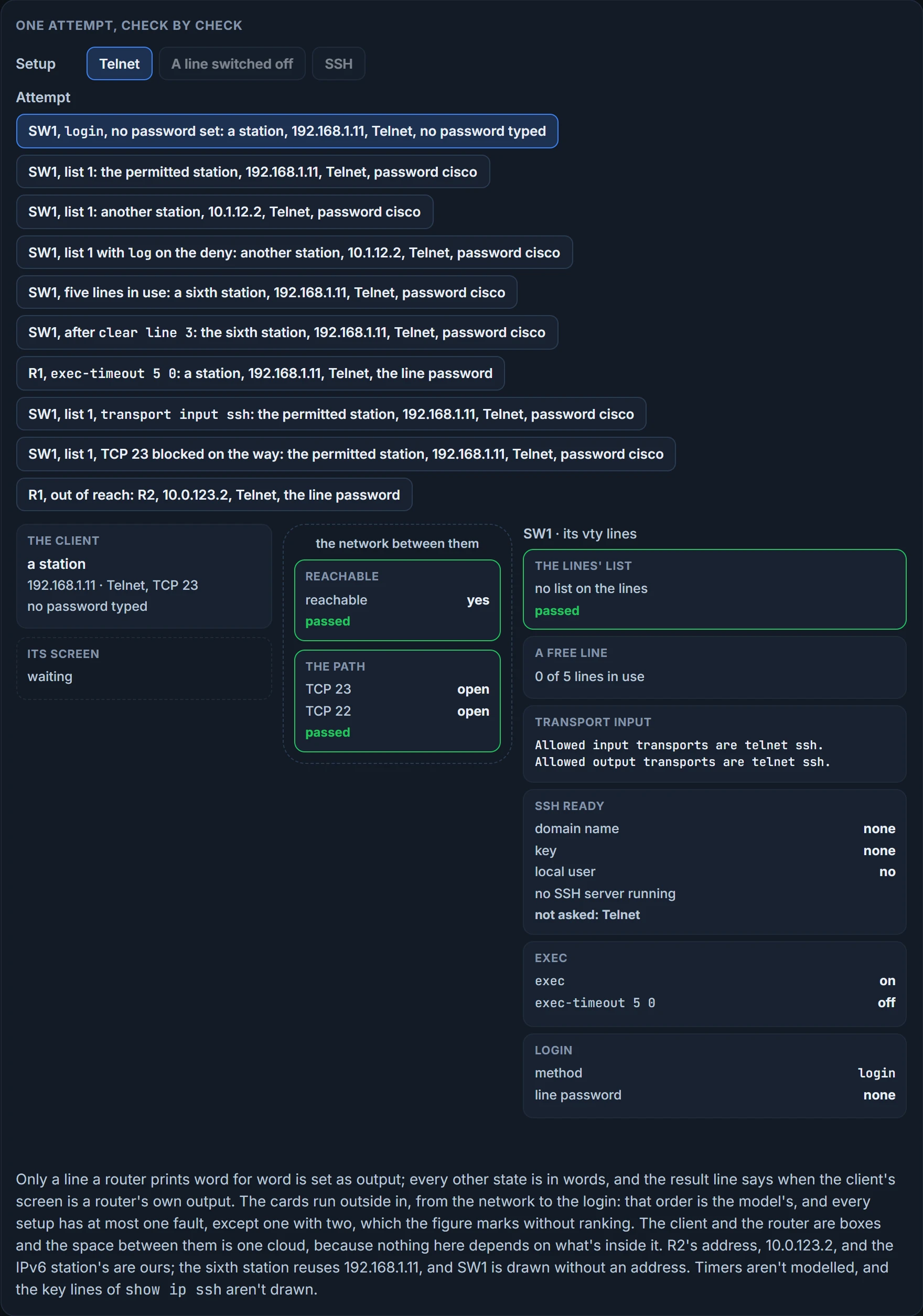
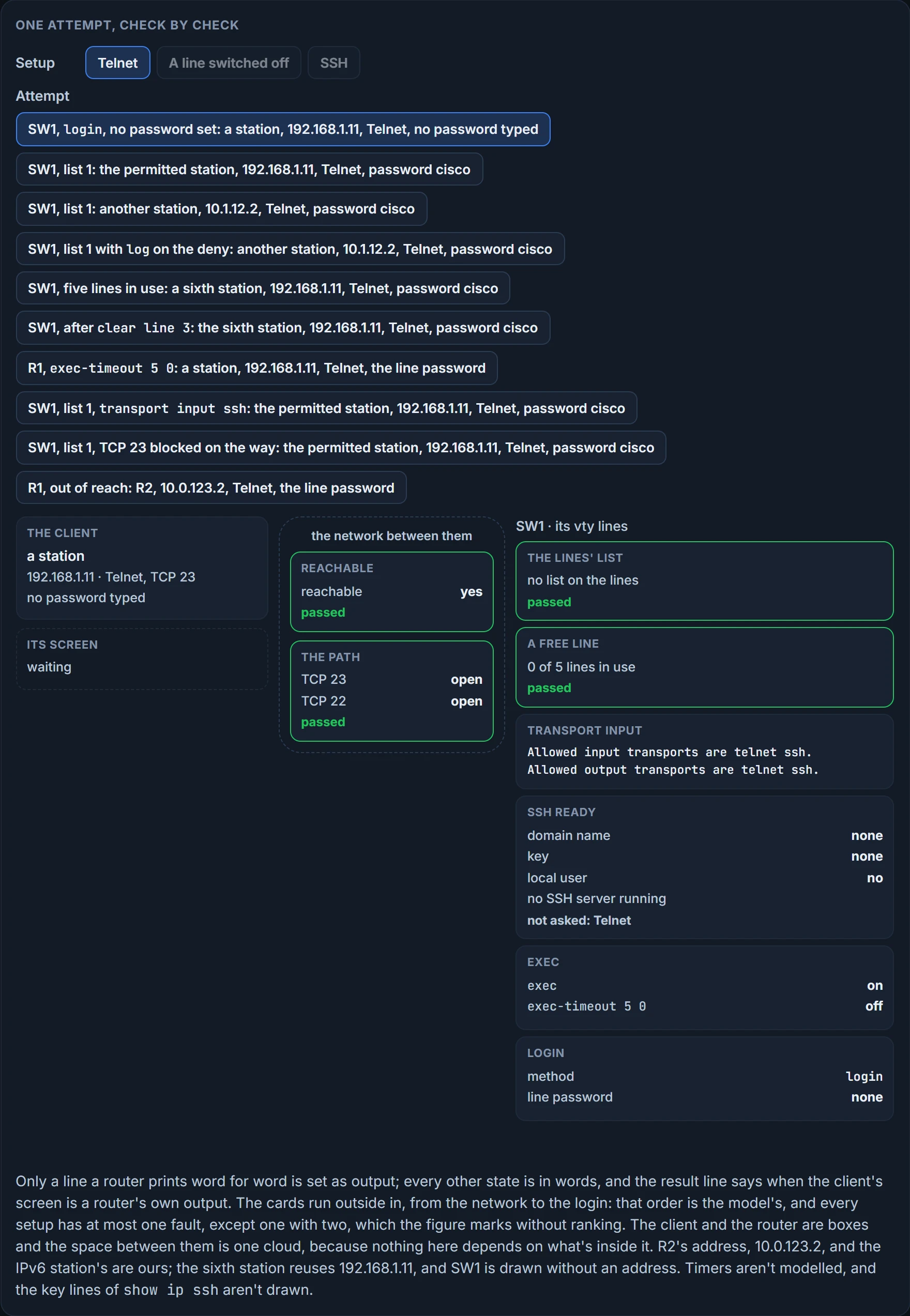
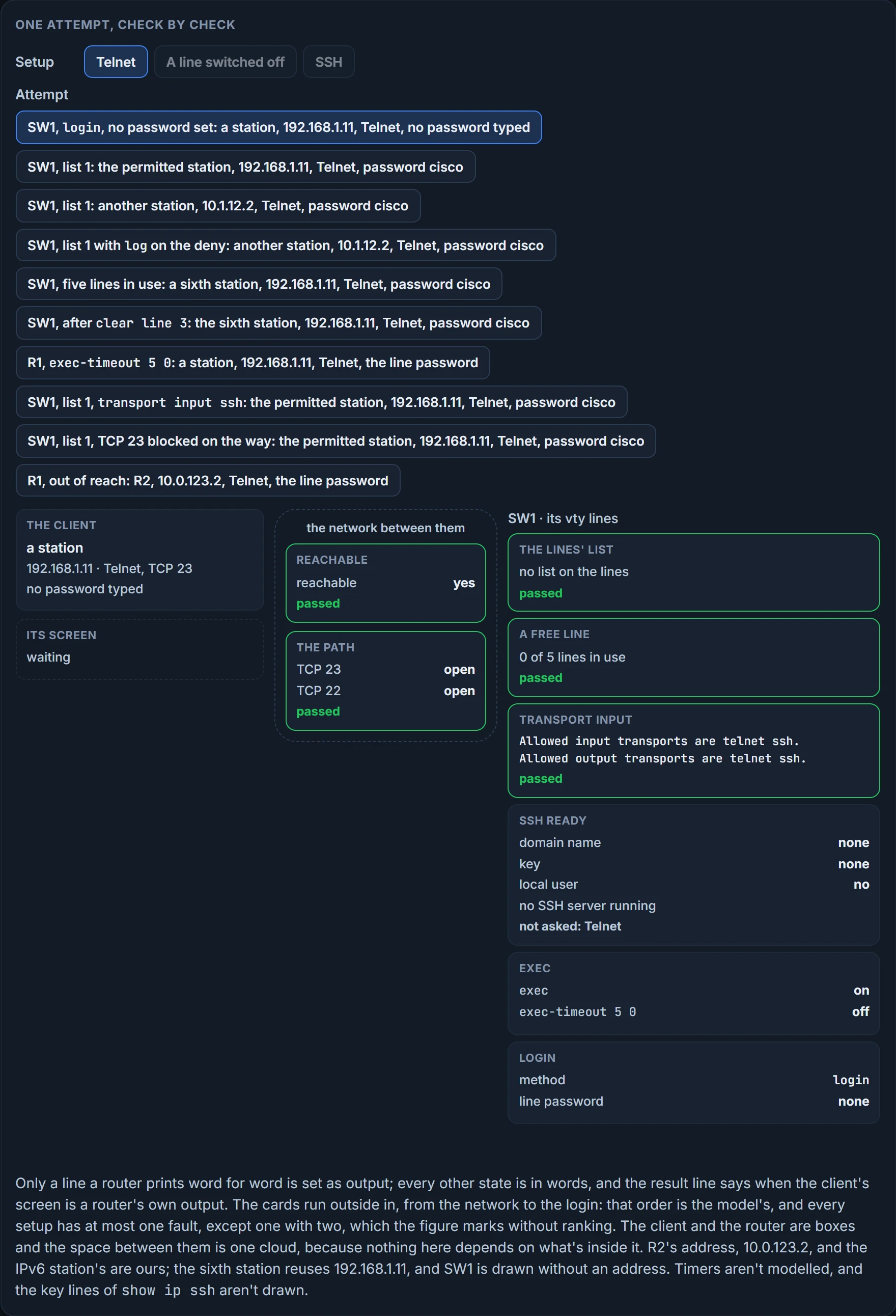
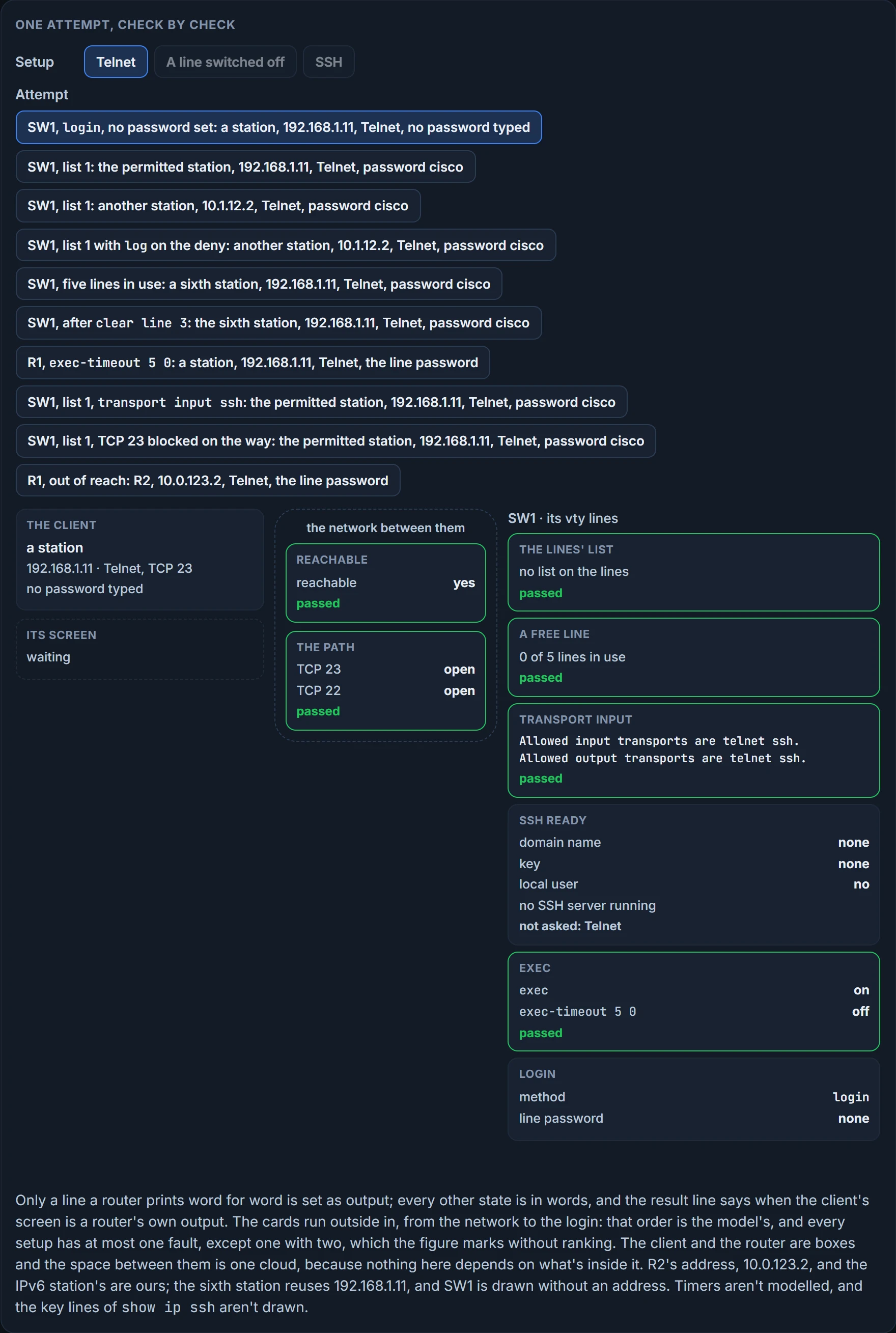
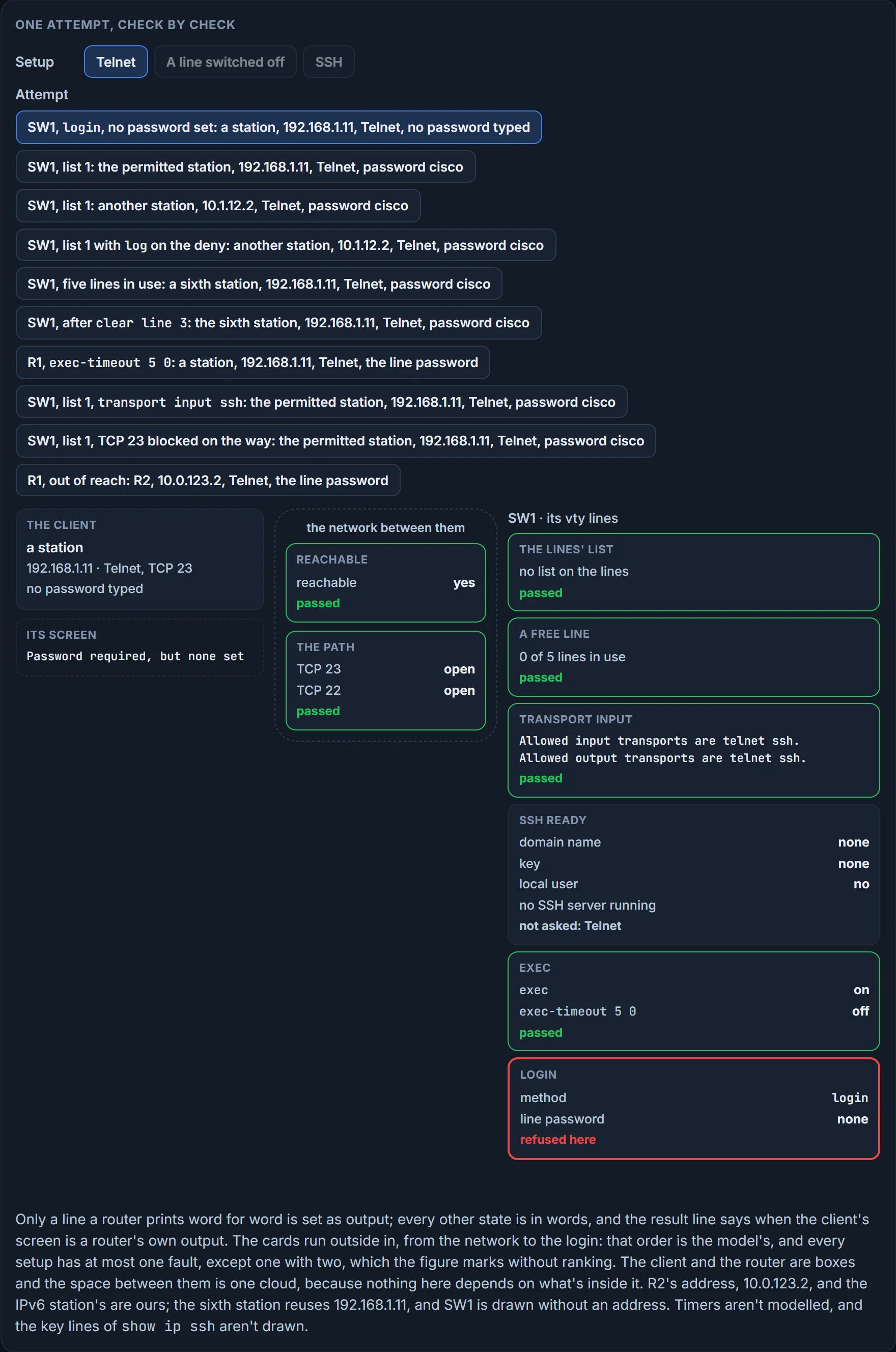
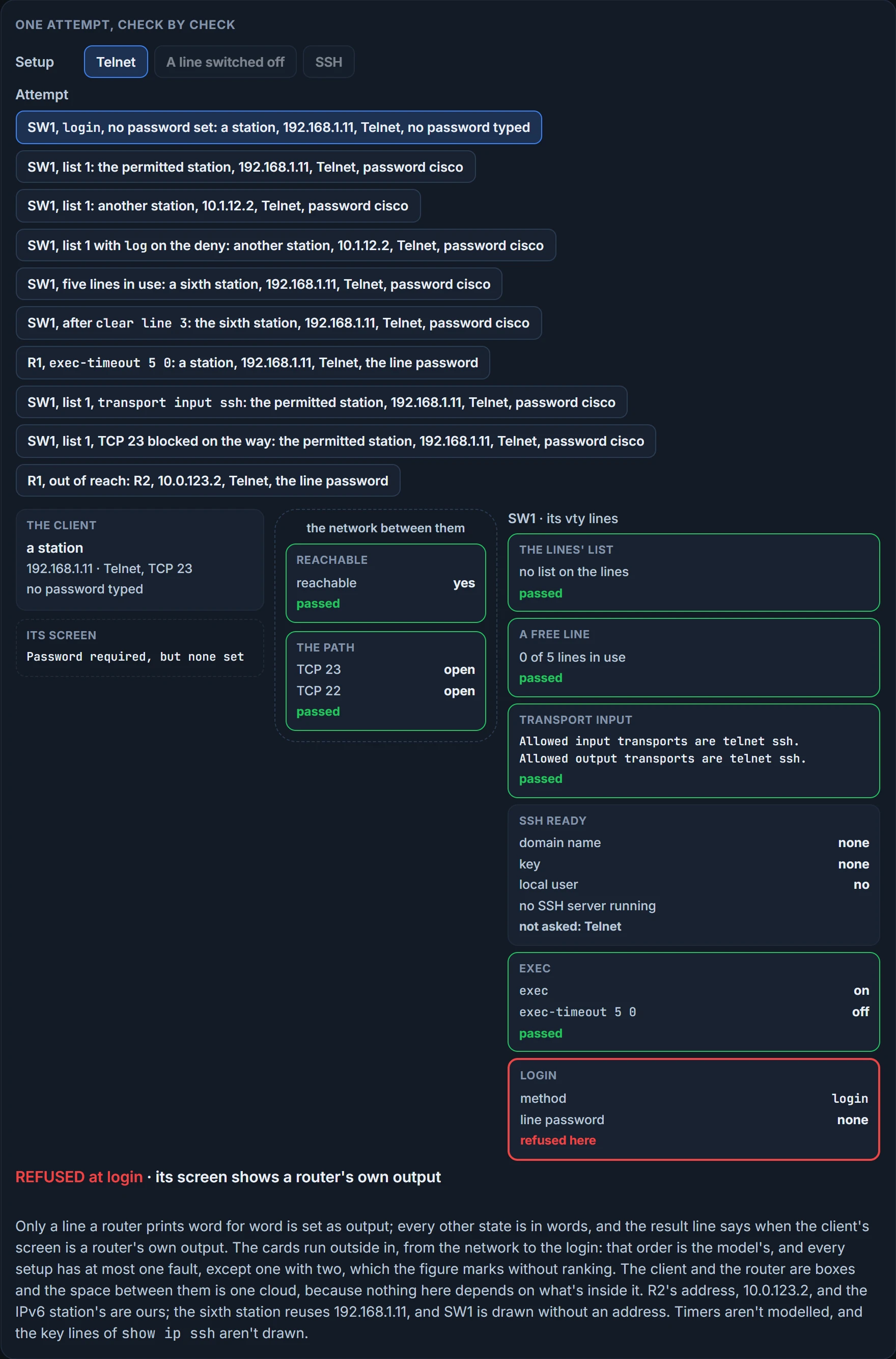
We haven't confirmed, on the routers this course targets, the default transport and what transport input all covers, how many vty lines there are, whether access-class takes a named list, or what a client prints when a list or the transport refuses it. How a line with lists in both families treats each family is this lesson's reading. The two details under "After you're in" are a switch's, and we haven't confirmed them on a router.
SSH: everything Telnet needs, and more
You've probably configured SSH before, and every missing piece of that recipe is a reason a connection fails. A K9 image, which show version shows; a hostname and a domain name, with hostname hostname and ip domain-name domain-name; local RSA keys made with crypto key generate rsa modulus key-size; at least one local username and password; and inbound SSH allowed on the lines, transport input ssh. If any of these is missing, the SSH connection fails. The image requirement is the server's: the SSH server needs a k9 image, while the SSH client is supported in both k8 and k9 images, depending on the release. show version proves which image is running; it doesn't prove anything else on that list is in place.
Here's the middle of that recipe on a router called R1:
R1(config)# ip domain-name ENARSI.LOCAL
R1(config)# crypto key generate rsa modulus 1024
The name for the keys will be: R1.ENARSI.LOCAL
% The key modulus size is 1024 bits
% Generating 1024 bit RSA keys, keys will be non-exportable...
[OK] (elapsed time was 7 seconds)
R1(config)#
*Sep 21 02:04:36.546: %SSH-5-ENABLED: SSH 1.99 has been enabled
R1(config)#ip ssh version 2
Two details. The key's name is built from the hostname and the domain name. And SSH came up the moment the key existed, at version 1.99, before anyone typed ip ssh version 2. SSH is linked to the first RSA keys generated, and deleting the key pair with crypto key zeroize rsa disables the SSH server. The key is the server's need: RSA key generation is an SSH server-side requirement, and a device acting only as an SSH client doesn't need keys. And with ip ssh rsa keypair-name, which names the key pair SSH uses, you're not forced to configure a hostname and a domain name. With the plain crypto key generate rsa used here, both are needed, and the key is named after them.
With SSH you can meet every issue Telnet had in the last section, plus several of its own.
The version. By default both versions, 1 and 2, are enabled: that's compatibility mode, in which both kinds of connection are honoured. ip ssh version {1 | 2} leaves just one. A client connecting with version 2 to a device set for version 1 fails, and so does a version 1 client against a device set for version 2. Set ip ssh version 2, because SSH version 1 has never been defined in a standard. no ip ssh version goes back to both.
show ip ssh tells you which. Version 1.99 means versions 1 and 2 are running, 1.5 means SSHv1 only, and 2.0 means SSHv2 only:
SW1# show ip ssh
SSH Enabled - version 1.99
Authentication timeout: 120 secs; Authentication retries: 3
Minimum expected Diffie Hellman key size : 1024 bits
IOS Keys in SECSH format(ssh-rsa, base64 encoded):
ssh-rsa AAAAB3NzaC1yc2EAAAADAQABAAAAgQDtRqwdcEI+aGEXYmklh4G6
That's both versions on, an authentication timeout of 120 seconds and three retries. The last two lines are the key: a heading, then the start of the key itself. If a key is missing, that part says None: you haven't imported or generated one, and you need to. show ip ssh proves SSH is enabled, at which version, with which key. It doesn't prove that any line allows SSH or that a login will work.
Quick check: a client that only speaks version 1 connects to a device whose show ip ssh says 2.0. In or out? Out: the device is set for version 2, and a version 1 client fails.
The login, again. In the last section, login asked for the line password and nothing else. SSH authenticates a user, with a username and a password. So predict one.
He's asked for a password only, and once he enters it, the SSH authentication and the connection fail. He typed cisco, the line's own password, and it still failed. login doesn't work for SSH because it only requests a password. Use login local to authenticate against the local database, or login authentication {default | list_name} for an AAA server:
SW1# show run | s line vty
line vty 0 4
 password cisco
 login local
The password cisco line is still there, and Raymond types the same word either way. What changes is what checks it: under login local, the word is checked against Raymond's entry in the local database, and the line password isn't what's checked.
The key size. SSHv2 uses an RSA key of 768 bits or more. If you were on SSHv1 with a smaller key and moved to SSHv2, you'd need a new key of the right size, or SSHv2 wouldn't work; with SSHv2 and a key under 768, SSHv2 connections aren't allowed. A release later than this course's raises the minimum RSA key pair size to 2048 bits; here 768 is the floor, and the case below uses 2048 anyway.
The path. SSH uses TCP port 22, and an ACL on a router or firewall blocking 22 stops it. Block 23 and leave 22 open, and Telnet fails while SSH gets through.
What's connected. show ssh shows the current SSH connections. Here it shows SSHv2 inbound and outbound connections for the username cisco, using aes128-cbc encryption and the HMAC hmac-sha1:
SW1# show ssh
Connection Version Mode Encryption Hmac State Username
0 2.0 IN aes128-cbc hmac-sha1 Session started cisco
0 2.0 OUT aes128-cbc hmac-sha1 Session started cisco
%No SSHv1 server connections running.
It proves an SSHv2 session is up under that username, with those algorithms. It doesn't show where the session came from: show users does that.
We haven't confirmed which image names and show version lines mark the K9 image on these routers, what the IN and OUT pair stands for beyond inbound and outbound, or whether taking the domain name away stops SSH once a key exists.
Leaving the router
Sometimes the router is the client. You're on one router and need a session to the next.
Outbound sessions need the line to allow them too. If you get % Telnet connections not permitted from this terminal. when you try one, enable the line to start outbound Telnet with transport output telnet in line configuration mode. The SSH version is % SSH connections not permitted from this terminal., fixed with transport output ssh. The second line of show line vty 0 | include Allowed is where you'd see what a line allows outbound. A list can act outbound as well: on an inbound vty, access lists control who can reach the lines; on an outbound vty, the destinations the lines can reach.
From a router, ssh needs the username: R2#ssh -l raymond 10.0.123.1. Without -l you get % No user specified nor available for SSH client.
One more thing about a session you start from a router, and it's the one the closing case turns on. Which address does it come from? By default the source is the address of the interface the SSH packet leaves through, the closest interface to the destination; ip ssh source-interface interface makes the client use that interface's address instead. That's this lesson's working rule for IPv4. So R2's session to R1 arrives from whichever of R2's interfaces faces R1, and if R1's lines carry a list, that's the address the list judges.
We haven't confirmed the source rule and its command on a router: they're a switch's, and what they do for IPv6 is open too. Nor have we confirmed how ssh takes an IPv6 address on these routers, or which IPv6 source it picks.
Continue the lesson
The whole lesson, with its drawings and its questions. 4 more sections after the ones above.