
DHCP for IPv4 and IPv6
A PC got an address and still reaches nothing: DHCP hands over four answers, the address, mask, gateway and DNS server, and any one can be wrong. The exchange is DORA: Discover, Offer, Request, Acknowledgment. A broadcast cannot cross a router, so the client's gateway relays with ip helper-address. IPv6 has three options: SLAAC, stateful DHCPv6 and stateless DHCPv6.
By Arif, founder of Daveth · Updated
The full 23 min walkthrough is in Daveth Pro (Network). See what the plan opens
What this page answers
What is DHCP DORA?
The four messages of a DHCP exchange: the client broadcasts a Discover, a server answers with an Offer, the client broadcasts a Request for that address, and the server confirms the lease with an Acknowledgment. Read it in “Four answers in one reply”
Where do you configure ip helper-address?
On the router interface that receives the clients' DHCPDISCOVER broadcasts, in interface configuration mode, pointing at the server. Anywhere else, the router cannot relay them. Read it in “Across a router: the relay writes its own address in”
What does a 169.254.x.x address mean?
The client is set to use DHCP and could not get an address from a server, so it gave itself an Automatic Private IP Addressing address. DHCP may not be the cause: a Layer 2 or Layer 3 problem can keep the client from the server. Read it in “No address at all”
Four answers in one reply
Here's the ticket. A PC on the Accounts LAN got an address, and it can't reach anything. Most people stop reading at "got an address": DHCP worked, so look somewhere else. This lesson is about why that's the wrong place to stop.
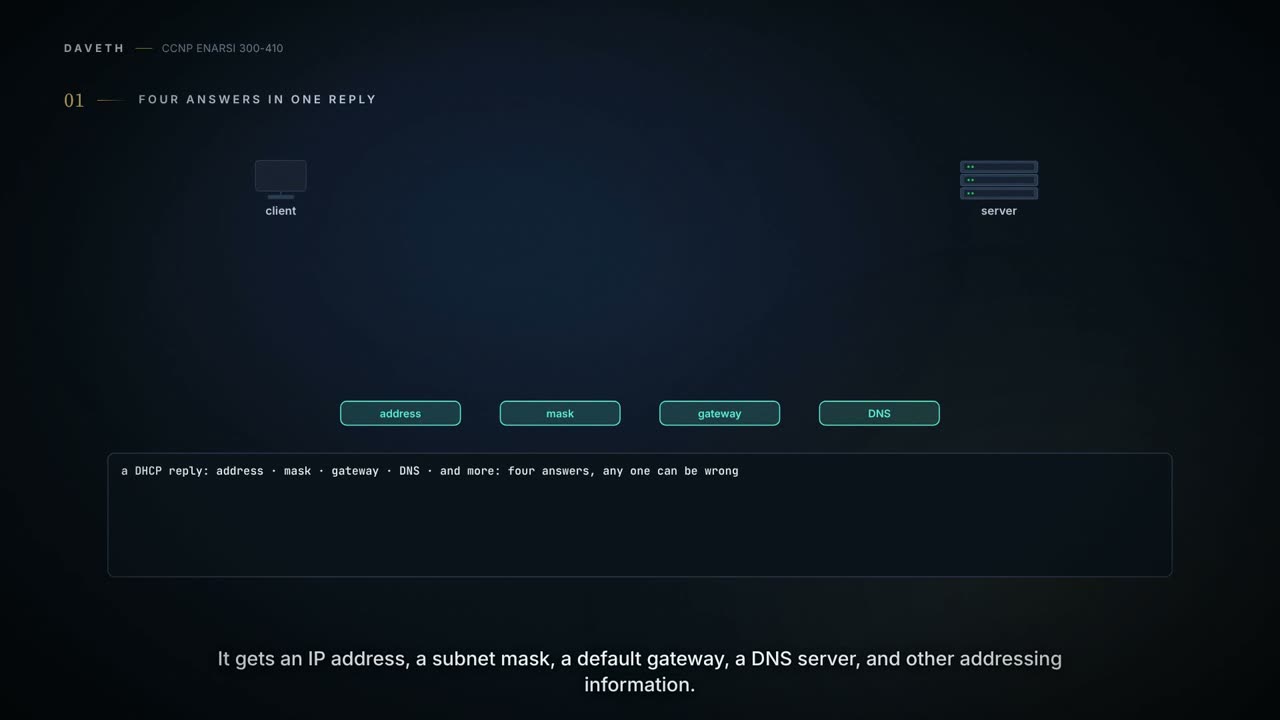
The Dynamic Host Configuration Protocol, DHCP, is the usual way an IPv4 host gets its address information. A DHCP client obtains an IP address, subnet mask, default gateway IP address, DNS server IP address and other addressing information from a DHCP server. The server can be in the client's own subnet, in a remote subnet, or be the same device as the default gateway. Hold the list: address, mask, gateway, DNS. A "got an address" is four answers in one reply, and any of them can be wrong.
Your home router most likely gets its address from your provider by DHCP and is the DHCP server for everything in your home; in a company network, a PC that boots gets its configuration from a corporate DHCP server. The exchange is called DORA, for its four messages: Discover, Offer, Request and Acknowledgment.
- The client has no address, no gateway, nothing. So it broadcasts a DHCPDISCOVER to destination IP address 255.255.255.255 and destination MAC address FFFF:FFFF:FFFF, from source IP address 0.0.0.0 and its own MAC address.
- A server that receives it can answer with a DHCPOFFER: an unleased address, a subnet mask and default gateway information. Because the Discover was a broadcast, more than one server may offer, and the client typically takes the first offer it receives.
- The client broadcasts a DHCPREQUEST saying it will use the offered address and wants it leased to itself.
- The server answers with a DHCPACK: the address is leased to the client, with any other options needed, such as the lease duration.
Two of those messages are broadcasts, and step 2's "first offer wins" means a stray server on the LAN can win too.
Across a router: the relay writes its own address in
Step 1 was a broadcast, and a broadcast can't cross a router boundary. So if the client is on a different network from the server, the client's default gateway has to be configured as a DHCP relay agent, which forwards the broadcasts to the server as unicasts. The command is ip helper-address ip_address, in interface configuration mode.
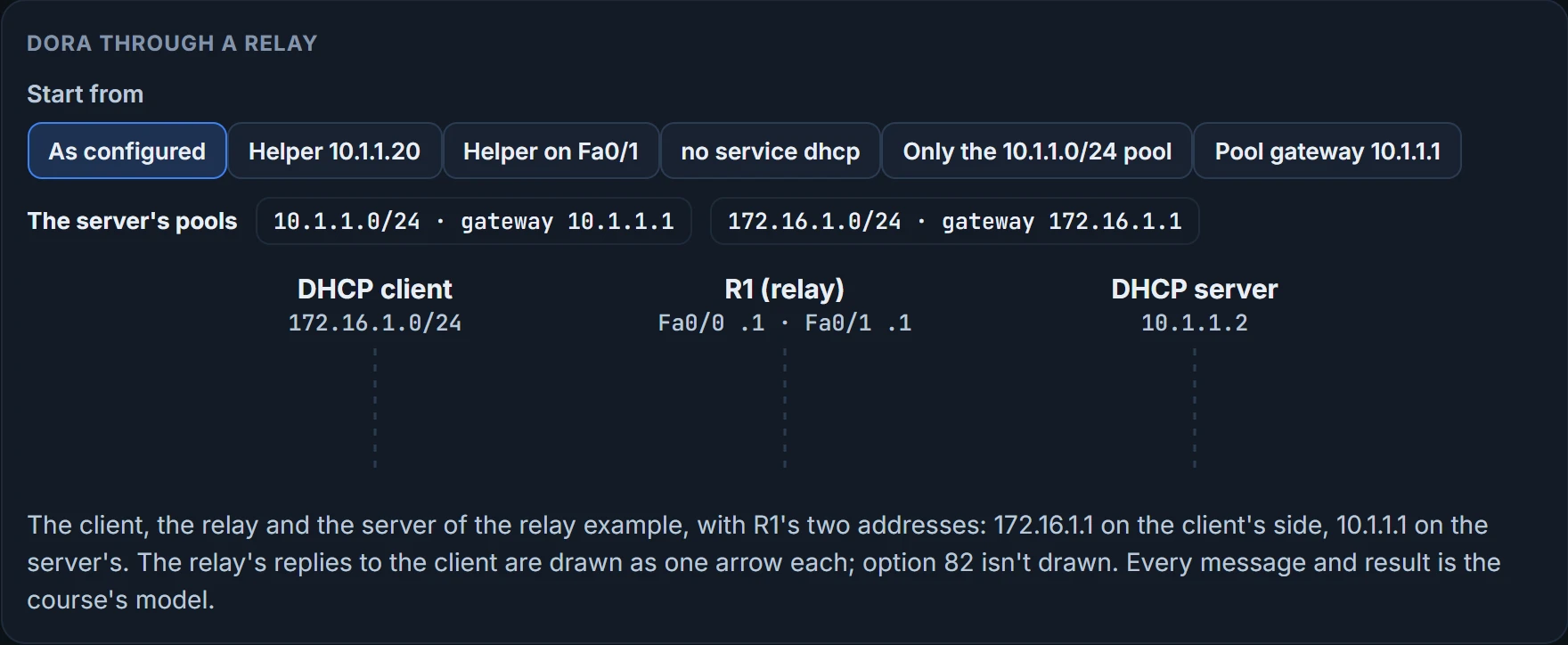
Here's a relay: R1 between a client on 172.16.1.0/24 and a server on 10.1.1.0/24. R1's Fa0/0 is 172.16.1.1 on the client's side, and its Fa0/1 is 10.1.1.1 on the server's; the server is 10.1.1.2:
R1# configure terminal
Enter configuration commands, one per line. End with CNTL/Z.
R1(config)# service dhcp
R1(config)# interface fa 0/0
R1(config-if)# ip helper-address 10.1.1.2
Three things can be wrong in those lines. service dhcp enables the DHCP service, which must be on; it's on by default, so it's usually not needed, but when you troubleshoot a relay you might confirm it. The helper's address is the server's: give the wrong one and the messages are relayed to the wrong device. And the helper goes on the interface that receives the clients' DHCPDISCOVER messages; anywhere else, the router can't relay them.
The relay doesn't only relay DHCP. It also forwards TFTP, DNS, Internet Time Service, NetBIOS name server, NetBIOS datagram server, BootP and TACACS. Worth knowing before you put a helper on a busy interface.
Now a question the commands don't answer. A server behind a relay doesn't need an interface in the subnet it hands out, and the client has no address yet, so it can't say where it is.
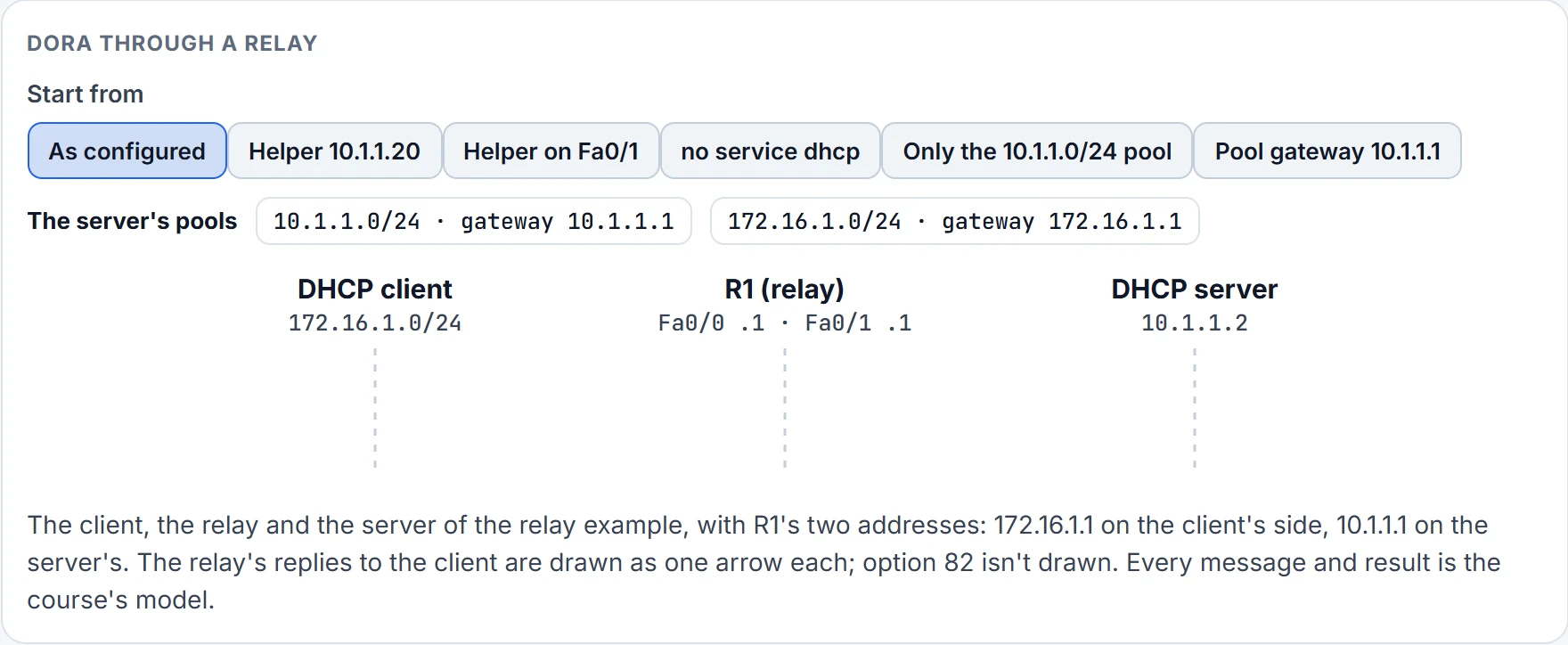
Step 1 of 9
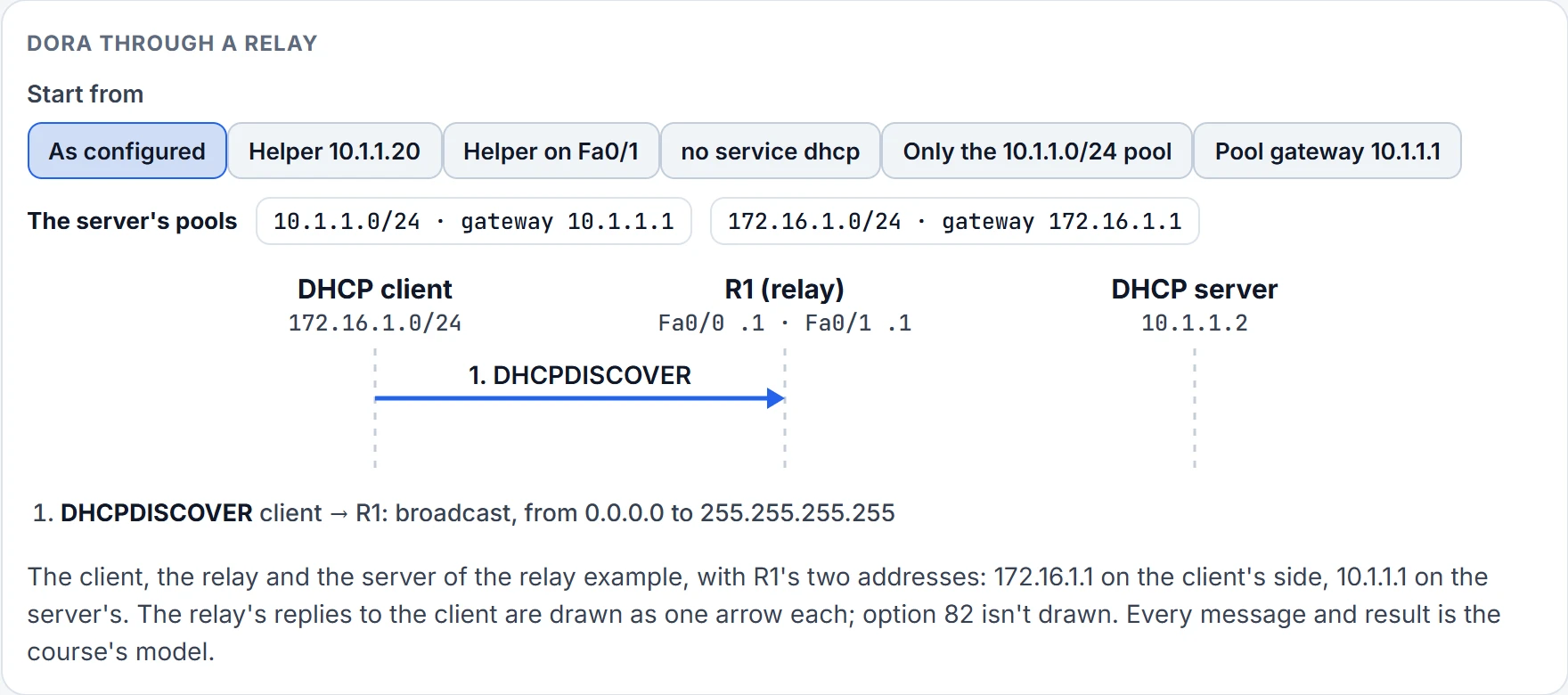
Step 2 of 9 Message 1 of 8.
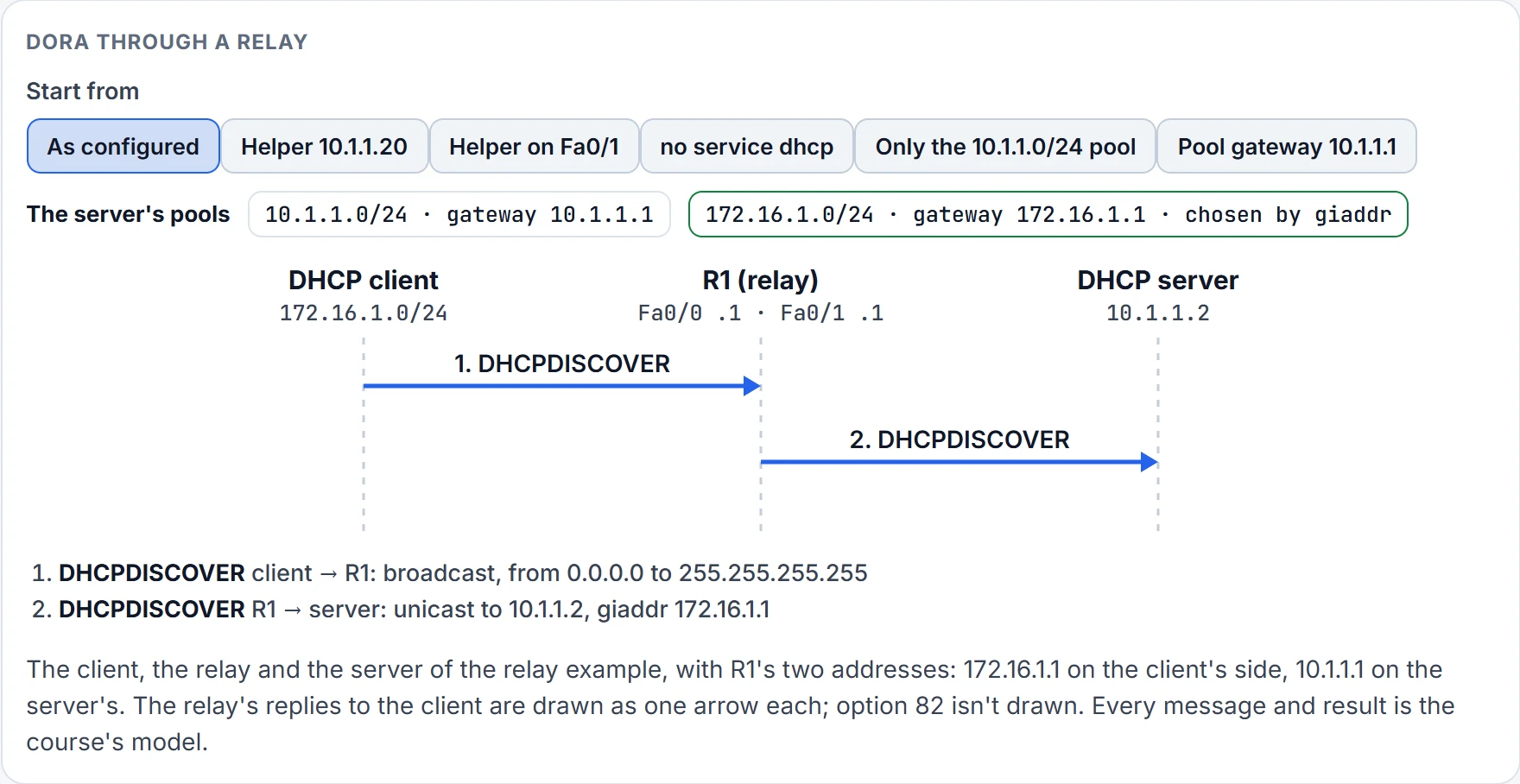
Step 3 of 9 Message 2 of 8.
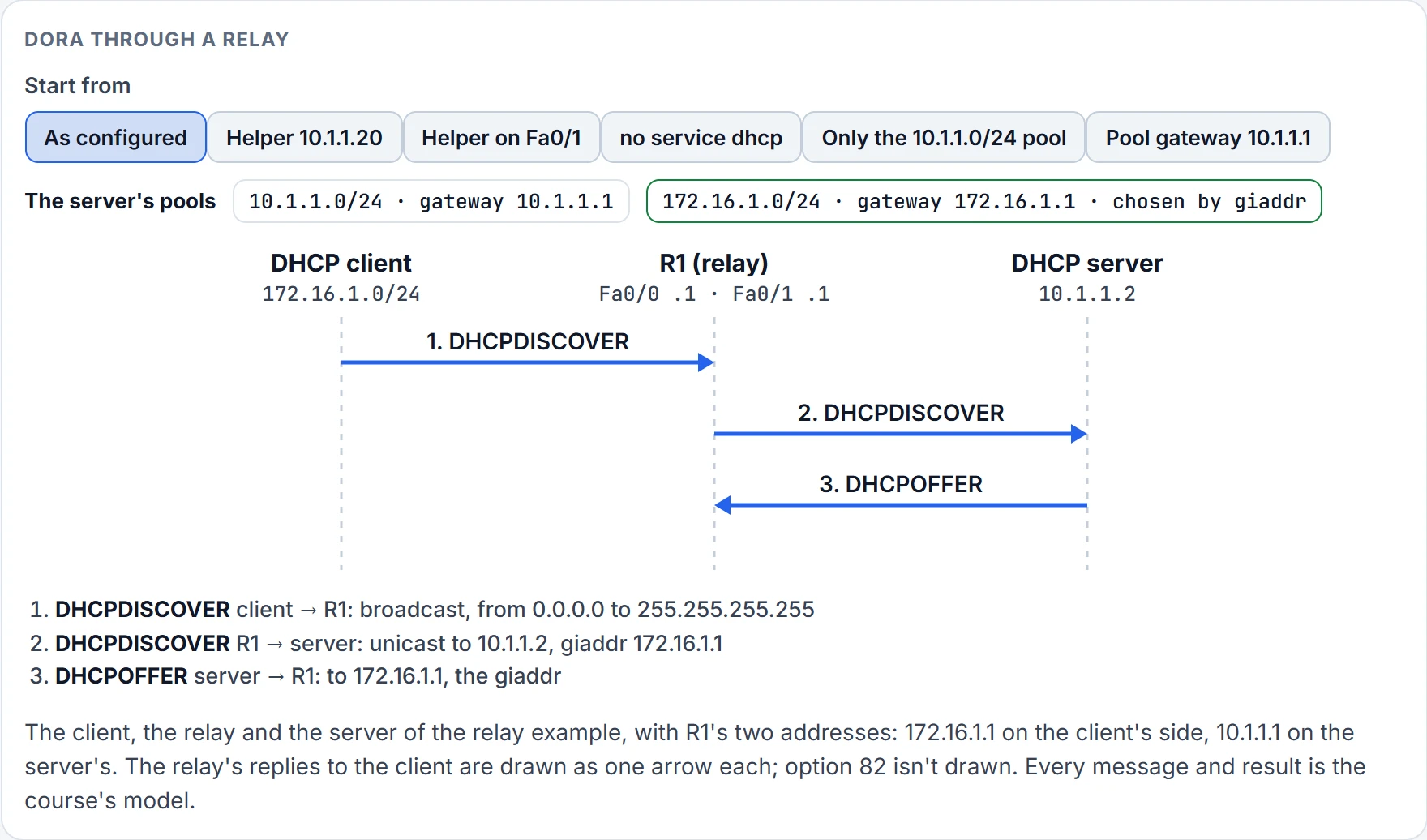
Step 4 of 9 Message 3 of 8.
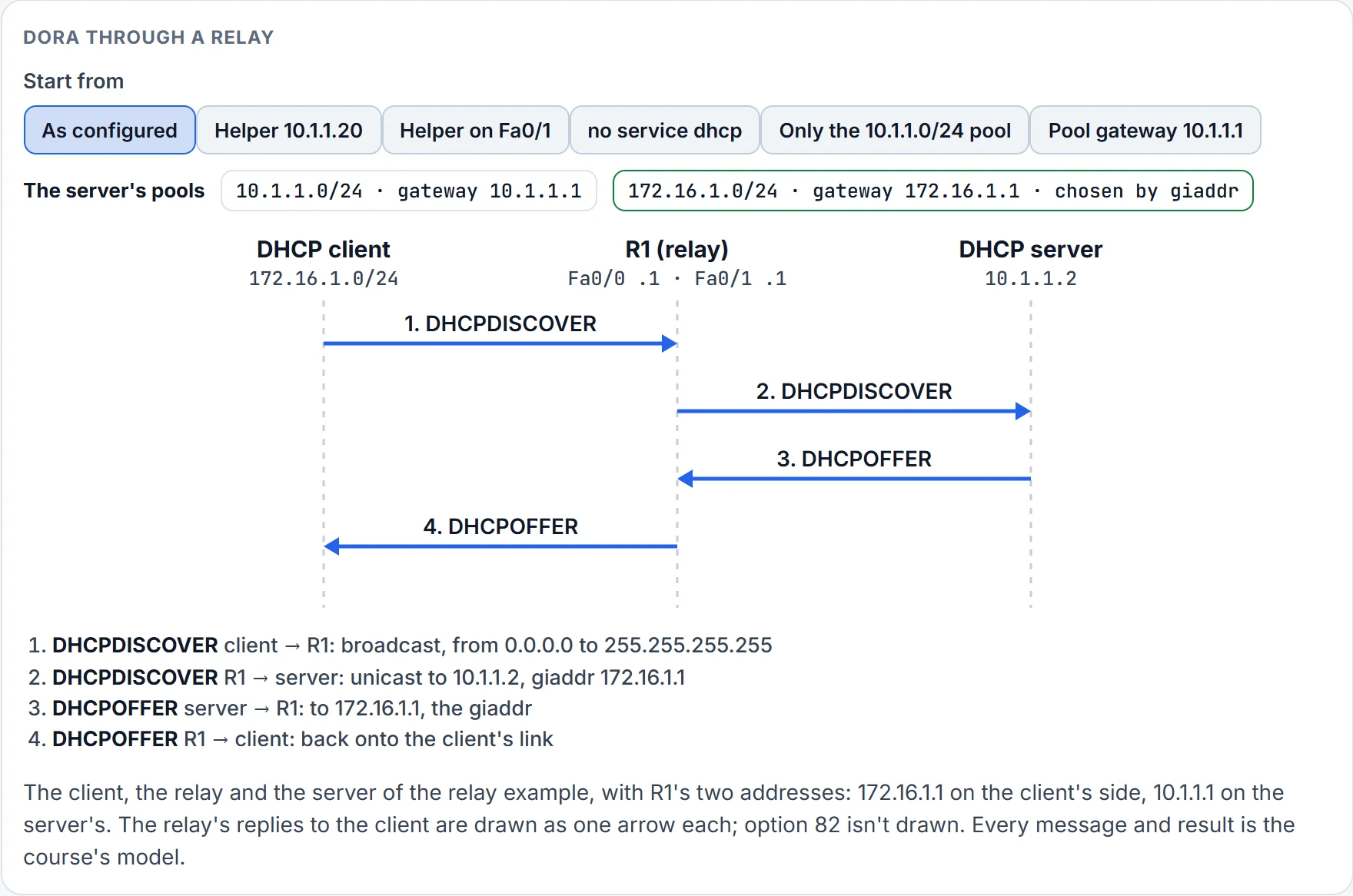
Step 5 of 9 Message 4 of 8.
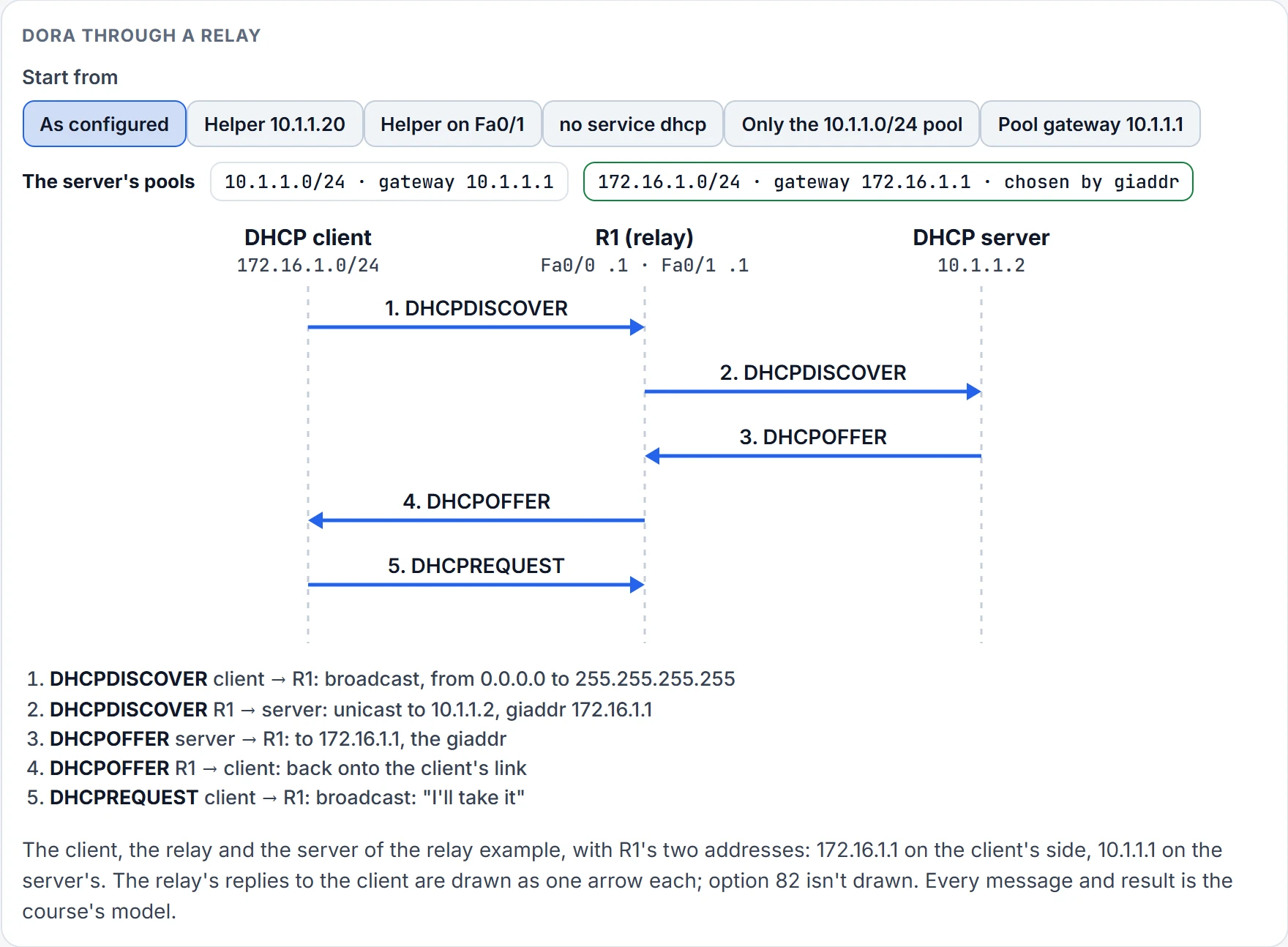
Step 6 of 9 Message 5 of 8.
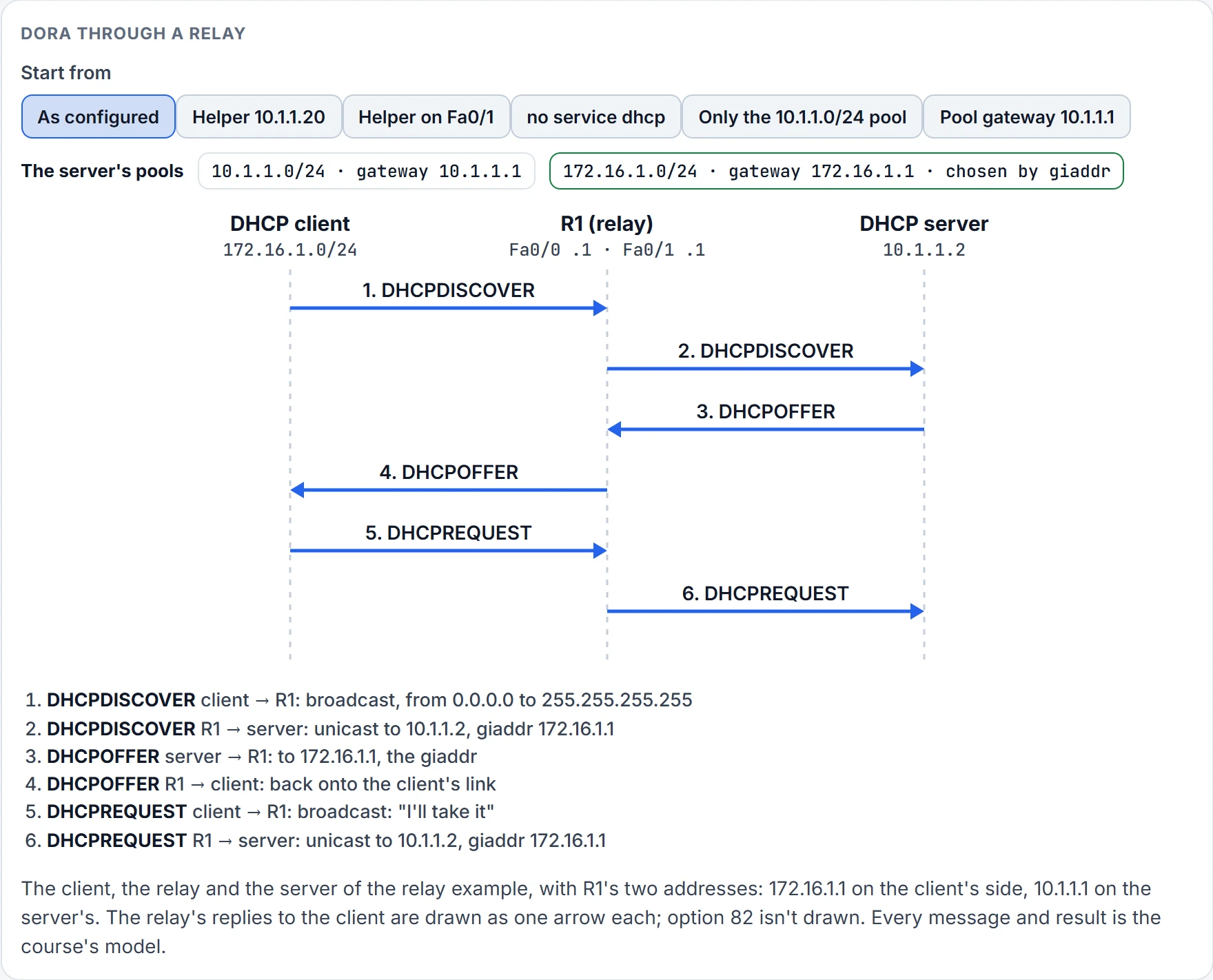
Step 7 of 9 Message 6 of 8.
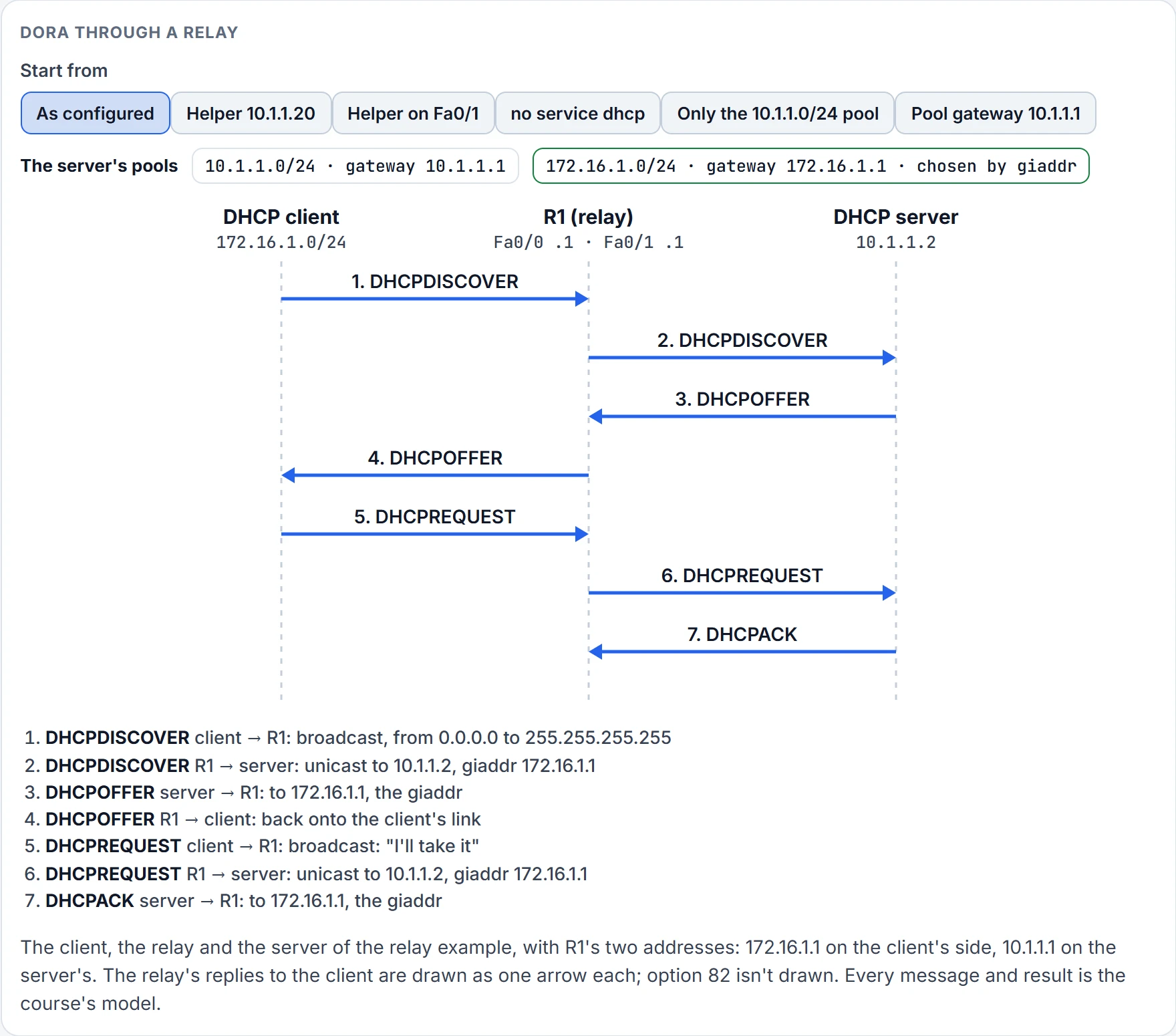
Step 8 of 9 Message 7 of 8.
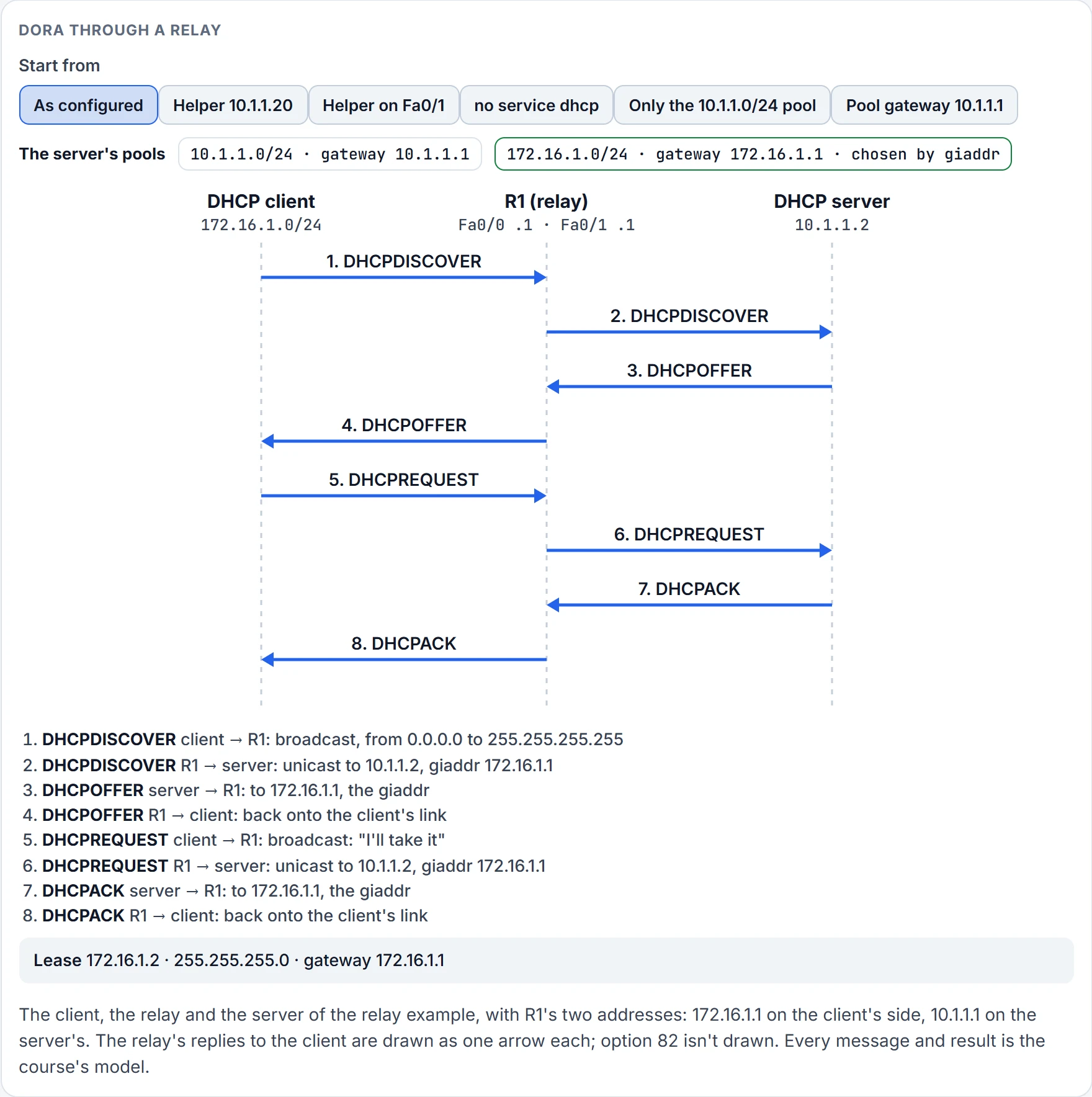
Step 9 of 9 Done: the client has its lease.
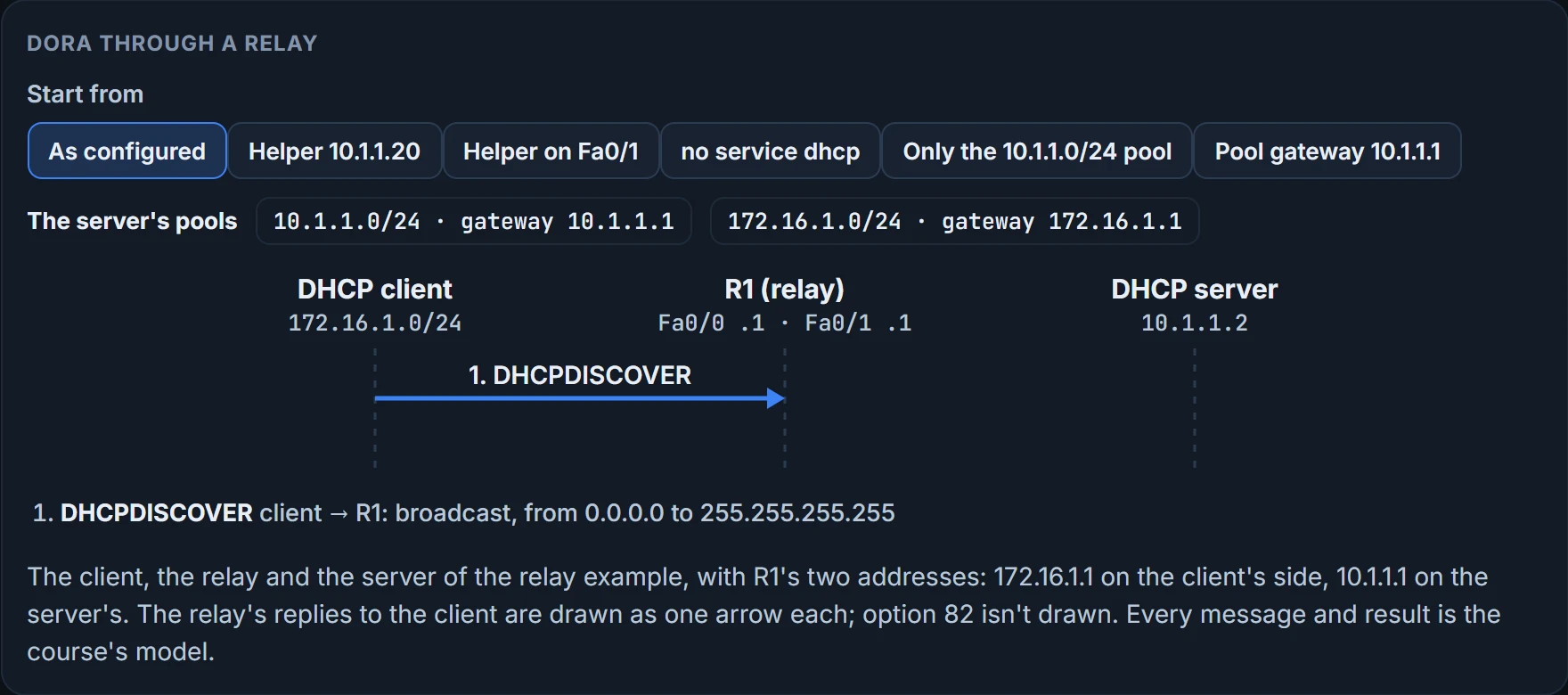
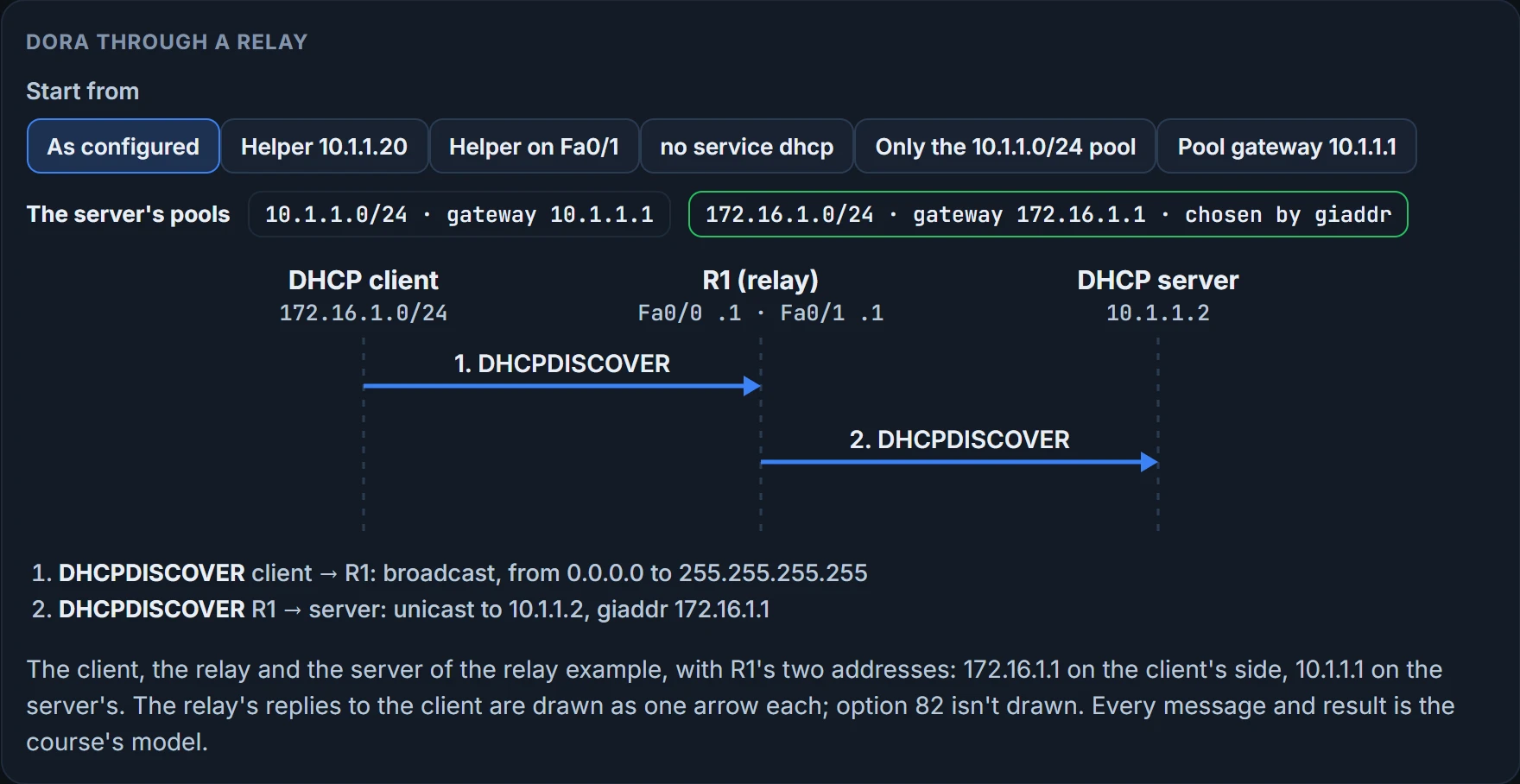
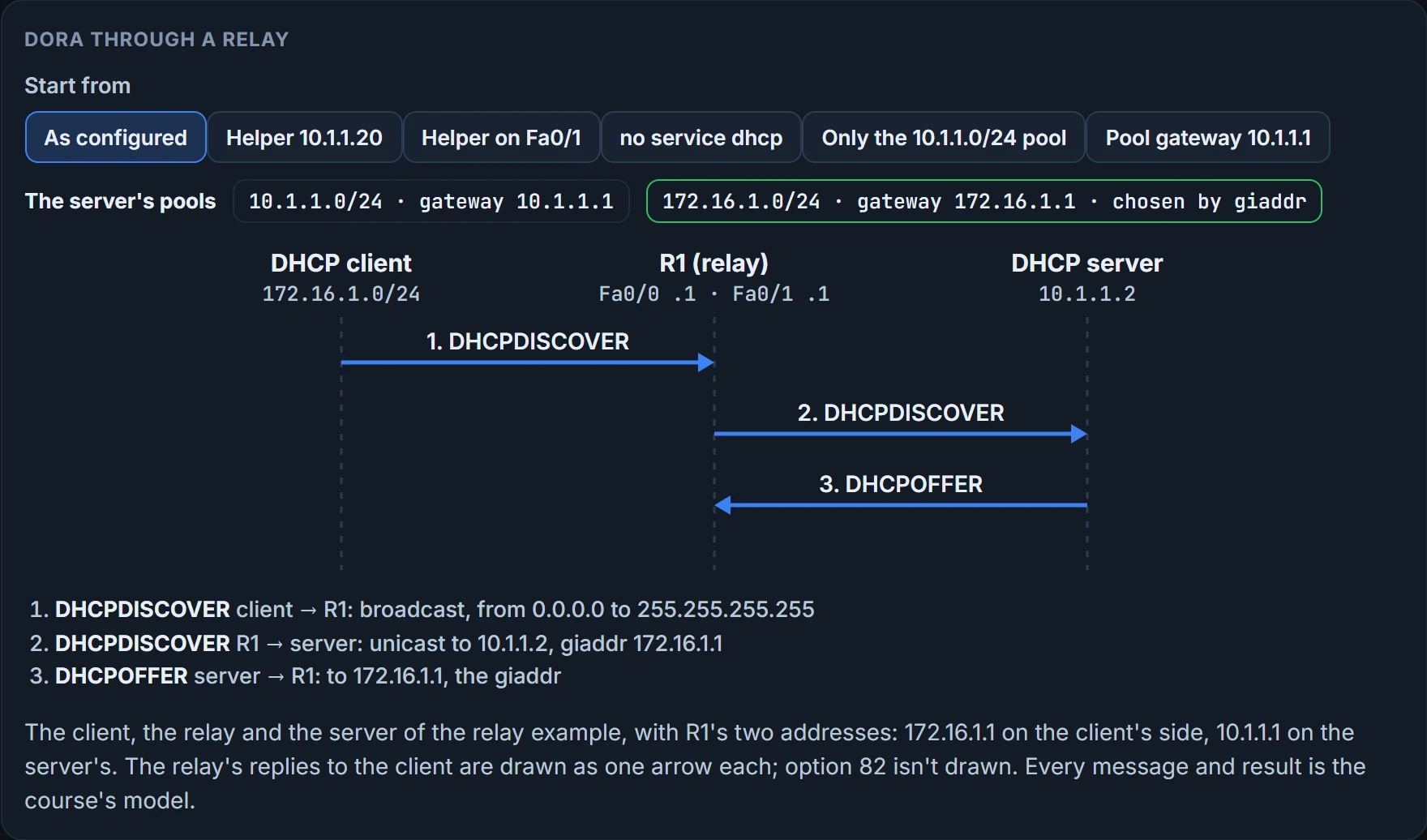
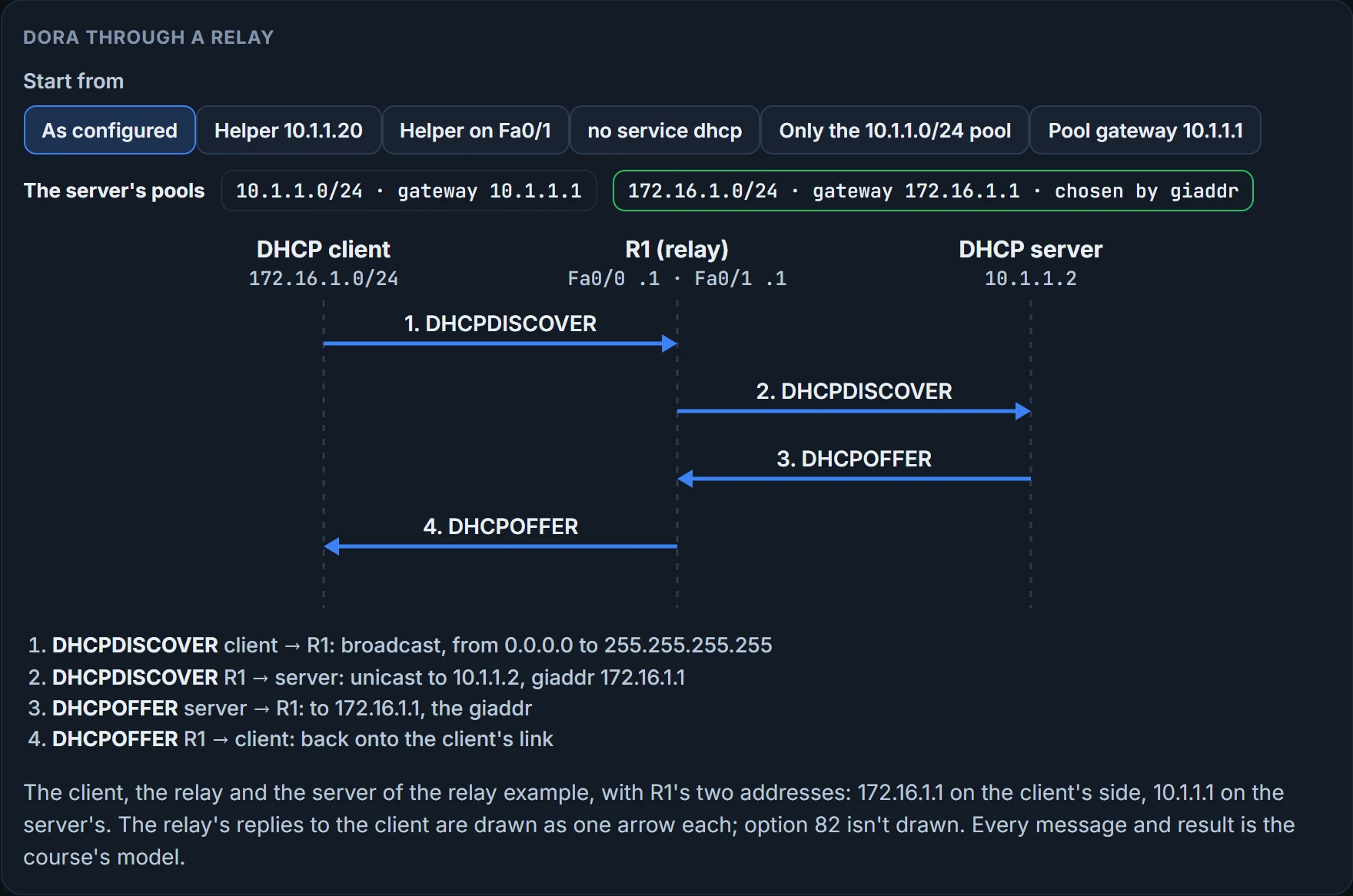
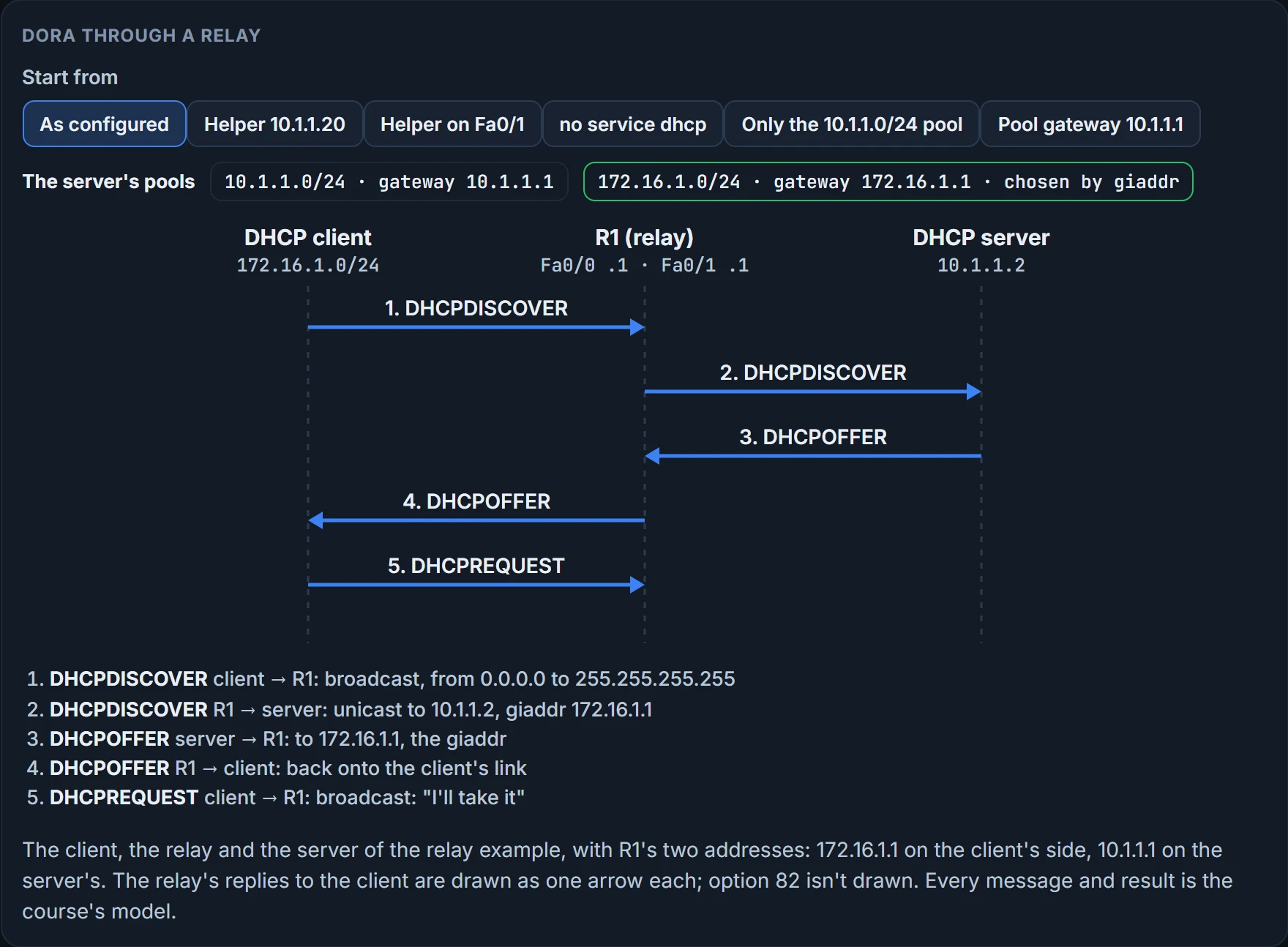
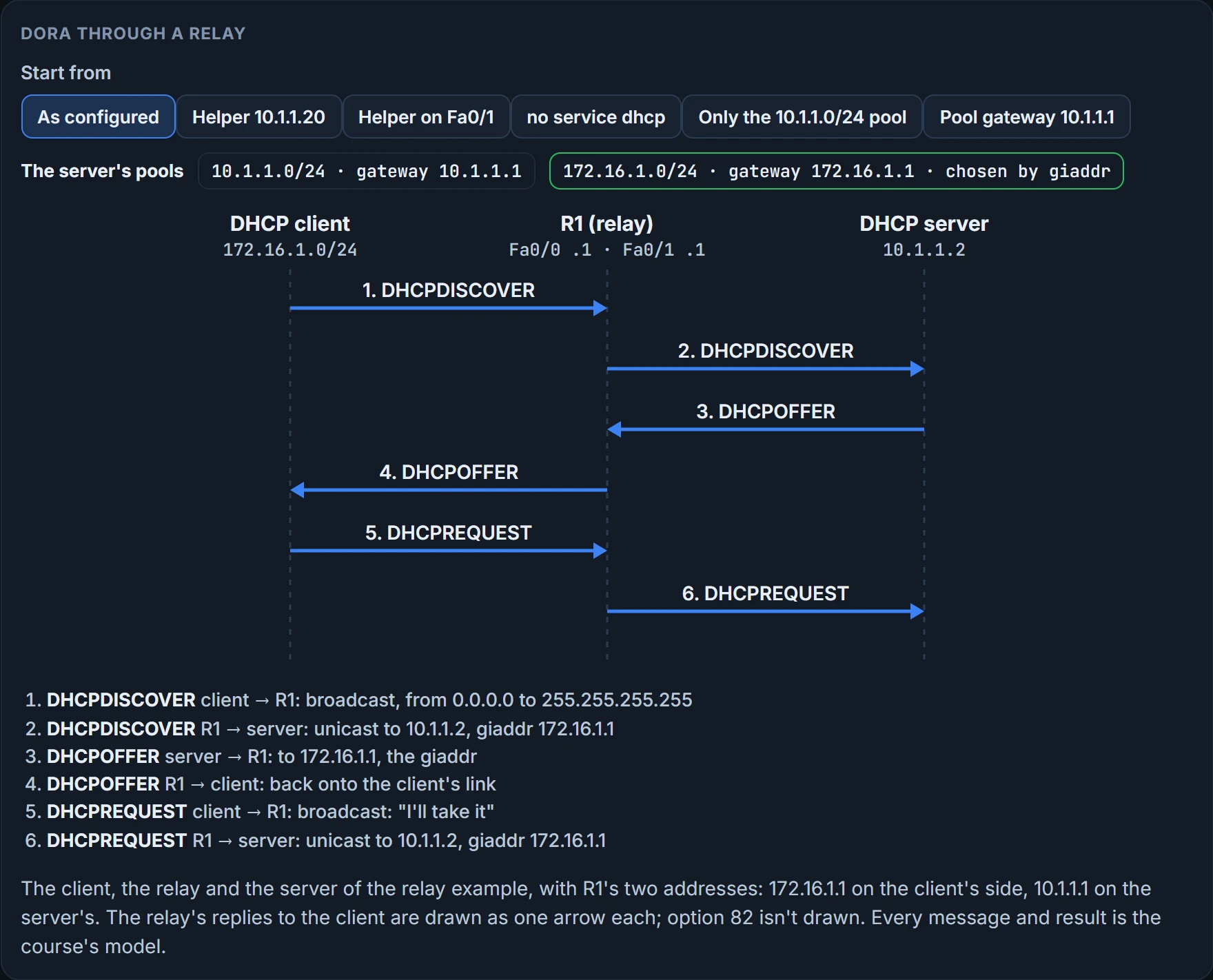
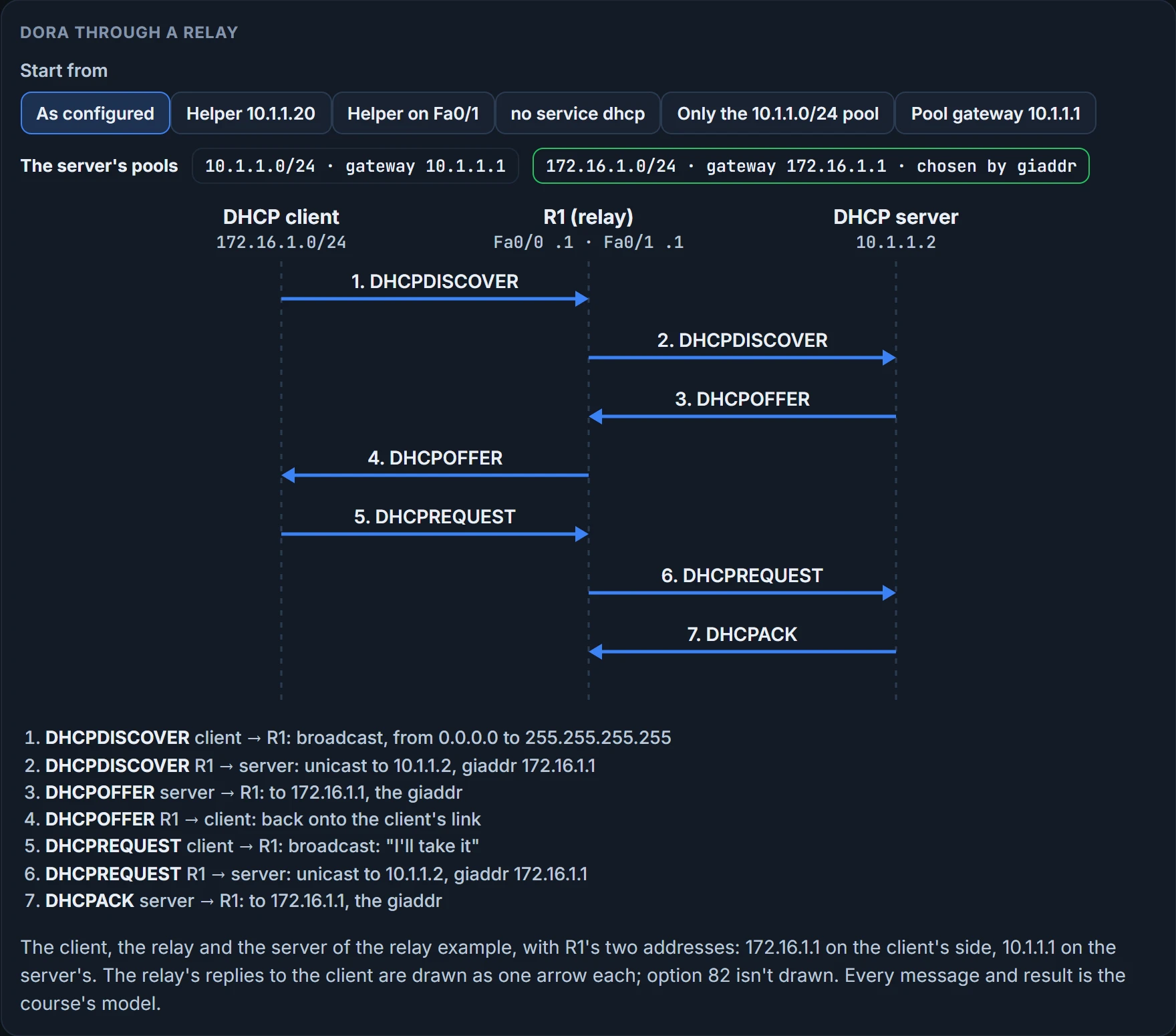
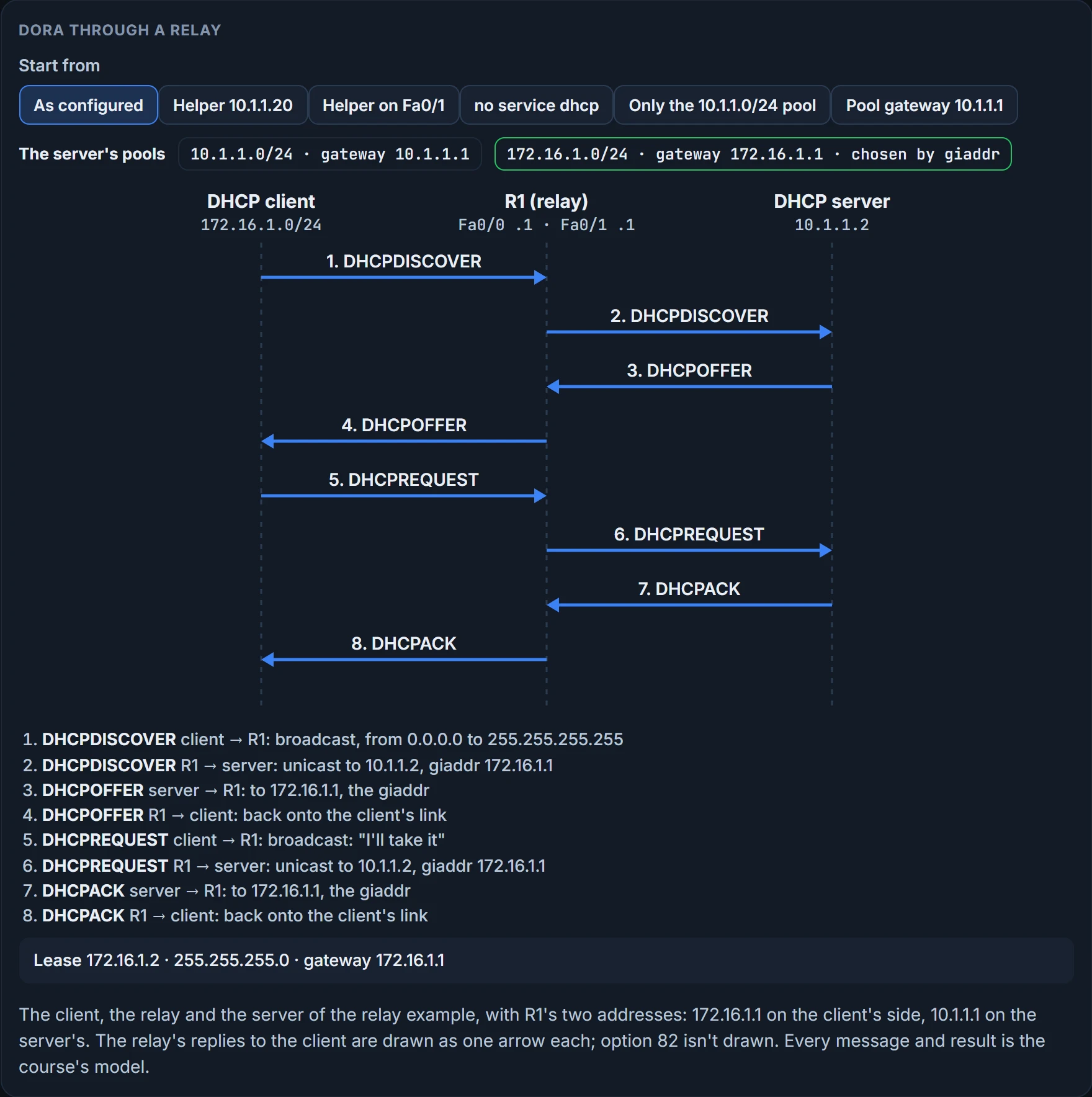
The 172.16.1.0/24 pool, and the reason is the relay. When R1 forwards the Discover, it writes its own address on the interface the Discover came in on into a field of the message, the gateway address field, giaddr: here 172.16.1.1. The server reads it. If giaddr isn't zero, the client isn't directly connected, and the server matches the Discover with the pool whose subnet contains the giaddr address. If giaddr is zero, the client is directly connected and the server uses the pools that match the subnets on the interface the Discover arrived on. The client said nothing about where it is. The relay's address said it for it.
That is why a server behind a relay needs no interface in the pool: the subnet comes from giaddr. And it gives you a line to recognise. A server's debug ip dhcp server events output can end like this:
DHCPD: circuit id 00000000
DHCPD: no subnet configured for 192.168.1.238.
On our reading, that's a server that got a relayed Discover whose giaddr, 192.168.1.238, falls in no pool it has. The relay worked. The server had nothing to match. With only one pool, the same thing happens for 172.16.1.1.
Two more things the relay changes. The server sends its replies to the relay, on the server port, not to the client; the relay passes them back onto the client's link. And the relay adds a relay agent information option, option 82, which the server's reply loses again on the way back. So the server must be able to route back to the giaddr address: a pool can be right and the reply still go nowhere.
We haven't confirmed on a router which giaddr a relay uses on an interface with secondary addresses, or whether option 82 is added by default.
What the server is told to give
A router can be a DHCP client too: an interface takes its address from a server with ip address dhcp in place of an address and mask:
R1# configure terminal

R1(config)# int fa 0/1

R1(config-if)# ip address dhcp
And a router or a multilayer switch can be the DHCP server. Here's one:
R1# show run
...output omitted...
ip dhcp excluded-address 10.8.8.1 10.8.8.10
!
ip dhcp pool POOL-A
network 10.8.8.0 255.255.255.0
default-router 10.8.8.1
dns-server 192.168.1.1
netbios-name-server 192.168.1.2
option 150 10.150.150.150
...output omitted...
ip dhcp excluded-address 10.8.8.1 10.8.8.10 keeps those addresses from ever being assigned. You don't have to exclude the router's own interface address: the router never hands out its own interface IP address. ip dhcp pool POOL-A creates the pool, which hands out addresses from 10.8.8.0/24 with a default gateway of 10.8.8.1, a DNS server of 192.168.1.1, a WINS server of 192.168.1.2 and a TFTP server's address with option 150. Option 66 can also hand out a TFTP server's address.
Read that pool again as a list of answers. Every line after network is something the server will tell every client, right or wrong. Nothing checks that default-router is on the client's subnet; the advice for the command is only that the address should be on the same subnet as the client. Remember that line for the last section.
The messages you'll meet while troubleshooting, in short:
| Message | Who sends it, and what for |
|---|---|
| DHCPDISCOVER | the client, to locate a server; broadcast to 255.255.255.255, UDP port 67 |
| DHCPOFFER | a server, in response to a Discover, to UDP port 68 |
| DHCPREQUEST | the client, broadcast, asking for the address and options the Offer carried |
| DHCPDECLINE | the client, telling the server the address is already in use on the network |
| DHCPACK | the server, with the IP configuration parameters |
| DHCPNAK | the server, declining to provide the requested configuration |
| DHCPRELEASE | the client, giving its lease back so the address can go to another client |
| DHCPINFORM | the client, asking for configuration parameters only; an access server might send it for a remote client |
No address at all
When a client set to use DHCP shows an Automatic Private IP Addressing address, 169.254.x.x, it couldn't get an address from a DHCP server:
C:\>ipconfig /all
Windows IP Configuration
...output omitted...
Ethernet adapter PC1 Lab:
Connection-specific DNS Suffix . :
Description . . . . . . . . . . .: AMD PCNET Family PCI Ethernet A
Physical Address. . . . . . . . .: 08-00-27-5D-06-D6
Dhcp Enabled. . . . . . . . . . .: Yes
Autoconfiguration Enabled . . . .: Yes
Autoconfiguration IP Address. . .: 169.254.180.166
Subnet Mask . . . . . . . . . . .: 255.255.0.0
IP Address. . . . . . . . . . . .: 2001:10::10
IP Address. . . . . . . . . . . .: fe80::a00:27ff:fe5d:6d6%4
Default Gateway . . . . . . . . .:
But don't assume DHCP is the problem. It may be a Layer 3 routing problem, or Layer 2 (VLANs, trunks, STP, or security) keeping the Discover from reaching the server. APIPA tells you the conversation didn't finish. It doesn't tell you where it stopped.
The things to consider:
- Router failing to forward broadcasts. By default a router doesn't forward broadcasts, Discovers included, so it has to be configured as a relay when client and server are on different subnets.
- Pool out of addresses. A pool holds a finite number of addresses; once it's depleted, new requests are rejected.
- Misconfiguration. The pool's range of addresses may be wrong, or the exclusions of addresses statically assigned to routers or DNS servers. Even the lease can be too long or too short: too long can exhaust the pool when there are more clients than it supports. Take an airport: 4096 addresses with 12-hour leases, and nobody stays more than 4 hours, so every address stays leased long after its user has flown, and the pool runs out as the day goes on; a 2-hour lease lets addresses come back sooner.
- Duplicate addresses. A server may hand out an address that's statically assigned to another host, and both hosts then have connectivity problems.
- Redundant services not communicating. Servers that back each other up must talk; if they can't, they hand out overlapping addresses.
- The "pull" nature of DHCP. The client pulls; the server can't push a change to a client after it has its address. Keep this one too.
- Interface not configured with an address in the pool. A router or multilayer switch acting as a server must have an interface with an address in the pool's subnet, and it only hands that pool to clients reachable out that interface. Not so behind a relay: then the server needs no interface in the pool. The section before said why.
The commands. show ip dhcp conflict lists addresses found in use twice:
R1# show ip dhcp conflict

IP address   Detection method   Detection time

172.16.1.3   Ping              Oct 15 2018 8:56 PM
172.16.1.3 is a duplicate, found by a ping; once you've fixed the duplicate, clear ip dhcp conflict * clears the list. The server checks for conflicts with ping and gratuitous ARP, and a conflicting address is taken out of the pool until the administrator resolves it.
show ip dhcp binding lists the leases:
R1# show ip dhcp binding
Bindings from all pools not associated with VRF:
IP address   Client-ID/           Lease expiration       Type
            Hardware address/
            User name
10.1.1.3     0100.50b6.0765.7a    Oct 17 2018 07:53 PM   Automatic
10.1.1.10    0108.0027.5d06.d6    Oct 17 2018 07:53 PM   Automatic
10.1.1.10 was assigned to a client; clear ip dhcp binding * releases the leases. debug ip dhcp server events shows updates to the DHCP database; its last line was the "no subnet configured" line above. debug ip dhcp server packet shows the messages themselves: a DHCPRELEASE as a client at 10.1.1.3 shuts down, and a client getting 10.1.1.4 through Discover, Offer, Request and Ack, with the server broadcasting each reply on its own link.
A ticket. PC1 (10.1.1.10) and PC2 (10.1.1.20) on 10.1.1.0/26, R1's Gig0/0 10.1.1.1 as their gateway, the DHCP server at 172.16.1.10 out R1's Gig2/0. PC1 can't reach the web server 192.0.2.1. PC1 can't ping it, can't ping its gateway 10.1.1.1, and PC2 can't ping either. So there's no Layer 2 or Layer 3 connectivity from either PC to the gateway, and VLANs, VACLs, trunks, VTP and STP could all cause that; check the basics first, starting with the client's addressing. PC1 shows:
C:\PC1>ipconfig
Windows IP Configuration
Ethernet adapter Local Area Connection:
Connection-specific DNS Suffix . :
IP Address. . . . . . . . . . . .: 169.254.180.166
Subnet Mask . . . . . . . . . . .: 255.255.0.0
Default Gateway . . . . . . . . .:
It means PC1 can't contact a DHCP server and is autoconfiguring; it still doesn't rule out VLANs, trunks, VTP or STP, but it narrows the focus. The server is out Gig2/0, in another subnet, so R1 has to relay, and that needs ip helper-address on Gig0/0:
R1# show run interface gigabitEthernet 0/0
Building configuration...
Current configuration : 193 bytes
!
interface GigabitEthernet0/0
ip address 10.1.1.1 255.255.255.192
ip helper-address 172.16.1.100
ip nat inside
end
172.16.1.100, not the server's 172.16.1.10. After no ip helper-address 172.16.1.100 and ip helper-address 172.16.1.10, PC1 gets 10.1.1.10, 255.255.255.192 and gateway 10.1.1.1 from the server, and its ping to 192.0.2.1 succeeds. With the helper set to 10.1.1.20, the Discover goes as a unicast to an address nobody answers on, so no Offer ever comes back.
We haven't confirmed on a router which free address a server hands out first.
IPv6: the router answers first
Assigning addresses by hand doesn't scale in either family. IPv4 has DHCP; IPv6 has three dynamic options: SLAAC (stateless address autoconfiguration), stateful DHCPv6 and stateless DHCPv6.
SLAAC lets a device configure its own IPv6 address, prefix and default gateway with no DHCPv6 server. Windows PCs have it enabled automatically. A router uses it only when you enable it on an interface with ipv6 address autoconfig. A device enabled for SLAAC sends a Router Solicitation (RS) to find routers on the link and waits for a Router Advertisement (RA) carrying the prefix the router uses; then it builds its own address in that prefix. A router builds the interface portion with EUI-64, and a PC generates it randomly. And the PC takes the link-local address of whoever sent the RA as its default gateway.
That last sentence is the IPv6 half of this lesson's answer. In IPv4 the gateway was one of the server's answers. In IPv6 it's the router's, carried in the RA.
R1 sends its RA out Gig0/0 from that interface's link-local address and MAC address, to the all-nodes link-local multicast FF02::1 and its MAC 33:33:00:00:00:01, which every IPv6-enabled interface listens to by default. PC1 takes the prefix, 2001:db8:a:a::/64, makes up its interface portion, and uses the RA's source as its gateway:
C:\PC1>ipconfig
Windows IP Configuration
Ethernet adapter Local Area Connection:
Connection-specific DNS Suffix . :
IPv6 Address. . . . . . . . . . .: 2001:db8:a:a:279:fc9b:eed4:3cd
Link-local IPv6 Address . . . . .: fe80::279:fc9b:eed4:3cd6%11
IPv4 Address. . . . . . . . . . .: 10.1.1.10
Subnet Mask . . . . . . . . . . .: 255.255.255.192
Default Gateway . . . . . . . . .: fe80::c80a:eff:fe3c:8%11
                                   10.1.1.1
On a router, show ipv6 interface shows the SLAAC address, and lists the default router as the RA sender's link-local address, but only when the router itself doesn't have IPv6 unicast routing enabled and so acts as an end device.
What an RA needs. A router generates RAs on an interface by default only if the interface is enabled for IPv6, IPv6 unicast routing is enabled, and RAs aren't suppressed on it. So when SLAAC isn't working, check four things:
ipv6 unicast-routingon the router that should send RAs:show run | include ipv6 unicast-routing.- The interface is enabled for IPv6:
show ipv6 interface. - The interface has a /64 prefix, because SLAAC works only on a /64:
show ipv6 interface. - RAs aren't suppressed:
show ipv6 interface, which says "ND RAs are suppressed (all)" when they are.
R1# show ipv6 interface gigabitEthernet 0/0
GigabitEthernet0/0 is up, line protocol is up
IPv6 is enabled, link-local address is FE80::C80A:EFF:FE3C:8
No Virtual link-local address(es):
Global unicast address(es):
2001:DB8:A:A::1, subnet is 2001:DB8:A:A::/64
...output omitted...
ND DAD is enabled, number of DAD attempts: 1
ND reachable time is 30000 milliseconds (using 30000)
ND RAs are suppressed (all)
Hosts use stateless autoconfig for addresses.
One more trap. With more than one router sending RAs on a subnet, which is normal with redundant gateways, the clients learn more than one default gateway. That helps only if every gateway can reach the same networks: with two routers on PC1's link and only one of them with a route to the web server, PC1 using the other gets "Destination net unreachable" to the web server. If users can't reach resources on a link with several routers sending RAs, check the gateways SLAAC learned and that each can route to what's wanted. Who may send an RA at all is a security question, and the first-hop security lesson's RA guard answers it.
Continue the lesson
The whole lesson, with its drawings and its questions. 3 more sections after the ones above.