
Moving files: TFTP, FTP, SCP, HTTP(S)
The same copy command can work to one server and fail to another, and each protocol owns part of the reason. TFTP runs over UDP port 69 and never asks who you are. FTP uses TCP ports 21 and 20 and a login the server can refuse. SCP rides on SSH and also needs AAA, so the router can decide whether the user may copy.
By Arif, founder of Daveth · Updated
The full 16 min walkthrough is in Daveth Pro (Network). See what the plan opens
What this page answers
What port does TFTP use?
UDP port 69. TFTP is unsecure and unreliable: it has no user authentication, and if you need reliable transport, use a TCP-based protocol such as FTP. Read it in “TFTP: nobody asks who you are”
What ports does FTP use?
TCP ports 21 and 20: the control connection goes to the server's port 21, and the server's default data port is 20. Unlike TFTP it has a login, so the server can refuse you. Read it in “FTP: the same copy over TCP”
What does SCP need on a Cisco router?
Everything SSH needs, plus AAA enabled, so the router can determine whether the user is authorized to copy, and ip scp server enable. Read it in “SCP: a copy over SSH”
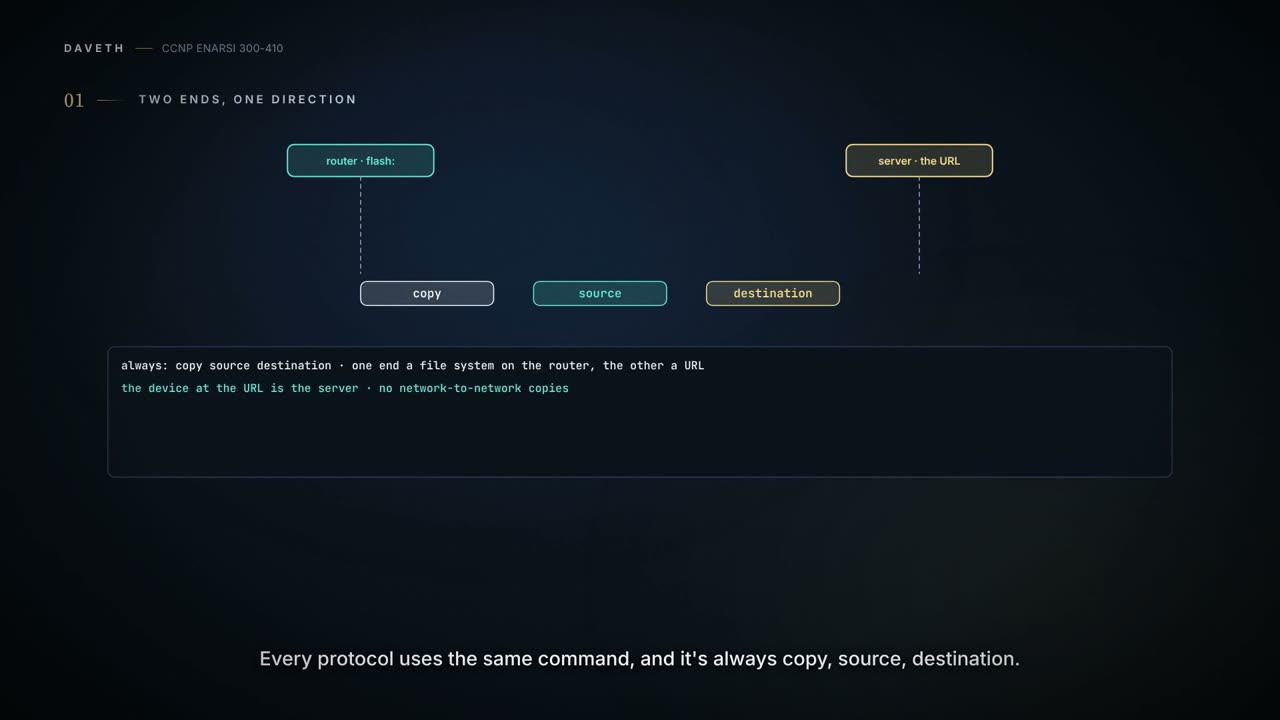
Two ends, one direction
Why does the same copy command work to one server and fail to another? Hold the question. Each protocol below gives part of the answer, and the last section puts it together on our network.
You'll need this soon enough. Cisco devices come preloaded with IOS and other files, but at some point you'll want to upgrade the IOS image or another file stored on the device, and there are many protocols that can do it. Sometimes it arrives in the middle of another job: you'll have to transfer configuration files or IOS images while you're troubleshooting something else. And when a transfer fails, you troubleshoot it by the protocol it used, which is how this lesson is cut: TFTP, FTP, HTTP and HTTPS, and SCP. Getting a router to a web server at all belongs to the lesson before this one. Here the file moves.
Start with the command, because every protocol uses the same one. It's always copy source destination. One end is a file system on the router, like flash:. The other is a URL, and the device at that URL is the server. If the URL is the source, the file comes down to the router; if it's the destination, the file goes up. Those two are a download and an upload, and the HTTP copy works the same way as copying from other remote file systems such as FTP or TFTP. One end has to be the router, too: there are no network-to-network copies.
Try it on one. A router runs this:
copy http://10.0.3.8/cisco_ios_files/c3900-universalk9-mz.SPA.156-3.M6a.bin flash:c3900-universalk9-mz.SPA.156-3.M6a.bin
The name ending in .bin is the IOS image file every example in this lesson moves.
In the examples the server is always 10.0.3.8 and the router is the client, whichever way the file goes. Keep that picture; the SCP section is where it turns round.
The server can be an IPv6 host just as well. An IPv6 address in a URL's host goes inside square brackets: the examples' server, given an IPv6 address of ours, is tftp://[2001:db8:3:3::8]/.... Nothing in the copy command itself belongs to one family.
We haven't confirmed on a router, for this section: that a router takes an IPv6 server address in a copy's URL in exactly that bracketed form.
TFTP: nobody asks who you are
TFTP is an unsecure protocol for moving files to and from a Cisco device using a TFTP server, and it runs over UDP port 69. That's why it's classed as unreliable: if you need reliable transport from source to destination, use a TCP-based protocol.
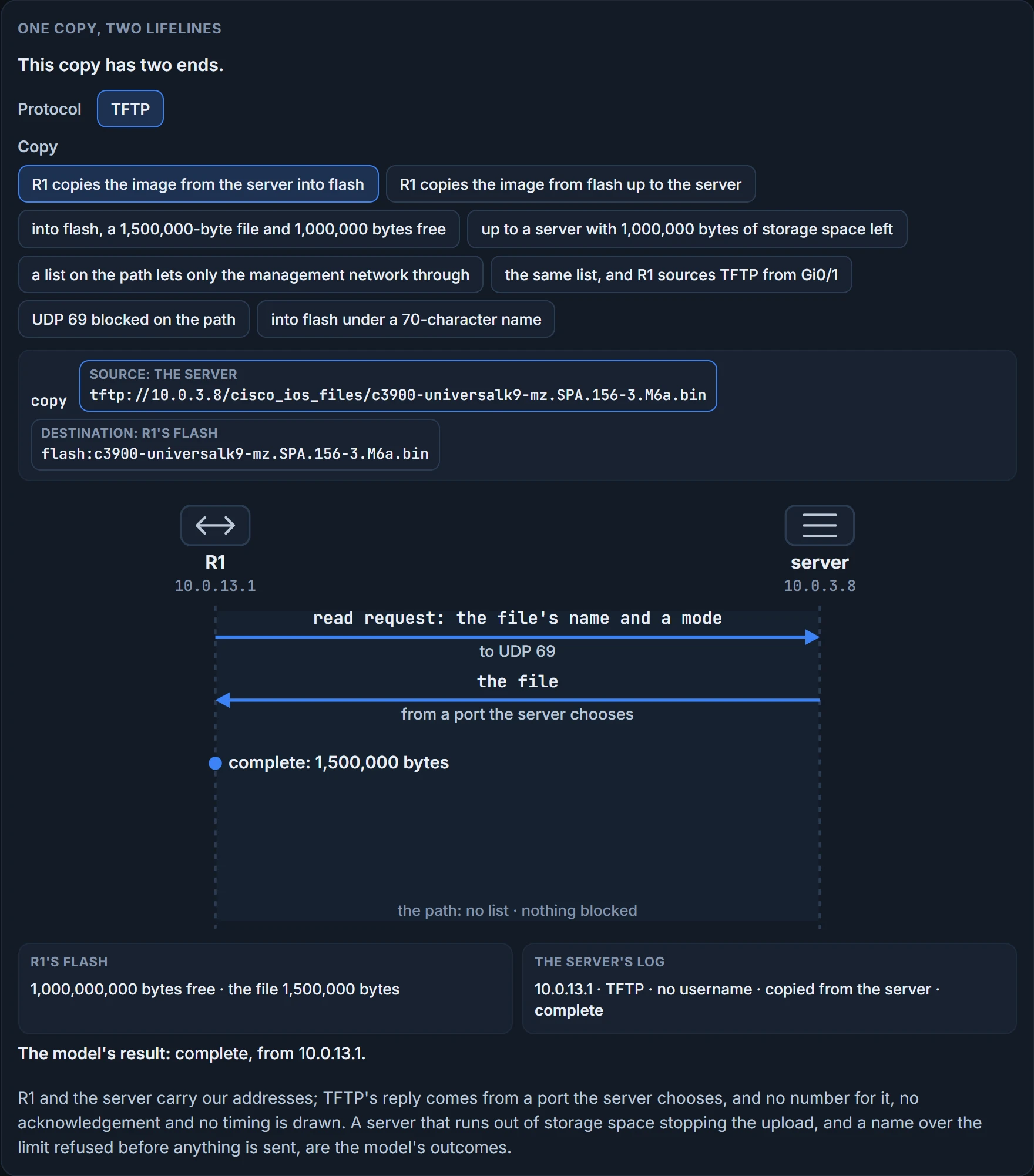
TFTP was built small and easy to implement, so it lacks most of FTP's features: it reads and writes files from and to a remote server, and it has no provisions for user authentication. It has had none since 1992. A transfer starts with a read or write request sent to port 69, and the request carries a filename and a mode.
So nobody checks who you are. Everything else, you have to.
Room at the receiving end. Copying to a TFTP server, make sure the server has enough storage space. Copying from one, make sure the storage location on the Cisco device has enough: show flash shows the free space, and you compare it with the size of the file you want. It proves the free space and the files already in flash, with their sizes. It doesn't prove the server has room, and it doesn't prove a file in flash is complete unless you set its size beside the original's.
Now look again at what the request carries: a filename and a mode. No size. So predict one.
Something else happens. The file is partially copied, and you get a failure message:
buffer overflow - xxxx /xxxx
The first number is the bytes read from the source file, the second the bytes available on the destination. A request with no size in it leaves the router nothing to check before the data starts.
A path to the server. Make sure the TFTP server is reachable from the Cisco device, and check along the path for access lists that might be blocking TFTP traffic. Which ports? The request goes to UDP 69, and the server answers from a port it chooses itself, so a list that permits only UDP 69 passes the request and then breaks the transfer: every packet after that goes to the server's chosen port. The figure below has no state for that one; it doesn't draw TFTP's acknowledgements.
The address it comes from. If you use a management interface for TFTP, ip tftp source-interface interface_type interface_number names the interface TFTP traffic is sourced from. Why it matters: a router sources packets from its exit interface, and an access list along the path judges that address.
Try it on this lesson's examples, where the router is R1. R1 reaches the server out of Gi0/0, 10.0.13.1 and 2001:db8:3:13::1; its management interface is Gi0/1, 10.0.99.1 and 2001:db8:3:99::1.
IPv6 follows the same rule: 2001:db8:3:13::1 leaves by Gi0/0 and meets the list, and 2001:db8:3:99::1 leaves once Gi0/1 is the source.
The command. copy source destination, as before. The two examples, from the server to flash and back:
copy tftp://10.0.3.8/cisco_ios_files/c3900-universalk9-mz.SPA.156-3.M6a.bin flash:c3900-universalk9-mz.SPA.156-3.M6a.bin
copy flash:c3900-universalk9-mz.SPA.156-3.M6a.bin tftp://10.0.3.8/cisco_ios_files/c3900-universalk9-mz.SPA.156-3.M6a.bin
The name. When copying to flash, keep the filename to 63 characters or fewer: flash memory has a 63-character limit on filenames. The image's name here is 38.
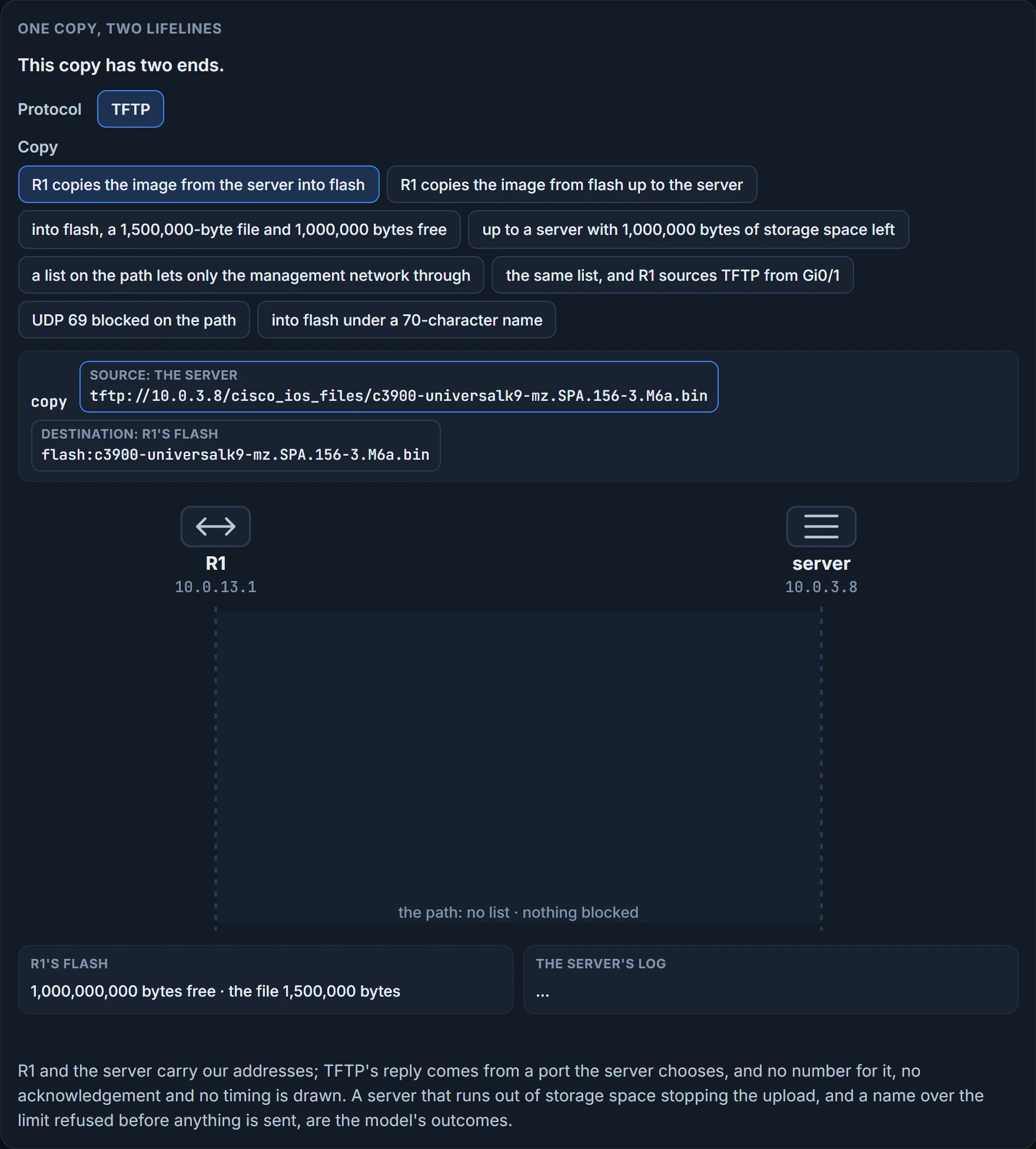
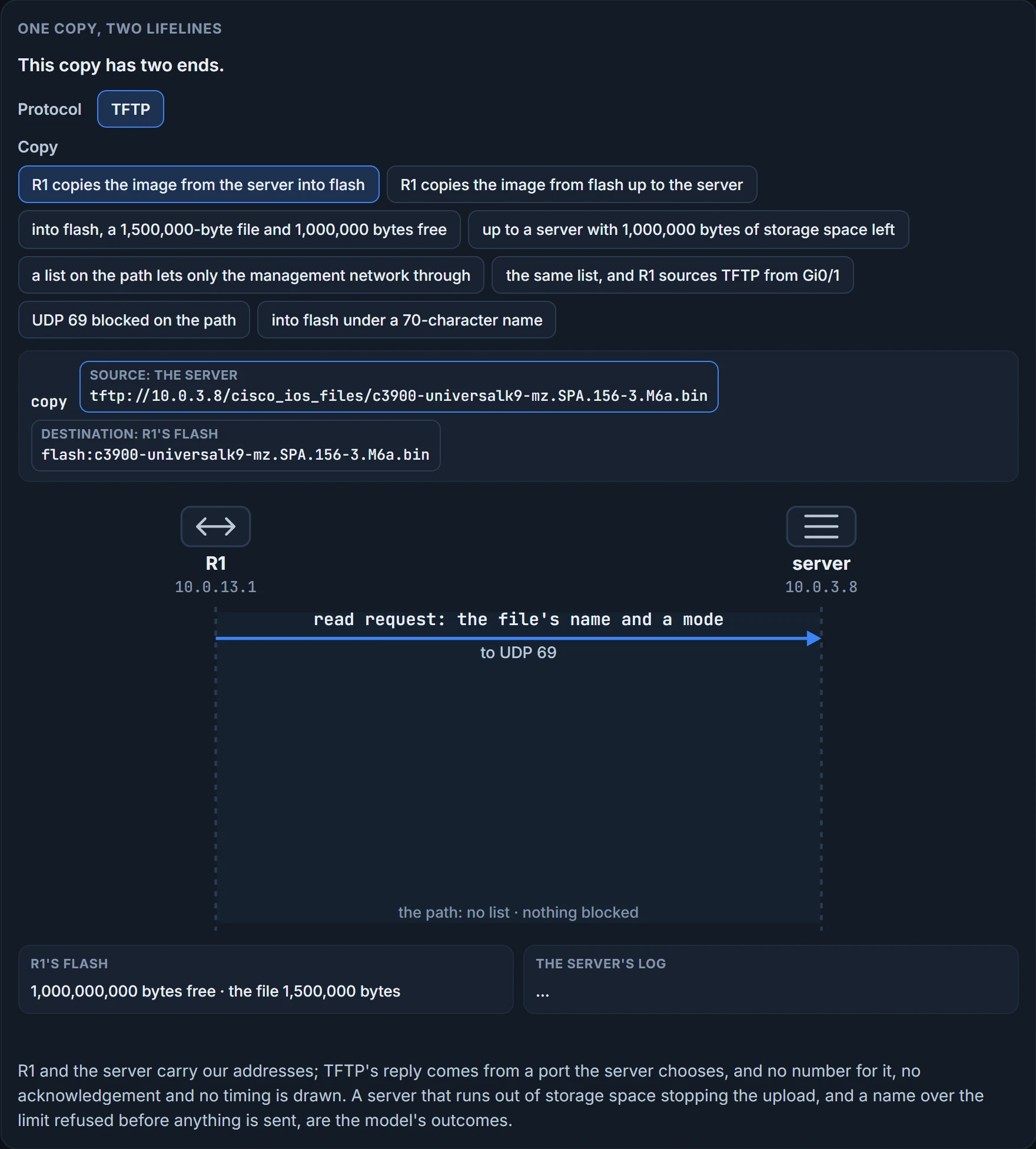
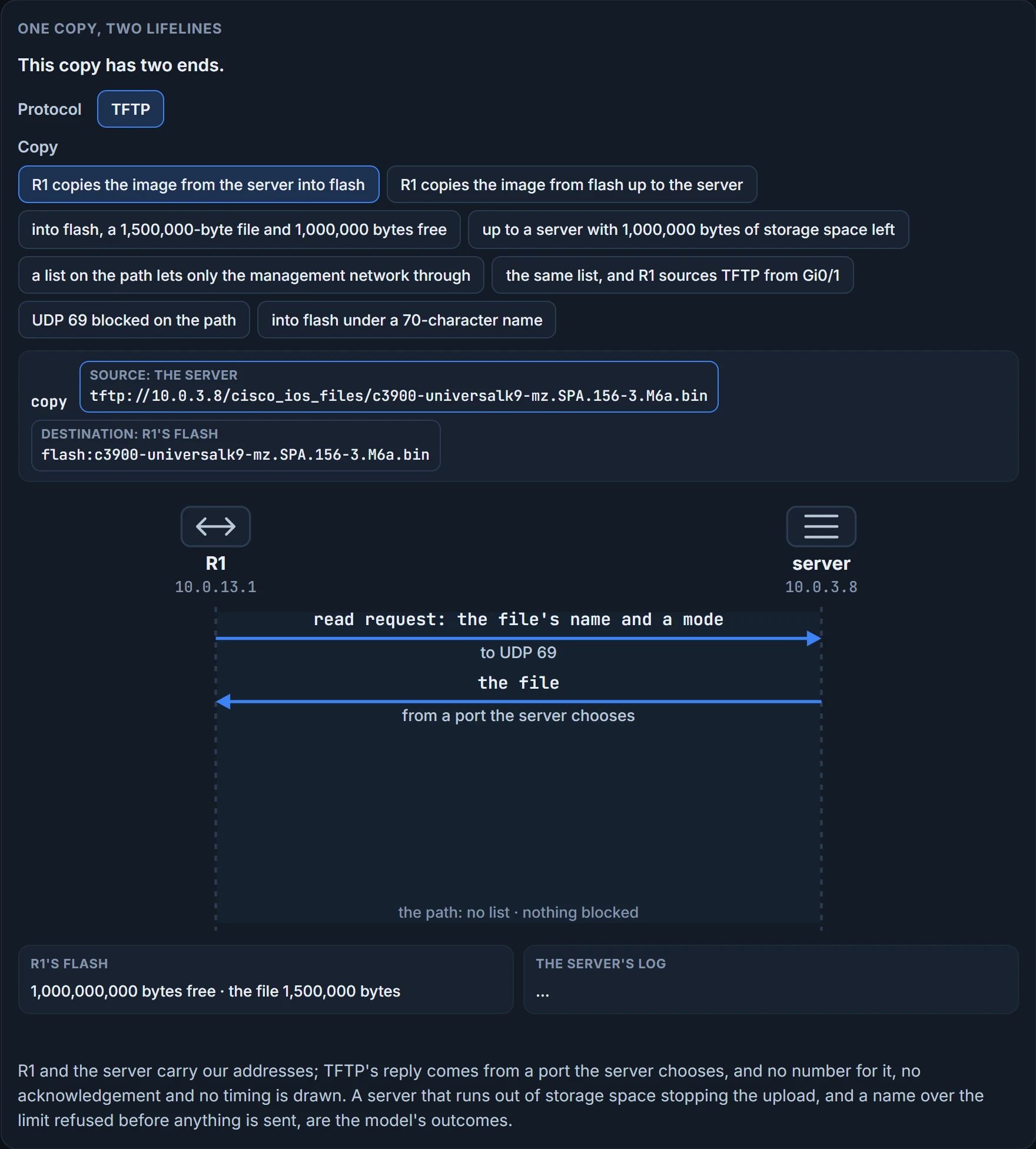
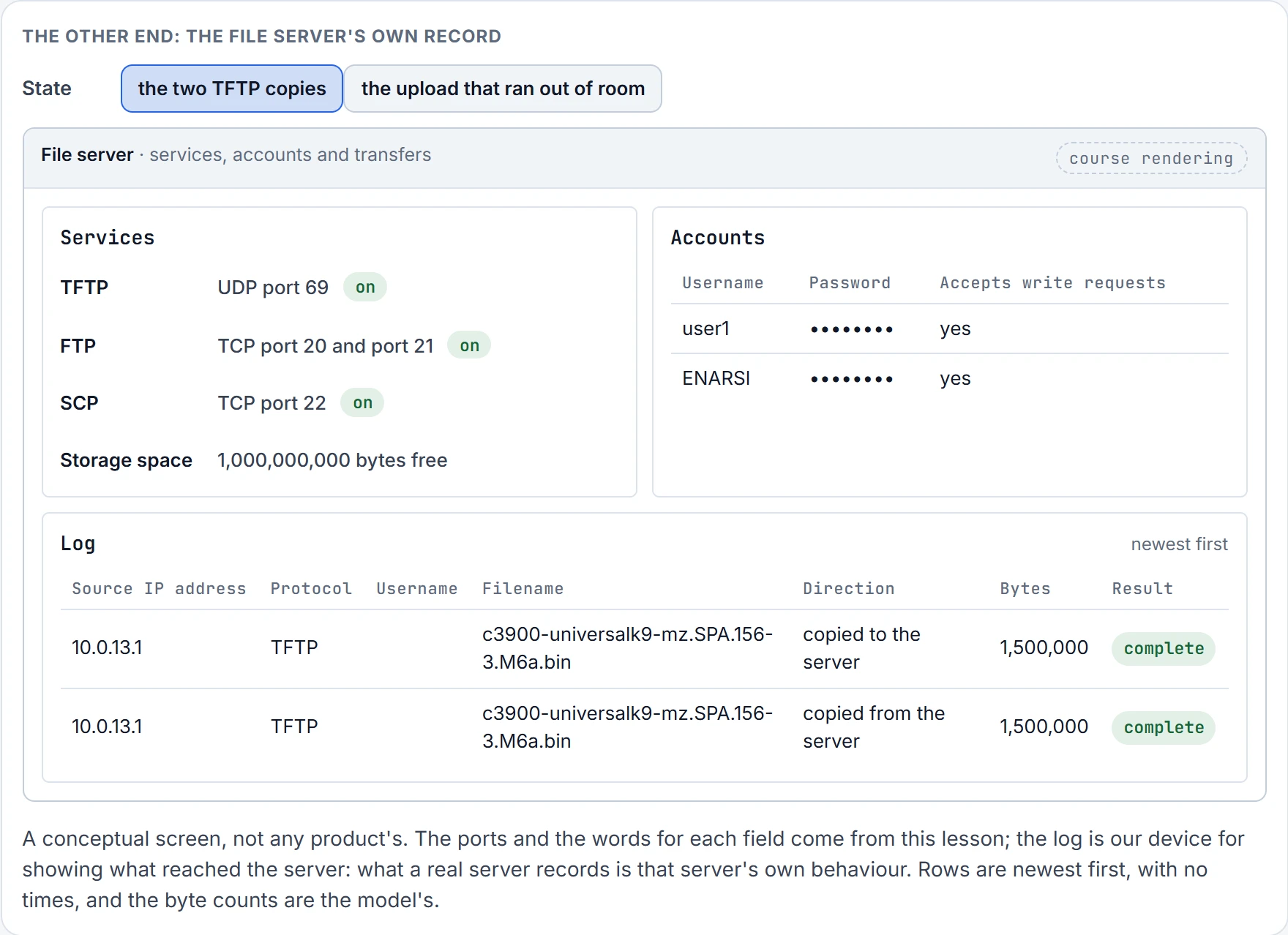
The figure below is one copy as a conversation: the router on the left, the server on the right, and every message between them. Under it is the other end's own record: the server's screen, with the transfers it received and how each one ended.
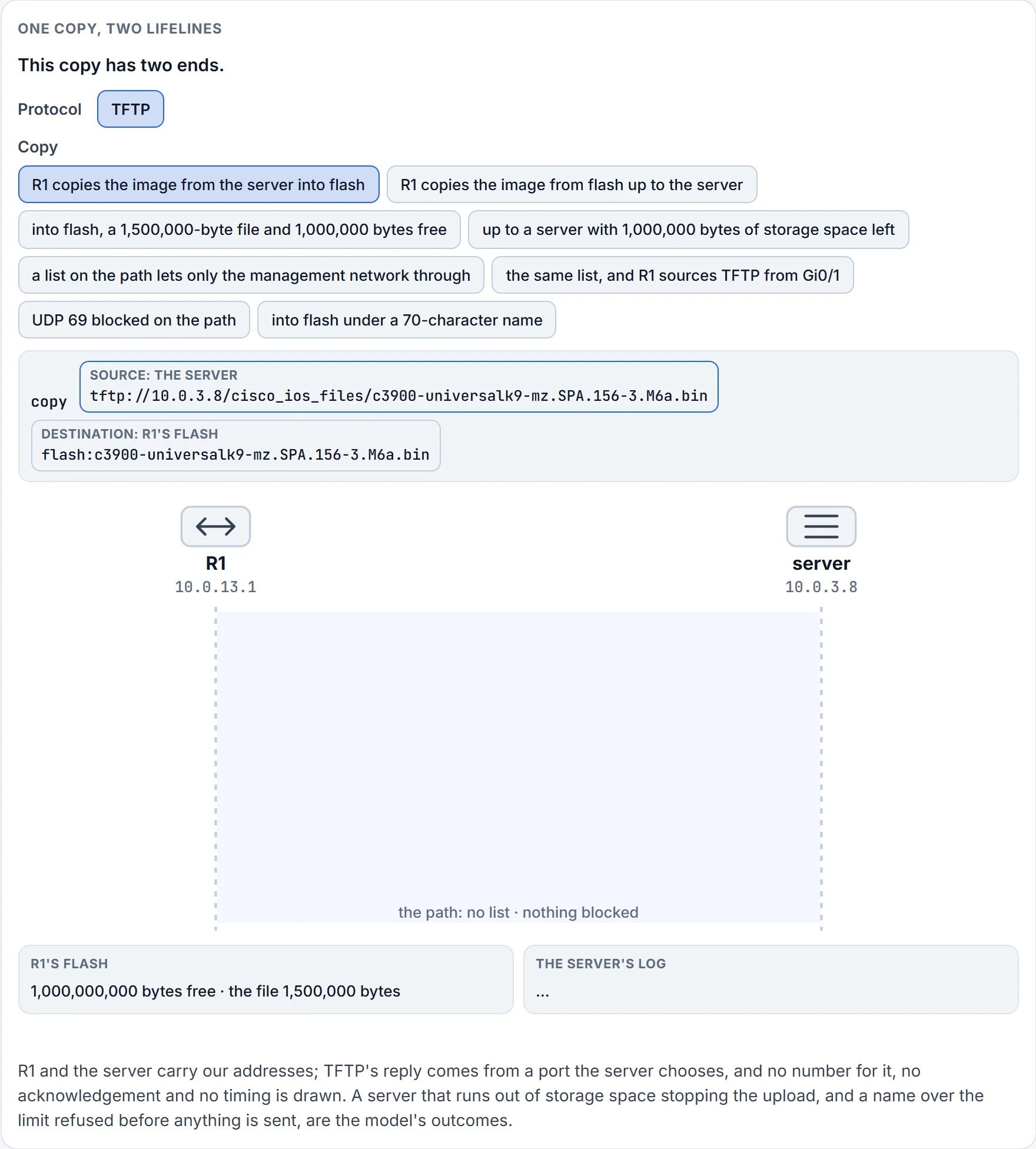
Step 1 of 4 Ready: R1 is the client and the server at 10.0.3.8 is the server.
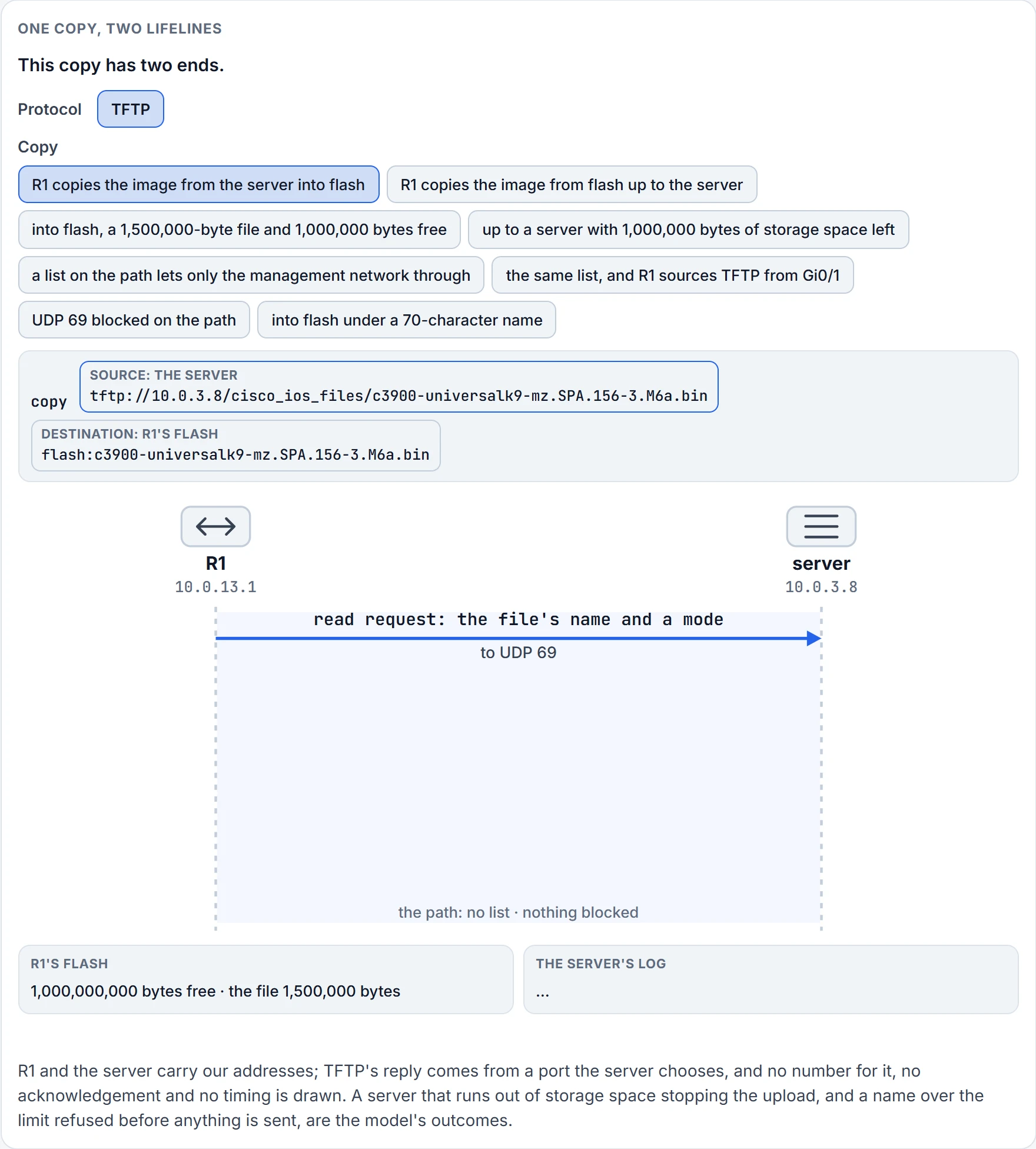
Step 2 of 4 R1 sends the server read request: the file's name and a mode, to UDP 69.
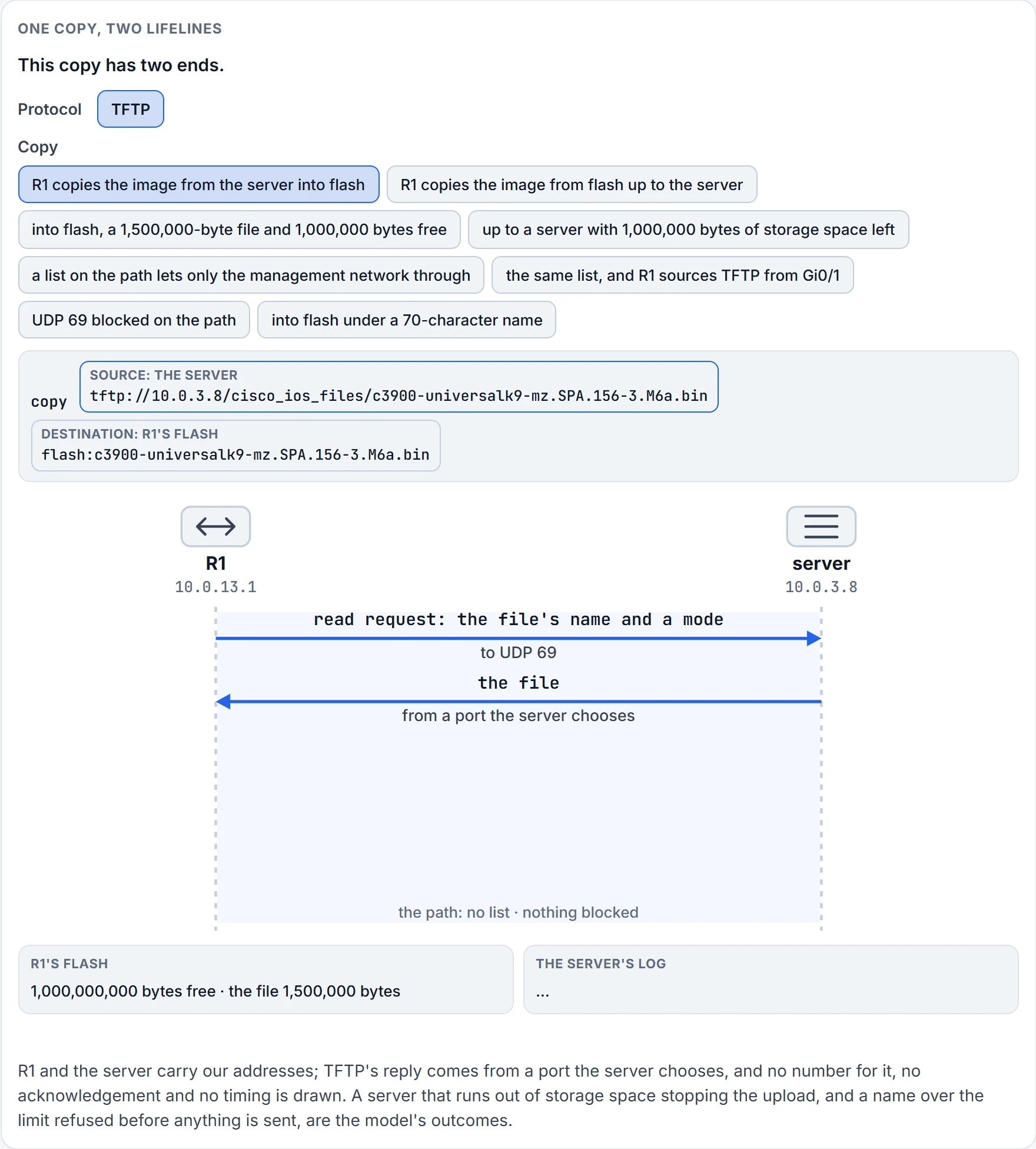
Step 3 of 4 The server sends R1 the file, from a port the server chooses.
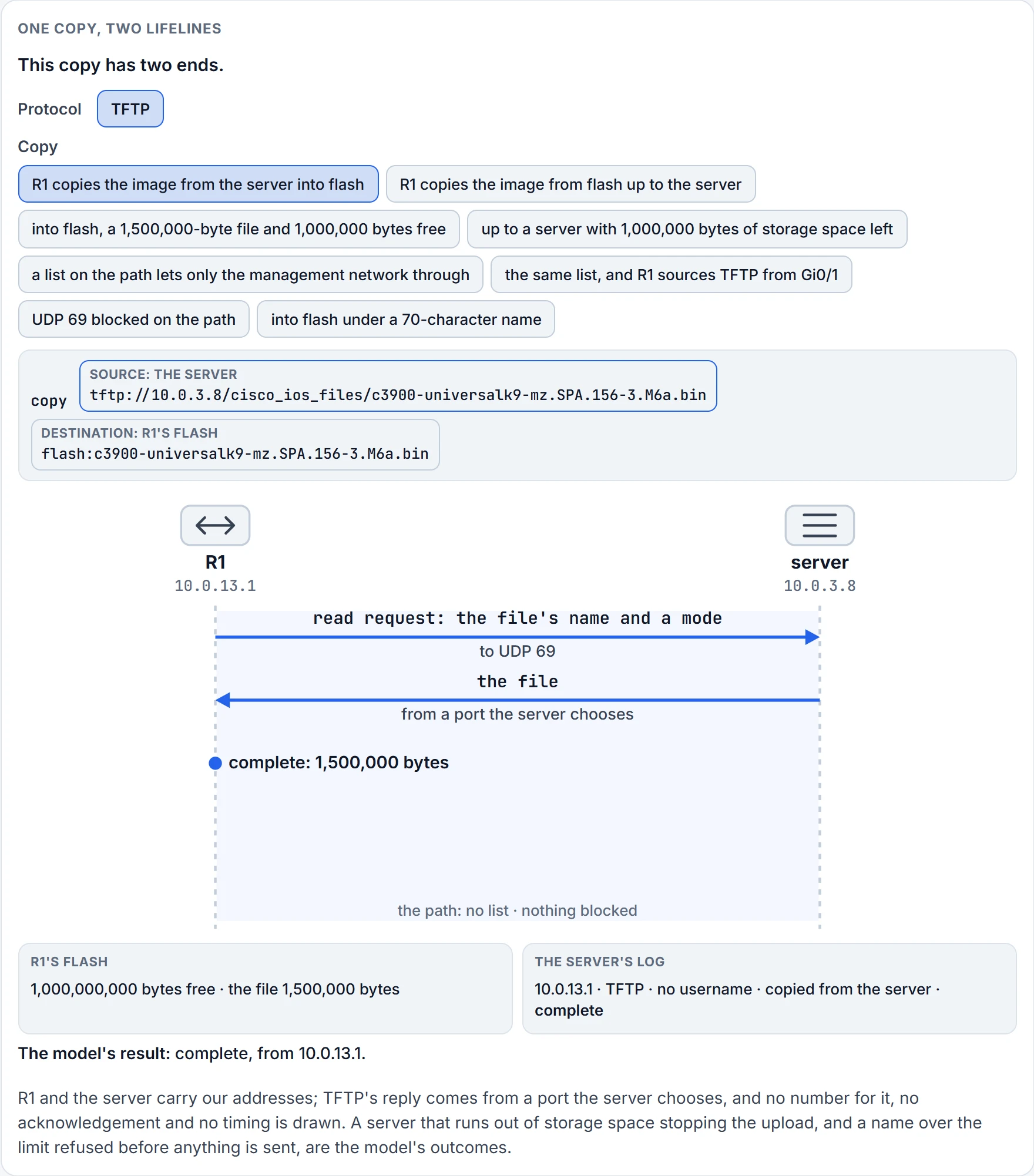
Step 4 of 4 R1: complete: 1,500,000 bytes.
We haven't confirmed on a router, for this section: what the partial copy's message looks like with real numbers in it, and what it leaves in flash; whether 63 characters is a router's own limit; which address a router's TFTP traffic leaves from when no source interface is set; and what a router shows when a list breaks a transfer after its request.
FTP: the same copy over TCP
FTP is an unsecure protocol that uses TCP ports 20 and 21, and like HTTP(S) it can carry IOS image files, core files, configuration files, log files, scripts and more, to or from a remote FTP server. The two ports have their own jobs: the control connection goes to the server's port 21, and the server's default data port is the one next to it, 20. TCP, so reliable; and a login, so the server can say no.
FTP's checks start where TFTP's did, so only what's new gets space here. Can the router connect? Ping the FTP server's IP address from the Cisco device. A ping proves the server is reachable from the address the ping used. It doesn't prove the FTP ports get through, or that the copy leaves from the same address. Is the server's address right in the copy command, with source and destination in that order? From an FTP server to flash, the FTP server is the source; from flash to an FTP server, it's the destination:
copy ftp://10.0.3.8/cisco_ios_files/c3900-universalk9-mz.SPA.156-3.M6a.bin flash:c3900-universalk9-mz.SPA.156-3.M6a.bin
copy flash:c3900-universalk9-mz.SPA.156-3.M6a.bin ftp://10.0.3.8/cisco_ios_files/c3900-universalk9-mz.SPA.156-3.M6a.bin
And is the filename right? Then the item TFTP never had. If you've set up FTP authentication on the FTP server, the correct username and password have to be in the copy command, user1 and its password here:
copy ftp://user1:mypasswrod@10.0.3.8/cisco_ios_files/c3900-universalk9-mz.SPA.156-3.M6a.bin flash:c3900-universalk9-mz.SPA.156-3.M6a.bin
The copy figure shows a password in a URL as dots. You can also set them once, for every copy, with ip ftp username username and ip ftp password password. Either way, the username and password in the copy command override the ones set by these commands.
One thing holds whatever you set: the protocol requires a remote username and password on each request. Your turn: a router has neither command, and someone copies from the FTP server with nothing in the URL either.
Anonymous. FTP has the client identify its user with USER and PASS on the control connection. The router sends the first valid username in this order: the one in the copy command, the one set by ip ftp username, and then anonymous. The password goes the same way: the copy command's, then ip ftp password's, and failing both the router forms one, username@routername.domain, from the username of the current session, the router's hostname and its domain. That order holds whichever way the file goes. So the server sees anonymous. Whether that works is up to the server.
That's the general rule for FTP: the username and password must belong to an account on the FTP server, and if you're writing to it, the server must be set to accept the write request from that user. If the server has a directory structure, the file is written to or read from the directory that goes with the username. Same server, two usernames, two different places for the file.
Last item: are packets to the FTP server sourced from the correct IP address? If not, an access list along the path might drop them, or a filter on the FTP server itself might, and ip ftp source-interface interface-id sets the source. TFTP's list stopped at the path. FTP's adds the server: it can refuse you for your address as well as for your name.
We haven't confirmed on a router, for this section: which address a router's FTP traffic leaves from when no source interface is set; what a router prints when an FTP server refuses the login or the write; and whether a router's FTP data goes to the server's port 20 at all, or to another port the server names.
HTTP(S): which way, and which file
Getting a router to a web server at all, with its HTTP client, credentials in the URL that override the client's own, the port, and http against https, belongs to the lesson before this one. Two items are left for here.
First, is the web server's URL or IP address right in the copy command? It's FTP's check again, with a URL allowed in place of the address. The copy command needs a source and a destination, in that order. From a web server to flash, the web server is the source; from flash to a web server, it's the destination:
copy http://10.0.3.8/cisco_ios_files/c3900-universalk9-mz.SPA.156-3.M6a.bin flash:c3900-universalk9-mz.SPA.156-3.M6a.bin
copy flash:c3900-universalk9-mz.SPA.156-3.M6a.bin http://10.0.3.8/cisco_ios_files/c3900-universalk9-mz.SPA.156-3.M6a.bin
And make sure the filename in the copy command is right. When an HTTP copy fails, start with the router's active connection to the Internet, then check the path and the filename, whether the server wants a username and password, and whether it uses a nonstandard port. With no port in the URL, http goes to TCP 80 and https to TCP 443; a port written in the URL replaces either.
SCP: a copy over SSH
SCP, Secure Copy Protocol, is another way of copying files between a storage location and a Cisco device. It relies on SSH for a secure and authenticated transfer. And it needs something SSH alone doesn't: AAA, enabled so the router can determine whether the user is authorized to copy.
Here's a router called R1 being set up for it:
R1# config terminal
Enter configuration commands, one per line.  End with CNTL/Z.
R1(config)# aaa new-model
R1(config)# aaa authentication login default local
R1(config)# aaa authorization exec default local
R1(config)# username ENARSI privilege 15 password EXAM
R1(config)# ip domain-name ENARSI.LOCAL
R1(config)# crypto key generate rsa modulus 1024
The name for the keys will be: R1.ENARSI.LOCAL
% The key modulus size is 1024 bits
% Generating 1024 bit RSA keys, keys will be non-exportable...
[OK] (elapsed time was 7 seconds)
R1(config)#
*Sep 21 02:04:36.546: %SSH-5-ENABLED: SSH 1.99 has been enabled
R1(config)#ip ssh version 2
R1(config)#ip scp server enable
R1(config)#end
R1#
Sort it into two piles. The middle is SSH: a domain name, a key, SSH up at 1.99, then version 2. Newer software refuses 1.99 and a 1024-bit key; the case's HQ-C1, from the last lesson, has a 2048-bit key. The login SSH needs, aaa new-model, a login list and a user, serves SSH and SCP alike. What SCP adds is the authorization line and ip scp server enable.
Whose configuration is this? These steps configure SCP's server-side functionality, and ip scp server enable enables the device to securely copy files from a remote workstation. SCP lets a user with the right authorization copy any file in the router's file system to and from the router with the copy command, and an authorized administrator can do the same from a workstation. So this configuration makes R1 the far end, the SCP server: the box a remote workstation copies to and from. In the figure, the one copying to it is another router, R2. That's the picture turning round.
Now leave one line out.
It doesn't. SCP requires AAA authorization to be configured so the router can determine whether the user has the correct privilege level. The exec keyword is the one that runs authorization to decide whether the user may run an EXEC shell, and you must use it when you configure SCP. And the AAA lesson showed what happens to a stored privilege 15 with AAA on and no authorization list: it's ignored. So ENARSI's login works and the copy doesn't.
Which privilege does the copy need? The two procedures for turning SCP on part ways here. One says the minimum privilege level is 15, and a privilege level of less than 15 results in the connection closing; the other's own example gives its SCP user privilege 2. R1's configuration gives ENARSI 15, and so does the case at the end of this lesson. Which level SCP itself needs, we haven't confirmed.
That's the gap between a login and a copy. An SSH login proves the half SCP shares with it: the path, the lines, the key, the login. It doesn't prove the half SCP adds. The prerequisites list both halves: configure SSH, authentication and authorization correctly before enabling SCP, and have an RSA key pair, because SCP relies on SSH for its transport; and AAA must be configured on the device to enable SCP on the SSH server.
The list to check, with the piles in mind:
- SSH, authentication and authorization configured correctly on the device.
- An RSA key that's available for encryption: no key, no SSH server.
- AAA configured correctly and working.
- SCP enabled on the device; if it isn't,
ip scp server enable. - The copy command used correctly.
- The right username and password for the copy; and if the users live on an external authentication server, check the credentials on that server.
The local username can be left out when a network server such as TACACS+ or RADIUS does the authentication. For anything still unexplained, debug ip scp troubleshoots SCP authentication problems. It proves SCP's own view of the attempts made while it's on. It says nothing about the attempts made before.
Continue the lesson
The whole lesson, with its drawings and its questions. The rest of this section and 2 more after it.