
DHCP Snooping, ARP Poisoning and Dynamic ARP Inspection
A rogue DHCP server answering faster than the real one can hand out wrong addresses and gateways. DHCP snooping lets only trusted ports answer as a server and records every lease it sees. Dynamic ARP inspection then checks each ARP message against those records, which stops ARP poisoning: a host claiming to be the gateway.
By Arif, founder of Daveth · Updated
The full 13 min walkthrough is in Daveth Pro (Network). See what the plan opens
What this page answers
What is DHCP snooping?
A switch feature that examines DHCP messages on untrusted ports, discards the ones only servers should send, and records each lease in a binding table. Ports toward the real servers or relay agents are set as trusted. Read it in “What snooping checks”
How do you configure DHCP snooping?
Enable it globally with ip dhcp snooping and choose the VLANs with ip dhcp snooping vlan, then mark the ports that lead to servers or relay agents with ip dhcp snooping trust. Every port is untrusted until you say otherwise. Read it in “Snooping on HQ2”
What is Dynamic ARP Inspection (DAI)?
A switch feature that checks each ARP message against the DHCP snooping records, so a host cannot claim another address's MAC, such as sending a gratuitous ARP that says the gateway is at its own MAC: ARP poisoning. Read it in the lesson
Two answers to one question
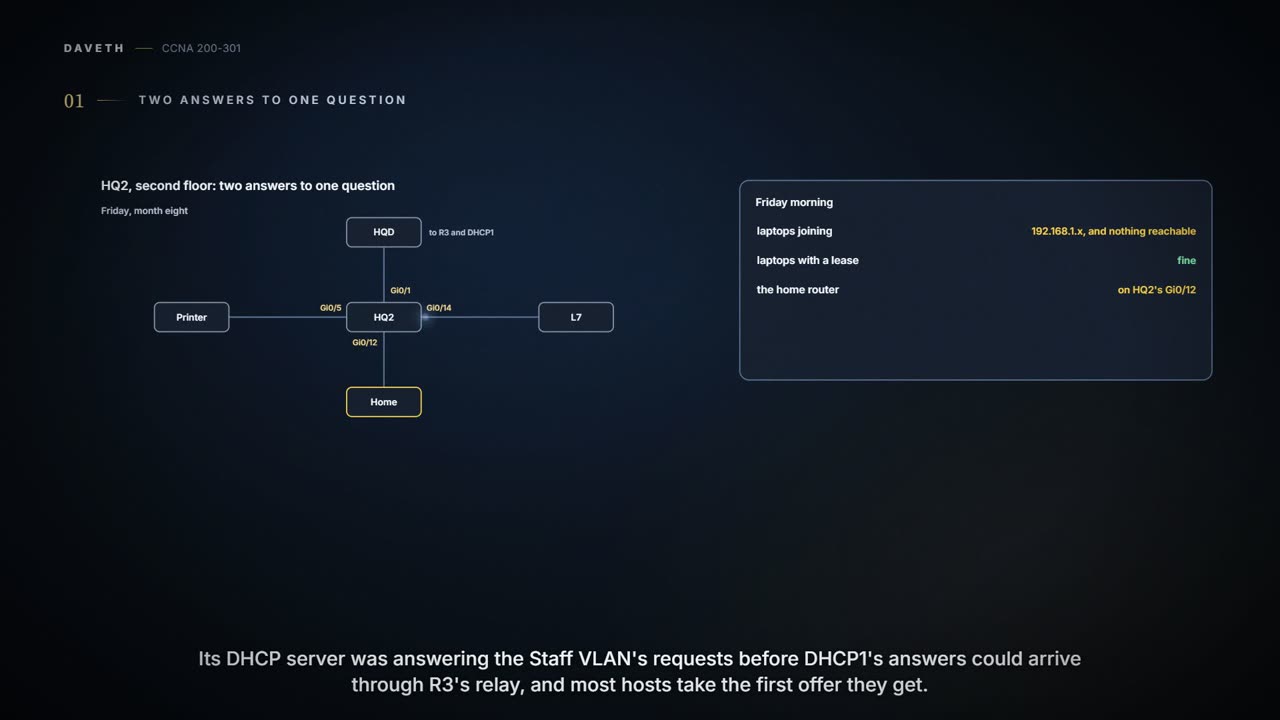
Friday, month eight. Laptops that joined the network on head office's second floor this morning got addresses in 192.168.1.x and could reach nothing. Laptops that already had a lease kept working. Someone had plugged one of a home wireless router's LAN ports into a Staff port on HQ2, Gi0/12, to get better Wi-Fi at a desk, and its DHCP server was answering the Staff VLAN's DISCOVERs faster than DHCP1 could through R3's relay. Once it was unplugged, Ravi had the affected laptops release their addresses and ask again.
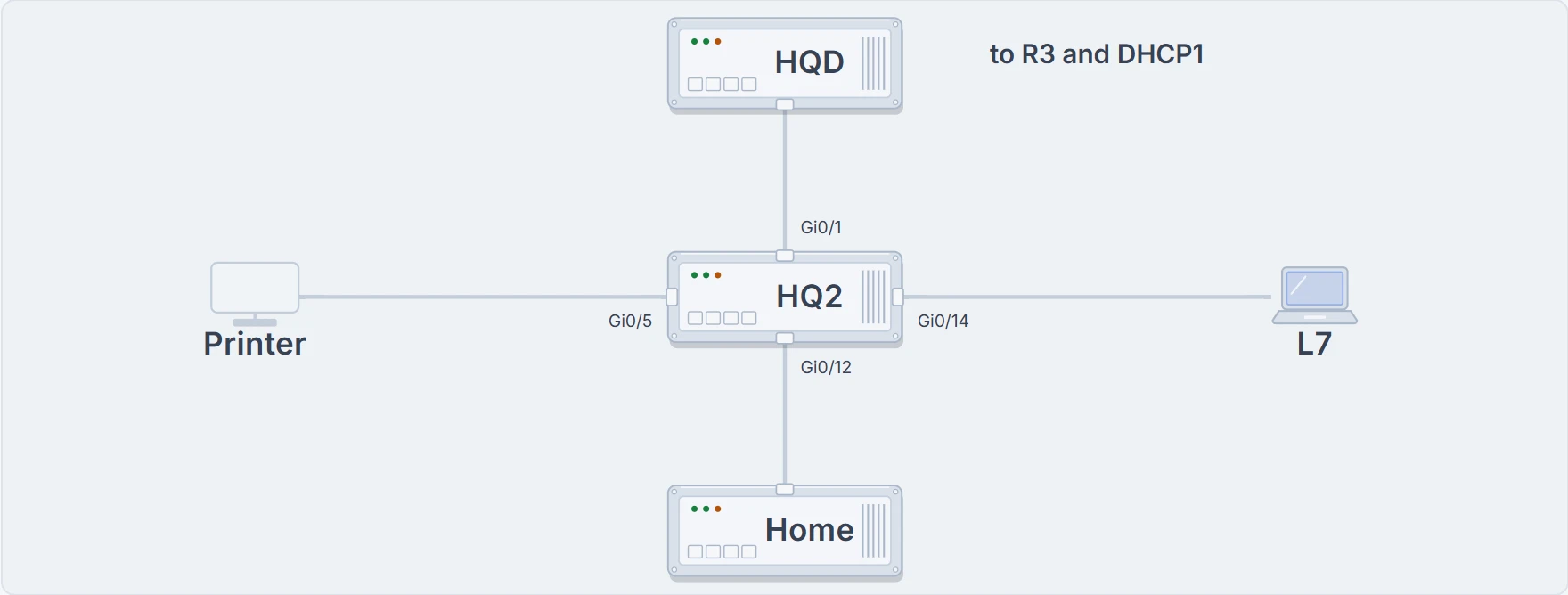
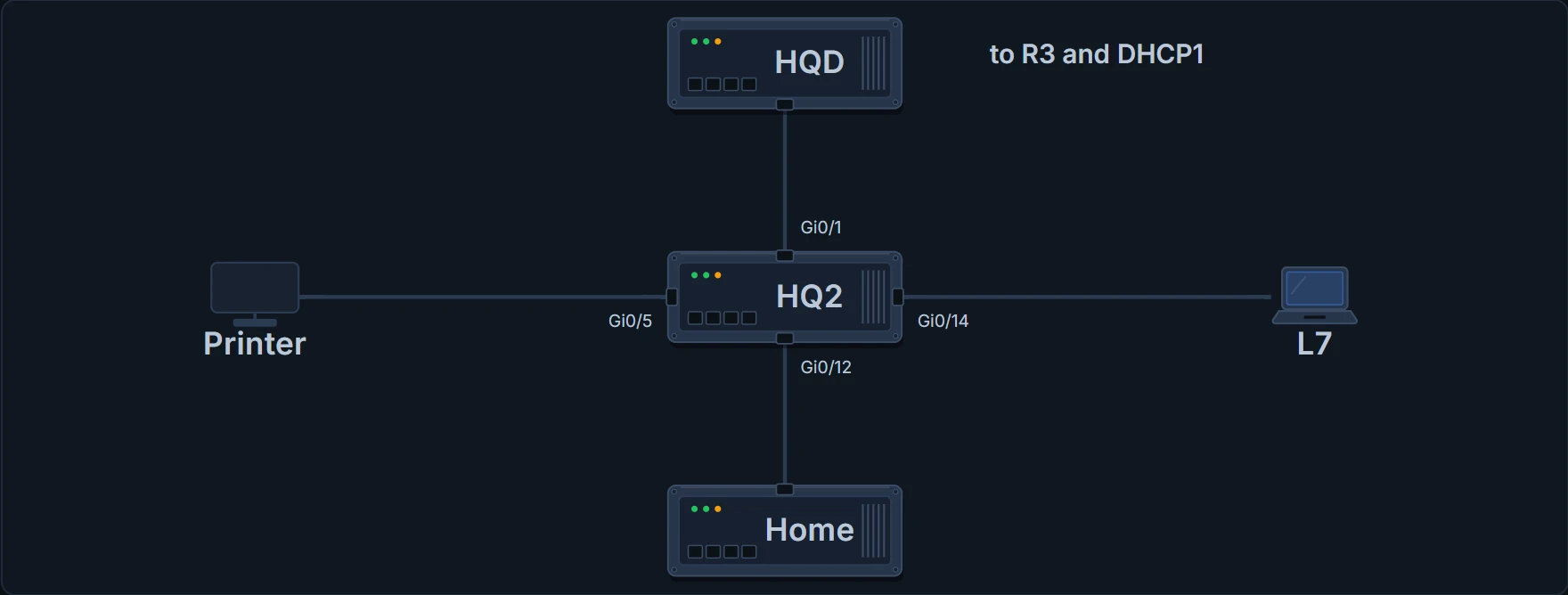
HQ2 on Friday morning: HQD above on the uplink Gi0/1, the Staff printer on Gi0/5, laptop L7 on Gi0/14, and the home router on Gi0/12.
Most hosts take the first OFFER they receive. This time the harm was an outage, because the home router handed out its own subnet. An attacker's DHCP server would be subtler: a correct address and mask in the right subnet, but the attacker's own address as the default gateway. Every packet bound for another subnet then goes to the attacker first, who keeps a copy and forwards it to the real router. The user notices nothing. That is a man-in-the-middle attack. Attackers study the rules of every protocol for a way in, sometimes to deny service, sometimes to gather information for a later attack; the two features on this page target, among others, the attacks that end with the attacker holding copies of a host's packets.
The home router meant well. It just wanted to be everyone's gateway.
DHCP snooping is a switch feature that stops this. It acts like a firewall for DHCP on the ports of a VLAN: it looks at DHCP messages only, never anything else, and decides for each one whether to let it through. It belongs on the switch because the switch sits between the DHCP clients and the servers or relay agents, and it commonly runs on Layer 2 LAN switches like HQ2.
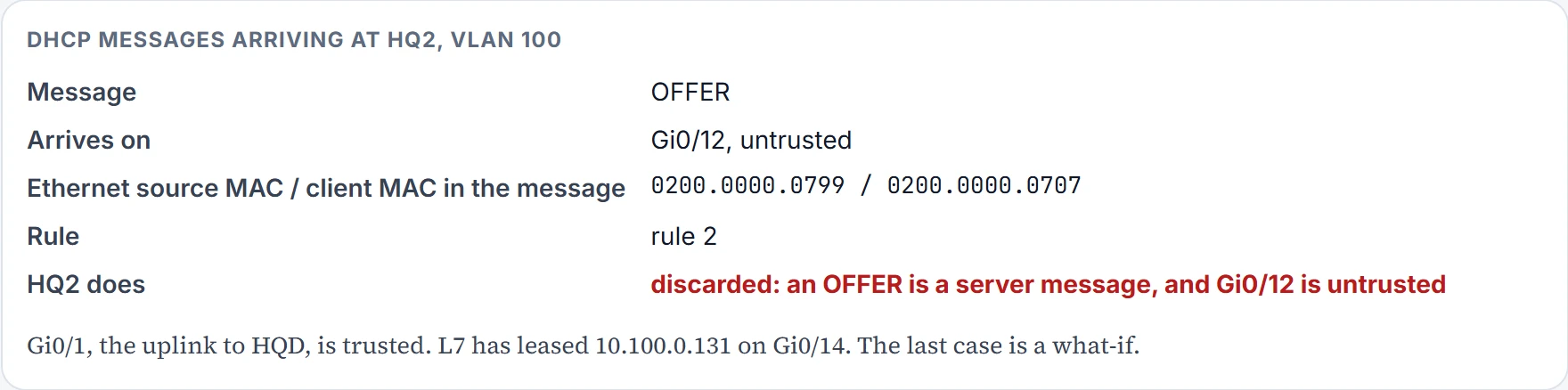
Every port in a snooped VLAN is trusted or untrusted. The rules split messages into the ones servers send (OFFER, ACK) and the ones clients send. A server message arriving on an untrusted port is always discarded. A client message on an untrusted port may be discarded if it looks like part of an attack. A trusted port forwards every DHCP message, so trusting a client port by mistake puts a rogue server behind it back in business.
You can think of it as a hotel where only the front desk may hand out room keys: a key offered by someone in the corridor is refused, however real it looks. (Where it stops: the switch can't tell a real server from a fake one; it only knows which ports you told it to trust.)
What snooping checks
Recall DORA (07.1.1): clients send DISCOVER and REQUEST, servers send OFFER and ACK. Clients also send two others. A RELEASE gives a leased address back to the server when the client no longer needs it, and a DECLINE turns an address down during DORA. Those two can be abused too.
On untrusted ports, the full logic is four rules:
- 1. Examine every incoming DHCP message.
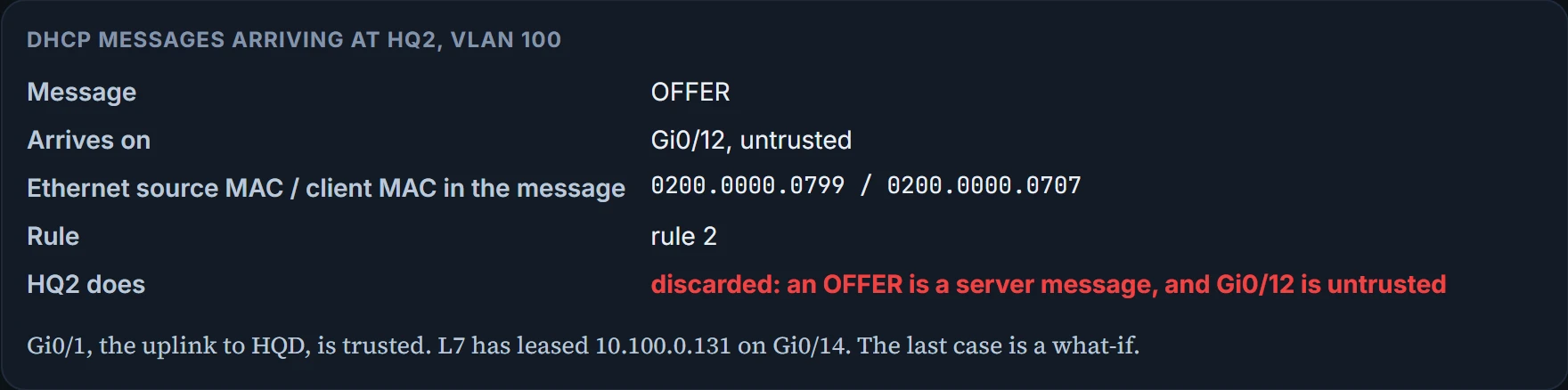
- 2. If servers normally send it, discard it.
- 3. If clients normally send it, filter it: a. for DISCOVER and REQUEST, check that the Ethernet source MAC matches the client MAC inside the DHCP message (the chaddr field); b. for RELEASE and DECLINE, check the incoming interface and IP address against the binding table.
- 4. For messages that result in a lease, add an entry to the binding table.
Rule 3a stops a flood tool. One laptop, with one Ethernet source MAC, could send DISCOVERs claiming a different client MAC each time, and to the server each looks like a new client, until the pool is empty and nobody else gets an address. Rule 3b stops a RELEASE for somebody else's address: the attacker releases it, then tries to lease the same address for itself.
The binding table is what makes rule 3b possible. For every DHCP exchange snooping allows to complete, it records the client's MAC, the IP address leased, the VLAN and the port. It holds only what snooping has seen; a device with a static address never went through DHCP, so normally it has no entry. Dynamic ARP inspection, later on this page, reads the same table.
Snooping on HQ2
- Step 1 (both required): ip dhcp snooping, globally, and ip dhcp snooping vlan vlan-list, to choose the VLANs.
- Step 2 (optional): no ip dhcp snooping information option, on a Layer 2 switch that isn't a DHCP relay agent.
- Step 3: ip dhcp snooping trust on the ports that lead to the servers or relay agents. Every port is untrusted until you say otherwise.
- Step 4 (optional): rate limits and err-disabled recovery, below.
Step 2 needs a reason. Relay agents add fields to DHCP requests, called option 82. By default, snooping inserts those fields as though the switch were a relay agent, which suits a Layer 3 switch that relays. On a Layer 2 switch that doesn't relay, the changed messages make most DHCP servers and relay agents ignore them, and DHCP stops. HQ2 is a Layer 2 floor switch, and R3 does the relaying, so Ravi turns option 82 off. The home router came out of Gi0/12 at 9:40; by 10:00 HQ2 had snooping on VLAN 100, with its uplink trusted:
HQ2# configure terminal
Enter configuration commands, one per line. End with CNTL/Z.
HQ2(config)# ip dhcp snooping
HQ2(config)# ip dhcp snooping vlan 100
HQ2(config)# no ip dhcp snooping information option
HQ2(config)# interface GigabitEthernet0/1
HQ2(config-if)# ip dhcp snooping trust
HQ2(config-if)# end
HQ2# show ip dhcp snooping
Switch DHCP snooping is enabled
Switch DHCP gleaning is disabled
DHCP snooping is configured on following VLANs:
100
DHCP snooping is operational on following VLANs:
100
Smartlog is configured on following VLANs:
none
Smartlog is operational on following VLANs:
none
DHCP snooping is configured on the following L3 Interfaces:

Insertion of option 82 is disabled
   circuit-id default format: vlan-mod-port
   remote-id: 0200.0000.0902 (MAC)
Option 82 on untrusted port is not allowed
Verification of hwaddr field is enabled
Verification of giaddr field is enabled
DHCP snooping trust/rate is configured on the following Interfaces:

Interface                  Trusted    Allow option    Rate limit (pps)
-----------------------    -------    ------------    ----------------
GigabitEthernet0/1         yes        yes             unlimited
  Custom circuit-ids:
HQ2#
What this proves: snooping is enabled and operational on VLAN 100, option 82 insertion is off, and Gi0/1 is the one trusted port, with no rate limit. The other lines can be ignored here. What it doesn't: that any lease has completed since, or that Gi0/1 really is the path to the server. Trust is only as right as the drawing you trusted it from.
HQ2# show ip dhcp snooping binding
MacAddress          IpAddress        Lease(sec)  Type           VLAN  Interface
------------------  ---------------  ----------  -------------  ----  --------------------
02:00:00:00:07:07   10.100.0.131     85902       dhcp-snooping  100   GigabitEthernet0/14
02:00:00:00:07:08   10.100.0.132     86311       dhcp-snooping  100   GigabitEthernet0/15
Total number of bindings: 2
HQ2#
What this proves: two exchanges have completed through snooping, L7 on Gi0/14 and L8 on Gi0/15, each with its lease in seconds. What it doesn't: that these are the only devices on VLAN 100. Laptops that haven't renewed since 10:00, and anything with a static address, aren't there.
Snooping runs in the switch's general-purpose CPU, so attackers can aim at it: a flood of DHCP messages can overload the CPU, or make snooping miss the messages it should check. An optional rate limit, set per interface, trusted or untrusted, counts the DHCP messages arriving each second. The command is ip dhcp snooping limit rate number; pass the limit and the port goes err-disabled (08.3.1). no ip dhcp snooping limit rate removes it again, and show ip dhcp snooping lists each port's limit in its Rate limit (pps) column, where Gi0/1 shows unlimited today. Set a limit too low and an honest, busy port goes err-disabled; there's no single right number. An err-disabled port stays down until someone enters shutdown, then no shutdown, so you can let the switch recover on its own instead: errdisable recovery cause dhcp-rate-limit, and errdisable recovery interval seconds, which sets the wait for every err-disabled cause.
Continue the lesson
The whole lesson, with its drawings and its questions. 3 more sections after the ones above.