
Firewalls, IPS and VPN / IPsec Fundamentals
Three jobs share the name security. A firewall decides which conversations may happen at all, by rules on addresses, ports and zones, and a stateful one remembers each allowed connection. An intrusion prevention system reads allowed traffic for known attacks using signatures. A VPN hides what is said from everyone between its two ends.
By Arif, founder of Daveth · Updated
The full 20 min walkthrough is in Daveth Pro (Network). See what the plan opens
What this page answers
What is a firewall?
A device in the forwarding path that decides, packet by packet, which conversations may happen, using rules the company writes on addresses, ports and zones. A stateful firewall remembers each allowed connection and drops packets that claim to belong to one it does not know. Read it in “Zones, and who may start”
What is a VPN?
A virtual private network: it tries to give a private WAN's protection over a network open to everyone, checking who sent each packet and encrypting it, so nobody in between can read or change it. Read it in “Three jobs called security”
What is an IPS?
An intrusion prevention system: it compares packets against a database of exploit signatures and, on a match, logs the event, discards the packets or redirects them for examination. Read it in “An IPS reads for known attacks”
Three jobs called security
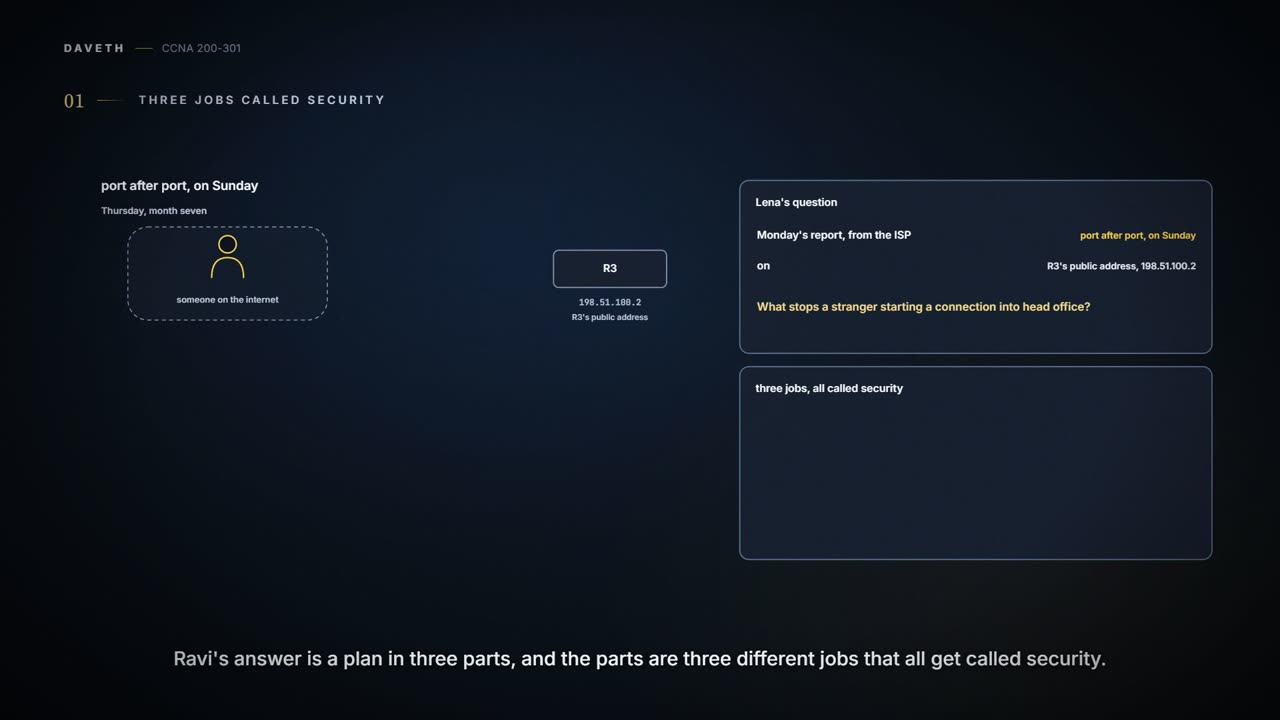
Thursday, month seven. Lena's last question of the week goes back to Monday's report from the ISP (08.1.1): on Sunday, someone on the internet tried port after port on R3's public address, 198.51.100.2. "What stops a stranger starting a connection into head office?" Ravi's answer is a plan in three parts, and each part has a different job.
A firewall decides which conversations may happen at all. An intrusion prevention system (IPS) reads the conversations that are allowed, looking for known attacks. A VPN hides what is said from everyone between its two ends. Mixing them up is the usual mistake: an allowed connection can still carry an attack, and an encrypted one can still carry a virus.
| Firewall | IPS | VPN | |
|---|---|---|---|
| The question it answers | May this conversation happen? | Does this traffic match a known attack? | Can anyone in between read or change it? |
| Decides by | rules the company's engineers write: addresses, ports and zones | signatures of known exploits, written mostly by the IPS vendor and kept updated | a key shared with the other end: it checks who sent each packet, and encrypts what is said |
| Where it sits | in the forwarding path, between zones | in the path of the packets, or watching a copy of them | at the two ends of the tunnel |
| What it doesn't do | a traditional firewall doesn't compare allowed traffic with known attacks | catch an attack nobody has written a signature for yet | make either end safe, or hide that the two ends are talking |
Three bouncers with three clipboards. When a guest is stopped, ask the right one why.
Zones, and who may start
Traditionally, a firewall sits in the forwarding path of all packets, so it can choose, packet by packet, to discard it, redirect it to be collected for later analysis, or let it through. At its most basic it does what a router's ACLs do, with many more options, and other security tasks besides. Ravi's plan puts a new firewall, FW1, between R3 and the ISP. FW1 takes over the company's public address, 198.51.100.2, and the PAT that R3 does today (07.2.1), so everything between the company and the internet passes through it; traffic between head office's own LANs, which R3 routes, never does. To decide, a firewall can:
- match the source and destination IP addresses, as an ACL does;
- identify applications by their well-known TCP and UDP ports, as an ACL does;
- watch application flows to learn the extra TCP and UDP ports a flow uses, and filter on those;
- match the text in the URI of a web request (the web address, often called a URL) and allow or deny the page;
- keep state: store information about each packet, and use that history to decide later packets. This is stateful inspection, one of the more obvious differences from a router's ACL.
Firewalls care about who starts a conversation. With TCP that's easy to see: the client's first segment has only the SYN bit set (01.5). They group interfaces into security zones: the rules say which zone may start connections to which, and several interfaces can share a zone when they need the same rules. In Ravi's plan, R3's side of FW1 is the inside zone and the ISP's side is the outside zone.
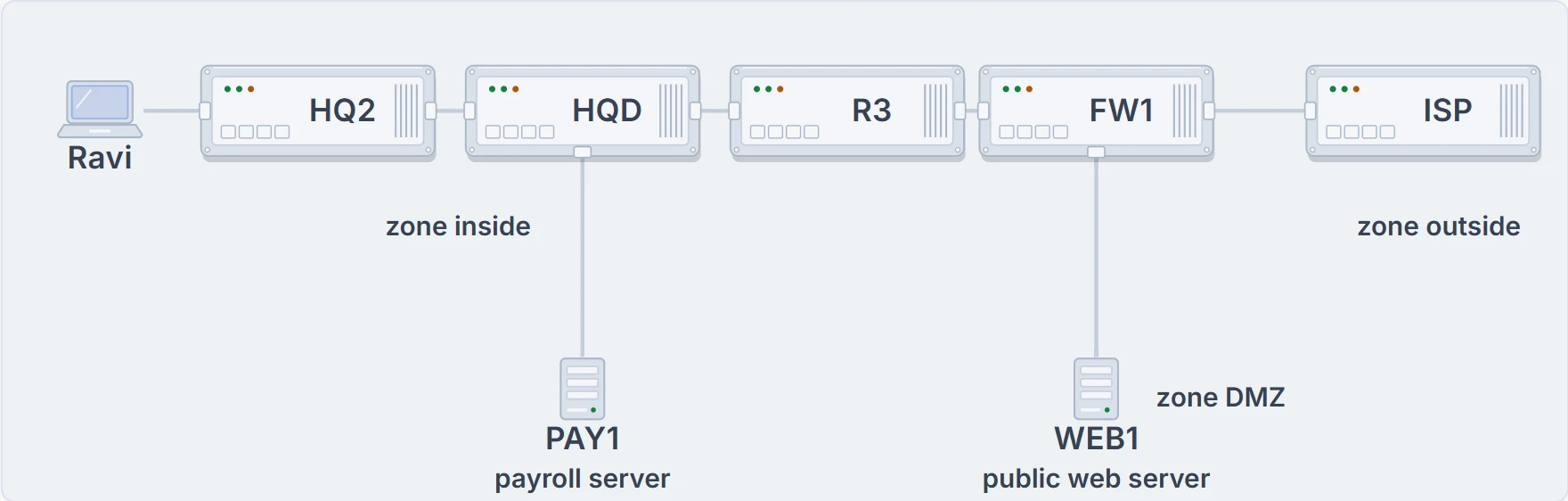
Ravi's plan, nothing built yet: FW1 between R3 and the ISP. Everything on R3's side is the inside zone, with Ravi's laptop and the payroll server PAY1; the ISP's side is the outside zone; below FW1 is a third zone, with WEB1.
The most basic rule with two zones: inside may start connections to outside, for a set of safe well-known ports, such as web traffic on 80 and 443. A firewall typically denies everything a rule doesn't allow, so that one rule does two jobs. It lets staff browse, and it stops anyone outside from starting a connection in. Nobody had to write "keep strangers away from PAY1". Inside isn't automatically safe, though: the rules protect one zone from another, not a zone from itself.
Most companies have a third zone as well as inside and outside: the demilitarized zone (DMZ), a name borrowed from the real world and used in networking for decades, for servers that people on the internet must reach. FW1 gets one more rule, outside may start HTTPS connections to the DMZ, and WEB1 goes on FW1's DMZ port next quarter. Internet users can reach WEB1 and nothing in the inside zone, and no rule lets them start anything toward the inside, which stops many kinds of attack.
Six packets at FW1
FW1 remembers. For each connection a rule allowed, it keeps the two addresses and ports, and any later packet of that connection, in either direction, passes without needing a rule. A packet that claims to belong to a connection FW1 doesn't remember is dropped. Here are six packets:
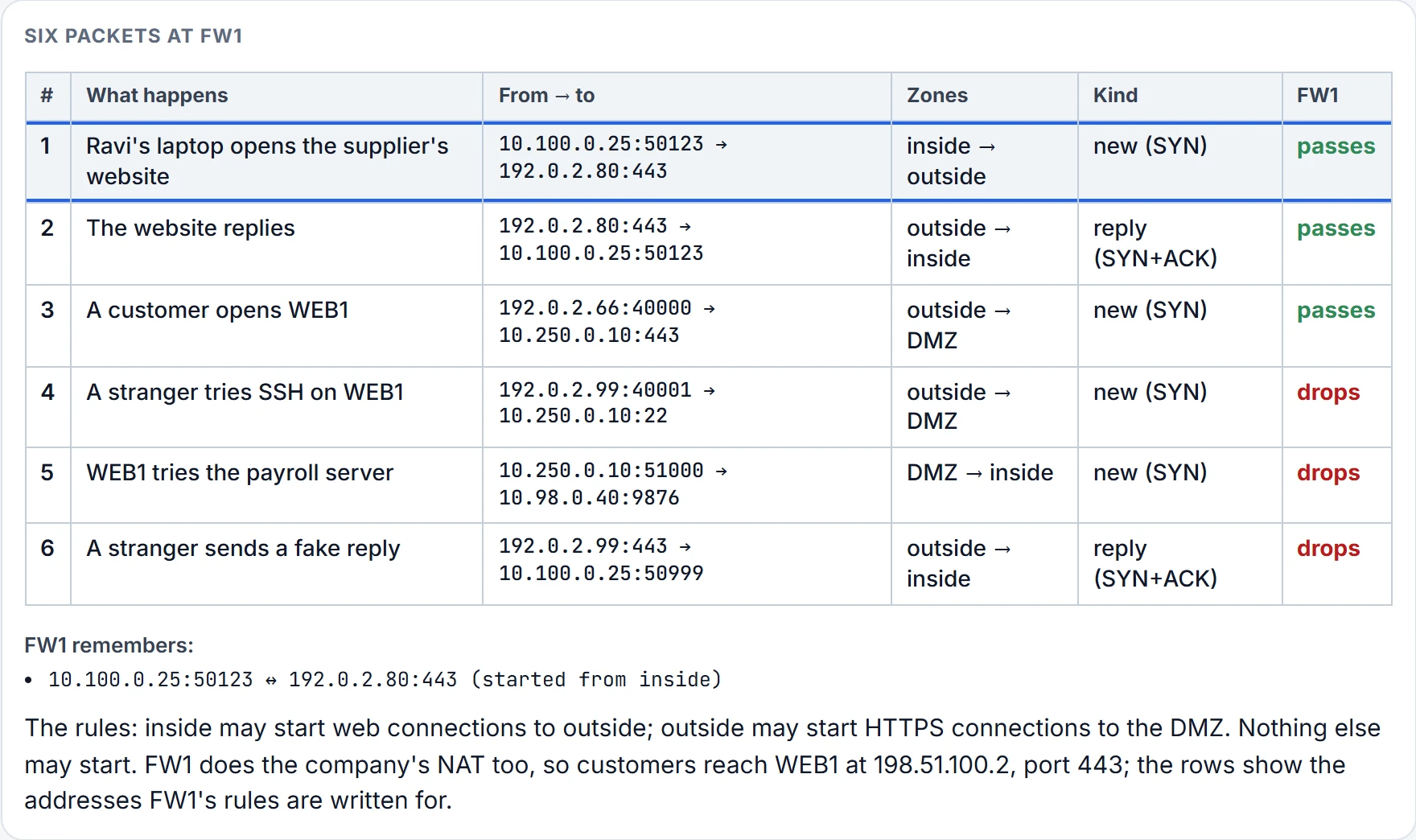
Step 1 of 6 Packet 1 passes: it starts a new connection, and the rule "inside may start web connections (ports 80 and 443) to outside" allows it. FW1 remembers the connection.
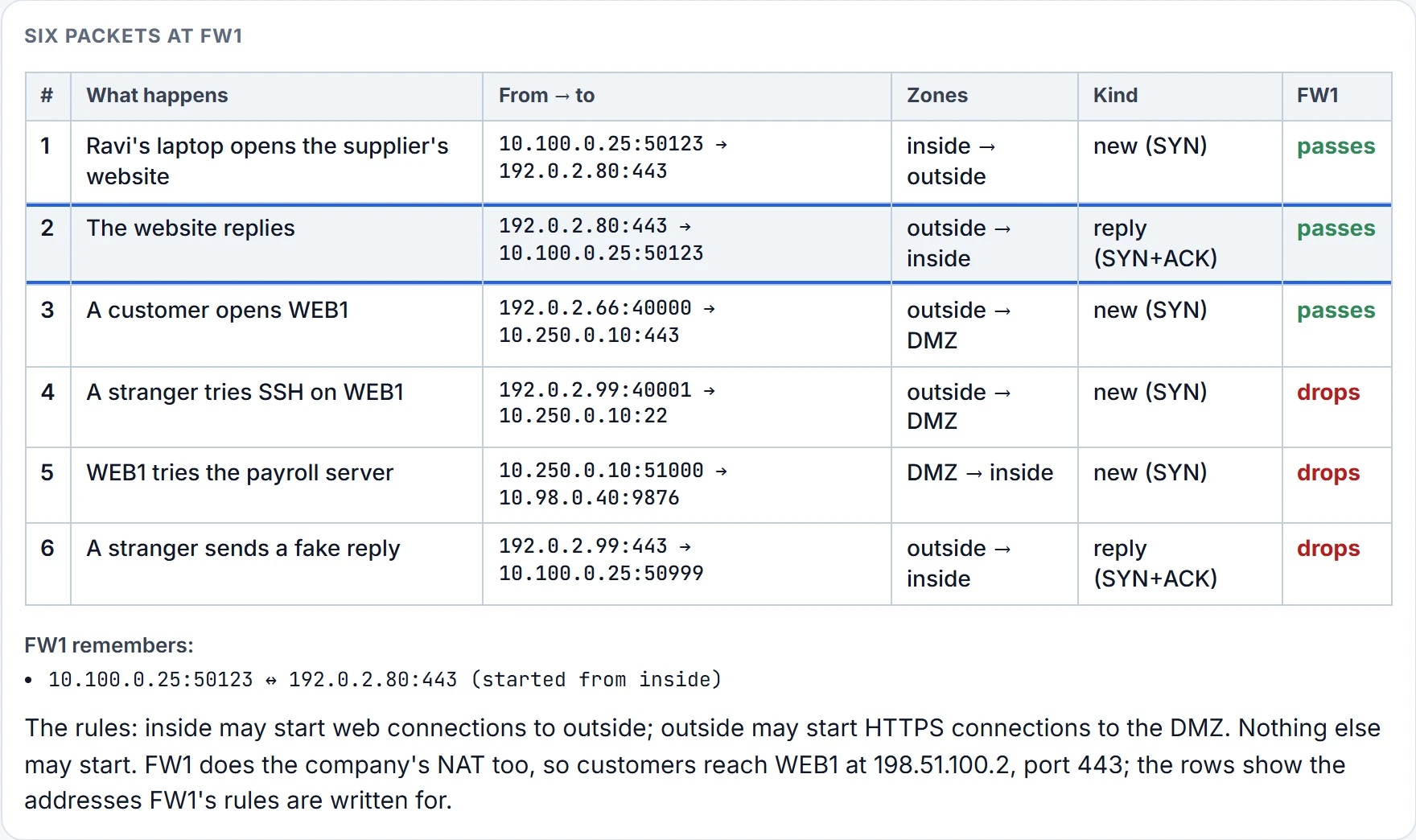
Step 2 of 6 Packet 2 passes: it belongs to a connection FW1 remembers, one started from the inside zone, so no rule is needed.
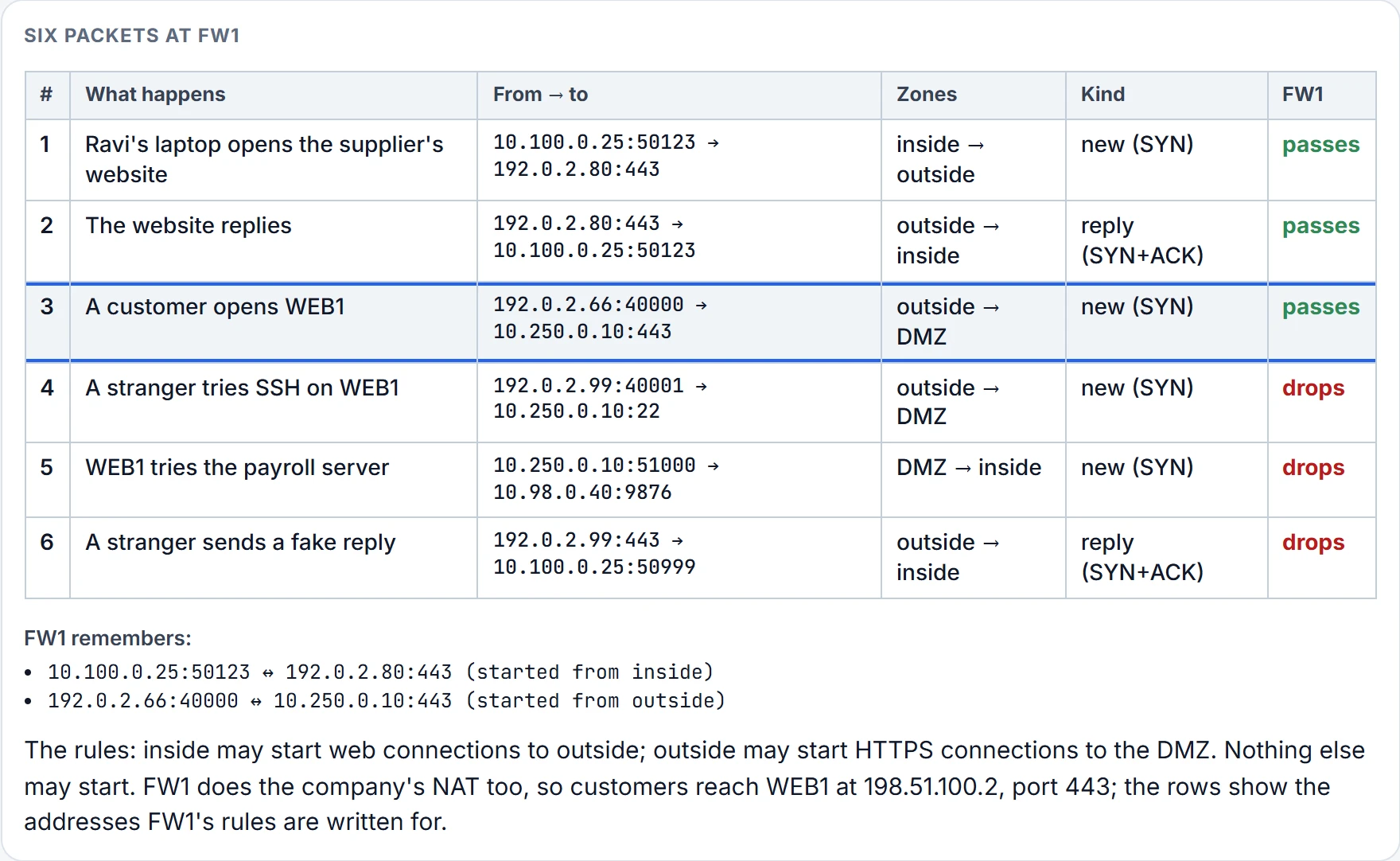
Step 3 of 6 Packet 3 passes: it starts a new connection, and the rule "outside may start HTTPS connections (port 443) to the DMZ" allows it. FW1 remembers the connection.
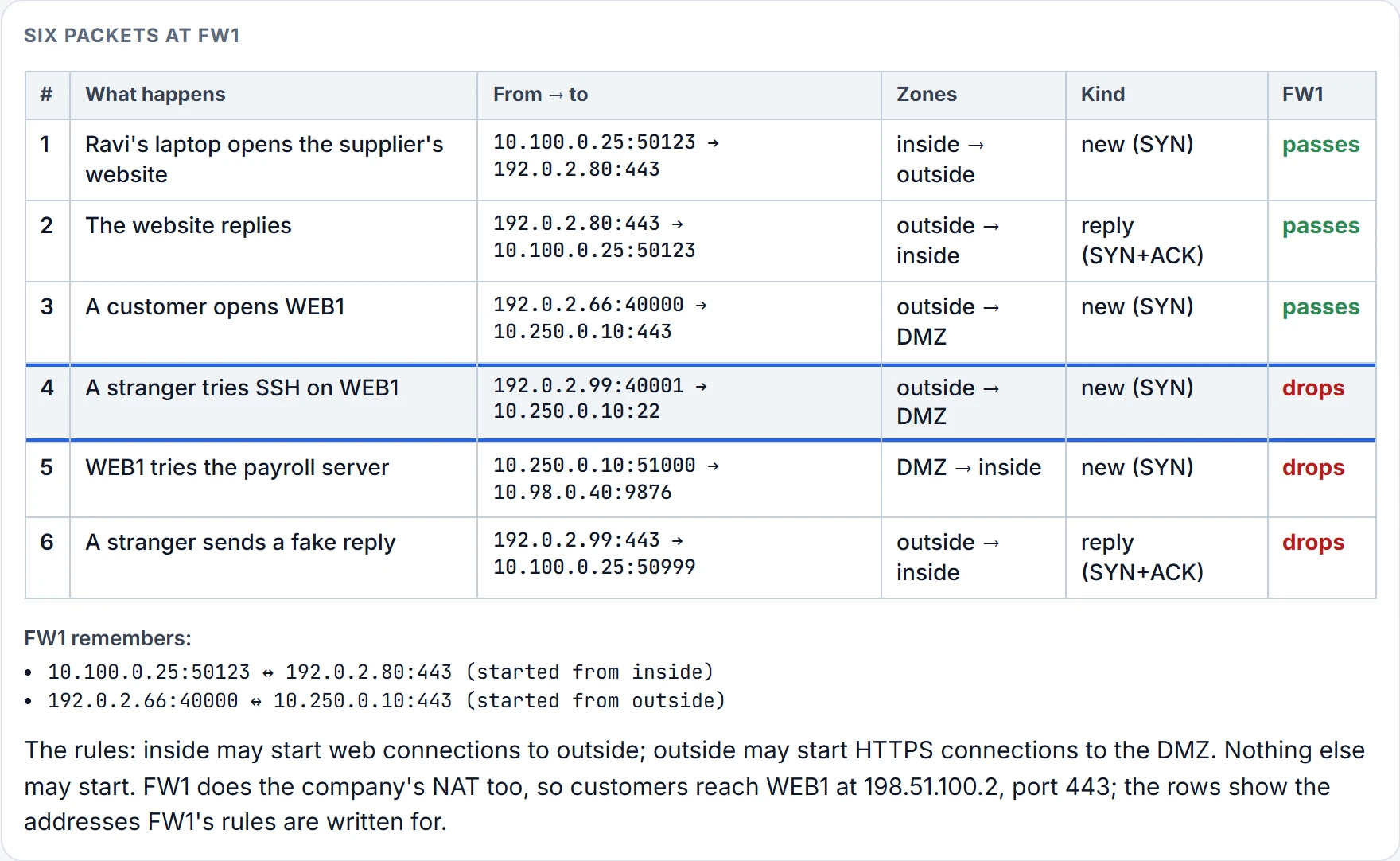
Step 4 of 6 Packet 4 is dropped: it starts a new connection from outside to DMZ on port 22, and the rule covers only port 443. Everything no rule allows is denied.
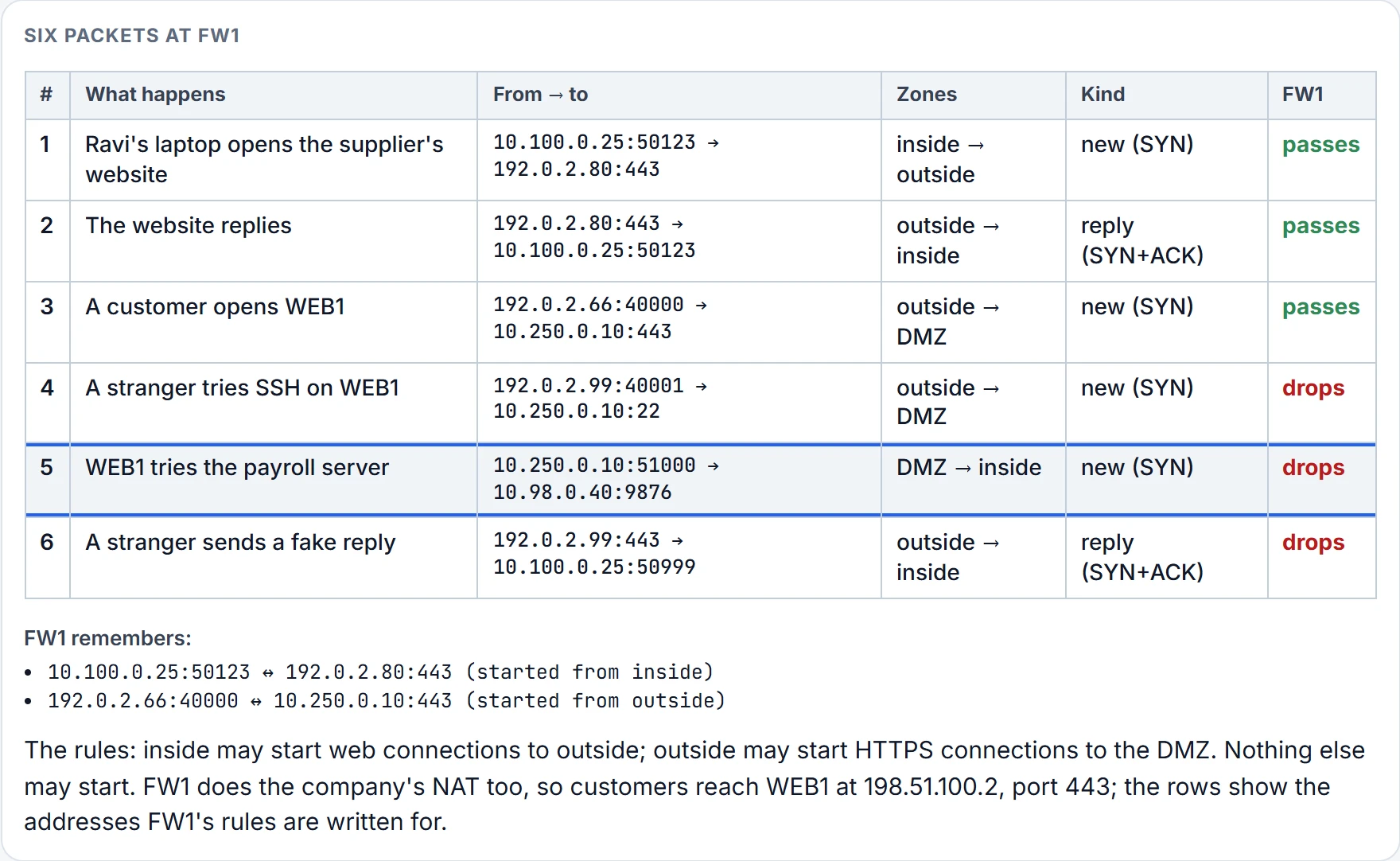
Step 5 of 6 Packet 5 is dropped: it starts a new connection from DMZ to inside, and no rule lets DMZ start connections to inside. Everything no rule allows is denied.
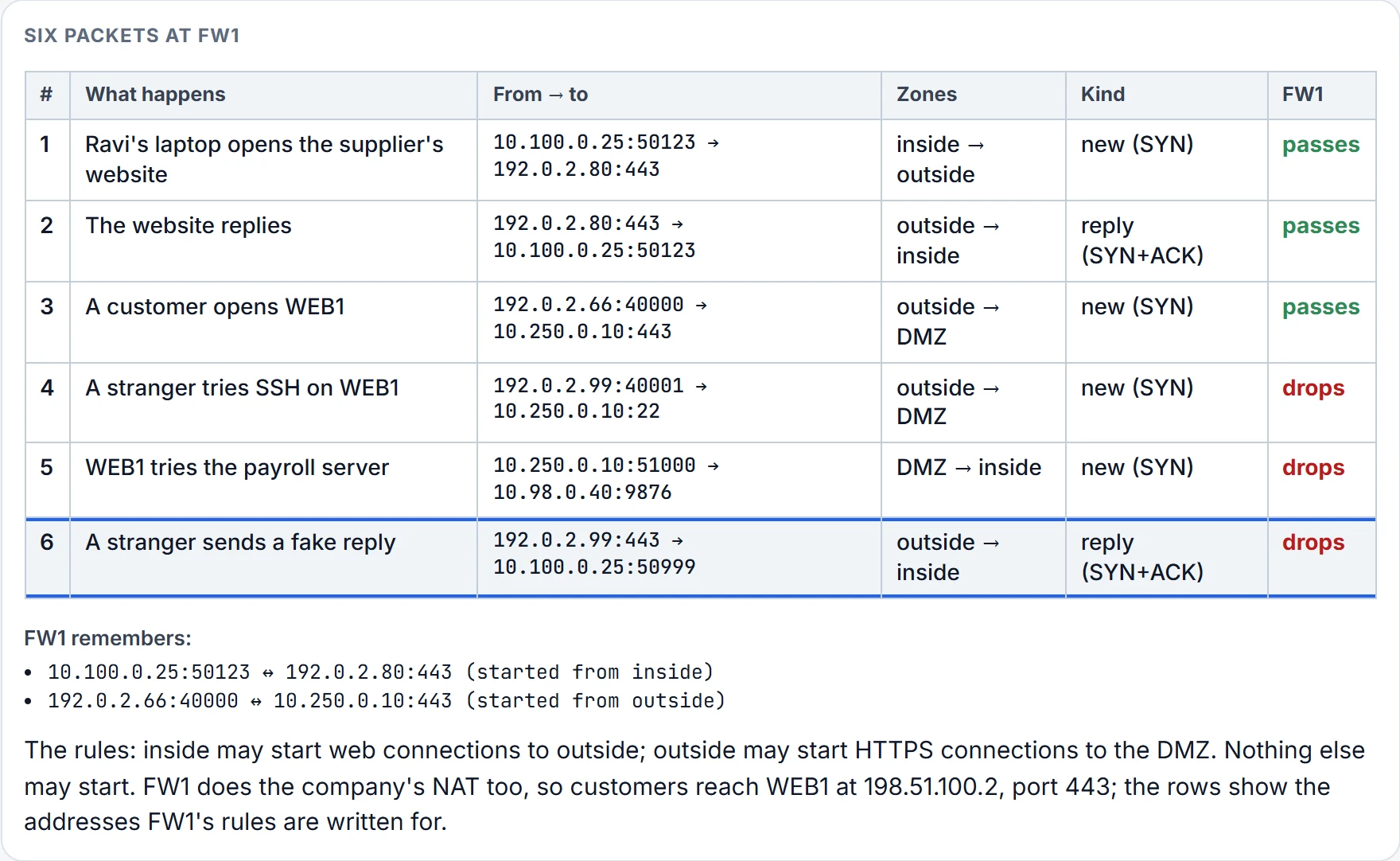
Step 6 of 6 Packet 6 is dropped: it claims to belong to a connection, but FW1 remembers no such connection.
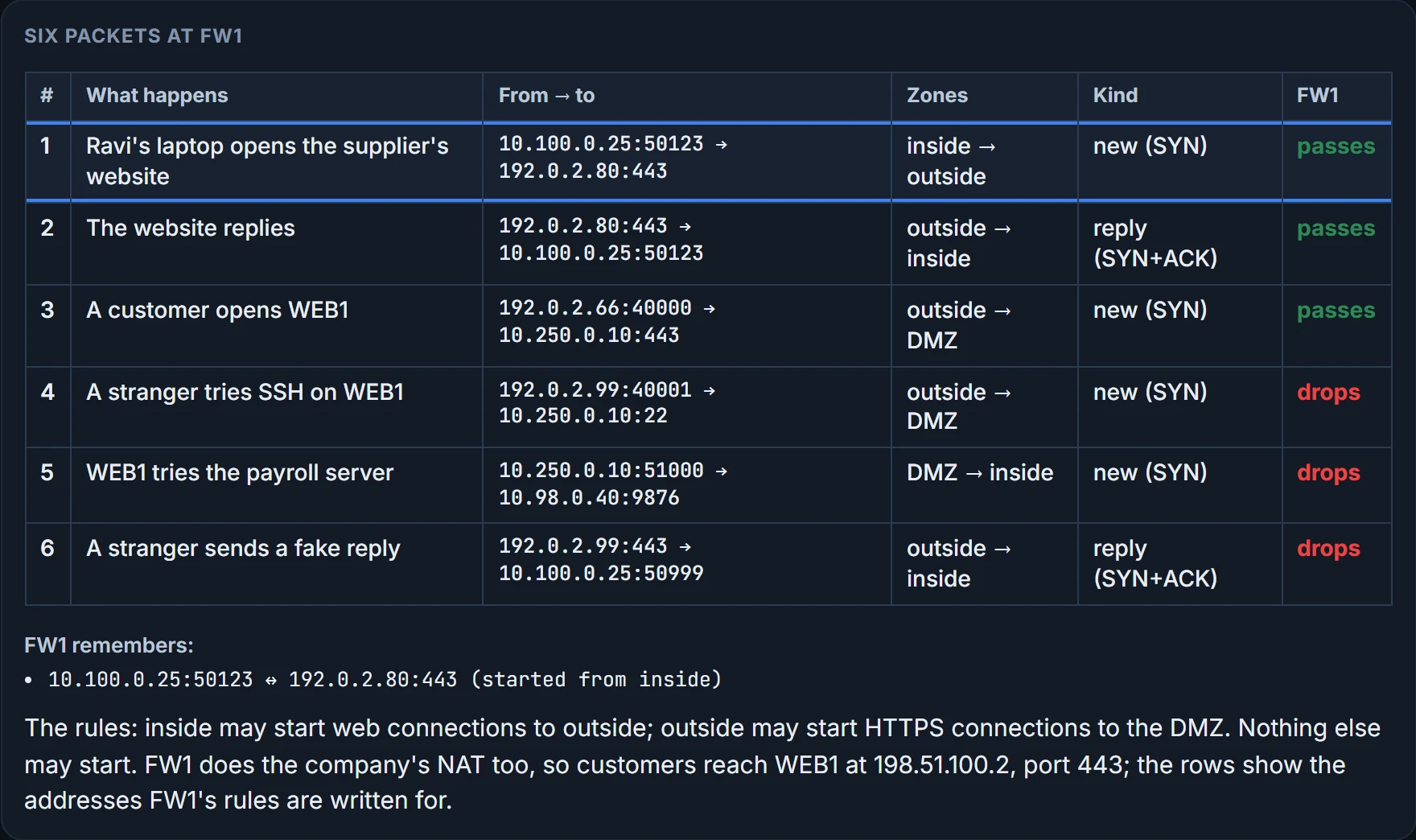
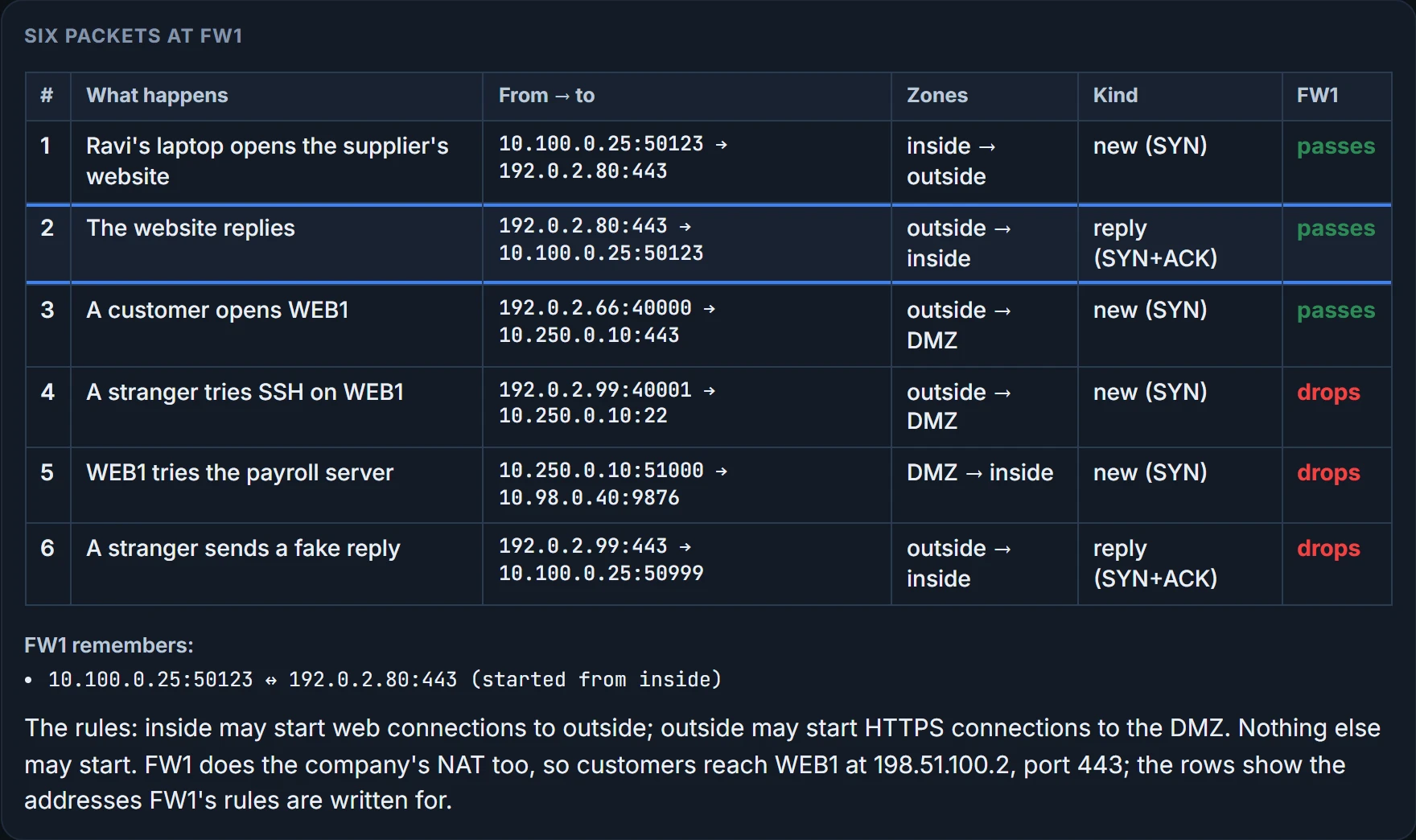
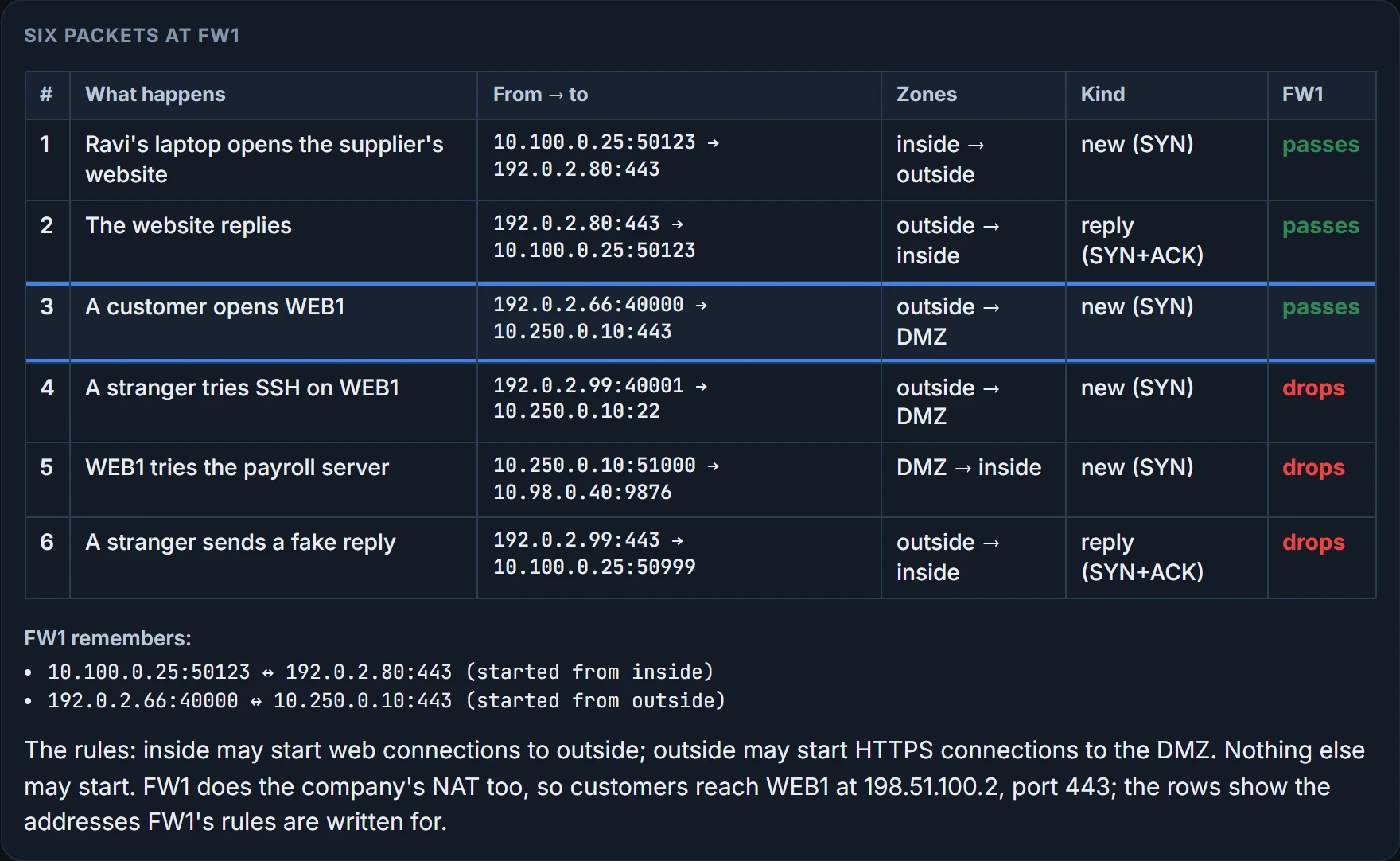
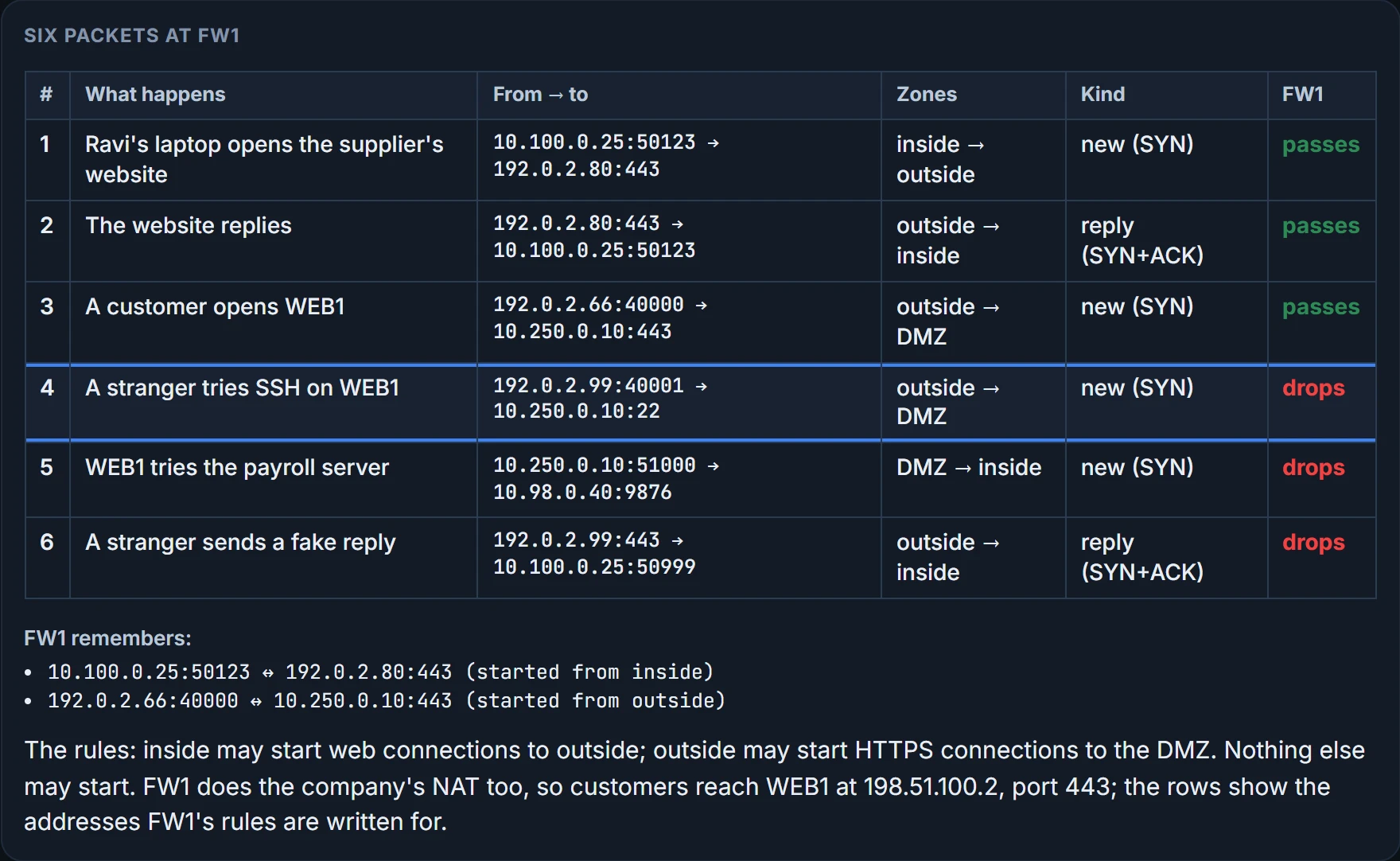
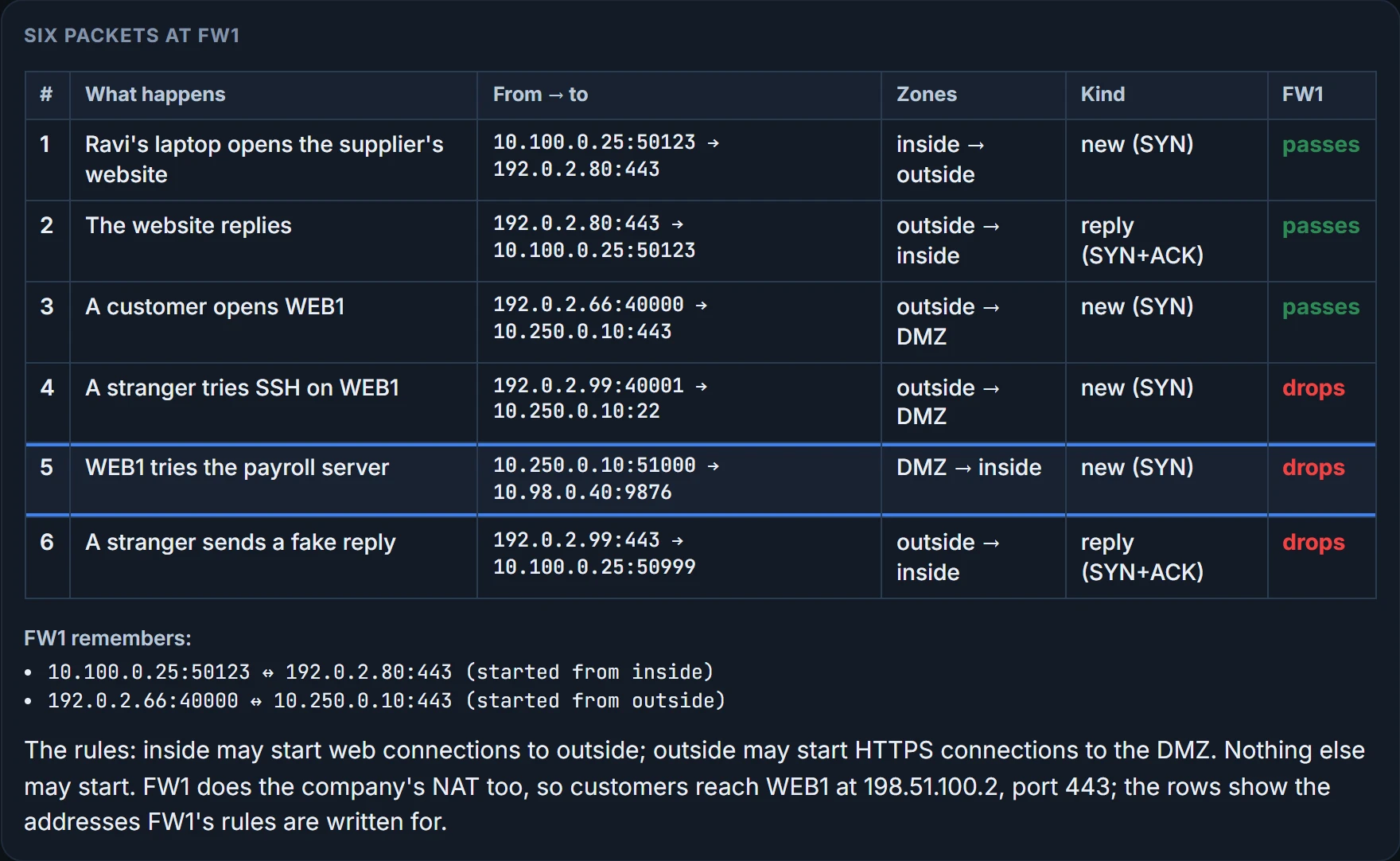
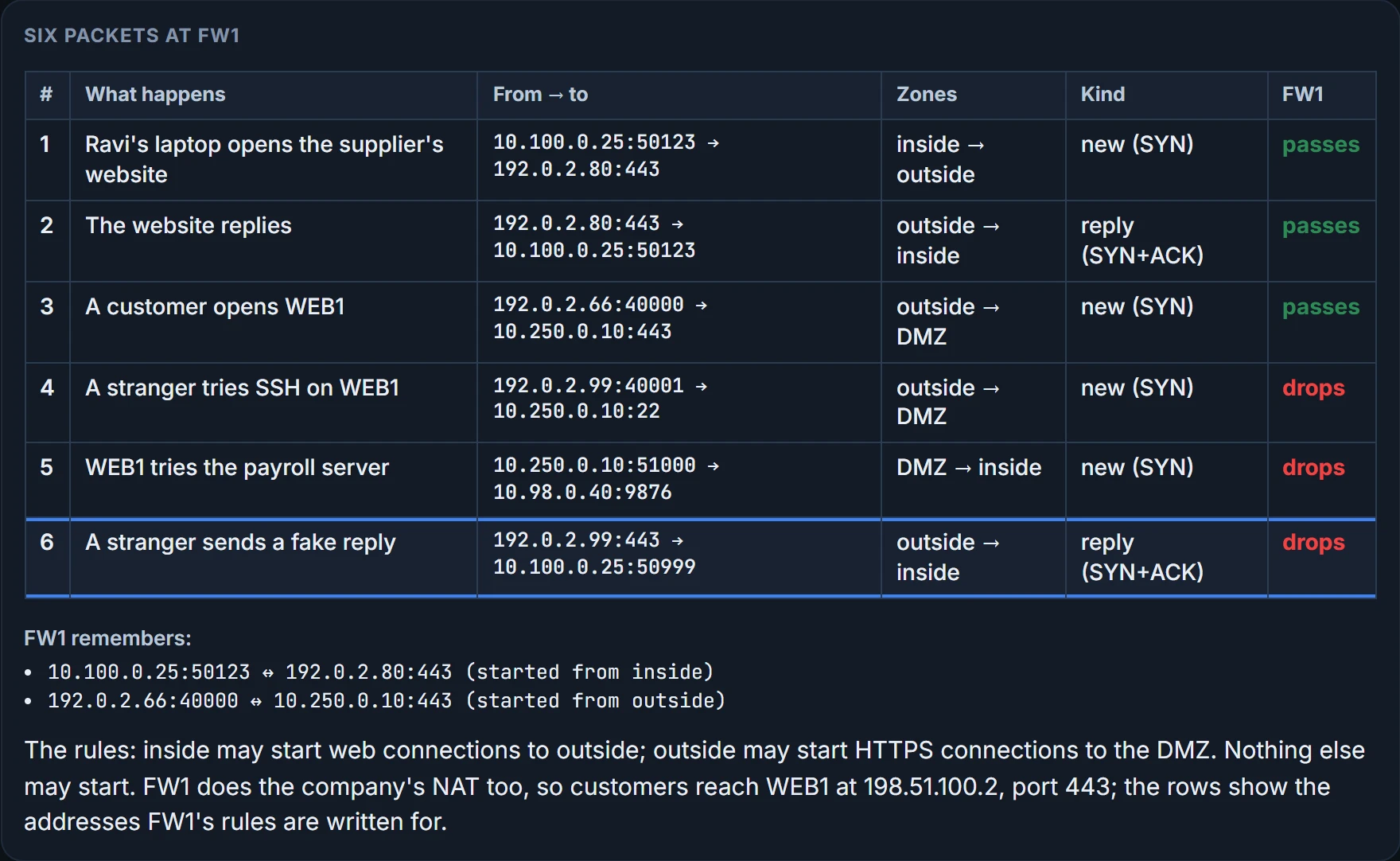
Packet 4 is the kind of probing the ISP reported on Monday: a stranger trying a port nobody opened. Packet 5 is WEB1 itself: if it is ever broken into, no rule lets it start anything toward the inside. And packet 6 is a fake reply: FW1 never saw that conversation start, so it doesn't let the ending in.
Why can't a router's ACL just do this? A router has to spend as little time as possible on each packet, so its ACLs can't gather information about earlier packets and consult it later. A firewall's whole job is security, so it does. Take a web server that normally sees about 10 new TCP connections a second, and 100 at the busiest times. A DoS attack might try thousands a second, until the server has no CPU or memory left for real users. A stateful firewall that counts connection requests from each client to each server notices thousands coming from a handful of clients, and starts filtering them. A stateless firewall, or a router's ACL, judges each SYN on its own and never notices the pattern.
An IPS reads for known attacks
A firewall's rules come from the company's engineers: applications by port, and zones. A traditional IPS can also sit in the path and filter packets, but it decides differently. It downloads a database of exploit signatures, each describing the header values found in the sequence of packets a known exploit uses, and compares packets against them. On a match it can log the event, discard the packets, or redirect them to another security application to be examined. The signatures come mostly from the IPS vendor's security experts, and they target DoS, DDoS, worms and viruses. So the IPS keeps downloading updates to its database.
Updates matter because of zero-day attacks: a new virus is out in the world before anyone has written a signature for it. Antivirus software on each PC works the same way, with signatures that look for how a virus is stored in files on the PC, or in files arriving by email or through a web browser, and it protects a PC only once that PC has updated. Researchers can also write an IPS signature for the virus in flight: a particular port, say, and a particular string of bytes in the payload. One IPS protects a whole section of the network, so it can sometimes react faster than updating every host. Both kinds of protection matter.
The ticket was valid; the bag inspection still found a problem.
Know its limits. A signature can match harmless traffic, a false alarm, and there is no signature for an attack nobody has described, so signatures need tuning as well as updates. An IPS placed in the path can drop traffic, and if it fails or misjudges, good traffic suffers with the bad; one that only watches a copy of the traffic can raise an alert but can't drop the packets itself. And it can only judge what it can read: once a payload is encrypted, the IPS can't see inside it unless the device decrypts it.
Next generation
Since the mid-2010s, vendors have called their current firewalls and IPSs next-generation: a next-generation firewall (NGFW) and a next-generation IPS (NGIPS). It's more than a marketing label. The security industry runs in endless cycles of new attacks and new answers. Mobile devices leave the company, use the internet, and come back; and no single box can stop some threats, so the tools have to work together. The line between a traditional firewall and a next-generation one is blurry, because the products changed a little at a time over many years.
An NGFW still does everything above: stateful filtering on the IP, TCP and UDP headers, with zones. The new part starts from a weakness in matching ports.
Each application should use its well-known port. Attackers know a firewall blocks most well-known ports from outside to inside, so they port-scan for any port it does let through, then run their own protocol, HTTP for example, on that nonstandard port. A firewall that only reads port numbers waves it through. The answer is to identify the application from its data, the application-layer headers and data structures far past the TCP and UDP headers, and not from its port number. That kind of deep packet inspection is called Application Visibility and Control (AVC): the firewall matches the application, whatever port it arrives on. Functions that benefit from sitting in the same path tend to move onto one product, and an NGFW can run the NGIPS feature too. FW1 will.
An NGIPS tackles the traditional IPS's worst habit: comparing every message against every known exploit and logging far more events than the security staff can read, the real ones buried like needles in a haystack. An NGIPS gathers context about the hosts it protects, their operating systems, software versions, applications and open ports, and puts less weight on exploits that can't apply there. A campus of identical PCs with no data centre doesn't need its IPS logging attacks on servers it doesn't have.
| Feature | NGFW | NGIPS |
|---|---|---|
| The traditional functions | stateful filtering, NAT and PAT, VPN termination (being the end of a VPN tunnel) | exploit signatures, a log of events, discarding or redirecting packets |
| Application Visibility and Control (AVC) | identifies the application from its data, not its port | the same |
| Advanced malware protection | antimalware on the firewall: blocks file transfers that would install malware, keeps copies for analysis | |
| URL filtering | sorts each web request's URL into a category, then blocks it or slows it by rule, using the reputation scores a vendor's researchers give each domain | |
| NGIPS on the same box | yes: one device can run both | |
| Contextual awareness | learns the hosts (operating system, software versions, patches, applications, open ports) and focuses on attacks that could hit them | |
| Reputation-based filtering | filters on the reputation scores a vendor's researchers give known bad actors, by IP address, domain, name or URL | |
| Event impact level | rates how much each logged event would matter if it is an attack |
Continue the lesson
The whole lesson, with its drawings and its questions. The rest of this section and 3 more after it.