
Network Components and Roles
Every box on a network drawing has one main decision. An endpoint sends to its default gateway for other subnets; a Layer 2 switch forwards frames by MAC address inside a VLAN; a router or Layer 3 switch forwards packets between subnets; a firewall decides which conversations may happen. The internet is not a box: it is the networks beyond the ISP's link.
By Arif, founder of Daveth · Updated
The full 10 min walkthrough is in Daveth Pro (Network). See what the plan opens
What this page answers
What are the components of a network?
Endpoints and servers, Layer 2 and Layer 3 switches, routers, next-generation firewalls and IPS, and access points with their controllers. Each makes one main decision, and a packet meets only the ones on its path. Read it in “One question per box”
One question per box
Monday, month nine. Head office is taking the fourth floor, and the facilities manager, planning power and cable runs, pins up the network drawing Ravi keeps, and points: "Which of these boxes is the internet?"
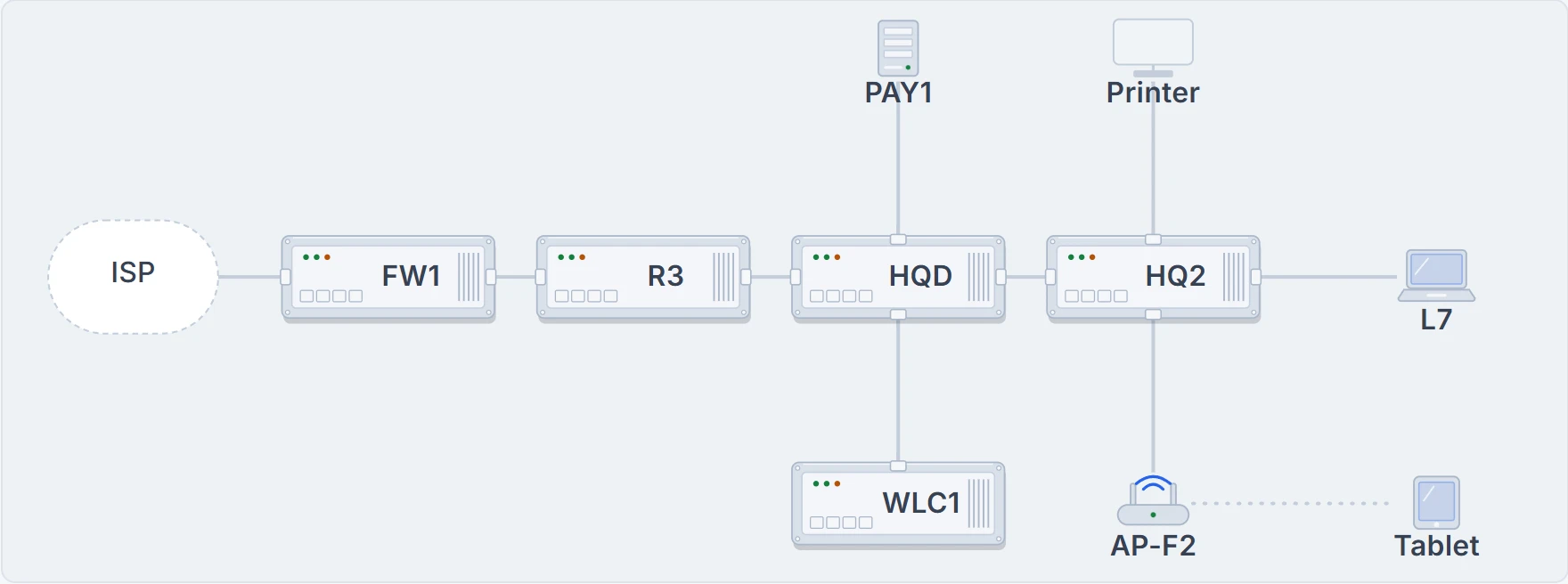
Head office from a desk to the ISP: L7 on HQ2, HQD, R3, FW1. PAY1 and the Staff printer above; WLC1 and AP-F2, with a tablet on its radio, below.
None of them. The internet isn't a box in the building; it's the networks beyond the ISP's link. Everything in the building is ours, and each box on the drawing exists to make one kind of decision. FW1 is new on it: it went in at the weekend, where 08.1.4 planned it, between R3 and the ISP.
| Role | Here | What it decides | What proves it |
|---|---|---|---|
| Endpoint | L7, the tablet, the printer | sends and receives the user's traffic; for another subnet, it sends to its default gateway | its own address, mask, gateway and DNS server, and its link or wireless association |
| Server | DHCP1, the DNS server, PAY1 | provides a service to clients | the service answering this client; "the server is up" isn't that |
| Layer 2 switch | HQ2, HQD | forwards frames inside a VLAN, by destination MAC | show mac address-table, and the VLAN on each port |
| Layer 3 switch | none at head office (Maya's home lab H1, 05.1.5) | switches frames and also routes between VLANs, using SVIs | show ip route and the SVIs in show ip interface brief |
| Router | R3 (and R1, BR1) | joins networks and picks the next hop by destination IP | show ip route |
| Firewall (NGFW), with IPS | FW1 | allows or refuses traffic by policy, zone (inside, outside, DMZ) and state (the sessions it has seen start); the NGFW also identifies applications, and its IPS matches signatures | its own rules, sessions and logs |
| Access point | AP-F2 and the other lightweight APs | bridges wireless clients onto the wired LAN; a lightweight AP does only the real-time 802.11 work | the client's association to the SSID |
| Wireless LAN controller | WLC1 | manages lightweight APs: authentication, security policy, channels and power | the APs joined to it and the clients it lists |
Four distinctions are worth slowing down for. An endpoint is where the user sits: a PC, a tablet, a phone, or the printer. A server provides a service, and "the server is up" proves only that; whether the service reaches this client depends on everything in between.
A Layer 2 switch forwards frames inside a VLAN and never between VLANs; HQ2 and HQD are Layer 2 switches. Something has to route between the VLANs, and here that is R3, over its trunk to HQD (router-on-a-stick, 05.1.5). A Layer 3 switch, also called a multilayer switch, does both jobs in one box, with an SVI as the gateway for each VLAN, or a routed port used like a router interface, the way Maya's home lab switch did (SVIs 05.1.5, routed ports 05.1.6).
A next-generation firewall still does what firewalls always did: stateful filtering, NAT and PAT, VPN termination. Like any firewall it refuses traffic unless a rule allows it: inside hosts may start web connections (80 and 443) out, outside hosts may start none, except to the servers in the DMZ that the internet must reach (empty until WEB1 arrives). It adds Application Visibility and Control, which identifies the application from its data rather than its port number; malware protection, which blocks file transfers that would install malware; and URL filtering by category and reputation. FW1 also runs the IPS, which sits in the path of the packets and compares them with a database of attack signatures, so it can discard or redirect as well as log. Its next-generation IPS side learns which systems and applications are really present, so it logs fewer, more relevant events, and it adds application identification, reputation filtering and an impact level (how much harm each event could do). Same box, separate decisions (08.1.4).
And wireless splits one job in two. An autonomous AP does everything itself. A lightweight access point such as AP-F2 does only the real-time 802.11 work, moving frames on and off the air, and can't normally work without its controller. WLC1 does the rest: authenticating users, applying security policy, choosing channels and power. That division is called split-MAC, and the two talk through CAPWAP tunnels (03.5.2). Head office's APs run in local mode, a lightweight AP's default; a FlexConnect AP, the other mode 03.5.2 met, can switch its clients' data where it is.
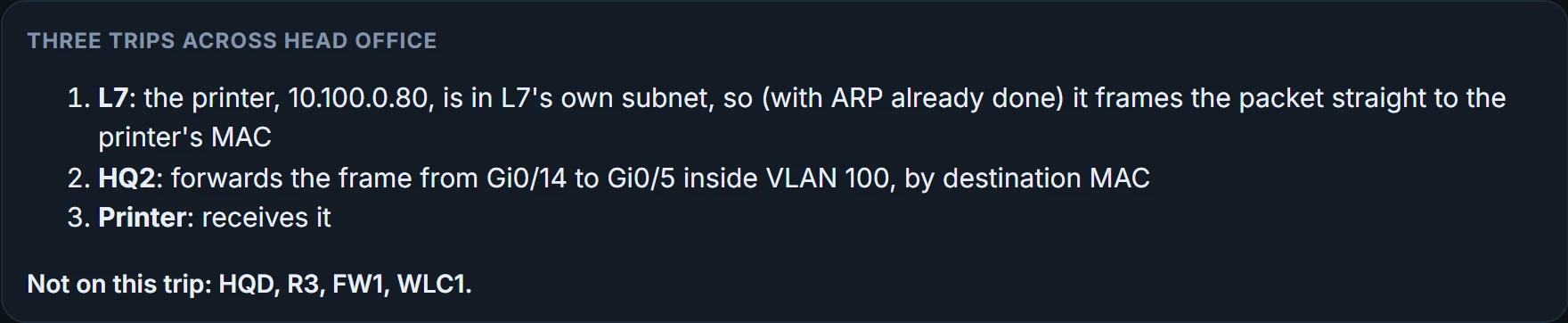
Three trips
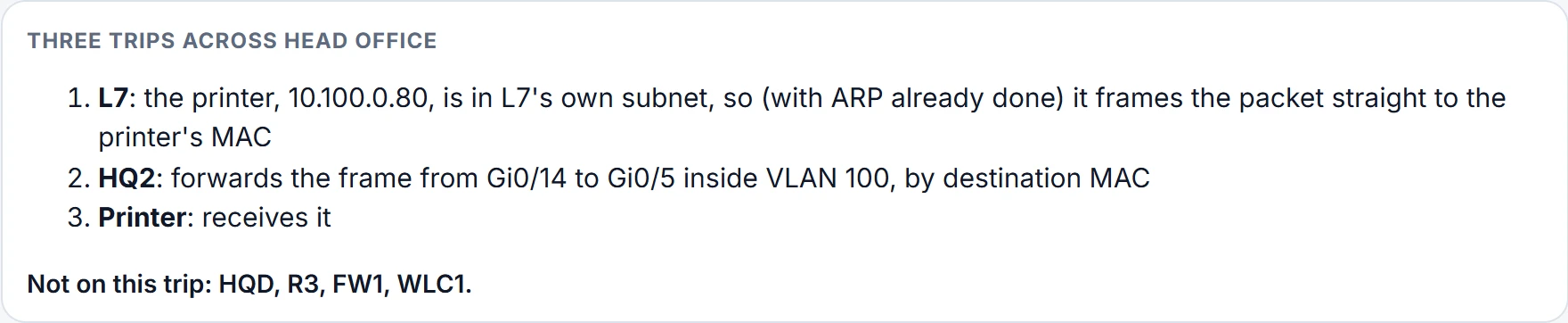
A drawing shows every box; a packet meets only some of them.
You can think of the controller as a coach who sets the plays for forty APs. (Where it stops: in local mode the ball does visit the coach; every client frame travels inside the tunnel to WLC1 before it goes anywhere.)
Look at what each trip leaves out. The print job never reaches a router, because L7 and the printer share a subnet; HQ2 is the only box between them. The trip to PAY1 crosses HQD twice, up to R3 in VLAN 100 and back down in VLAN 98, because R3 does the routing from one end of a trunk. The reply takes the same boxes in reverse, in on .98 and out on .100, so PAY1-ONLY, outbound on .98, never sees it. And the tablet's web request goes up to WLC1 before it goes anywhere near the internet: to WLC1 through the CAPWAP tunnel, which R3 has to route because the APs and WLC1 live in different VLANs, then back out on VLAN 100 to R3 again, then FW1: HQD three times, R3 twice. FW1 keeps a record of the session, which is what lets the website's reply back in; R3's ACLs keep no such record.
Continue the lesson
The whole lesson, with its drawings and its questions. The rest of this section and 2 more after it.