
Applying and Troubleshooting IPv4 ACLs
Extended ACLs belong as close as possible to the source of the packets, so unwanted ones are discarded early. When an ACL does not do what you meant, every cable and route can be right and it can still discard the packets; ping and traceroute are not the packets users send, so think about the ACL against the real traffic before typing commands.
By Arif, founder of Daveth · Updated
The full 12 min walkthrough is in Daveth Pro (Network). See what the plan opens
What this page answers
Where should you apply an extended ACL?
As close as possible to the source of the packets, so unwanted packets are discarded early and use no bandwidth on the way. When the sources arrive from several directions, that can mean more than one interface. Read it in “Where it goes”
How do you troubleshoot an ACL?
Start where the ACL is, then read it against the packets that matter. Ping and traceroute send different packets from users' applications, so an ACL can pass the tests while blocking the users, or the other way round. Read it in “When it doesn't do what you meant”
Where it goes
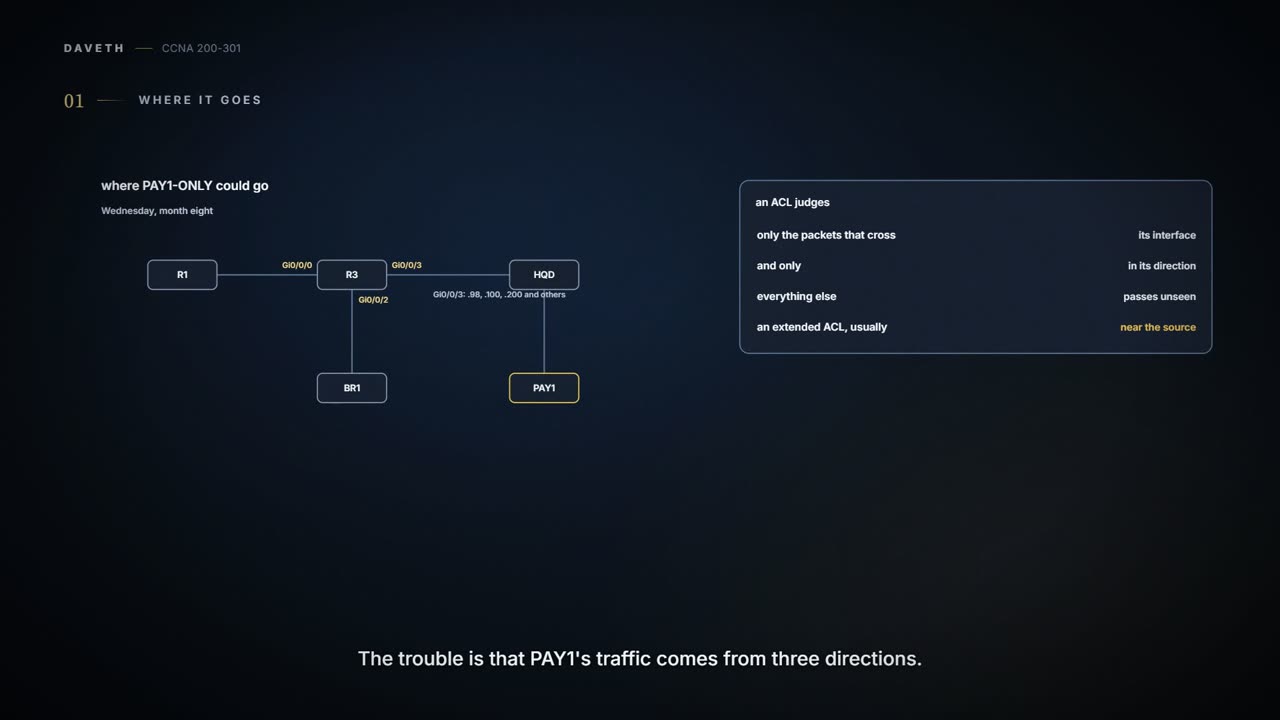
Wednesday, month eight. PAY1-ONLY is written (08.2.3); today Ravi puts it somewhere. Extended ACLs belong as close as possible to the source of the packets, so unwanted packets are discarded early and don't use bandwidth on the way. But the sources that matter come from three directions: the Staff LAN on R3's subinterface Gi0/0/3.100, head office guests on Gi0/0/3.200, and the branch on Gi0/0/0, or on the backup line, Gi0/0/2, when the fibre is down.
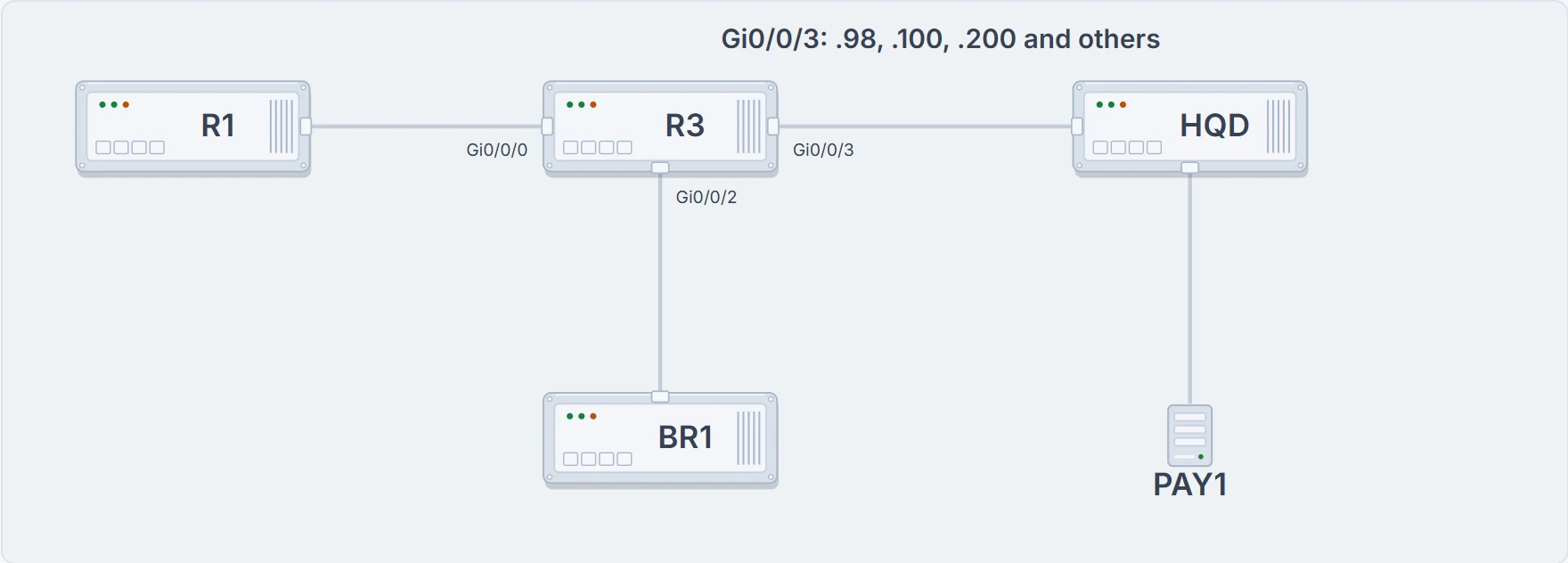
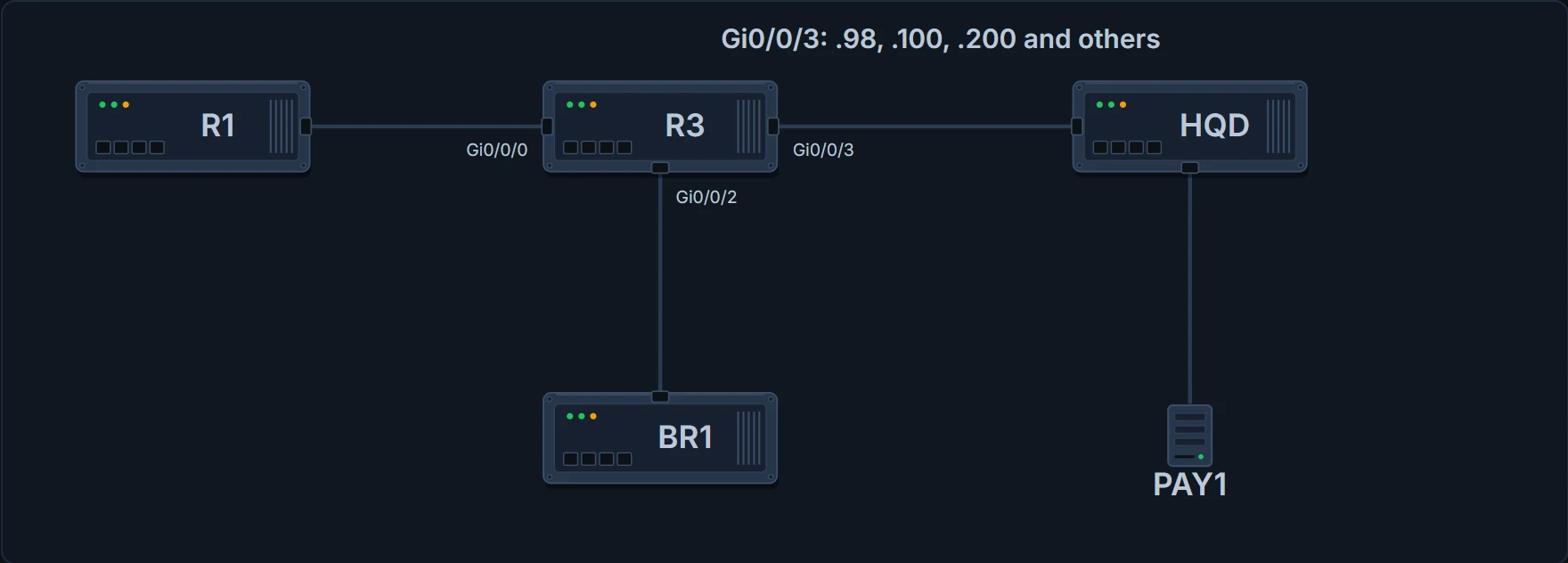
R3 in the middle: R1 on Gi0/0/0, BR1 on the backup line Gi0/0/2, and the trunk Gi0/0/3 to HQD, with subinterfaces including .98 (PAY1), .100 (Staff) and .200 (Guest). Not drawn: the fibre between R1 and BR1.
An ACL only filters packets that cross its interface, in its direction.
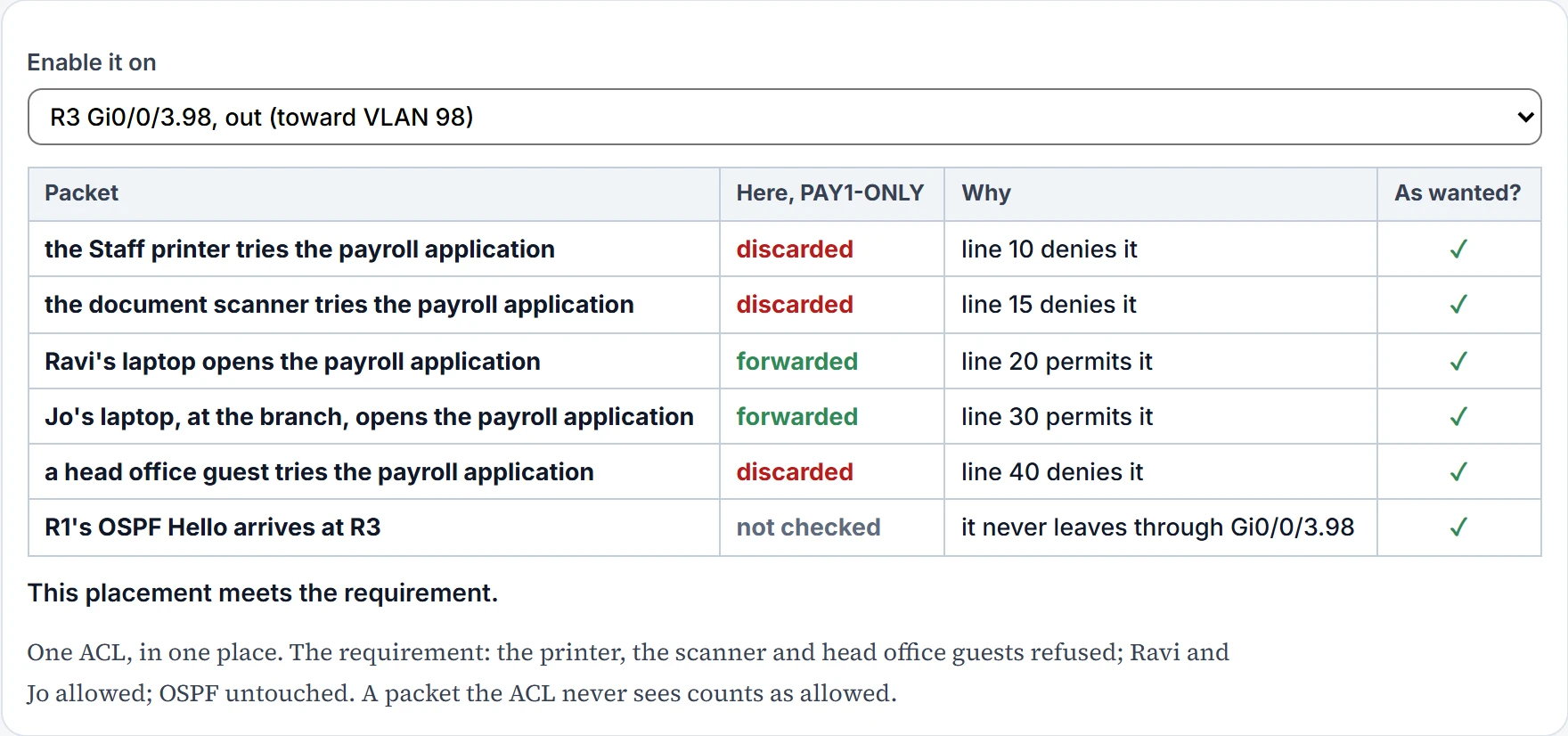
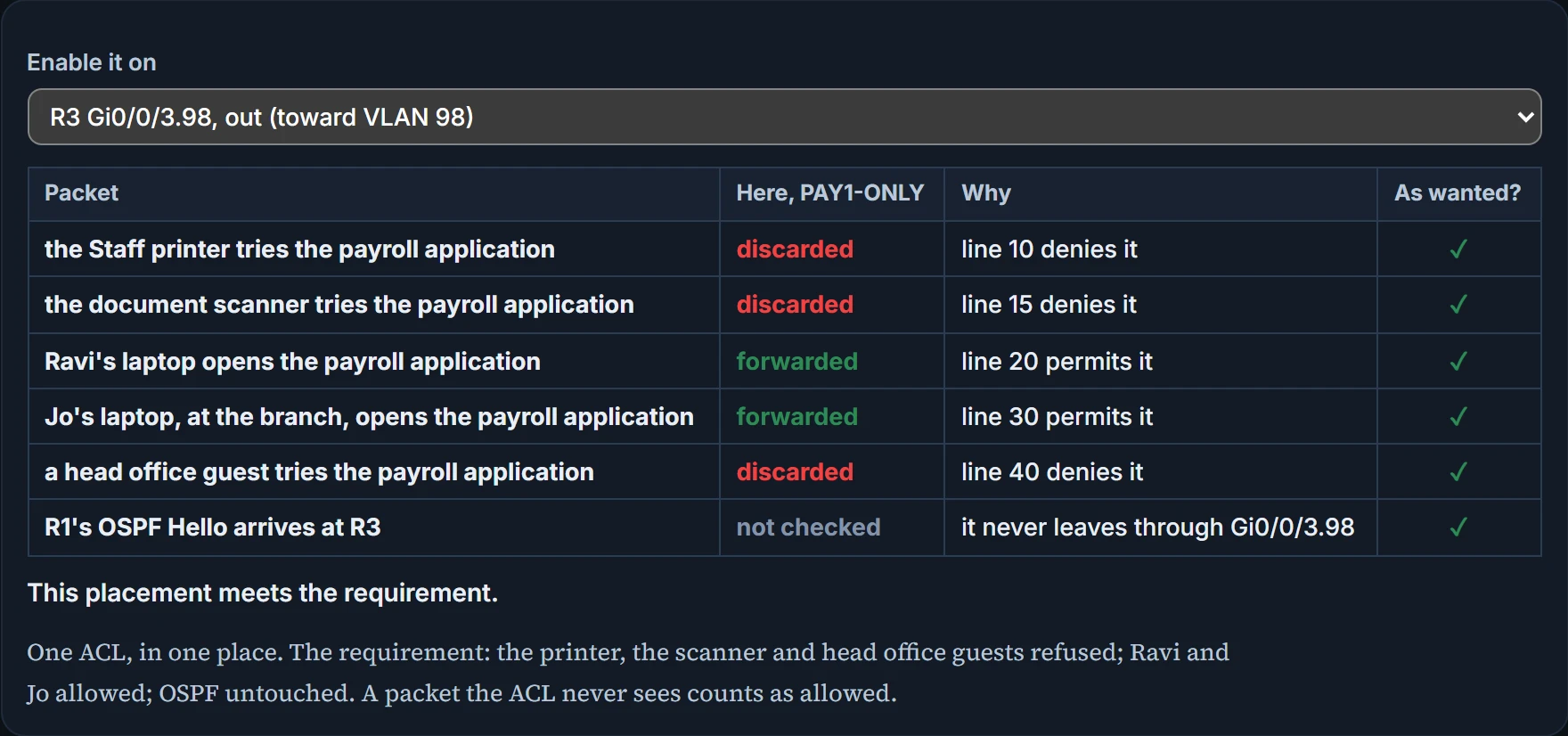
Only one place sees every packet R3 routes to PAY1: outbound on Gi0/0/3.98, where they all leave R3. That is the destination side, against the usual advice for extended ACLs, and it is a reasoned exception. Head office's packets have come one hop, and the branch's have crossed links with bandwidth to spare. One ACL in one place is easier to keep right than one near each source: several on R3, and one on BR1. The near-source choices each see only some of the sources, and pointing the right ACL the wrong way sees none of them. Ravi enables it:
R3# configure terminal
Enter configuration commands, one per line. End with CNTL/Z.
R3(config)# interface GigabitEthernet0/0/3.98
R3(config-subif)# ip access-group PAY1-ONLY out
R3(config-subif)# end
R3# show ip interface g0/0/3.98 | include access list
  Outgoing Common access list is not set
  Outgoing access list is PAY1-ONLY
  Inbound Common access list is not set
  Inbound access list is not set
! mid-morning
R3# show ip access-lists PAY1-ONLY
Extended IP access list PAY1-ONLY
    10 deny tcp host 10.100.0.80 host 10.98.0.40 eq 9876 (4 matches)
    15 deny tcp host 10.100.0.81 host 10.98.0.40 eq 9876 (2 matches)
    20 permit tcp 10.100.0.0 0.0.0.255 host 10.98.0.40 eq 9876 (386 matches)
    30 permit tcp 10.50.0.0 0.0.0.255 host 10.98.0.40 eq 9876 (91 matches)
    40 deny ip any host 10.98.0.40 (23 matches)
    50 permit ip any any (5210 matches)
R3#
What this proves: PAY1-ONLY is enabled outbound on Gi0/0/3.98, and each line is matching traffic: the printer and the scanner refused, the Staff LAN and branch staff allowed, everything else to PAY1 refused by line 40, and all other traffic through line 50. What it doesn't: that every packet reaches R3 by the path Ravi expects, or that Ravi's tests behave like the users' traffic.
When it doesn't do what you meant
ACLs make troubleshooting harder. Every cable, address and route can be right, and an ACL can still discard the packets. Worse, ping and traceroute don't send the same kind of packets as users' applications, so an ACL can let the tests through while it blocks the users, or block the tests while the users are fine. Much of the work is thinking about the ACL against the packets, not typing commands.
Start where the ACL is, then read it, then think:
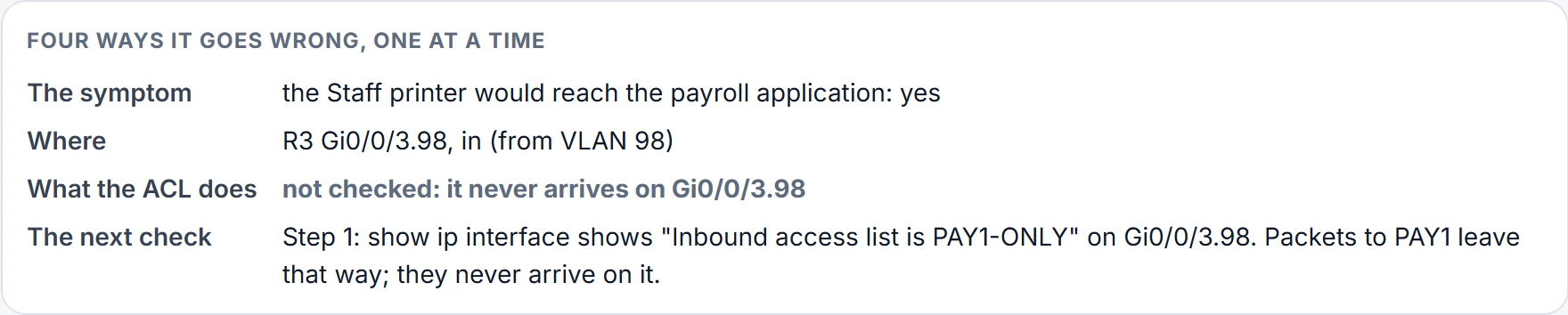
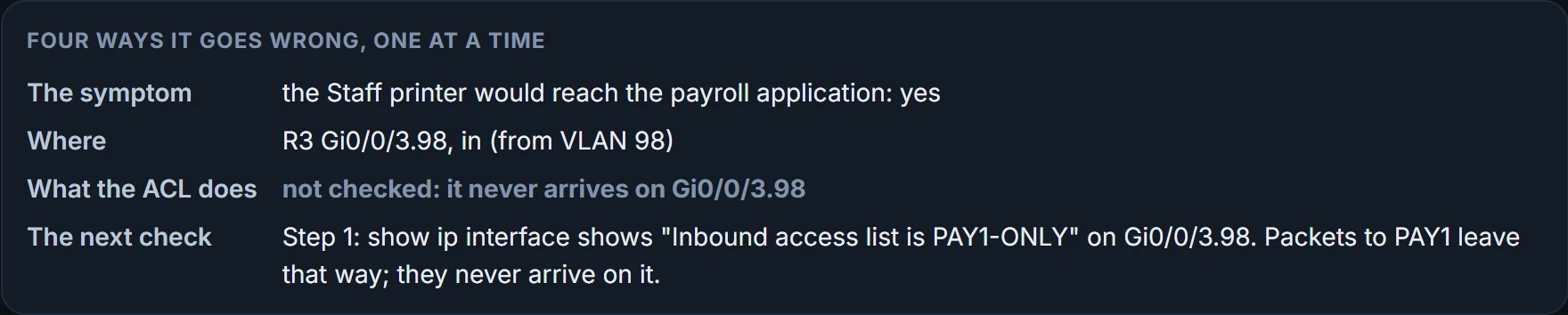
- Step 1: find where each ACL is enabled, and which way: the ip access-group lines in show running-config are quickest; where enable mode isn't allowed, use show ip interface (for one interface, or for every interface if you name none).
- Step 2: read each ACL: show ip access-lists, show access-lists, show running-config. The counters show which lines are matching.
- Step 3: analyse. A: lines out of order (first match). B: source and destination addresses swapped for this interface and direction; the router gives no error for that. C: source and destination ports swapped: the server's well-known port is the destination port on packets going to it and the source port on its replies. D: ports need the tcp or udp keyword; the router rejects a port on an ip line. E: ICMP is neither TCP nor UDP; it has its own keyword, icmp. F: an explicit deny any at the end, so its counter shows what is being dropped. G: inbound ACLs with a deny all at the end, which can drop routing protocol messages. H: standard ACLs near the source, which discard more than they should.
A counter helps most when you control the test. Write down the packet's five fields, protocol, source and destination addresses, source and destination ports, and walk them down the list yourself; then send traffic that should match a line and watch that line's counter. If it never rises, those packets are matching an earlier line, or aren't reaching this router, this interface, this direction, at all. Counters can also be old, so compare before and after a fresh test rather than reading one number. And remember the replies: an ACL keeps no memory (08.1.4), so the return traffic crosses whatever ACL faces the other way, and needs checking separately.
Test with specific packets, not with an application. A web browser opening a page also asks DNS for the name, among other things, so a browser that fails may have been stopped by a rule that has nothing to do with the one you were testing.
The browser asked three questions; the ACL answered only the one we meant to test.
After it went live, Ravi and Maya, on a call, walked through four ways it could have gone wrong, each changing one thing:
| Fault | The printer's packet | Found by |
|---|---|---|
| Enabled the wrong way round | not checked | Step 1 |
| The Staff LAN permit above the printer's deny | forwarded | Step 3A |
| Source and destination swapped in line 10 | forwarded | Step 3B |
| ip instead of tcp on the printer line | forwarded | Step 2 |
A perfect guard posted at the wrong gate guards a broom cupboard.
Continue the lesson
The whole lesson, with its drawings and its questions. 3 more sections after the ones above.