
Named and Extended IPv4 ACLs
An extended ACL can read more of the packet than a standard one: each line names a protocol, a source and a destination, and with tcp or udp it can also check port numbers with eq, ne, lt, gt or range. Every field must match for the line to match. Named ACLs add a recognisable name and the ability to delete and insert single lines.
By Arif, founder of Daveth · Updated
The full 11 min walkthrough is in Daveth Pro (Network). See what the plan opens
What this page answers
How do you write an extended access list?
access-list with a number from 100 to 199 or 2000 to 2699, permit or deny, then the protocol (ip, tcp, udp or icmp), the source and the destination. With tcp or udp, eq and the other tests can check the ports too. Read it in “Protocol, source, destination”
What is a named ACL?
An ACL created with ip access-list extended or standard and a name. Its lines are subcommands, and single lines can be deleted or inserted; it filters no differently from a numbered one. Read it in “Named, and easier to change”
One more thing to read
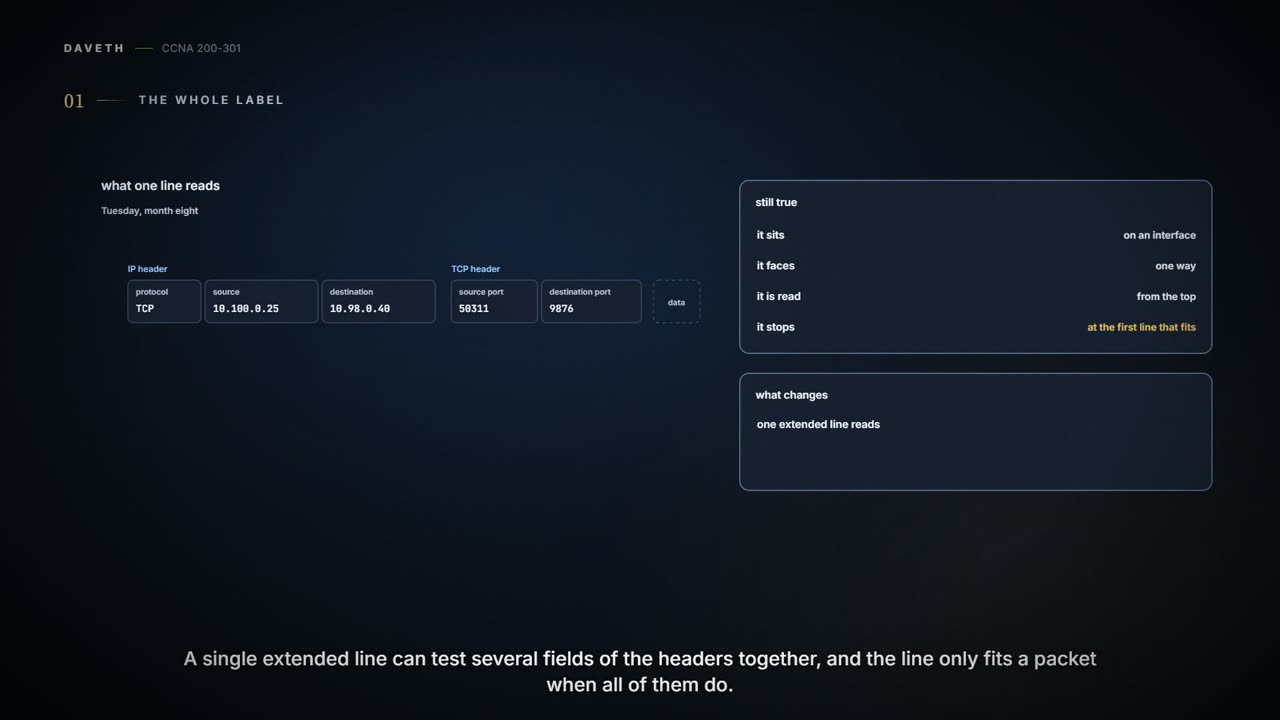
Tuesday, month eight. Monday showed Ravi the limit of a standard ACL: it can't say "only to PAY1". An extended ACL can. In most ways it is the same kind of thing: enabled on an interface in one direction, read from the top, first match wins. The difference is how much of the packet it can read. One extended line can check several header fields at once, and all of them must match for the line to match.
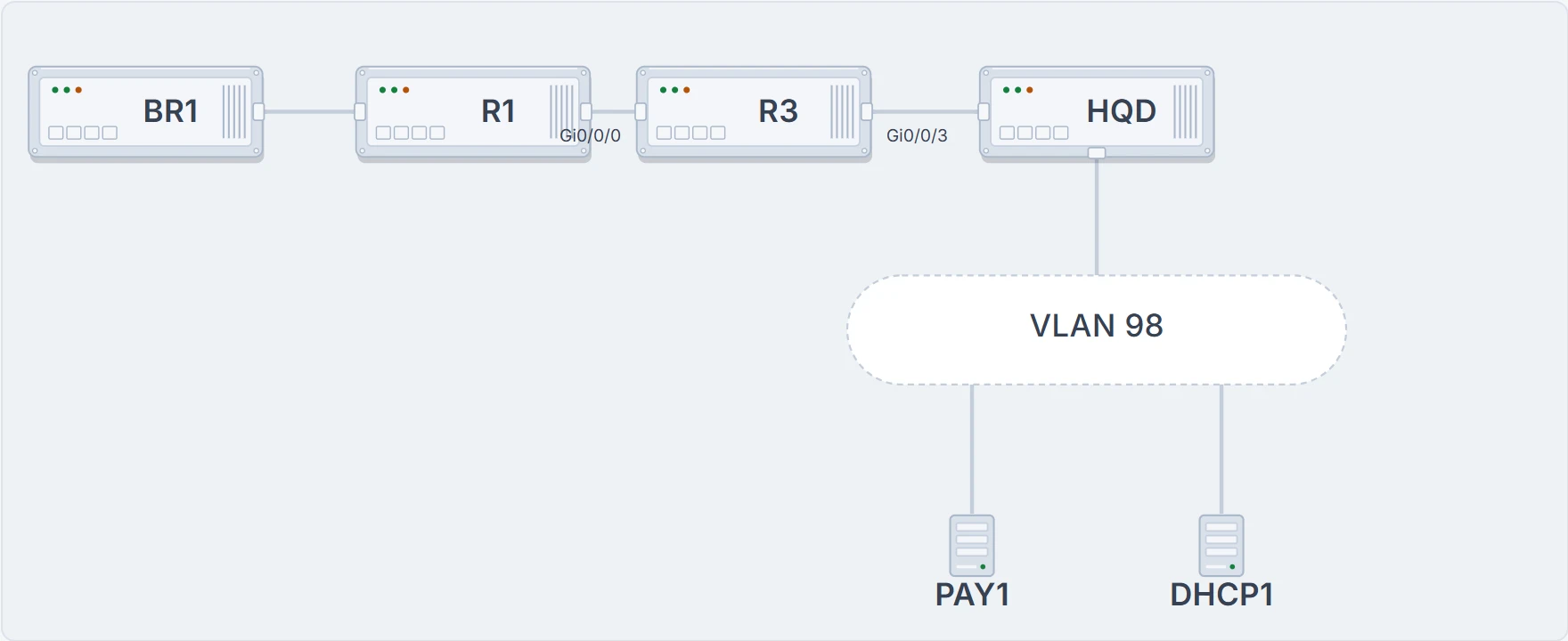
BR1, R1 and R3; R3's trunk Gi0/0/3 to HQD; VLAN 98 below, with PAY1, the payroll server, and DHCP1. Not drawn: the other VLAN 98 servers.
Protocol, source, destination
An extended numbered ACL uses the same access-list global command, with a number from 100 to 199 or 2000 to 2699, and after permit or deny it needs three things: the protocol, the source and the destination. The protocol is a keyword: tcp, udp or icmp match packets whose IP header is followed by a TCP, UDP or ICMP header (the IP header's Protocol field says which, 6 for TCP, for example), ip matches every IPv4 packet, and there are keywords for other protocols too, such as eigrp or ospf. The addresses use the same address and wildcard pairs, and any, as a standard ACL, with one difference: a single address needs the word host in front of it. That makes extended ACLs more useful than standard ones, and more complex.
- access-list 101 deny tcp any any: every packet with a TCP header.
- access-list 101 deny icmp any any: every packet with an ICMP header.
- access-list 101 deny ip host 10.100.0.80 host 10.98.0.40: every packet from the Staff printer to PAY1, whatever follows the IP header.
- access-list 101 deny udp 10.50.1.0 0.0.0.255 any: UDP from the branch guest VLAN, to anywhere.
The rule to remember: in an extended line, every parameter must match the packet for the line to match. A packet can have the right source and destination and still miss the line on its protocol, or its port.
Which port is which
With tcp or udp, and only then, a line can also check the port numbers in the TCP or UDP header that follows the IP header; they say which application sent or will receive the data, and the servers' well-known ports are usually the useful ones to check. The tests are eq (equal), ne (not equal), lt (less than), gt (greater than) and range (range 20 21, from one port to another), with a port number or, for common applications, a keyword: type eq 80 and the configuration shows eq www. A port test left out matches any port. deny tcp any gt 49151 host 10.1.1.1 eq 23, for example, checks both: a source port above 49151, and Telnet at the destination. Sam, watching Ravi's shared screen on a call from the office, asks what nobody else will: "Does 9876 go after the first address or the second?"
Position decides. A port test belongs to the address just before it. Traffic to PAY1's payroll application has destination port 9876, so the request is matched with eq 9876 after PAY1's address: permit tcp 10.100.0.0 0.0.0.255 host 10.98.0.40 eq 9876.
In PAY1's replies, 9876 is the source port, so a line for them puts eq 9876 after PAY1's address in the source position: permit tcp host 10.98.0.40 eq 9876 10.100.0.0 0.0.0.255. So before writing a port test, ask where the ACL will sit and in which direction: that tells you whether its packets are going to the server or coming from it. An ACL keeps no memory of the request (08.1.4), so the replies need their own permission wherever they cross an ACL.
| Port | Protocol | Application | Keyword |
|---|---|---|---|
| 20 | TCP | FTP data | ftp-data |
| 21 | TCP | FTP control | ftp |
| 22 | TCP | SSH | – |
| 23 | TCP | Telnet | telnet |
| 25 | TCP | SMTP | smtp |
| 53 | UDP, TCP | DNS | domain |
| 67 | UDP | DHCP server | bootps |
| 68 | UDP | DHCP client | bootpc |
| 69 | UDP | TFTP | tftp |
| 80 | TCP | HTTP (web) | www |
| 110 | TCP | POP3 | pop3 |
| 161 | UDP | SNMP | snmp |
| 443 | TCP | SSL (HTTPS) | – |
| 514 | UDP | Syslog | – |
| 16,384-32,767 | UDP | RTP (voice, video) | – |
Named, and easier to change
Ravi gives this one a name instead of a number. ip access-list extended PAY1-ONLY creates the ACL, says it is extended, and moves into ACL configuration mode, where permit, deny and remark are subcommands with the same syntax as the access-list lines. (ip access-list standard does the same for a standard ACL.) Named ACLs brought three differences: a name you can recognise, subcommands instead of global commands, and the ability to delete and insert single lines. They add no filtering power: a named standard ACL matches the same fields as a numbered standard one, and a named extended ACL the same as a numbered extended one, and like numbered ACLs they serve many other features besides filtering. (Numbered ACLs take remarks too, as access-list 10 remark … did on Monday.) At the end of a line, log or log-input asks for log messages about matches.
R3# configure terminal
Enter configuration commands, one per line. End with CNTL/Z.
R3(config)# ip access-list extended PAY1-ONLY
R3(config-ext-nacl)# remark Payroll (TCP 9876): Staff LAN and branch staff only, never the printer
R3(config-ext-nacl)# deny tcp host 10.100.0.80 host 10.98.0.40 eq 9876
R3(config-ext-nacl)# permit tcp 10.100.0.0 0.0.0.255 host 10.98.0.40 eq 9876
R3(config-ext-nacl)# permit tcp 10.50.0.0 0.0.0.255 host 10.98.0.40 eq 9876
R3(config-ext-nacl)# deny ip any host 10.98.0.40
R3(config-ext-nacl)# permit ip any any
R3(config-ext-nacl)# end
R3# show ip access-lists PAY1-ONLY
Extended IP access list PAY1-ONLY
    10 deny   tcp host 10.100.0.80 host 10.98.0.40 eq 9876
    20 permit tcp 10.100.0.0 0.0.0.255 host 10.98.0.40 eq 9876
    30 permit tcp 10.50.0.0 0.0.0.255 host 10.98.0.40 eq 9876
    40 deny   ip any host 10.98.0.40
    50 permit ip any any
R3#
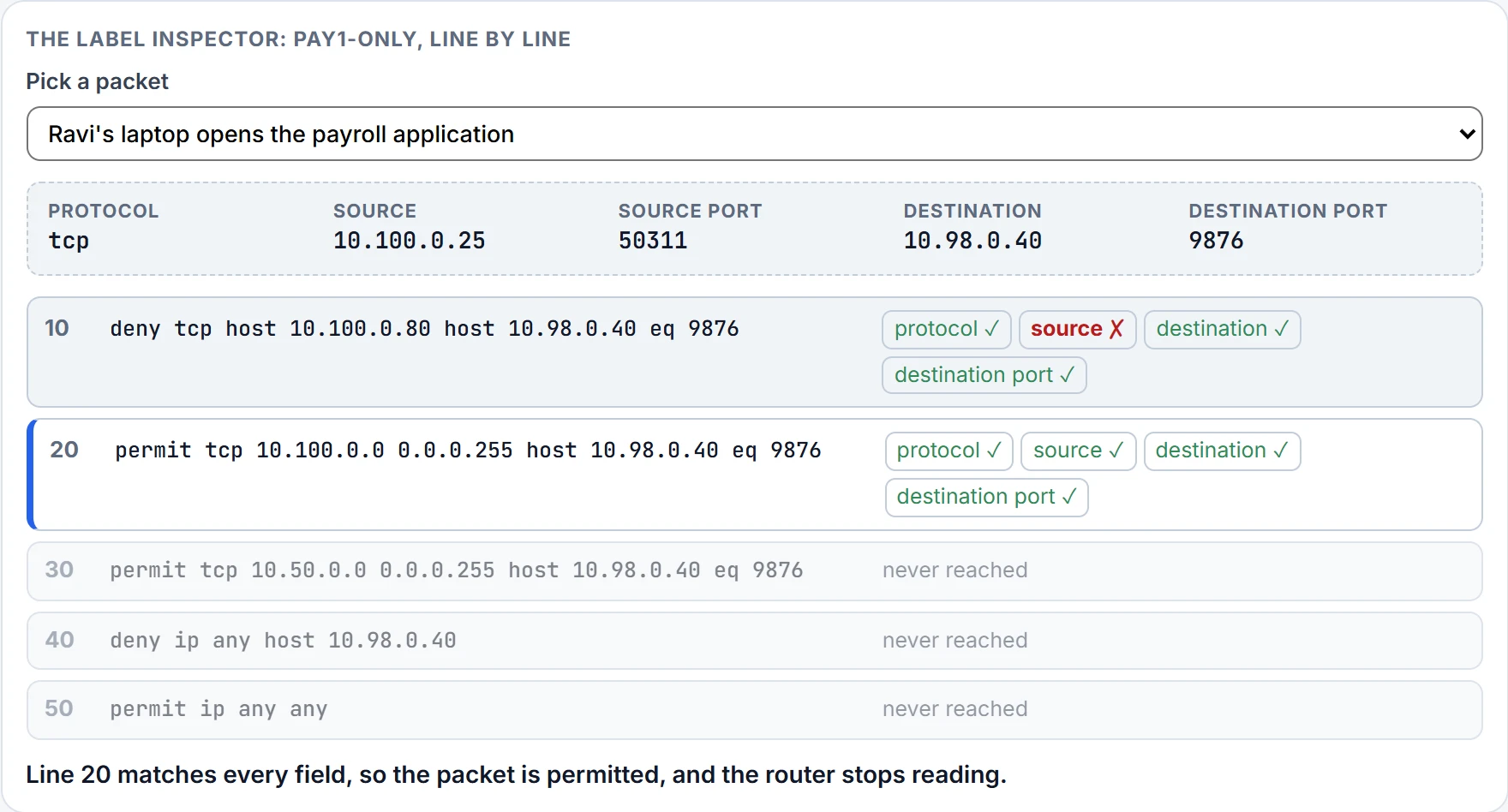
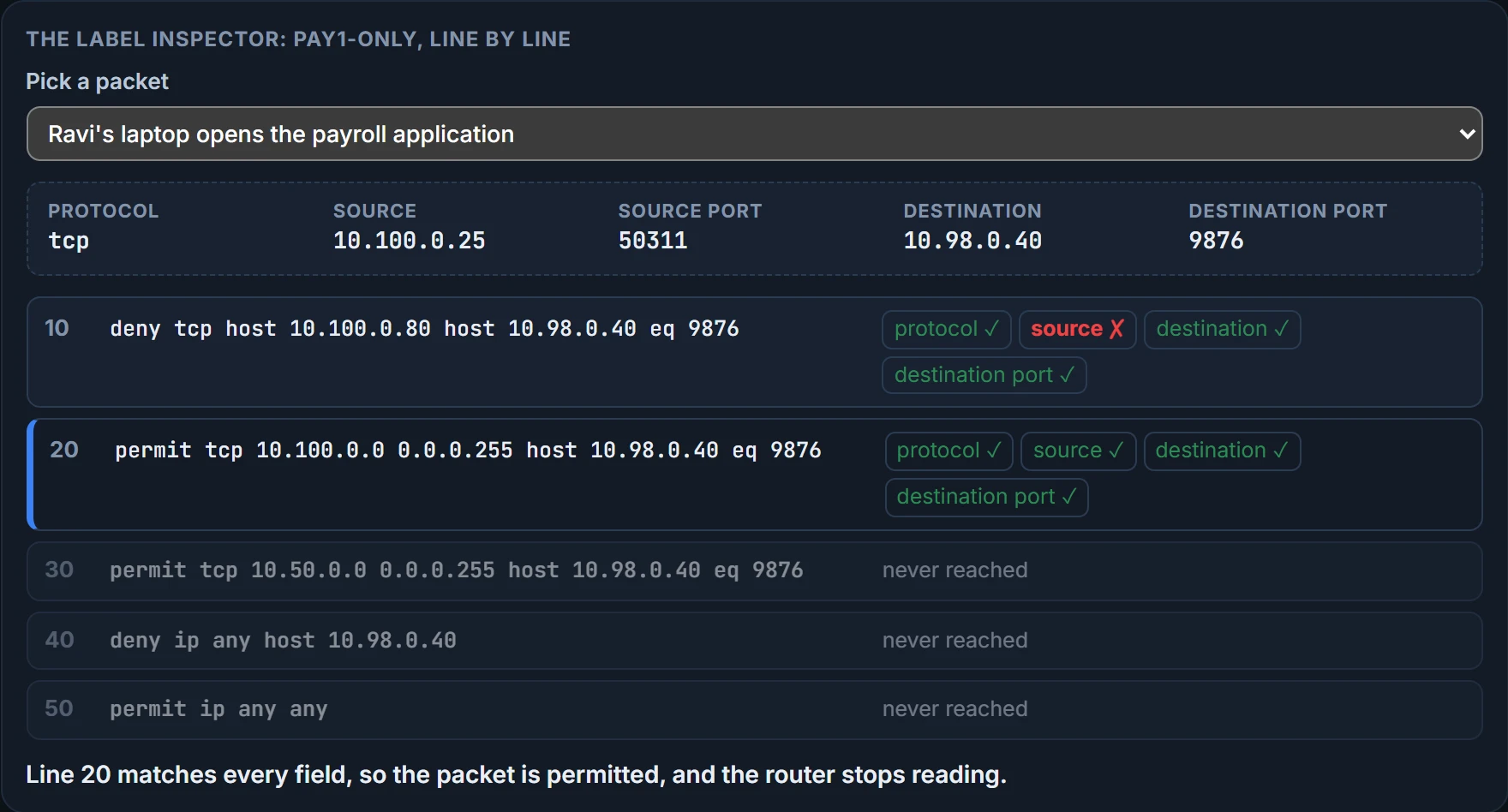
Lines 10 to 30 say who may reach the payroll application: not the printer, yes the Staff LAN, yes the branch staff VLAN. Line 40 refuses everything else to PAY1, Ravi's own SSH from the Staff LAN included; Ravi manages PAY1 from VLAN 98, so that is intended. Line 50, permit ip any any, lets all other traffic through, so DHCP1 and the rest of VLAN 98 are untouched: the lesson of Monday. That last line is this ACL's decision, made from this requirement, not a safe default for every ACL. show running-config lists it as an ip access-list extended PAY1-ONLY block with its lines indented beneath. What the listing proves: the lines exist, in this order, with these numbers. What it doesn't: that any packet is filtered. PAY1-ONLY isn't enabled on an interface yet, and where to put it is the next page. Check each packet against it:
Continue the lesson
The whole lesson, with its drawings and its questions. The rest of this section and 3 more after it.