
MAC Address Learning, Forwarding, Flooding and Filtering
Every time a frame arrives, a switch does two things. It writes the source MAC address in its MAC address table against the port the frame came in on, and it looks up the destination: if the address is there, one copy goes out that port; if it is not, an unknown unicast, the switch floods it out every other port in the VLAN, as it does a broadcast.
By Arif, founder of Daveth · Updated
The full 15 min walkthrough is in Daveth Pro (Network). See what the plan opens
What this page answers
How does a switch learn MAC addresses?
From the source MAC address of every frame it receives: it writes that address in its MAC address table next to the port the frame came in on. Nobody has to configure it. Read it in “9:01 a.m. · The first letter”
What is an unknown unicast, and why does a switch flood it?
A frame addressed to one device that is not yet in the switch's MAC address table. The switch cannot tell which port leads there, so it sends one copy out of every other port in the VLAN. Read it in “9:01 a.m. · The first letter”
Does a switch send a frame back out the port it came in on?
No. When the destination's entry points at the same port the frame arrived on, the switch filters it: the frame has already reached that segment, so no copy goes anywhere. Read it in “10:15 a.m. · Back out the port it came in on?”
8:59 a.m. · A switch that knows nobody
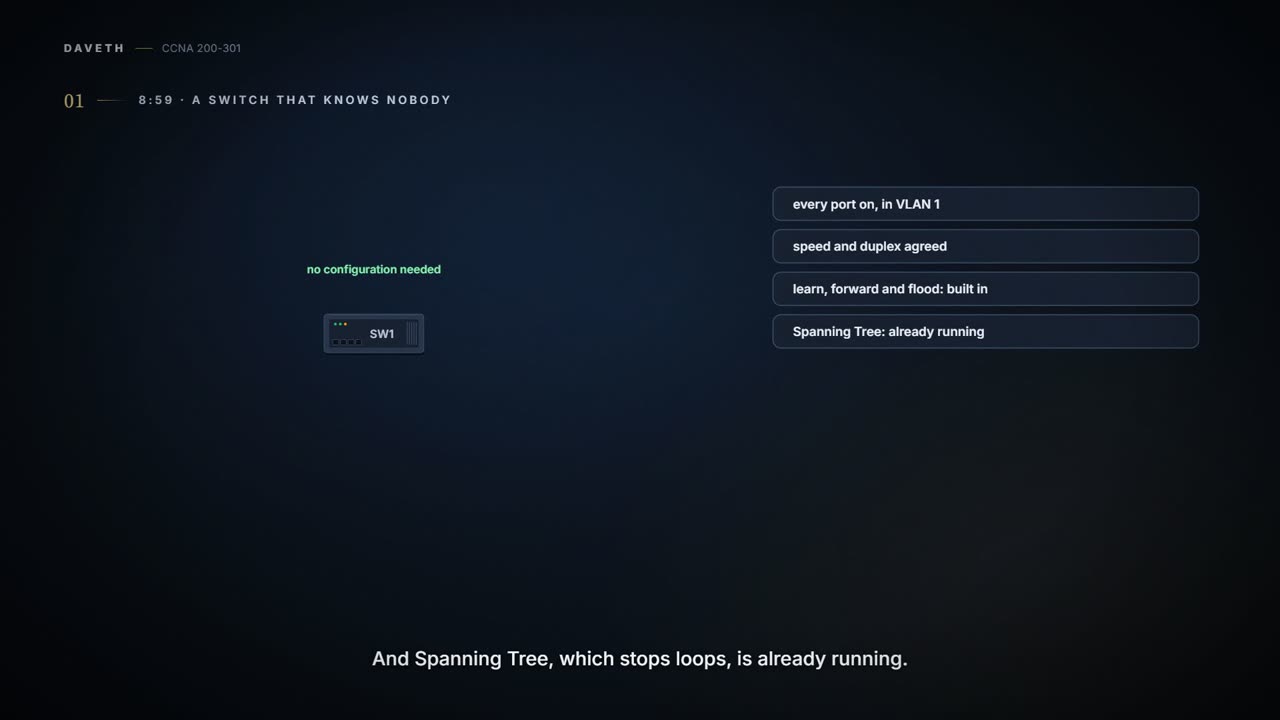
Monday, 8:59. Somebody unboxes SW1, the office's new switch, and plugs it in. Nobody has to configure it before it starts forwarding. Out of the box, every port is switched on and in VLAN 1, its 10/100 and 10/100/1000 ports agree speed and duplex with whatever is plugged in (autonegotiation, topic 02.8), the switch already knows how to learn, forward and flood, and Spanning Tree, which stops loops, is already running. You'll see why that matters at 11:45.
SW1 is part of a campus LAN: the part of a LAN that serves the people, with switches in wiring closets close to them. The servers those people use, and the servers' switches, often sit in a closed room of their own, a data center, connected to the campus LAN.
Here's who SW1 works for. Maya, on Fa0/1, talks first and takes long lunches. Noor, on Fa0/2, replies to everything. The printer, on Fa0/3, is the most patient employee in the building: it reads the address on each frame that reaches it, and bins the ones that aren't for it without a word. And down the hallway, behind a second switch, SW2, sits Eli.
The guest kiosk, on Fa0/4, is in a different VLAN: a group of ports that the switch treats as a LAN of its own. The office is VLAN 10 and the kiosk VLAN 20, so as far as office gossip goes, the kiosk might as well be on another floor. You'll build VLANs in topic 03.1. Today you need one fact: frames stay inside their VLAN.
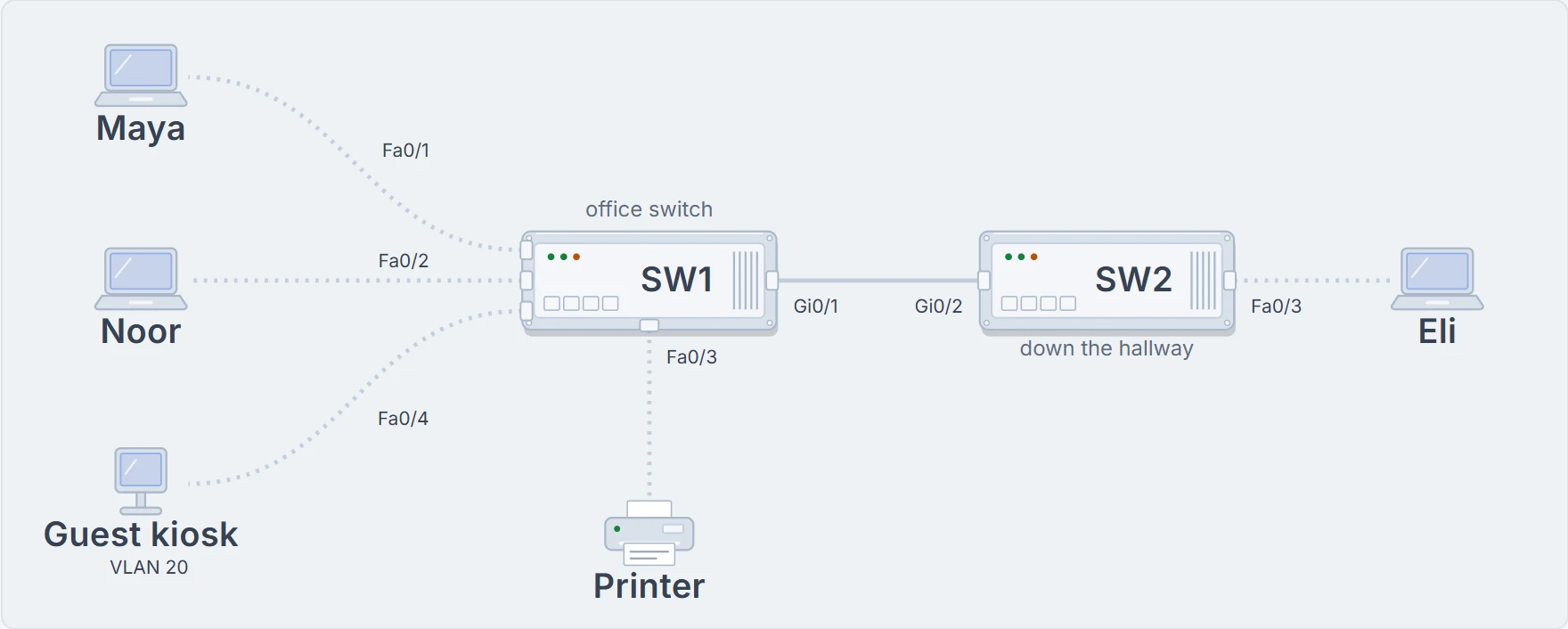
SW1 keeps a MAC address table, the list it uses to find devices. We'll call it SW1's notebook, and right now it's empty. A frame, one message on the network, is about to arrive. Make a call first.
The seven steps and the story below follow the same Monday. Watch first or read first; both work, and the story goes further.
9:01 a.m. · The first letter
Maya sends Noor a frame. You can see where Noor sits; SW1 can't. Every time a frame arrives, it does two things:
- It reads the source MAC address, the address of the device that sent the frame, and writes it in the notebook next to the port the frame came in on. Here: Maya, Fa0/1.
- It reads the destination MAC address, the device the frame is for, and looks it up. If it's there, one copy goes out that port. Here, the notebook is two minutes old: no Noor.
A frame addressed to one device is a unicast. One whose destination isn't in the table yet is an unknown unicast, and SW1 handles it the only way it can: it floods it, one copy out of every other port in the VLAN. Not back out Fa0/1, where it came from. Not to the kiosk, in VLAN 20. The switch doesn't know Noor's chair, so it checks the whole room once. The room is VLAN 10, not the entire building.
Noor gets her copy. So does the printer, which reads it, sees it isn't for it, and bins it. So does SW2, which runs the same two moves with its own notebook: it writes Maya against Gi0/2, its port toward SW1, doesn't know Noor either, and floods on to Eli.
Notice that SW1 only learns from the sender. The switch learns from who spoke. A frame for Noor tells SW1 nothing about where Noor is. Real switch hardware may overlap the two moves; we take them one at a time so you can follow.
A letter addressed to Noor proves Noor has mail. It doesn't prove where she sits.
9:02 a.m. · Noor replies
Noor answers Maya. Move one: SW1 writes Noor, Fa0/2 as row two. Move two: where is Maya? On Fa0/1. So one copy goes out Fa0/1, and nothing goes anywhere else. Here's the notebook after each of the first two frames:
| vlan | mac address | who | port |
|---|---|---|---|
| 10 | 0200.0000.0210 | Maya | Fa0/1 |
| vlan | mac address | who | port |
|---|---|---|---|
| 10 | 0200.0000.0210 | Maya | Fa0/1 |
| 10 | 0200.0000.0220 | Noor | Fa0/2 |
Then Maya writes to Noor again. Before you read on:
This time the destination is in the table: a known unicast, one copy, one port. That's what a switch does nearly all day. The 9:01 flood was just the price of starting with an empty notebook.
Look at what didn't happen. No copy for the printer. None for SW2. Choosing not to send a copy out a port is filtering, and it's as much a decision as forwarding; you'll see the whole choice called the forward-versus-filter decision. Filtering isn't a security rule, and nothing is wrong with the frame. SW1 just has no reason to send it there.
Why bother learning at all? A switch that never learned could still deliver every frame, by flooding every one, but the whole LAN would carry far more traffic than it needs to. An old hub did exactly that: it flooded every frame out every other port, every time (topic 02.4). The notebook is what lets a switch send one copy, to one port.
Noor replied. Now SW1 knows which chair to use next time.
10:15 a.m. · Back out the port it came in on?
Mid-morning, facilities move the printer. It now shares Fa0/3 with a new scanner, through a little desk switch someone has just plugged in. The desk switch's notebook is empty. SW1's still says the printer is on Fa0/3, which is still true: the printer is just one more switch away.
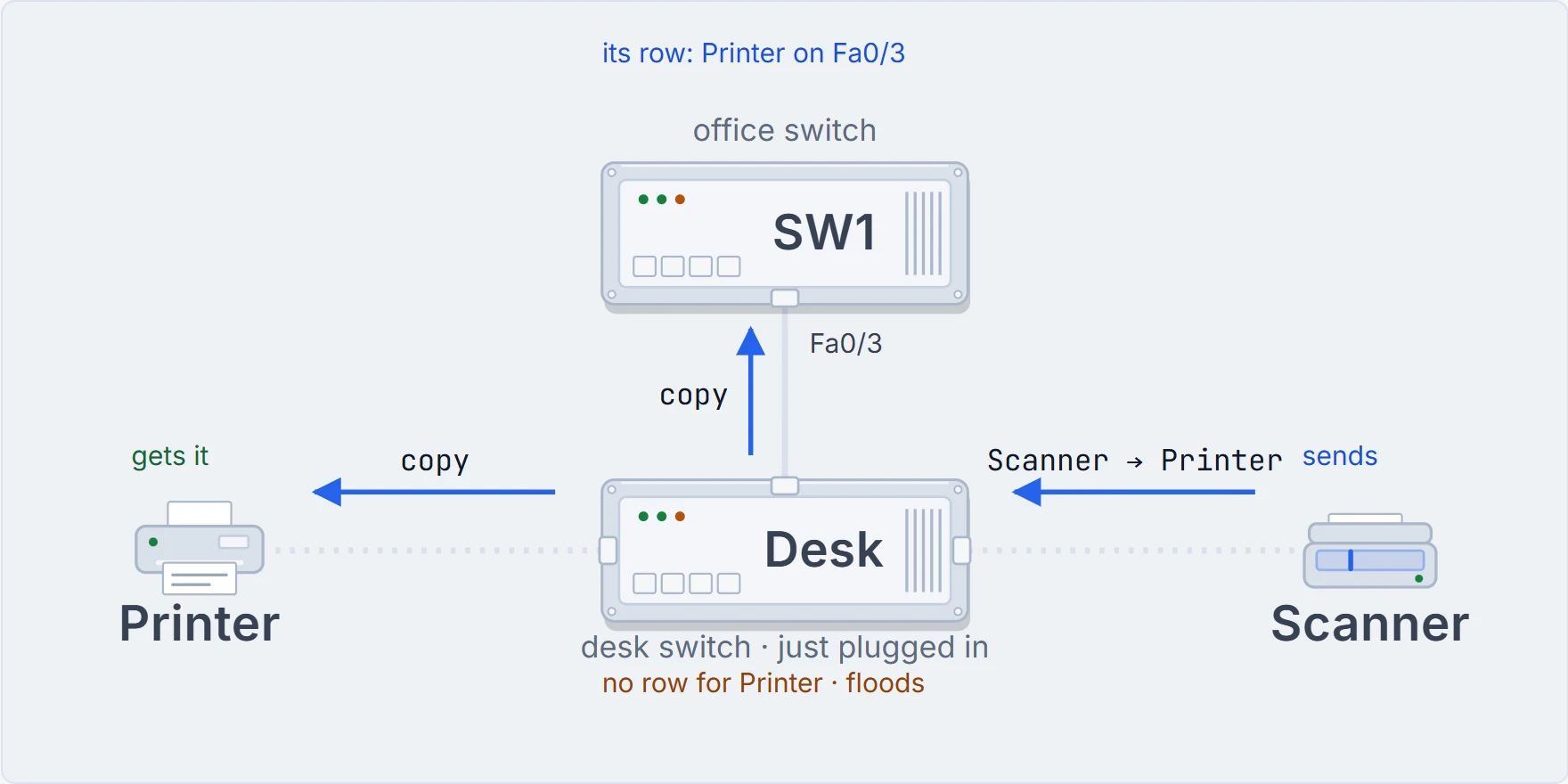
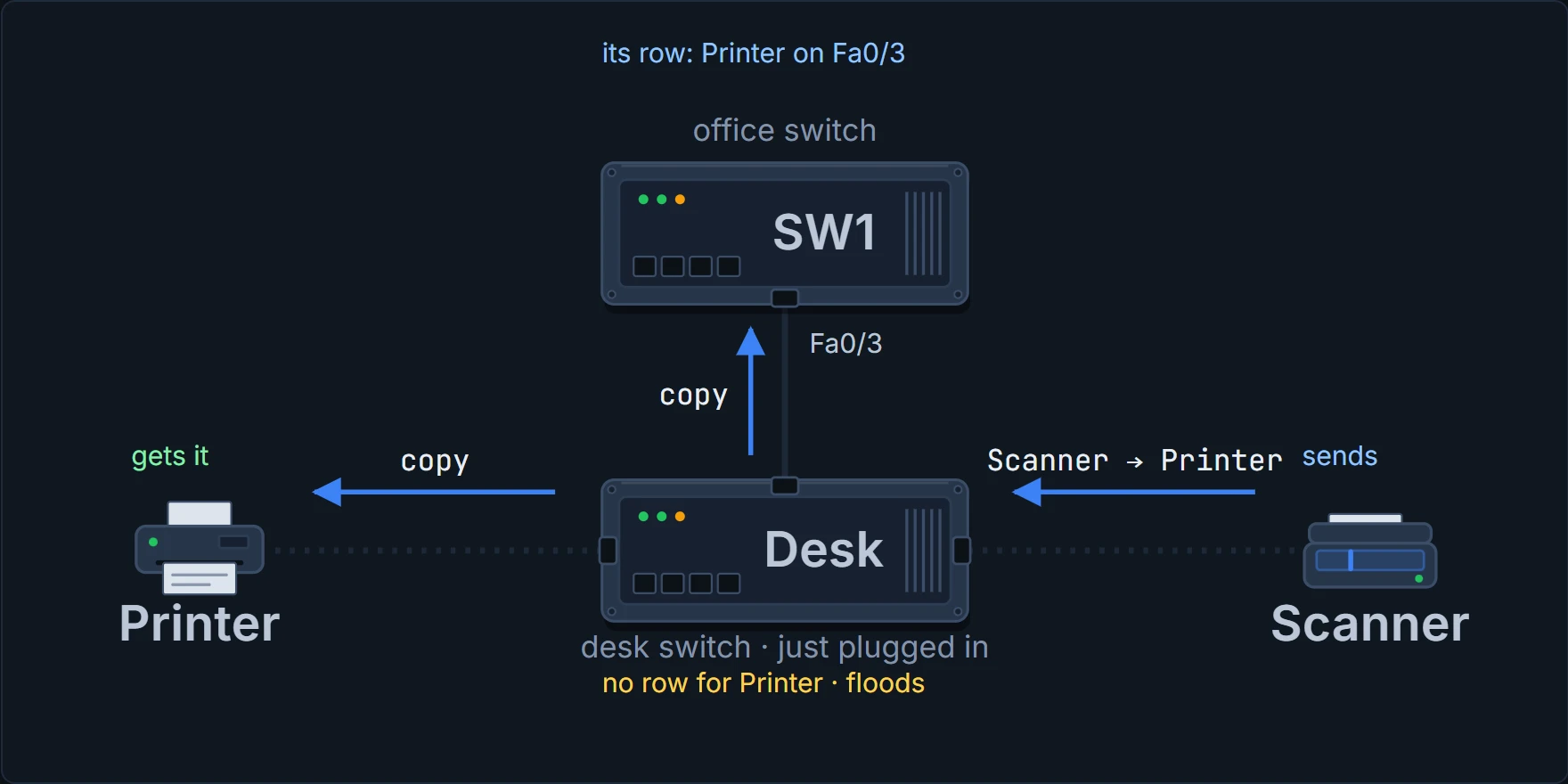
The scanner sends the printer a frame. The desk switch has never heard of the printer, so it floods: one copy to the printer, one up to SW1.
11:00 a.m. · Everybody, listen up
Maya's laptop needs the MAC address that goes with an IP address, the ARP question from topic 01.7. It has no idea who owns that IP, so it asks everyone: a broadcast, addressed to ffff.ffff.ffff.
SW1 learns from the source as always, then floods it out every other VLAN 10 port. The printer bins another one. Put it next to Maya's 9:01 frame: the same fan of copies, for a completely different reason, and it's one of the most tested ideas in this topic.
Unknown unicast
Addressed to one device, and SW1 has no row for it. The flood is SW1 admitting it doesn't know.
Shouting "Is there a Noor here?" across the office. Everyone looks up. Only Noor answers.
Broadcast
Addressed to everyone, on purpose. Even a perfect notebook wouldn't stop it flooding.
The fire-drill announcement. Nobody's lost. It's meant for all of you.
One frame is asking everyone on purpose. The other is only visiting everyone because SW1 lost the address.
Both obey the same two rules: never back out the port they came in on, and never outside their VLAN. The kiosk hasn't had a single frame all day. And the VLAN ends at the router, which doesn't pass a broadcast on to other networks.
There's a third kind that floods, by default: multicast, a frame addressed to a group of devices. That default can be changed, and you'll meet multicast later. The full list: broadcast, multicast and unknown unicast all flood.
11:30 a.m. · A letter from down the hallway
It's been a busy morning, and everyone in the office keeps sending frames, so their rows stay fresh. You'll see at 1:00 what happens when someone goes quiet.
A minute ago Maya sent Eli a message. Now Eli replies, from his desk behind SW2. Two switches, two separate decisions, each with its own notebook.
SW2 goes first. Move one: Eli came in on Fa0/3, so SW2 writes Eli, Fa0/3. Move two: Maya? SW2 heard from her a minute ago, when her message came down the hallway on Gi0/2. One copy, up the hallway.
Then SW1. The frame arrives on Gi0/1. Move one: SW1 writes Eli, Gi0/1. Move two: Maya is on Fa0/1. One copy, to Maya's desk.
Look at SW1's new row. Eli isn't plugged into Gi0/1. Gi0/1 is the hallway, and Eli is somewhere at the far end of it; everyone behind SW2 will end up listed against that same port. SW1 has no idea which desk Eli sits at, and it doesn't need to. It only needs the port that leads toward him. Every switch keeps its own notebook, and they never compare notes.
SW1's table points to the hallway. It doesn't claim Eli's desk is inside the hallway.
11:45 a.m. · What if somebody adds a second cable?
A switch has three jobs. The main one is forwarding: using the destination MAC to pick a port, or filtering. The second is learning, from the source. You've watched both all morning. The third is keeping loops out of the network, and this is where you see why.
This one is a "what if". It doesn't happen in the real office today. Say someone runs a second cable between SW1 and SW2, "to be safe". And at the end of the hallway, plugged into SW2, is the meeting-room projector, which nobody has switched on since the Christmas party. Here's what happens if nothing stops it.
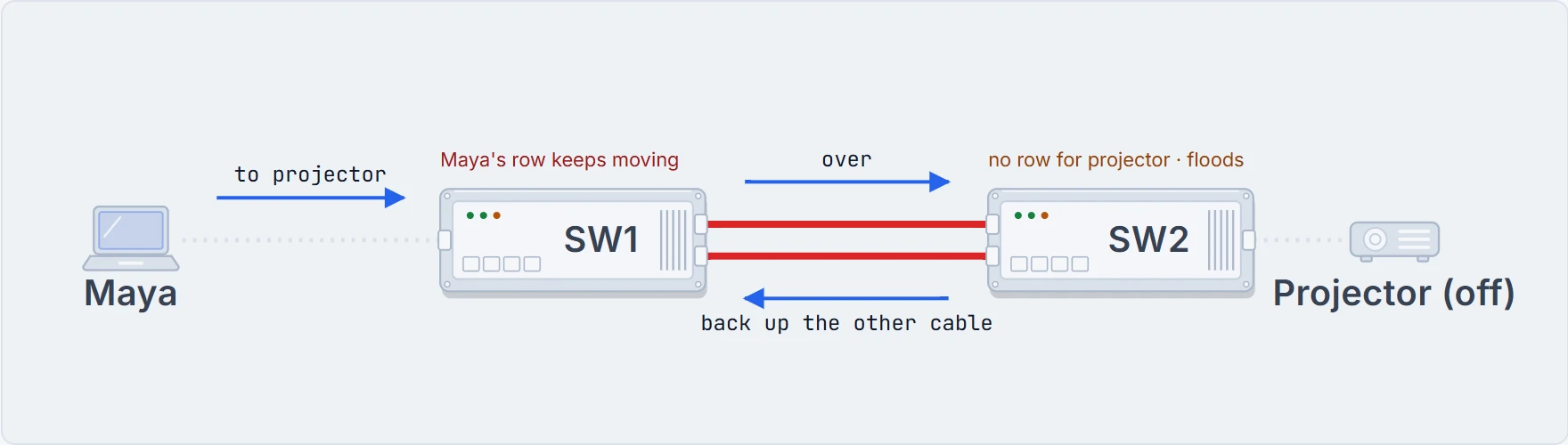
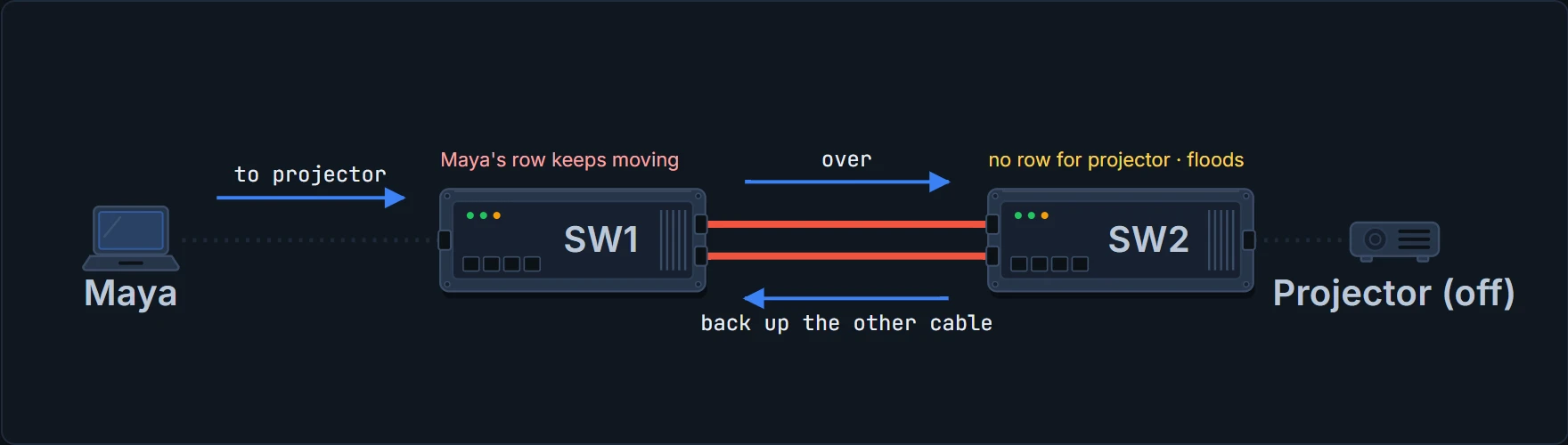
Maya sends the projector a frame. SW1 has no row for the projector, so it floods, and with two cables to SW2 that means a copy down each one. SW2 has no row for the projector either, so it floods too, and "every other port" includes the other cable. Each copy comes back to SW1 on the cable it didn't leave by. SW1 still has no row for the projector, so it floods them again. The projector is off, never replies, and nobody ever learns where it is.
Continue the lesson
The whole lesson, with its drawings and its questions. The rest of this section and 5 more after it.