
Ethernet Physical Media and Cabling
Ethernet over UTP sends data as electricity on pairs of copper wires, one pair per direction for 10BASE-T and 100BASE-T. For that to work the wires must land on the right pins: NICs transmit on pins 1 and 2 and switches receive on them, so a PC-to-switch link uses a straight-through cable and two like devices need a crossover.
By Arif, founder of Daveth · Updated
The full 8 min walkthrough is in Daveth Pro (Network). See what the plan opens
What this page answers
What is the difference between a straight-through and a crossover cable?
A straight-through cable connects each pin to the same pin at the other end, 1 to 1 and 2 to 2. A crossover connects one end's transmit pins to the other end's receive pins, for two devices that transmit on the same pins. Read it in “Which wires carry which way”
Which pins does Ethernet use?
For 10BASE-T and 100BASE-T, NICs transmit on pins 1 and 2 and receive on 3 and 6; switches do the opposite. 1000BASE-T uses all four pairs. Read it in “Which wires carry which way”
One link, opened up
Look closely at one of 02.1's lines. Usually it's a UTP cable, and before a frame can cross it, both ends have to be able to send bits over it. So look inside.
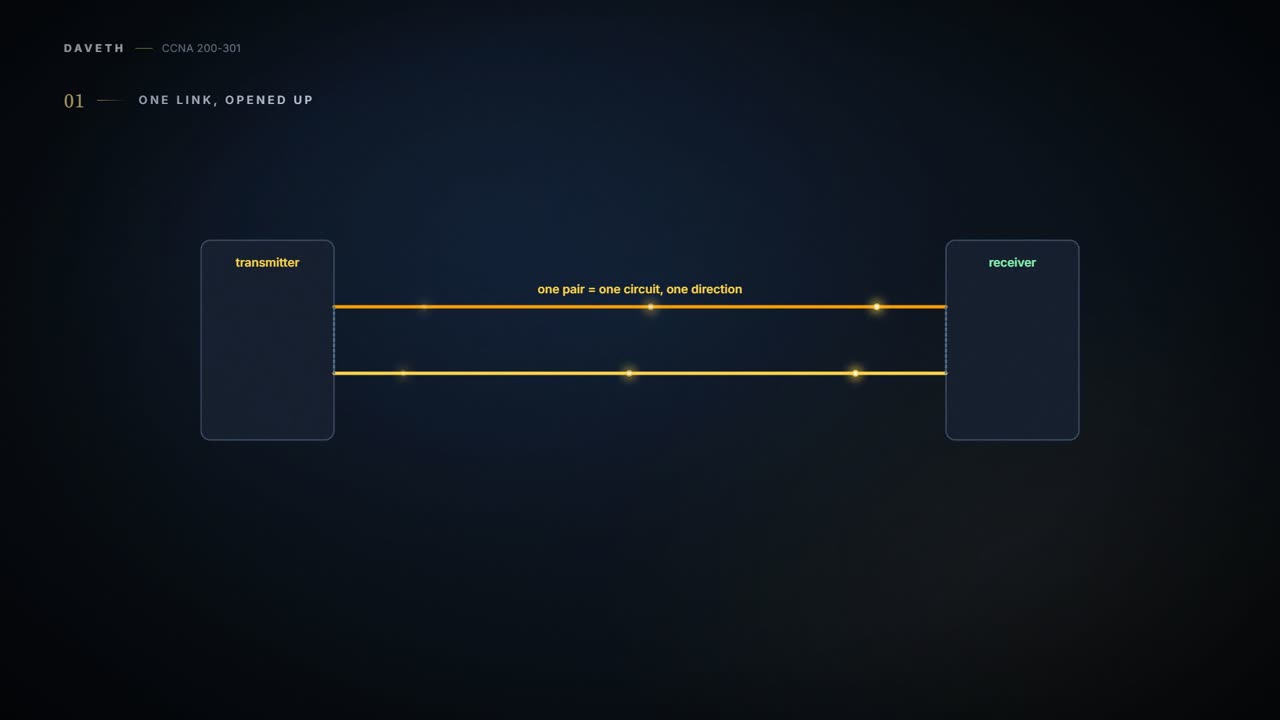
Ethernet over UTP sends data as electricity, over the copper wires inside the cable. Electricity needs a complete loop, a circuit, so Ethernet uses the two wires of one pair to make one circuit, which sends in one direction. To send bits, the two ends follow the same rules, called an encoding scheme: the transmitter changes the electrical signal over time, and the receiver, following the same rules, reads those changes as 0s and 1s. (10BASE-T, for example, encodes a binary 0 as a change from higher voltage to lower voltage in the middle of a one-ten-millionth-of-a-second interval.)
The wires in each pair are twisted together, and there's a reason. Current flowing in a wire creates electromagnetic interference (EMI), which disturbs the signals in wires nearby, including the other wires in the same cable. EMI between the pairs in one cable is called crosstalk. Twisting each pair helps cancel most of it, which is why most copper network links use twisted pairs: UTP stands for unshielded twisted pair.
Think about the last time you heard a neighbour's music through the wall: nobody meant to share it, it just leaks. That's crosstalk. (Where it stops: walls don't come twisted. Twisting the wires cancels most of the leak, though a little still gets through.)
The wires are neighbours. Left untwisted, they'd pick up each other's electrical gossip.
An Ethernet link is any physical cable between two Ethernet nodes, and it has three parts: the cable, the connectors on its ends, and the matching ports on the devices. The cable holds its wires in twisted pairs, each wire colour-coded: in the blue pair, one wire is plain blue and the other blue-and-white striped. 10BASE-T and 100BASE-T use two of the pairs; 1000BASE-T uses all four.
Many UTP cables have an RJ-45 connector on each end. It has eight places for the eight wires, called pin positions, or pins, where the wires touch the electronics in the device. The device needs a matching RJ-45 port: on a PC it's often part of the NIC, the network interface card, which can be a card fitted inside or built into the machine. Switches have many RJ-45 ports, because giving devices somewhere to connect is their job.
A plug fitting a socket is step one. It hasn't yet proved the two ends can hold a conversation.
Some switch ports let you swap the port hardware itself. That hardware, the transceiver, can be swapped, even after the switch is bought, so you can pick the type of link later. When you buy a switch, you choose the mix and number of each type of port you want. Three names to know:
- GBIC (Gigabit Ethernet Interface Converter): the original swappable transceiver for Gigabit ports. The largest of the three.
- SFP (Small Form-factor Pluggable): the GBIC's replacement for Gigabit ports, and smaller.
- SFP+: the same size as an SFP, but for 10 Gbps ports. The plus is the extra speed.
It acts kind of like an electric toothbrush with swappable heads: one handle, and you clip on the head for the job. (Where it stops: a switch takes only the modules it supports, and the module decides what kind of cable plugs into it.)
Which wires carry which way
The three most commonly used Ethernet standards over UTP are 10BASE-T (Ethernet), 100BASE-T (Fast Ethernet, or FE) and 1000BASE-T (Gigabit Ethernet, or GE). 10BASE-T and 100BASE-T use two pairs: one pair for each direction. For that to work, the wires have to land on the right pins at both ends. The transmitter at one end has to send on the pins whose wires reach the receiver at the other.
So there's a convention. Ethernet NICs transmit on pins 1 and 2, and receive on pins 3 and 6. Switches do the opposite: they receive on 1 and 2, and transmit on 3 and 6. (Pins 3 and 6 are one pair, split either side of 4 and 5.) The cable's pinout is its wiring: which colour wire sits in each of the eight numbered pin positions, at each end. From here on, "10/100" means a port that runs at 10 or 100 Mbps.
A straight-through cable connects each pin to the same pin at the other end: 1 to 1, 2 to 2, 3 to 3, 6 to 6. From a PC to a switch, that's exactly right: the PC's transmit pins, 1 and 2, reach the switch's receive pins, 1 and 2, and the switch's transmit pins, 3 and 6, reach the PC's receive pins. A straight-through cable works whenever the two ends transmit on different pairs.
But connect two switches, and both transmit on 3 and 6. A straight-through cable would join transmitter to transmitter. So that link needs a crossover cable, which crosses each end's transmit pair over to the other end's receive pins: 3 and 6 on one end to 1 and 2 on the other, and 1 and 2 to 3 and 6.
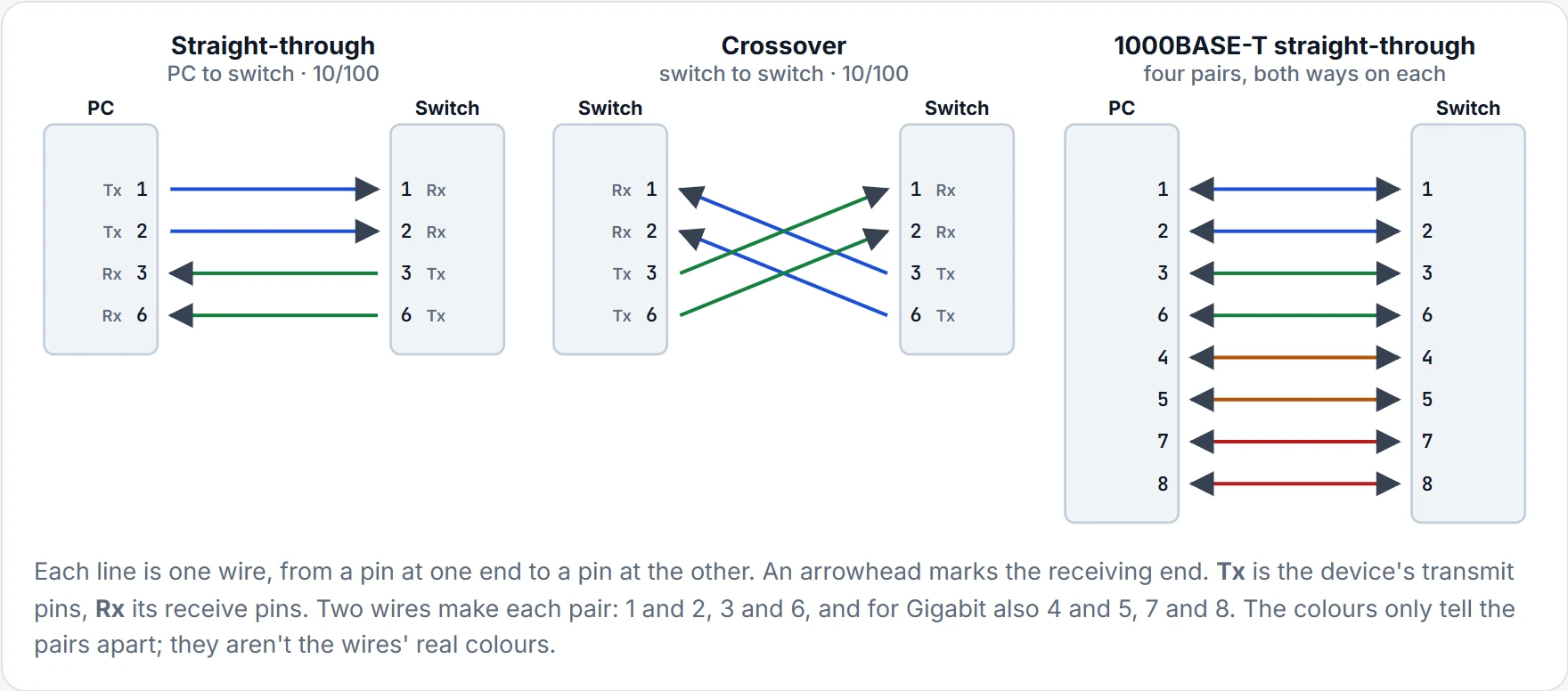
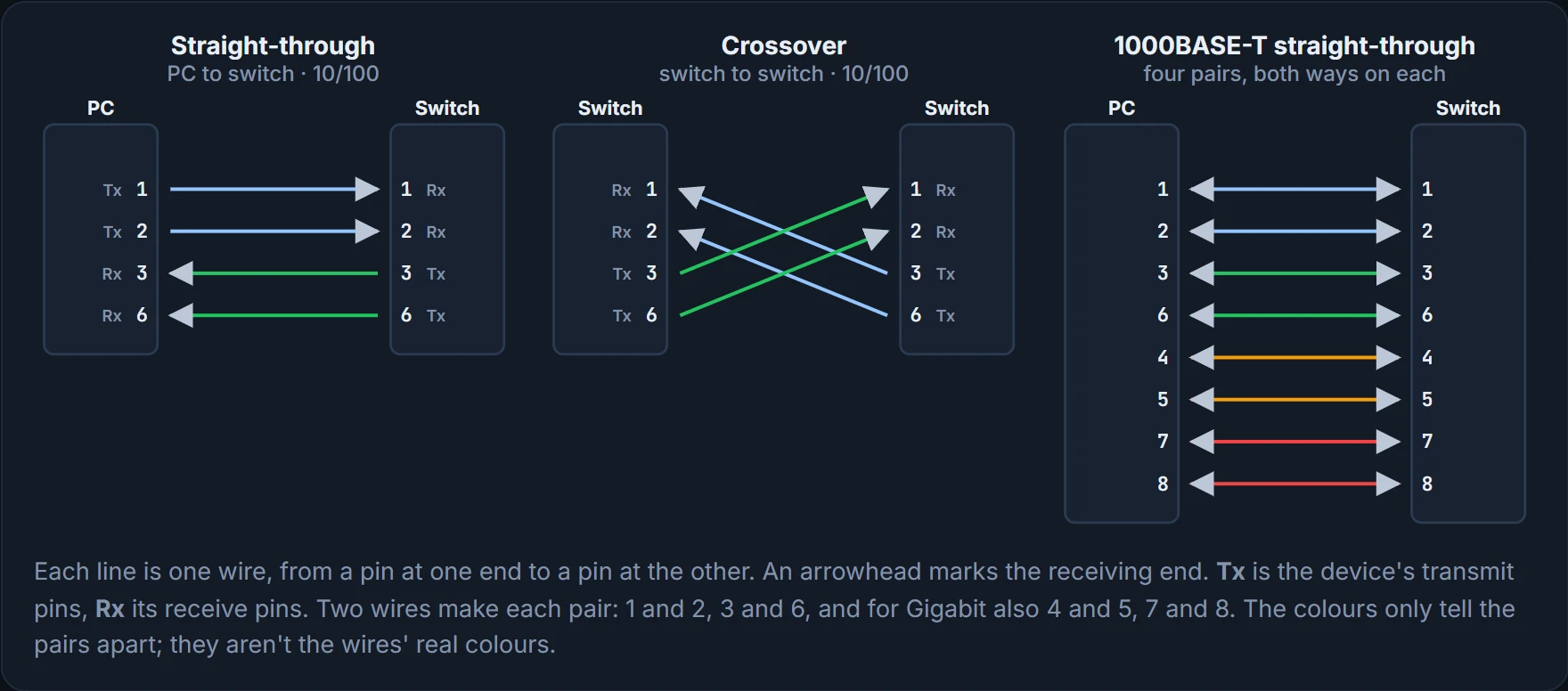
Two switches on a straight-through cable: both talking on the same pair, and the other pair sitting in silence.
It's basically like two speaking tubes between two rooms: one runs from your mouth to their ear, the other from their mouth to your ear. Fit them mouth to mouth, and you both shout while nobody hears. (Where it stops: tubes carry sound, the pairs carry electricity, and at Gigabit speeds each pair carries both directions.)
So the choice needs one fact about each end: does it transmit on 1,2, like a NIC, or on 3,6, like a switch? Then:
- Crossover cable: if the two ends transmit on the same pin pair.
- Straight-through cable: if they transmit on different pin pairs.
| Transmits on pins 1,2 | Transmits on pins 3,6 |
|---|---|
| PC NIC | Hub |
| Router | Switch |
| AP (Ethernet interface) | – |
In the new office, that means straight-through cables from the desk PCs, from the meeting-room AP and from R1 to the office switch, and a crossover between the office switch and the small desk switch in the printer's corner. In a bigger building, the same pattern repeats: straight-through to the PCs, crossover between the switches.
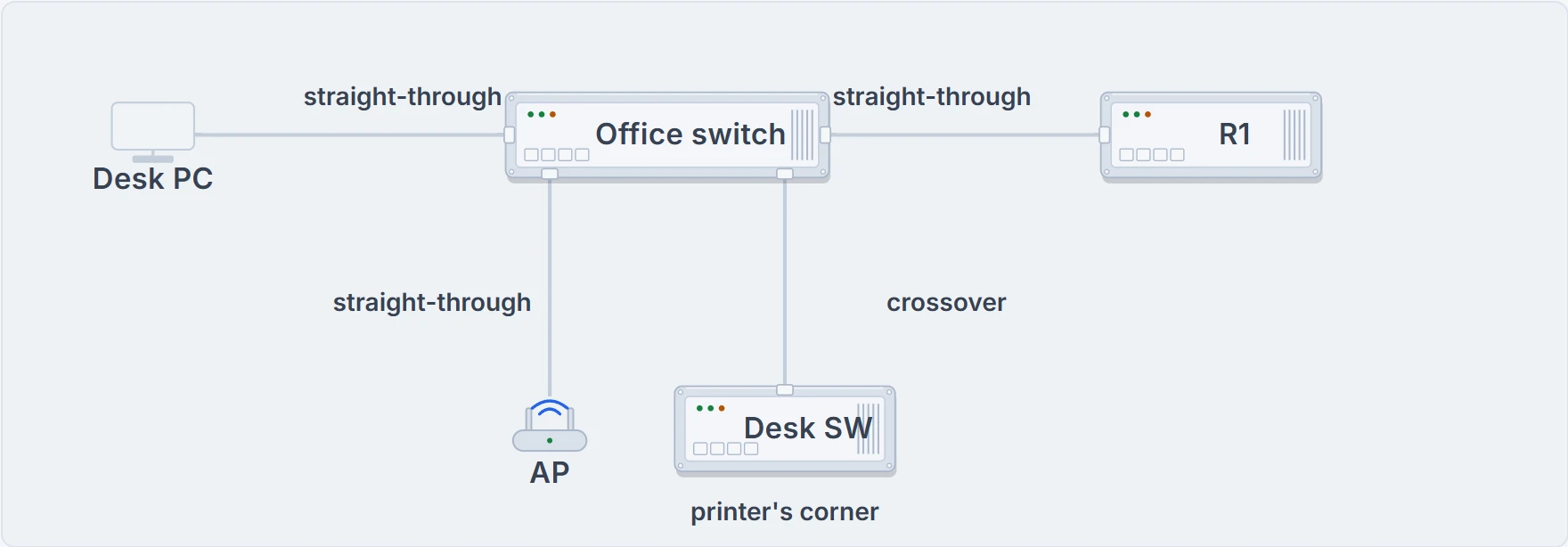
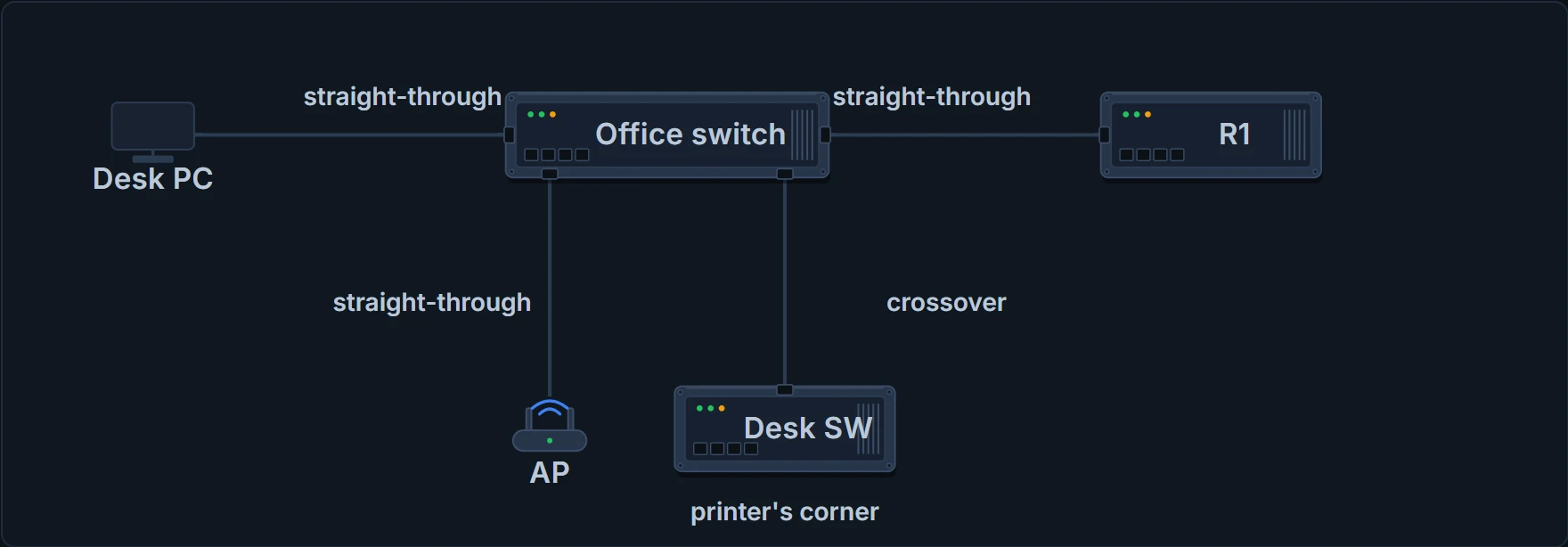
The new office's cables. Different transmit pairs get straight-through; the two switches get a crossover.
If you've plugged in the "wrong" cable before and the link still worked, there's a reason. Many switches have a feature called auto-mdix: they notice the wrong cable and change their own logic so the link works anyway. Handy, but it doesn't change which cable is correct, and that's what you're asked to identify.
1000BASE-T: four pairs, both ways
Gigabit Ethernet over UTP, 1000BASE-T, is different in two ways. It needs all four pairs. And its electronics let both ends transmit and receive at the same time on every pair. The pinouts work almost the same way: a straight-through cable still matches every pin, adding the pairs at pins 4,5 and 7,8, and a Gigabit crossover crosses 1,2 with 3,6 as before, and 4,5 with 7,8 as well.
The cable passed its 100 Mbps interview on two pairs. Gigabit asks the other two to turn up for work.
Continue the lesson
The whole lesson, with its drawings and its questions. 3 more sections after the ones above.