
Ethernet Switching Logic
A switch forwards each frame out the port toward its destination, and with only PCs and switches every link can run full duplex, sending and receiving at once. An old hub repeats every signal out every other port, so two devices sending at once collide; hubs need half duplex, and CSMA/CD makes the devices take turns.
By Arif, founder of Daveth · Updated
The full 7 min walkthrough is in Daveth Pro (Network). See what the plan opens
What this page answers
What is a collision on an Ethernet LAN?
On a hub, two devices sending at the same instant: the hub repeats every signal it receives, even two at once, so the signals collide and become garbled. Switches with full-duplex links never have them. Read it in “The box from the old office”
What is the difference between full duplex and half duplex?
A half-duplex device has to wait to send while it is receiving; it cannot send and receive at the same time. A full-duplex device does not have to wait. Read it in “One frame, two switches”
What is CSMA/CD?
Carrier sense multiple access with collision detection: the algorithm half-duplex devices use to take turns on a hub, waiting while someone else sends and recovering when two start at the same instant. Read it in “Taking turns: CSMA/CD”
One frame, two switches
Ethernet LANs behave slightly differently depending on what joins the devices together: modern LAN switches, or the older devices called LAN hubs. Switches allow full-duplex working, which is much faster and simpler; hubs need half duplex. First, the modern way.
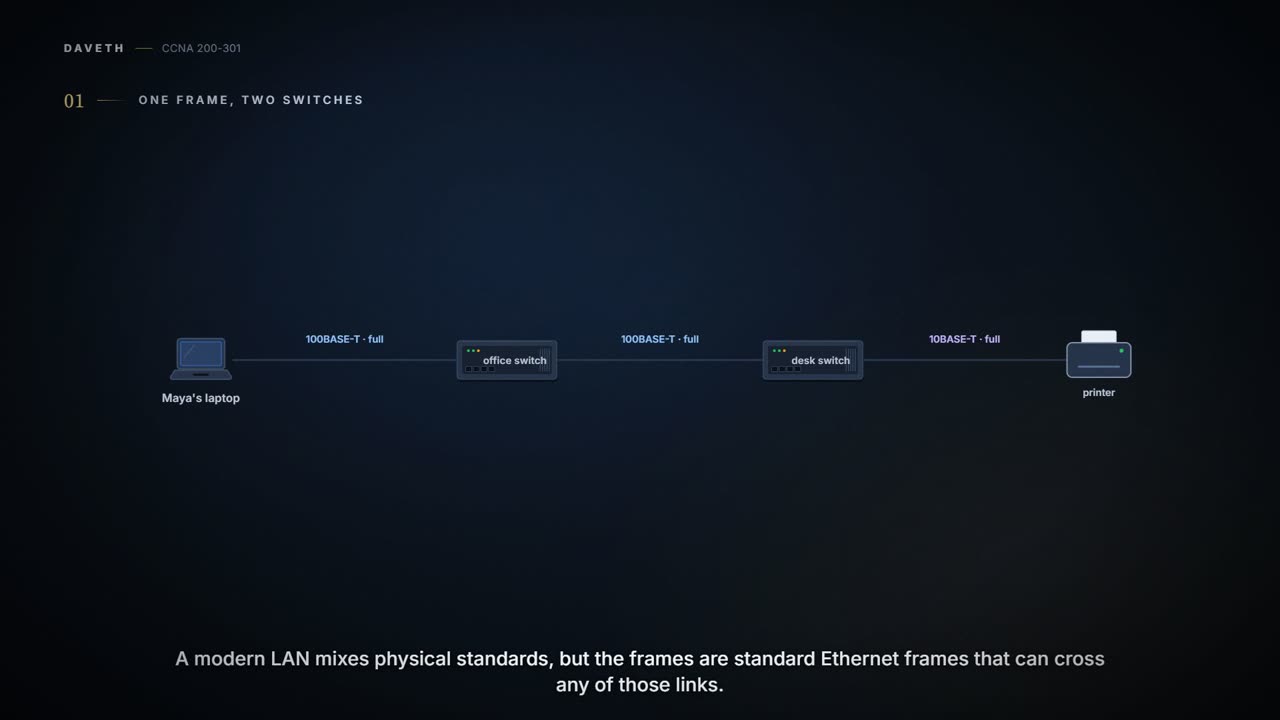
A modern LAN mixes physical standards (02.2), but the frames are standard Ethernet frames (02.3) that can cross any of those links, and each link can run at its own speed. The job of the switches is simple on purpose, so that each one can send a large number of frames every second. Here is Maya's laptop sending a frame to the printer, through the office switch and the small desk switch in the printer's corner:
- Maya's laptop builds the frame: source 0200.0000.0210 (its own), destination 0200.0000.0250 (the printer's).
- The office switch, SW1, receives it and forwards it out the port toward the desk switch, perhaps named Gi0/1 (short for Gigabit Ethernet interface 0/1) or Fa0/2 (Fast Ethernet interface 0/2) (how it picks that port is the next topic's question).
- The desk switch receives it and forwards it out the port toward the printer.
- The printer receives it, recognizes 0200.0000.0250 as its own address, and processes the frame.
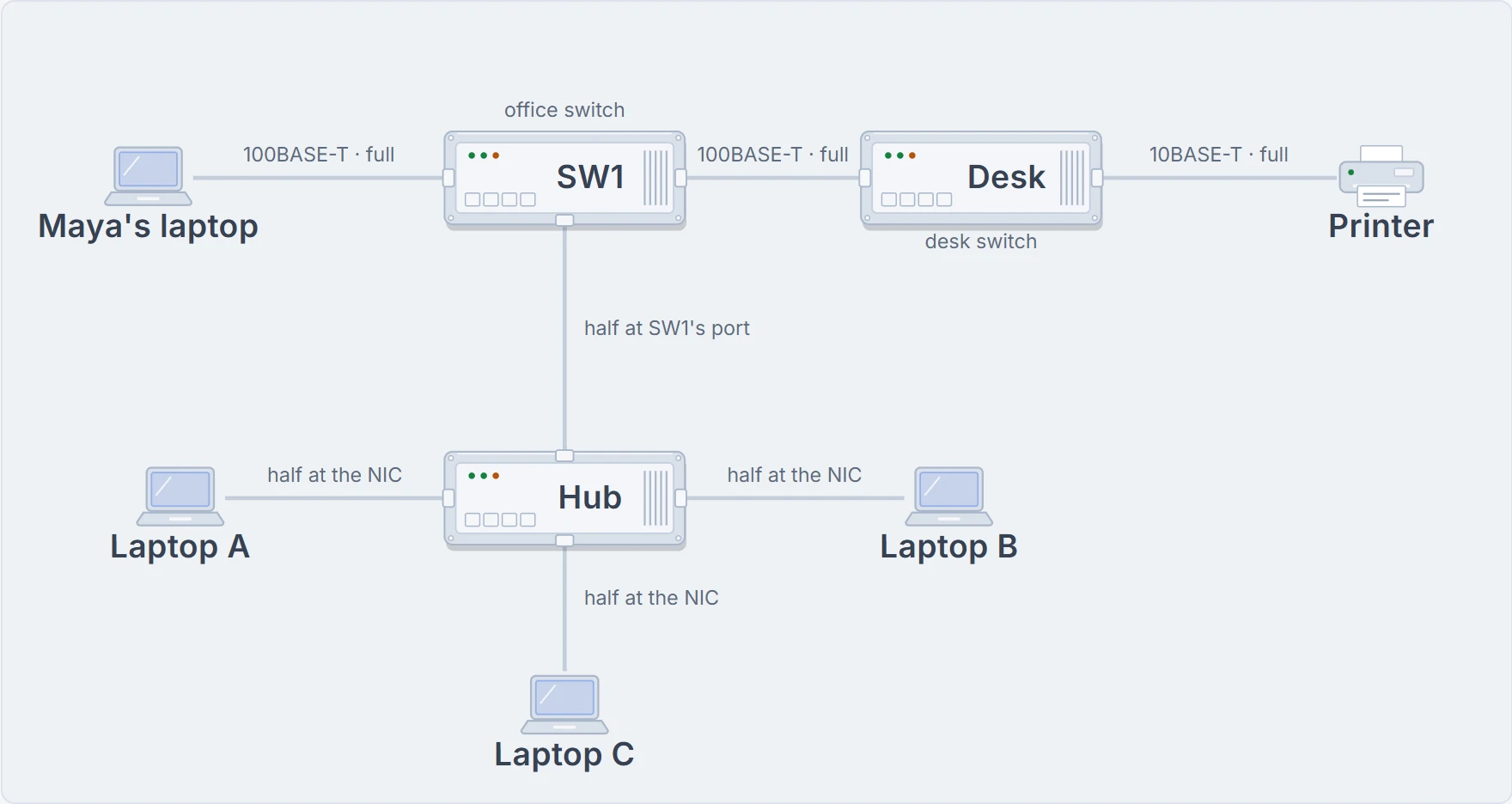
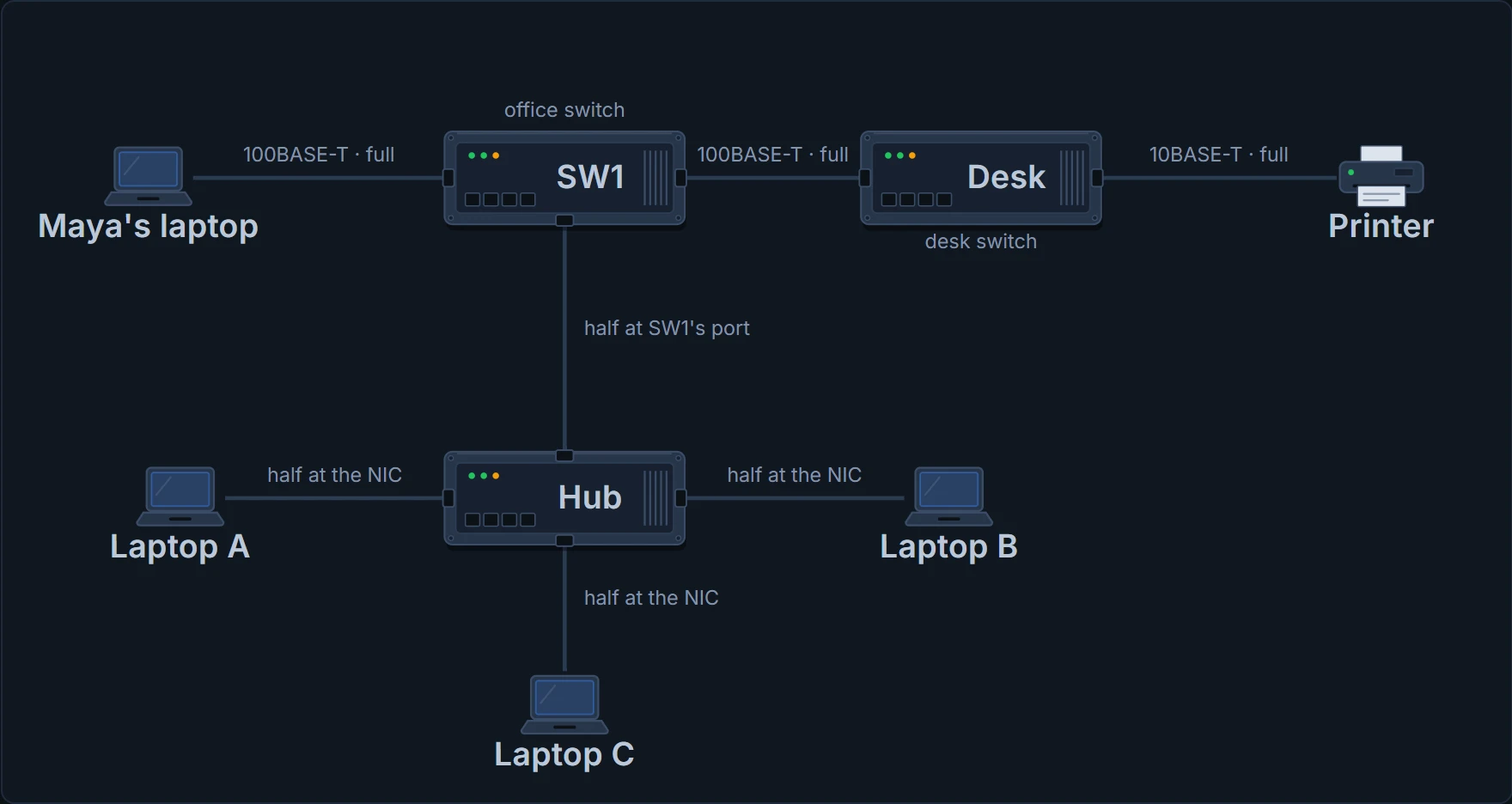
The office at the end of moving day. Top row: Maya's frame's path, three links at two different speeds, all full duplex. Below: the old hub as it would be cabled if Maya used it (she doesn't): half duplex on SW1's port and on each laptop's NIC. The hub itself runs no duplex logic.
Every link on Maya's path runs at full duplex. To see what that is, meet its opposite:
- Half duplex: the device has to wait to send if it's currently receiving a frame. It can't send and receive at the same time.
- Full duplex: the device doesn't have to wait. It can send and receive at the same time.
It's basically like the difference between a walkie-talkie, where you press to talk and don't hear while you do, and a phone call, where both people can talk and listen at once. (Where it stops: a walkie-talkie makes you take turns. A full-duplex link never does, even when, as with 1000BASE-T in 02.2, both directions share the same wires.)
With only PCs and switches, and no hubs, every node can use full duplex. Maya's laptop and the printer could send frames to each other at the very same moment, in both directions, with no waiting.
The box from the old office
Noor finds an old hub in a box from the previous office and suggests using it in the meeting room for three spare laptops, A, B and C. It looks like a small switch: a row of RJ-45 ports. But it isn't one. When the IEEE introduced 10BASE-T in 1990, switches didn't exist yet; networks used hubs, and hubs follow different rules for moving data.
A hub works with physical layer standards, not data-link ones, so it counts as a Layer 1 device. When an electrical signal comes in one port, the hub repeats it out every other port (not the one it came in on), so the data reaches every other node on the hub and, with luck, the right one. The hub has no idea what a frame is, or an address, and makes no decisions about them.
It acts kind of like a megaphone: whatever it hears, it repeats to the whole room. (Where it stops: a megaphone makes a voice louder for everyone, including the speaker. A hub copies the signal out every other port, but not back out the one it came in on.)
The hub has one instruction: "I heard something, so everyone else hears it too."
And that causes trouble. If two or more devices send at the same instant, their electrical signals collide and become garbled, because the hub repeats every signal it receives, even two at once:
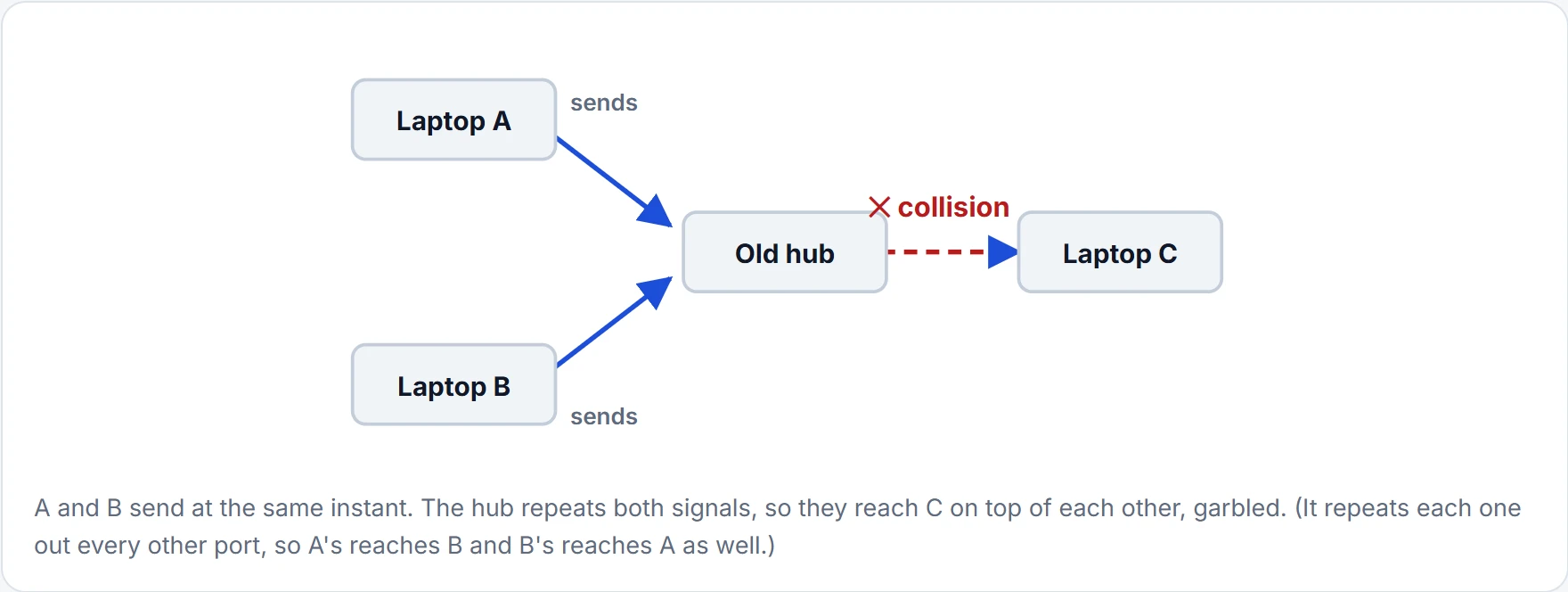
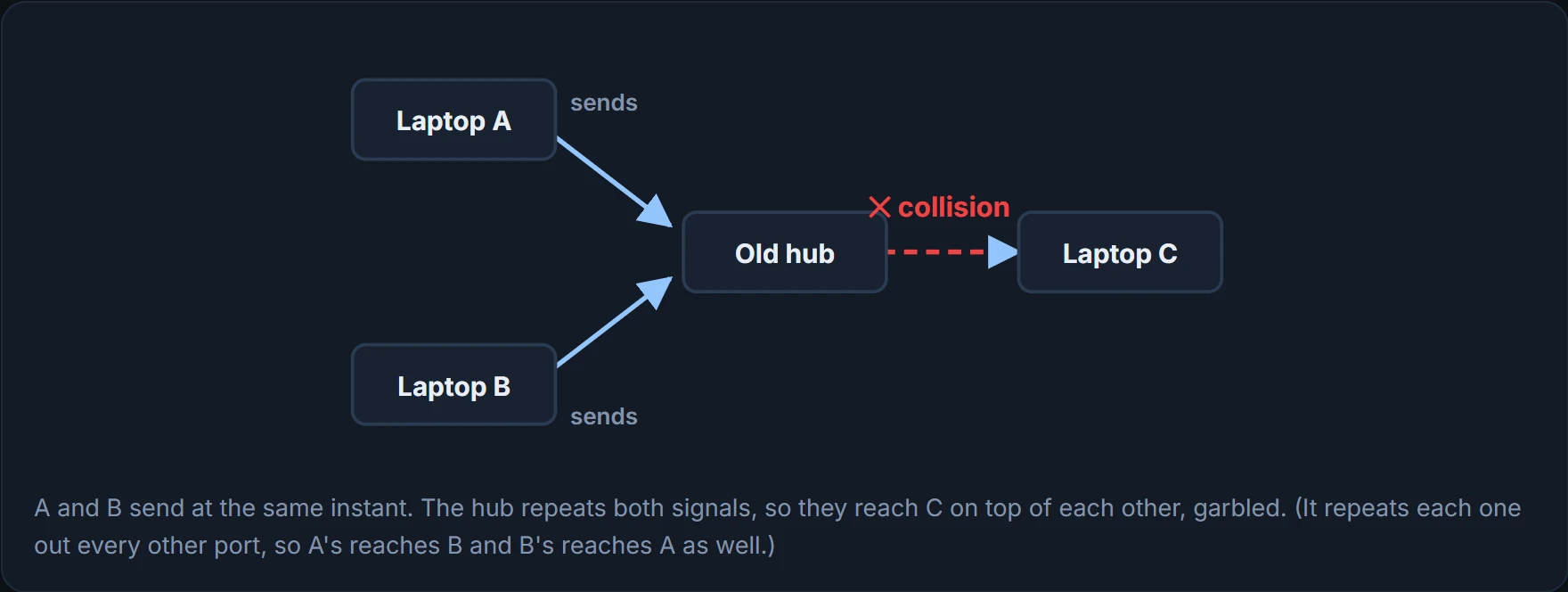
Put a switch in the hub's place and that collision doesn't happen. A switch is a Layer 2 device: it looks at the data-link header and trailer, including the MAC addresses. Even if both frames were for laptop C, the switch would send one frame, and queue the other until the first had finished.
Picture yourself at a shop with one till: when two customers arrive together, one waits behind the other instead of both talking to the cashier. (Where it stops: a switch's queue has a limit. It holds frames briefly, and there's a limit to how many.)
Taking turns: CSMA/CD
On a hub, the only way to avoid collisions is for the devices to take turns, using half-duplex logic: if someone else is sending, wait. If laptop A started sending early enough that laptop B heard the first bits before it began its own frame, B would notice and simply wait.
But the timing can be unlucky: two devices can check at exactly the same instant, both hear silence, and both start sending. So half-duplex devices use an algorithm called CSMA/CD, carrier sense multiple access with collision detection, which covers the unlucky cases too:
- A device with a frame to send listens until nobody else is sending (the Ethernet isn't busy).
- When it's not busy, the device starts sending the frame.
- It listens while sending, to find out whether a collision happens (collisions can have many causes, unlucky timing among them). If one does, every device that was sending first sends a jamming signal, which tells all the nodes a collision happened; then waits a random time of its own choosing, so they don't collide again; then starts again at step 1.
Continue the lesson
The whole lesson, with its drawings and its questions. The rest of this section and 2 more after it.