
Basic Switch Management and Configuration Files
A switch uses its running-config, held in RAM, and loads its startup-config from NVRAM when it starts, so a change that is not saved with copy running-config startup-config is lost at the next restart. To be managed over the network, a switch needs an IP address on a VLAN interface, an SVI, and a default gateway.
By Arif, founder of Daveth · Updated
The full 18 min walkthrough is in Daveth Pro (Network). See what the plan opens
What this page answers
What is the difference between running-config and startup-config?
The running-config is what the switch is using now, in RAM, and it keeps nothing through a power cut or reload. The startup-config is the saved file in NVRAM that the switch loads when it starts. Read it in “7:50 a.m. · Two show commands”
How do you give a Cisco switch an IP address?
On a VLAN interface, also called a switched virtual interface or SVI: a virtual network card inside the switch, connected to one VLAN, such as interface vlan 1. The switch also needs a default gateway to reach other subnets. Read it in “9:10 a.m. · An address inside the switch”
What does copy startup-config running-config do?
It does not replace what is running: it merges, applying each line of the saved file as if you had typed it. copy running-config startup-config is the save, overwriting the whole startup-config. Read it in “7:55 a.m. · Saving, before anyone arrives”
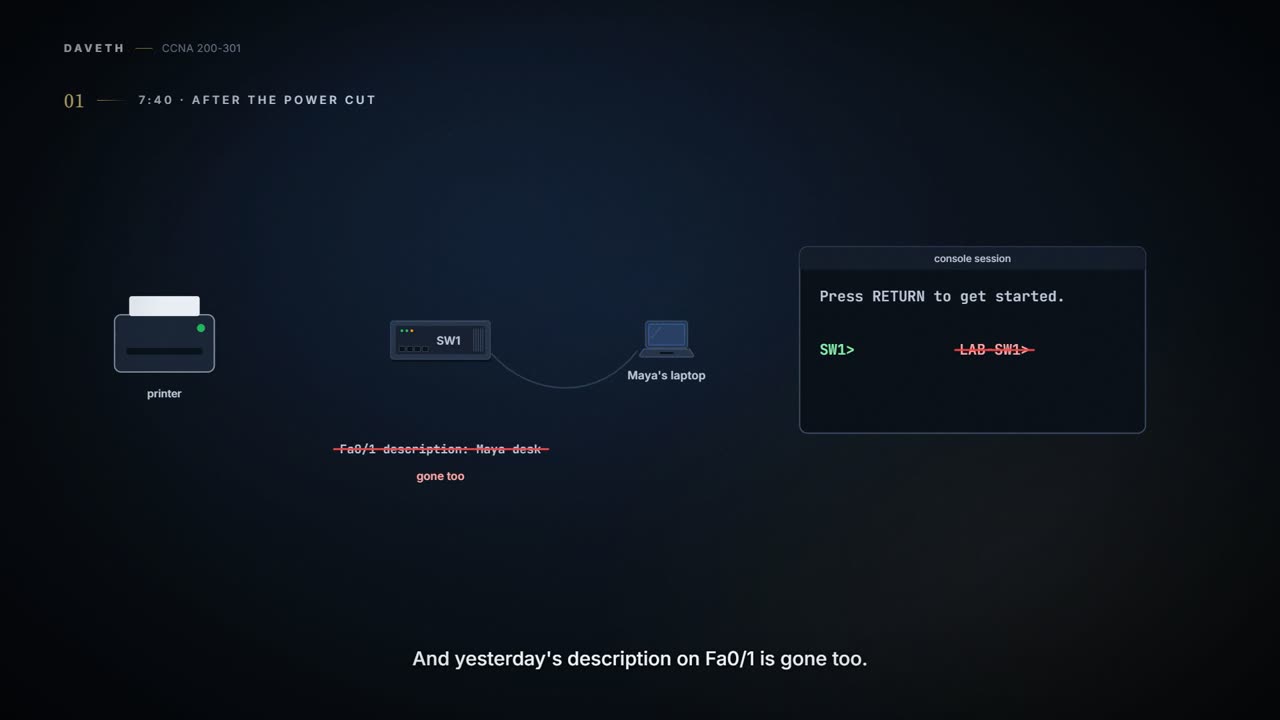
7:40 a.m. · After the power cut
Wednesday. Overnight the power went off for a few minutes, and everything in the office restarted when it came back. The printer was up first, and waited patiently for somebody to need it. SW1 took longer.
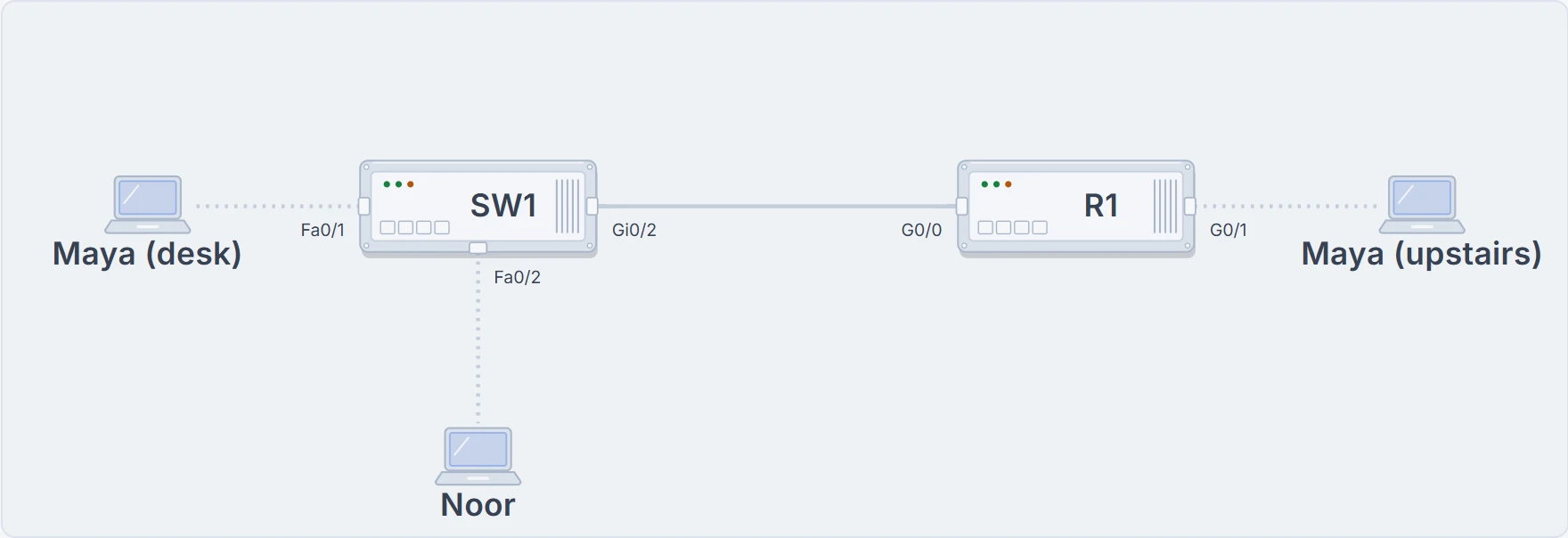
SW1 and what this page plugs into it: Maya's desk on Fa0/1, Noor on Fa0/2, and R1 on Gi0/2, with Maya's laptop upstairs behind R1. Every terminal below is on this switch: SW1, which Maya renames LAB-SW1.
Yesterday Maya renamed SW1 to LAB-SW1, and gave Fa0/1 a description. She never saved either change. Make the call before she plugs in.
Each step changes one thing about SW1.
Every terminal on this page is a practice switch running in your browser. Nothing here touches real equipment.
SW1 woke up as SW1, and the description on Fa0/1 was gone too. The switch keeps two copies of its configuration.
Running-config is what the switch is using now. Startup-config is what it reads when it starts. Changing one does not automatically rewrite the other.
LAB-SW1 worked all afternoon. The switch woke up as SW1. It remembered the old note, not Maya's unsaved one.
7:45 a.m. · Where each copy lives
A switch is a small computer, with four kinds of memory. The power cut has already told you something about two of them.
- ROM: the bootstrap program runs
- Flash to RAM: it loads IOS
- NVRAM to RAM: IOS loads the startup-config as the running-config
RAM is working memory, and it holds the running-config; it keeps nothing through a power cut or a reload. The other three keep their contents with the power off, and none has moving parts, which helps a switch stay up. NVRAM, non-volatile RAM, holds the startup-config. Flash, a chip inside or a removable card, holds the IOS software, and can store other files too, such as a backup copy of a configuration. ROM holds the bootstrap program.
So every start-up goes the same way. The bootstrap program runs from ROM, finds IOS, in flash by default, and loads it into RAM. IOS then loads the startup-config from NVRAM into RAM, where it becomes the running-config.
RAM is the desk. NVRAM is the drawer Maya has to put the instructions in before going home.
This is the classic model. Some switches keep these things differently inside, but the two files, and what each is for, stay the same.
7:50 a.m. · Two show commands
Maya renames the switch again. This time she looks before she trusts it.
SW1> enable
SW1# configure terminal
SW1(config)# hostname LAB-SW1
LAB-SW1(config)# end
LAB-SW1# show running-config
! (lines omitted)
hostname LAB-SW1
! (rest of lines omitted)
LAB-SW1# show startup-config
! (lines omitted)
hostname SW1
! (rest of lines omitted)
LAB-SW1#
Find the one line that differs. show running-config lists what SW1 is using right now: hostname LAB-SW1. show startup-config lists the saved file: hostname SW1. The prompt is a clue too: it's built from the hostname SW1 is using. A configuration command changes the running-config the moment it's accepted, and nothing else.
The real listings are much longer; ! (lines omitted) marks where this page trims them. In any listing, a line that starts with ! is a comment, not a command. And on a real switch, show running-config | begin line vty skips ahead to the first line that contains line vty.
- what SW1 is using at the moment you ask (
show running-config) - what is saved for the next start-up (
show startup-config)
- what the other file says: one listing tells you nothing about the other
- every setting: both listings usually leave out settings still at their defaults
7:55 a.m. · Saving, before anyone arrives
copy running-config startup-config is the save. Read copy the way it's written: from the first file, to the second. It overwrites the whole startup-config with what's running.
LAB-SW1# copy running-config startup-config
Destination filename [startup-config]?
! (Return accepts the name in brackets; the switch then reports the bytes it copied)
LAB-SW1#
The switch offers startup-config as the destination, in brackets; pressing Return accepts it.
copy running-config startup-config is Maya putting the new note in the drawer. The arrow direction matters.
Then Maya tests the save with reload, the command that restarts the switch, allowed only in privileged EXEC. A reload interrupts everything going through the switch until the restart finishes. Nobody else is in yet, so now is the time:
LAB-SW1# reload
Proceed with reload? [confirm]
%SYS-5-RELOAD: Reload requested by console. Reload Reason: Reload Command.
! (a practice switch: a real one goes offline here until it has restarted)
Press RETURN to get started.
LAB-SW1>
The name survived. From here on, the prompt says LAB-SW1.
copy startup-config running-config isn't a mirror image of the save. It doesn't replace what's running: it merges, applying each line of the saved file as if you'd typed it. Here it would put hostname SW1 back into the running switch and leave everything the file doesn't mention alone. It has its uses, in some recovery procedures.
You'll also meet write memory in older notes. It's the original save command, since replaced by copy running-config startup-config.
Both files live only inside the switch, so a switch that fails takes its configuration with it, unless someone kept a copy somewhere else. With many switches and several people changing them, a harder question appears: which copy is the right one? Configurations that quietly drift apart are topic 10.6.
Three commands erase the startup-config: write erase, erase startup-config and erase nvram:, the newest and recommended of the three. There's no command that empties the running-config. So a clean slate takes two steps: erase the startup-config, then reload, and the switch starts with nothing. A full lab reset also deletes the VLAN configuration details, kept in a file called vlan.dat, before the reload; VLANs are topic 03.1. This page won't run any of them, and neither should you on a switch anybody depends on.
9:00 a.m. · The switch's three jobs
The office fills up. Maya spends the rest of the morning in the training room upstairs, and she'd like to manage SW1 from there. Her SSH client gets no answer from 192.0.2.2.
SW1 has no address at all yet, and it never needed one for its main job. The work a network device does splits three ways. The data plane is the main job: forwarding the frames other devices send. The control plane is the configuration and processes that shape the data plane's forwarding choices, like which ports are enabled, and which ones Spanning Tree blocks. The management plane is about managing the device itself: logging in, checking it, changing it. Today is all management plane.
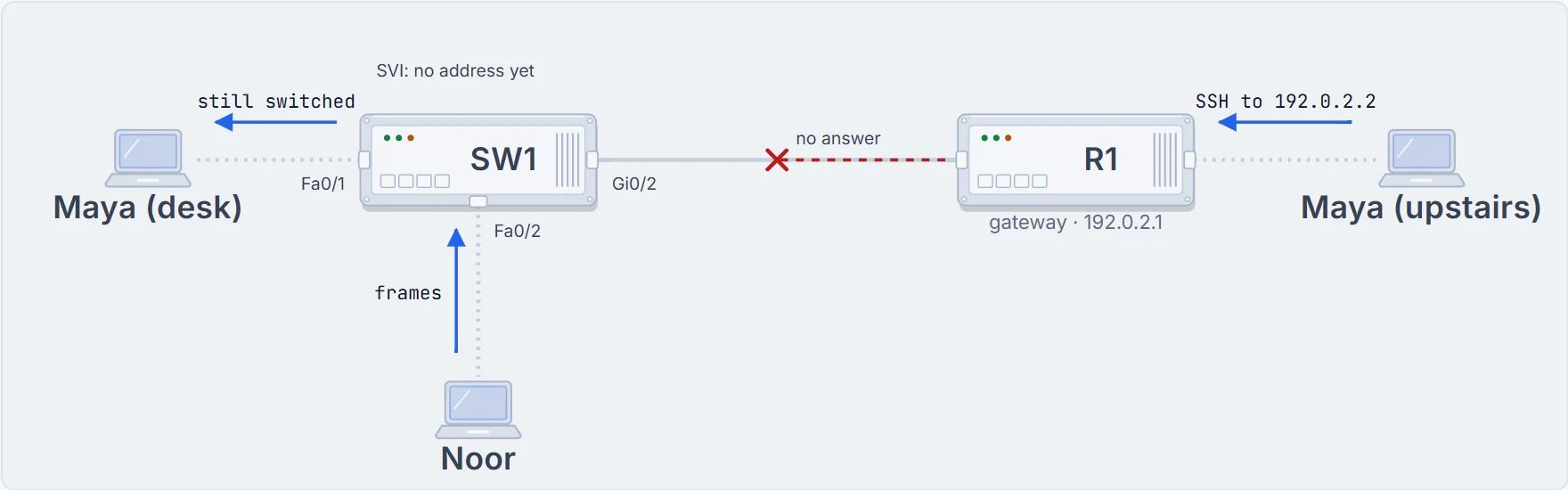
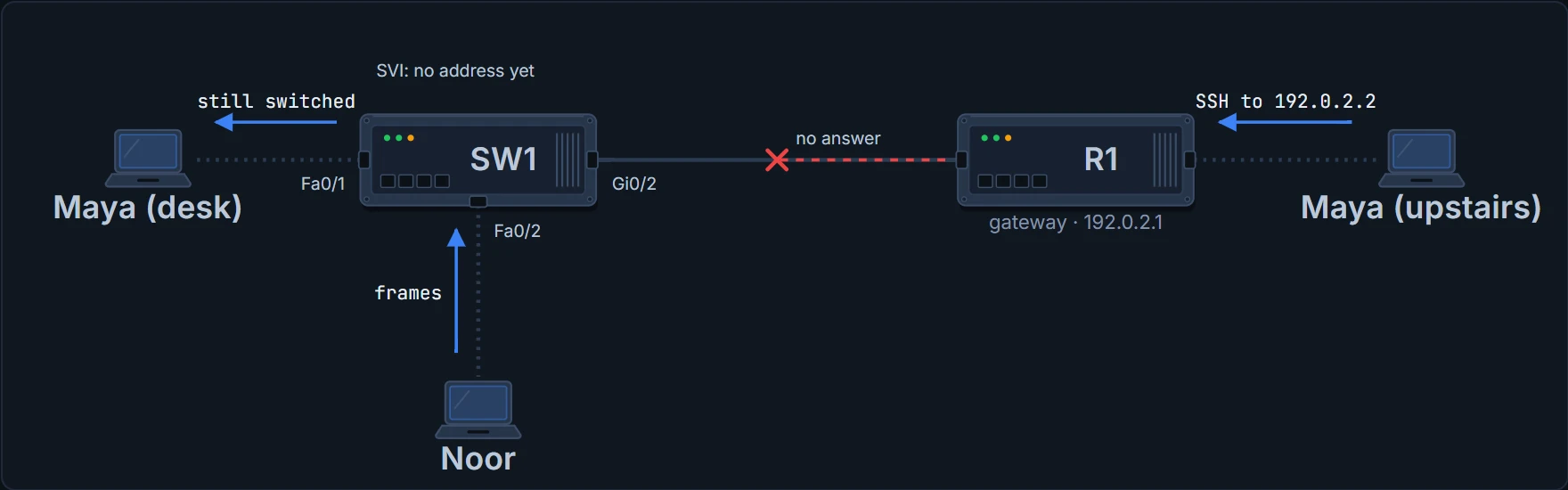
Noor's frames still reach Maya's desk, switched by MAC address as they have been since Monday. Upstairs, nothing answers to 192.0.2.2.
The switch can be doing its day job while ignoring Maya's phone call. Check the management path.
9:10 a.m. · An address inside the switch
A switch needs the same IP settings as a PC with one network card: an address and mask, and a default gateway. But SW1 doesn't put its address on any of its Ethernet ports. It uses a VLAN interface, also called a switched virtual interface, or SVI: a virtual network card inside the switch, connecting IOS to one VLAN. (A VLAN, from Monday, is a group of ports the switch treats as one LAN.)
By default every port is in VLAN 1, so the classic example uses interface vlan 1. SW1's office is VLAN 10, so Maya uses interface vlan 10. A Layer 2 switch needs only one management address, on any VLAN it has ports in. Choose a VLAN with no ports in it and its interface never reaches up/up: the switch has no way to talk to anything outside itself.
The SVI is how this Layer 2 switch joins the IP network for management. Its access ports still switch Ethernet frames by MAC.
The same address carries all of SW1's management traffic: SSH, and monitoring protocols like SNMP (topic 07.3.2). Some switches can also route packets, as Layer 3 switches (topic 05.1.5); SW1 is a Layer 2 switch. A switch can take an IPv6 management address with similar commands; this page sticks to IPv4.
LAB-SW1> enable
LAB-SW1# configure terminal
LAB-SW1(config)# interface vlan 10
LAB-SW1(config-if)# ip address 192.0.2.2 255.255.255.0
LAB-SW1(config-if)# no shutdown
%LINK-3-UPDOWN: Interface Vlan10, changed state to up
%LINEPROTO-5-UPDOWN: Line protocol on Interface Vlan10, changed state to up
LAB-SW1(config-if)# end
LAB-SW1# show interfaces vlan 10
Vlan10 is up, line protocol is up
  Hardware is EtherSVI, address is 0200.0000.0100 (bia 0200.0000.0100)
  Internet address is 192.0.2.2/24
! (lines omitted)
LAB-SW1#
The address goes in interface configuration mode, (config-if)#, under interface vlan 10. That isn't VLAN configuration mode, (config-vlan)#, which vlan 10 enters.
no shutdown matters: a new VLAN interface starts shut down, so typing an address isn't enough. The two log lines are the switch reporting the interface up; by default, the console gets a copy of every unsolicited log message, these included. The same shutdown and no shutdown work on the physical ports too.
Read show interfaces vlan 10 from the top. The first line gives two states. up, line protocol is up is the only good answer. administratively down means nobody has typed no shutdown. up, line protocol is down means the VLAN isn't working on this switch, for example because no port in it is up; topic 05.1.5 lists the other causes. The address is on the third line.
- SW1 has 192.0.2.2/24 and can use it: the interface is up/up
- that anyone outside 192.0.2.0/24 can reach it: that needs the default gateway
- that SSH will let anyone log in
- whether the address was typed in or leased: the output looks the same either way
9:15 a.m. · Near and far
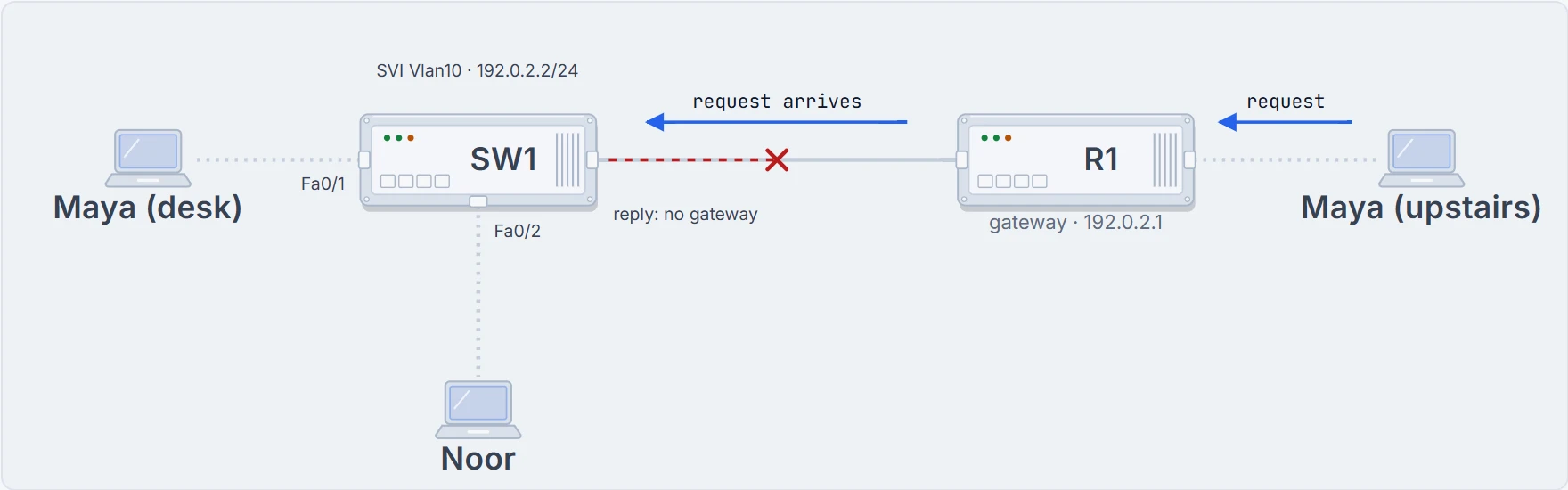
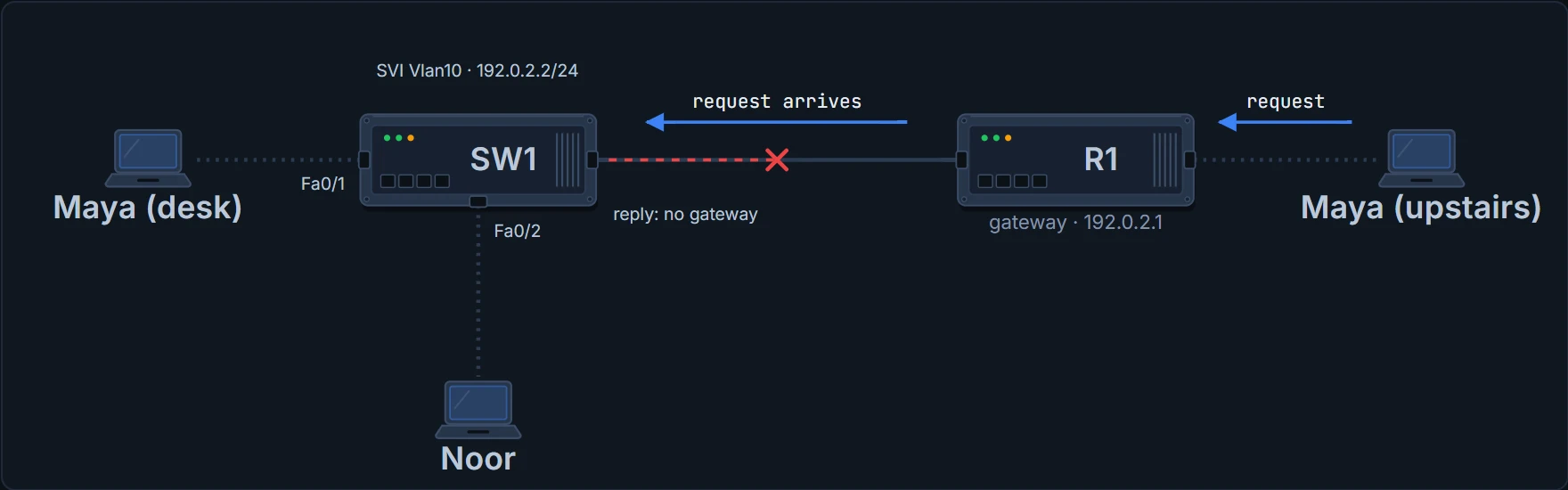
Maya's desk laptop, 192.0.2.10, is in SW1's subnet, and SW1 answers it directly. Upstairs is different. Maya's request crosses R1 and arrives; it's SW1's reply that's stuck. To send to a host in its own subnet, any host, PC or switch, sends directly. To send to another subnet, it sends to its default gateway, a router in its own subnet. SW1 doesn't have one yet.
LAB-SW1# configure terminal
LAB-SW1(config)# ip default-gateway 192.0.2.1
LAB-SW1(config)# end
LAB-SW1# show ip default-gateway
192.0.2.1
LAB-SW1#
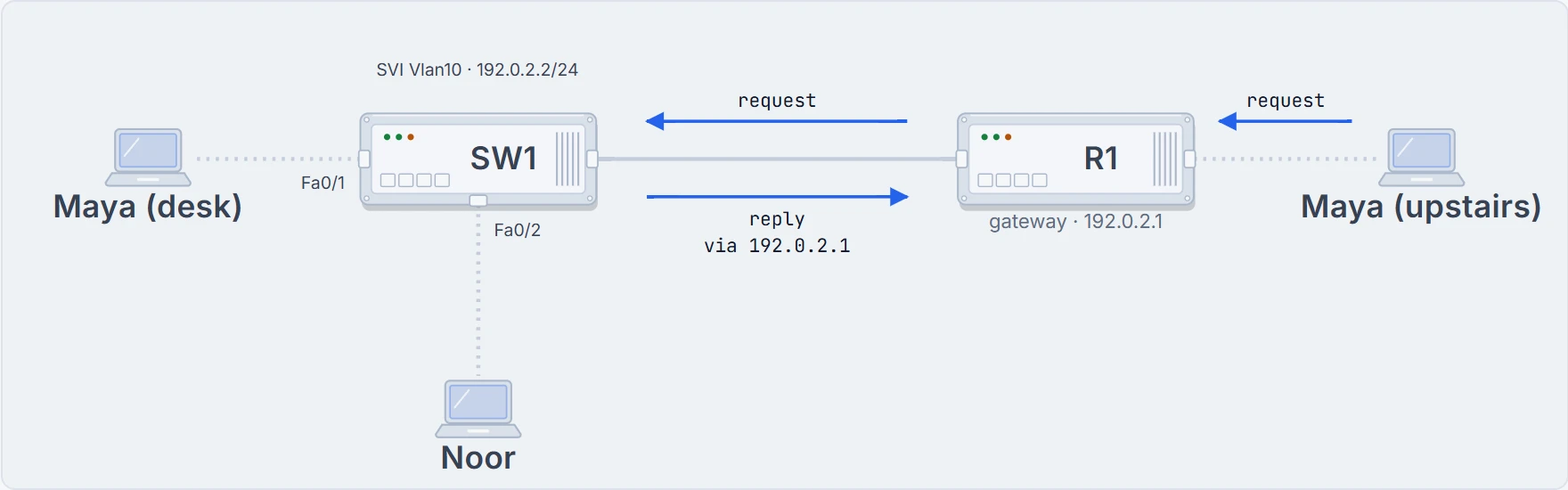
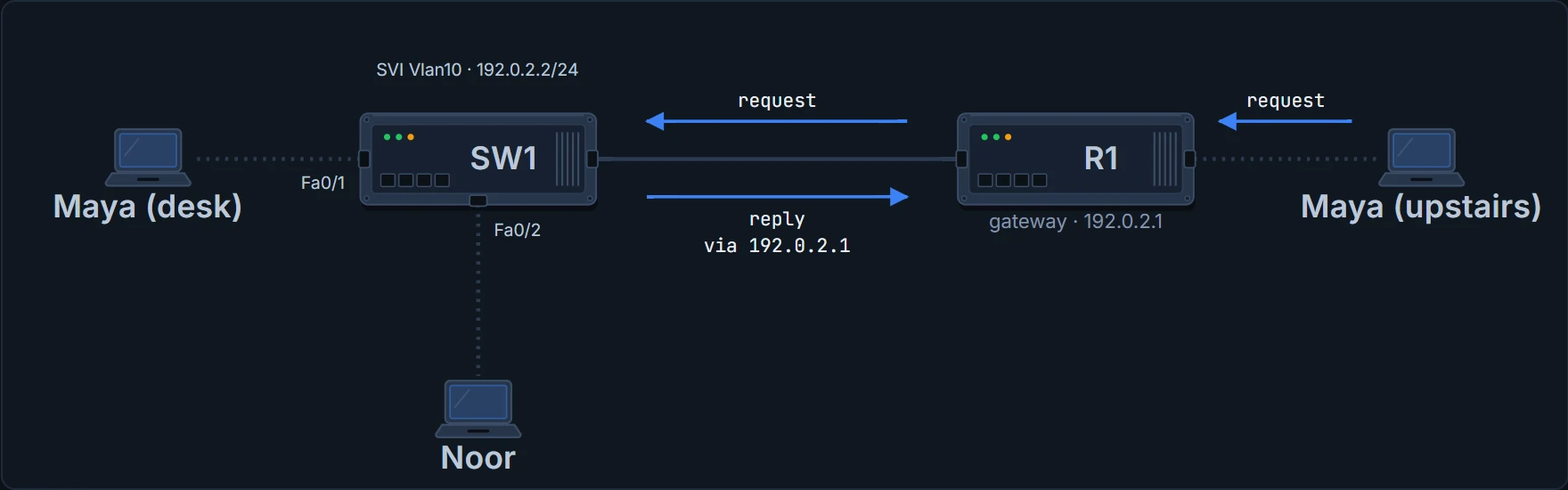
ip default-gateway 192.0.2.1 is a global command, and it names R1. Now the reply goes to R1, and R1 routes it upstairs. show ip default-gateway prints the setting, whether it was typed in or learned. One optional extra, also global: ip name-server gives the switch the addresses of DNS servers, so commands typed on it can use names instead of addresses.
- which router SW1 sends to for other subnets
- that R1 is up and routing
- anything about the VLAN interface: check that separately
Worth remembering when things break: two devices in the same subnet can reach each other even if the gateway, and all the routing beyond it, is broken.
Continue the lesson
The whole lesson, with its drawings and its questions. 6 more sections after the ones above.