
DHCP Client, Server and Relay
A host needs four IPv4 settings: an address, a mask, a default router and DNS servers. DHCP leases them with four messages, Discover, Offer, Request and Acknowledgment: DORA. The client's Discover is a broadcast, so a router does not forward it; with a central server, ip helper-address on each LAN interface makes the router relay it.
By Arif, founder of Daveth · Updated
The full 24 min walkthrough is in Daveth Pro (Network). See what the plan opens
What this page answers
What is DHCP?
The Dynamic Host Configuration Protocol: a client with no settings finds a DHCP server and leases an IPv4 address, mask, default router and DNS servers, using four messages, Discover, Offer, Request and Acknowledgment. Read it in “Four messages”
What is a DHCP relay agent (ip helper-address)?
A router that forwards DHCP messages between clients on its LAN and a server in another subnet. ip helper-address, followed by the server's address, on the interface facing the clients turns it on. Read it in “Across a router”
Forty laptops, four settings
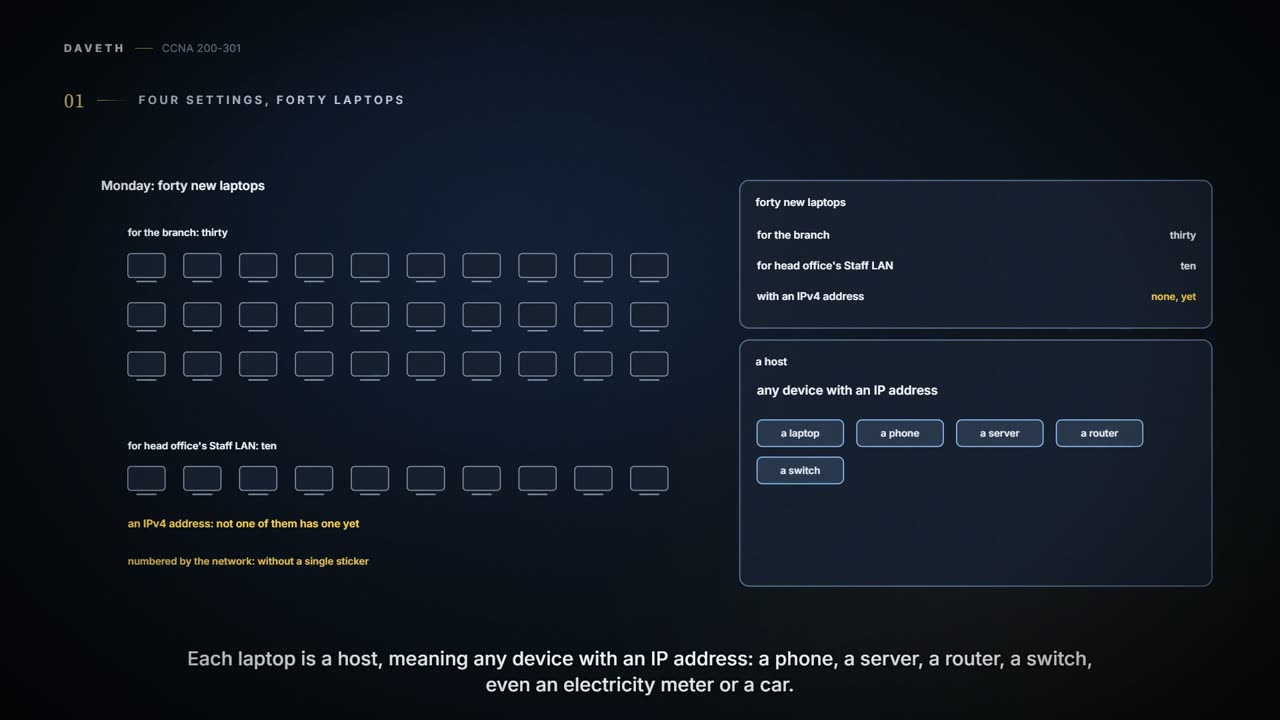
Monday, month six. Forty new laptops arrive: thirty for the branch and ten for head office's Staff LAN. None of them has an IPv4 address yet.
Jo hand-labels forty laptops before lunch. The network will number them by teatime, without a single sticker.
A host is any device with an IP address: a laptop, a phone, a server, a router, a switch, and some less obvious ones, such as an electricity meter that reports your usage over the mobile network, or a car. Whatever the kind, an IPv4 host needs four settings to work properly:
- its own IP address;
- its subnet mask;
- the default router's (default gateway's) IP address;
- the DNS servers' IP addresses.
Typing four settings into forty laptops is an afternoon of typos. With the Dynamic Host Configuration Protocol (DHCP), the settings live on a DHCP server, and each laptop, as a DHCP client, learns them with DHCP messages. The IT staff control the configuration in one place, so users make fewer mistakes. DHCP can assign an address permanently, but it usually hands out a temporary lease, which lets the server reclaim addresses from devices that leave. It helps people who move, too: a laptop that goes from the office to a coffee shop and back leases an address on each network and carries on. Most user devices learn their IPv4 settings this way.
The company already has two DHCP servers at head office: DHCP1, 10.98.0.17, and DHCP2, 10.98.0.18, on VLAN 98 beside WLC1 (03.5.4). Head office's Staff laptops have leased from them since month two (04.6). The branch never has; Jo's laptop, 10.50.0.20, was typed in by hand in month three. The company's DNS server, which the pools will hand out, is 10.98.0.53, on the same VLAN.
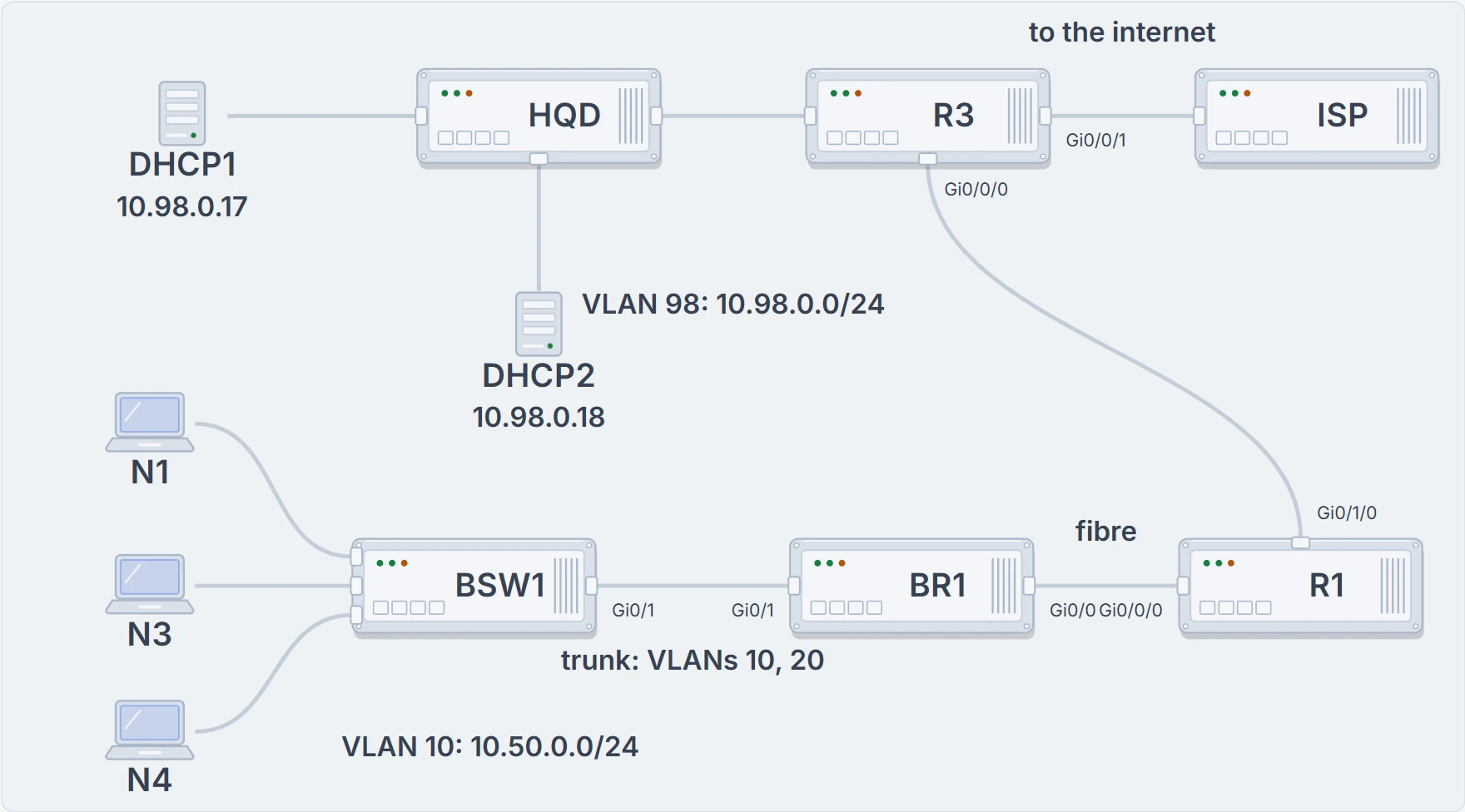
Head office on top: DHCP1 and DHCP2 on VLAN 98, on the switch HQD, and R3 with its internet link. The branch below: N1, N3 and N4 on the switch BSW1, whose Gi0/1 is a trunk to BR1, then the fibre to R1, and R1's link to R3.
Four messages
A DHCP client starts with no IPv4 settings at all: no address, no mask, no default router, no DNS servers. What it does have is DHCP itself, which it uses to find a DHCP server and ask to lease an address.
DHCP uses four messages between the client and the server. Their first letters spell DORA:
- Discover, sent by the client to find a willing DHCP server;
- Offer, sent by a server, offering to lease the client a specific IP address, and telling it the other settings;
- Request, sent by the client, asking to lease the address listed in the Offer;
- Acknowledgment, sent by the server, assigning the address and listing the mask, default router and DNS server addresses.
There's a catch: a client with no address still has to send these messages inside IP packets. Two special IPv4 addresses make that work on the local subnet:
- 0.0.0.0, reserved as the source address for a host that doesn't have an address yet;
- 255.255.255.255, the local broadcast address. Packets sent to it are broadcast on the local data link, and routers don't forward them.
Start with the simple case: a client on the same subnet as a DHCP server. Its Discover goes from 0.0.0.0 to 255.255.255.255, in a broadcast frame, so it reaches every host in the subnet, the server included. The server's Offer goes to 255.255.255.255 as well, because the client still has no address to send it to, so every host in the subnet receives the Offer. The Discover listed a client ID, which includes the client's MAC address, and the Offer lists it too; the other hosts see a different device's client ID and ignore the message. (These examples assume the client asks for broadcast replies, with a DHCP option called the broadcast flag.)
The Request and the Acknowledgment follow, and the client has its settings. No router took part: a client and a server on the same subnet don't need one. The company doesn't have that simple case anywhere. DHCP1 and DHCP2 share VLAN 98 with WLC1, not with any laptops.
Across a router
Network engineers have a design choice here. They can put a DHCP server in every subnet: a router can act as the server, so each site's router could do the job, and the messages stay local. (A router as the server is handy in a lab and in some limited cases.) Or they can run a central server and carry the messages to it. Some design documents suggest the central design as best practice, partly because it keeps every address the company hands out under one configuration. The company went central long ago, and Ravi wants the branch on DHCP1 too.
But N1's Discover goes to 255.255.255.255, and BR1 won't route it. The fix is one interface subcommand on the router: ip helper-address, followed by the server's address.
For DHCP messages coming in an interface from a client, ip helper-address tells the router to:
- watch for incoming DHCP messages with destination address 255.255.255.255;
- change the packet's source address to the router's own address on the incoming interface;
- change the destination address to the DHCP server's, as configured in the command;
- route the packet to the server.
(Strictly, the command acts on local broadcasts that use UDP, which DHCP does.) Changing the destination gets around the rule that packets for 255.255.255.255 aren't routed: once the destination is DHCP1's address, the network routes the packet like any other. Relaying DHCP messages by changing their addresses is called DHCP relay, and the router doing it is a DHCP relay agent.
On the way back, the server simply reverses the addresses of the packet it received, so the Offer goes to BR1's 10.50.0.1. When BR1 receives a DHCP message addressed to one of its own addresses, it treats it as possible relay traffic: it changes the destination to 255.255.255.255 and forwards the packet out the interface that owns that address, Gi0/1.10, where N1 hears it. Here it is, step by step:
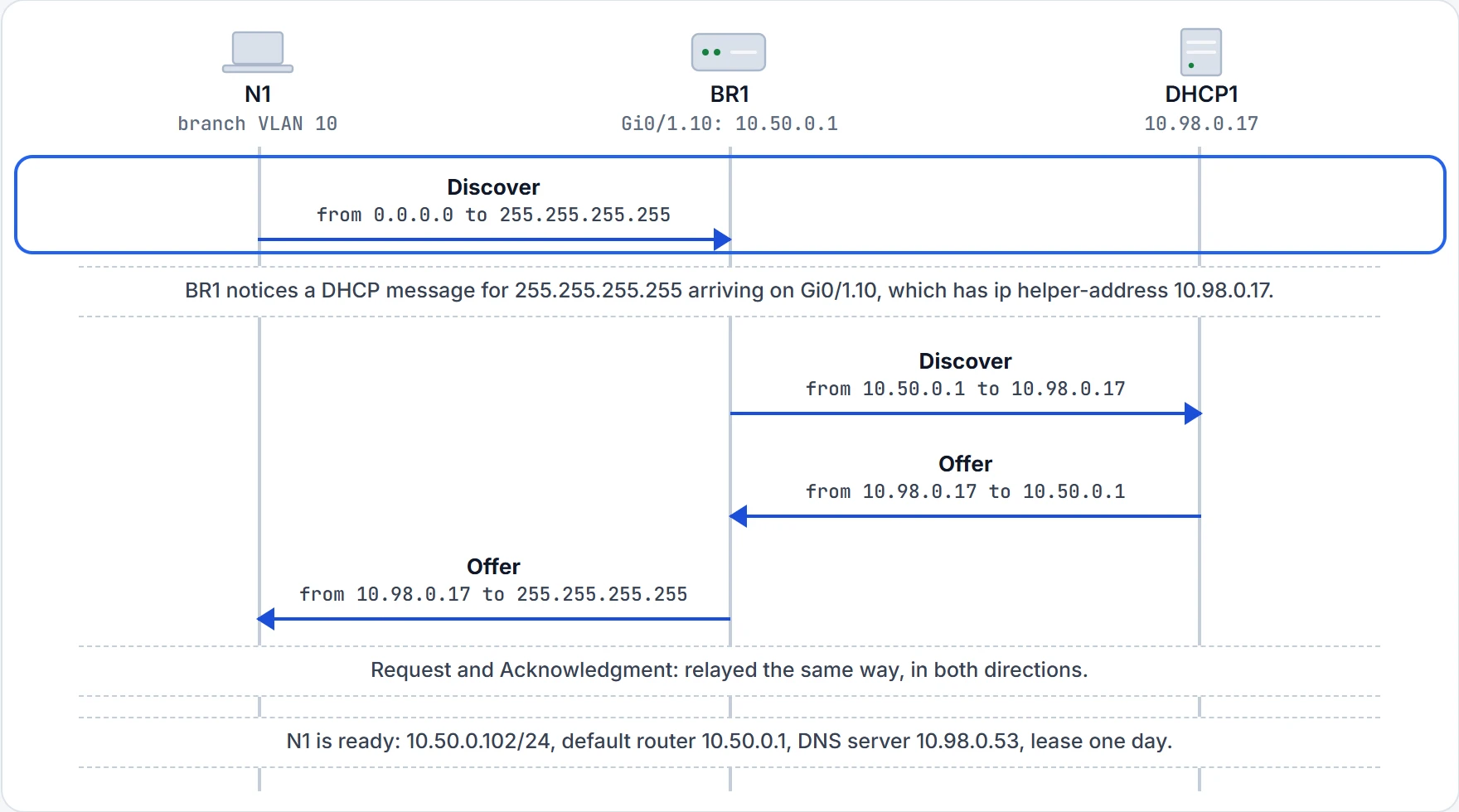
Step 1 of 7 N1 has no address, so it sends from 0.0.0.0 to 255.255.255.255. There's no DHCP server on VLAN 10, and BR1 won't route a packet sent to 255.255.255.255.
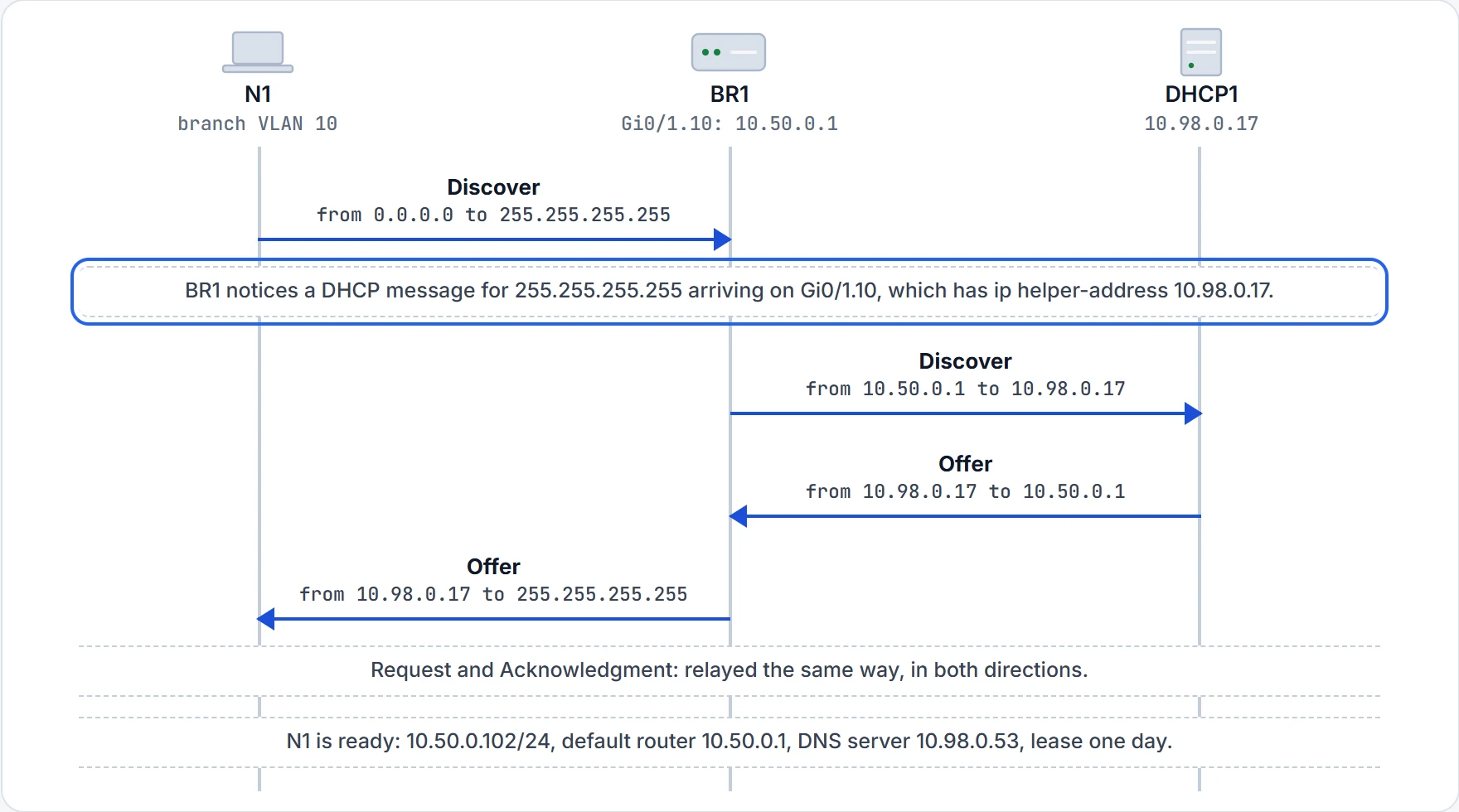
Step 2 of 7 Step 1 of the helper: watch for incoming DHCP messages sent to 255.255.255.255.
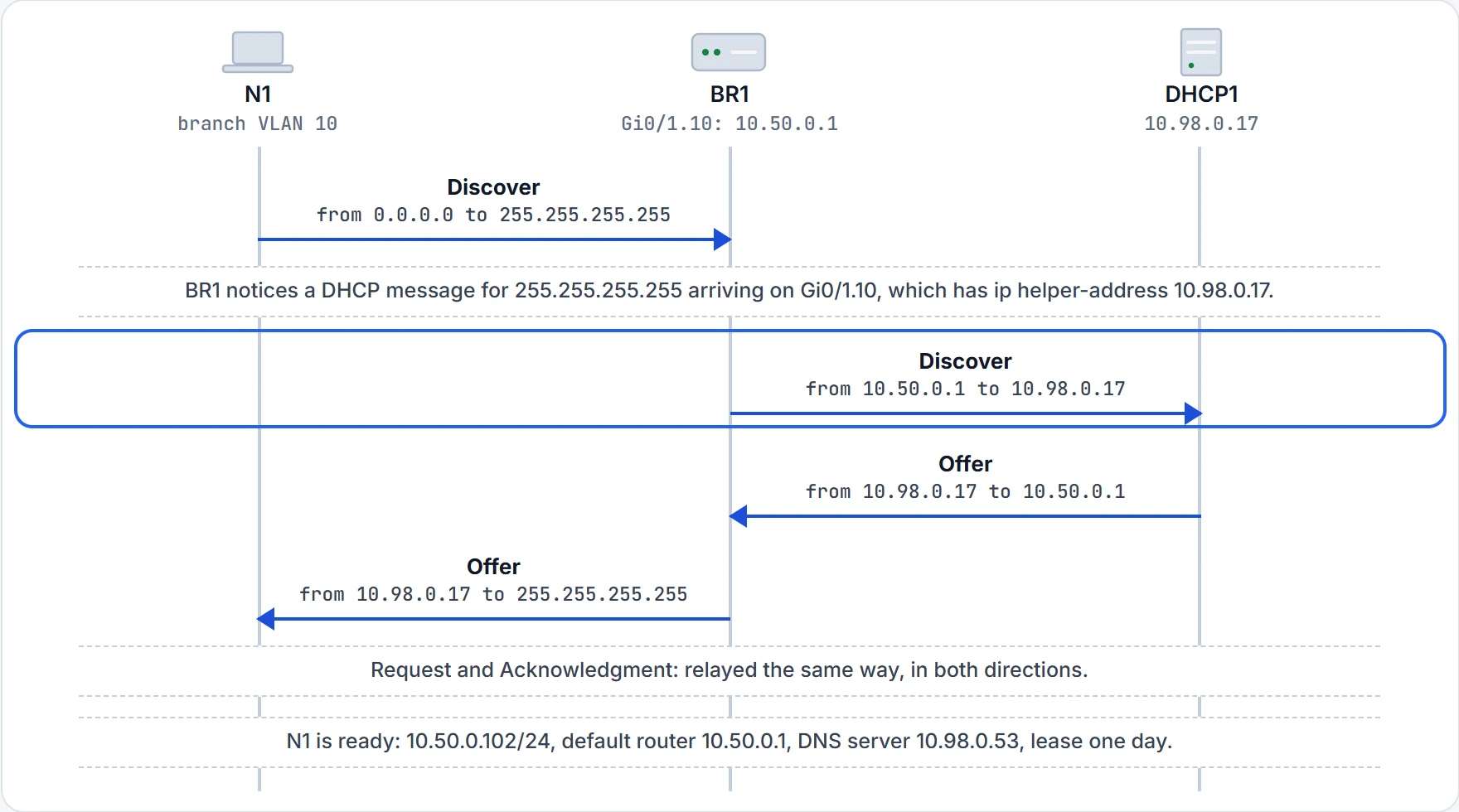
Step 3 of 7 Steps 2 to 4: the source becomes BR1's own Gi0/1.10 address, 10.50.0.1; the destination becomes DHCP1, 10.98.0.17; and BR1 routes the packet like any other.
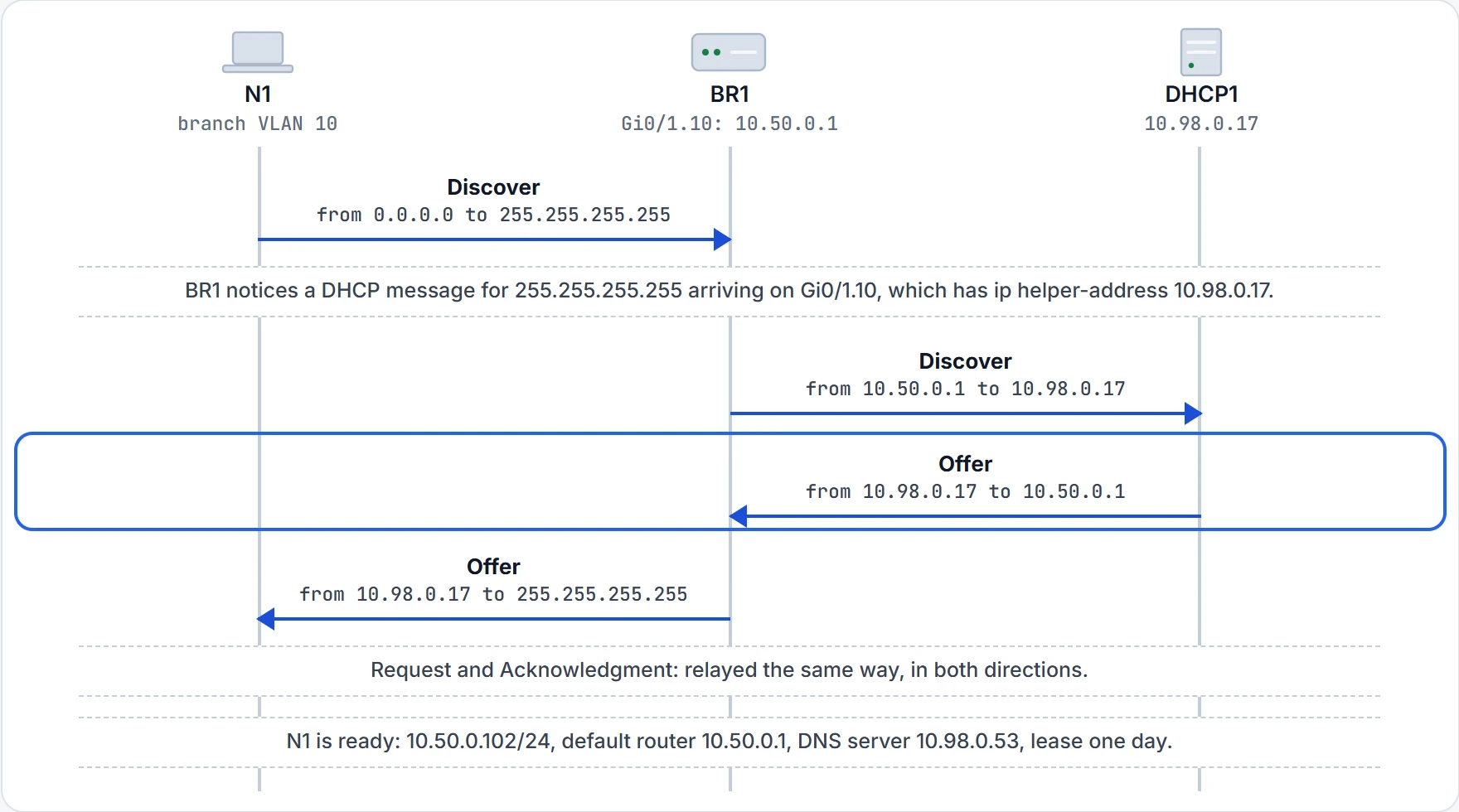
Step 4 of 7 DHCP1 reverses the addresses it received: the Offer (for 10.50.0.102) goes to 10.50.0.1, BR1's address.
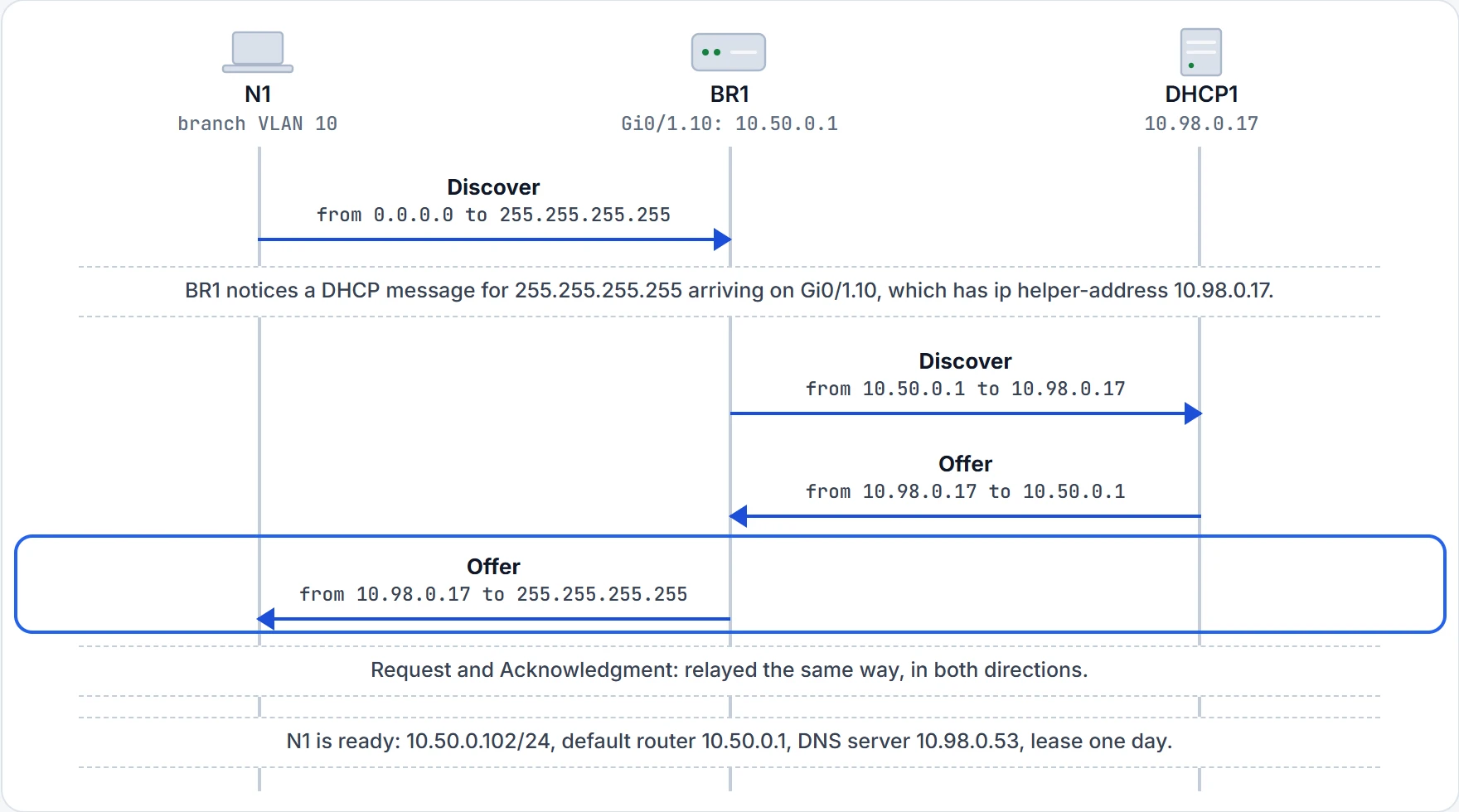
Step 5 of 7 The Offer arrives addressed to BR1's own 10.50.0.1, so BR1 treats it as relay traffic: it changes the destination to 255.255.255.255 and sends it out Gi0/1.10, the interface that owns 10.50.0.1.
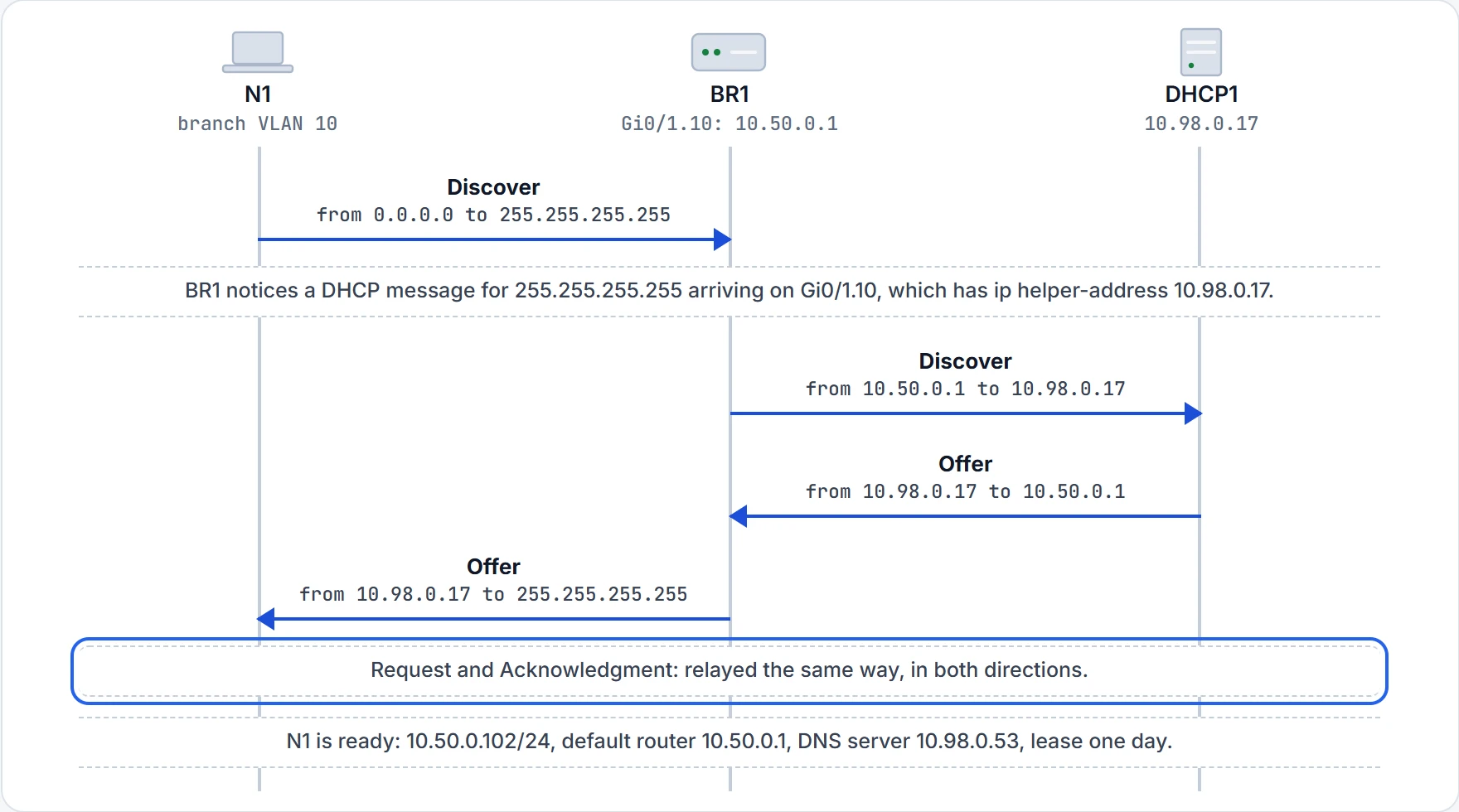
Step 6 of 7 The Request and the Acknowledgment cross BR1 by the same process.
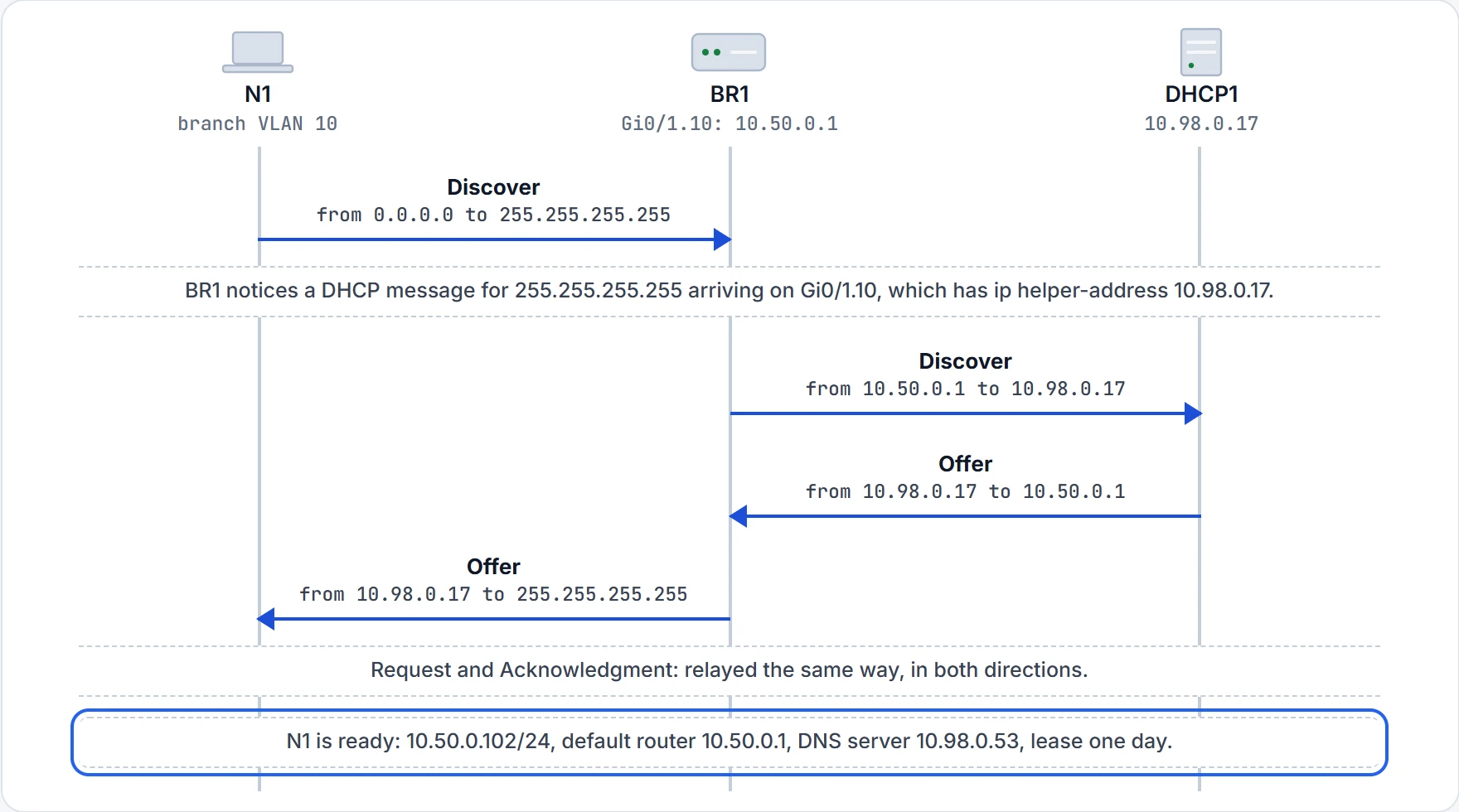
Step 7 of 7 DHCP1 chose every one of those settings. BR1 only carried the messages.
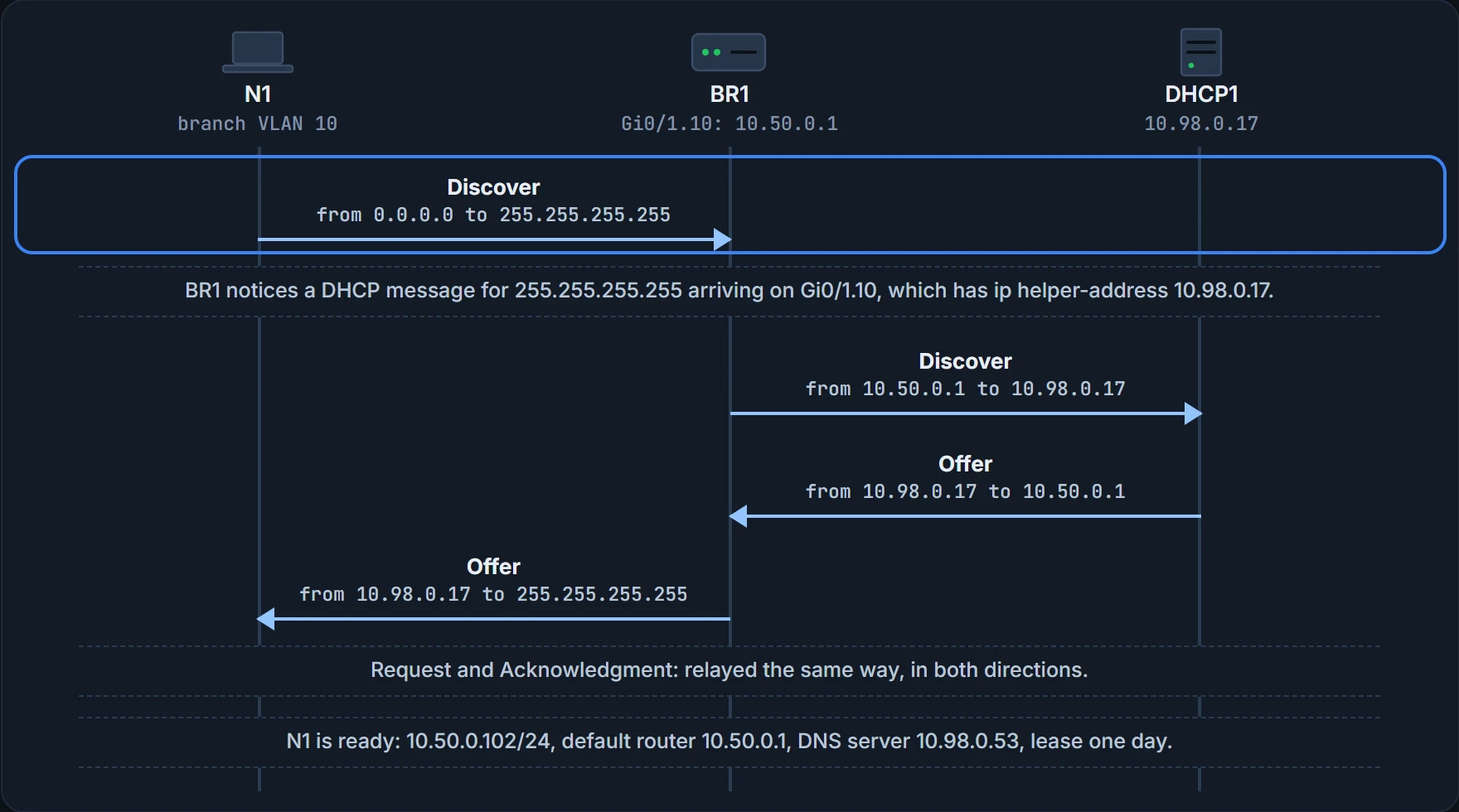
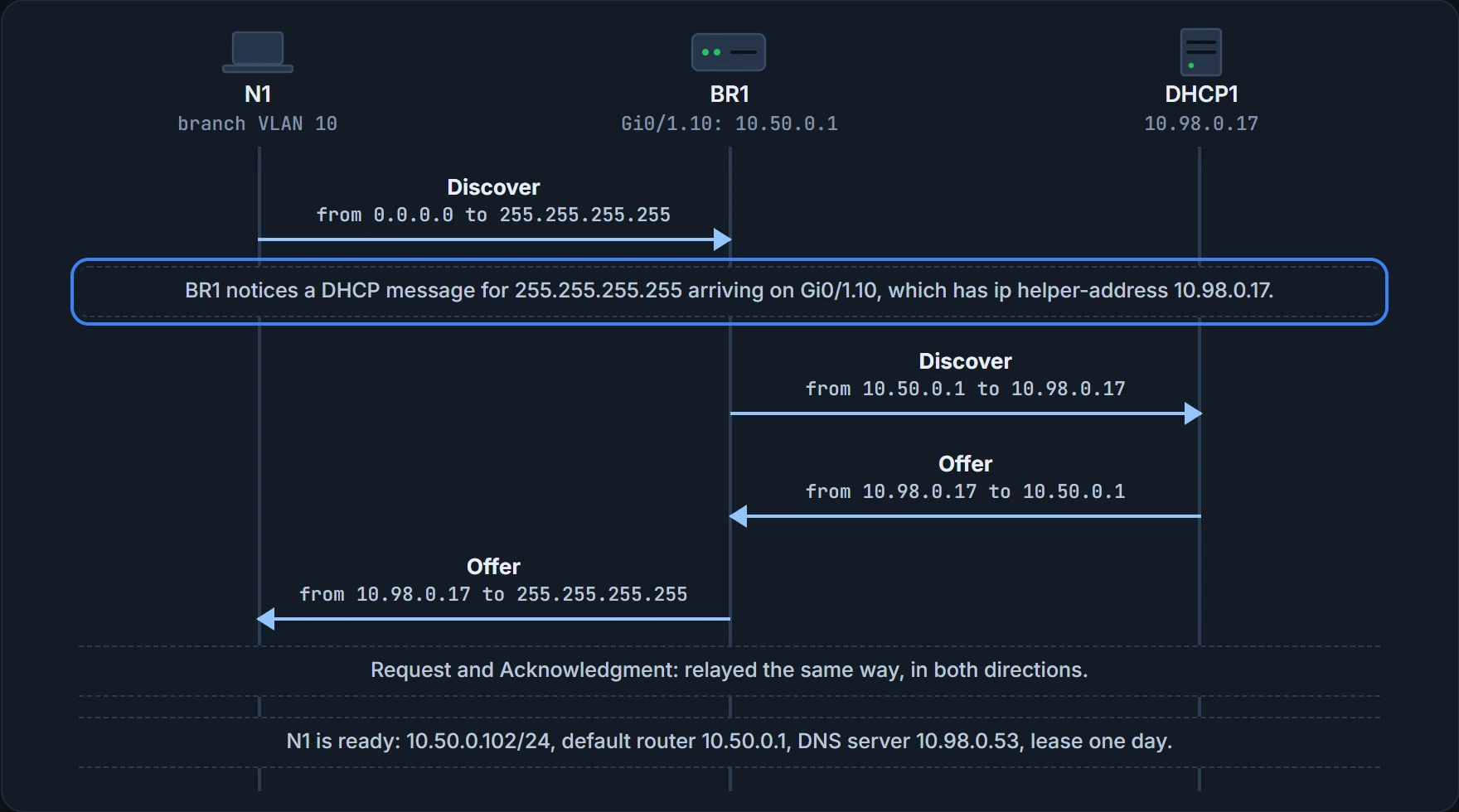
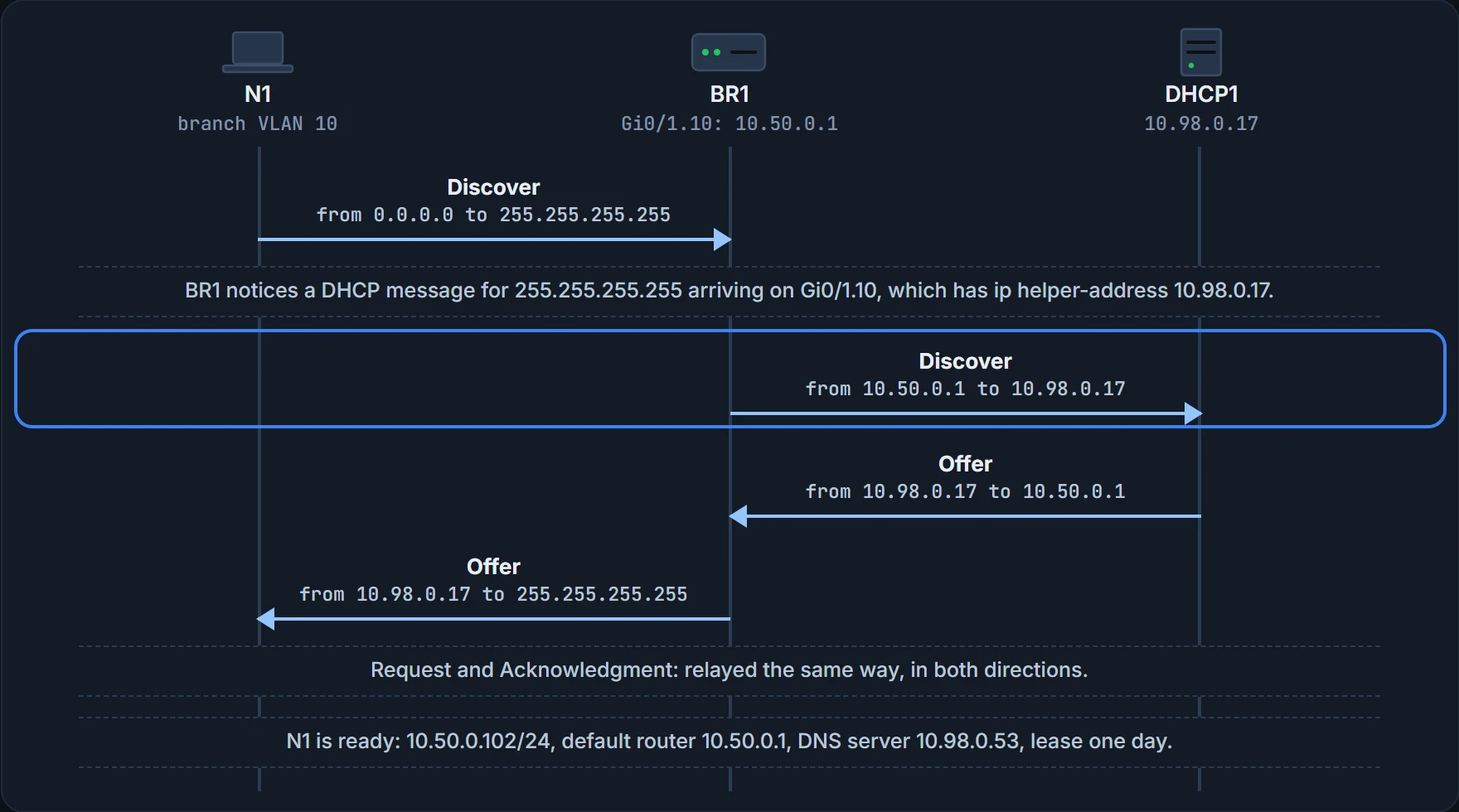
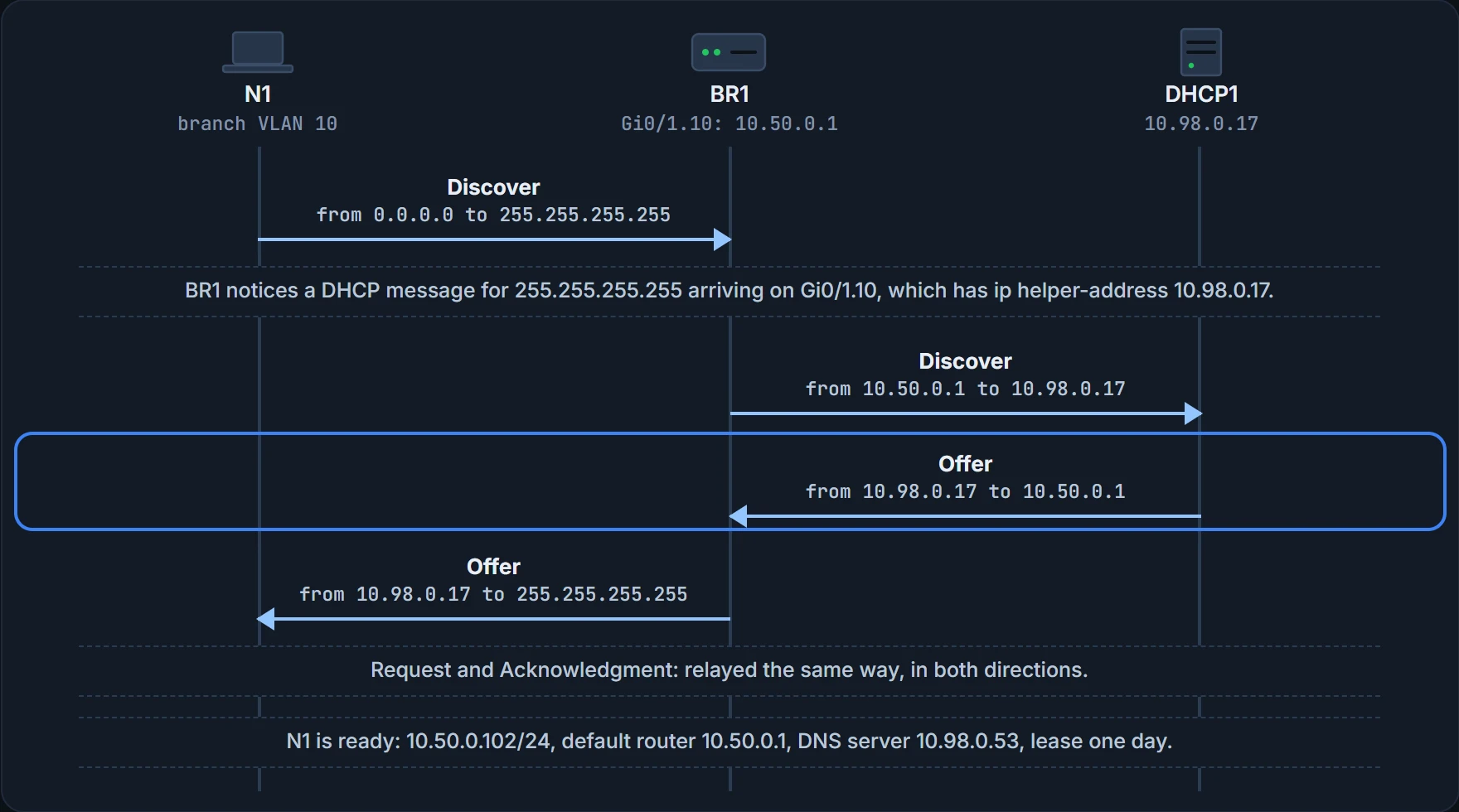
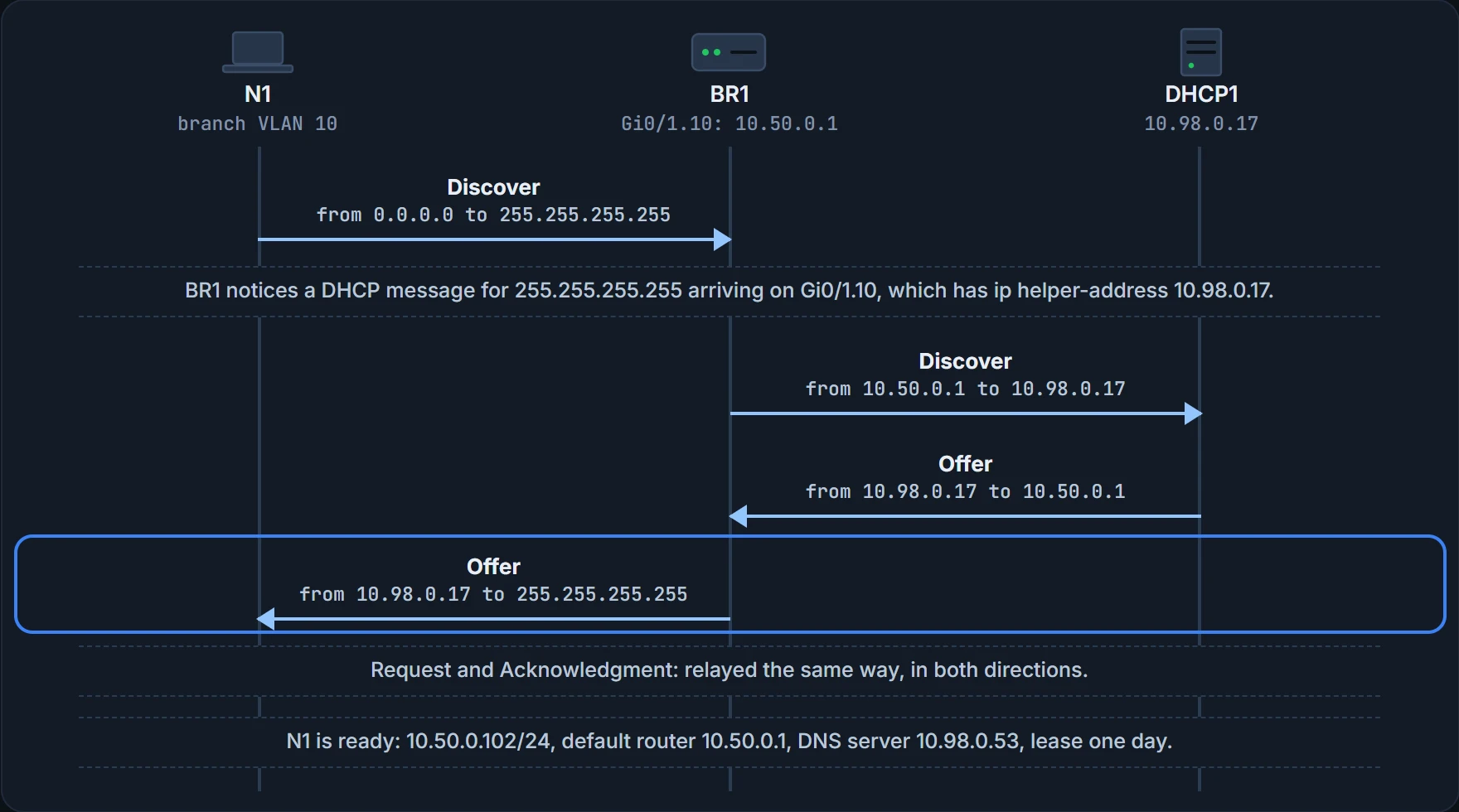
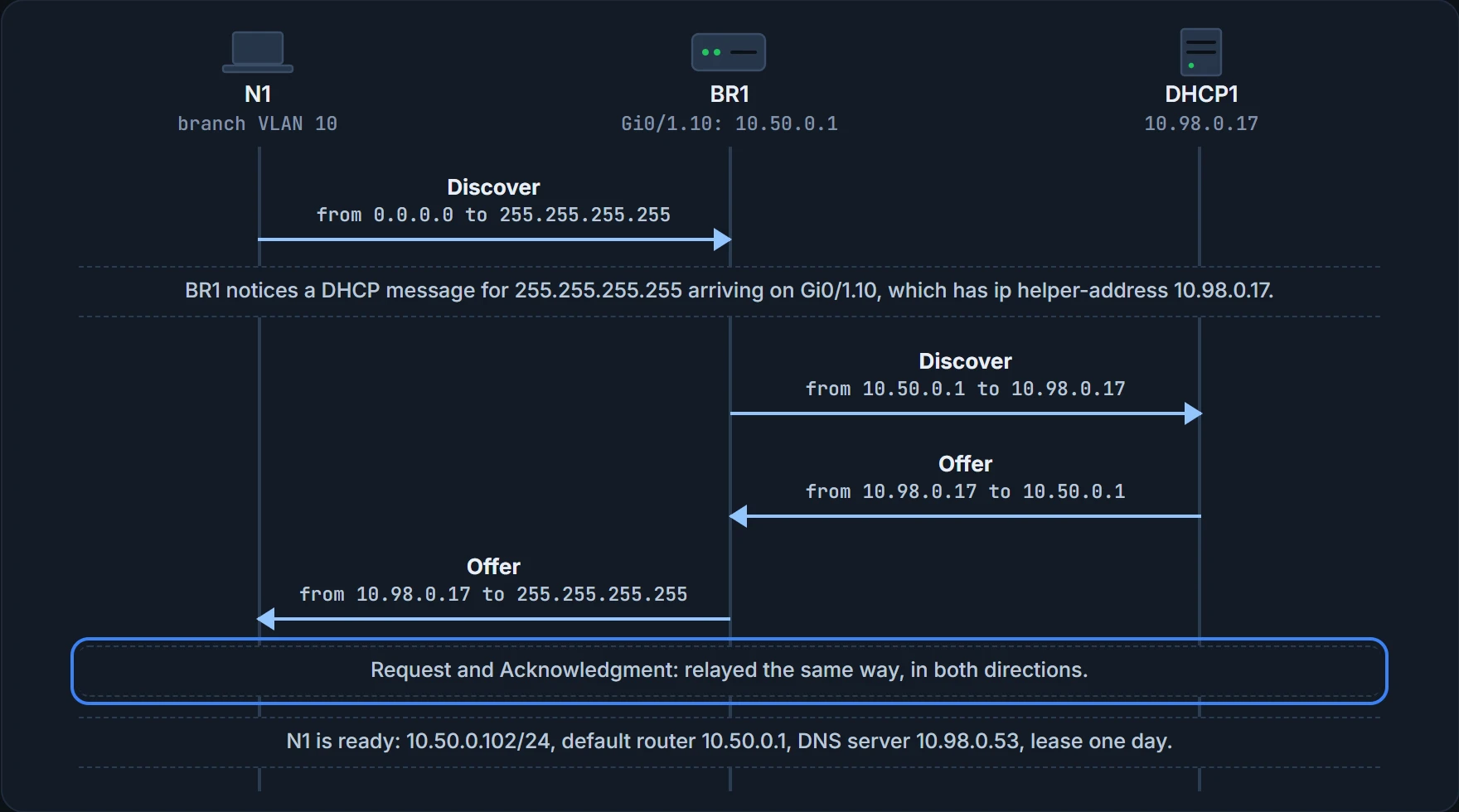
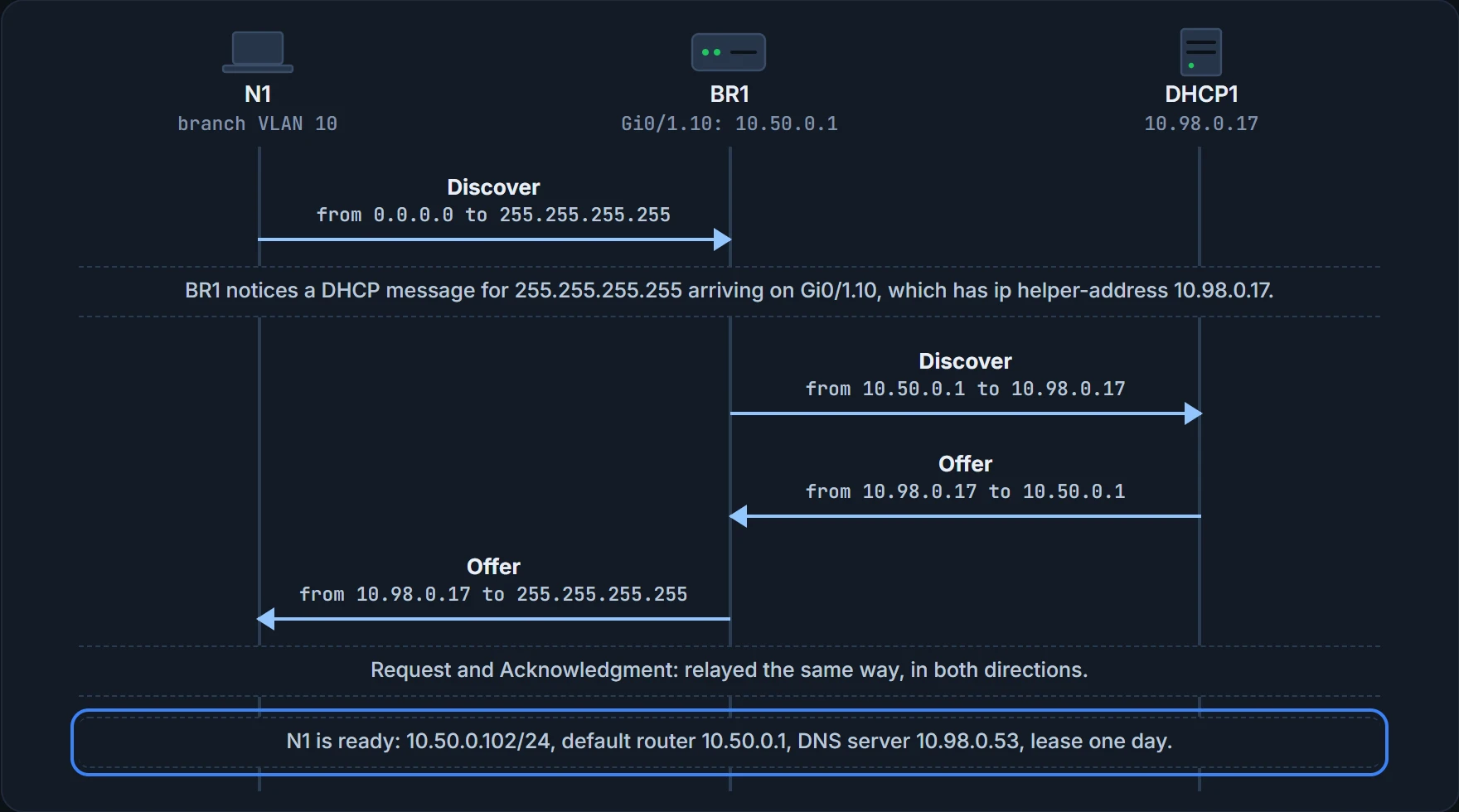
What the steps above prove: which addresses each message carries on each side of BR1. What it doesn't: that DHCP1 has a free address, or that routes exist between the branch and DHCP1 in both directions. A relay changes addresses; it can't invent routes. Here OSPF already carries them (05.2.3).
BR1's relay works kind of like a hotel porter who takes a guest's note from the lobby to the front desk in the next building: the porter carries it, and the desk still chooses the room. (Where it stops: a porter walks the note over. BR1 re-addresses the messages and lets the network deliver them; and, like the desk, DHCP1 chooses the address and every setting.)
So which interfaces need a helper? Any router interface whose subnet has DHCP clients in it and no DHCP server in it. Without the relay, the request never reaches the server. With a central server, the usual router configuration puts ip helper-address on every LAN interface and subinterface, so hosts on any of them can lease an address. R3 has had one on the Staff VLAN since month two.
| Subnet | DHCP clients in it? | DHCP server in it? | Relay needed? |
|---|---|---|---|
| Branch VLAN 10 (Jo, the new laptops) | yes | no | yes, on BR1 Gi0/1.10 |
| Branch VLAN 20 (visitors) | yes | no | yes, on BR1 Gi0/1.20 |
| The fibre, BR1 to R1 | no | no | no |
| Head office VLAN 98 (DHCP1, DHCP2, WLC1) | no | yes | no |
Ravi configured both branch subinterfaces on Friday, and checked one:
BR1# configure terminal
BR1(config)# interface GigabitEthernet0/1.10
BR1(config-subif)# ip helper-address 10.98.0.17
BR1(config-subif)# interface GigabitEthernet0/1.20
BR1(config-subif)# ip helper-address 10.98.0.17
BR1(config-subif)# end
BR1# show ip interface GigabitEthernet0/1.10
GigabitEthernet0/1.10 is up, line protocol is up
  Internet address is 10.50.0.1/24
  Broadcast address is 255.255.255.255
  Address determined by non-volatile memory
  MTU is 1500 bytes
  Helper address is 10.98.0.17
! (the rest is left out)
BR1#
show ip interface lists the setting in its Helper address line; with none configured, the line reads "Helper address is not set". (show running-config shows the command itself.) What this proves: BR1 will relay DHCP messages from VLAN 10 to 10.98.0.17. What it doesn't: that DHCP1 answers, or that BR1 has a route to it.
When relayed leases fail, the evidence points different ways. A helper on the wrong interface, or with the wrong server address, means requests never reach DHCP1. A pool with no free addresses left means DHCP1 has nothing to offer. A pool missing its default router gives laptops an address but no way off their subnet. And one failed Discover doesn't prove the server is down.
What DHCP1 knows
A DHCP server sounds like a large humming box in a cold, locked room. It's software, running on a server operating system; it could even run on an old PC. But because new clients can turn up at any time, companies usually run it somewhere stable, in a data centre with high-availability features. DHCP1 is exactly that: software on a server at head office.
The cold, locked room is optional. The software isn't.
The server organises its settings per subnet, because what it tells clients is the same for every host in one subnet and slightly different between subnets: each subnet has its own default router, for example. For each subnet it needs:
- the subnet ID and mask, so it knows every address in the subnet. It never leases the subnet ID or the subnet broadcast address;
- excluded (reserved) addresses, which it must not lease, kept for static addresses: routers, switches, servers and most things other than user devices. Engineers usually follow one convention in every subnet, reserving either the lowest addresses or the highest;
- the default router(s): the router's address on that subnet;
- the DNS server addresses.
The company's convention since month two (04.1) is .1 to .100 static and .101 to .254 by DHCP, and each LAN's router is .1. Here's what DHCP1 holds for the branch and the Staff LAN:
| Subnet | Subnet ID and mask | Excluded (kept for static addresses) | Default router | DNS server | Lease |
|---|---|---|---|---|---|
| Branch VLAN 10 | 10.50.0.0 255.255.255.0 | 10.50.0.1 to 10.50.0.100 | 10.50.0.1 | 10.98.0.53 | 86400 seconds (one day) |
| Branch VLAN 20 | 10.50.1.0 255.255.255.0 | 10.50.1.1 to 10.50.1.100 | 10.50.1.1 | 10.98.0.53 | 86400 seconds (one day) |
| Head office Staff (VLAN 100) | 10.100.0.0 255.255.255.0 | 10.100.0.1 to 10.100.0.100 | 10.100.0.1 | 10.98.0.53 | 86400 seconds (one day) |
The configuration can list more, and the lease time is one. The server leases an address for a time, usually some days, and the client can ask to renew it. If a client doesn't renew, the server can reclaim the address and put it back in the pool of available addresses. DHCP1's leases last a day: long enough to survive even Maya's lunches.
You can think of a lease as a library loan: keep renewing and it stays with you; stop, and it goes back on the shelf for someone else. (Where it stops: a library chases you for an overdue loan. DHCP1 doesn't chase anyone; the address just goes back in the pool.)
DHCP has three allocation modes, which differ only in the server's configuration. Dynamic allocation is everything on this page: leases with a time limit. Automatic allocation sets the lease time to infinite, so once the server gives a client an address, it stays with that client. Static allocation preconfigures a specific address for one client, identified by its MAC address, and only that client uses it. A server can also supply other settings, such as the address of a TFTP server (Trivial File Transfer Protocol, a basic way to store files and transfer them to hosts): some IP phones download their configuration files by TFTP when they start, and DHCP tells them where to find it.
Continue the lesson
The whole lesson, with its drawings and its questions. 3 more sections after the ones above.