
SNMP, FTP and TFTP
SNMP lets a network management station ask devices how they are doing: each device runs an agent holding variables, and the NMS polls them with Get messages, changes them with Set, and hears about events through Traps and Informs. All SNMP messages travel over UDP. FTP and TFTP move files, such as images and configuration backups.
By Arif, founder of Daveth · Updated
The full 18 min walkthrough is in Daveth Pro (Network). See what the plan opens
What this page answers
What is SNMP?
The Simple Network Management Protocol: a management station polls agents on devices for variables, stores the answers over time and alerts staff at thresholds; Set can change a device's configuration, and Traps and Informs report events. Read it in “Get, Set, Trap and Inform”
What is the difference between FTP and TFTP?
Both copy files between a client and a server. FTP, from RFC 959, uses TCP. TFTP uses UDP port 69, and because UDP does not recover errors, it checks each file with a checksum after the transfer. A router becomes a client when its copy command names ftp or tftp. Read it in “FTP and TFTP”
Asking a router how it's doing
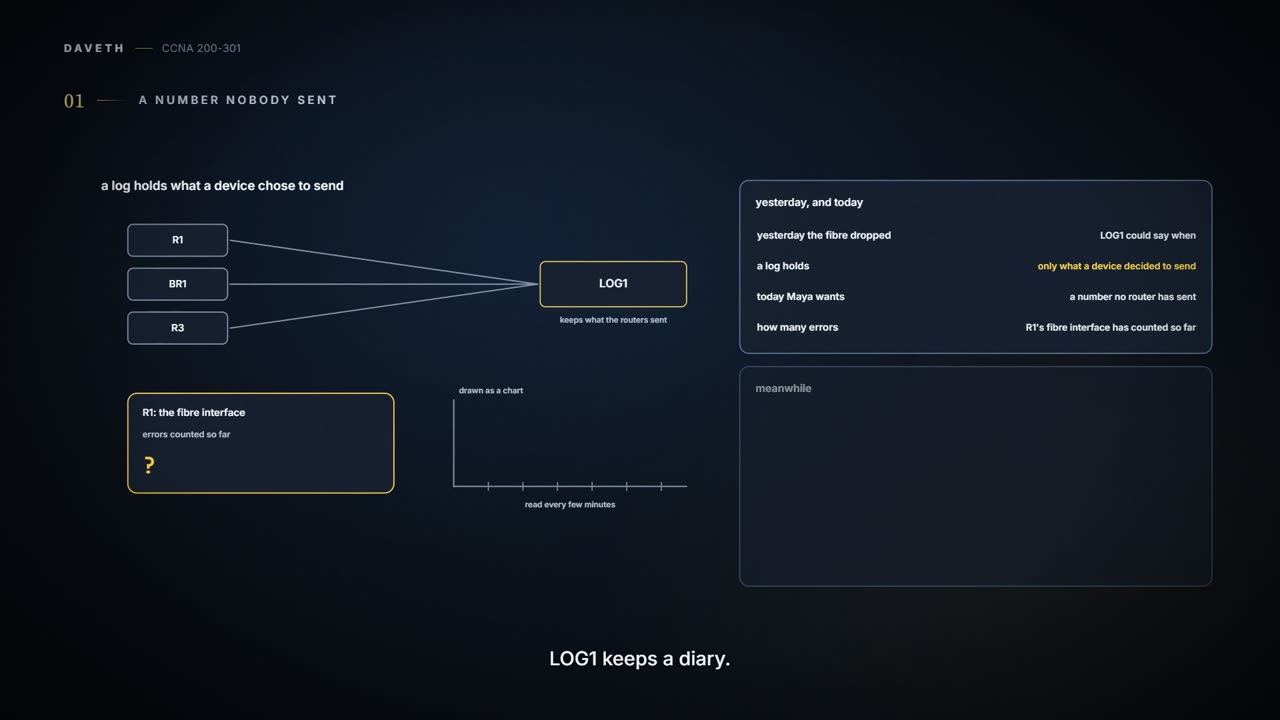
Friday, month six. After Thursday's fibre drop, Maya wants more than LOG1 can give. LOG1 holds messages the routers chose to send. Maya wants to ask R1, every few minutes, how many errors the fibre interface has counted so far, and see a chart of it.
LOG1 keeps a diary. Maya wants to read the thermometer.
That's the job of the Simple Network Management Protocol (SNMP). The idea dates from the late 1980s: a device's configuration settings, status and counters can be described as a database of variables, and management software can collect them from every device the same way. SNMP is an application layer protocol between two roles. An SNMP manager is management software running on a PC or server, usually called a Network Management Station (NMS). An SNMP agent is software inside each managed device, a router or switch, that knows the device's variables. The agent's database of variables is the Management Information Base (MIB): some variables are common to most devices, many are specific to one kind of device, and a router can have thousands.
Ravi sets up NMS1, at 10.98.0.70 on VLAN 98 next to LOG1, and turns on the SNMP agent in every router:
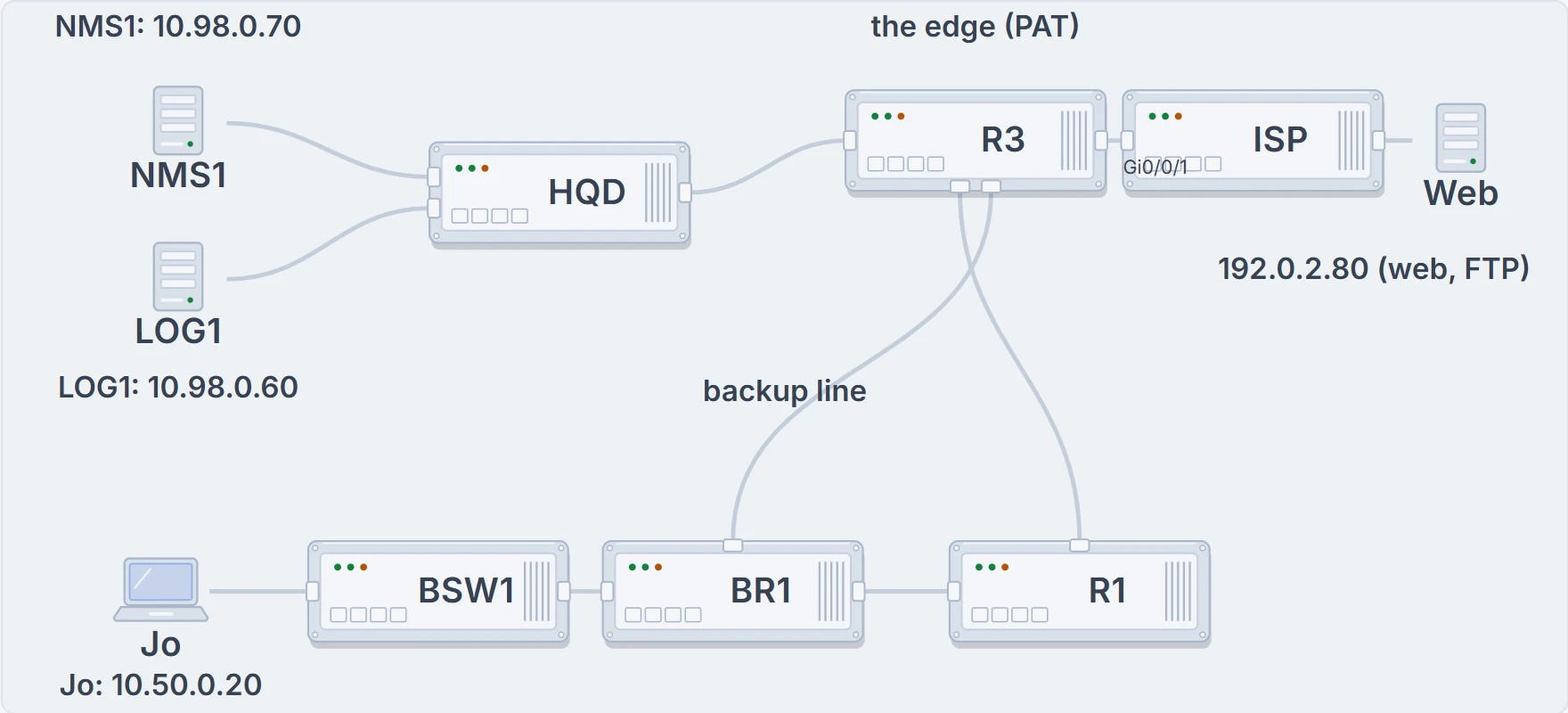
NMS1 and LOG1 sit on head office's servers VLAN, on the switch HQD. The supplier's server offers web and FTP beyond R3, the edge; Jo's laptop is at the branch, on the switch BSW1.
What the drawing shows: where the management traffic starts and ends. What it doesn't: that any of it is allowed through; that's the ACLs' job.
Get, Set, Trap and Inform
The NMS usually polls each agent: it asks for variables, stores the answers over time, and works out averages, minimums and maximums. It can alert the staff by email or text when a value passes a threshold someone set. It can even change a device's configuration through its variables, if that level of control is allowed. All SNMP messages travel over UDP.
To ask, the NMS sends a Get (or GetNext or GetBulk, together just called Gets). To write a variable, and so change the configuration, it sends a Set. Messages come in pairs: a Get Request asks for a variable, and the agent's Get Response carries its value.
Agents can also start the conversation. When certain variables reach a certain state, such as an interface failing, the agent sends a notification to the NMS, which can then send a text, turn the router's icon red, and so on. There are two kinds. A Trap, there since the first SNMP version, is fire-and-forget: it goes to the NMS over UDP, with no error recovery at the application layer, so if it's lost, it's lost. An Inform, added in SNMP version 2, is a Trap with reliability: the NMS acknowledges it with a Response, or the agent times out and sends it again. Both are still used; Traps cost the agent less, and Informs are more reliable.
Inside the MIB, each variable is an object ID (OID), organised in a tree and named by its path, by name or by number: a long string of numbers such as 1.3.6.1.4.1.9.2.1.58.0, which on one vendor's routers is the CPU use. Some branches come from standards, some from the vendor. People rarely type OIDs; the NMS hides them behind names and graphs.
SNMP has to be protected, because a Set can change configuration. One strong measure works with any version: ACLs on each device, the same kind of list as in 07.2.2 but used here to filter, that accept SNMP only from the NMS addresses, in IPv4 and IPv6. NMS hosts seldom move, so their addresses are well known. Beyond that, it depends on the version. SNMPv1 uses communities, which work like passwords sent in clear text: the agent and the NMS both know them, and each Get or Set carries one. A read-only (RO) community allows Gets; a read-write (RW) community allows Gets and Sets. The original SNMPv2 dropped communities, but the market wanted them, so a later standard added them back: community-based SNMPv2, or SNMPv2c, the version vendors implemented. Security stayed weak. SNMPv3 replaces communities with message integrity (was it changed on the way?), optional authentication with a user name and a password that's hashed, never sent in clear text, and optional encryption (privacy), so an attacker who captures the messages can't read them. NMS1 uses SNMPv3, with ACLs on every router.
| Message | Sent by | What for | Acknowledged? | Which community lets it in (v1, v2c) |
|---|---|---|---|---|
| Get (and GetNext, GetBulk) | the manager (NMS) | ask the agent for the value of MIB variables | yes: the agent answers with a Response | read-only or read-write |
| Set | the manager (NMS) | change a variable, and so the device's configuration | yes: a Response | read-write only |
| Trap | the agent | tell the manager a variable reached a certain state | no: if it's lost, it's lost | not the Get and Set rule |
| Inform | the agent | the same as a Trap | yes: the manager sends a Response, or the agent times out and resends | not the Get and Set rule |
What the table sums up: who sends each message, and what lets it in. What it doesn't: which variables a particular device offers; that's in its MIB.
FTP and TFTP
The other management job is moving files: software images, configuration backups, price lists. The File Transfer Protocol (FTP) and the Trivial File Transfer Protocol (TFTP) both work client and server: the client connects to the server and copies files to it or from it. A router becomes a client too, when its copy command names tftp or ftp; 07.3.3 uses that to copy software images.
FTP's standard, RFC 959, dates from 1985. FTP uses TCP, so each transfer arrives as an exact copy, with nothing missing. The client opens a TCP connection to the server's well-known port 21, the server authenticates the user, and then FTP commands flow over that connection: list the files, move between directories on either side, create and remove directories, and transfer files: Get (from the server) and Put (to it). Most people use an FTP app with a file-browser view that sends the commands for them. An FTP server decides which users may log in, which directories each may use, and whether they may only read or also write.
FTP uses two kinds of TCP connection: the control connection, for commands, and data connections, for file contents and listings. For plain FTP, the control connection goes from the client to port 21. How the data connection is opened depends on the mode, which the user at the client chooses, and that's where Jo gets stuck, fetching a price list from the supplier's FTP server:
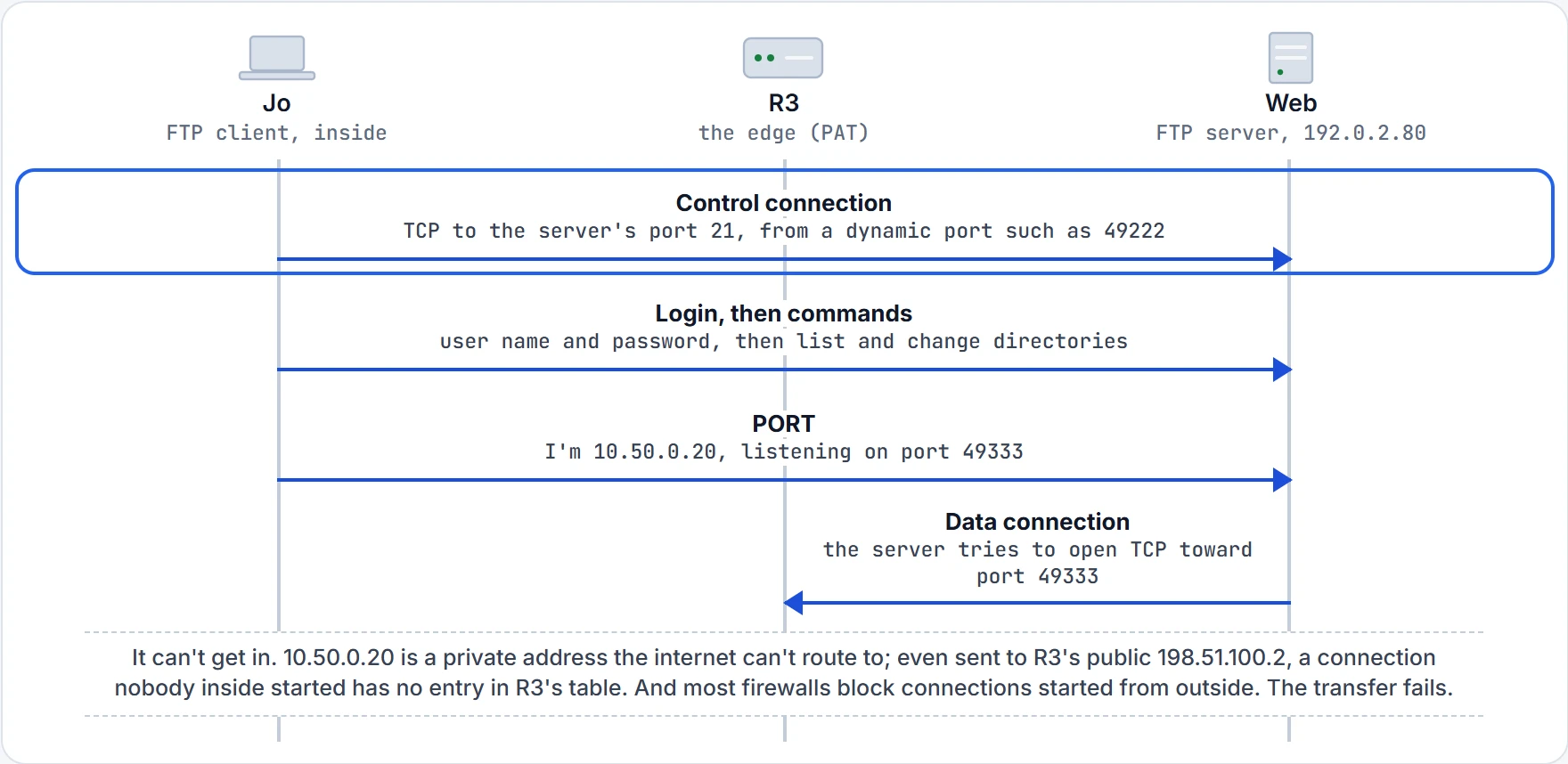
Step 1 of 5 The client opens the control connection, like any outgoing TCP connection. R3 translates it on the way out (07.2.1).
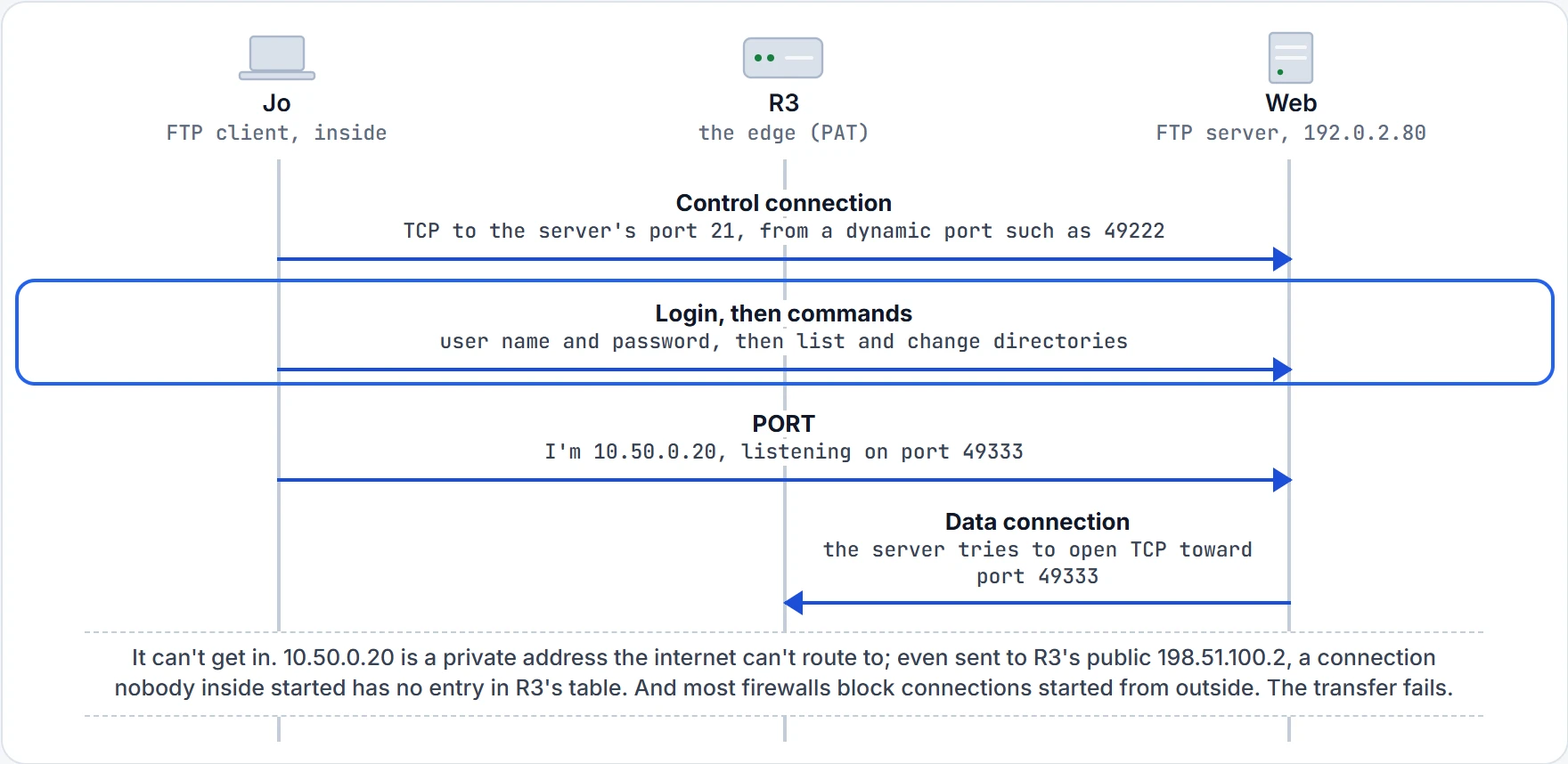
Step 2 of 5 The server authenticates the user, then FTP commands flow over the control connection. With plain FTP, all of it is clear text.
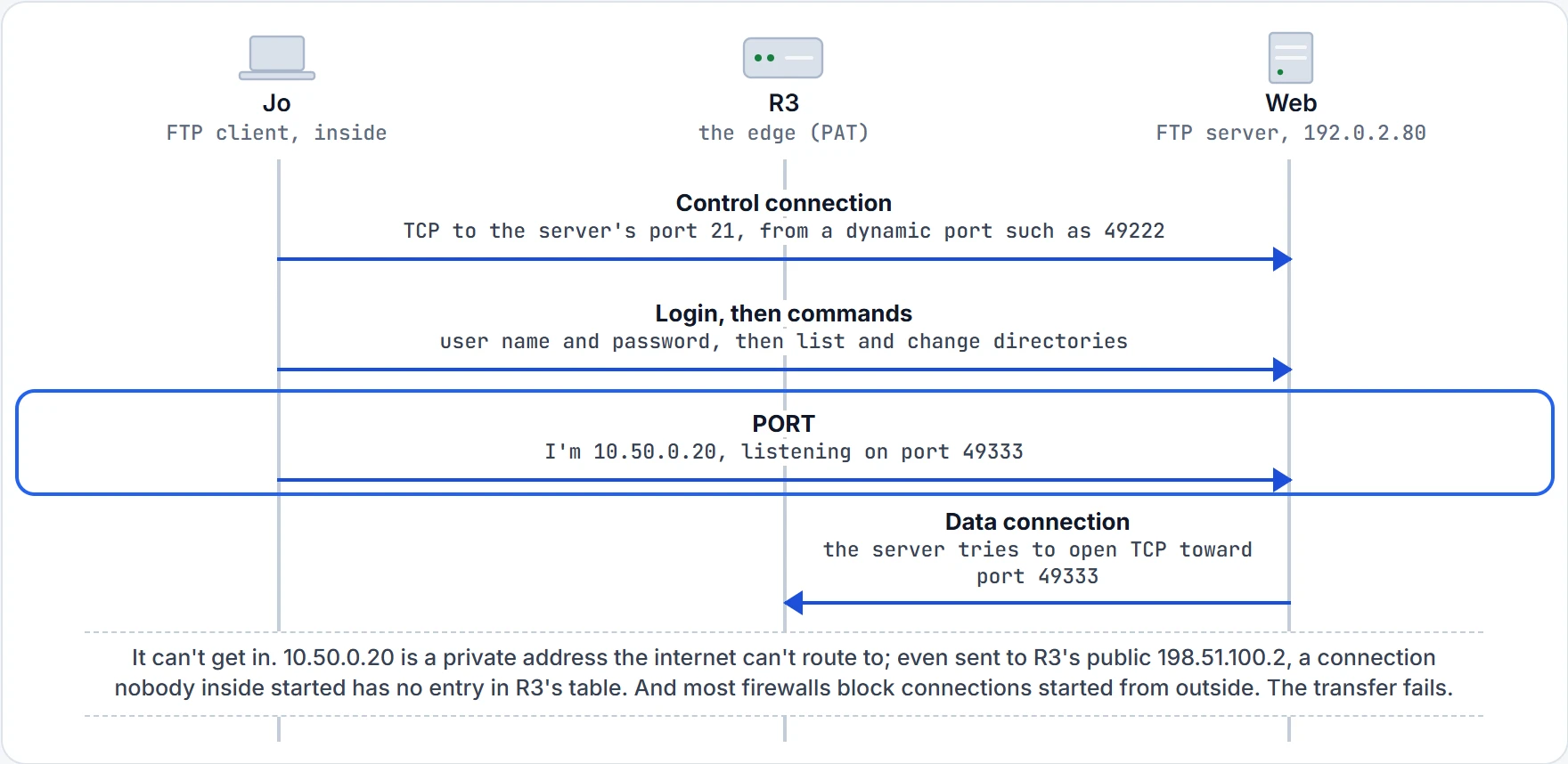
Step 3 of 5 Active mode: the client picks a free dynamic port, listens on it, and tells the server with the PORT command.
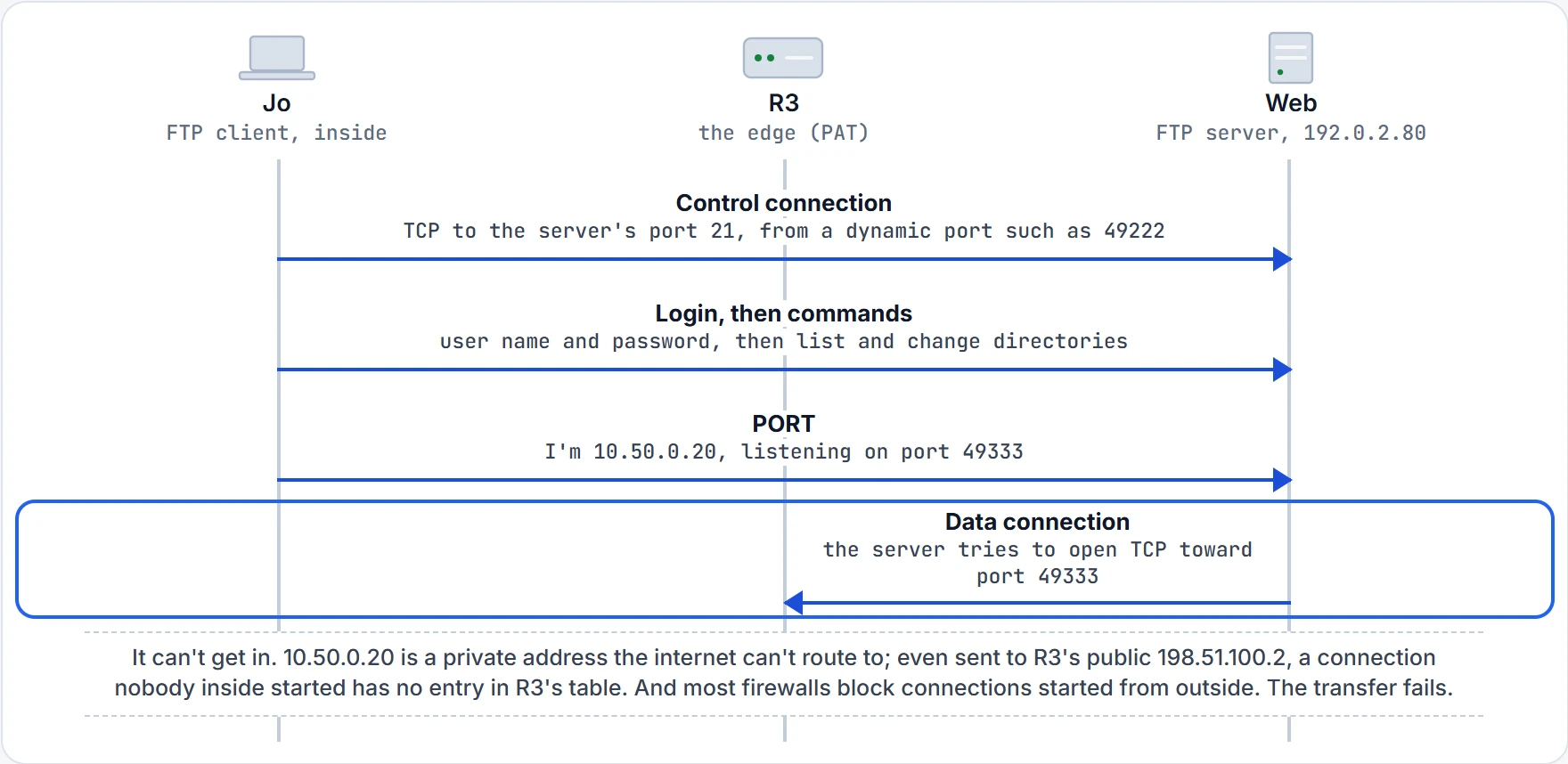
Step 4 of 5 The server tries to open the data connection, from outside toward the inside.
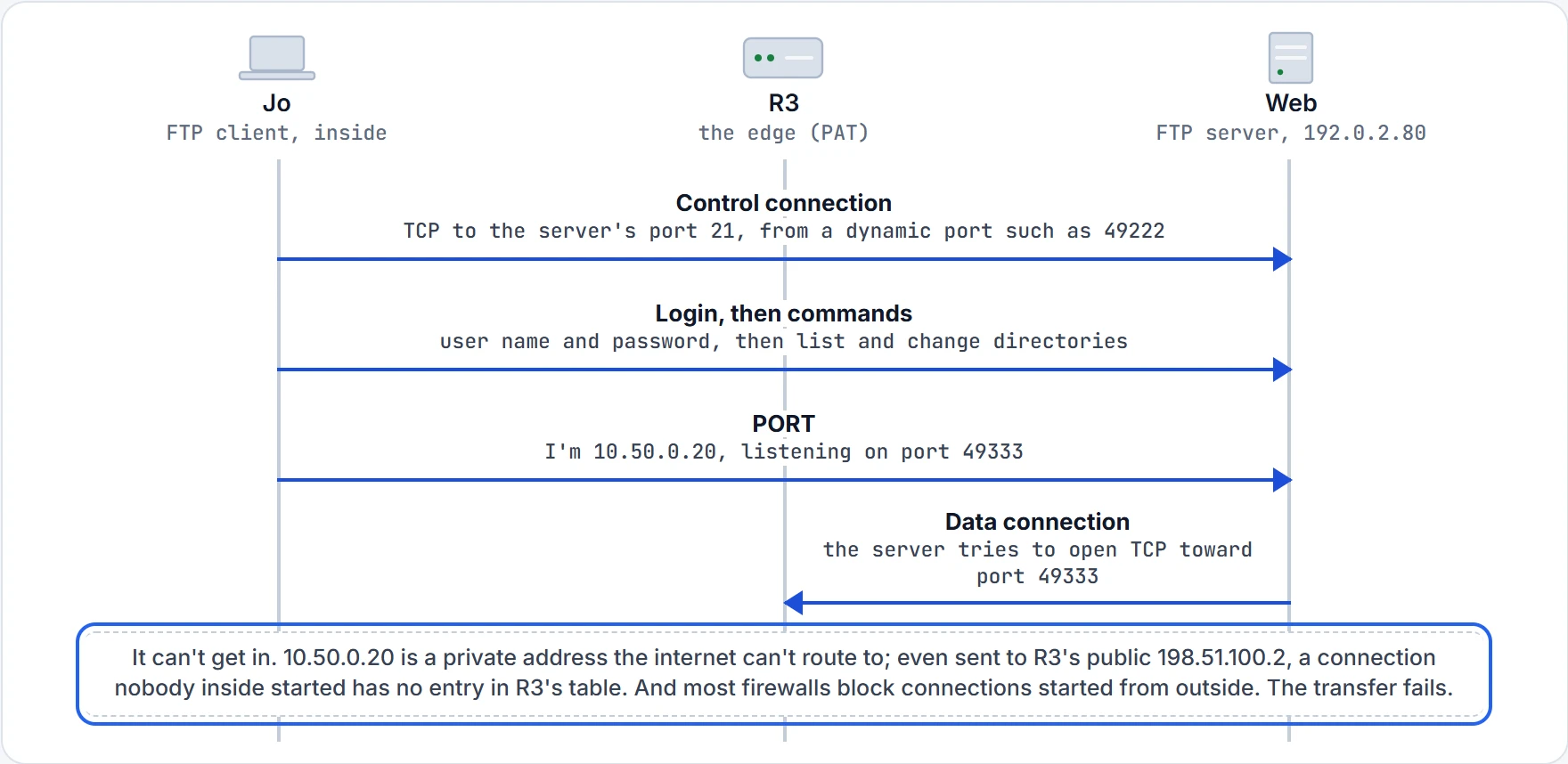
Step 5 of 5 That's why active mode typically fails when the client is inside a company and the server is on the internet. Between two hosts in the same company, it works well.
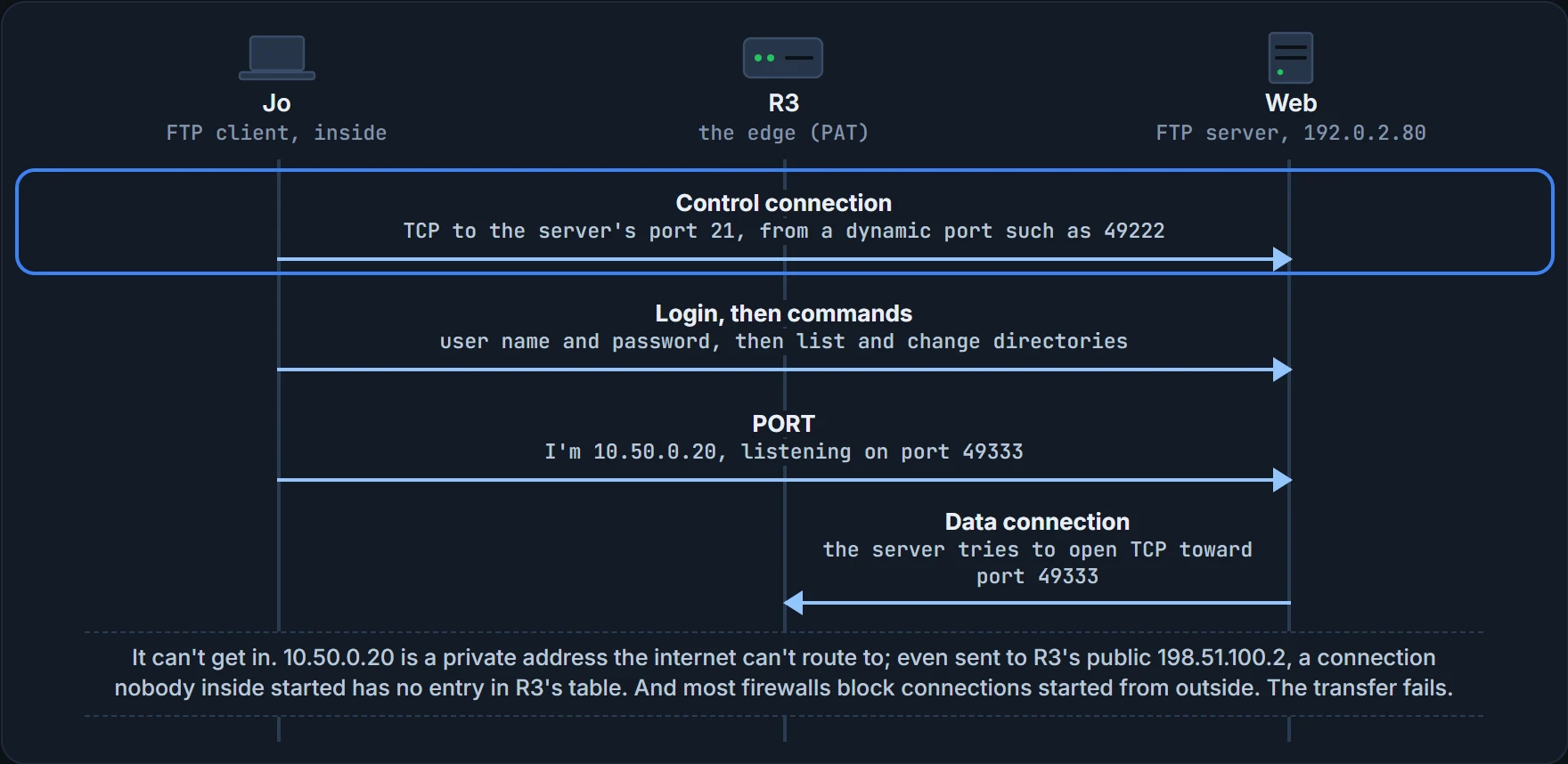
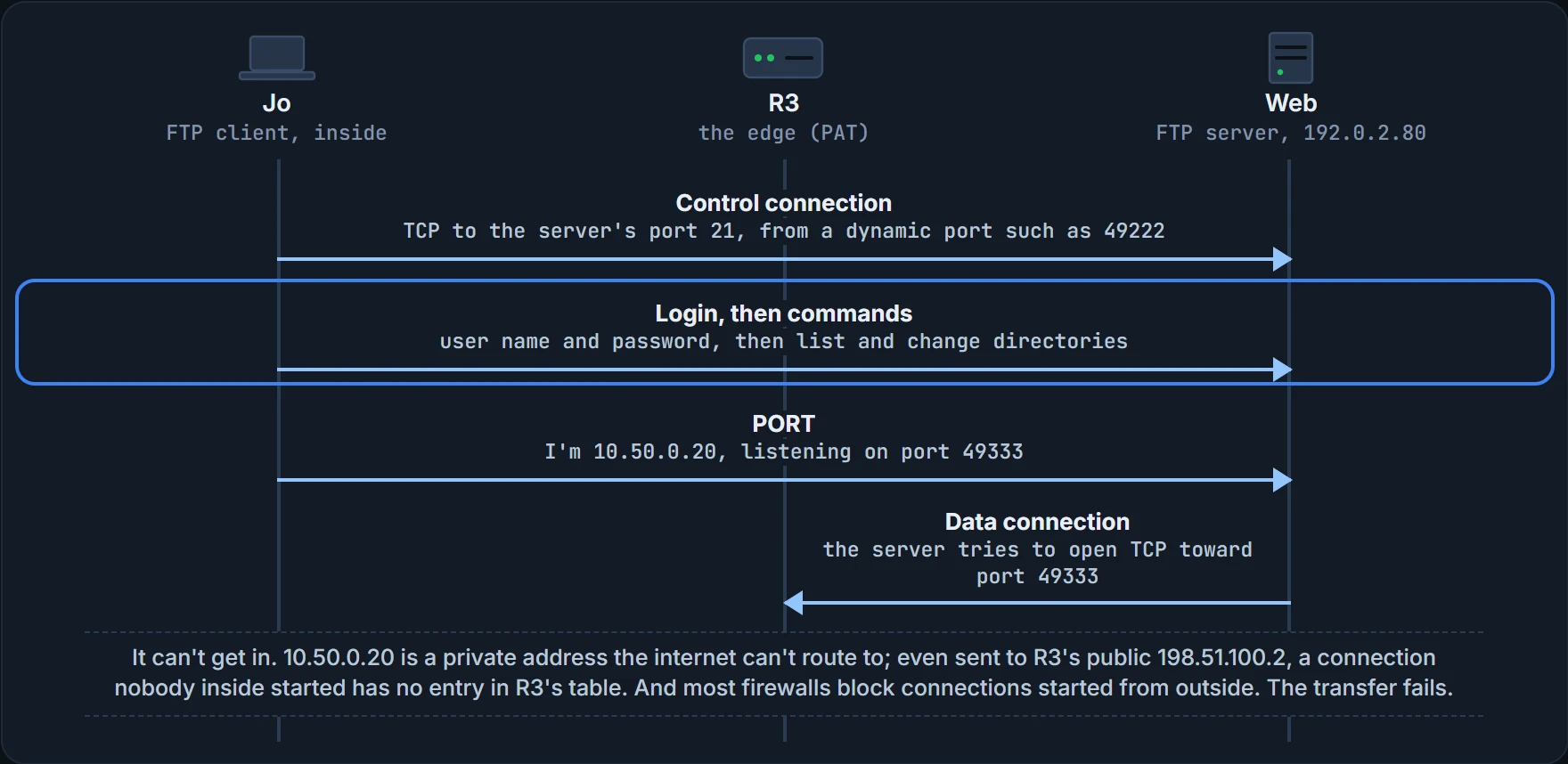
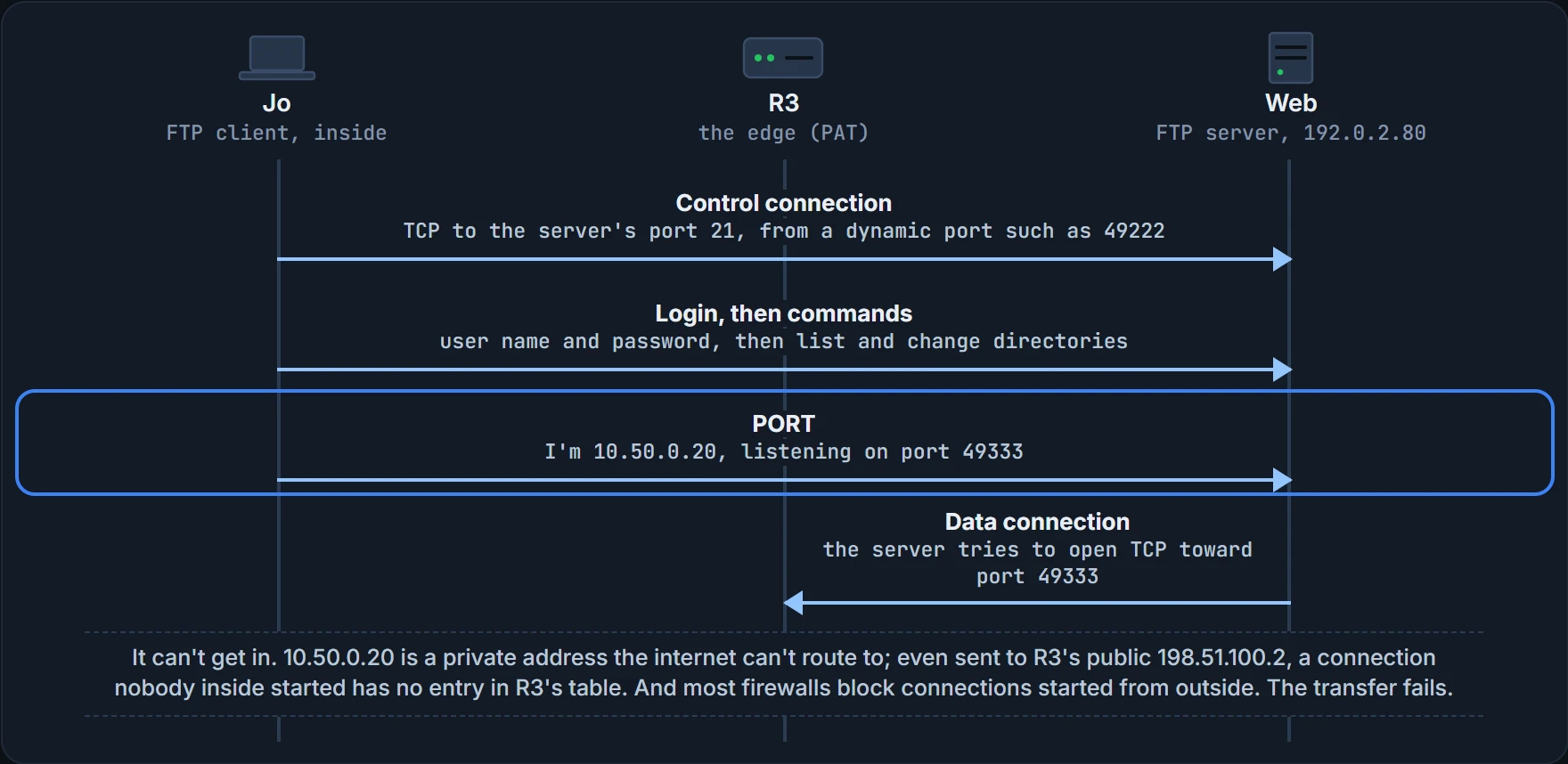
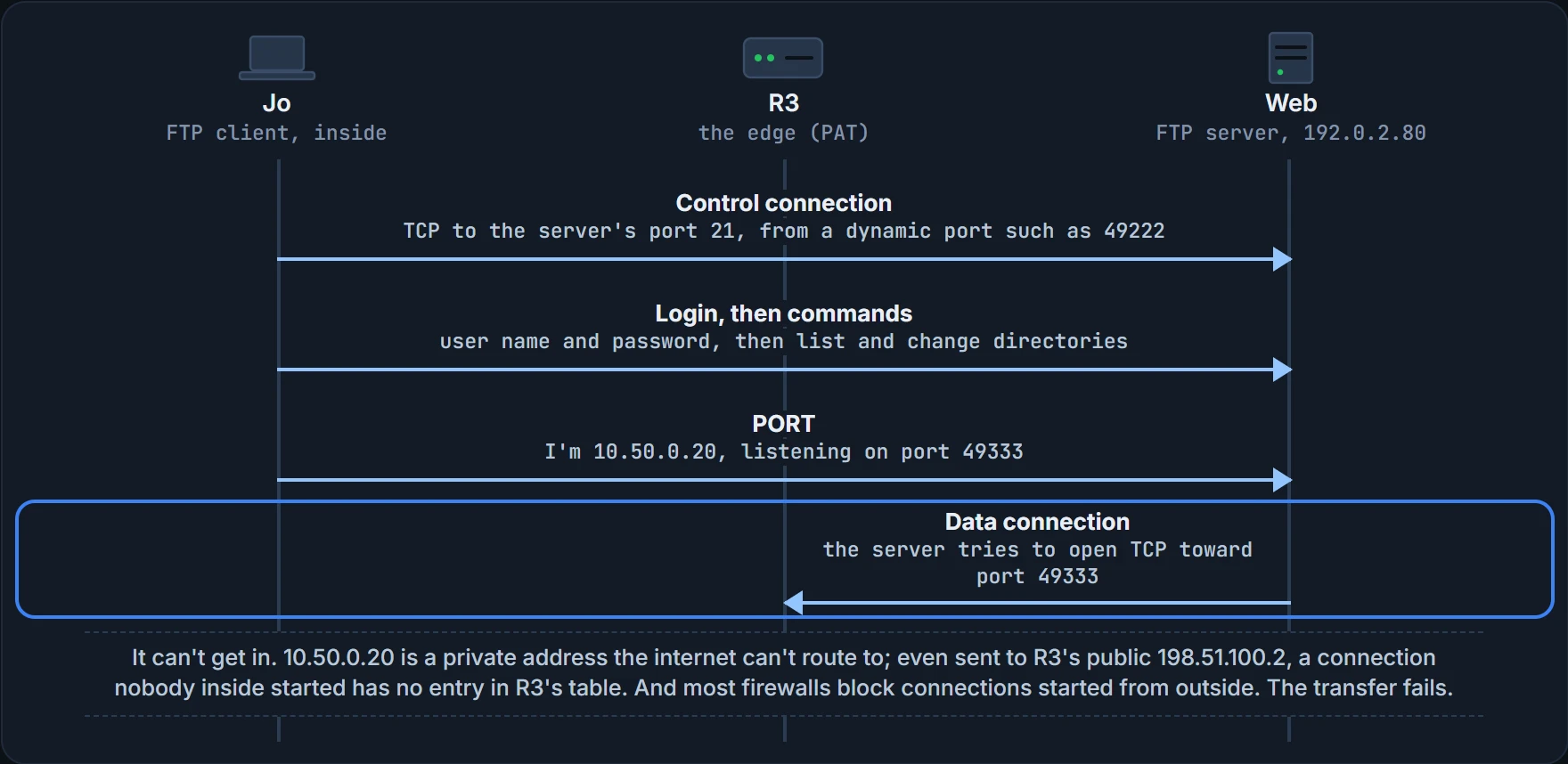
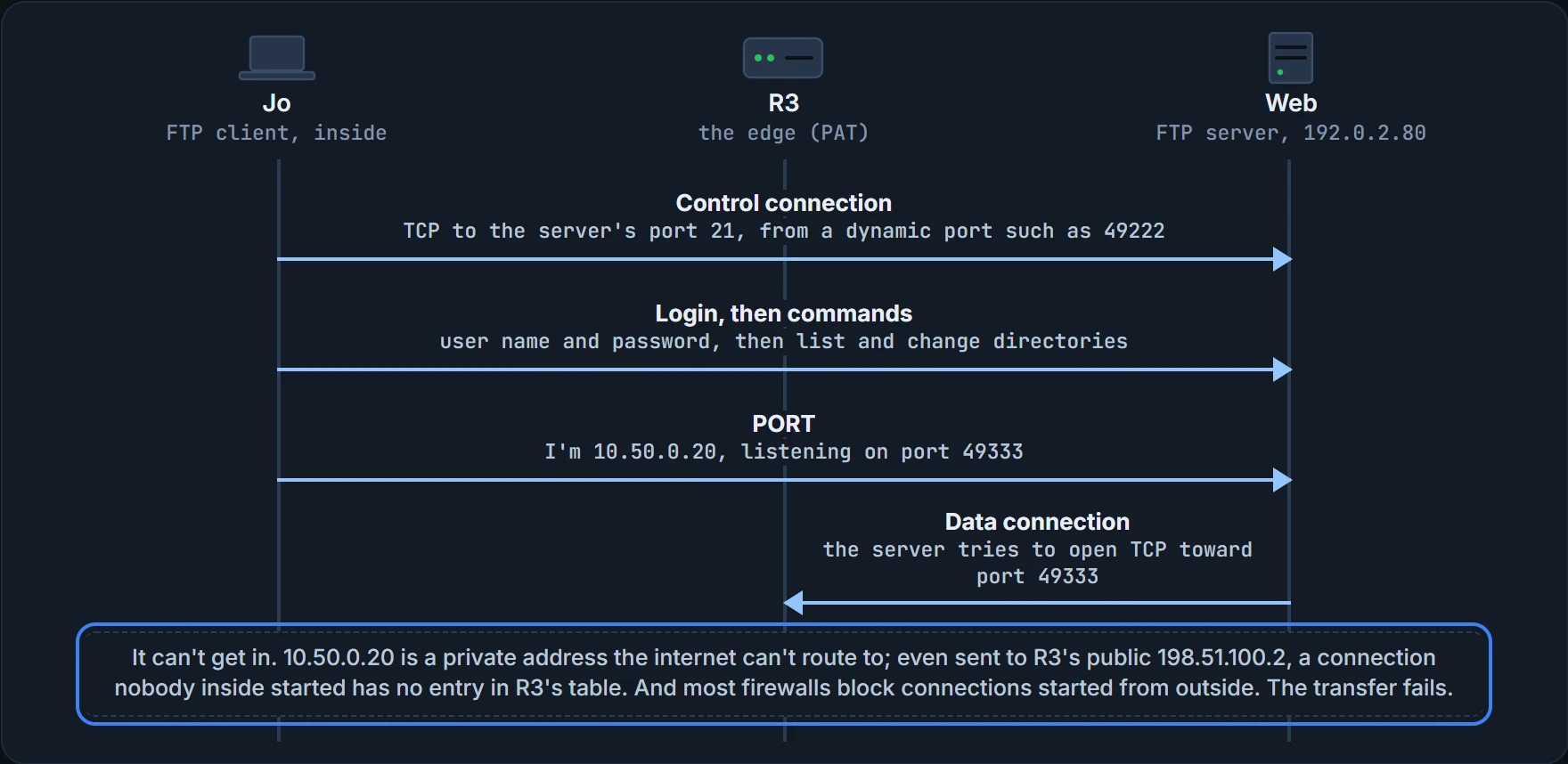
In active mode, the client listens on a dynamic port, tells the server with the PORT command, and the server opens the data connection. Inside one company, with no NAT or firewall between them, that works well. From a laptop behind R3 to a server on the internet, it typically fails: most firewalls don't let hosts on the internet start connections to inside hosts, except to known ports someone made a rule for, and the client picked any free port. In passive mode, the client sends PASV, the server replies with an address and port to use, and the client opens the data connection itself, which is why passive mode is the one more likely to work. What the steps above prove: which side opens each connection, and why that matters at the edge. What it doesn't: that the server allows Jo's login, or that the file exists. (FTP also reserves port 20 for data, though data connections often use other ports, as here.)
Continue the lesson
The whole lesson, with its drawings and its questions. The rest of this section and 1 more after it.