
IPv6 Static Routing and Troubleshooting
IPv6 routes come from the same three sources as IPv4's: connected and local routes, static routes and routing protocols. ipv6 route takes the destination prefix and length, then an outgoing interface, a next-hop address or both. On Ethernet, a route with only an outgoing interface cannot forward; a link-local next hop must be paired with the interface.
By Arif, founder of Daveth · Updated
The full 16 min walkthrough is in Daveth Pro (Network). See what the plan opens
What this page answers
How do you configure an IPv6 static route?
With ipv6 route, the destination prefix and length, then how to get there. On Ethernet use the next hop's global unicast or unique local address, the outgoing interface with that address, or the outgoing interface with the next hop's link-local address. Read it in “Typing a route”
Why does an IPv6 static route with a link-local next hop need the interface?
Because the link-local address does not tell the router which interface to use, so a route with a link-local next hop must also name the outgoing interface. Read it in the lesson
Where routes come from
Wednesday, month five, week two. Every IPv6 link Ravi has configured has its addresses, and Jo's laptop has built its own. But Jo's laptop still can't reach Ravi's test laptop on the office LAN over IPv6, because a router only knows about the subnets on its own interfaces. As with IPv4, a router adds IPv6 routes for three reasons:
- IPv6 addresses on its working interfaces give it connected and local routes.
- Someone configures a static route.
- A routing protocol, such as OSPFv3, learns routes from neighbouring routers.
The company will run an IPv6 routing protocol eventually; that's beyond this course. Until then, Ravi types the routes in.
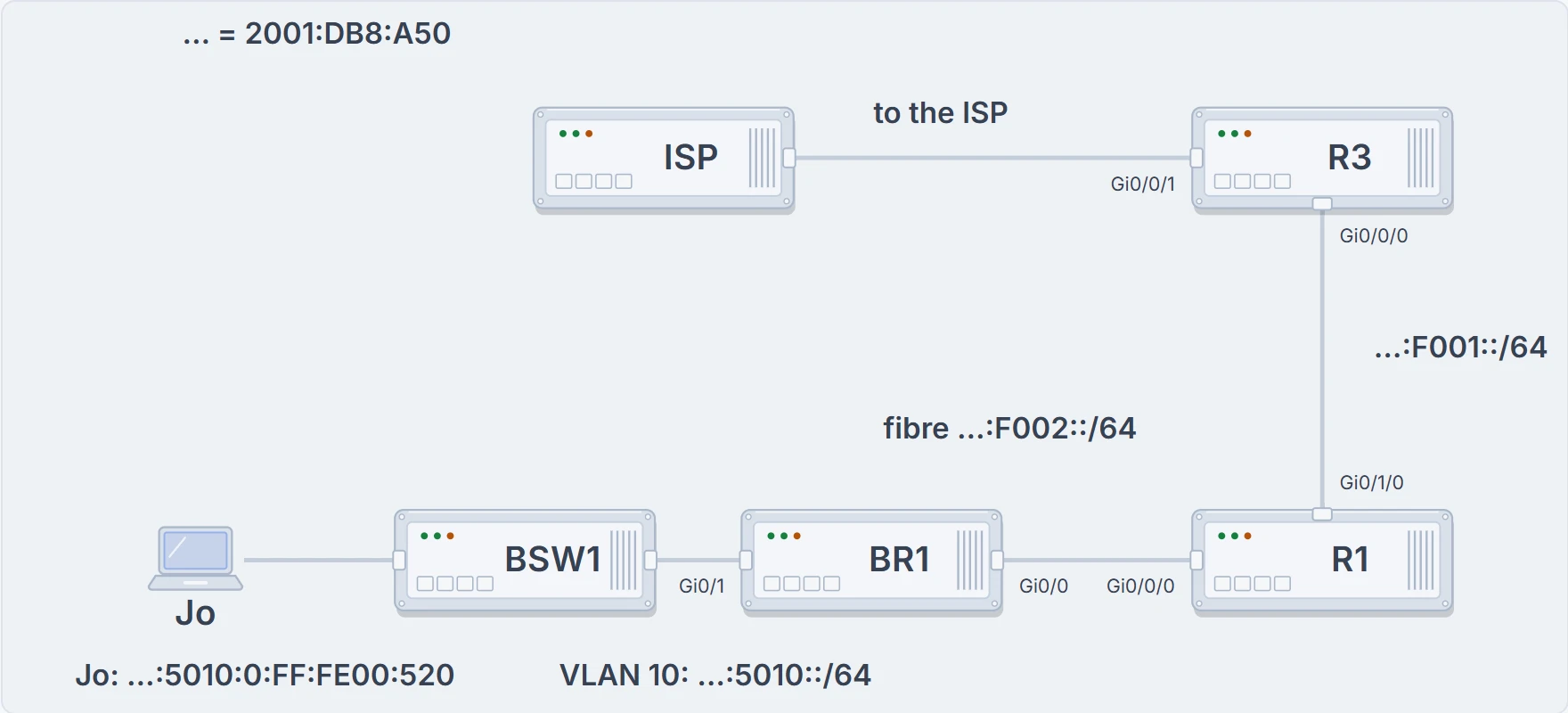
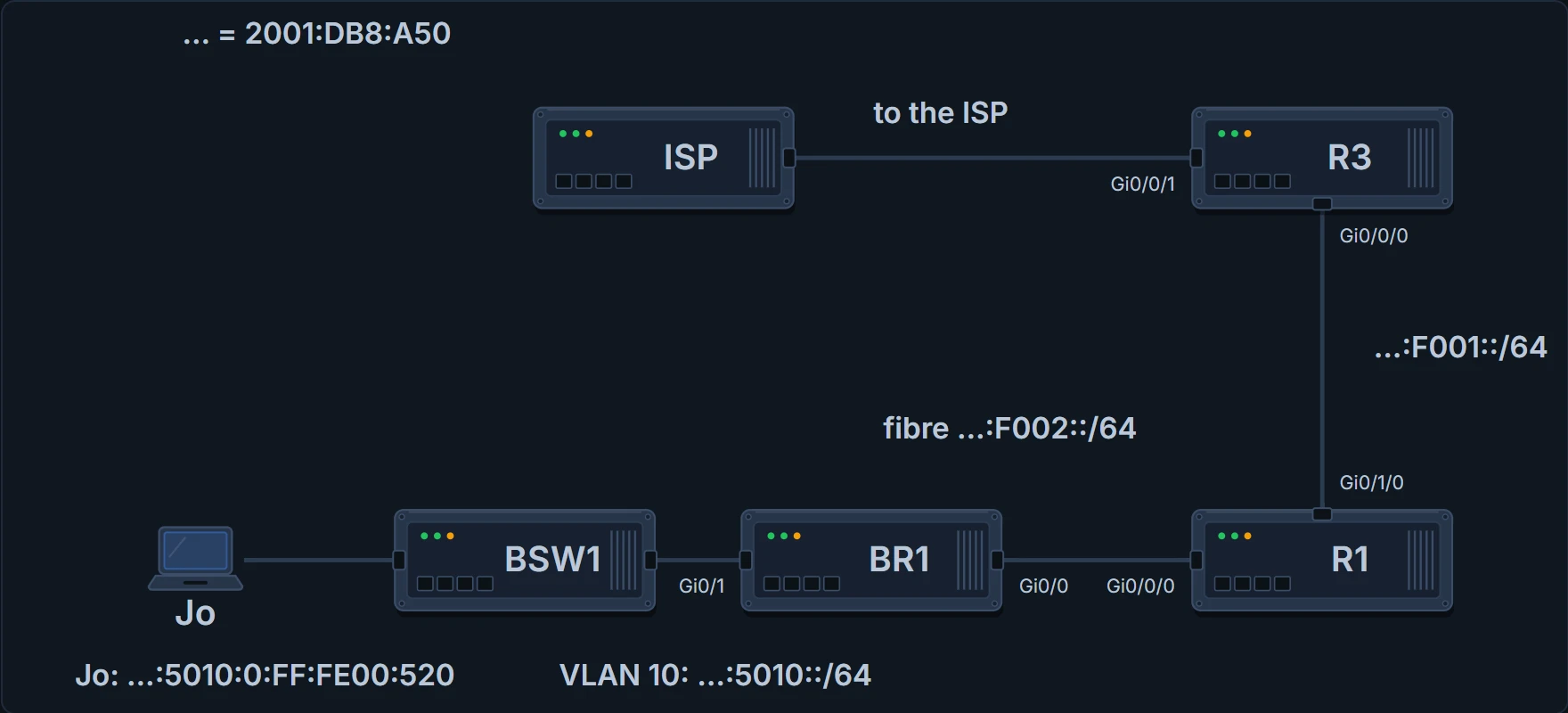
The IPv6 path from Jo's laptop to the ISP: BR1, the fibre, R1, the link to R3, and R3's link to the ISP.
BR1# show ipv6 route
IPv6 Routing Table - default - 5 entries
! (the code list is left out)
C   2001:DB8:A50:5010::/64 [0/0]
     via GigabitEthernet0/1.10, directly connected
L   2001:DB8:A50:5010::1/128 [0/0]
     via GigabitEthernet0/1.10, receive
C   2001:DB8:A50:F002::/64 [0/0]
     via GigabitEthernet0/0, directly connected
L   2001:DB8:A50:F002::2/128 [0/0]
     via GigabitEthernet0/0, receive
L   FF00::/8 [0/0]
     via Null0, receive
BR1#
BR1's table shows the rules at work. For each unicast address configured with ipv6 address, on an interface that's up/up, the router creates two routes:
- a connected route (C) for the subnet, which the router works out from the address and prefix length;
- a local route (L), a host route with prefix length /128 for the router's own address: exactly that one address.
Routers don't create routes for link-local addresses. They remove an interface's connected and local routes when it fails, and add them back when it's up/up again. (The FF00::/8 local route is there for other purposes; leave it be.) show ipv6 route local lists only the local routes, and show ipv6 route connected only the connected ones. The numbers in brackets mean what they do in IPv4: administrative distance, then metric. What the table proves: BR1 knows its two subnets. What it doesn't: anything beyond BR1's own two links, which is exactly the problem.
BR1's routing table is honest, at least. It lists everything BR1 knows, and that doesn't take long.
Typing a route
ipv6 route follows the same logic as IPv4's ip route (05.1.4). It starts with the prefix and prefix length of the destination, then says how to get there: the outgoing interface, the next-hop router's address, or both. An interface in the command is always one of the local router's own interfaces.
The router accepts a route with only an outgoing interface. But if that interface is Ethernet, it can't successfully forward IPv6 packets with the route. On Ethernet links, LAN or WAN, use one of three styles:
- the next hop's global unicast (or unique local) address only;
- the outgoing interface and the next hop's global unicast (or unique local) address;
- the outgoing interface and the next hop's link-local address.
With a global unicast next hop, the router can work out the outgoing interface: it finds the connected route that contains the next-hop address. A link-local next hop gives it nothing to look up, so the command must name the interface too. Leave it out and the router refuses the command. With a link-local next hop, show ipv6 route static lists both parts: via FE80::FF:FE00:500, GigabitEthernet0/0/0.
The interface-only style isn't useless everywhere. On a point-to-point serial link there's only one router at the other end, so naming the interface is enough. Such a route shows up in show ipv6 route as "directly connected", even though it's static: trust the S code, not the words.
BR1 has one IPv6 way out so far, the fibre to R1 (the backup line to R3 has no IPv6 yet), so a default route does it: ::/0, IPv6's version of 0.0.0.0/0. The fibre is Ethernet, so Ravi gives the next hop, R1's address on it:
BR1# configure terminal
BR1(config)# ipv6 route ::/0 2001:DB8:A50:F002::1
BR1(config)# end
BR1# show ipv6 route static
! (the header and code list are left out)
S   ::/0 [1/0]
     via 2001:DB8:A50:F002::1
BR1#
S marks a static route, with administrative distance 1. What this proves: BR1's default route is installed, via R1's F002::1. What it doesn't: that R1 knows where to send the packets next, or that anything can find its way back to the branch. On R1, Ravi adds a route to the branch LAN via BR1, and a default toward R3; R3 gets its address on the link to R1 and one route back for the whole company's /48:
R1# configure terminal
R1(config)# ipv6 route 2001:DB8:A50:5010::/64 2001:DB8:A50:F002::2
R1(config)# ipv6 route ::/0 2001:DB8:A50:F001::2
R1(config)# end
R1# show ipv6 route 2001:DB8:A50:5010:0:FF:FE00:520
Routing entry for 2001:DB8:A50:5010::/64
  Known via "static", distance 1, metric 0
  Route count is 1/1, share count 0
  Routing paths:
    2001:DB8:A50:F002::2
      ! (the last-updated timer is left out)
R1#
R3# configure terminal R3(config)# interface GigabitEthernet0/0/0 R3(config-if)# ipv6 address 2001:DB8:A50:F001::2/64 R3(config-if)# exit R3(config)# ipv6 route 2001:DB8:A50::/48 2001:DB8:A50:F001::1 R3(config)# end
show ipv6 route followed by an address asks the router which route it would use for that destination. R1 would forward packets for Jo's laptop by its static route, via BR1's F002::2. What this proves: R1's own choice for that address. What it doesn't: that BR1, the next router, has a working route onward, or that replies can come back. Each router along the path makes its own decision. To find out whether hosts can actually use the routes, test with ping and traceroute; show ipv6 route lists every route, and show ipv6 route static only the static ones.
With routes in both directions, Jo's laptop and Ravi's test laptop on the office LAN can now reach each other over IPv6. Neither has anything to say to the other yet, but it's a start.
Continue the lesson
The whole lesson, with its drawings and its questions. 3 more sections after the ones above.