
Network Address Translation and PAT Concepts
NAT lets a host with a private address reach the Internet by using a registered public address in its place: the router changes each packet's source address on the way out and the destination on the way back. Static NAT maps one to one, dynamic NAT uses a pool, and PAT lets many hosts share one public address by also changing port numbers.
By Arif, founder of Daveth · Updated
The full 15 min walkthrough is in Daveth Pro (Network). See what the plan opens
What this page answers
What are NAT and PAT?
NAT lets a host without a registered public address reach the Internet by translating its address to a public one at the router. PAT, NAT overload, translates many inside hosts to one public address by giving each connection its own port. Read it in “What R3 changes”
What do inside local and inside global mean?
Inside local is the inside host's address as used within the company, usually private; inside global is the public address that represents it on the Internet. Read it in “Four names for addresses”
What is the difference between static and dynamic NAT?
Static NAT is configured as fixed one-to-one mappings, in the NAT table before any packet flows. Dynamic NAT takes a public address from a pool when a host first needs one. Read it in “Static and dynamic NAT”
One public address, forty laptops
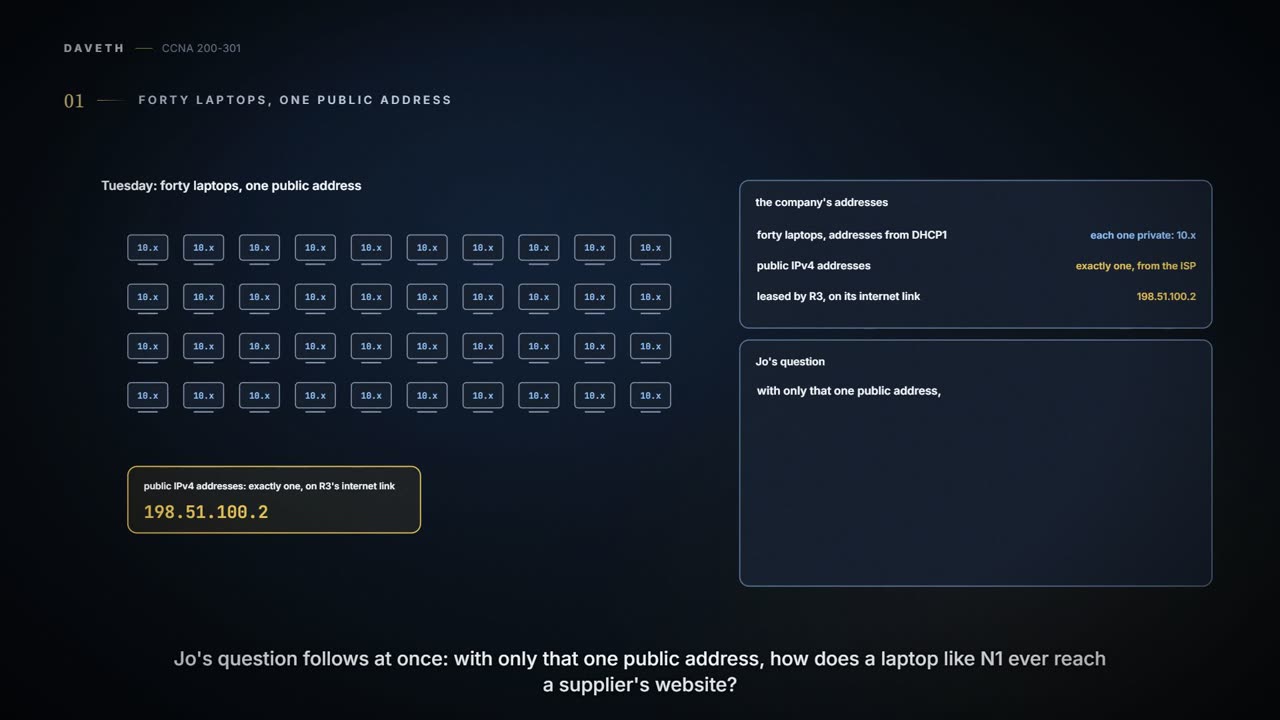
Tuesday, month six. The forty new laptops have their addresses from DHCP1, and every one of them is a private 10.x address. Jo's question is a fair one: the ISP gave the company exactly one public IPv4 address, the one R3 leases on its internet link, 198.51.100.2. So how does N1 reach a supplier's website at all? Ravi, who looks after R3, draws it for Jo.
The answer starts with the problem IPv4 ran into. The original design gave every organization its own registered classful network numbers, never reused, so no address was ever duplicated. Then the internet grew so fast in the early 1990s that all the network numbers looked set to be handed out within a few years. The long-term fix was a bigger address: IPv6's 128 bits instead of IPv4's 32 (06.1). The short-term fix was three standards working together: classless interdomain routing (CIDR), private addressing (both 04.1) and Network Address Translation (NAT), this page. CIDR also lets ISPs summarize: if one ISP holds every address that starts with 198, other ISPs need a single route, 198.0.0.0/8, to reach them all. The three worked well: IANA didn't run out of IPv4 addresses until February 2011, and the registry for North America, ARIN, until September 2015.
Private addresses, such as the company's 10.x plan, can be used by any organization, but no organization may advertise them on the internet. NAT is what lets hosts with those addresses talk to the internet anyway; private addressing and NAT were made for each other. (NAT's standard is RFC 3022; private addressing's is RFC 1918.) The public addresses on these pages come from ranges set aside for examples, standing in for real ones. The office's old numbers, copied from those same example ranges (04.1), were retired last month when the office moved onto the 10.x plan.
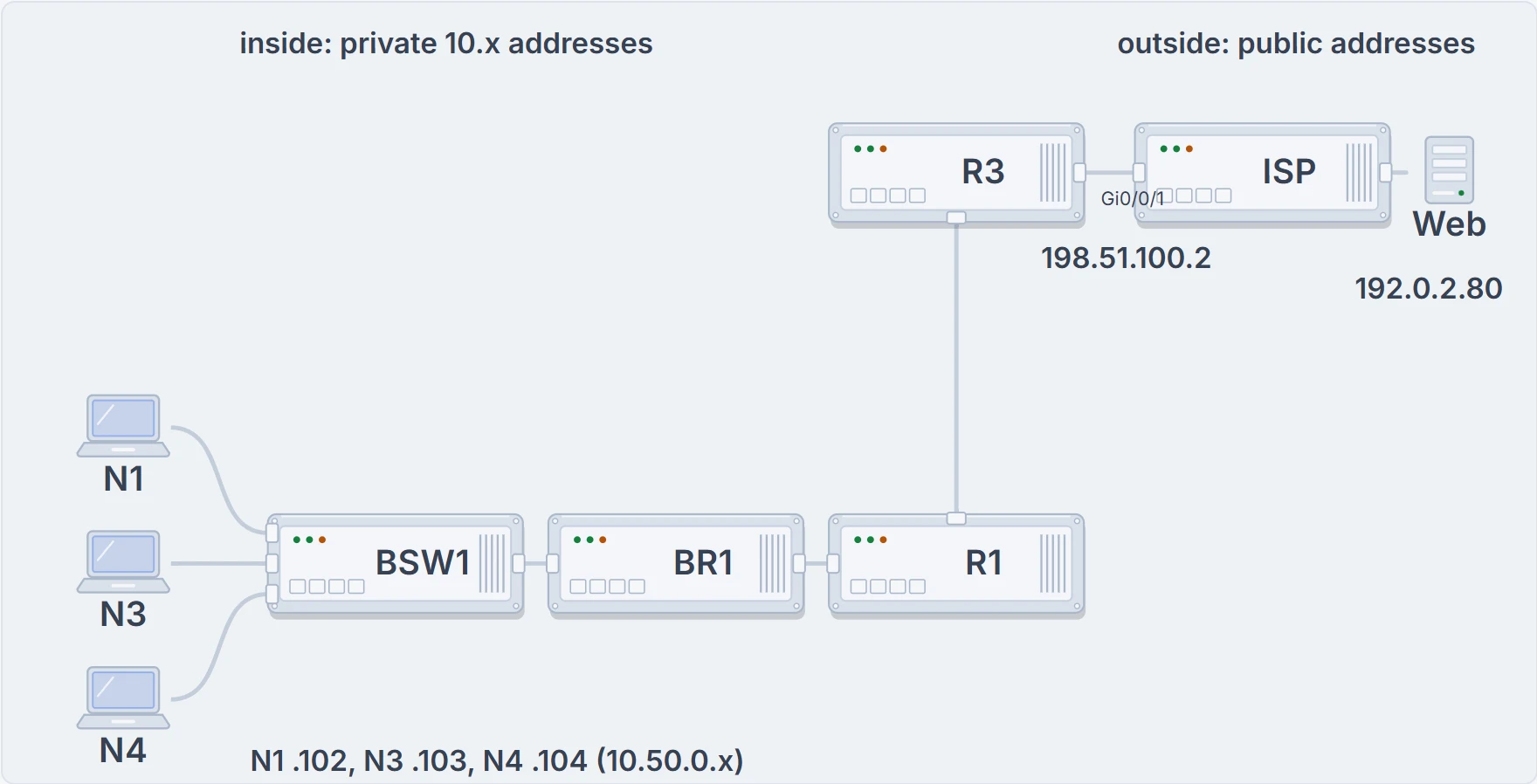
R3 is the edge. Inside: R3 and everything below and to its left, with private 10.x addresses. Outside: its Gi0/0/1 link to the ISP, and the supplier's web server beyond, with public addresses.
What R3 changes
NAT lets a host that has no valid, registered, globally unique IPv4 address communicate with hosts across the internet. The host might be using a private address, or one that belongs to another organization; either way, NAT lets it keep that address inside.
NAT does it by using a registered public address to represent the private one. The router doing NAT changes the source address of each packet as it leaves the private network, and the destination address of each packet it forwards back in. Here's N1's connection to the supplier's server, on port 443 (HTTPS, secure web), at four points, with R3 doing the translating:
| Where | Source | Destination |
|---|---|---|
| N1 sends it (inside) | 10.50.0.102:51515 | 192.0.2.80:443 |
| After R3 (outside) | 198.51.100.2:51515 | 192.0.2.80:443 |
| The reply arrives at R3 (outside) | 192.0.2.80:443 | 198.51.100.2:51515 |
| After R3, back to N1 (inside) | 192.0.2.80:443 | 10.50.0.102:51515 |
N1 never sees 198.51.100.2, and the server never sees 10.50.0.102. The kind of NAT on this page is source NAT: the kind that lets a company use private addresses inside and still talk to the internet. (Destination NAT exists too; it isn't part of this course.)
The supplier's server never finds out N1 exists. As far as the outside can tell, the whole company is one very busy computer.
You can think of R3 as the company's switchboard: every outgoing call shows the one main number, and the switchboard writes down which desk made it, so the answer can be put through to the right one. (Where it stops: a switchboard can take a message for a desk that never called out. R3 needs something in its table to know which inside host a packet belongs to.)
Four names for addresses
NAT's terms look confusing at first, because a host that needs NAT has two addresses, and each needs a name. The company's network, which uses private addresses and so needs NAT, is the inside. The internet side of R3 is the outside. Then each address gets a second word: local for the address used while the packet is in the company, global for the one used while it crosses the internet.
| Term | Here | Meaning |
|---|---|---|
| Inside local | 10.50.0.102 | The address of the inside host while the packet is inside the company (local, not global). Usually a private address: think "inside private". |
| Inside global | 198.51.100.2 | The address that represents the same inside host while the packet crosses the internet. Usually public: think "inside public". |
| Outside global | 192.0.2.80 | The outside host's address. Source NAT never changes it, so it needs no second name. Think "outside public". |
| Outside local | not used | With destination NAT, the address that represents an outside host while packets are inside the company. Source NAT doesn't use it. |
So N1 has an inside local address, 10.50.0.102, and an inside global address, 198.51.100.2. With source NAT, only those two ever differ. The server's 192.0.2.80 is an outside global address the whole way, which is why its opposite number, outside local, never comes up.
Static and dynamic NAT
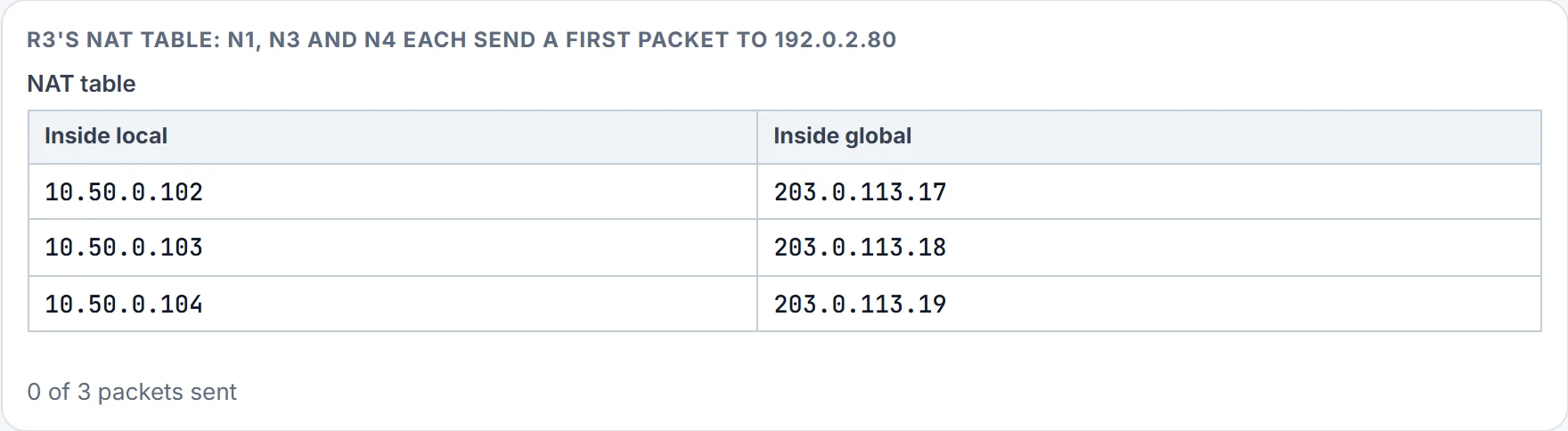
R3 has one public address, and in 06.1 the ISP told Ravi it has no more IPv4 addresses to hand out. To see the other two kinds of NAT, suppose it still had a small block to rent, 203.0.113.16/29.
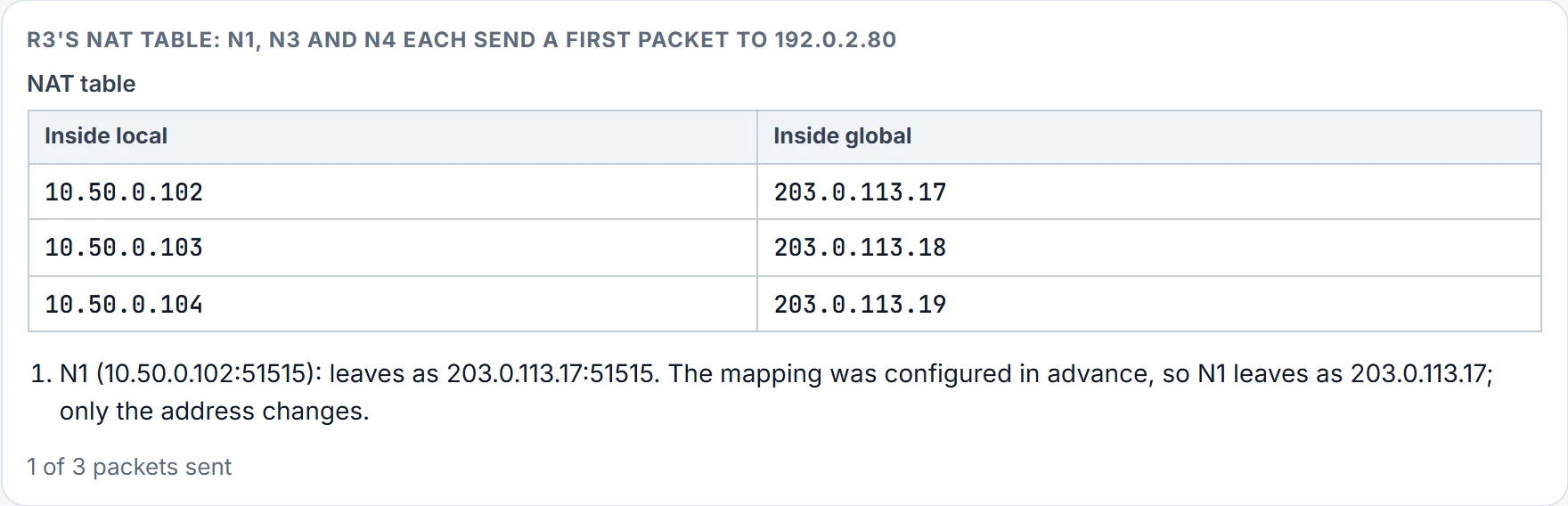
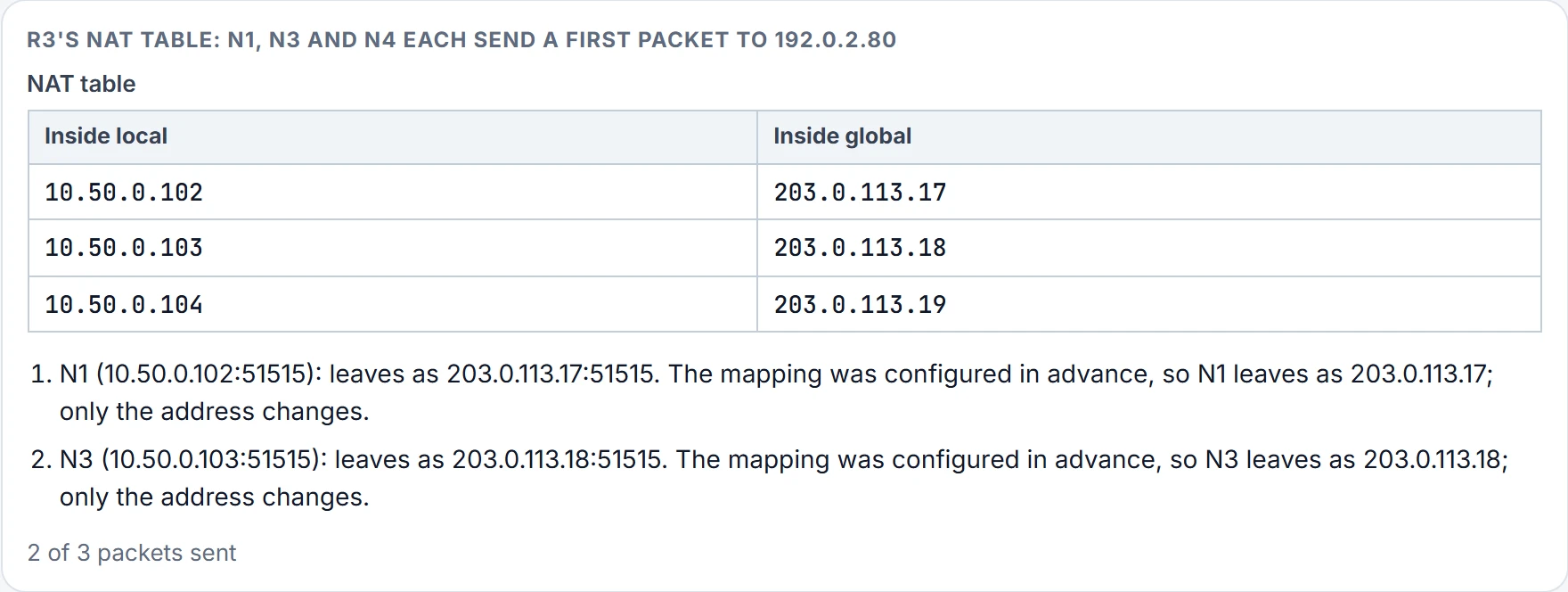
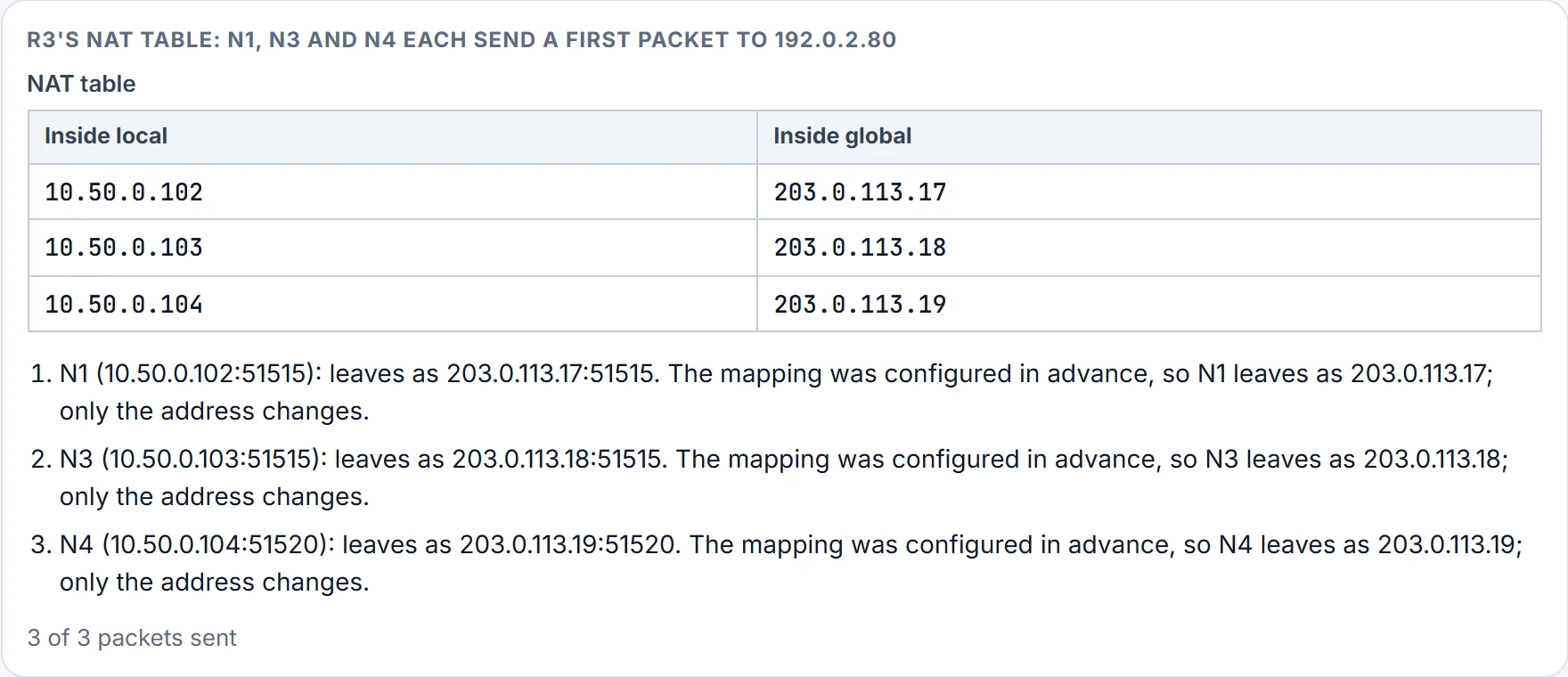
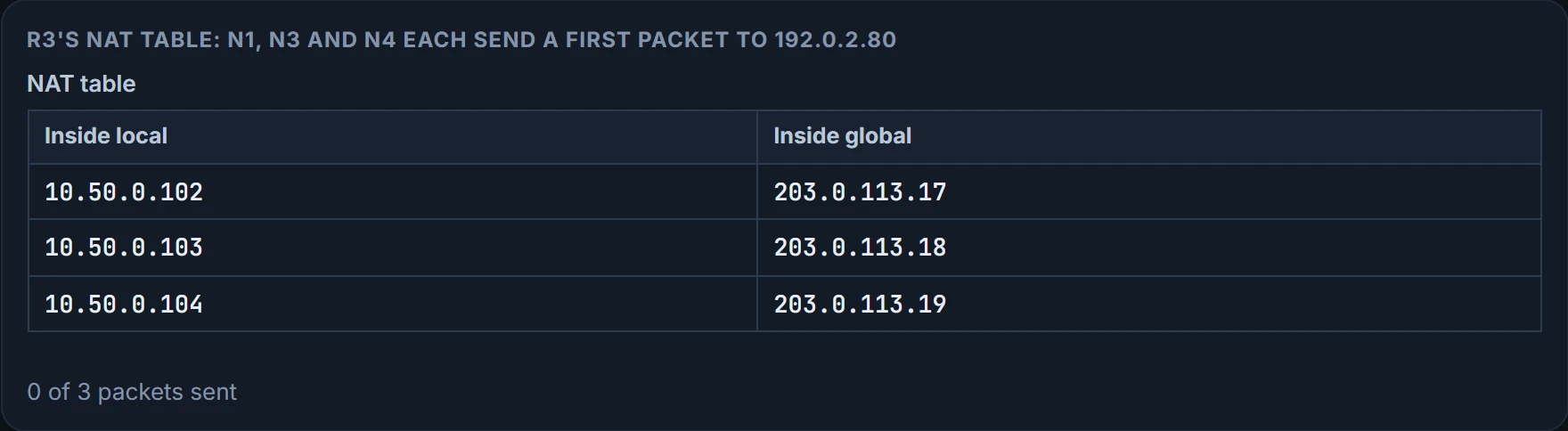
Static NAT is configured as fixed one-to-one mappings: N1's 10.50.0.102 always becomes 203.0.113.17, N3's always becomes 203.0.113.18, and so on. Because the mappings come from configuration, they're in the NAT table before any packet flows. The catch: every host needs its own public address. A whole /24 of public addresses would cover only 254 hosts, and it saves no public addresses at all.
Dynamic NAT is still one-to-one, but the pairing happens on demand. The router has a pool of inside global addresses and a rule saying which inside local addresses to translate, say, every source address starting 10.50.0. When a host sends its first packet:
- the packet arrives at the NAT router, which checks the source address against the rule;
- it matches, so the router adds an entry to the NAT table with that inside local address;
- the router takes the first free address from the pool as the inside global address, completing the entry;
- the router translates the source address and forwards the packet.
The entry stays while the host keeps sending now and then. A configurable timeout removes it after a spell with no translated packets, and the command clear ip nat translation * clears all the dynamic entries by hand.
A pool can have fewer addresses than there are inside hosts. The router hands them out until they're all allocated; after that, a packet from yet another host that needs an entry is simply discarded. That host must try again until some entry times out. So a dynamic pool needs as many addresses as the most hosts that will use the internet at the same moment. With forty new laptops, all online all day, that's a lot of rented addresses.
One address, many connections
Static NAT needs a public address per host; dynamic NAT needs one per host online at once. Neither saves much if most hosts use the internet all day. R3 has one address and forty laptops, so it does something else.
It's called NAT overload, better known as Port Address Translation (PAT), and the trick is in how TCP and UDP use port numbers. A server sees each connection as an address and a port at each end. Three connections from three different hosts, or three from one host with three different ports: the server can see the difference, but it doesn't care. It simply sends and receives data on each one. PAT uses that. It translates the address and, when it has to, the port as well, so that many hosts' connections look like the same number of connections from one host.
R3 keeps one table entry for every combination of inside local address and port, each mapped to the inside global address with a unique port. Here R3 kept N1's and N4's ports and gave N3 51516; another router might pick different numbers, and all that matters is that each is unique. Because the port field is 16 bits, one public address can carry more than 65,000 sessions; often one inside global address is all a company needs. That's why PAT is by far the most popular of the three. All three kinds on R3, step by step:
Step 1 of 4
Step 2 of 4
Step 3 of 4
Step 4 of 4
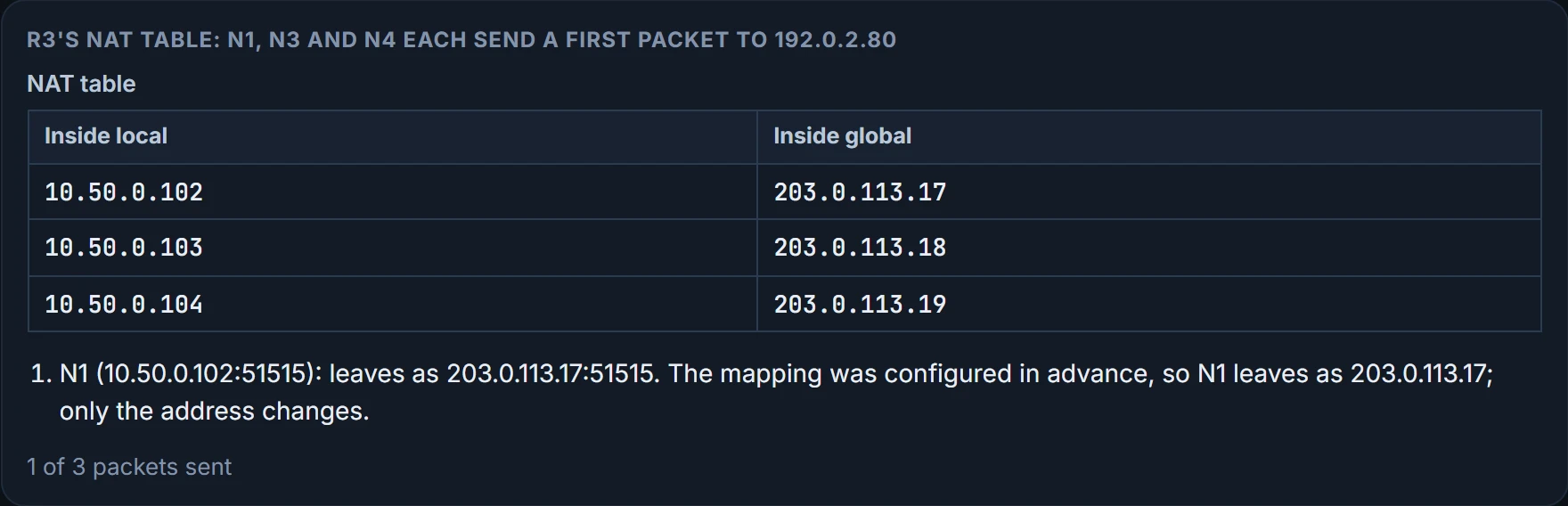
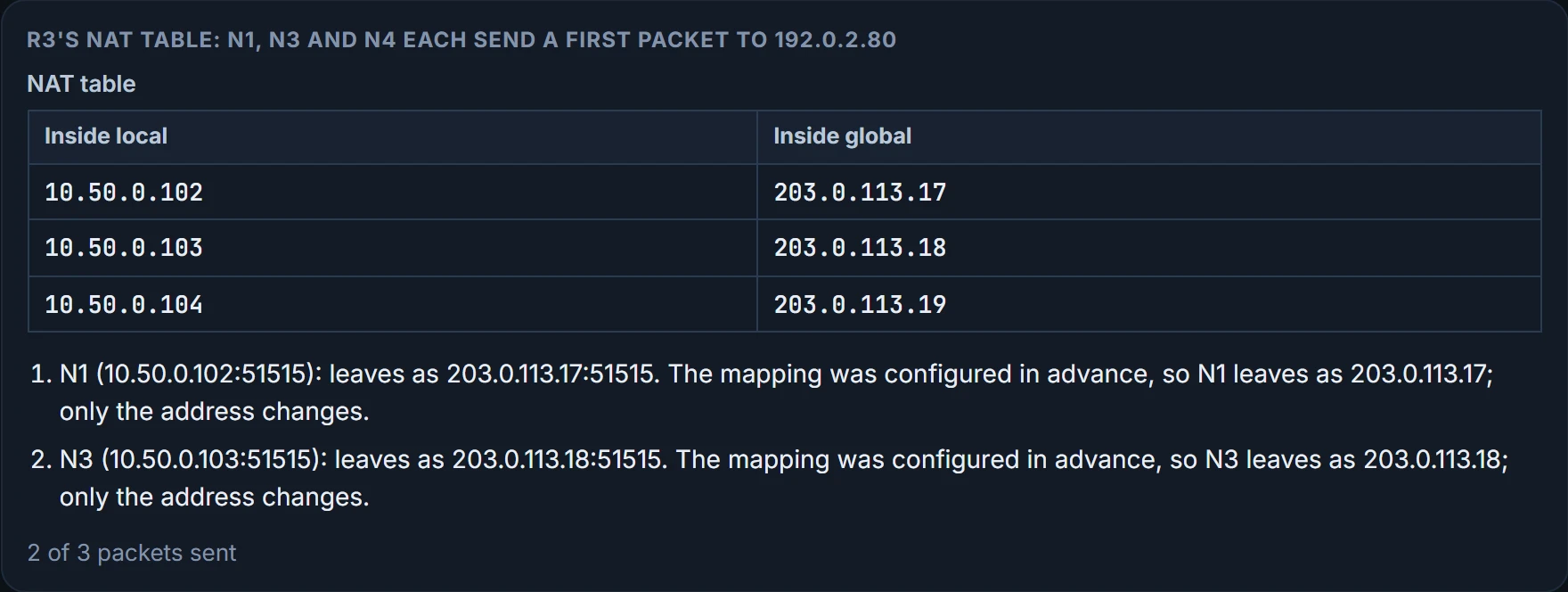
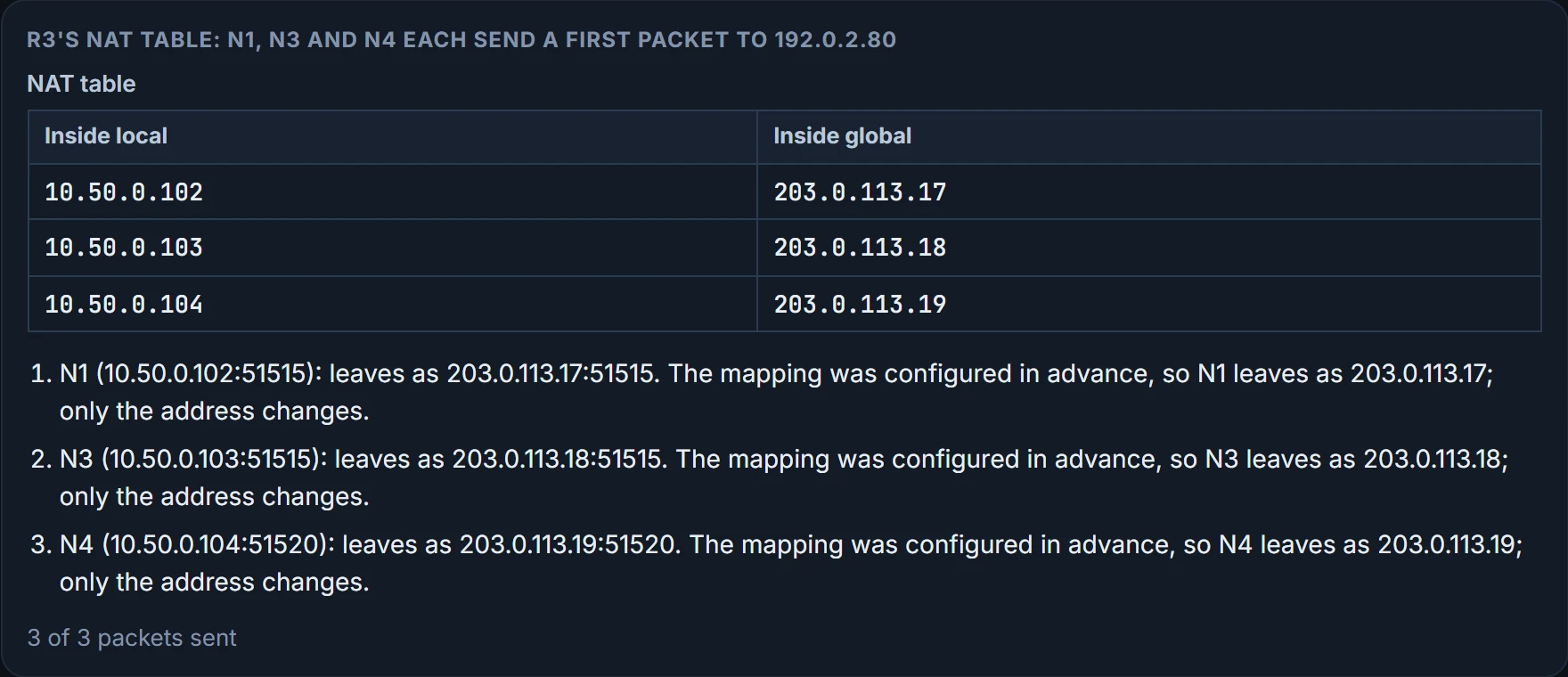
What the translator proves: how each kind fills R3's table, and where each runs out. What it doesn't: that a translated packet gets anywhere. R3 still needs its default route to the ISP (05.2.4), and the server still has to answer.
One limit worth knowing now: NAT only rewrites addresses and ports. It doesn't encrypt anything, and it isn't a security policy.
Port 51515 turns out to be a popular choice. PAT doesn't mind; it just hands out another one.
Five lines to keep
- Private addresses can't be used on the internet; NAT lets hosts that have them talk to it anyway.
- Source NAT changes the source address of packets leaving the inside, and the destination of replies coming back.
- Inside local is the inside host's own address, inside global the one that represents it on the internet, and outside global the outside host's.
- Static NAT: configured one-to-one mappings. Dynamic NAT: one-to-one from a pool, created by the first packet, and a discarded packet when the pool runs out.
- PAT (overload): address and, when needed, port; one entry per inside address and port, so many hosts can share one public address.
Next, 07.2.2: R3's NAT configuration itself: which interfaces are inside and outside, which addresses to translate, and how to read the table when a laptop can't reach the internet.
The interactive lesson
The whole lesson, with its drawings and its questions. Free with a Daveth account.