
QoS Classification, Marking, DSCP and PHB
QoS decides which traffic gets better treatment when a link is busy: a voice or video call cannot stand the delay, jitter and loss a backup upload can. First a device classifies packets, matching fields to decide which action applies; marking then writes the result into the header, above all the DSCP field of the IP header, so later devices can act on it.
By Arif, founder of Daveth · Updated
The full 21 min walkthrough is in Daveth Pro (Network). See what the plan opens
What this page answers
What is QoS (quality of service)?
The tools that control which traffic gets bandwidth, and how much delay, jitter and loss each kind suffers, when a link is busy. They define per-hop behaviours: what a device does to a packet beyond storing and forwarding it. Read it in “What a call can't stand”
What are QoS classification and marking?
Classification matches fields in a packet to decide which QoS action applies. Marking writes a value into a header, such as DSCP in the IP header, so devices further on can classify by that one field. Read it in “Which packets are which”
What a call can't stand
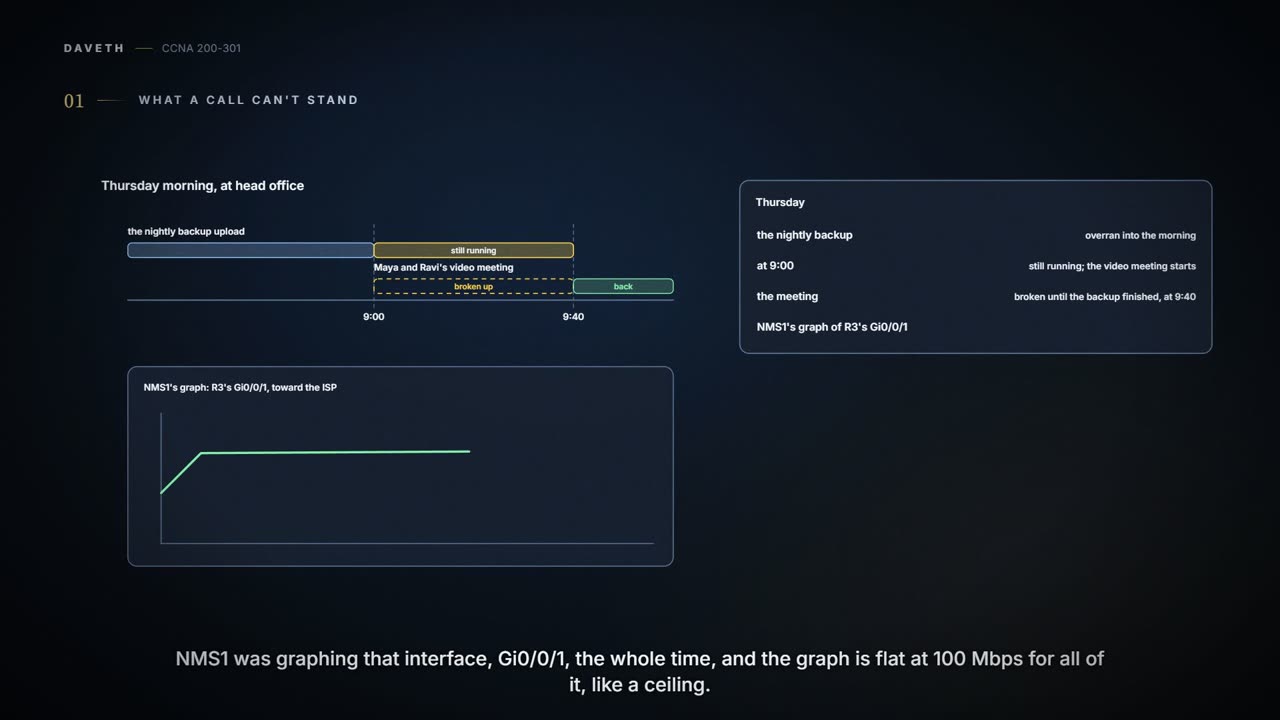
Thursday, month six, week two. Since the forty new laptops arrived (07.1.1), head office's nightly backup upload has grown, and this week it overran into the morning: on Thursday it was still running at 9:00, when Maya and Ravi's video meeting started, and the meeting broke up until it finished at 9:40. NMS1's graph of R3's Gi0/0/1 (07.3.2) shows its traffic flat at 100 Mbps the whole time, as if it had hit a ceiling; why a 1 Gbps port stops at 100 is the next page's story. At a WAN edge, the LAN interfaces usually run much faster than what the WAN carries, so traffic arrives faster than it can leave.
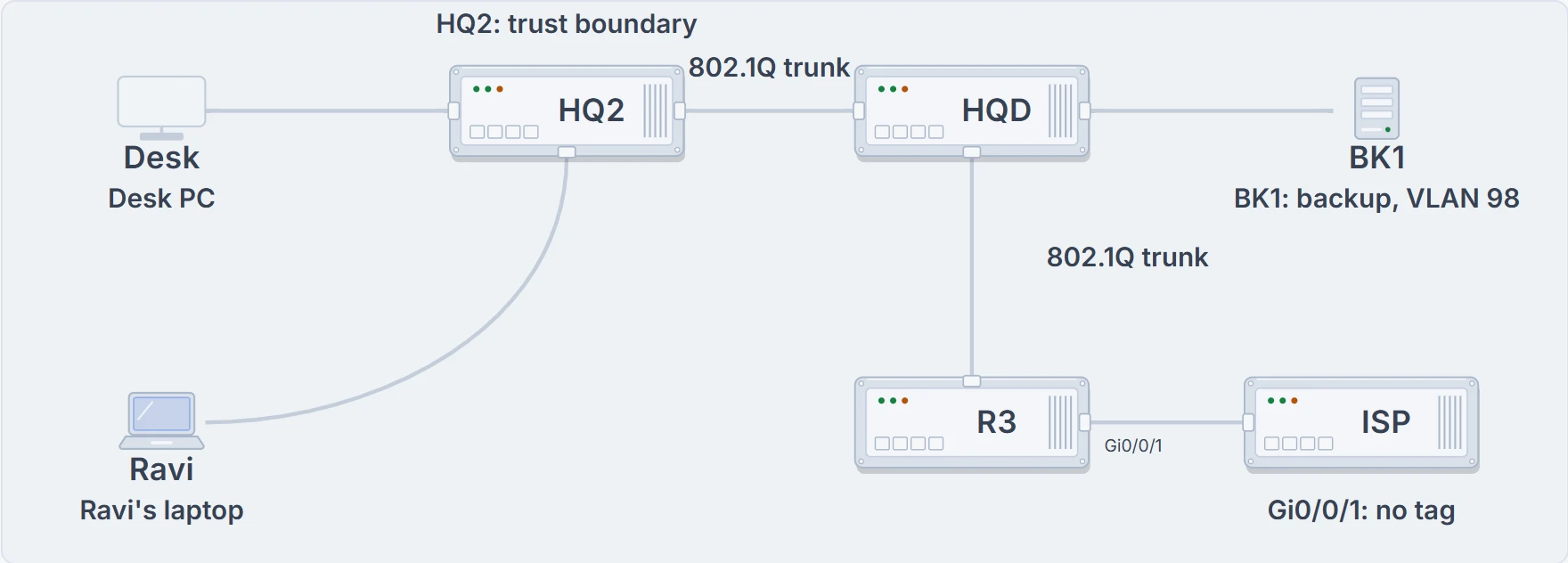
Head office's path to the internet: a desk PC and Ravi's laptop on the floor switch HQ2; the backup server BK1 on HQD; then R3, and R3's Gi0/0/1 to the ISP.
A router with more packets than its link can send has choices: send them in the order they came, send some sooner, or throw some away when too many are waiting. Quality of service (QoS) is the set of tools for those choices, on switches and routers alike. The tools define per-hop behaviours (PHBs): what a device does to a packet between receiving it and sending it on, beyond just storing and forwarding it. A PHB can delay a packet, discard it, or change fields in its header, and a device can use different PHBs for different kinds of packets, which makes things better for some and worse for others. More bandwidth might help too; QoS decides who waits when there isn't enough.
QoS tools manage four things. Bandwidth is the link's capacity, in bits per second, and the tools decide which packets use it next, and how much of it each kind gets over time. Delay is how long a packet takes: one-way, from sender to receiver, or round-trip, there and back. Jitter is the variation in one-way delay between successive packets of the same flow, the data from one application to another in one direction: one-way delays of 300 ms, then 310, then 325 are 10 ms and then 15 ms of jitter. Loss is the share of packets that never arrive: 98 of 100 is 2% loss. Faulty cables cause some of it, but more often a device's queue is full, and it has nowhere to put a new packet.
A live call is small but fussy. In voice over IP (VoIP), a phone's codec turns each 20 ms of sound into 160 bytes (with the G.711 codec), puts them in a 200-byte IP packet, and sends 50 packets a second: about 80 kbps a call, before the data-link header and trailer (G.729 needs about 24 kbps). Too much delay and people talk over each other; loss or jitter and the sound breaks up. Video is like voice with far more bandwidth. A backup is the opposite: lots of data, nobody watching live, so it only has to finish within its window, with little enough loss that TCP isn't resending all night. Web applications sit in between. One click can bring back hundreds of packets: at up to 1460 bytes of data each, 1000 packets is about 1.5 MB, a page with a few pictures. What users feel, with any application, is the quality of experience (QoE).
A call hates surprise pauses more than a file download does; the file can wait without saying "hello?" three times.
| Traffic | Bandwidth | Delay, jitter and loss | Here |
|---|---|---|---|
| Voice | small and steady: about 80 kbps a call (G.711, before the data-link header and trailer) | one-way delay 150 ms or less, jitter 30 ms or less, loss 1% or less | Sam's trial phone |
| Video | 384 kbps to 20 Mbps and more | one-way delay 200-400 ms, jitter 30-50 ms, loss 0.1-1% | the morning video meeting |
| Interactive data | bursty, when someone clicks | tolerates more; people feel it as waiting | staff web applications |
| Batch data | a lot | delay and jitter hardly matter; it needs enough bandwidth to finish in its window, and little loss, so fewer resends | the nightly backup |
The voice and video figures are guidelines a design aims for, and they're tendencies, not a licence to starve everything else: a plan that favours video still has to leave the backup room to finish.
Which packets are which
A plan can favour traffic because of the business (the finance servers sit in these subnets) or because of the kind of application (a call can't wait). Either way, a device first has to tell packets apart. QoS tools sit in a packet's path much like ACLs do: enabled on an interface, for packets coming in or going out. Classification is matching fields in a packet to decide which QoS action applies. Many QoS tools can simply point to an ACL: a packet the ACL permits is a match. Inside R3, an output queuing tool would work like this:
- R3 makes its forwarding decision;
- the queuing tool classifies the packet, to choose an output queue for it;
- the packet waits in that queue while the interface is busy;
- the scheduler picks which queue sends next. (Queues and scheduling are the next page.)
Every device could classify every packet from scratch, but on every interface of every device that's a lot of configuration, and complex matching can slow some devices down. The better plan matches carefully once, early in the packet's life, and marks it: sets a value in a header field designed for QoS. Every device after that makes a simple match on the mark: this value is voice, that one is video.
The careful match can use the fields an ACL can: source and destination addresses, the protocol, source and destination ports. Many applications can't be told apart by port, though, and for those, NBAR (Network Based Application Recognition) recognises applications from what's inside the packets, with signatures for over a thousand of them: an entertainment video can be told apart from a security camera's.
If you've ever had luggage tagged at check-in, you've seen marking: one person reads your ticket once, and every belt and handler after that just reads the tag. (Where it stops: a luggage tag is checked against a ticket. A mark is just a few bits in a header, and nothing checks it unless someone decides to, which is a later section's problem.)
Writing the mark
A mark is only useful while the header that holds it exists, and packets cross many links and several kinds of header on the way. Before the details:
The mark that matters most lives in the IP header. IPv4's header has a Type of Service byte, and the original plan used its first 3 bits as IP Precedence (IPP): eight values, 0 to 7; the other 5 bits went largely unused. Eight wasn't many, so later the first 6 bits became the Differentiated Services Code Point (DSCP): 64 values, with the last 2 bits left for ECN (explicit congestion notification), a separate job. IPv6 has the same 6-bit DSCP, in a byte called Traffic Class. Routers throw away each old frame and build a new one, but they keep the IP header, so a DSCP set near the source stays with the packet all the way to the destination, unless a device along the way re-marks it.
Ethernet frames have a mark too, but only sometimes. The 802.1Q header has a 3-bit field, eight values, first defined by 802.1p and called Class of Service (CoS) or Priority Code Point (PCP). The 802.1Q header only exists on a link that tags frames: a trunk, or a phone's link carrying its voice VLAN (03.1.5). So CoS lives only there: at head office, on the trunks from HQ2 to HQD and from HQD to R3, but not on the PCs' links, and not on R3's link to the ISP. A switch can set a frame's CoS to match its DSCP, under its own policy; they're still two separate fields.
| Field | Header | Bits | Where it lives |
|---|---|---|---|
| DSCP | IPv4, IPv6 | 6 | the whole trip, unless a device re-marks it |
| IPP | IPv4, IPv6 | 3 | the whole trip (the older field) |
| CoS (PCP) | 802.1Q | 3 | only over a link that carries the 802.1Q tag |
| TID | 802.11 | 3 | only over Wi-Fi |
| EXP | MPLS label | 3 | only across an MPLS network |
And setting a mark reserves nothing and queues nothing: it's a label that asks for treatment later.
Continue the lesson
The whole lesson, with its drawings and its questions. 3 more sections after the ones above.