
Configuring and Troubleshooting NAT and PAT
Every kind of source NAT starts by marking interfaces with ip nat inside and ip nat outside. Static NAT adds ip nat inside source static. Dynamic NAT adds an ACL matching the hosts to translate, an ip nat pool, and ip nat inside source list. PAT adds the overload keyword, often translating to the outside interface's own address.
By Arif, founder of Daveth · Updated
The full 17 min walkthrough is in Daveth Pro (Network). See what the plan opens
What this page answers
How do you configure static NAT?
ip nat inside on each inside interface, ip nat outside on each outside interface, then ip nat inside source static inside-local inside-global in global configuration mode, once per mapping. Read it in “Configuring source NAT”
How do you configure dynamic NAT?
Mark the inside and outside interfaces, write an ACL that matches the packets to translate, define the public addresses with ip nat pool name first last netmask mask, and tie them together with ip nat inside source list acl pool name. Read it in “Configuring source NAT”
How do you configure PAT (NAT overload)?
As dynamic NAT, with overload at the end. For example, ip nat inside source list 1 interface GigabitEthernet0/0/1 overload translates every source matching ACL 1 to that interface's address. Read it in “R3's configuration, and the evidence”
How do you troubleshoot NAT?
In order: which interfaces are inside and outside, which sources the configuration matches, the pool or overload, the routes out and back, then the translation table, and only then anything beyond the router. Read it in “The branch can't get out”
The branch can't get out
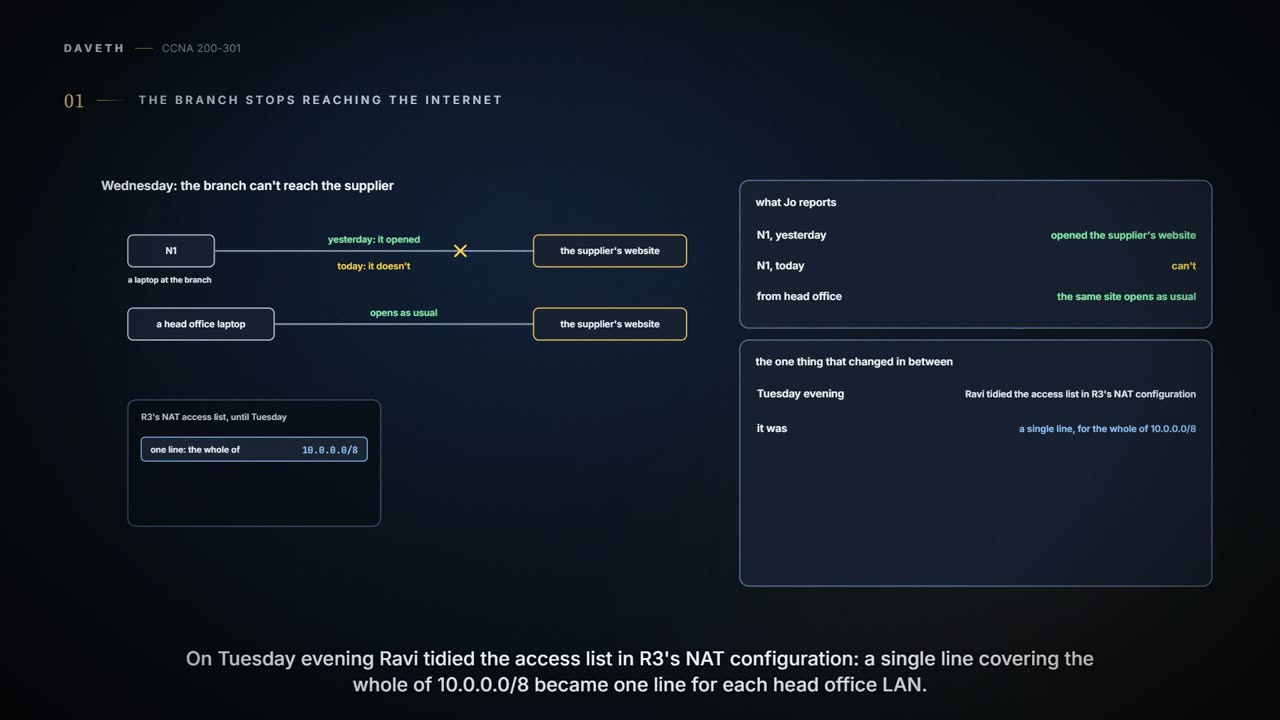
Wednesday, month six. Jo reports that N1 can't reach the supplier's website, though it could yesterday. Head office's laptops still can. The only change since then: on Tuesday evening Ravi tidied R3's NAT access list, which had one line for the whole of 10.0.0.0/8, into one line per head office LAN.
NAT faults are easy to guess at and slow to fix by guessing. Ravi works in an order: which interfaces are inside and outside, which sources the configuration matches, the pool or overload, the routes out and back, then the translation table, and only then anything beyond R3. Most NAT problems turn out to be configuration mistakes, so the configuration comes first.
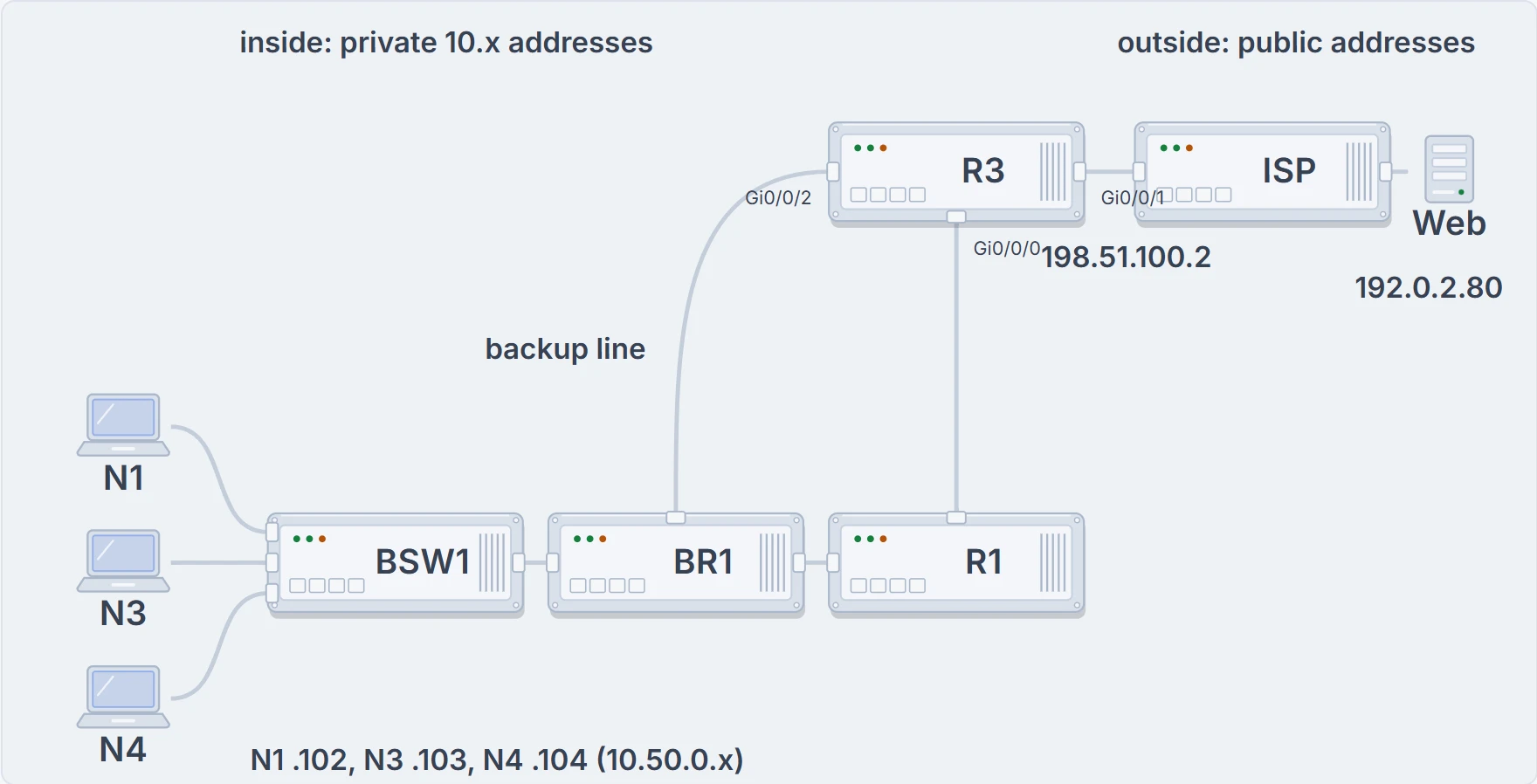
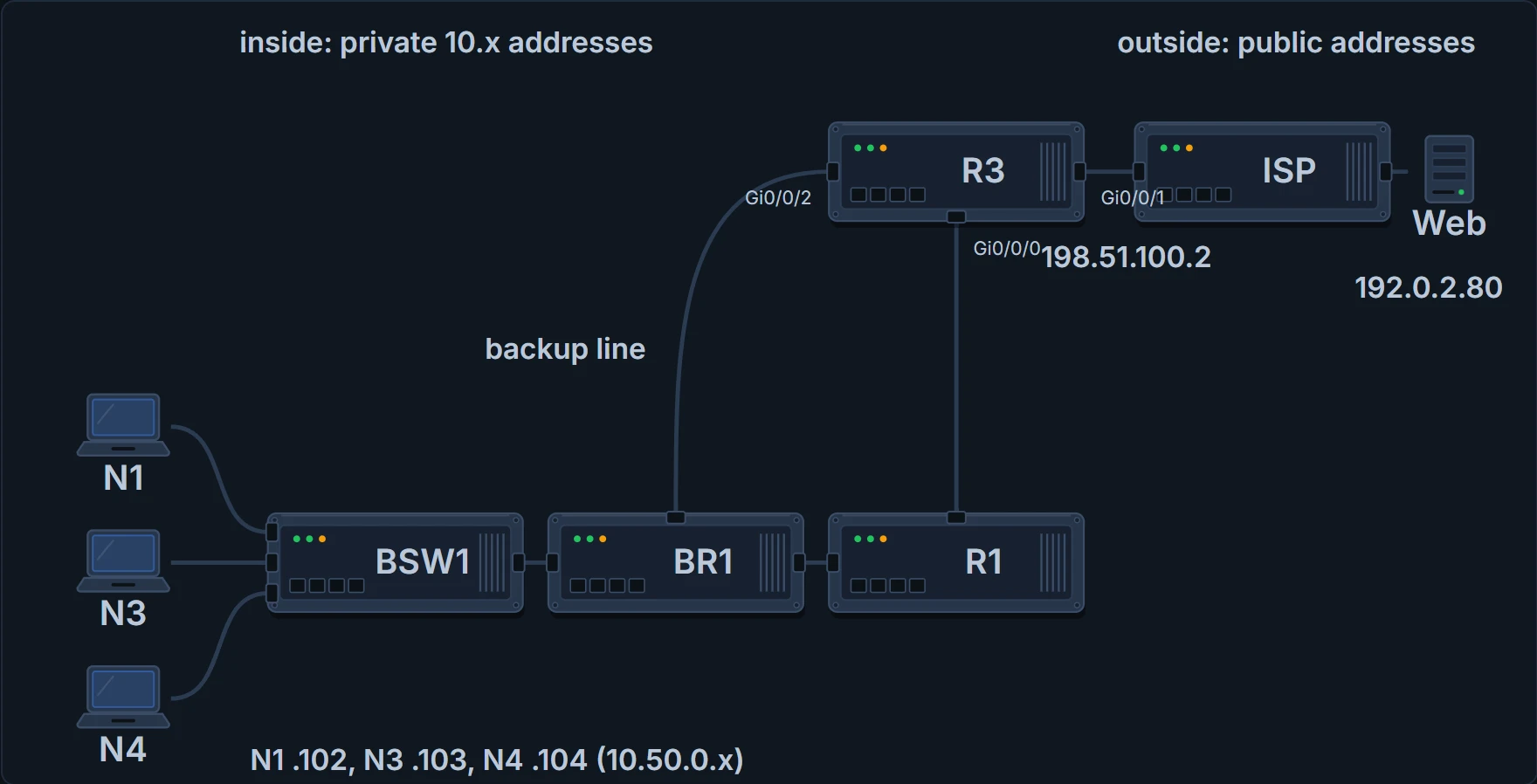
R3 is the NAT router. Gi0/0/0 leads to R1 and the branch, Gi0/0/2 is the backup line to BR1, and Gi0/0/1, 198.51.100.2, leads to the ISP.
Configuring source NAT
Every kind of source NAT needs the router told which of its interfaces are inside and which are outside, because NAT may be used on only some of them.
Static NAT takes three steps:
- ip nat inside in interface configuration mode, on each inside interface;
- ip nat outside in interface configuration mode, on each outside interface;
- ip nat inside source static inside-local inside-global in global configuration mode, once per mapping.
Read the keywords: inside means NAT translates for hosts on the inside; source means it translates the source address of packets arriving on inside interfaces; static means the entry comes from configuration and never times out of the table. The inside global addresses have to come from a registered range: often spare addresses in the subnet on the ISP link, or an address on a loopback interface. In show ip nat translations, a static or dynamic (non-PAT) entry has no protocol and no ports: just the inside global and inside local addresses, 203.0.113.17 and 10.50.0.102, with dashes in the protocol and outside columns.
Dynamic NAT keeps the two interface steps and adds three:
- an access control list (ACL) that matches the packets, arriving on inside interfaces, that should be translated;
- ip nat pool name first-address last-address netmask mask, the pool of public addresses;
- ip nat inside source list acl-number pool name, which ties the two together.
An ACL here is a list of permit lines, numbered (or named), such as access-list 1 permit 10.50.0.0 0.0.1.255. The address and wildcard mask work as in OSPF's network command (05.2.3): 0 bits must match, 1 bits don't matter. 255 frees a whole octet; in the third octet, 1 is 00000001, so only its last bit is free, 0 or 1. That line matches 10.50.0.0 to 10.50.1.255, the whole branch. In a NAT configuration the ACL only selects which sources to translate. (An ACL can also be applied to an interface as a filter, which is a different job.)
You can think of the ACL as the list at a translation desk: only sources on it get a new address. (Where it stops: a guest list decides who gets in. This ACL decides only who gets a new address.)
The ip nat pool command lists an inclusive range, first to last (a prefix-length can replace the netmask). It also checks the netmask: with that mask, the first and last addresses must fall in the same subnet, or the router rejects the command.


The command that ties it together, ip nat inside source list 1 pool LAB, reads as: for packets entering any inside interface, create NAT table entries for hosts matched by ACL 1, taking an inside global address from the pool called LAB. Dynamic entries time out after a period of inactivity, which puts their inside global addresses back in the pool. clear ip nat translation * removes them at once, and the next host to send can get a freed address.
PAT has two forms. With a pool, it's the dynamic NAT configuration with overload added to the end of ip nat inside source list. With just one public address, the router can use one of its own interface addresses instead of a pool: ip nat inside source list acl-number interface type/number overload. There's no separate PAT command: overload is it. Each flow gets a unique port on the inside global address, so one host can hold several entries and one public address can support more than 65,000 flows, an entire organization. It's the NAT configuration that matters most, because it's the one that saves public addresses.
| Kind | Which sources | Translated to | The enabling command |
|---|---|---|---|
| Static NAT | each mapping names one inside local address | one inside global address per mapping | ip nat inside source static 10.50.0.102 203.0.113.17 |
| Dynamic NAT | an ACL: access-list 1 permit 10.50.0.0 0.0.1.255 | a pool: ip nat pool LAB 203.0.113.17 203.0.113.22 netmask 255.255.255.248 | ip nat inside source list 1 pool LAB |
| PAT on a pool | the same ACL | the same pool, shared by port | ip nat inside source list 1 pool LAB overload |
| PAT on an interface | the same ACL | the interface's own address | ip nat inside source list 1 interface GigabitEthernet0/0/1 overload |
R3's configuration, and the evidence
Ravi starts where the order says, with the configuration:
R3# show running-config
! (lines left out)
interface GigabitEthernet0/0/0
 ip address 10.255.255.2 255.255.255.252
 ip nat inside
!
interface GigabitEthernet0/0/1
 ip address dhcp
 ip nat outside
!
interface GigabitEthernet0/0/2
 ip address 10.255.255.10 255.255.255.252
 ip nat inside
!
! (head office's VLAN interfaces, each with ip nat inside, are left out)
ip nat inside source list 1 interface GigabitEthernet0/0/1 overload
!
access-list 1 permit 10.98.0.0 0.0.0.255
access-list 1 permit 10.100.0.0 0.0.0.255
access-list 1 permit 10.200.0.0 0.0.0.255
R3#
PAT on an interface. list 1 means sources matching ACL 1 get translated; interface GigabitEthernet0/0/1 means the only inside global address is that interface's address, 198.51.100.2; overload turns on PAT. Without overload, it would just be dynamic NAT. The interface roles are right: Gi0/0/0 and Gi0/0/2 inside, Gi0/0/1 outside. What this proves: the configuration R3 is running. What it doesn't: what happens to any particular packet.
R3# show ip nat translations
Pro  Inside global         Inside local          Outside local      Outside global
tcp  198.51.100.2:50212    10.100.0.121:50212    192.0.2.80:443     192.0.2.80:443
tcp  198.51.100.2:50388    10.100.0.134:50388    192.0.2.80:443     192.0.2.80:443
tcp  198.51.100.2:61022    10.200.0.107:61022    192.0.2.80:443     192.0.2.80:443
R3# show ip nat statistics
Total active translations: 3 (0 static, 3 dynamic; 3 extended)
Outside interfaces:
  GigabitEthernet0/0/1
Inside interfaces:
  GigabitEthernet0/0/0
  GigabitEthernet0/0/2
! (the VLAN interfaces are left out)
! (the peak, hits, misses and expired lines are left out)
Dynamic mappings:
! (the Inside Source heading line is left out)
access-list 1 interface GigabitEthernet0/0/1 refcount 3
R3#
show ip nat translations lists the NAT table: here three PAT entries, all head office laptops, each with inside global, inside local and outside addresses and ports. show ip nat statistics confirms the interface roles and counts active translations; extended ones are entries with ports, the PAT kind, and the refcount on the mapping line matches the three entries. N1 has been trying for minutes, and no entry has 10.50.0.102. What this proves: R3 isn't translating N1. What it doesn't: why. The configuration answers that: the tidied ACL 1 lists head office's LANs, and no line matches 10.50.0.102.
The statistics also keep two different counters called misses. The first, next to hits, counts packets that needed a NAT entry and didn't find one, so NAT built one; hits count packets translated by an existing entry. A line such as Hits: 69 Misses: 1 means one packet built an entry and the next 69 used it.
Continue the lesson
The whole lesson, with its drawings and its questions. The rest of this section and 2 more after it.