
OSPF adjacencies
Six routers on one segment and three never reach Full with R1, and nothing is broken: on broadcast and NBMA networks a router becomes full only with the DR and BDR and stays in 2-Way with the rest. Unlike EIGRP, OSPF hello and dead timers must match. Read the eight neighbour states as a lookup: where an adjacency sits tells you what to check.
By Arif, founder of Daveth · Updated
The full 5 min walkthrough is in Daveth Pro (Network). See what the plan opens
What this page answers
Why is my OSPF neighbor stuck in 2-Way?
On broadcast and NBMA networks that is often correct: a router becomes full only with the DR and BDR and stays in 2-Way with all other neighbours. Read it in “Why three of those routers will never go Full”
What are the OSPF neighbor states?
Down, Attempt, Init, 2-Way, Exstart, Exchange, Loading and Full. Attempt is only for manually configured neighbours on NBMA networks. Read it in “The eight states, read as a lookup rather than a list”
Do OSPF hello and dead timers have to match?
Yes. Mismatched hello or dead intervals are a listed cause of adjacency problems, the opposite of EIGRP, where each router announces its own hold time. Read it in “Before anything else, a rule that just reversed”
Three neighbours are not reaching Full, and nothing is broken
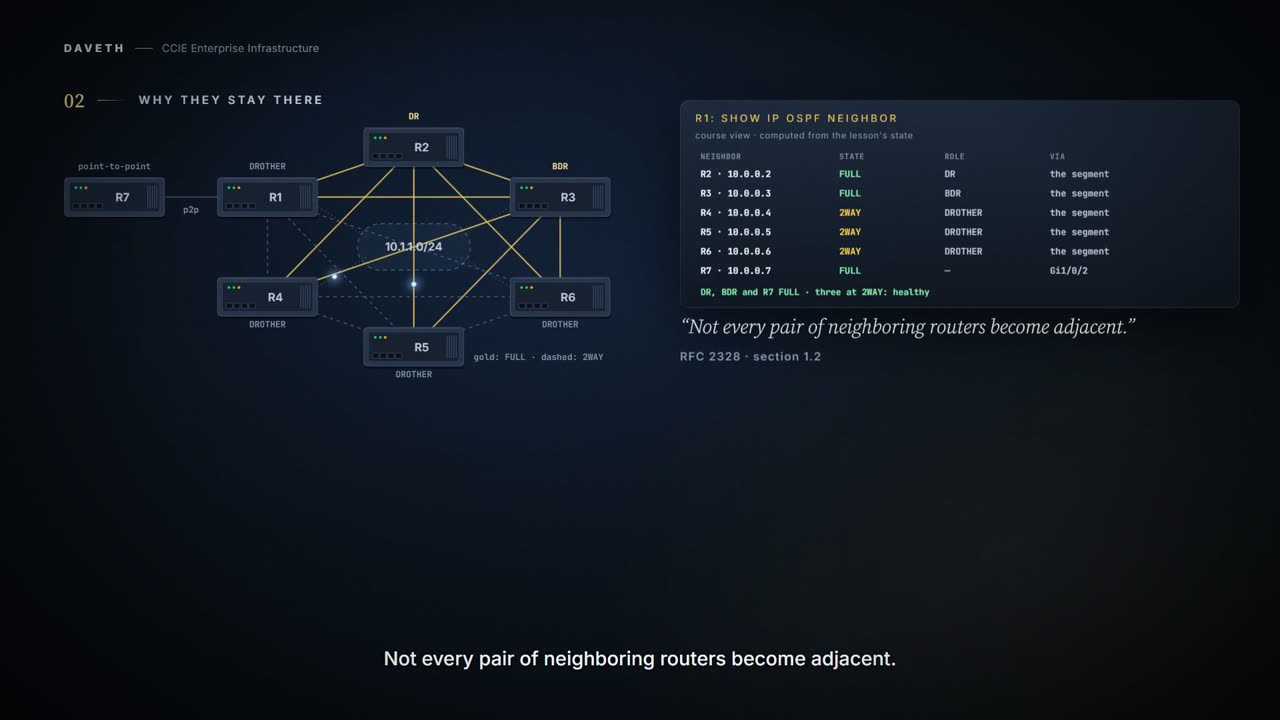
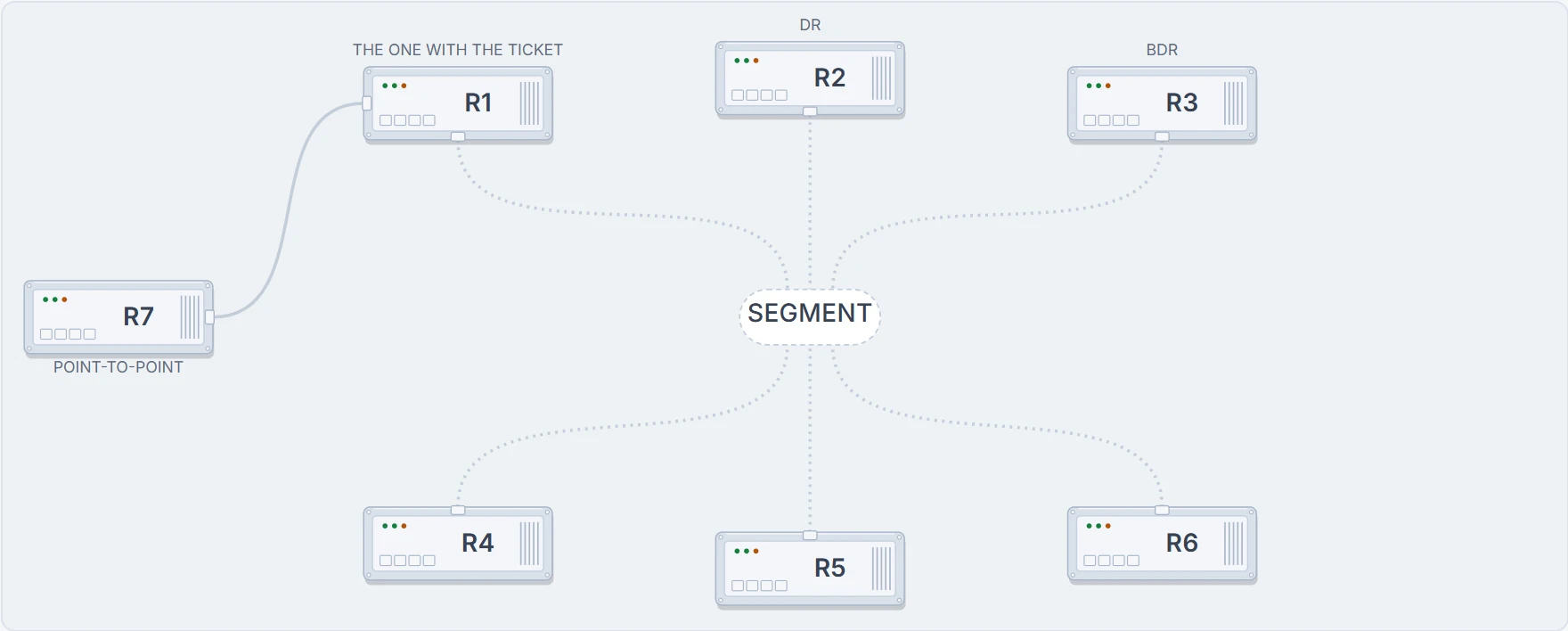
A ticket lands on your desk. Six routers on one switched segment, OSPF everywhere, and this on R1:
R1# show ip ospf neighbor
Neighbor ID     Pri   State           Dead Time   Address         Interface
10.0.0.2        1     FULL/DR         00:00:34    10.1.1.2        Gi1/0/1
10.0.0.3        1     FULL/BDR        00:00:31    10.1.1.3        Gi1/0/1
10.0.0.4        1     2WAY/DROTHER    00:00:38    10.1.1.4        Gi1/0/1
! three of them stop here, and this is what correct looks like
10.0.0.5        1     2WAY/DROTHER    00:00:33    10.1.1.5        Gi1/0/1
10.0.0.6        1     2WAY/DROTHER    00:00:36    10.1.1.6        Gi1/0/1
10.0.0.7        1     FULL            00:00:35    10.9.9.2        Gi1/0/2
Nothing is broken. That output is exactly what a correctly working six-router broadcast segment looks like, and if you "fix" it you will make things worse.
State 1 Six routers on one wire
Which pairs of these are actually synchronising databases with each other?
Before anything else, a rule that just reversed
You have twelve lessons of EIGRP behind you, and 1.3.a spent its length making one point: EIGRP routers advertise their hold time rather than agreeing on it, so mismatched timers produce lopsided detection and not a failure.
Put that down. It is a true statement about EIGRP and it is the opposite of the truth here. OSPF's matching parameters include, OSPF HELLO and Dead timer values, and a mismatch is listed directly as a cause of adjacency problems: OSPF HELLO or Dead timer interval values are mismatched.
Two protocols, same knob, opposite consequence. Worth pausing on, because a candidate who carries the EIGRP habit into an OSPF question will rule out timers early and lose twenty minutes.
Why three of those routers will never go Full
On broadcast media and non-broadcast multi-access networks, a router becomes full only with the designated router (DR) and the backup designated router (BDR); it stays in the 2-way state with all other neighbors.
Two-Way is not a failed attempt at Full. On this segment it is the correct answer.
Read the last clause again. Stays. Not eventually reaches. Stays there, for as long as the segment exists. And it is said directly when listing the states you should be suspicious of: The only exception to this is the 2-way state, which is normal in a broadcast network.
| Routers on the segment | Every pair adjacent | With a designated router and a backup |
|---|---|---|
| 4 | 6 | 5 |
| 6 | 15 | 9 |
| 7 | 21 | 11 |
| 20 | 190 | 37 |
Where does nine come from? The designated-router-to-backup pair, plus two for each of the remaining four routers: 1 + 8. The general form is 2n − 3, and this page's model builds the pairs and counts 9 of them rather than taking anybody's word for it.
And notice the shape of the two columns. Every pair adjacent grows as the square of the segment; with a designated router it grows as a straight line. That is the kind of curve that is fine at four routers and unmanageable at forty, which is the whole design argument.
State 2 Adjacent, and merely neighbours
Three relationships, drawn. Which of them does the neighbour list distinguish?
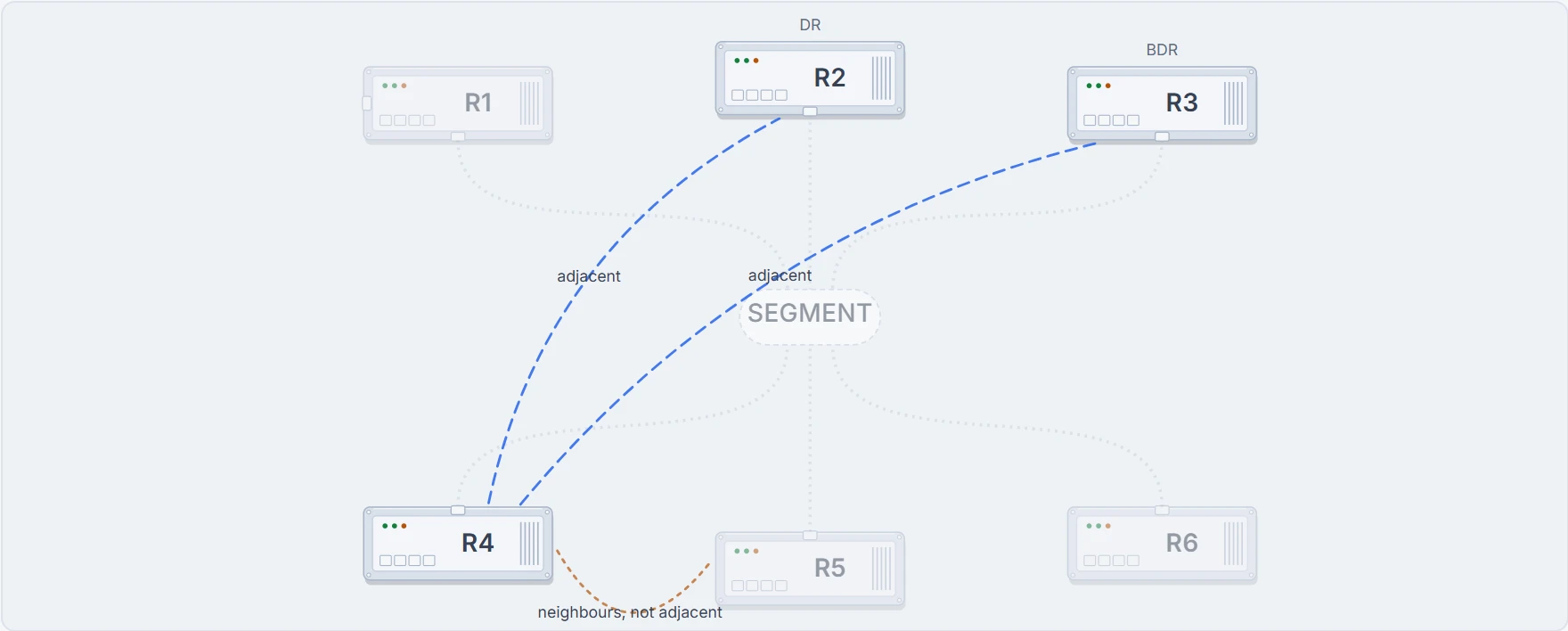
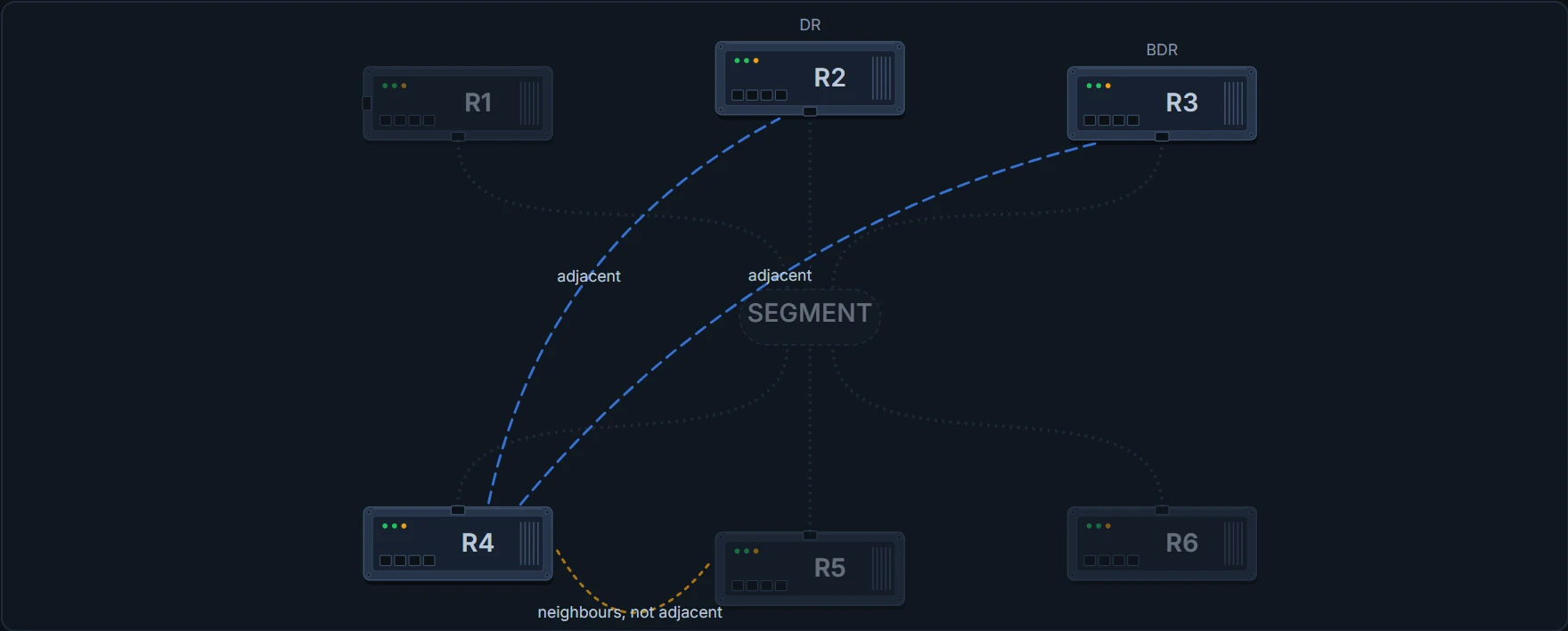
Neighbour and adjacent are not synonyms. Those three routers are neighbours: they see each other, they exchange hellos, they will notice each other failing. They are not adjacent, because adjacency means synchronised databases. When a question says "adjacency", it means FULL. And the neighbour list prints all three relationships in the same column, which is why the distinction has to be known rather than read.
The timing falls out of the same sentence: "At the end of this stage, the DR and BDR for broadcast and non-broadcast multi-access networks are elected." Which is why every router passes through 2-Way: it is the point at which everyone knows who is on the segment, and therefore the earliest point at which a designated router can be chosen.
Who wins that election is not modelled anywhere on this page. No page this course consulted gives the rule, so R2 and R3 are named by the scenario and nothing is derived from how they got there. What is modelled from a quotation is a different contest entirely: "the router with the highest Router-ID becomes the Primary" inside the database descriptor exchange. On the link on this page that is R7, with router ID 10.0.0.7, and a router can be the designated router and the subordinate in the same conversation.
The eight states, read as a lookup rather than a list
Here they are in order: Down → Attempt → Init → 2-Way → Exstart → Exchange → Loading → Full. Do not memorise the list: read each one with a single question in mind: if an adjacency were sitting here, what would that tell me?
| State | What it means |
|---|---|
| Down | no information (hellos) has been received from this neighbor, but hello packets can still be sent to the neighbor in this state |
| Attempt | only valid for manually configured neighbors in an NBMA environment: the router sends unicast hello packets every poll interval |
| Init | the router has received a hello packet from its neighbor, but the receiving router ID was not included in the hello packet |
| 2-Way | bi-directional communication has been established between two routers |
| Exstart | the routers and their DR and BDR establish a primary-secondary relationship and choose the initial sequence number |
| Exchange | OSPF routers exchange database descriptor (DBD) packets |
| Loading | the actual exchange of link state information occurs |
| Full | routers are fully adjacent with each other: all the router and network LSAs are exchanged and the databases are fully synchronized |
The router heard hello. It is still waiting to hear its own name back. That is Init, and it is the most informative state in the whole list.
Somebody across a noisy room reads out the names of everyone they can hear. You hear them perfectly, so their voice reaches you. But your name is not on their list. In that one moment you have learned something they have not: they cannot hear you at all.
That is Init, and notice who ends up holding the information. The router that is hearing nothing back is the one that cannot tell anybody. The router that is being ignored is the one that can see the whole problem.
The comparison stops there. Two people in a room would just shout louder. These two have a list of things that must match before they exchange anything at all, and even after that list passes, not every neighbour is meant to go all the way to Full.
So: you received their hello, your router ID was not in it. They are not receiving yours and the conversation is one-way, and Init tells you which direction is failing without a single additional command.
| Resting at | What it means | Look at |
|---|---|---|
| Down | Nothing is arriving, or a hello parameter disagrees | Interface, subnet and mask, area, area type, timers |
| Init | Their hellos reach you; yours do not reach them | The far end's receive path: the fault is one-way |
| 2-Way | Between two routers on a broadcast segment, neither of them the designated router or its backup: nothing: this is normal. | Whether either of the two is the designated router or its backup |
| Exstart / Exchange | The database descriptor exchange is failing | MTU |
| Loading | The link-state request and update exchange is failing | Rarer: corrupt or missing advertisements |
| Full | The two databases are synchronised with each other, and that is all it says | Nothing in this column. If routes are still missing, the network type on both ends |
Read the last row carefully, because it is where the instrument runs out. Every healthy pair ends at FULL, and so does at least one fault. The state names where a negotiation stopped. A fault that lets the negotiation finish leaves nothing in the state column to read, and the last section of this page breaks one.
Three faults, one column
Everything below is the same command on the same router. Watch one column.
A mask. R4 is given a /25 on the segment, and "Subnet and subnet mask" is on the must-match list. Which state does R1's list show for R4 now?
R1# show ip ospf neighbor
Neighbor ID     Pri   State           Dead Time   Address         Interface
10.0.0.2        1     FULL/DR         00:00:34    10.1.1.2        Gi1/0/1
10.0.0.3        1     FULL/BDR        00:00:31    10.1.1.3        Gi1/0/1
10.0.0.5        1     2WAY/DROTHER    00:00:33    10.1.1.5        Gi1/0/1
10.0.0.6        1     2WAY/DROTHER    00:00:36    10.1.1.6        Gi1/0/1
10.0.0.7        1     FULL            00:00:35    10.9.9.2        Gi1/0/2
R4 is simply gone from the list. It did not fail to reach Full; it never appeared. And the two routers ping each other perfectly: if you have been using reachability as evidence that the link is fine, this is the case that punishes it.
So what does a missing neighbour tell you? Almost nothing, and that is the point of the list. Area number, area type, subnet and mask, and the hello and dead timers are all on it, and all produce the same absence. The four are worth knowing by name because the output will not name them for you.
A one-way conversation. The mask goes back and R5's hellos stop arriving at the far end. Does R5 vanish from the list the way R4 did?
R1# show ip ospf neighbor
Neighbor ID     Pri   State           Dead Time   Address         Interface
10.0.0.2        1     FULL/DR         00:00:34    10.1.1.2        Gi1/0/1
10.0.0.3        1     FULL/BDR        00:00:31    10.1.1.3        Gi1/0/1
10.0.0.4        1     2WAY/DROTHER    00:00:38    10.1.1.4        Gi1/0/1
10.0.0.5        1     INIT/DROTHER    00:00:33    10.1.1.5        Gi1/0/1
! and this one is still in the list, resting one state lower
10.0.0.6        1     2WAY/DROTHER    00:00:36    10.1.1.6        Gi1/0/1
10.0.0.7        1     FULL            00:00:35    10.9.9.2        Gi1/0/2
Init. You received their hello and your router ID was not in it, so they are not receiving yours. The state names the direction, which is more than the missing neighbour above managed.
An MTU. R7, on the point-to-point link, is lowered to 1400. Which state does the link stop in?
R1# show ip ospf neighbor
Neighbor ID     Pri   State           Dead Time   Address         Interface
10.0.0.2        1     FULL/DR         00:00:34    10.1.1.2        Gi1/0/1
10.0.0.3        1     FULL/BDR        00:00:31    10.1.1.3        Gi1/0/1
10.0.0.4        1     2WAY/DROTHER    00:00:38    10.1.1.4        Gi1/0/1
10.0.0.5        1     2WAY/DROTHER    00:00:33    10.1.1.5        Gi1/0/1
10.0.0.6        1     2WAY/DROTHER    00:00:36    10.1.1.6        Gi1/0/1
10.0.0.7        1     EXSTART         00:00:35    10.9.9.2        Gi1/0/2
! the first state in which OSPF sends something big
Continue the lesson
The whole lesson, with its drawings and its questions. The rest of this section and 4 more after it.