
OSPF stub router
A reloaded router has OSPF up in forty seconds and BGP loaded in two hundred, so traffic arrives before it can be carried. max-metric router-lsa makes the router advertise a maximum metric on its transit links, so others avoid it as a transit path while it stays reachable. It is not a stub area. OSPFv2 and OSPFv3 each need their own command, and on-startup has no default timer.
By Arif, founder of Daveth · Updated
The full 5 min walkthrough is in Daveth Pro (Network). See what the plan opens
What this page answers
What does max-metric router-lsa do?
It makes the router originate LSAs with the maximum metric, 0xFFFF, on all nonstub links, so other routers avoid it as a transit path while BGP converges. Its directly connected stub links keep their cost. Read it in “Expensive, not gone”
Is an OSPF stub router the same as a stub area?
No. A stub area refuses external LSAs. A stub router is a router in an ordinary area making itself expensive as a transit path, so it forwards mainly to its directly connected links. Read it in “Which "stub" is this?”
Does max-metric router-lsa on-startup have a default time?
No. The announce time must follow on-startup, from 5 to 86,400 seconds, and there is no default value. Read it in “A timer, or the thing you were waiting for”
The router that came back too soon
OSPF is ready before BGP is. Traffic can arrive before the router can carry it.
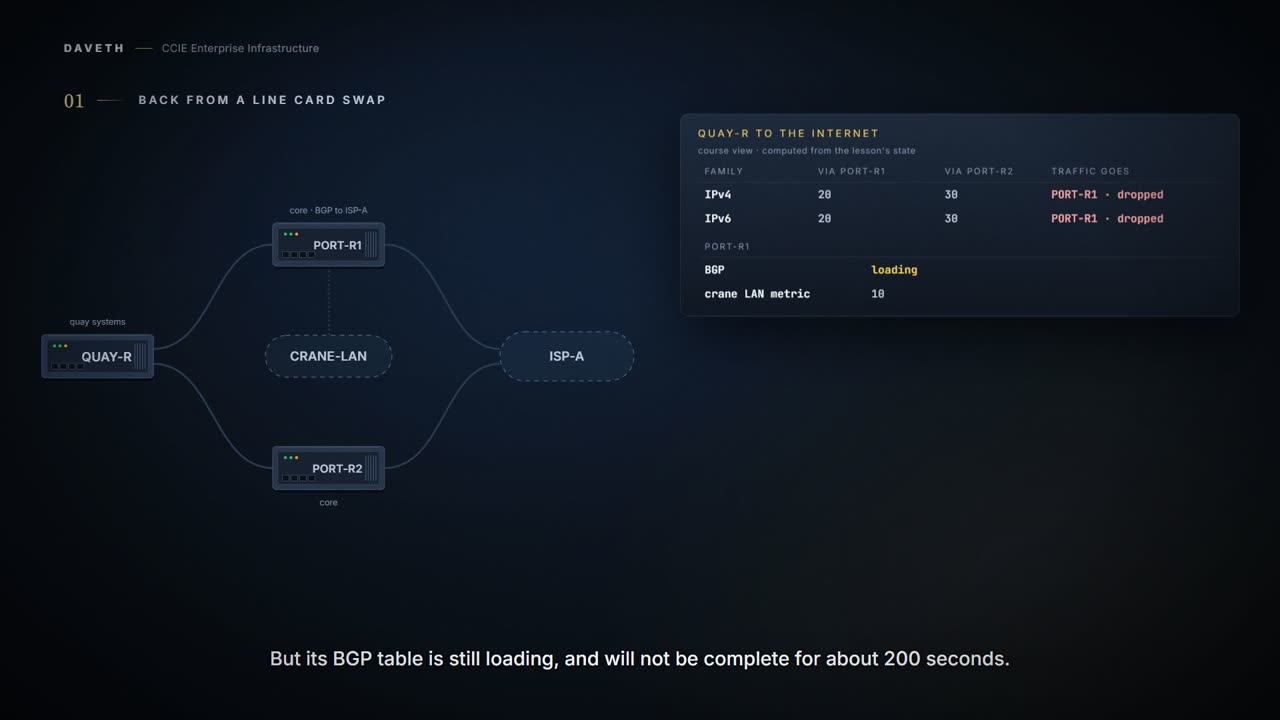
A harbour authority reloads PORT-R1, one of its two core routers, after a line card swap. Forty seconds later OSPF is up with every neighbor and has every database it needs, in IPv4 and in IPv6. Its BGP table, which is how it reaches the internet, is about eight percent loaded and will not be complete until about 200 seconds after the reload.
So the quay's traffic is handed to a router that cannot forward it. QUAY-R compares its two paths, PORT-R1 is the cheaper one, and the packets go there and stop. Which of the two protocols is at fault here, the fast one or the slow one?
Computed from the state, where the traffic goes while PORT-R1 is still loading. No command prints it in this form.
family  QUAY-R goes via cost    other path result
OSPFv2  PORT-R1         20      30         dropped: BGP still loading
OSPFv3  PORT-R1         20      30         dropped: BGP still loading
crane LAN         reachable through PORT-R1 at metric 10 (OSPFv2) and 10 (OSPFv3)
PORT-R1 BGP       still loading: it cannot forward
Read the last row: BGP still loading, so it cannot forward. By this course's reading of the chapter's first scenario, that is exactly the packet loss the feature exists to prevent: the fast protocol advertising a router the slow protocol has not caught up with.
This is useful in two main scenarios: Bringing up a new device: Prevents immediate OSPF transit traffic through the new device until it is fully operational. Graceful shutdown or reload: Allows a device to withdraw itself from being a transit path, preventing packet loss when the device is about to go down. Ensures that the device does not forward transit traffic until BGP is ready, preventing packet drops.
Which "stub" is this?
Stub router is not stub area. The shared word is doing a lot of unpaid overtime.
This course has now used the word for four different things, so pin it down before reading on. An EIGRP stub router (1.3.e.iii) announces that it is not transit, so its neighbors do not query it. An OSPF stub area (1.4.c) is an area that refuses external LSAs; a totally stubby area refuses more. This lesson is none of those: it is a router, in an ordinary area, making itself expensive.
The OSPFv3 chapter uses the word for the role rather than the configuration. Before you read its two sentences, ask yourself which of the four they are describing:
By using the max-metric LSA control, an OSPFv3 device effectively places itself into a "stub router" role. A stub router's primary function is to forward packets only to its directly connected links.
Notice what that second sentence does and does not say. Forwarding to directly connected links is what is left when everyone else routes around you. It is not a refusal to hold LSAs, which is what the area types do.
Expensive, not gone
The OSPF Stub Router Advertisement is an enhancement feature that enables a device running OSPF to temporarily advertise itself as an undesirable path, also known as stub, by setting its OSPF interface metrics to maximum or infinite. The device advertises a maximum (or infinite) cost for all its OSPF routes. Other devices will avoid using this device as a transit path. Once the device is ready or has completed its shutdown, normal metrics are restored.
The load-bearing word is metrics. The command reference says which links get the maximum and what the number is:
Enabling the max-metric router-lsa command will cause a router to originate LSAs with a maximum metric (LSInfinity: 0xFFFF) through all nonstub links, which allows BGP routing tables to converge without attracting transit traffic (if there are not alternate lower cost paths around the router). Command Default Router link-state advertisements (LSAs) are originated with normal link metrics.
Now the case that decides whether this is safe to type on a Friday afternoon. The crane control segment is cabled to PORT-R1 and to nothing else: no other OSPF device on it, so it is a stub network in PORT-R1's router LSA. Before you read on, decide what metric that segment gets.
Directly connected links in a stub network are not affected by the configuration of a maximum or infinite metric because the cost of a stub link is always set to the output interface cost. The device advertises the normal interface cost if the link is a stub network.
Computed from the state: the router LSA once the maximum metric is on. No command prints it in this form.
link                  kind     OSPFv2  OSPFv3
Gi0/0/1 to QUAY-R     transit  65535   10
Gi0/0/3 to CRANE-LAN  stub     10      10
Look at the two rows. The transit link to QUAY-R carries 65535. The stub link to the crane segment carries its interface cost, 10, in both address families. So the crane LAN is reached exactly as before, and it is the transit through PORT-R1 that everyone avoids.
That is the whole feature, and it is why the maximum metric is not a shutdown. 65535 is a large finite number: the LSA is still there, the neighbors are still up, and a path that costs 65535 still beats no path at all. By this course's reading of that arithmetic, QUAY-R moves because its other path costs 30 and this one now costs 65545: a neighbor with an alternative takes the alternative, and a neighbor without one keeps using this router.
One correction to make here, because it is easy to over-state. The no-withdrawal reading above is true of the form this scenario uses, and the chapter lists three options, of which the first does withdraw:
The device only advertises a default route with a maximum metric. All other routes are withdrawn from OSPF advertisements. The device advertises all its routes, but with a maximum metric. This effectively makes the device the least preferred path for all networks. Only summary and external routes (LSA Type 3, 4, and 5) are advertised with a maximum metric.
PORT-R1 uses the middle one. Read the first again though: a default route with a maximum metric, and everything else gone from the advertisement. That is a different promise to the network, and the word "stub" in the feature's name covers both.
Two address families, two commands
The engineer types the OSPFv2 command, watches the IPv4 traffic move to PORT-R2, and calls it done. Twenty minutes later the quay's camera platform is still losing frames.
Configuration: what was typed: the OSPFv2 process only, in the forms these commands take.
PORT-R1# configure terminal
PORT-R1(config)# router ospf 10
PORT-R1(config-router)# max-metric router-lsa on-startup 300
PORT-R1(config-router)# end
! OSPFv3: max-metric router-lsa not configured
Computed from the state: the two address families after only OSPFv2 is configured. No command prints it in this form.
family  QUAY-R goes via cost    other path result
OSPFv2  PORT-R2         30      65545      forwarded
OSPFv3  PORT-R1         20      30         dropped: BGP still loading
crane LAN         reachable through PORT-R1 at metric 10 (OSPFv2) and 10 (OSPFv3)
PORT-R1 BGP       still loading: it cannot forward
Read the OSPFv3 row: still through PORT-R1, still dropped. The maximum metric is per protocol, and OSPFv3 is a separate protocol with its own database and its own command:
OSPFv3 Max-Metric Router LSA is a network optimization feature that enables OSPFv3 to advertise its locally generated router link-state advertisements (LSAs) with a maximum metric. Specifically, the OSPFv3 stub router advertisement allows a device to advertise an "infinity metric" (0xFFFF) for its connected links in router LSAs.
0xFFFF is 65535, the same number the IPv4 command reference calls LSInfinity. The command lives in the IPv6 address family:
max-metric router-lsa [external-lsa [max-metric-value]] [include-stub] [inter-area-lsas max-metric-value]] [on-startup {seconds | wait-for-bgp}] [prefix-lsa] [stub-prefix-lsa [max-metric-value]] [summary-lsa [max-metric-value]]
Read the first two words of the prompt in the chapter's own example. Where does this command live?
From elsewhere: the OSPFv3 configuration line. The names, numbers and addresses come from elsewhere, not from this scenario.
Device(config-router-af)# max-metric router-lsa on-startup wait-for-bgp
Configuration: the OSPFv3 command added; the OSPFv2 process is unchanged, in the forms these commands take.
PORT-R1# configure terminal
PORT-R1(config)# router ospfv3 10
PORT-R1(config-router)# address-family ipv6 unicast
PORT-R1(config-router-af)# max-metric router-lsa on-startup wait-for-bgp
PORT-R1(config-router-af)# end
Computed from the state: the two address families once both are configured. No command prints it in this form.
family  QUAY-R goes via cost    other path result
OSPFv2  PORT-R2         30      65545      forwarded
OSPFv3  PORT-R2         30      65545      forwarded
crane LAN         reachable through PORT-R1 at metric 10 (OSPFv2) and 10 (OSPFv3)
PORT-R1 BGP       still loading: it cannot forward
Ask yourself what a dual-stack maintenance checklist has to say because of this. Whatever it says about draining a router, it has to say it twice, and a check that only reads the IPv4 side will pass while half the traffic is still crossing the router being worked on.
A timer, or the thing you were waiting for
How long should a router stay unattractive after it comes up? Ask yourself what you would actually be timing.
When the device starts or reloads, it advertises a maximum metric for a user-configured period (timer). Neighbor devices avoid using this device as a transit path until the timer expires. The announce-time argument is a configurable timer that must follow the on-startup keyword to be configured. The configurable time range is from 5 to 86,400 seconds. There is no default timer value.
Notice the last of those: there is no default, so the number is always somebody's choice.
From elsewhere: the startup example. The names, numbers and addresses come from elsewhere, not from this scenario.
Device> enable
Device# configure terminal
Device(config)# router ospf 100
Device(config-router)# max-metric router-lsa on-startup 300
Device(config-router)# end
After timer expiration, the device advertises normal OSPF metrics, and can be used for forwarding traffic.
So 300 seconds was a guess about BGP, and guesses are wrong in both directions. Weeks later PORT-R1 is reloaded with a bigger internet table, and BGP needs about 480 seconds.
Computed from the state: the condition in each family on the night BGP took longer. No command prints it in this form.
family  condition                           state    maximum metric
OSPFv2  on startup for 300 seconds          inactive stopped: the 300-second timer expired
OSPFv3  on startup while BGP is converging  active   advertising
clock   310 seconds since PORT-R1 came up; BGP converges at 480
Computed from the state, where the traffic goes at 310 seconds. No command prints it in this form.
family  QUAY-R goes via cost    other path result
OSPFv2  PORT-R1         20      30         dropped: BGP still loading
OSPFv3  PORT-R2         30      65545      forwarded
crane LAN         reachable through PORT-R1 at metric 10 (OSPFv2) and 10 (OSPFv3)
PORT-R1 BGP       still loading: it cannot forward
Look at the OSPFv2 rows: the timer expired, the traffic came back, and BGP is still loading. The OSPFv3 side, which was configured to wait for BGP rather than for a number, is still keeping traffic away. That is the whole argument for the other trigger:
The device advertises a maximum metric at startup and continues to do so until either: BGP routing tables have converged (detected via BGP protocol events) The default timer expires (600 seconds), whichever comes first The wait-for-bgp keyword must follow the on-startup keyword to be configured. Configures OSPF to advertise a maximum metric until BGP routing tables have converged or until the default timer has expired. The default timer value is 600 seconds.
What is different about the command below, other than the missing number?
From elsewhere: the wait-for-bgp example. The names, numbers and addresses come from elsewhere, not from this scenario.
Device> enable
Device# configure terminal
Device(config)# router ospf 100
Device(config-router)# max-metric router-lsa on-startup wait-for-bgp
Device(config-router)# end
Computed from the state: both families waiting for BGP. No command prints it in this form.
family  condition                           state    maximum metric
OSPFv2  on startup while BGP is converging  active   advertising
OSPFv3  on startup while BGP is converging  active   advertising
clock   310 seconds since PORT-R1 came up; BGP converges at 480
Read the condition column: the rule is now an event, not a duration. And notice the backstop in that last quotation. On the day the ISP-A session never comes up, BGP never converges, and the router still has to rejoin the network:
Computed from the state: the condition when BGP never converges. No command prints it in this form.
family  condition                           state    maximum metric
OSPFv2  on startup while BGP is converging  inactive stopped: the 600-second default timer expired
OSPFv3  on startup while BGP is converging  inactive stopped: the 600-second default timer expired
clock   620 seconds since PORT-R1 came up; BGP never converges this time
Read the reason: the 600-second default timer expired. Whichever trigger is used, the return to normal is the same:
The router will advertise accurate (normal) metrics after the configured or default timers expire or after BGP sends a notification that routing tables have converged.
Continue the lesson
The whole lesson, with its drawings and its questions. 5 more sections after the ones above.