
OSPF metrics
A 10-gigabit fibre and a gigabit link can get the same OSPF cost. Cost is a reference bandwidth divided by the interface bandwidth, and the reference defaults to 100 Mbps, so everything at 100 Mbps or faster costs 1. The fraction is discarded rather than rounded, judging by the published default costs. Raising the reference with auto-cost reference-bandwidth tells faster links apart again.
By Arif, founder of Daveth · Updated
The full 6 min walkthrough is in Daveth Pro (Network). See what the plan opens
What this page answers
How is OSPF cost calculated?
Reference bandwidth divided by the interface's bandwidth, with the reference at 10^8, 100 Mbps, by default. So a T1 costs 64 and every link of 100 Mbps or more costs 1. Read it in “One division”
Why do my 1 Gbps and 10 Gbps links have the same OSPF cost?
With the default 100 Mbps reference, both divisions come out below 1, so both cost 1 and OSPF splits traffic between them. Raise the reference with auto-cost reference-bandwidth to tell them apart. Read it in “Two uplinks, one cost”
Is OSPF cost rounded or truncated?
No rule is stated, but the published default costs, such as 64 for a T1 where the division gives 64.77, show the fraction being discarded rather than rounded. Read it in “What the fraction does”
Two uplinks, one cost
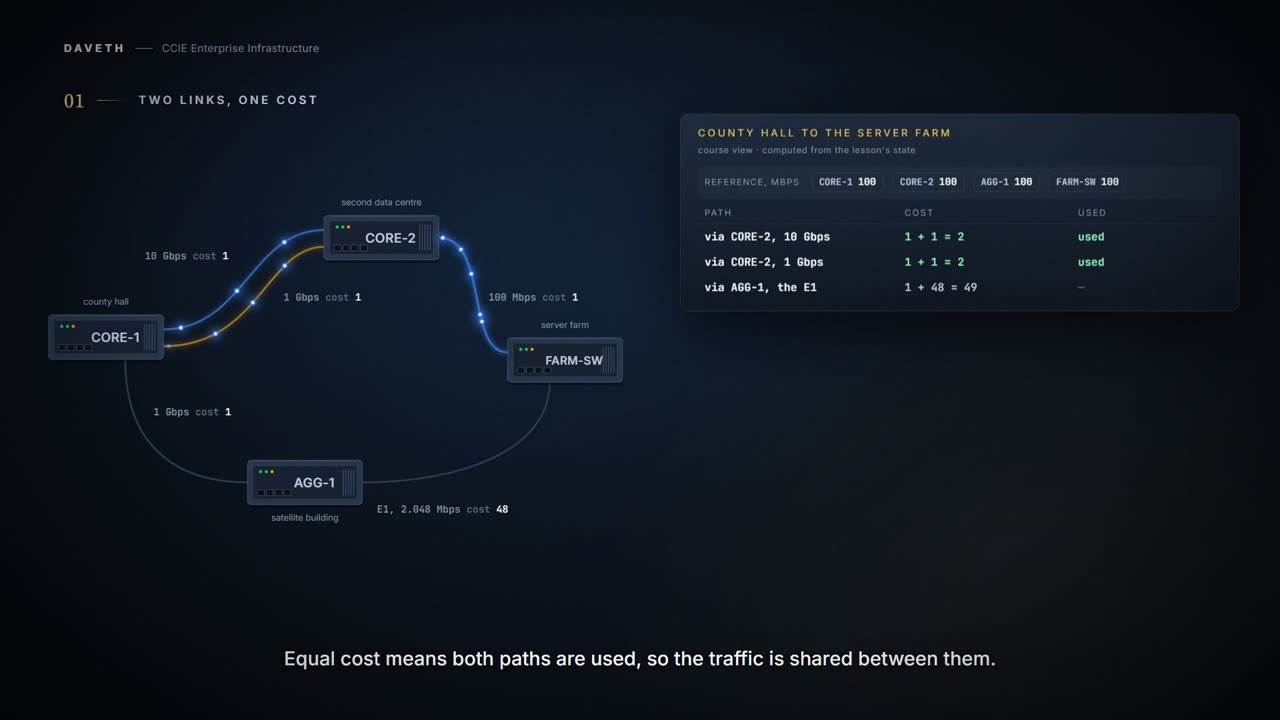
A county council has two links between county hall and its second data centre: a 10-gigabit fibre put in last year, and the gigabit link it was bought to replace. Both are up, both are in OSPF, and OSPF has given them the same cost. Not close. The same integer.
Computed from the state, every link on this network and what it costs, read the two rows for the parallel pair. No command prints it in this form.
link        bandwidth      router   cost   from      reference
c1-c2-fast  10 Gbps        CORE-1   1      formula   100 Mbps
c1-c2-fast  10 Gbps        CORE-2   1      formula   100 Mbps
c1-c2-slow  1 Gbps         CORE-1   1      formula   100 Mbps
c1-c2-slow  1 Gbps         CORE-2   1      formula   100 Mbps
c2-dc       100 Mbps       CORE-2   1      formula   100 Mbps
c2-dc       100 Mbps       FARM-SW  1      formula   100 Mbps
c1-agg      1 Gbps         CORE-1   1      formula   100 Mbps
c1-agg      1 Gbps         AGG-1    1      formula   100 Mbps
agg-dc      2.048 Mbps     AGG-1    48     formula   100 Mbps
agg-dc      2.048 Mbps     FARM-SW  48     formula   100 Mbps
Ten gigabit and one gigabit, tied. The new link is faster in every way that matters to the people paying for it, and OSPF is still measuring it with the ruler it was given. The cables got quicker. The ruler did not grow with them.
Equal cost means both are in the routing table, so the traffic is shared between them. Half the council's server traffic goes down a link that can carry a tenth of what the one beside it can. The gigabit link runs flat out in the afternoons, the fibre is nearly idle, nothing is logged and no router is misconfigured.
Computed from the state, the ways from county hall to the server farm, read the in-the-table column. No command prints it in this form.
path                              cost   in the table  narrowest link
CORE-1 > CORE-2 > FARM-SW         2      yes           100 Mbps
CORE-1 > CORE-2 > FARM-SW         2      yes           100 Mbps
CORE-1 > AGG-1 > FARM-SW          49     no            2.048 Mbps
Before you go looking for a fault, notice that there is not one. It is a default doing exactly what it says, and what it says was decided when the fastest thing you could plug into a router was a hundred megabits.
One division
The cost of an interface is one division, and the pages that document it agree on what is being divided:
In Cisco IOS Release 10.3 and later releases, by default OSPF calculates the OSPF metric for an interface according to the bandwidth of the interface Default Metrics: OSPF calculates the OSPF metric for an interface according to the bandwidth of the interface.
A reference bandwidth, divided by the interface's bandwidth. The reference has a default, and the default is where the whole of this lesson lives:
The range is from 1 to 4294967; the default is 100.
100 Mbps. So a 100 Mbps interface divides to exactly 1, and everything faster divides to less than 1, which is the sentence to carry out of this page. Read the cost column above again: the 10-gigabit link and the gigabit link are both 1 because both of them ran off the end of a scale that stops at a hundred megabits.
If you have multiple links with high bandwidth (such as FDDI or ATM), you might want to use a larger number to differentiate the cost on those links.
That is the command reference telling you, in its own usage guidelines, that the default has a ceiling and here is what to do about it. The advice is twenty-odd years old and still correct; what has changed is that multiple links with high bandwidth now describes an ordinary access switch.
The number the documentation cannot quite show you
Now read the formula itself, and notice a problem with reading it. Here are three pages stating the same rule. Read the number in each:
The OSPF metric is calculated as the ref-bw value divided by the bandwidth value, with the ref-bw value equal to 108 by default, and the bandwidth value determined by the bandwidth interface configuration command.
The OSPF metric is calculated as the ref-bw value divided by the bandwidth , with mbps equal to 108 by default, and bandwidth determined by the bandwidth (interface) command.
Cost is calculated with this formula: 108 / bandwidth (in bits per second [bps])
One hundred and eight? No. On all three pages that exponent is a superscript: ten to the eighth, a hundred million bits per second, which is 100 Mbps. Copied out as text the superscript collapses and "10⁸" becomes "108". A fourth page does something worse:
The metric is calculated as ref-bw divided by bandwidth, where ref is 10 by default, and bandwidth (bw ) is specified by the bandwidth interface configuration command.
There it collapses to a bare 10. Same rule, same vendor, three renderings, and none of them says what it means once the formatting is gone. The first version of this page quoted it as 10^8, twice and in quotation marks, and that string is on none of these pages. It was a reasonable thing to write and a wrong thing to put in quotation marks, and the citation ledger recorded it as verified, which is how a small edit becomes a permanent one.
So: read a formula off a rendered page and you may be reading the formatting, not the formula. When the exponent matters, get it from a number you can check, and this rule has eight of those.
What the fraction does
The formula leaves one question open: 100 Mbps divided by 1.544 Mbps is 64.76, and a cost is an integer. What happens to the .76? No page consulted states a rule. But the command reference publishes a list of default costs, and the list answers it:
In general, the path cost is calculated using the following formula: 108 / bandwidth 56-kbps serial link--Default cost is 1785 64-kbps serial link--Default cost is 1562 T1 (1.544-Mbps serial link)--Default cost is 64 E1 (2.048-Mbps serial link)--Default cost is 48 4-Mbps Token Ring--Default cost is 25 Ethernet--Default cost is 10 16-Mbps Token Ring--Default cost is 6 FDDI--Default cost is 1
Put every one of those through the division yourself, and then compare. Read the last column before you read anything else:
Computed from the state (the published list, divided out) read the last column before anything else. No command prints it in this form.
link type                     bandwidth   division    published  truncated?
56-kbps serial link           56 kbps     1785.71     1785       yes
64-kbps serial link           64 kbps     1562.50     1562       yes
T1 (1.544-Mbps serial link)   1.544 Mbps  64.77       64         yes
E1 (2.048-Mbps serial link)   2.048 Mbps  48.83       48         yes
4-Mbps Token Ring             4 Mbps      25.00       25         exact
Ethernet                      10 Mbps     10.00       10         exact
16-Mbps Token Ring            16 Mbps     6.25        6          yes
FDDI                          100 Mbps    1.00        1          exact
Every published value is the quotient with the fraction dropped, and four of them would be a different number if it rounded. A 64-kbps link is 1562.5 and the list says 1562, not 1563. A T1 is 64.76 and the list says 64, not 65. An E1 is 48.83 and the list says 48, not 49. A 56-kbps link is 1785.71 and the list says 1785, not 1786.
By this course's reading, then, the fraction is discarded rather than rounded, and that is a derivation from eight published numbers, not a quotation, because no sentence on any of these pages states the rule. The command reference is also clear that the list is a starting point rather than a law:
If these values do not suit your network, you can use your own method of calculating path costs.
You have met this shape before, in 1.3.b.ii. The classic EIGRP metric bottoms out the same way: a formula built for an era of slow links stops telling two fast links apart, and every interface above the ceiling scores the same. A metric that cannot separate two paths is not a metric, it is a formality.
One value in the list needs no arithmetic at all, and it is the one that pins the ceiling:
The calculation gives FDDI a metric of 1. FDDI--Default cost is 1
FDDI is 100 Mbps, so it is exactly 1 with nothing left over. Anything faster divides to less than one and is still published as 1: the list gives ATM a cost of 1 too, without saying what bandwidth it assumes. That a sub-one result becomes 1 rather than 0 is the one part of this arithmetic this page takes on inference rather than on a stated rule, and it says so here rather than burying it.
Raising the reference
The command is one line. Before you read it, ask yourself what number you would choose, and on how many routers. The command reference publishes a worked example of exactly the change this council needs:
The following example changes the cost of the FDDI link to 10, while the gigabit Ethernet link remains at a cost of 1. Thus, the link costs are differentiated.
Reference 1000, FDDI 10, gigabit 1: the same division, done against a bigger number, and suddenly two speeds that used to tie do not. The council needs one more decimal place than that, because its fast link is ten gigabits.
One line, then. On how many of these four routers does it need to go?
Configuration: the reference raised on CORE-1, and the same line typed on CORE-2, in the forms these commands take.
CORE-1# configure terminal
CORE-1(config)# router ospf 1
CORE-1(config-router)# auto-cost reference-bandwidth 10000
CORE-1(config-router)# end
And it is raised on the two cores, because that is where the fast links are. AGG-1 in the satellite building has nothing faster than a gigabit, so its arithmetic is unchanged by a bigger reference.
And here is the part that turns this into a long evening. Change the reference on two routers and the rest carry on with their own arithmetic. Every neighbour stays Full. Nothing goes down, nothing logs, and the path choices quietly stop agreeing with each other. People measuring one job with two different rulers still hand you a plan; it is just not the same plan.
Computed from the state, the ways to the server farm now, read the cost column, then the in-the-table column. No command prints it in this form.
path                              cost   in the table  narrowest link
CORE-1 > AGG-1 > FARM-SW          58     yes           2.048 Mbps
CORE-1 > CORE-2 > FARM-SW         101    no            100 Mbps
CORE-1 > CORE-2 > FARM-SW         110    no            100 Mbps
The traffic has left the data centre. It goes out of county hall towards the satellite building and crosses a 2.048 Mbps leased line to reach servers that are sitting next to a 10-gigabit core.
Continue the lesson
The whole lesson, with its drawings and its questions. 5 more sections after the ones above.