
OSPFv3 address families
OSPFv3 can carry IPv4 routes as well as IPv6, so a network already running OSPFv3 can use the same IGP for both. Each interface joins a family with ospfv3 process area area ipv4 or ipv6. The families are separate conversations that use the same message format, each with its own adjacencies, and the IPv4 family needs one thing on every link: IPv4 addresses.
By Arif, founder of Daveth · Updated
The full 6 min walkthrough is in Daveth Pro (Network). See what the plan opens
What this page answers
Can OSPFv3 carry IPv4 routes?
Yes, with address families. Users with an IPv6 network running OSPFv3 can use the same IGP to carry and install IPv4 routes; the IPv4 family runs its own instance with its own adjacencies. Read it in “IPv4 routes across an IPv6 network”
How do you enable an OSPFv3 address family on an interface?
With ospfv3 process-id area area-id ipv4 or ipv6 in interface configuration mode, under a router ospfv3 process with the matching address-family. Read it in “Start with IPv6”
Do OSPFv3 IPv4 and IPv6 address families share adjacencies?
No. Each address family establishes different adjacencies: the families are separate conversations that use the same message format, so IPv4 does not ride along on the IPv6 adjacency. Read it in “Add IPv4 beside it”
IPv4 routes across an IPv6 network
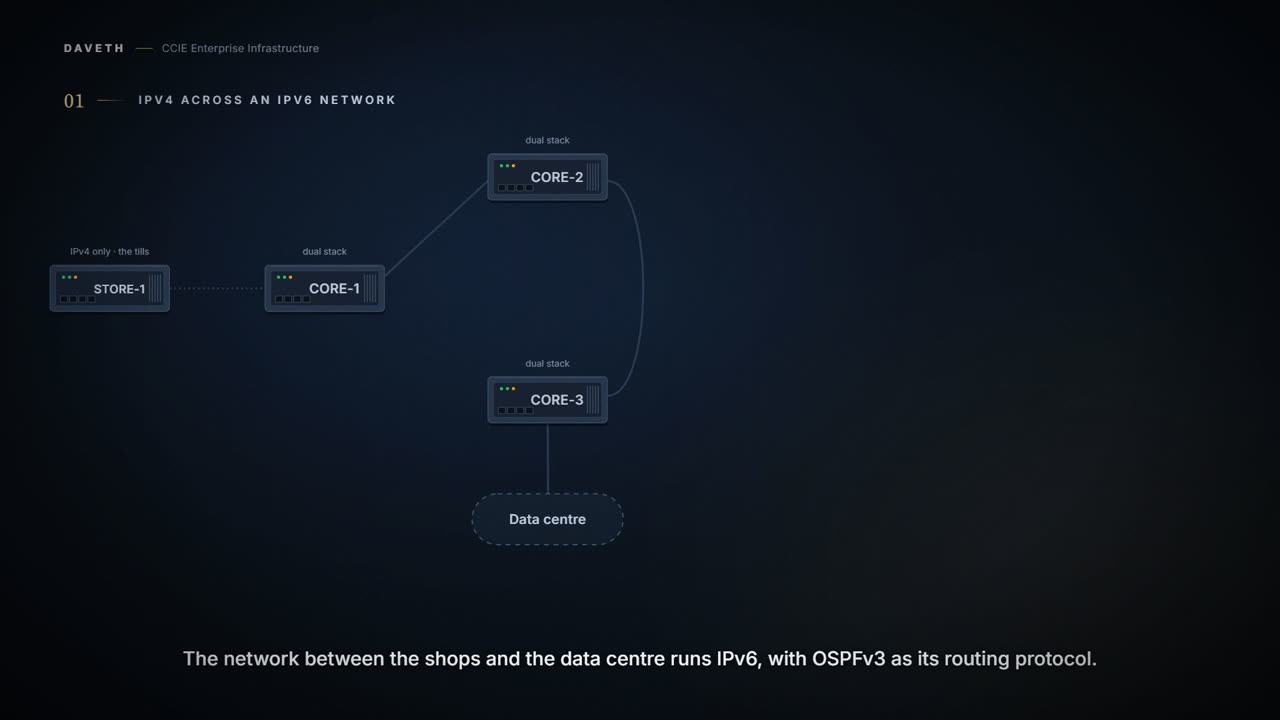
Picture a shop chain. The tills in each shop only speak IPv4. The network between the shops and the data centre was rebuilt on IPv6 and runs OSPFv3. How do the tills' IPv4 routes get across, without wrapping every packet in a tunnel?
Cisco's guide describes exactly that network:
Users with an IPv6 network that uses OSPFv3 as its IGP may want to use the same IGP to help carry and install IPv4 routes. All devices on this network have an IPv6 forwarding stack. Some (or all) of the links on this network may be allowed to do IPv4 forwarding and be configured with IPv4 addresses. Pockets of IPv4-only devices exist around the edges running an IPv4 static or dynamic routing protocol. In this scenario, users need the ability to forward IPv4 traffic between these pockets without tunneling overhead, which means that any IPv4 transit device has both IPv4 and IPv6 forwarding stacks (e.g., is dual stack).
Here, STORE-1 is the IPv4-only pocket, and CORE-1, CORE-2 and CORE-3 are the dual-stack routers between it and the data centre. Dual stack just means a router runs IPv4 and IPv6 side by side.
The Open Shortest Path First version 3 (OSPFv3) address families feature enables both IPv4 and IPv6 unicast traffic to be supported. With this feature, users may have two processes per interface, but only one process per address family (AF). An OSPFv3 process can be configured to be either IPv4 or IPv6.
An address family is simply the kind of address a set of routes is for: IPv4 or IPv6. So the guide's rule reads: an interface can have one OSPFv3 process for IPv4 and one for IPv6, and no more than one of each. By this course's reading of those two sentences, this unit gives each family its own process, number 6 for IPv6 and number 4 for IPv4.
From elsewhere: the router command. The names, numbers and addresses in it are the guide's.
Router(config)# router ospfv3 1
From elsewhere: the IPv6 family. The names, numbers and addresses in it are the guide's.
Router(config-router)# address-family ipv6 unicast
From elsewhere: the IPv4 family. The names, numbers and addresses in it are the guide's.
Router(config-router)# address-family ipv4 unicast
Enables OSPFv3 router configuration mode for the IPv4 or IPv6 address family.
Start with IPv6
The core already runs IPv6. Which command puts an interface into a family?
ospfv3 process-id area area-ID {ipv4 | ipv6 } [instance instance-id ] Enables OSPFv3 on an interface with the IPv4 or IPv6 AF.
From elsewhere: the guide's interface example. The names, numbers and addresses in it are the guide's.
Device(config-if)# ospfv3 1 area 1 ipv4
From elsewhere: IPv6 forwarding, from the Catalyst 9300 guide. The names, numbers and addresses in it are the guide's.
Device(config)# ipv6 unicast-routing
Enables forwarding of IPv6 unicast data packets.
Configuration: CORE-1's IPv6 process and its link to CORE-2, in the forms these commands take; the addresses, process numbers and names are this course's own.
CORE-1# configure terminal
CORE-1(config)# ipv6 unicast-routing
CORE-1(config)# router ospfv3 6
CORE-1(config-router)# address-family ipv6 unicast
CORE-1(config-router-af)# interface GigabitEthernet0/0/1
CORE-1(config-if)# ipv6 address 2001:db8:0:12::1/64
CORE-1(config-if)# ospfv3 6 area 0 ipv6
CORE-1(config-if)# end
Proves: The interface configuration proves which families the interface is configured for, and whether IPv6 is enabled on it. Does not prove: that the router at the other end is configured the same way, or that any adjacency has formed.
Computed from the state: adjacencies on each link. No command prints it.
link                IPv4 family         IPv6 family
CORE-1 to CORE-2    -                   adjacent
CORE-2 to CORE-3    -                   adjacent
CORE-1 to CORE-3    -                   -
Computed from the state: routes to the data centre. No command prints it.
10.30.1.0/24          no route
2001:db8:30:1::/64    intra-area, via CORE-2
An adjacency is two routers agreeing to swap routing information. Look at the table: the IPv6 column is up on both core links, and there is no IPv4 route yet.
Add IPv4 beside it
Now the same two links get IPv4 addresses and the IPv4 family. Does IPv4 ride along on the IPv6 adjacency, or get its own?
Configuration: what CORE-1 adds for IPv4: the IPv4 process, and an address and the family on its link to CORE-2, in the forms these commands take; the addresses, process numbers and names are this course's own.
CORE-1# configure terminal
CORE-1(config)# router ospfv3 4
CORE-1(config-router)# address-family ipv4 unicast
CORE-1(config-router-af)# interface GigabitEthernet0/0/1
CORE-1(config-if)# ip address 10.0.12.1 255.255.255.0
CORE-1(config-if)# ospfv3 4 area 0 ipv4
CORE-1(config-if)# end
Each AF establishes different adjacencies, has a different link state database, and computes a different shortest path tree. The AF then installs the routes in AF-specific RIB.
In plain words: each family has its own neighbor relationships, its own copy of the network map (the link-state database), its own best-path calculation (the shortest path tree), and its own routing table.
Computed from the state: adjacencies with both families. No command prints it.
link                IPv4 family         IPv6 family
CORE-1 to CORE-2    adjacent            adjacent
CORE-2 to CORE-3    adjacent            adjacent
CORE-1 to CORE-3    -                   -
Computed from the state: routes to the data centre. No command prints it.
10.30.1.0/24          intra-area, via CORE-2
2001:db8:30:1::/64    intra-area, via CORE-2
Notice two adjacencies on each wire. Same cable, same two routers, one per family.
LSAs that carry IPv6 unicast prefixes are used without any modification in different instances to carry each AFs’ prefixes. The address-family command is used to determine which AF will run in the OSPFv3 process, and only one address family can be configured per instance. Different instance ID ranges are used for each AF. A single IPv4 or IPv6 OSPFv3 process running multiple instances on the same interface is not supported.
So the families are separate conversations that use the same message format. The first version of this lesson said they were about as related as OSPF and EIGRP, which the guide's sentence on LSAs does not support.
A direct link for IPv4 only
The shop traffic should take a shorter path, so a direct CORE-1 to CORE-3 link goes in, for IPv4 only. Each end gets an IPv4 address and the IPv4 family. What happens?
Configuration: the direct link, IPv4 only, in the forms these commands take; the addresses, process numbers and names are this course's own.
CORE-1# configure terminal
CORE-1(config)# interface GigabitEthernet0/0/2
CORE-1(config-if)# ip address 10.0.13.1 255.255.255.0
CORE-1(config-if)# ospfv3 4 area 0 ipv4
CORE-1(config-if)# end
Computed from the state: adjacencies with the direct link. No command prints it.
link                IPv4 family         IPv6 family
CORE-1 to CORE-2    adjacent            adjacent
CORE-2 to CORE-3    adjacent            adjacent
CORE-1 to CORE-3    down                -
Look at the last row: the IPv4 family is down on the direct link. Both ends have an IPv4 address and the IPv4 family, and neither has IPv6. Cisco's guide makes IPv6 a condition:
To use the IPv4 unicast address families (AF) in OSPFv3, you must enable IPv6 on a link, although the link may not be participating in IPv6 unicast AF. If the AF is IPv4, an IPv4 address must first be configured on the interface, but IPv6 must be enabled on the interface.
Yes, you have to switch on IPv6 so a link can carry IPv4. The tills will never know.
Continue the lesson
The whole lesson, with its drawings and its questions. The rest of this section and 4 more after it.