
OSPF graceful shutdown
Pull the power and neighbours keep sending traffic until their dead interval expires. OSPF graceful shutdown temporarily shuts OSPF down and notifies neighbours instead. On an interface, ip ospf shutdown sends a link-state update saying it is going down and keeps all the interface's OSPF configuration. Under router ospf, shutdown applies to that one instance, and a second process is not part of it.
By Arif, founder of Daveth · Updated
The full 7 min walkthrough is in Daveth Pro (Network). See what the plan opens
What this page answers
What does ip ospf shutdown do?
It gracefully shuts OSPF down on one interface: the interface sends a link-state update telling neighbours it is going down, OSPF stops advertising it or forming adjacencies over it, and its OSPF configuration is retained. no ip ospf shutdown restarts it. Read it in “The smaller scope, and what goes down the wire”
How do you gracefully shut down OSPF on a router?
Use shutdown in router ospf configuration mode. It applies to the current OSPF instance only, so on a router with two processes the other one keeps running. Read it in “The bigger scope, and the word that limits it”
A change window, and a router to reload
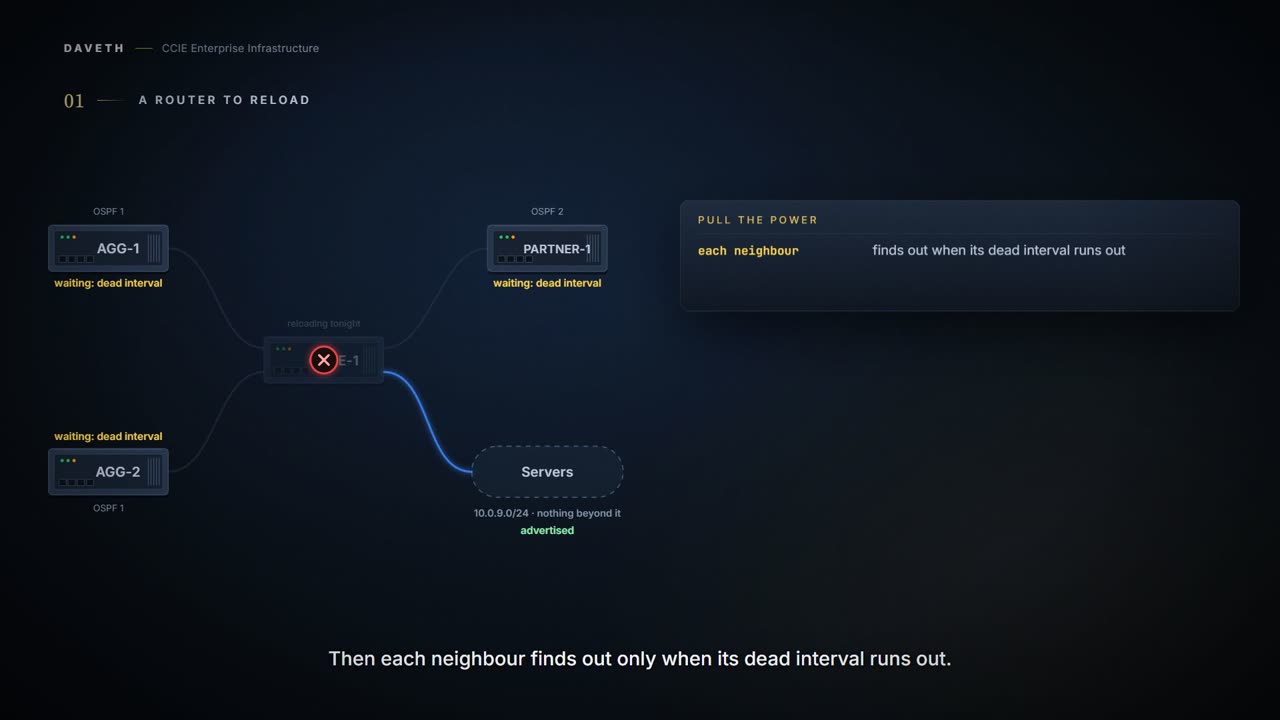
CORE-1 comes out at two in the morning. Two aggregation switches sit behind it, a partner organisation hangs off it on a second OSPF process, and a server network is attached to it directly.
The crude way is to pull the power. Where nothing tells a neighbour that its link has gone, it finds out when the dead interval expires, and for those seconds it goes on handing traffic to a router that has already gone.
Recall from 1.3.c.v: announcing a departure beats being discovered, and that lesson put a number on the difference. EIGRP announces with a goodbye message. OSPF has its own answer, and this is it, so this page spends its length on the part EIGRP did not have to decide: how much do you take down?
Temporarily, and notify
The OSPF Graceful Shutdown feature provides the ability to temporarily shut down the OSPF protocol in the least disruptive manner and notify its neighbors that it is going away.
Two words carry the sentence. Temporarily: an operational state you enter and leave, not a way of decommissioning anything. Notify: the neighbours are told rather than left to work it out.
And then a third sentence, which sits in the middle of that same paragraph and decides how much comfort the first two are worth:
All traffic that has another path through the network will be directed to that alternate path.
Read the qualifier rather than the promise. Traffic that has another path is directed to it. Traffic that has not, is not. The page is being precise rather than reassuring, and the difference between those two readings is the whole of the last section on this page.
The feature is offered at two scopes, and the page introduces both in the same breath:
A graceful shutdown of the OSPF protocol can be initiated using the shutdown command in router configuration mode. This feature also provides the ability to shut down OSPF on a specific interface. To initiate a graceful shutdown of an interface, use the ip ospf shutdown command in interface configuration mode.
The smaller scope, and what goes down the wire
Start with one interface, because the documentation is most explicit there.
In this case, OSPF will not advertise the interface or form adjacencies over it; however, all of the OSPF interface configuration will be retained.
Read that in two halves; they say opposite things. The first half is what stops: no advertisement, no adjacency. The second is what does not: the configuration stays.
Which makes the command exactly what its name promises. You already know what shutdown does to an interface: an administrative state laid over a configuration that remains intact, reversed by typing no. This is that, applied to OSPF rather than to the link. There is something quietly satisfying about a feature whose entire user interface is a word you already type every day, one level up.
Configuration: the command reference's own example, reproduced line for line.
Router(config)# interface ethernet 0/2
Router(config-if)# ip ospf shutdown
So how are the neighbours told? The overview prose does not say. Step four of the same page's configuration procedure does:
Initiates an OSPF protocol graceful shutdown at the interface level. When the ip ospf shutdown interface command is entered, the interface on which it is configured sends a link-state update advising its neighbors that is going down, which allows those neighbors to begin routing OSPF traffic around this router.
A link-state update. Worth holding as a mechanism rather than a reassurance: the neighbours are not sent a special goodbye packet. They are sent the ordinary machinery of OSPF, carrying news that makes them recompute, which is why the page can describe the result as letting them begin routing OSPF traffic around this router.
The command reference adds the reverse and a keyword worth knowing mostly so you stop hunting for it:
To initiate an graceful shutdown of Open Shortest Path First (OSPF) protocol at the interface level, use the ip ospf shutdown command in interface configuration mode. To restart the OSPF protocol on an interface, use the no form of this command. Use the ip ospf shutdown command to put OSPF in shutdown mode under a specific interface.
Disables the initiation of the OSPF graceful shutdown at the interface level; OSPF stays active at the interface level. This keyword is available only in virtual network interface mode.
disable is not a general way of overriding the shutdown. It exists on the interface command and then the same page removes it from almost everywhere: only in virtual network interface mode. On an ordinary link the answer is no ip ospf shutdown, and disable is something you will meet in a virtual network and nowhere else.
If the ip ospf shutdown command is enabled for a virtual network and you want to disable it, use the disable keyword in virtual network interface configuration mode. OSPF stays active at the interface level.
The bigger scope, and the word that limits it
The work has grown; the whole router is coming out. shutdown, under router ospf 1.
CORE-1 runs two OSPF processes. Process 1 carries the campus: both aggregation links and the server network. Process 2 carries a single link to a partner organisation, and it has been there since before anybody currently on the change board joined.
Before you read on: what happens to the partner adjacency?
To initiate a graceful shutdown of the Open Shortest Path First (OSPF) protocol under the current instance, use the shutdown command in router configuration mode. OSPF stays active under the current instance.
Under the current instance. Not "on this router". Every process 1 adjacency drops; the partner adjacency does not move. CORE-1 has not left OSPF: it is still an OSPF router, still adjacent, still advertising the partner prefix. It has shut down one instance.
The router leaves OSPF is a fair description of a router with one process. On a router with two it is wrong, and it is wrong in the direction that matters: the routers carrying a second process are the ones with a partner link, a management network or an old acquisition on them, which are exactly the ones where an unexpected survivor or an unexpected casualty gets noticed.
Use the shutdown command in router configuration mode to temporarily shut down a protocol in the least disruptive manner and to notify its neighbors that it is going away. To restart the OSPF protocol, use the no form of this command.
The command reference points each command at the other, and the two sentences together are the tidiest statement of the scopes on any page consulted:
Initiates a graceful shutdown on a specific OSPF interface. Initiates a graceful shutdown of the OSPF protocol under the current instance.
One says on a specific OSPF interface. The other says under the current instance. Neither says "on this router", and between them that is the whole of the choice this lesson exists to help you make.
Configuration: the process-level command against this scenario, in the form the command reference gives it.
CORE-1# configure terminal
CORE-1(config)# router ospf 1
CORE-1(config-router)# shutdown
CORE-1(config-router)# end
Continue the lesson
The whole lesson, with its drawings and its questions. 5 more sections after the ones above.