
OSPF TTL security (GTSM)
Everything that identifies an OSPF packet's sender is written by the sender, except one number that only goes down: the TTL. With TTL security, OSPF sends packets with a TTL of 255 and drops those arriving below a threshold, so a packet from a direct neighbour arrives at 255 and one from two hops away at 254. The default hop-count of 1 accepts 255 only.
By Arif, founder of Daveth · Updated
The full 6 min walkthrough is in Daveth Pro (Network). See what the plan opens
What this page answers
How does OSPF TTL security work?
OSPF sends packets with a TTL of 255 and discards packets with a TTL below a configured threshold. A directly connected neighbour's packets arrive at 255; a packet from further away arrives lower and is dropped, whatever its source address says. Read it in “The one number that only goes down”
How do you enable OSPF TTL security?
Router-wide with ttl-security all-interfaces under router ospf, or per interface with ip ospf ttl-security. The hop-count is 1 to 254, with a default of 1, which accepts only TTL 255. Read it in “Turning it on”
Which field can it trust?
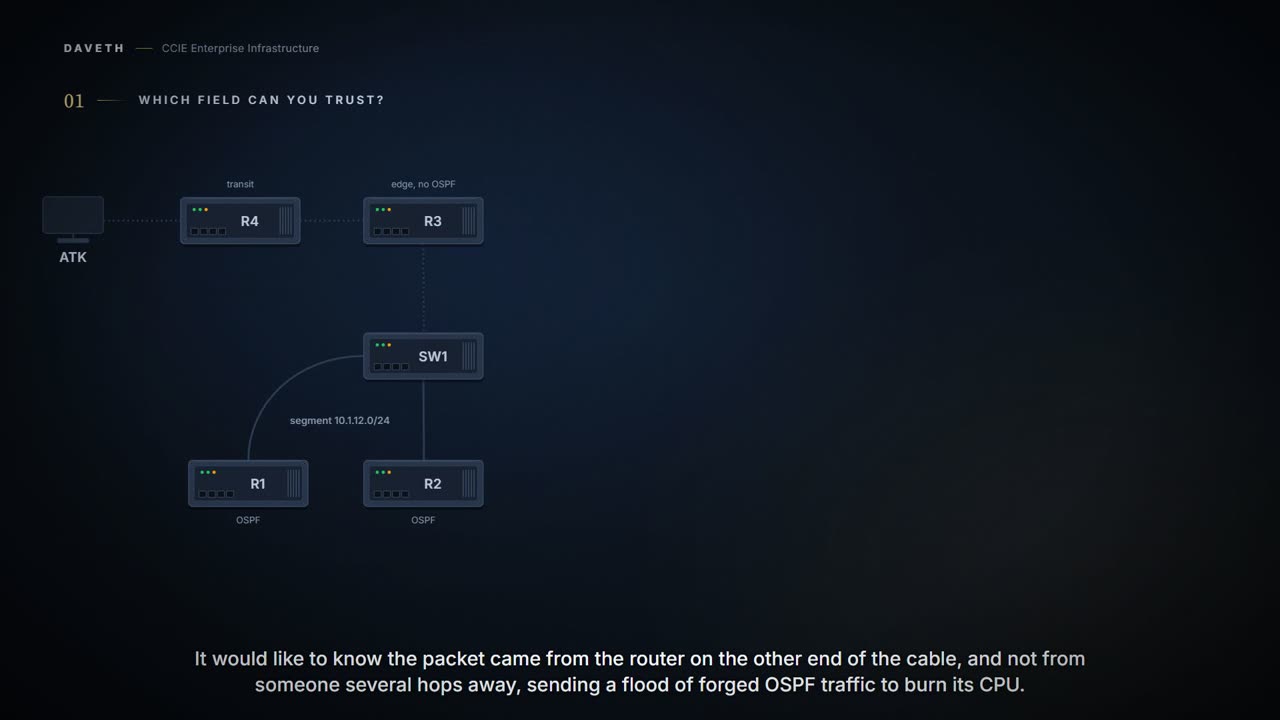
A router receives an OSPF packet. It would very much like to know the packet came from the device on the other end of the cable, and not from somebody several hops away sending a flood of forged OSPF traffic to burn its CPU.
So which field in that packet can it trust? Go through the candidates before reading on. Source address? The attacker writes whatever they like there. Router ID? In the payload they control. Everything that identifies the sender is written by the sender. So look for a field the sender can't control, and there is essentially one, and it wasn't designed for this at all.
The one number that only goes down
OSPF sends outgoing packets with an IP header Time to Live (TTL) value of 255 and discards incoming packets that have TTL values less than a configurable threshold. Since each device that forwards an IP packet decrements the TTL, packets received via a direct (one-hop) connection will have a value of 255. Packets that cross two hops will have a value of 254, and so on.
Now think it through from the attacker's side, because that is where the mechanism proves itself. ATK sets TTL 255; nothing stops it, it is ATK's packet. Then the packet crosses R4: 254. Then R3: 253. Every router that forwards it takes one off, and ATK can do nothing about that from where it stands. It can set the starting value. It can't stop the counting down, and it can't add any back. Step 1 of the walk.
So a received 255 is not a claim the sender makes. It is the arithmetic result of a path with no routers in it. A high TTL cannot be forged from a distance. The general principle is worth keeping: useful security checks test something an attacker cannot raise, not something they merely have to guess.
There's a pleasing accident in it, too. RFC 791 gave the field its job in 1981:
Say the asymmetry out loud, because it is the whole trick. The sender can put any number it likes in there. Every router on the way keeps subtracting, and nobody can add. So a big number on arrival is not a boast. It is a receipt for a short trip, and nobody along the way can write a bigger number.
The intention is to cause undeliverable datagrams to be discarded, and to bound the maximum datagram lifetime.
Four decades later, the field meant to let undeliverable datagrams die quietly turns out to be the one number in an IP header an attacker can't inflate. Not bad for a retirement job.
And what it buys, documented:
When this feature is enabled, a host cannot attack an OSPF session if the host is not a member of the local or remote OSPF network, or if the host is not directly connected to a network segment between the local and remote OSPF networks. This solution greatly reduces the effectiveness of Denial of Service (DoS) attacks against an OSPF autonomous system.
Turning it on
The guide gives two forms. Router-wide, under router ospf: ttl-security all-interfaces [hops hop-count]. Per interface: ip ospf ttl-security [hops hop-count | disable]. Which one does the walk need? One link to one neighbor, so the interface form.
This course's R1, as step 2 of the walk types it: the interface form, default hop-count.
R1# configure terminal
R1(config)# interface GigabitEthernet0/0
R1(config-if)# ip ospf ttl-security
R1(config-if)# end
The value for this hop-count argument is a number from 1 to 254, with a default of 1. The receive threshold is configured in terms of the maximum number of hops that a packet may have traveled. The disable keyword can be used to disable TTL security on an interface.
Now stop on the direction, because it is not what you would expect. Does a bigger hop-count make the check stronger or weaker? Weaker. The hop-count is how far away a sender is allowed to be, so raising it lets more distant senders through. The default of 1 is the strict setting, and the one you want.
This course's reading, not a quotation: the exact threshold. The guide never gives the formula, and its statements point two ways. Read as the maximum number of hops, with one hop arriving at 255 and two at 254, the default of 1 accepts 255 only. Read from hops 254 allows any value, the threshold is 255 minus the hop count, and the default accepts 254 too. The two readings differ on exactly one TTL, 254 at the default, and nothing on this page depends on it: the walk's packets arrive at 255, 253 or 1. The lab settles it on a router.
Deploying it without breaking anything
Here is the practical problem. What does an unconfigured neighbor put in the TTL of its hellos? RFC 2328:
Packets sent to these multicast addresses should never be forwarded; they are meant to travel a single hop only. To ensure that these packets will not travel multiple hops, their IP TTL must be set to 1.
So turn the check on at one end of a live segment and think about what happens. R1 now drops anything below its threshold, and R2's hellos arrive at 1. How does R2 then list R1? Step 2 of the walk asks it.
If one side of the connection has TTL security enabled, the other side shows the neighbor in the INIT state.
Why INIT? R2 still hears R1, whose hellos now arrive at 255. But R1 has stopped hearing R2, so R1's hellos no longer list R2. RFC 2328's definition of the state:
However, bidirectional communication has not yet been established with the neighbor (i.e., the router itself did not appear in the neighbor's Hello packet).
So a check configured on one router changes what the other one reports. Only R1 was touched, and R2 is the device showing the odd state, which is worth expecting before it happens: whoever is handed this symptom will start on the router that looks wrong, and the change is on the other one.
You have caused an outage by turning on a security feature. The guide's answer is the least disruptive order:
set the hop-count argument to 254. This setting causes outgoing packets to be sent with a TTL value of 255, but allows any value for input packets. Later, once the device at the other end of the link has had TTL security enabled you can start enforcing the hop limit for the incoming packets by using the same ip ospf ttl-security command with no hop count specified. This process ensures that OSPF packets will not be dropped because of a temporary mismatch in TTL security.
Continue the lesson
The whole lesson, with its drawings and its questions. The rest of this section and 6 more after it.