
Soft reconfiguration and route refresh
Change an inbound route map and nothing happens to routes the old policy already rejected: they were discarded. A hard reset tears down the session and the TCP connection and deletes the peer's routes. Soft reconfiguration inbound stores every update received, at a cost in memory, so new policy applies without disruption. Route refresh, RFC 2918, asks the peer to send them again and stores nothing.
By Arif, founder of Daveth · Updated
The full 6 min walkthrough is in Daveth Pro (Network). See what the plan opens
What this page answers
What is the difference between soft reconfiguration and route refresh?
Soft reconfiguration inbound stores all updates received from the neighbour, using extra memory, and reapplies policy to that copy. Route refresh, defined in RFC 2918, stores nothing and asks the peer to send its routes again. Read it in “Two: ask the peer to send them again”
Why does a BGP route map change not take effect?
Policy applies as updates arrive. Routes the old policy rejected were discarded, so the session must be reset, hard or soft, before the new policy sees them. Read it in “A route map change”
What does a BGP hard reset do?
It tears down the peering session and the TCP connection and deletes the routes from that peer, so the router holds nothing from it until everything is sent again. Read it in “What the obvious command costs”
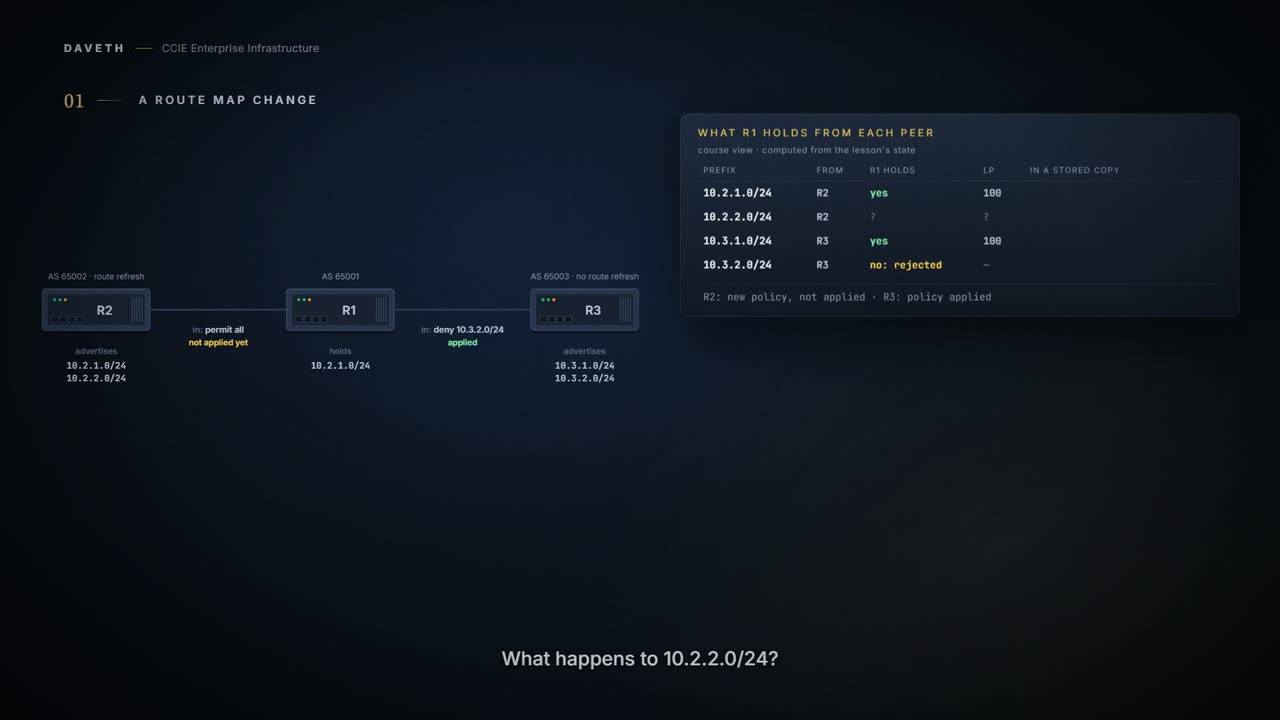
A route map change
You change an inbound route map on a BGP session. The configuration is accepted.
R1's policy toward R2 used to deny 10.2.2.0/24, and you have just changed it to permit everything. What happens to 10.2.2.0/24? Step 1 of the walk asks it.
Whenever the routing policy changes due to a configuration change, BGP peering sessions must be reset by using the clear ip bgp command.
The routes R1 holds are the ones that got through the old policy. The ones it rejected were evaluated, discarded, and are gone: R1 has no copy to look at again, so the new policy has nothing to run against. So you reach for the obvious command. Before you do, what does it cost?
What the obvious command costs
A hard reset tears down the specified peering sessions including the TCP connection and deletes routes coming from the specified peer.
Read all three things it does: tears down the peering session, tears down the TCP connection, deletes the routes. Step 2 of the walk: R1 has nothing from R2 until R2 has sent everything again. On a session carrying a large table, that is a real outage, and 1.5.a.ii-iii showed why BGP treats tearing a session down as expensive.
So the fix for a route map can't be the reset. The guide offers two better answers, and they come at the problem from opposite ends.
One: keep your own copy
Soft reconfiguration uses stored update information, at the cost of additional memory for storing the updates, to allow you to apply new BGP policy without disrupting the network. Soft reconfiguration can be configured for inbound or outbound sessions.
This page is about inbound, the direction the guide gives a procedure for.
The guide's example, as printed.
router bgp 100
 neighbor 192.168.1.1 remote-as 200
 neighbor 192.168.1.1 soft-reconfiguration inbound
Configures the Cisco software to start storing updates. All the updates received from this neighbor will be stored unmodified, regardless of the inbound policy. When inbound soft reconfiguration is done later, the stored information will be used to generate a new set of inbound updates.
Unmodified, regardless of the inbound policy. Stop on that, because it is the whole mechanism. The router keeps what it was sent, not what it accepted, so when the policy changes, the original updates are still there to run it against. Step 4 of the walk: R3's rejected 10.3.2.0/24 is still in R1's copy.
Can you see the copy? The guide prints it:
This peer does not support route refresh so the soft-reconfig inbound paths for BGP peer 192.168.3.2 will be stored because there is no other way to update any inbound policy updates. Both BGP peers are advertising 172.17.1.0/24, but only the received-only path is stored for 192.168.3.2.
The guide's show ip bgp sample, as printed.
BGP routing table entry for 172.17.1.0/24, version 11
Paths: (3 available, best #3, table Default-IP-Routing-Table, RIB-failure(4))
Flag: 0x820
 Advertised to update-groups:
    1
 50000
   192.168.3.2 from 192.168.3.2 (172.17.1.0)
     Origin incomplete, metric 0, localpref 200, valid, external
 50000, (received-only)
   192.168.3.2 from 192.168.3.2 (172.17.1.0)
     Origin incomplete, metric 0, localpref 100, valid, external
 40000
   192.168.1.2 from 192.168.1.2 (172.16.1.0)
     Origin incomplete, metric 0, localpref 200, valid, external, best
This course's reading, not a quotation: the path marked (received-only) is the stored copy, as the peer sent it (localpref 100). The 192.168.3.2 path above it is what the inbound policy made of the same update.
Now find the cost. It is in the definition: additional memory for storing the updates.
Note that the memory requirements for storing the inbound update information can become quite large.
And it is not paid when you change a policy. It is paid all the time, from the moment you configure it, for every update from that peer, whether or not you ever change a policy again.
There is a small irony here: an entire feature, and a memory bill the guide warns can become quite large, all so that nobody has to type one particular command.
Two: ask the peer to send them again
The route refresh capability, as defined in RFC 2918, allows the local device to reset inbound routing tables dynamically by exchanging route refresh requests to supporting peers. The route refresh capability does not store update information locally for nondisruptive policy changes.
Notice this is the opposite strategy. Instead of keeping a copy in case you need it, you ask the peer to send again, which is fine, because the peer has the routes anyway: they are its own advertisements. Nothing is stored between changes; you pay only at the moment you need it, and what you pay is one re-send. Step 3 of the walk.
Route refresh must first be advertised through BGP capability negotiation between peers. All BGP devices must support the route refresh capability. This command requires that the peer support the route refresh capability.
So both ends must support it, and the capability arrives through the negotiation the first sentence names. You can read whether it did:
Received route refresh capability from peer.
The guide's show ip bgp neighbors samples, as printed: a peer that supports route refresh, then one that does not.
BGP neighbor is 192.168.1.2,  remote AS 40000, external link
 Neighbor capabilities:
   Route refresh: advertised and received(new)

BGP neighbor is 192.168.3.2,  remote AS 50000, external link
 Neighbor capabilities:
   Route refresh: advertised
Look at the last line of each. advertised and received: both ends can do it. advertised alone: this router offered it and the peer did not, so for that peer the only soft reset is from a stored copy. One slip in the source: the guide's text before its neighbor samples names 192.168.2.1, while the output shows 192.168.1.2.
Continue the lesson
The whole lesson, with its drawings and its questions. 6 more sections after the ones above.