
BGP aggregation and as-set
aggregate-address creates one shorter prefix covering several longer ones, and on its own sends the aggregate as well as every more-specific route. summary-only filters the more-specifics out of the updates to every neighbour. The aggregate is advertised from your own AS, with ATOMIC_AGGREGATE set to say information may be missing; as-set puts the AS numbers of the routes inside back.
By Arif, founder of Daveth · Updated
The full 6 min walkthrough is in Daveth Pro (Network). See what the plan opens
What this page answers
What does summary-only do on a BGP aggregate?
It creates the aggregate and filters every more-specific route out of the updates, to every neighbour. Without it, the aggregate is sent as well as the routes it covers. Read it in “summary-only sends the aggregate alone”
What is the BGP ATOMIC_AGGREGATE attribute?
A marker set automatically on an aggregate, which is advertised as coming from your own AS, to say that path information from the routes inside it might be missing. It is a marker, not an instruction. Read it in “What the aggregate leaves out”
What options does aggregate-address take?
aggregate-address address mask, then optionally as-set, as-confed-set, summary-only, suppress-map, advertise-map and attribute-map. Read it in “The aggregate that added a route”
The aggregate that added a route
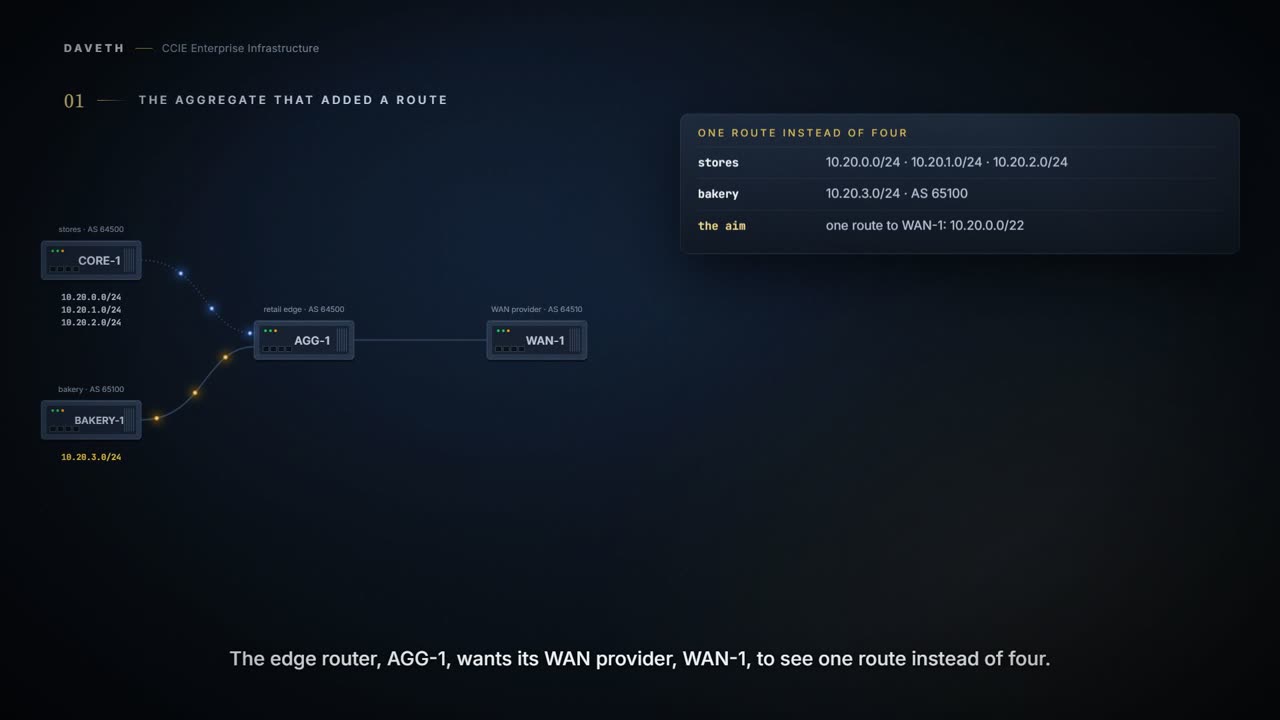
A retail chain, AS 64500, has three store regions behind CORE-1: 10.20.0.0/24, 10.20.1.0/24 and 10.20.2.0/24. It has just bought a bakery chain, BAKERY-1, which still runs its own AS, 65100, and advertises 10.20.3.0/24. The retailer's edge router, AGG-1, wants its WAN provider, WAN-1, to see one route instead of four.
An aggregate is one shorter prefix that covers several longer ones. 10.20.0.0/22 covers all four /24s, and each /24 is a more-specific route inside it. What does the command send?
The whole command is this shape, and everything after the mask is optional: aggregate-address <address> <mask> [as-set] [as-confed-set] [summary-only] [suppress-map <name>] [advertise-map <name>] [attribute-map <name>]. Read the brackets: the aggregate is created by the first three words, and every keyword after them changes something about what goes out. This page adds them one at a time.
Configuration: the plain aggregate, typed on AGG-1. The addresses, AS numbers and route-map names are this course's own.
AGG-1# configure terminal
AGG-1(config)# router bgp 64500
AGG-1(config-router)# neighbor 10.0.0.1 remote-as 64500
AGG-1(config-router)# neighbor 192.0.2.2 remote-as 65100
AGG-1(config-router)# neighbor 192.0.2.6 remote-as 64510
AGG-1(config-router)# aggregate-address 10.20.0.0 255.255.252.0
AGG-1(config-router)# end
Proves: The configuration proves which keywords the aggregate is built with. Does not prove: which routes any neighbor holds. An aggregate without summary-only looks just as finished in the configuration.
On its own, the command advertises the aggregate and all the more-specific routes it covers. It does not replace them. Nothing about creating a shorter prefix stops the longer ones being sent, and the plain form does not try to.
Computed from the state: what each neighbor is sent and keeps. No command prints it.
neighbor  route sent    path            kept
WAN-1     10.20.0.0/22  64500           yes
WAN-1     10.20.0.0/24  64500           yes
WAN-1     10.20.1.0/24  64500           yes
WAN-1     10.20.2.0/24  64500           yes
WAN-1     10.20.3.0/24  64500 65100     yes
BAKERY-1  10.20.0.0/22  64500           yes
BAKERY-1  10.20.0.0/24  64500           yes
BAKERY-1  10.20.1.0/24  64500           yes
BAKERY-1  10.20.2.0/24  64500           yes
BAKERY-1  10.20.3.0/24  64500 65100     no: own AS in the path
Count WAN-1's rows: five. A command named for combining routes has just added one.
Look at BAKERY-1's last row. Its own route came back with 65100 in the path, and it dropped that one: the loop check from 1.5.d.
Can you aggregate a range you know nothing about? No. Aggregation works on what is already in the BGP table: at least one more-specific route of the aggregate has to be there, or the aggregate is not created and nothing is advertised. The command is not a way to originate a prefix you do not have.
summary-only sends the aggregate alone
Which keyword stops the four /24s going out? summary-only. It creates the aggregate exactly as before and then filters every more-specific route out of the updates: to every neighbor, not a chosen few.
Configuration: adding summary-only, typed on AGG-1. The addresses, AS numbers and route-map names are this course's own.
AGG-1# configure terminal
AGG-1(config)# router bgp 64500
AGG-1(config-router)# no aggregate-address 10.20.0.0 255.255.252.0
AGG-1(config-router)# aggregate-address 10.20.0.0 255.255.252.0 summary-only
AGG-1(config-router)# end
Computed from the state: with summary-only. No command prints it.
neighbor  route sent    path            kept
WAN-1     10.20.0.0/22  64500           yes
BAKERY-1  10.20.0.0/22  64500           yes
WAN-1 and BAKERY-1 are each sent one route now. Read every neighbor as literally as it is written: the bakery lost its view of the three store /24s too, and reaches them through the aggregate.
And if a single /24 escapes anyway (leaked by another router, or by a policy nobody remembered) every BGP router will prefer it over your aggregate for the addresses it covers. Longest match means the router uses the most specific prefix that fits the address, so one leak quietly undoes the aggregation for that range and there is nothing in your own configuration to show it.
One component to watch: a network AGG-1 injects itself with a network statement. By this course's reading, do not assume summary-only suppresses that one: a locally injected entry can keep being advertised alongside the aggregate. None of AGG-1's components is one here, so this walk does not settle it; on your own network, check what you send rather than what you configured.
Where would you check what AGG-1 actually sends? In show ip bgp neighbors with the advertised-routes keyword, on the sending router. It lists the prefixes going to that one neighbor and finishes with a count of them, which is the number to read: it should fall by three the moment summary-only goes in.
Proves: That view proves which routes this router sends to that neighbor, including whether the more-specific routes are still going. Does not prove: that the neighbor kept them. BAKERY-1 is sent the aggregate at step three and drops it.
What the aggregate leaves out
Computed from the state: the aggregate itself. No command prints it.
aggregate     path            ATOMIC_AGGREGATE  communities
10.20.0.0/22  64500           set               none
Look at the path: 64500, nothing else. WAN-1 can't tell that one of the four routes inside came from AS 65100. How does BGP flag that?
With ATOMIC_AGGREGATE, which is set on the aggregate automatically: the aggregate is advertised as coming from your own AS, and the attribute goes on to say that information might be missing.
ATOMIC_AGGREGATE is a marker on the route, not an instruction. Read the verb: might. The marker says the path may be shorter than the routes it stands for, not that it certainly is, and nothing downstream is obliged to do anything about it.
That shortened path is not only a loss of detail. It is a loss of protection. A network that cannot see an AS in the path cannot use that AS to catch a loop, so aggregating away a component AS can let a route back into the network it came from, which is exactly what the loop check exists to stop.
And there is a second thing a shorter path hides, which is whether anything is there at all. A signpost that points at a whole block is right about the block and says nothing about the empty plot in the middle of it. You have told the internet you can reach a range. Every address in that range is now yours to answer for, including the parts of it nobody has built on.
Where the signpost stops: somebody walking down a street can see the empty plot when they arrive. BGP cannot. The aggregate is one route, it either exists or it does not, and traffic for the gap in the middle arrives at you exactly as confidently as traffic for the parts that work.
So one broad route can be covering several very different stories. You shortened the table. The reachability design still needs the whole truth, and the table is no longer where you will find it.
Continue the lesson
The whole lesson, with its drawings and its questions. 5 more sections after the ones above.