
4-byte and private AS numbers
AS numbers were two octets, 1 to 65535, until demand ran them out, and IANA began allocating four-octet numbers from 65536 to 4294967295. Cisco implements two of RFC 5396's notations: asplain, the decimal value, and asdot, where 4-byte numbers are written as two parts with a dot. Regular expressions match 4-byte numbers in asplain by default, which bgp asnotation dot changes.
By Arif, founder of Daveth · Updated
The full 6 min walkthrough is in Daveth Pro (Network). See what the plan opens
What this page answers
What is the difference between asplain and asdot?
Asplain writes every AS number as its decimal value, so 234567 is a 4-byte AS. Asdot writes 2-byte numbers in decimal and 4-byte numbers as two values with a dot, so the same AS is 1.169031. Read it in “Two notations, one default”
What is the 4-byte AS number range?
IANA allocates four-octet AS numbers from 65536 to 4294967295. Two-octet numbers, described in RFC 4271, run from 1 to 65535. Read it in “The field ran out”
Why did my AS-path filter stop matching after bgp asnotation dot?
Regular expressions match 4-byte AS numbers in asplain by default; bgp asnotation dot changes the output, and the format regular expressions match, so a filter written in asplain stops matching. Read it in “Switching the notation”
The filter that stopped matching
An AS-path filter that has worked for two years stops matching. Nobody touched the route map, the prefix list or the filter. The only change in the window was somebody typing bgp asnotation dot to make the output easier to read. Getting to why that broke routing policy means starting with what happened to the AS number itself.
The field ran out
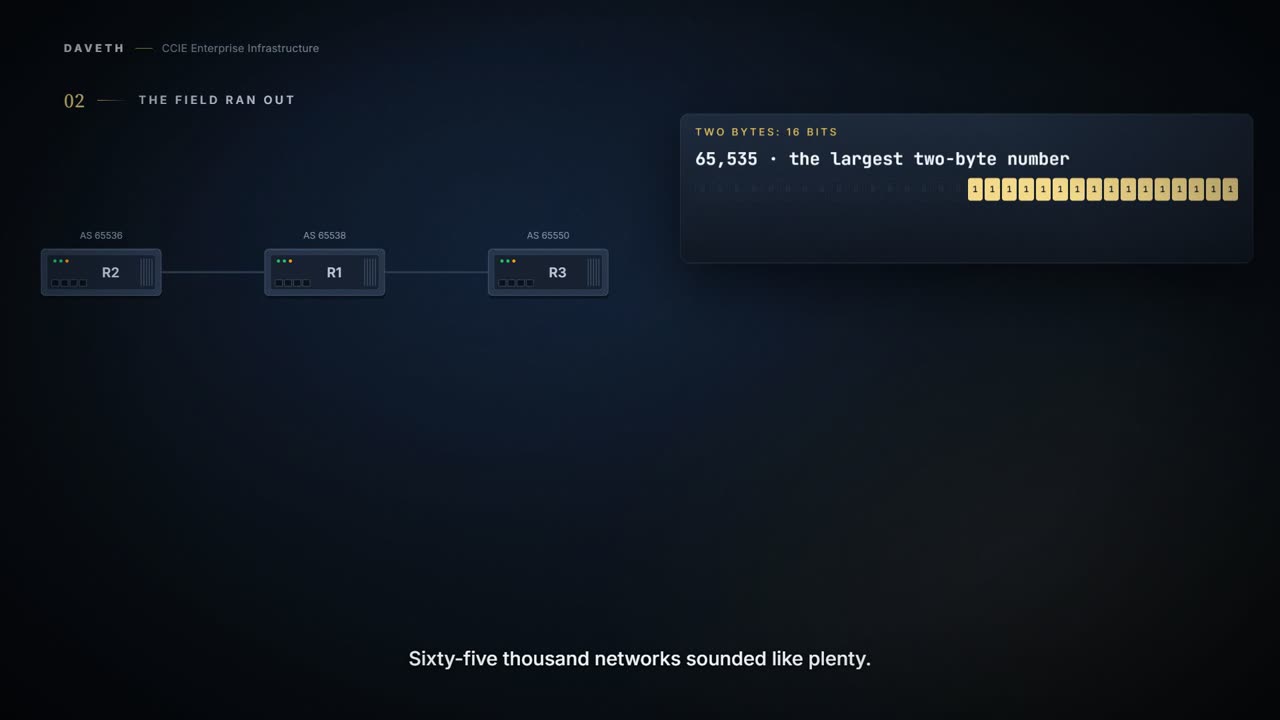
Prior to January 2009, BGP autonomous system (AS) numbers that were allocated to companies were 2-octet numbers in the range from 1 to 65535 as described in RFC 4271, A Border Gateway Protocol 4 (BGP-4). Due to increased demand for AS numbers, the Internet Assigned Number Authority (IANA) started to allocate four-octet AS numbers in the range from 65536 to 4294967295.
Sixty-five thousand networks sounded like plenty. It wasn't. Four billion should hold, but it brings a problem the old range didn't have: 4294967295 is a horrible thing to read, type or check against a diagram. So there is more than one way to write one.
Two notations, one default
RFC 5396, Textual Representation of Autonomous System (AS) Numbers, documents three methods of representing AS numbers. Cisco has implemented the following two methods: Asplain—Decimal value notation where both 2-byte and 4-byte AS numbers are represented by their decimal value. For example, 65526 is a 2-byte AS number and 234567 is a 4-byte AS number. Asdot—Autonomous system dot notation where 2-byte AS numbers are represented by their decimal value and 4-byte AS numbers are represented by a dot notation. For example, 65526 is a 2-byte AS number and 1.169031 is a 4-byte AS number (this is dot notation for the 234567 decimal number).
Asdot writes a 4-byte number as two parts, high and low. Look at how the guide converts its own numbers, and check the example against it:
these are the asdot conversions of the 65536 and 65550 AS numbers 4-byte: 1.0 to 65535.65535
This course's arithmetic, from the guide's own rule: 65536 is 1.0 and 65550 is 1.14, so asdot is high × 65536 + low, each part up to 65535. By that rule 234567 is 3.37959 (3 × 65536 + 37959), and 1.169031 cannot be an asdot number at all: its low part is over 65535. The guide's example pair is wrong.
Notice something that matters later: 2-byte numbers look the same in both notations. Only 4-byte numbers change. And the default:
In Cisco IOS XE Release 2.4 and later releases, the Cisco implementation of 4-byte AS numbers uses asplain as the default display format for AS numbers, but you can configure 4-byte AS numbers in both the asplain and asdot format. The show command output and regular expression match are not changed and remain in asplain (decimal value) format for 2-byte AS numbers regardless of the format configured for 4-byte AS numbers.
Switching the notation
In addition, the default format for matching 4-byte AS numbers in regular expressions is asplain, so you must ensure that any regular expressions to match 4-byte AS numbers are written in the asplain format. If you want to change the default show command output to display 4-byte autonomous system numbers in the asdot format, use the bgp asnotation dot command under router configuration mode.
R1's filter from R2 permits only ^65536$, and has for two years. R1 now runs bgp asnotation dot. What happens to R2's route? Step 2 of the walk asks it.
When the asdot format is enabled as the default, any regular expressions to match 4-byte AS numbers must be written using the asdot format, or the regular expression match will fail. This command affects only the output displayed for show commands or the matching of regular expressions. After enabling the bgp asnotation dot command, a hard reset must be initiated for all BGP sessions by entering the clear ip bgp * command.
So the guide does say it: the command changes the matching of regular expressions, not only what show prints, and it needs every session reset. After the reset, R2's path is the text 1.0, and an expression written for 65536 is looking for characters that are no longer there.
For a formatting preference, it asks a lot: the guide's own procedure for it ends with a hard reset of every BGP session on the router.
So what does the change look like on the router itself? The guide prints the same router before and after.
The guide's show ip bgp summary, before and after, as printed. Its router is in 65538 with neighbors in 65536 and 65550, the numbers the walk uses.
Router# show ip bgp summary
BGP router identifier 172.17.1.99, local AS number 65538
BGP table version is 1, main routing table version 1
Neighbor        V           AS MsgRcvd MsgSent   TblVer  InQ OutQ Up/Down  Statd
192.168.1.2     4       65536       7       7        1    0    0 00:03:04      0
192.168.3.2     4       65550       4       4        1    0    0 00:00:15      0
Router# show ip bgp summary
BGP router identifier 172.17.1.99, local AS number 1.2
BGP table version is 1, main routing table version 1
Neighbor        V           AS MsgRcvd MsgSent   TblVer  InQ OutQ Up/Down  Statd
192.168.1.2     4         1.0       9       9        1    0    0 00:04:13      0
192.168.3.2     4        1.14       6       6        1    0    0 00:01:24      0
And does the old expression still select anything?
The guide's show ip bgp regexp, after the change, as printed. The asplain expression prints nothing at all.
Router# show ip bgp regexp ^65536$

Router# show ip bgp regexp ^1\.0$

BGP table version is 2, local router ID is 172.17.1.99
Status codes: s suppressed, d damped, h history, * valid, > best, i - internal,
              r RIB-failure, S Stale
Origin codes: i - IGP, e - EGP, ? - incomplete
   Network          Next Hop            Metric LocPrf Weight Path
*> 10.1.1.0/24      192.168.1.2              0             0 1.0 i
Look at the first command. No error, no warning: an empty answer. That is what every policy using that expression now sees.
This course's reading, not a quotation: a filter whose only line is a permit denies whatever does not match, so on R1 the empty match means R2's route is denied. Written the other way round, as a deny line, it would let through what it was written to stop.
Continue the lesson
The whole lesson, with its drawings and its questions. The rest of this section and 5 more after it.