
BGP path attributes
The prefix is in the BGP table, the session is up, and the router will not use it. On eBGP the next hop is the neighbour's address; iBGP carries that eBGP next hop unchanged, so an internal router may have no route to it. next-hop-self on the advertising border router fixes it. Then sort the attributes by how far each travels: weight nowhere, local preference within the AS.
By Arif, founder of Daveth · Updated
The full 4 min walkthrough is in Daveth Pro (Network). See what the plan opens
What this page answers
Why is a BGP route in the table but not used?
Often its next hop is unreachable. iBGP carries the next hop that eBGP advertised unchanged, so an internal router may have no route to the external peer's address. Read it in “The next hop that isn't yours”
Where do you configure next-hop-self?
On the router that advertises the route, toward its iBGP peer: neighbor address next-hop-self. The symptom is on the receiving router; the change goes on the advertising one. Read it in “The fix, and where it goes”
How far do BGP attributes travel?
Weight goes nowhere: it is Cisco-defined and exists only on the router where it is set. Local preference stays within your AS. Sorting attributes by how far they go is easier than memorising a list. Read it in “Now sort the rest by how far they go”
The route you can't use
The prefix is in the table. You can see it in show ip bgp. The session is up, the AS_PATH looks right, nobody is filtering anything. The router will not use it.
It happens in the most ordinary iBGP design there is, a border router with eBGP outside and iBGP inside; it has nothing to do with filtering or policy; and the cause is one attribute behaving exactly as specified. 1.5.a.0 deferred it to this lesson.
The next hop that isn't yours
The BGP next hop attribute is the next hop IP address to use in order to reach a certain destination. For eBGP, the next hop is always the IP address of the neighbor that the neighbor command specifies.
On an eBGP session that is your peer's address on the shared link: connected, reachable, fine. Now the sentence that causes the opening:
For iBGP, the protocol states that the next hop that eBGP advertises must be carried into iBGP.
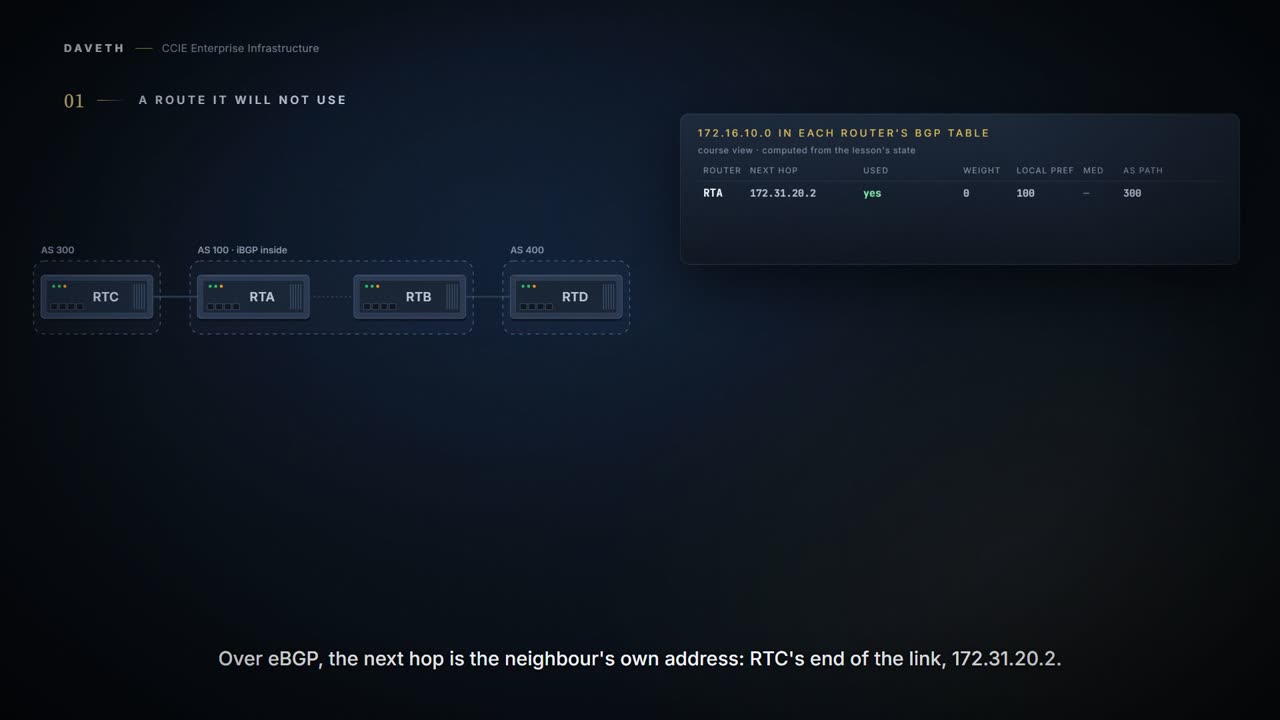
Carried into iBGP. Not replaced. Here is the case-studies document's own example: RTC in AS 300, RTA and RTB in AS 100.
The document's configuration, as printed, trailing spaces trimmed.
RTA#
router bgp 100
 neighbor 172.31.20.2 remote-as 300
 neighbor 192.168.150.10 remote-as 100
 network 172.31.202.2

RTB#
router bgp 100
 neighbor 10.150.10.30 remote-as 100

RTC#
router bgp 300
 neighbor 172.31.20.1 remote-as 100
 network 172.16.10.0
RTC advertises 172.16.10.0 to RTA with next hop 172.31.20.2, RTC's own address. RTA passes it to RTB with that same next hop. Ask yourself: does RTB have a route to 172.31.20.2? It is RTC's end of a link outside AS 100. The document says what happens if it does not:
Make sure that RTB can reach 172.31.20.2 via IGP. Otherwise, RTB drops packets with the destination of 172.16.10.0 because the next hop address is inaccessible.
And the best-path page puts it on the list of paths the router does not even consider:
Paths for which the NEXT_HOP is inaccessible. Be sure that there is an Interior Gateway Protocol (IGP) route to the NEXT_HOP that is associated with the path.
Nothing is broken. This is the specified behaviour. Steps 1 and 2 of the walk show it: the path arrives at RTB, and RTB cannot use it.
The fix, and where it goes
The next-hop-self command allows you to force BGP to use a specific IP address as the next hop.
The syntax, as the document prints it.
neighbor {ip-address | peer-group-name} next-hop-selfBefore reading on: on which router would you type it? On RTA, the advertising router, toward its iBGP peer. The symptom was on RTB; the change goes on RTA. It is the same the device with the problem is not the device showing the symptom shape you met with OSPF MTU in 1.4.a. With it, RTB receives RTA's own address as the next hop, which AS 100's IGP carries. That is step 3 of the walk.
Applied to the document's example: this course's line, in the document's syntax.
RTA# configure terminal
RTA(config)# router bgp 100
RTA(config-router)# neighbor 192.168.150.10 next-hop-self
RTA(config-router)# end
The other fix is not a BGP command at all: carry the provider's link subnet in your IGP, as the document's Make sure that RTB can reach suggests. It works, and it means running your IGP over an address block you do not control.
Now sort the rest by how far they go
The attributes are usually presented as a list to memorise. They sort themselves if you ask one question of each: how far does this travel?
WEIGHT: nowhere
The weight attribute is a Cisco-defined attribute. The value only makes sense to the specific router. The value is not propagated or carried through any of the route updates.
It exists only on the router where you set it. Step 4 of the walk sets it on RTA: RTB and RTD never see it.
LOCAL_PREF: your AS, and no further
Local preference is an indication to the AS about which path has preference to exit the AS in order to reach a certain network. Unlike the weight attribute, which is only relevant to the local router, local preference is an attribute that routers exchange in the same AS.
Exchange in the same AS. This is how you tell your whole network which exit to prefer: one setting on a border router, carried over iBGP, and every router in the AS agrees. Same kind of preference as WEIGHT; one router against the entire AS.
MED: one AS boundary, then it stops
The attribute is a hint to external neighbors about the path preference into an AS. A metric is carried into an AS but does not leave the AS. When the same update passes on to a third AS, that metric returns to 0.
Read all three. It is a hint; it travels into the neighboring AS; and a third AS sees 0. So MED is how you ask a neighbor to prefer one of your links over another, and the request stops at their border.
Which is worth sitting with, because it is the only attribute here that depends on somebody else agreeing. The neighbour weighs your suggestion against its own policy, and its own policy is decided before yours is even looked at. A suggestion that loses has not failed to arrive; it arrived and was outranked.
Continue the lesson
The whole lesson, with its drawings and its questions. The rest of this section and 6 more after it.