
AS path manipulation
Two warehouses share private AS 64512, and one cannot see the other's routes: BGP drops a path that already contains its own AS number. neighbor allowas-in on the receiving router turns that check off for one neighbour, three times by default. Private AS numbers, 64512 to 65535, must not leak into the global table, because they are not unique and best path needs unique numbers.
By Arif, founder of Daveth · Updated
The full 8 min walkthrough is in Daveth Pro (Network). See what the plan opens
What this page answers
What does BGP allowas-in do?
It lets a router accept routes whose AS path contains its own AS number, which the loop check otherwise drops. It goes on the receiving router, neighbor address allowas-in, with a count from 1 to 10 and a default of 3. Read it in “Turning the loop check off for one neighbor”
Why can't one site see another site with the same AS number?
BGP rejects a route whose AS path already contains its own AS number, to avoid loops. Two sites sharing an AS each see the other's routes as a loop. Read it in “The warehouse that can't see the stock system”
What is the private BGP AS range?
64512 to 65535 for 2-byte numbers; public numbers range from 1 to 64511. Private numbers cannot be leaked to the global BGP table because they are not unique. Read it in “A private number in another provider's table”
The warehouse that can't see the stock system
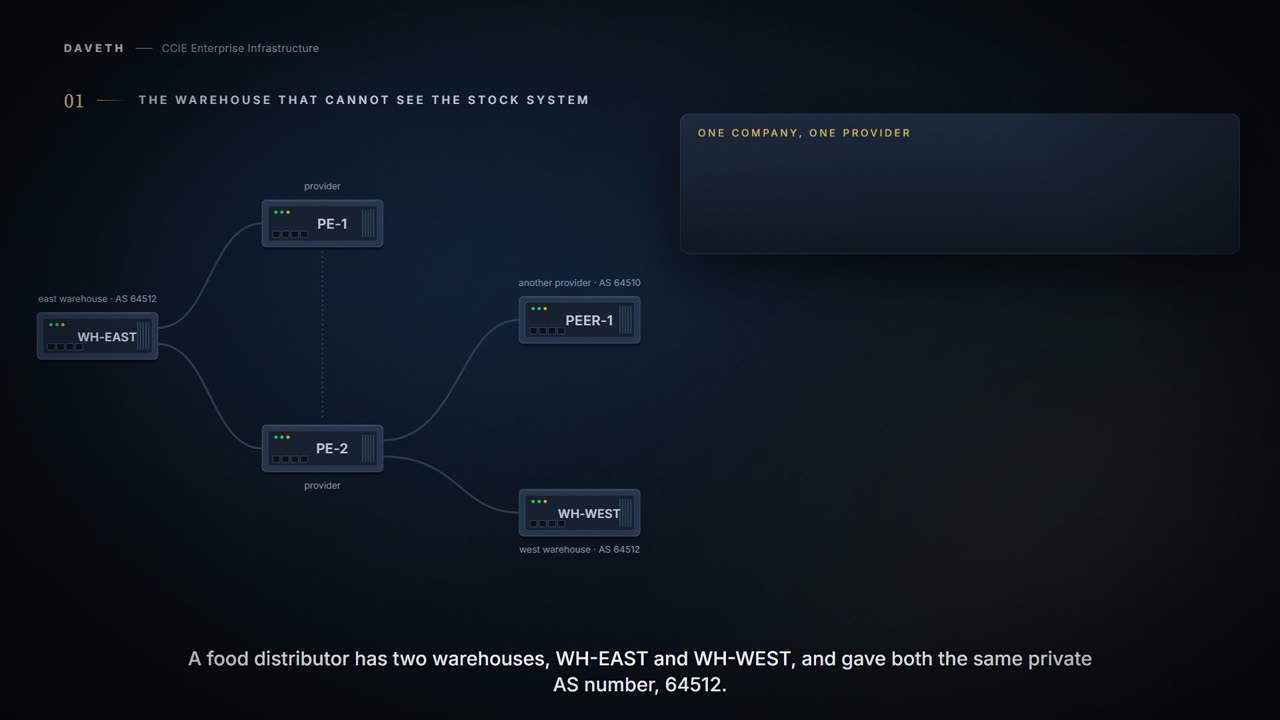
A food distributor has two warehouses, WH-EAST and WH-WEST, and gave both the same private AS number, 64512. Its stock system runs at WH-EAST on 203.0.113.0/24, and both warehouses connect to the same provider, AS 64500. WH-WEST has no route to the stock system. Why?
An AS, or autonomous system, is one organization's network, known to BGP by its number. An eBGP neighbor is a router in a different AS; an iBGP neighbor is one in the same AS.
Whenever a route update passes through an AS, the AS number is prepended to that update. The AS_PATH attribute is actually the list of AS numbers that a route has traversed in order to reach a destination.
Read the first sentence again: each AS adds its own number as the route passes through.
So the AS path is the list of networks a route has already been through. Hold on to that, because BGP uses the same list to catch loops.
Configuration: the east warehouse, in the forms these commands take; the addresses, AS numbers and route-map names are this course's own.
WH-EAST# configure terminal
WH-EAST(config)# router bgp 64512
WH-EAST(config-router)# network 203.0.113.0 mask 255.255.255.0
WH-EAST(config-router)# neighbor 192.0.2.1 remote-as 64500
WH-EAST(config-router)# neighbor 192.0.2.10 remote-as 64500
WH-EAST(config-router)# end
Configuration: the west warehouse, in the forms these commands take; the addresses, AS numbers and route-map names are this course's own.
WH-WEST# configure terminal
WH-WEST(config)# router bgp 64512
WH-WEST(config-router)# network 198.51.100.0 mask 255.255.255.0
WH-WEST(config-router)# neighbor 192.0.2.13 remote-as 64500
WH-WEST(config-router)# end
Proves: The configuration proves what this router is told to do with the AS path to or from that neighbor. Does not prove: what the neighbor holds, or which path any router chose. Only that router's BGP table shows it.
WH-EAST sends the route with the path 64512, and PE-2 adds 64500 on the way to WH-WEST. What does WH-WEST do with it?
Paths from an external BGP (eBGP) neighbor if the local autonomous system (AS) appears in the AS_PATH.
Computed from the state: the stock system route at each router. No command prints it.
router   path, 203.0.113.0/24  accepted                lp   decided   sends on
PE-1     64512                 yes                     100  step 7    primary link
PE-2     64512                 yes                     100  step 7    backup link
WH-WEST  64500 64512           no: own AS in the path  -    -         -
PEER-1   64500 64512           yes                     -    -         -
Look at WH-WEST's row. It found 64512, its own number, in the path, so it treated the route as one that had already been through its network. That is BGP's loop check doing its job, on a route that isn't a loop.
When the SP passes it to the other branch router (R2), by default, the routes can be dropped if the other branch also runs BGP with the SP and uses the same AS number. Because R2 sees its own AS number (121) in the AS-PATH, R2 does not take those routes.
From elsewhere: the branch router that was left without the other branch's routes. The names, numbers and addresses come from elsewhere, not from this scenario.
r2#show ip bgp
   Network          Next Hop            Metric LocPrf Weight Path
r> 10.10.12.0/24    10.10.12.2               0             0 500 i
*> 10.33.33.33/32   0.0.0.0                  0         32768 i
*> 172.16.12.0/24   10.10.12.2               0             0 500 i
Notice what's missing from that table: 10.22.22.22/32. That is R1's route, and R1 is in the same AS as R2.
This notification means that the BGP route received by the CE router has its own AS number in the AS path and is considered a router loop for the CE router.
Turning the loop check off for one neighbor
Which router has to change, the provider or WH-WEST? The check runs on the router that receives the path, so the command goes on WH-WEST.
This is natural behavior because the BGP tries to avoid routing loops. For example, the readvertisement of all prefixes that contain duplicate Autonomous System Numbers (ASNs) is disabled by default.
neighbor ip-address allowas-in [number] (Optional) Specifies the number of times to allow the advertisement of a PE router’s ASN. The range is 1 to 10. If no number is supplied, the default value of 3 times is used. This feature can only be used for true eBGP peers. You cannot use this feature for two peers that are members of different confederation sub-ASs.
Notice the restriction at the end: true eBGP peers only.
And be clear about what has just been switched off, because it is the protocol's own safety catch. Seeing its own AS number in a path is how BGP knows a route has come back round to where it started; it does not read the rest of the path to decide, it stops there. This command tells one neighbour that the answer is allowed to be yes anyway.
The exception is deliberate and narrow, and it is not a proof that no loop can form. It opens a specific door for a specific peer, so the number you put after it is the whole of the limit you are relying on.
Configuration: the west warehouse, adding allowas-in, in the forms these commands take; the addresses, AS numbers and route-map names are this course's own.
WH-WEST# configure terminal
WH-WEST(config)# router bgp 64512
WH-WEST(config-router)# neighbor 192.0.2.13 allowas-in
WH-WEST(config-router)# end
From elsewhere: the command on the document's R2. The names, numbers and addresses come from elsewhere, not from this scenario.
r2(config-router)#neighbor 10.10.12.2 allowas-in
Computed from the state: with allowas-in. No command prints it.
router   path, 203.0.113.0/24  accepted                lp   decided   sends on
PE-1     64512                 yes                     100  step 7    primary link
PE-2     64512                 yes                     100  step 7    backup link
WH-WEST  64500 64512           yes, with allowas-in    -    -         -
PEER-1   64500 64512           yes                     -    -         -
WH-WEST uses the stock system route now. What else did it just agree to accept?
Computed from the state: its own route, as PE-2 sends it back. No command prints it.
router   prefix           path from PE-2  held
WH-WEST  198.51.100.0/24  64500 64512     yes, not best: WH-WEST originated it
From elsewhere: the same thing in the document's own output. The names, numbers and addresses come from elsewhere, not from this scenario.
r2#show ip bgp
   Network          Next Hop            Metric LocPrf Weight Path
*> 10.22.22.22/32    10.10.12.2                             0 500 121 i
*  10.33.33.33/32    10.10.12.2                             0 500 121 i
*>                   0.0.0.0                  0         32768 i
Read the two 10.33.33.33/32 lines. That is R2's own loopback. One copy comes from R2 itself, with weight 32768, and is marked best. The other went out to AS 500 and came back with the path 500 121, and R2 kept it. The loop check had one job, and allowas-in is the command that gives it the day off.
Proves: A BGP table entry proves the AS path this router holds for the prefix, and which path it marks best. Does not prove: that anyone else chose the path you sent. A prepend looks the same in your output whether or not the far end ever compares it.
The number after allowas-in sets how many times the AS number is allowed, from 1 to 10, and 3 if you leave it out. The page doesn't say exactly how it counts, and this walk never has more than two copies. Here is the document's example with a number, on a VRF address family:
From elsewhere: allowas-in with a number. The names, numbers and addresses come from elsewhere, not from this scenario.
Router(config)#router bgp 100
Router(config-router)#address-family ipv4 vrf vrf1
Router(config-router)#neighbor 192.168.255.255 allowas-in 6
A private number in another provider's table
Look at PEER-1's row in both readings so far: 64500 64512. Another provider is holding the distributor's private AS number. Is that a problem?
Public AS numbers are assigned by InterNIC and are globally unique. They range from 1 to 64511. Private AS numbers are used to conserve globally unique AS numbers, and they range from 64512 to 65535. Private AS numbers cannot be leaked to a global BGP routing table because they are not unique, and BGP best path calculations require unique AS numbers.
A private AS number is one any organization can use inside its own network, so the same number can mean different networks in different places.
The private AS numbers are from 64512 to 65535. You can configure external neighbors to remove private AS numbers from the AS path by using the neighbor remove-private-as router configuration command. Then when an update is passed to an external neighbor, if the AS path includes private AS numbers, these numbers are dropped.
Look at when that happens: as the update goes to an external neighbor.
Which router is allowed to remove it?
The feature applies to eBGP neighbors only. The feature applies to routers in a public AS only. A network administrator configures the routers to remove private AS numbers from the AS path contained in outgoing update messages and optionally, to replace those numbers with the ASN of the local router, so that the AS Path length remains unchanged.
PE-2 is in AS 64500, public by that page's range, and PEER-1 is an eBGP neighbor, so PE-2 qualifies. The warehouses, in a private AS, don't.
Configuration: the provider, removing private numbers toward PEER-1, in the forms these commands take; the addresses, AS numbers and route-map names are this course's own.
PE-2# configure terminal
PE-2(config)# router bgp 64500
PE-2(config-router)# neighbor 192.0.2.9 remote-as 64512
PE-2(config-router)# neighbor 10.0.0.1 remote-as 64500
PE-2(config-router)# neighbor 192.0.2.14 remote-as 64512
PE-2(config-router)# neighbor 192.0.2.18 remote-as 64510
PE-2(config-router)# neighbor 192.0.2.18 remove-private-as
PE-2(config-router)# end
Computed from the state: after remove-private-as. No command prints it.
router   path, 203.0.113.0/24  accepted                lp   decided   sends on
PE-1     64512                 yes                     100  step 7    primary link
PE-2     64512                 yes                     100  step 7    backup link
WH-WEST  64500 64512           yes, with allowas-in    -    -         -
PEER-1   64500                 yes                     -    -         -
The neighbor remove-private-as command will remove private AS numbers from the AS path even if the path contains both public and private ASNs.
From elsewhere: a path with private numbers, as RouterA holds it. The names, numbers and addresses come from elsewhere, not from this scenario.
RouterA# show ip bgp 1.1.1.1
  1001 65200 65201 65201 1002 1003 1003
Predict how many numbers RouterB holds before you read its output.
From elsewhere, and as RouterB receives it. The names, numbers and addresses come from elsewhere, not from this scenario.
RouterB# show ip bgp 1.1.1.1
  100 1001 1002 1003 1003
Count the numbers: RouterA held seven, and RouterB holds five. Both copies of 65201 went, not just one. The page calls the leading 100 Router B's own AS number, but its configuration puts Router A in AS 100 and Router B in AS 200. The path is shorter now, and AS path length is one of the things the best-path comparison looks at.
The replace-as keyword is available to replace the private AS numbers being removed from the path with the local AS number, thereby retaining the same AS path length.
From elsewhere: the keywords. The names, numbers and addresses come from elsewhere, not from this scenario.
Router(config-router)# neighbor 192.168.0.2 remove-private-as all replace-as
From elsewhere, and RouterB, with replace-as. The names, numbers and addresses come from elsewhere, not from this scenario.
RouterB# show ip bgp 1.1.1.1
   100 1001 100 100 100 1002 1003 1003
Eight numbers this time: RouterA's seven plus its own AS, with 100 standing in for each private one. Why not use remove-private-as toward WH-WEST instead of allowas-in?
If the AS path contained the AS number of the eBGP neighbor, the private AS numbers would not be removed.
The page lists that among the restrictions before IOS XE Release 3.1S, and its list of enhancements doesn't say it was lifted. Toward WH-WEST, 64512 is exactly the AS number of the eBGP neighbor. This course doesn't claim either way, and keeps allowas-in.
Continue the lesson
The whole lesson, with its drawings and its questions. 5 more sections after the ones above.