
AS path regular expressions
A filter for AS 100 written as 100 also matches paths through AS 1100, 21005 and 1001, because a regular expression matches text: the AS path is written out as a string and 100 is the characters 1, 0, 0. The underscore matches a space, comma, brace or either end of the string, and anchors with ^ and $ make a pattern mean exactly one AS.
By Arif, founder of Daveth · Updated
The full 6 min walkthrough is in Daveth Pro (Network). See what the plan opens
What this page answers
Why does a BGP regex for AS 100 match AS 1100?
The pattern is applied to the AS path as text, so 100 matches the characters 1, 0, 0 wherever they appear, including inside 1100, 1001 and 21005. Delimiters such as the underscore make it match the whole AS number. Read it in “What is actually being matched”
What does the underscore mean in a BGP regular expression?
It matches a comma, left brace, right brace, the start of the input string, the end of the input string, or a space, so it marks the edge of an AS number. Read it in “The characters”
A filter for AS 100
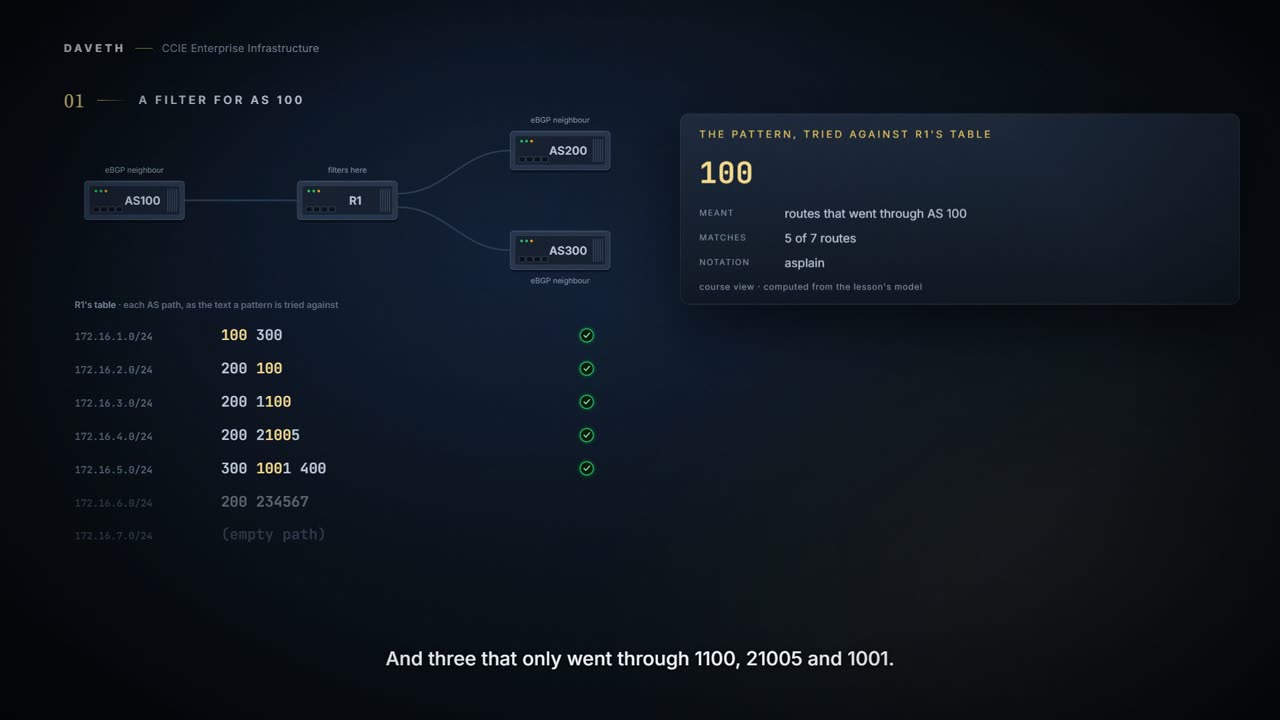
You write a filter to catch routes that passed through AS 100, and the pattern is simply 100. Before you read on, predict: in a table that also has paths through AS 1100, AS 21005 and AS 1001, which routes does it match? Step 1 of the walk asks the same.
Five routes match: the two that really went through AS 100, and three that only went through AS 1100, AS 21005 and AS 1001. In fairness, a filter written for AS 100 that also catches 1100, 21005 and 1001 is very thorough. You find out when somebody asks why a prefix from an unrelated network stopped arriving. The pattern did exactly what you wrote; the problem is what you thought you were writing.
What is actually being matched
A regular expression is a pattern to match against an input string. In the case of BGP, you specify a string that consists of path information that an input must match.
A string. Not a list, not numbers. The path is written out as text and the pattern is applied to the text, so 100 is not the number one hundred. It is the characters 1, 0, 0, and they appear inside 1100, 1001 and 21005.
Is that printed anywhere, or only reasoned? The nearest printed example is in the IOS XE 17.x System Management guide, in its chapter on filtering show output. It explains the underscore with a longer number:
So, although {1300_ matches the regular expression _1300_ , 21300 and 13000 do not.
So an underscore on each side is what keeps 1300 from being found inside 21300 and 13000. The same chapter makes the point with a word, bracketing a space on each side of is in its show interface example:
Use of the parenthesis ensures that only lines containing is with a space both before and after it will be included in the output (excluding from the search, for example, words like “disconnect”).
Be exact about what that shows. Both examples search show output, not AS paths, and that chapter's underscore list is longer than the case-studies list: it adds parentheses and the underscore itself. No cited page prints a bare AS number matching a longer one. That 100 matches inside 1100 is this course's reading of the two pages together: a pattern tried against a string, and a delimiter printed to stop exactly this. Hold that, and the rest of the topic is technique.
The command that uses a pattern:
The syntax, as the case-studies page prints it.
ip as-path access-list <access-list-number>{permit | deny} <as-regular-expression>The characters
The page's own meanings, word for word:
| Character | Meaning, as the page gives it |
|---|---|
| . | "matches any single character." |
| ^ | "matches the start of the input string." |
| $ | "matches the end of the input string." |
| _ | "matches a comma (,), left brace ({), right brace (}), the start of the input string, the end of the input string, or a space." |
| * | "matches 0 or more sequences of the atom." |
| + | "matches 1 or more sequences of the atom." |
| ? | "matches the atom or the null string." |
Look at ^ and $ first: they fix a pattern to one end of the string, which is how you stop it floating. Then the underscore: it matches the gaps between AS numbers and the two ends, which is how you say 100 as a whole number. Read the asterisk against the plus sign: zero or more against one or more. A pattern using the asterisk can match when the thing it describes is not there at all.
The same page also lists the backslash, which the 4-byte guide below uses to keep a special character literal, and a range:
A range is a sequence of characters within left and right square brackets.
That backslash matters more than it looks, because a dot is two different things depending on who is reading it. Written in an AS number it is punctuation. Written in a pattern it is an instruction meaning any character, so an unescaped dot quietly turns a specific AS into a wildcard.
The idioms, and which end is which
The page gives four patterns with their meanings:
This expression means via AS100. This expression indicates an origin of AS100. This expression indicates transmission from AS100. This expression indicates origination from this AS.
Before reading them, fix the standard you are judging against, because it is easy to set it far too low: the question is never whether an expression matched something. Almost any expression matches something. The question is whether the set it matches is the set you meant, and the two come apart quietly.
In the order printed, those are _100_, _100$, ^100 .* and ^$. Now read the second and third against what you know about AS_PATH from 1.5.a.0:
Whenever a route update passes through an AS, the AS number is prepended to that update.
The path grows at the left. So the end of the string, $, is the oldest entry: the AS that originated the route. The start, ^, is the newest: the neighbor that sent it to you. End of string means origin; start of string means neighbor. And ^$, start and end with nothing between, is a route with no AS in its path at all: one this AS originated.
Continue the lesson
The whole lesson, with its drawings and its questions. The rest of this section and 5 more after it.