
BGP communities
A customer wants its provider to carry a route but not pass it on, and asks with the COMMUNITIES attribute: an optional, transitive 32-bit value. Communities are not sent unless each router is told to with send-community, at every hop. Four values mean the same everywhere: no-export, no-advertise, internet and local-as. And set community replaces existing values unless you write additive.
By Arif, founder of Daveth · Updated
The full 6 min walkthrough is in Daveth Pro (Network). See what the plan opens
What this page answers
What is the difference between no-export and no-advertise?
no-export: do not advertise the route to eBGP peers, keep it within the AS. no-advertise: do not advertise it to any peer, internal or external. Read it in “What the well-known values mean”
Why are BGP communities not reaching the neighbor?
Communities are sent only where send-community is configured, and that is needed on every router along the way: one hop without it delivers the route with no communities. Read it in “Every hop, not just the first”
What does the additive keyword do in set community?
It appends the value to the communities a route already carries. Without additive, set community replaces them, silently throwing the old values away. Read it in “A second tag that erases the first”
A request that never arrived
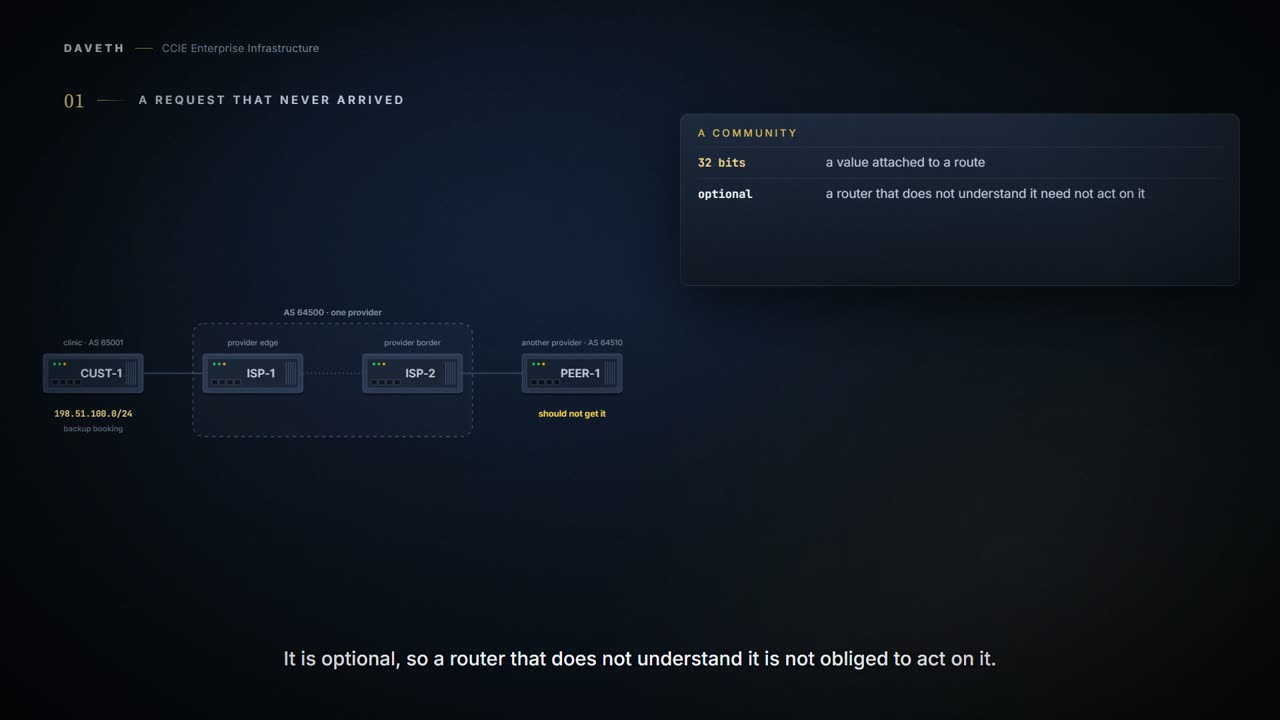
A clinic group, CUST-1, runs a backup booking system on 198.51.100.0/24. It wants its provider to carry that route but not pass it on to other providers. How does a router ask for that?
With the COMMUNITIES attribute: an optional, transitive, 32-bit value attached to a route. Optional means a router that does not understand it is not obliged to; transitive means it is meant to survive being passed between autonomous systems. There is no fixed list of what the numbers mean: a community means whatever the routers that read it have agreed it means, which is why providers publish the values they honour.
You attach one in a route map, with set community <value>, and the value can be a number, one of the well-known names below, or several of either. There is one keyword to know about, additive, and the next-but-one section is about what happens when you forget it.
Configuration: the clinic's outbound tag. The addresses, AS numbers and route-map names are this course's own.
CUST-1# configure terminal
CUST-1(config)# route-map TAG permit 10
CUST-1(config-route-map)# set community no-export
CUST-1(config-route-map)# router bgp 65001
CUST-1(config-router)# neighbor 192.0.2.1 remote-as 64500
CUST-1(config-router)# neighbor 192.0.2.1 route-map TAG out
CUST-1(config-router)# end
Proves: The configuration on CUST-1 proves that the route map sets the community and whether this router is told to send communities to that neighbor. Does not prove: that the neighbor received the community, or that any router beyond it did. Each hop needs its own send-community.
That route map attaches no-export to the route on its way to ISP-1. What does ISP-1 receive?
Setting a community and sending it are two separate things, and only the first of them is on by default. No COMMUNITIES attribute is sent to a neighbor unless that neighbor is configured for it, with neighbor <address> send-community. Without that line the attribute is set locally, obeyed locally, and stripped on the way out.
Which is worth saying out loud, because one word in the definition above points the other way. The attribute is called transitive, and by default it does not transit. Transitive is a statement about what a router may pass on, not a promise that yours will.
And the instruction is per neighbour, so a route can arrive carrying its tag from one direction and stripped of it from another. The route itself looks identical either way. What differs is whether the hop it came through had been told to include the attribute at all.
Computed from the state, where the route and its communities are. No command prints it.
router    has the route  communities
CUST-1    yes (origin)   set on the way out: no-export
ISP-1     yes            none
ISP-2     yes            none
PEER-1    yes            not traced
Look at the last row. PEER-1, another provider, has the route: nobody along the way ever saw no-export. What PEER-1 itself holds is not traced; it is another provider's router. The attribute is called transitive, and by default it doesn't transit anywhere.
Every hop, not just the first
CUST-1 adds send-community. Is the route safe now?
Configuration: the clinic, adding send-community. The addresses, AS numbers and route-map names are this course's own.
CUST-1# configure terminal
CUST-1(config)# router bgp 65001
CUST-1(config-router)# neighbor 192.0.2.1 send-community
CUST-1(config-router)# end
Computed from the state: after the clinic sends. No command prints it.
router    has the route  communities
CUST-1    yes (origin)   set on the way out: no-export
ISP-1     yes            no-export
ISP-2     yes            none
PEER-1    yes            not traced
Look at ISP-2's row: no communities. ISP-1 holds no-export, but communities are not sent by default on the next hop either, so ISP-2 had nothing to obey. The default is per neighbor, not per router, and that is the whole shape of this fault: the attribute survives exactly as far as the consecutive run of neighbors that were each told to pass it on.
Configuration: the provider edge, sending to ISP-2. The addresses, AS numbers and route-map names are this course's own.
ISP-1# configure terminal
ISP-1(config)# router bgp 64500
ISP-1(config-router)# neighbor 192.0.2.2 remote-as 65001
ISP-1(config-router)# neighbor 10.0.0.2 remote-as 64500
ISP-1(config-router)# neighbor 10.0.0.2 send-community
ISP-1(config-router)# end
Computed from the state: with send-community on both hops. No command prints it.
router    has the route  communities
CUST-1    yes (origin)   set on the way out: no-export
ISP-1     yes            no-export
ISP-2     yes            no-export
PEER-1    no             -
Proves: A BGP table entry showing a community proves which communities this router holds on the route. Does not prove: that the router will send them on. Holding a community and sending it are separate.
Now PEER-1 has no route. The same missing line would have to be found on every router between the clinic and the edge of the provider.
What the well-known values mean
Four values have fixed meanings everywhere. Which one does the clinic actually want?
no-export: do not advertise this route to eBGP peers; keep it within the AS. no-advertise: do not advertise it to any peer, internal or external. internet: advertise it normally; every router belongs to this community, so by default every destination is in it. local-as: do not advertise it outside the local autonomous system; inside a confederation, that means not outside the sub-AS, which is the case this value exists for.
An eBGP peer is a router in a different AS; an internal peer is one in the same AS. So read the difference between the first two precisely: no-export stops at the edge of the AS, and no-advertise stops at the router that received it.
A second tag that erases the first
The provider starts tagging every customer route with its own value, 64500:120, on the way into ISP-1. What happens to the clinic's no-export?
set community replaces. It does not add. Setting a value on a route that already carries one throws the old one away, unless you write additive, which appends instead. Nothing warns you, and the route map that did it looks perfectly reasonable in the configuration.
Configuration: the provider's own tag, without additive. The addresses, AS numbers and route-map names are this course's own.
ISP-1# configure terminal
ISP-1(config)# ip bgp-community new-format
ISP-1(config)# route-map CLINIC-IN permit 10
ISP-1(config-route-map)# set community 64500:120
ISP-1(config-route-map)# router bgp 64500
ISP-1(config-router)# neighbor 192.0.2.2 route-map CLINIC-IN in
ISP-1(config-router)# end
Computed from the state: after the provider's tag. No command prints it.
Continue the lesson
The whole lesson, with its drawings and its questions. The rest of this section and 4 more after it.