
Dynamic trunking: DTP and VTP, and why a trunk won't form
VTP lets you create a VLAN once on a server and have it spread to client switches in the same domain; transparent switches pass advertisements on without applying them. The higher configuration revision always wins, so a lab switch with a high revision can wipe VLANs across a domain. DTP is the separate conversation two ports have about whether to trunk.
By Arif, founder of Daveth · Updated
The full 10 min walkthrough is in Daveth Pro (Network). See what the plan opens
What this page answers
What are the VTP modes?
Server creates, changes and deletes VLANs for the domain; client takes the advertisements and cannot create VLANs locally; transparent passes advertisements on but keeps its own VLANs; off takes no part and passes nothing on. Read it in “4.1 The chore VTP was invented to kill”
What does VTP version 3 add?
Versions 1 and 2 carry only VLANs 1 to 1005; version 3 carries the full range, 1 to 4094. In version 3 one server is the primary, claimed with the exec command vtp primary. Read it in “4.1 The chore VTP was invented to kill”
Why can a switch with a higher VTP revision wipe a network?
Switches in a domain take the VLAN list with the higher configuration revision. A switch from a lab joining with a higher number replaces everyone's list, and VLANs missing from it are deleted. Reset a switch's revision to 0 before it joins. Read it in “4.1 The chore VTP was invented to kill”
4.1 The chore VTP was invented to kill
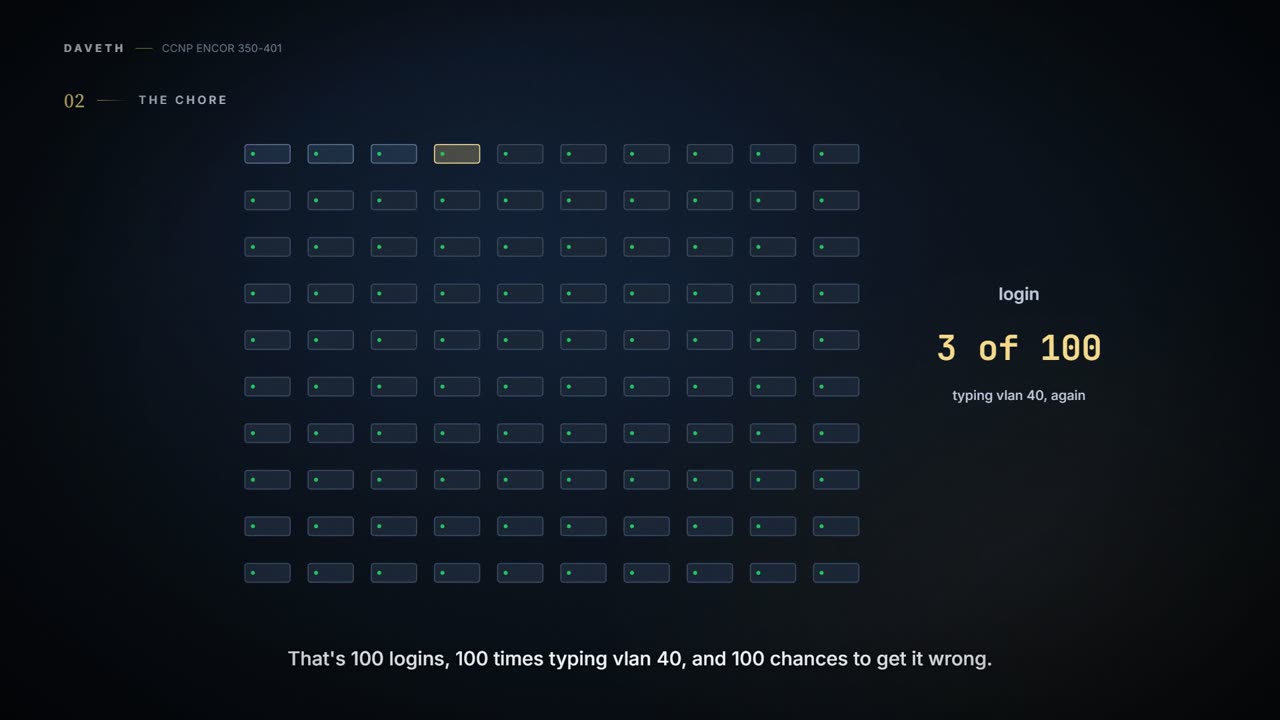
Before switches had APIs, every change was typed by hand, switch by switch. Now picture a network with 100 switches, and someone needs one new VLAN. That's 100 logins, 100 times typing vlan 40, and 100 chances to typo it. If you scaled that down to a household, it's texting every relative about the barbecue one by one, and getting the date wrong in one of the texts. Cisco built its own protocol for exactly this chore: VTP, the VLAN Trunking Protocol.
100 switches, one VLAN, 100 logins. VTP was invented by someone on login number 37.
You can think of it as a shared family calendar. One person adds "dentist, Tuesday", and it appears on everyone's phone. With VTP, you create a VLAN once on a VTP server, and it spreads to the client switches in the same VTP domain.
Every switch in VTP plays one of four roles:
- Server: creates, changes and deletes VLANs for the whole domain. It's the person who's allowed to edit the family calendar.
- Client: receives the advertisements and updates its own VLANs to match (and it takes part in the revision comparison like everyone else, which section 4.5 shows can go badly), but you can't create VLANs on it locally. It's like the kids' phones: they see every appointment, and they can't add one.
- Transparent: receives advertisements and passes them along, but doesn't change its own VLAN database; its VLANs are configured locally.
- Off: doesn't take part, and doesn't even pass advertisements on; VLANs are local only. It's the house that won't take a parcel in for anyone.
In the guide's example topology, SW3 is transparent and SW6 is a client sitting behind it. SW6 still gets every update, because SW3 passes them through. If you've ever had a neighbour take a parcel in for you and hand it over unopened, that's SW3: the parcel still reaches you, and nothing in the neighbour's house changes. Transparent doesn't mean "blocks".
Transparent mode is the most polite role in networking. It delivers every letter, and reads none of them.
There are three versions, and version 1 is the default. Versions 1 and 2 only carry VLANs 1 to 1005; version 3 carries the full range, 1 to 4094. Most switches today can run version 3. A domain can have several servers, and a server treats updates from another server just as a client would. In version 3, one server is the primary, set with the exec command vtp primary.
VTP sends its updates as multicast, over the trunk links. That's one reason 01-1 matters here: no trunk, no VTP. It uses three kinds of message:
- Summary: every 300 seconds, or whenever a VLAN is added, removed or changed. It carries the VTP version, the domain name, the configuration revision number and a timestamp.
- Subset: sent after a change, carrying the actual detail of the VLANs.
- Client request: a switch asking for the detail. Typically this happens when a switch with a lower revision joins the domain. It acts kind of like a new phone asking the family account for everything it has missed.
So the whole system turns on one number. Have you ever noticed how, when two people have edited the same shopping list, a family can end up trusting whichever copy has been scribbled on the most, without reading either? The configuration revision is that count. It isn't a time: it goes up by one with every change, and switches take the VLAN list from whoever has the highest number. Nobody compares the contents, or the dates, to decide who's right.
D2
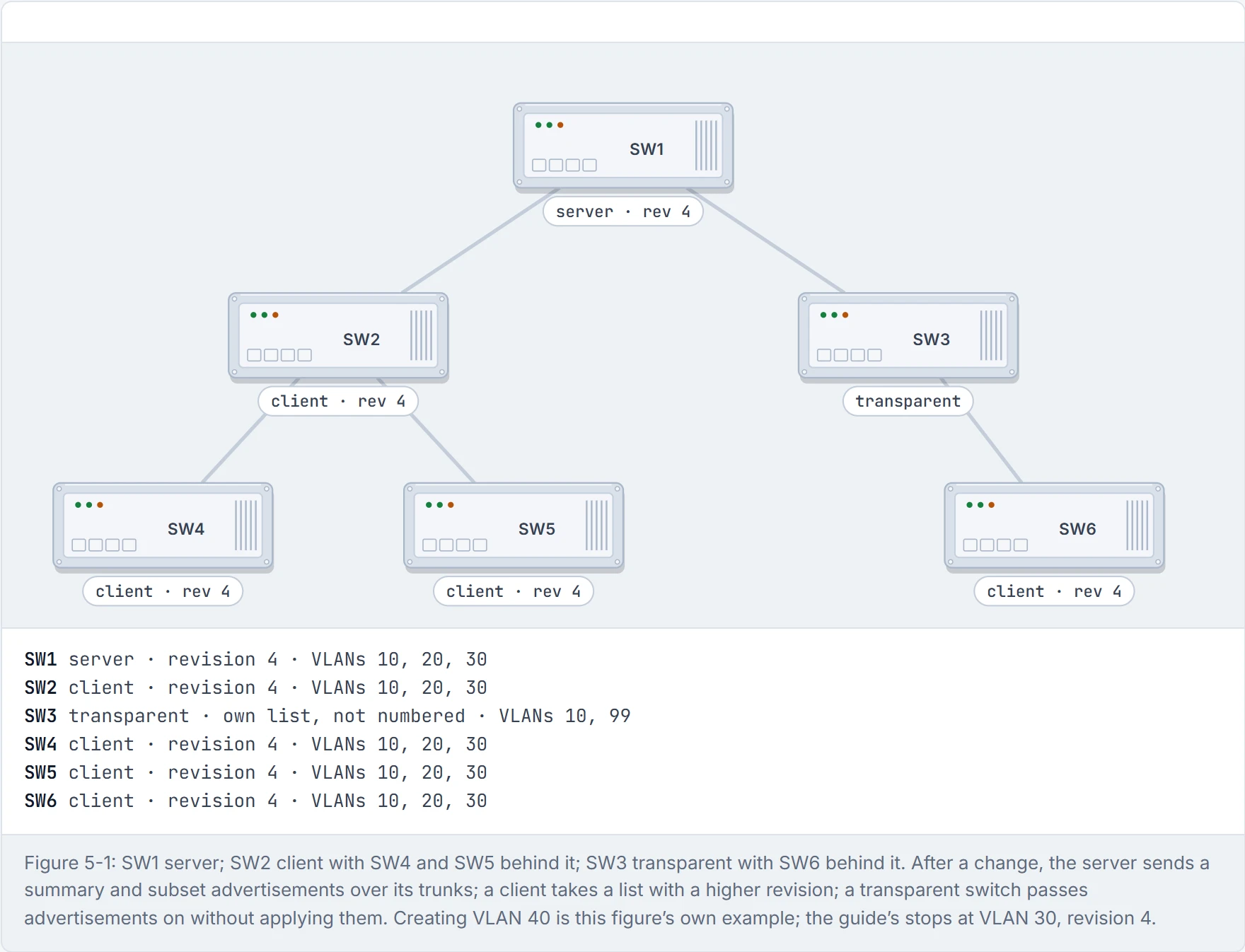
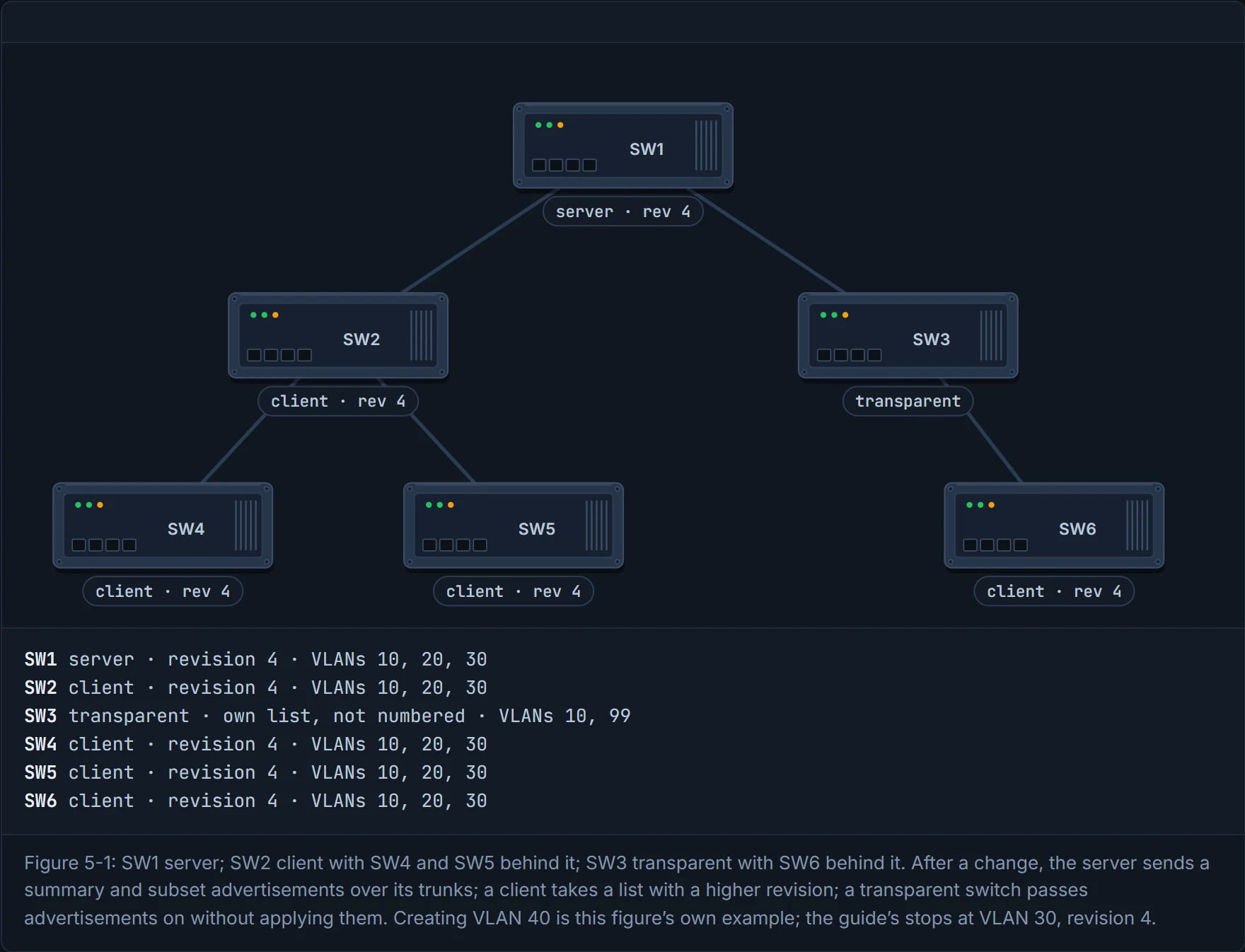
Step 1 of 4 The server and every client are at revision 4 with VLANs 10, 20 and 30. SW3 is transparent: it keeps its own VLAN list and takes no part in the numbering.
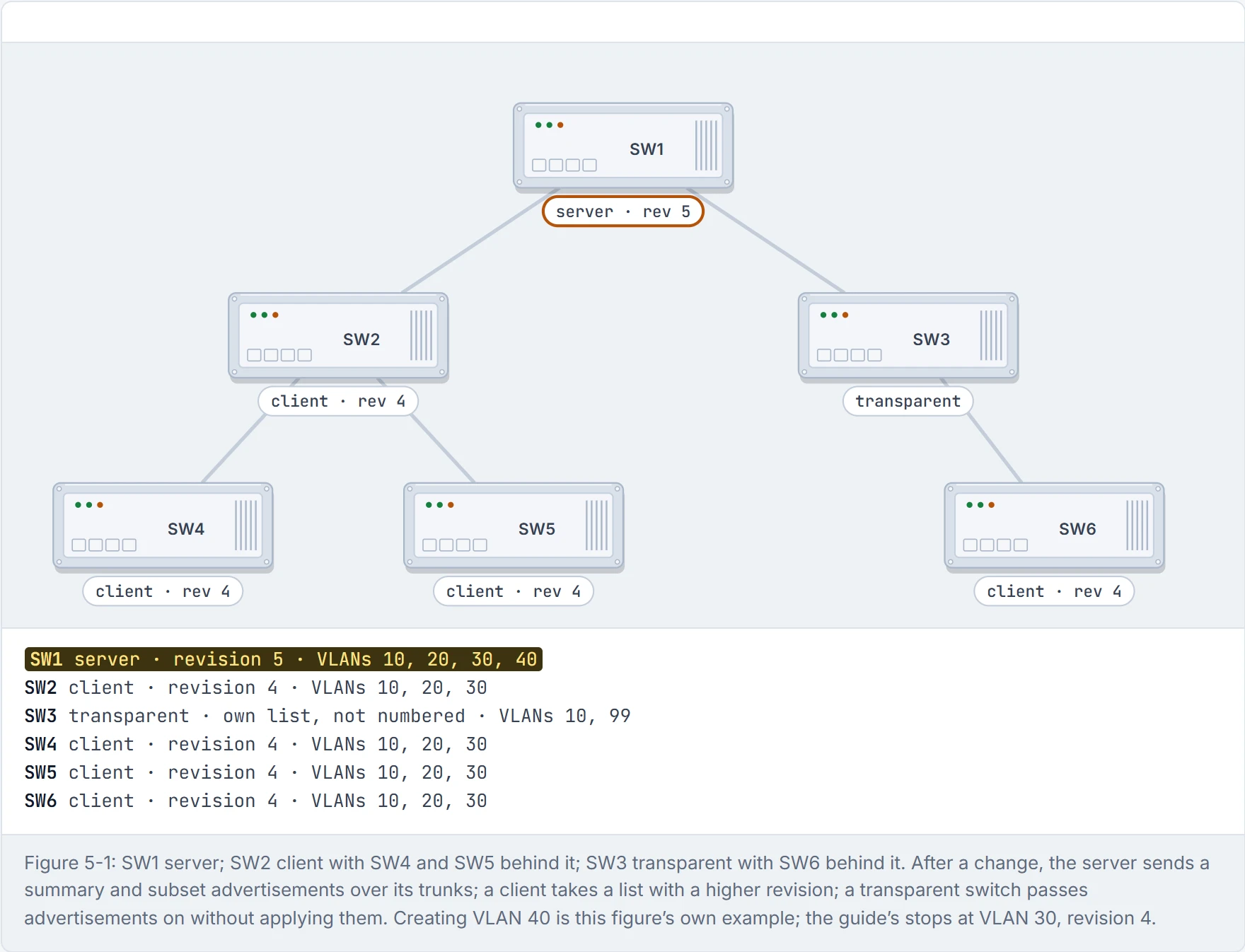
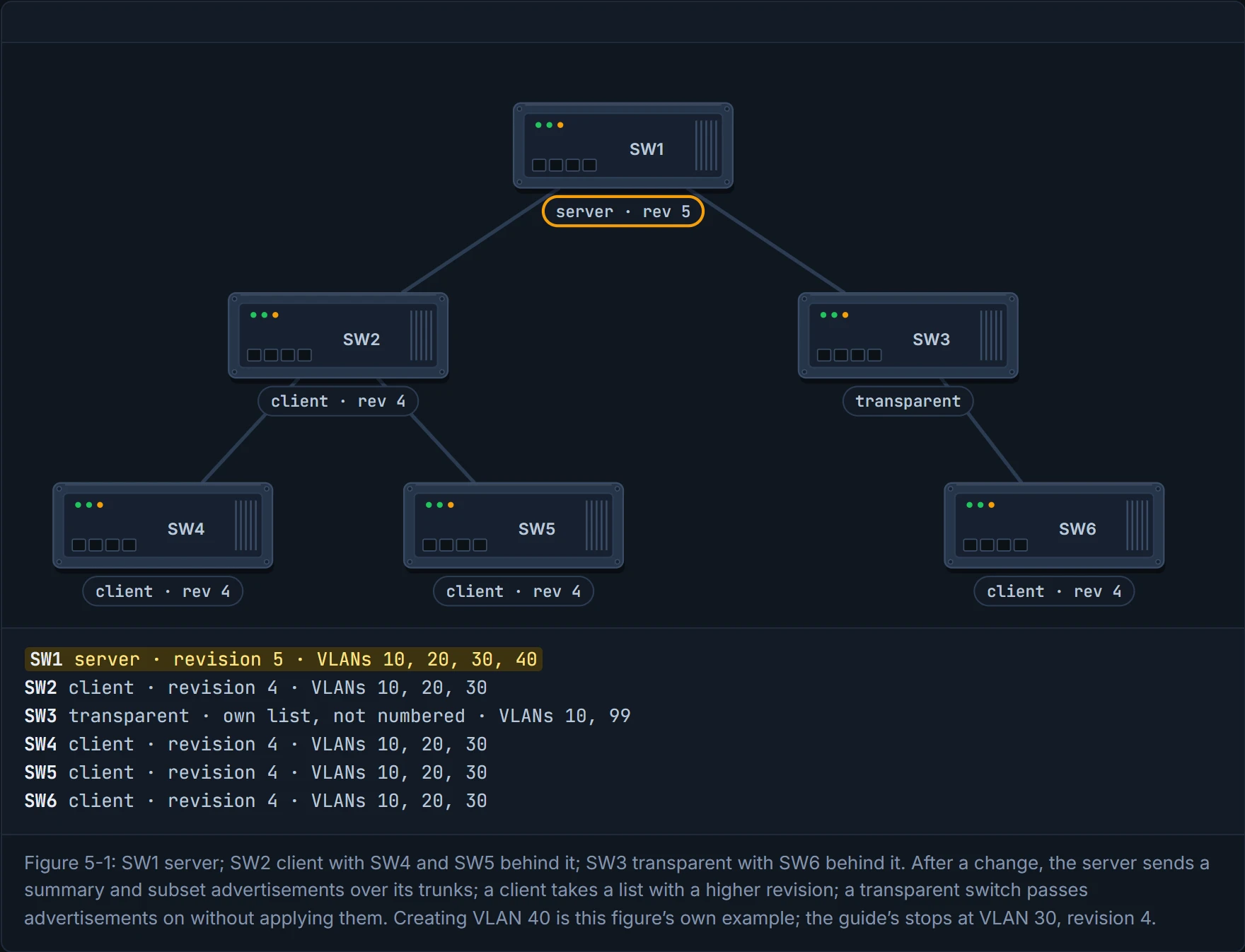
Step 2 of 4 An engineer creates VLAN 40 on SW1, the server. Its revision goes from 4 to 5: the number counts changes.
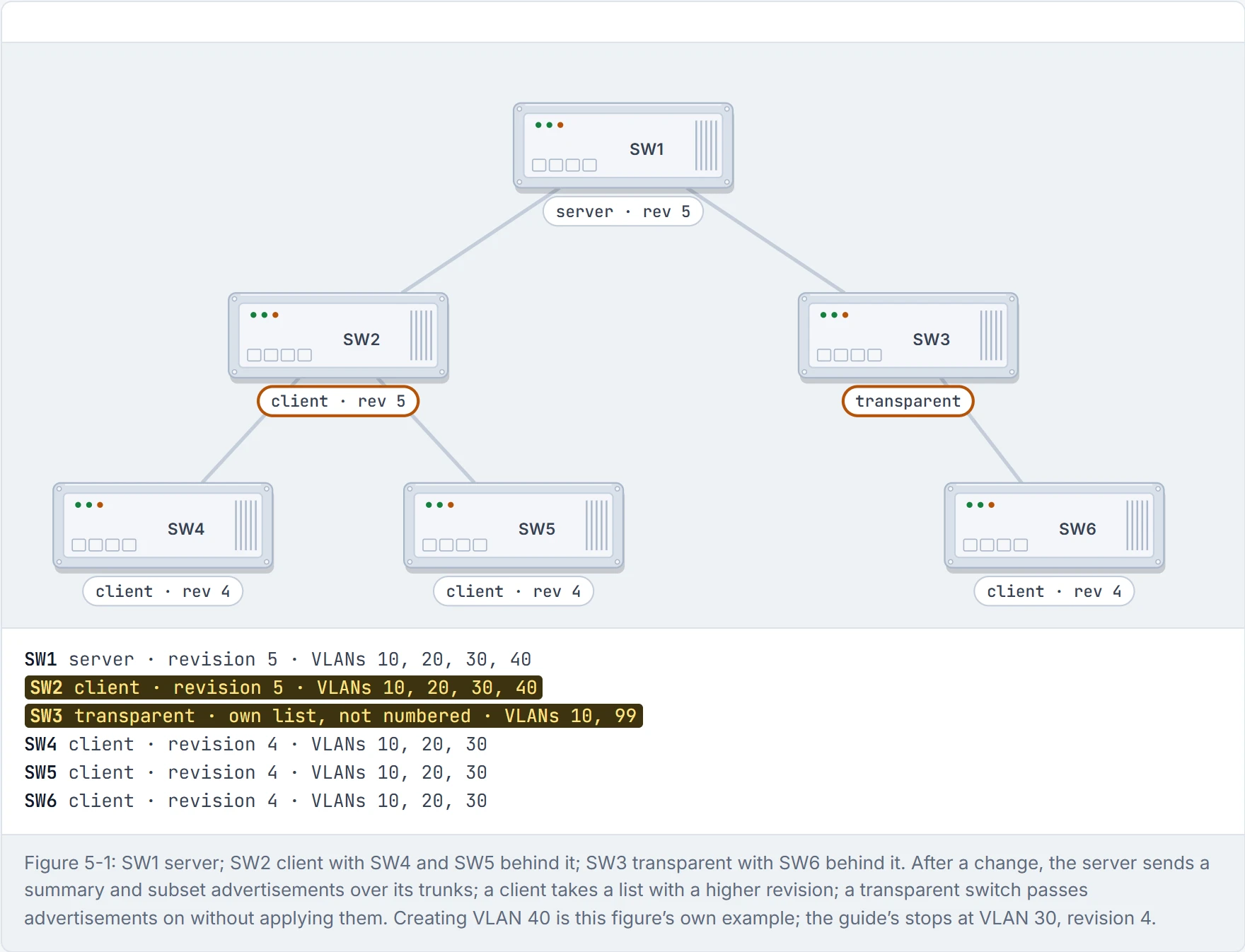
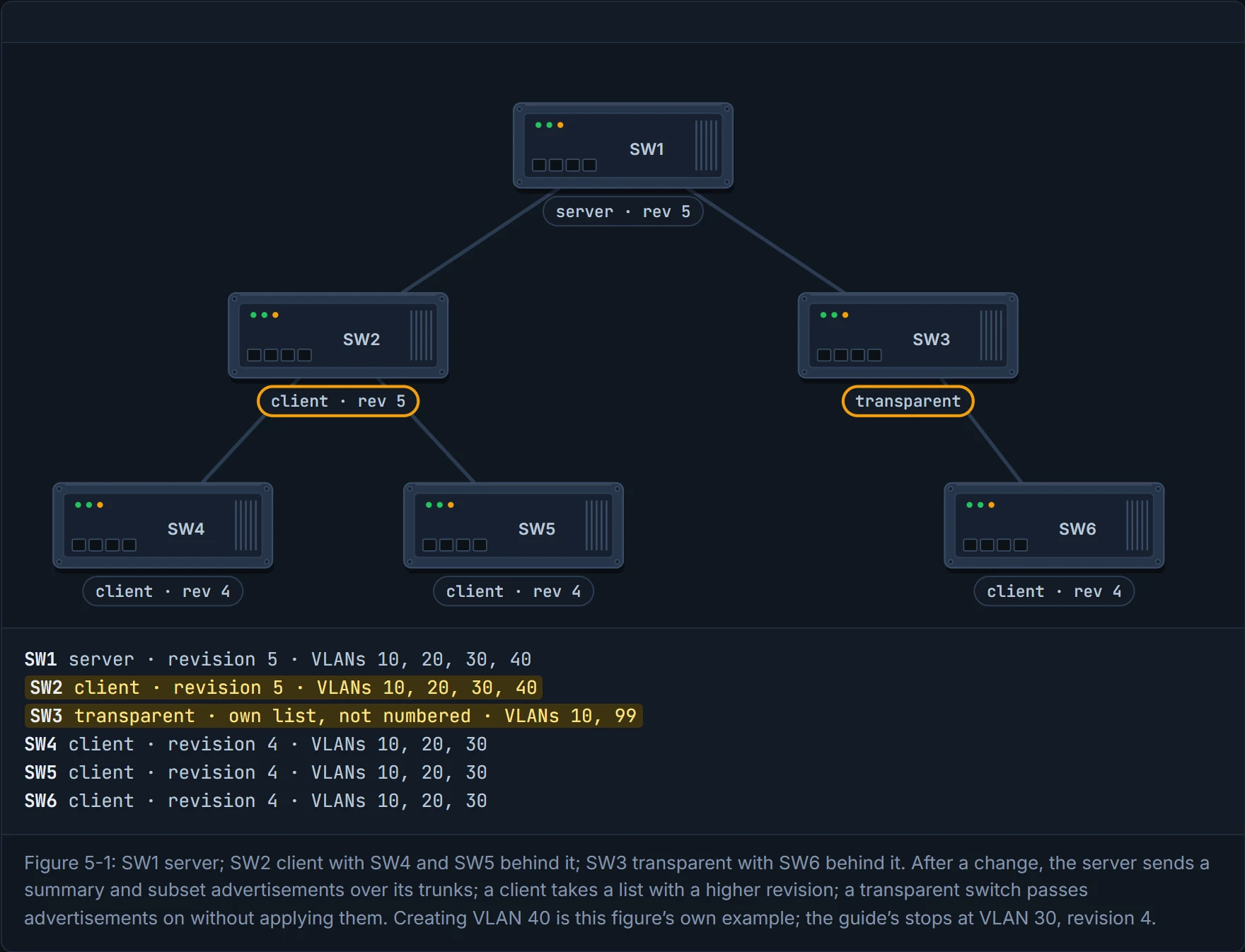
Step 3 of 4 After the change SW1 sends its summary and subset advertisements over its trunks. SW2, a client, sees revision 5, higher than its 4, and takes the new list. SW3 is transparent: it passes the advertisement on and its own VLANs don’t change.
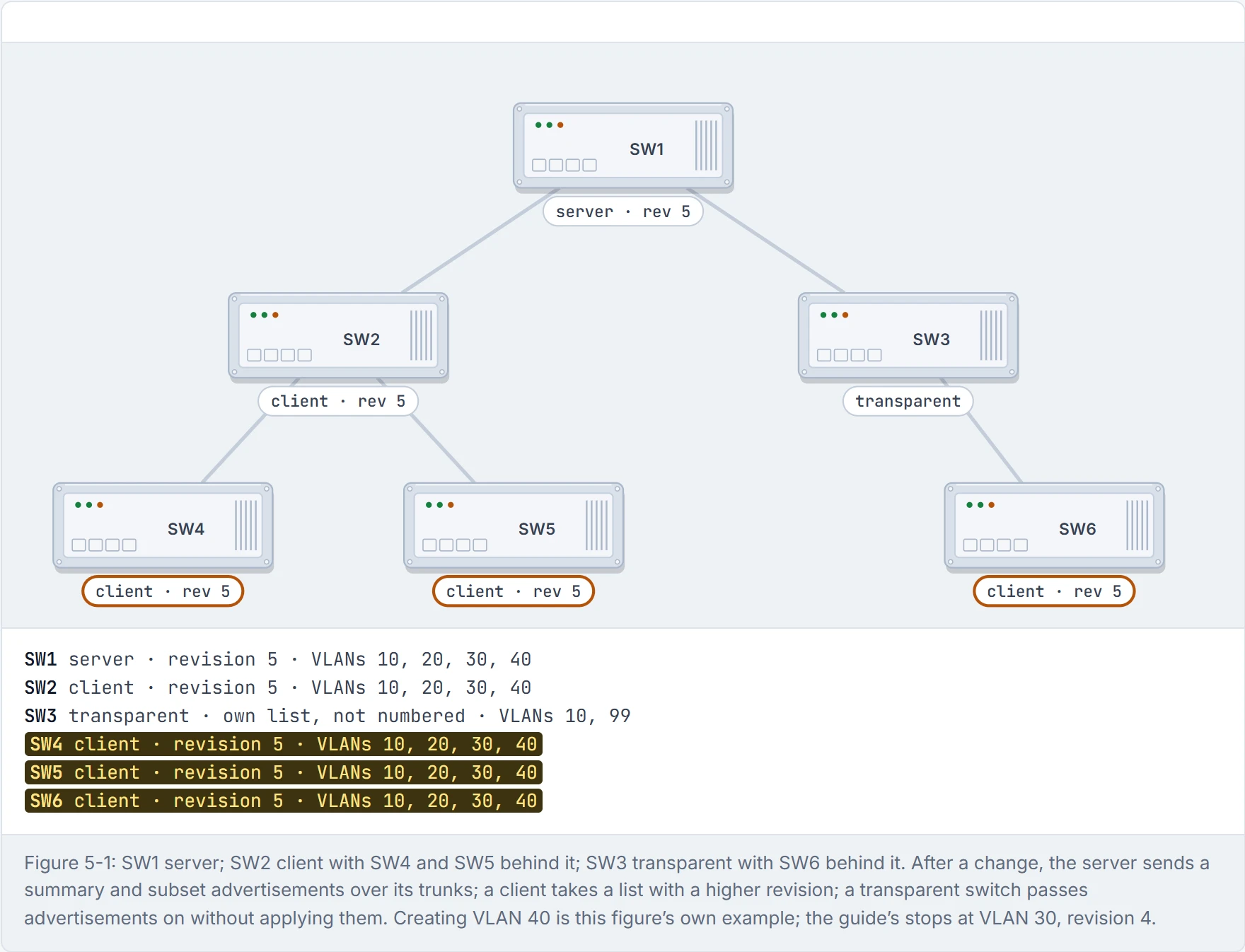
Step 4 of 4 SW2 passes it to SW4 and SW5, and SW3 passes it to SW6. All three take VLAN 40 at revision 5. Nobody typed vlan 40 anywhere but SW1.
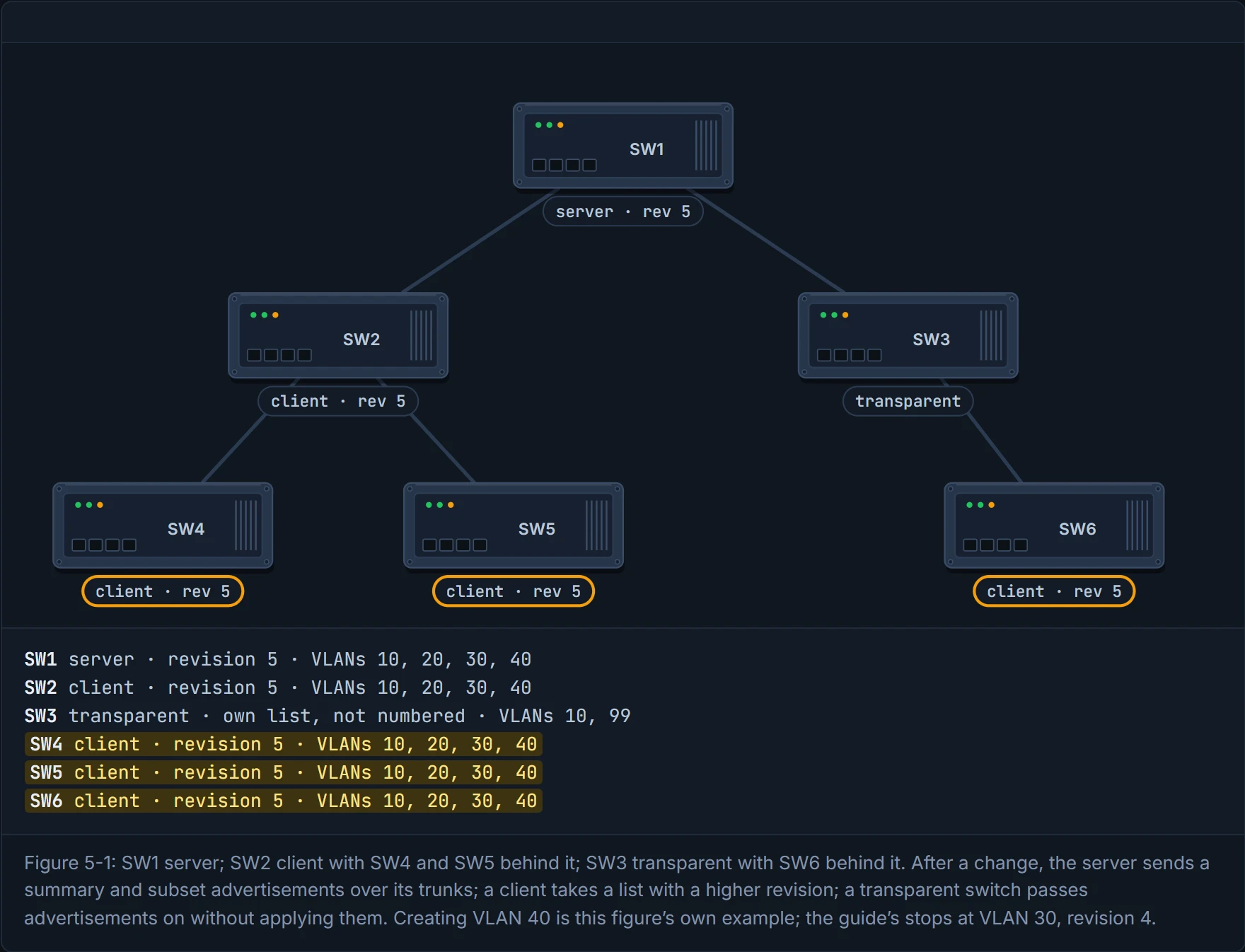
VTP doesn't ask who's right. It asks who has edited the most. Like every family argument won by whoever talked longest.
The steps:
SW1(config)# vtp domain CISCO
SW1(config)# vtp version 3
SW1(config)# vtp mode server
SW1(config)# vtp password PASSWORD
SW1(config)# exit
SW1# vtp primary
vtp version {1 | 2 | 3}. (The guide lists the version first; the example above sets the domain first, as the guide's own SW1 does in Example 5-1.)vtp domain <name>. Changing the domain name resets this switch's configuration revision back to 0.vtp mode {server | client | transparent | off}. (The guide printsnonefor the last one; Cisco's command isoff.)vtp password <password>: optional, and recommended, because it helps prevent a stranger switch from joining your domain. It works like a door code on the calendar: without it, anyone who knows the family name could start editing.
In version 3, the primary server is claimed with vtp primary, which asks you to confirm.
Check it with show vtp status. The lines that matter: the version running, the domain name, the operating mode (a version 3 primary shows "Primary Server"), the number of VLANs, and the configuration revision. Further down there are "Feature MST" and "Feature UNKNOWN" sections with their own modes; skip them, they're not what this lesson is about. Consider it your receipt: it's where you check the shop actually took the order, before you go home and wait for the delivery.
Watch the number move. The server creates VLANs 10, 20 and 30, and its revision goes from 1 to 4, one step per change. Over on SW6, a client sitting behind the transparent SW3, show vtp status also says revision 4, and show vlan lists VLANs 10, 20 and 30, without anyone typing them there.
The revision number is the only counter in networking you have to remember to wind back to zero before you plug anything in.
Here's the danger, and it's a real one. The guide's rule covers "every switch that connects to a VTP domain", not only servers. Picture yourself taking a switch out of the lab, where it has seen hundreds of changes, and plugging it into production with the same domain name, as a server or a client. Its revision is higher than production's. The other switches see the bigger number and believe it. If that lab switch has fewer VLANs, those missing VLANs are deleted everywhere. That's roughly equivalent to an old phone, with last year's contacts, syncing to the family cloud and overwriting everyone's address book.
So every switch joining a domain must have its revision reset to 0 first. Changing its domain name does that. Just like when you set an old phone's sync counter back to zero before it joins the family account: its contacts stay, but it no longer outranks anyone. Cisco adds an important detail the guide doesn't: this wipe happens with VTP versions 1 and 2; with version 3, adding the switch doesn't erase the VLAN information. That's one good reason to run version 3.
And when a VLAN does disappear, its access ports don't quietly move somewhere safe. They go inactive and stay tied to the missing VLAN until someone assigns them again. It's like a hotel keycard for a room that's been knocked through: the card still says room 30, and it opens nothing until reception codes it again. The guide says they move to VLAN 1; Cisco's configuration guides say otherwise, so this page follows Cisco. Either way, the fix is the same: every one of those ports needs reassigning.
The lab switch didn't attack production. It just had more experience, and everyone listened to it. We've all worked with that person.
VTP pruning, briefly. show vtp status has a line VTP Pruning Mode: Disabled, and a port's switchport output lists Pruning VLANs Enabled: 2-1001. Pruning stops flooded traffic from crossing trunks that don't need it. It's off by default, and VLANs 2 to 1001 are eligible. That's all this lesson needs: now those two lines make sense.
D3
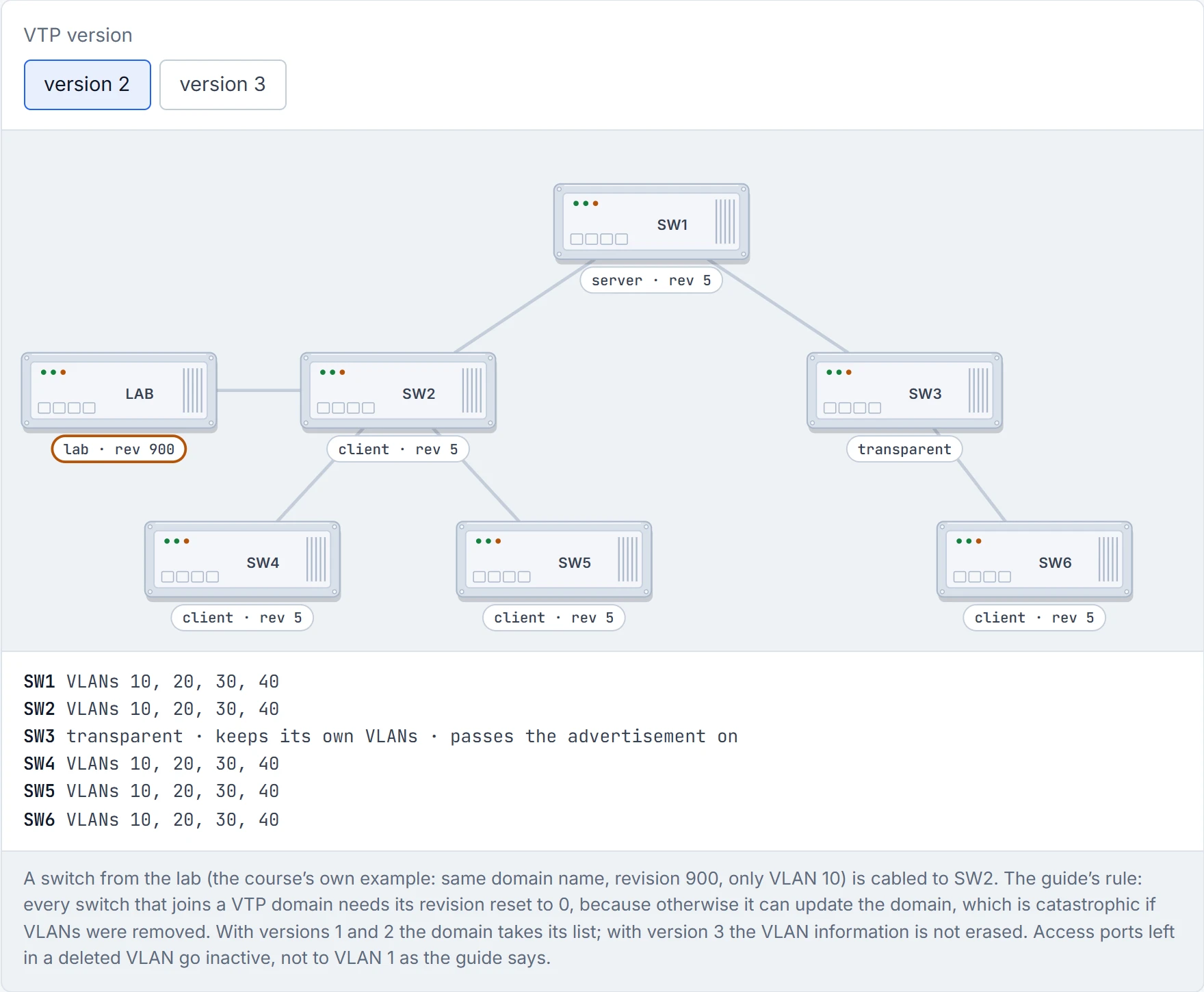
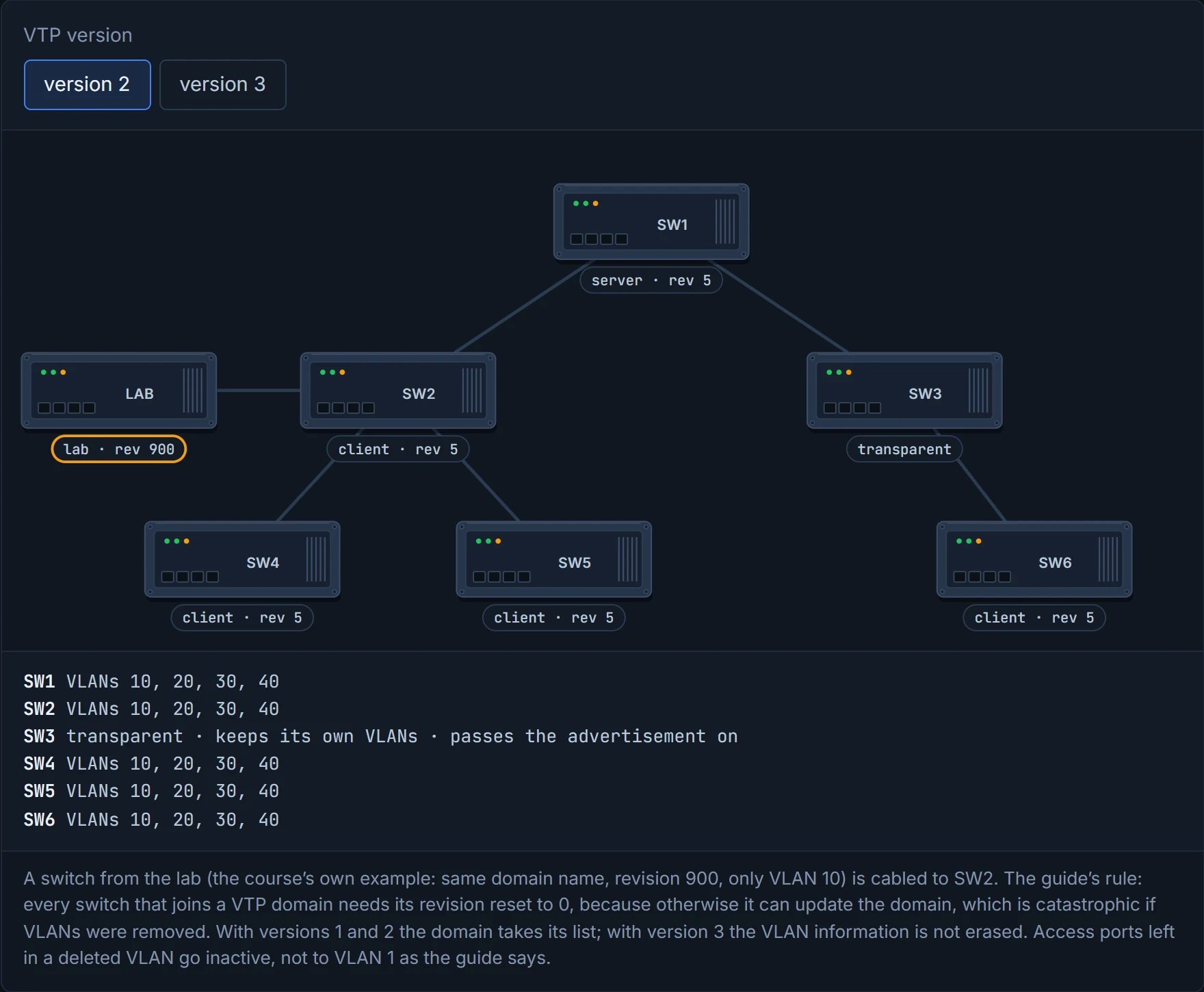
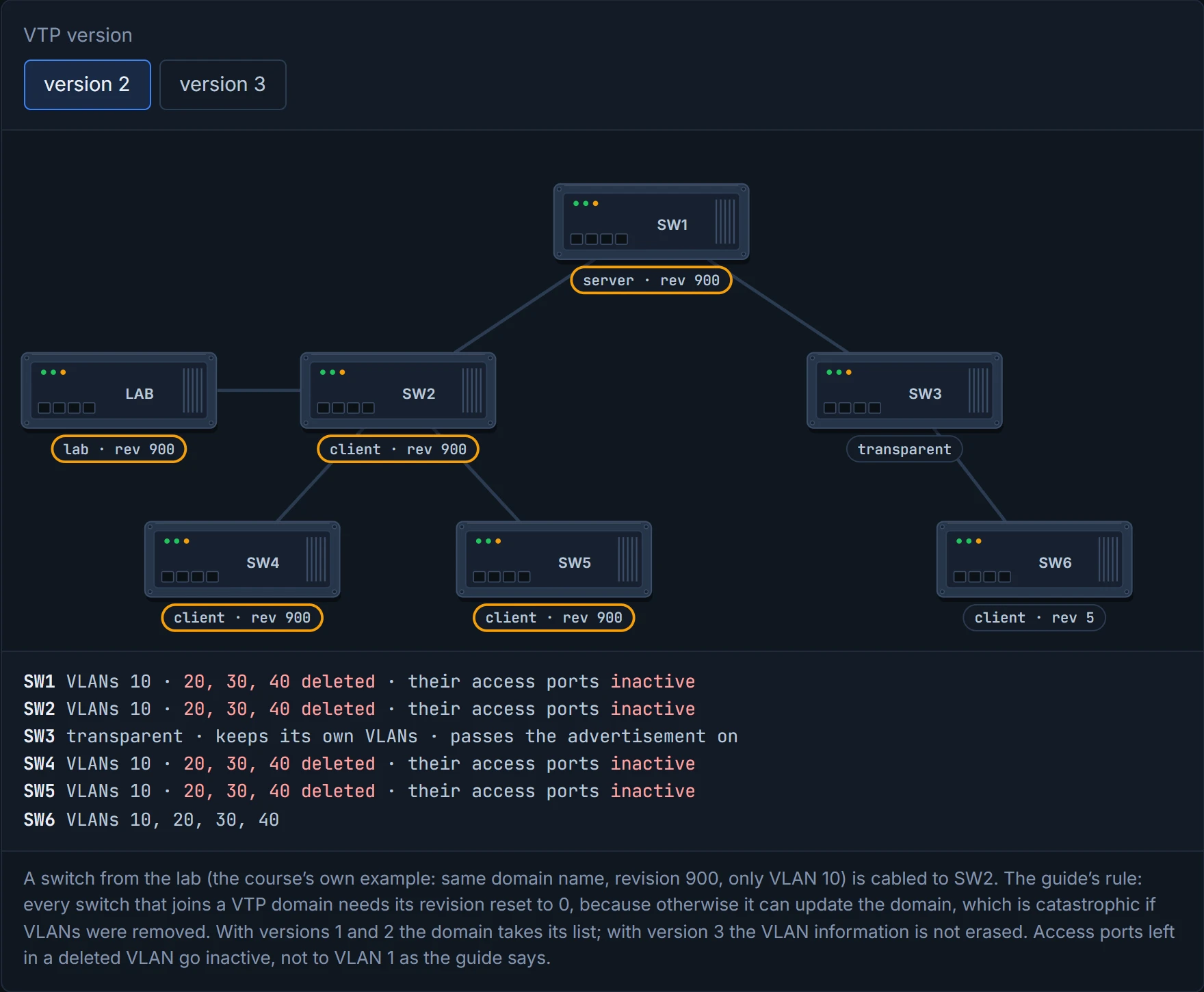
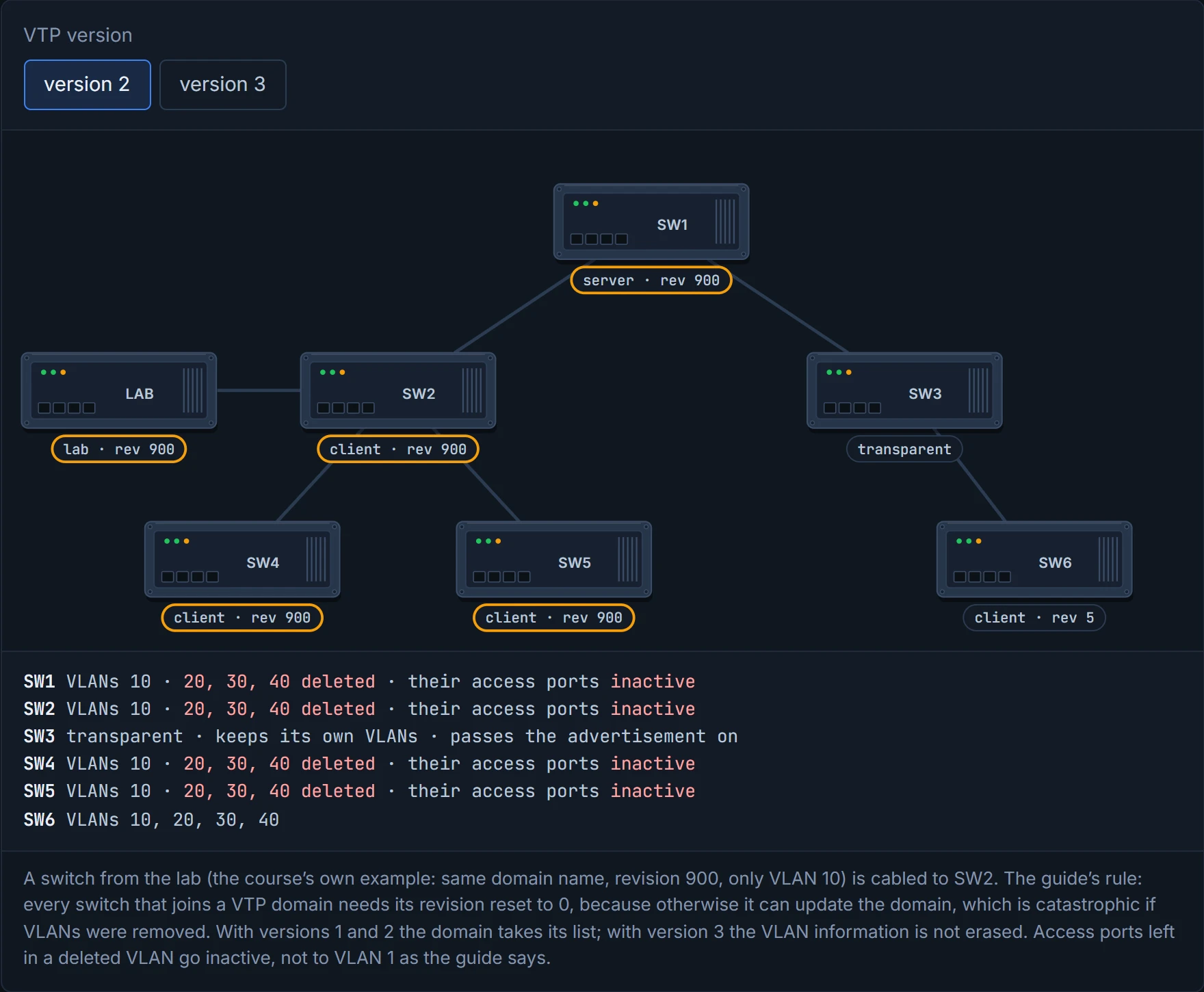
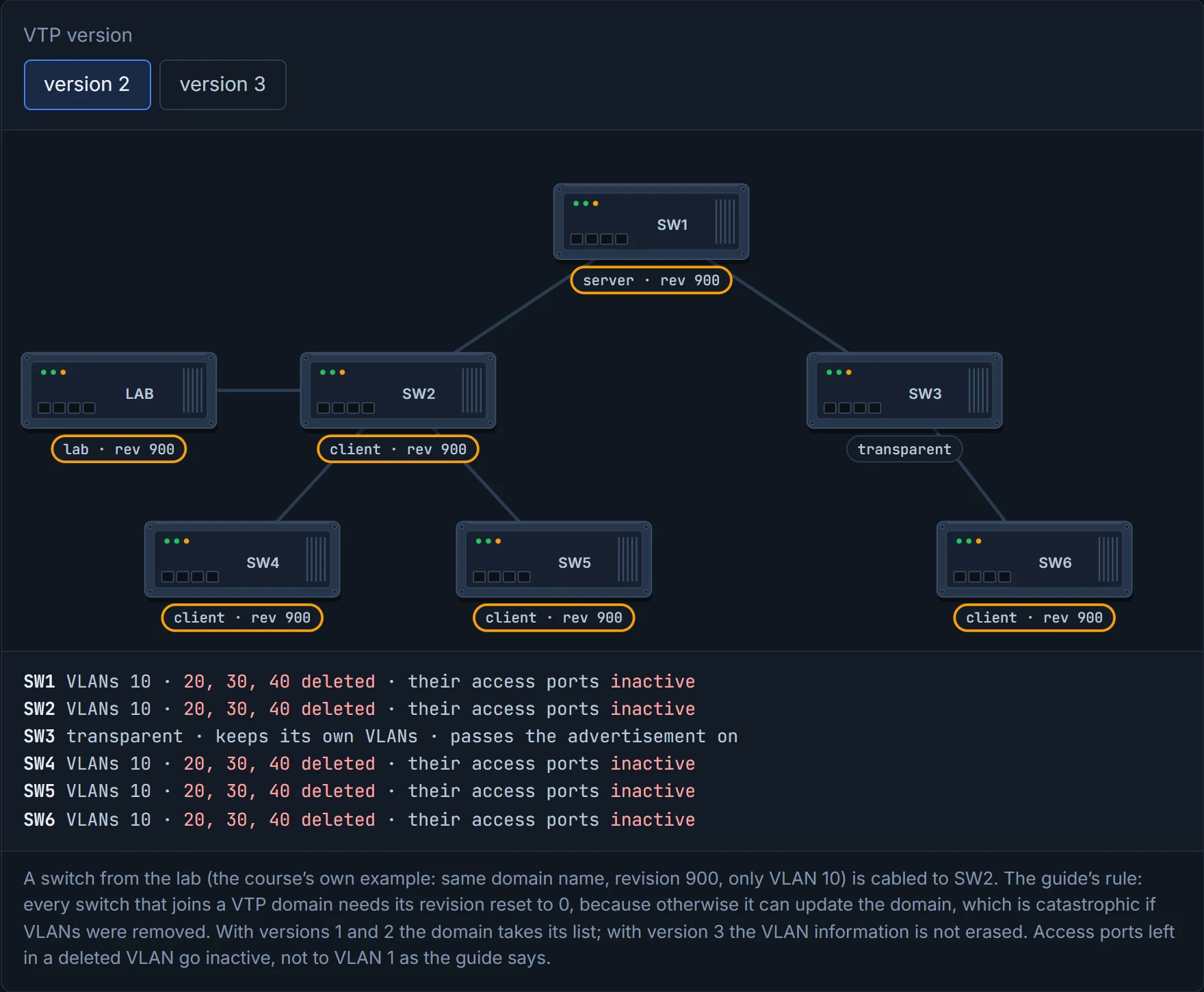
Step 1 of 5 The production domain is at revision 5 with VLANs 10, 20, 30 and 40. A switch from the lab is cabled to SW2: same domain name, revision 900, and only VLAN 10. It could be a server or a client; what matters is that it joins with a higher revision.
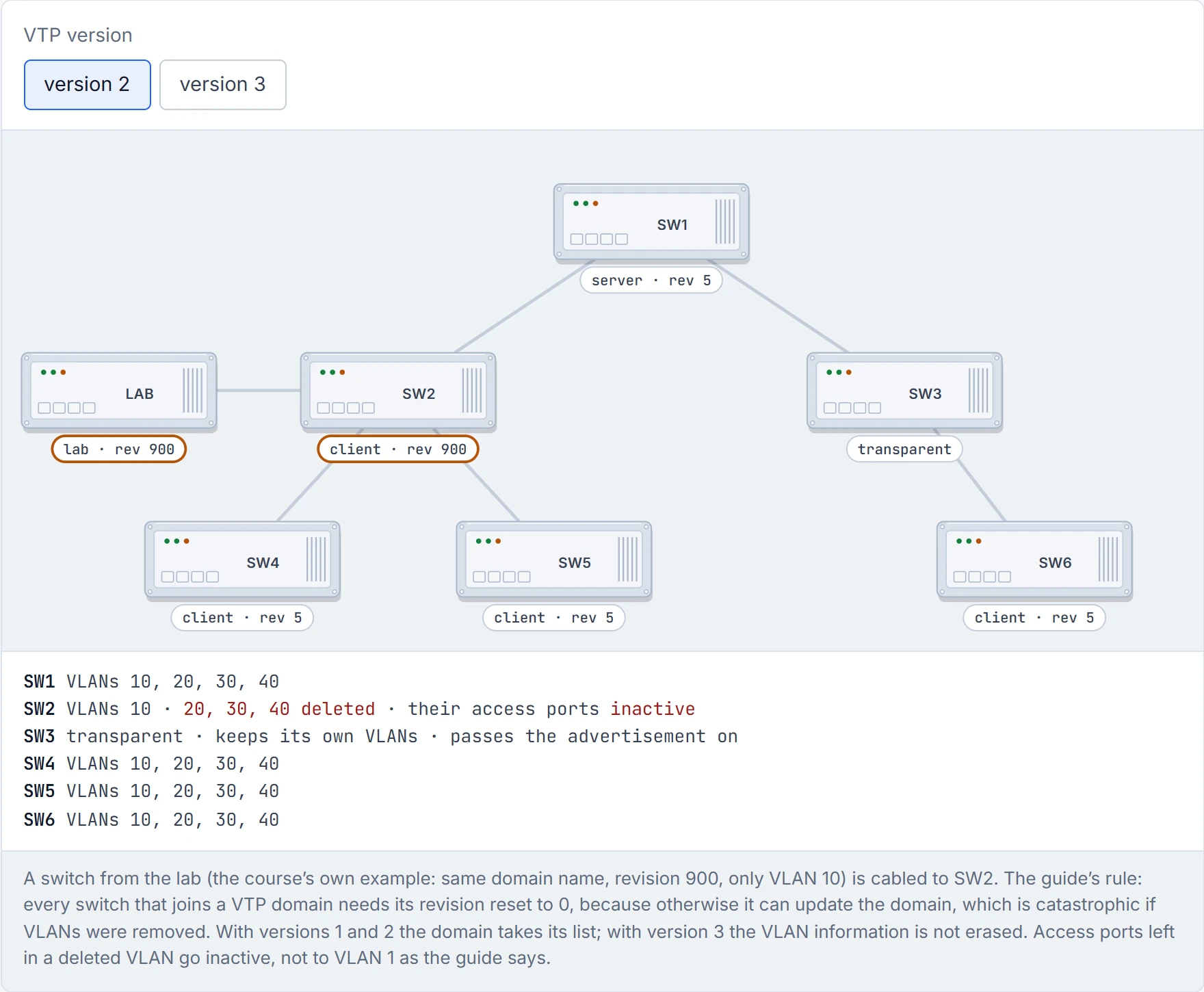
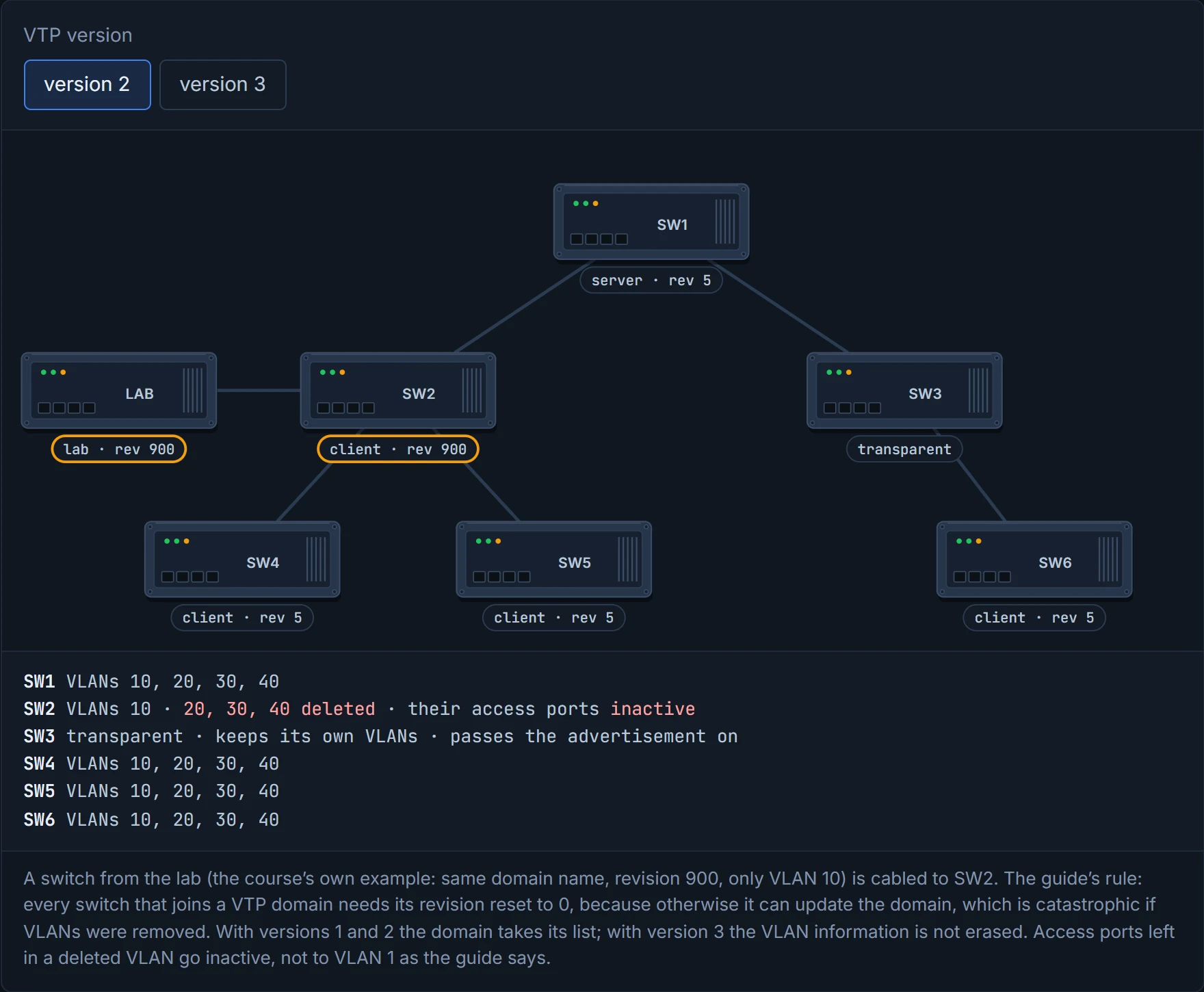
Step 2 of 5 SW2 compares 900 with its 5. The higher number wins, so SW2 takes the lab switch’s list: VLANs 20, 30 and 40 are gone from it.
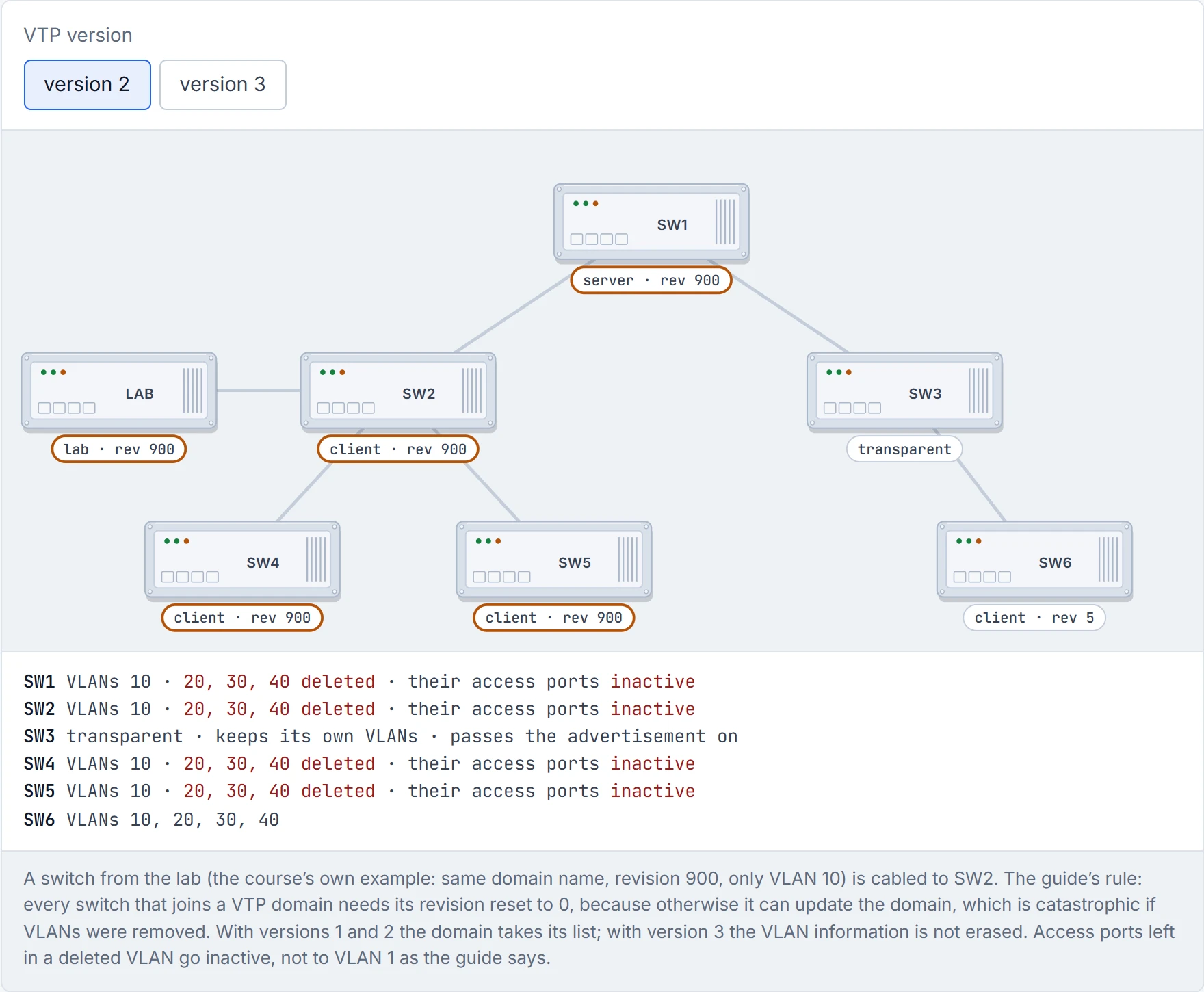
Step 3 of 5 SW2 passes it on. SW1, the real server, sees 900 against 5 and takes it too; so do SW4 and SW5.
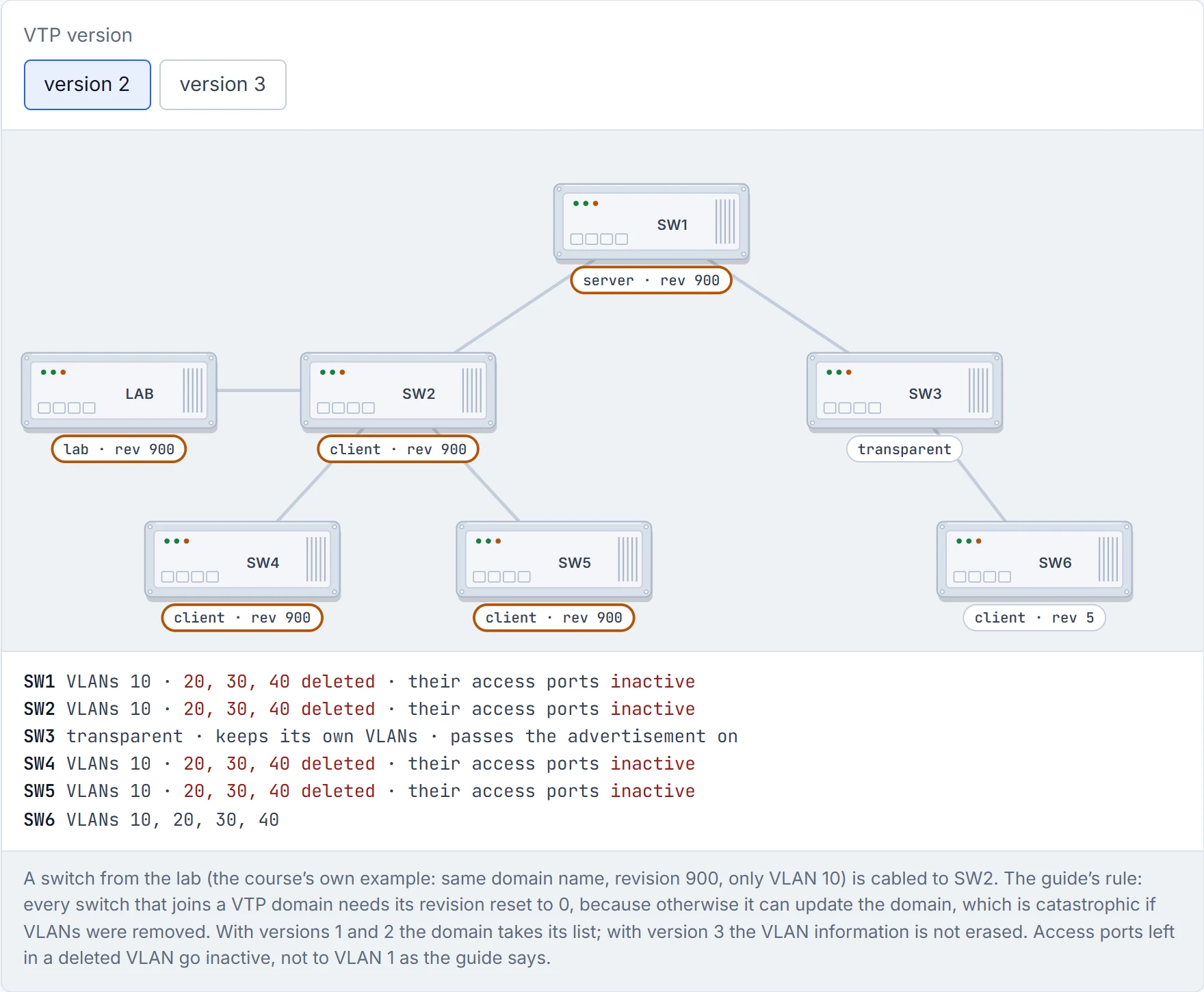
Step 4 of 5 SW1 passes it to SW3. SW3 is transparent: it keeps its own VLANs and passes the advertisement on untouched.
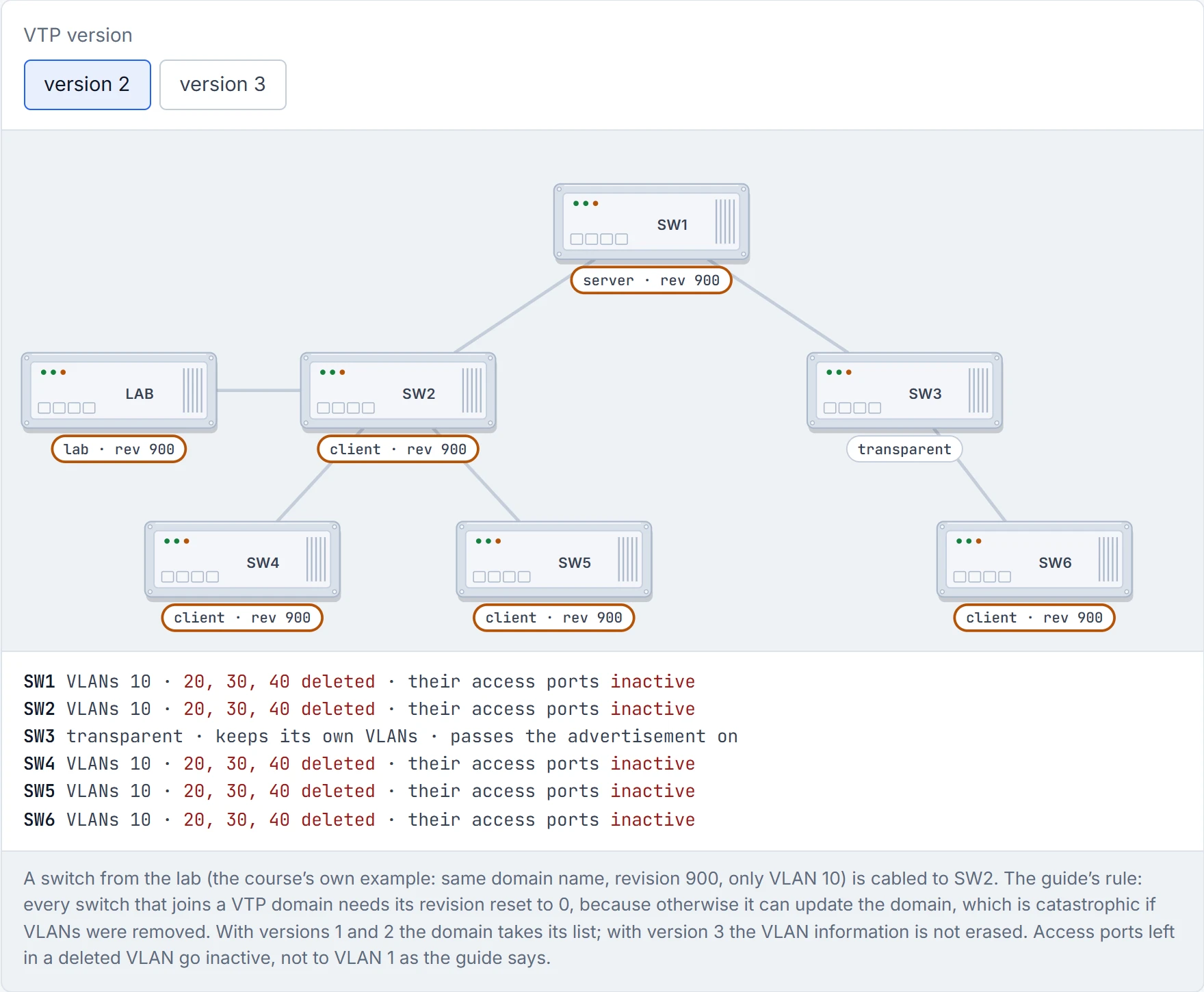
Step 5 of 5 SW6 takes it from SW3. Every server and client in the domain has lost VLANs 20, 30 and 40, and their access ports have gone inactive. One cable did that. Reset a switch’s revision to 0 before it joins.
Now the other protocol. DTP, the Dynamic Trunking Protocol, lets a port negotiate becoming a trunk. Each side sends DTP packets, and if they agree, the port becomes a trunk. Think about the last time you offered a colleague a lift home: you had to ask, and they had to answer. DTP is that question, and it repeats itself every 30 seconds, so the neighbour always knows where it stands. And there's a catch that trips people up: DTP only works if both switches are in the same VTP domain. Mismatched domain names, and the conversation fails.
It's basically like two people deciding whether to share a car. Three attitudes are possible:
- Trunk (
switchport mode trunk): "I'm driving, and I'm telling you I'm driving." It's a trunk whatever happens, and it still sends DTP so the other side can join in. - Dynamic desirable (
switchport mode dynamic desirable): "Shall we share a car?" It behaves as an access port, but it asks: it sends DTP and listens. If the other side agrees, it becomes a trunk. - Dynamic auto (
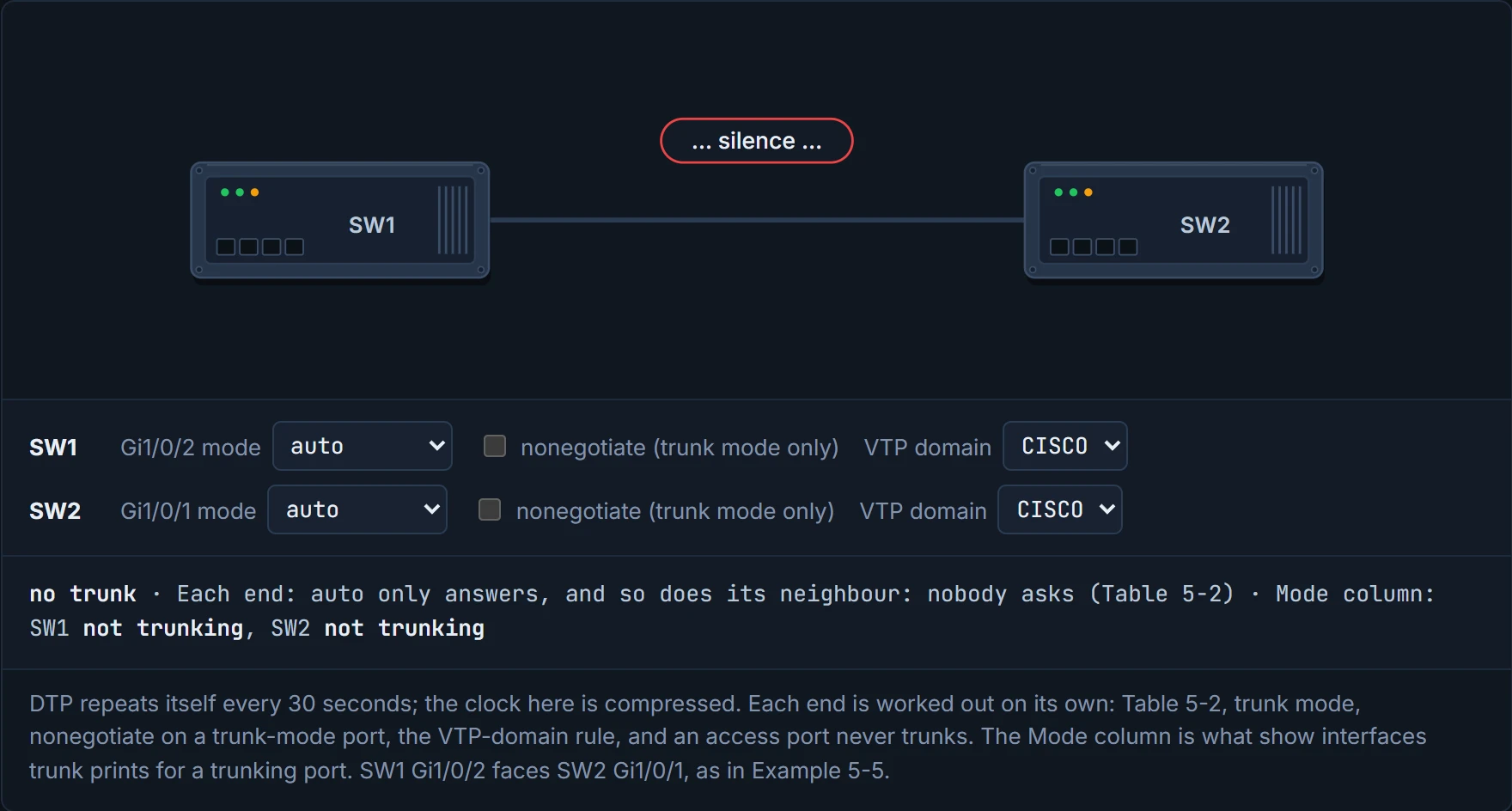
switchport mode dynamic auto): "If you offer, I'll say yes." It behaves as an access port and waits: it listens and responds, but never asks first.
Look at SW1's Gi1/0/5 in the guide's Example 1-9: Administrative Mode: dynamic auto and Negotiation of Trunking: On. A port sitting in dynamic auto is quietly waiting to be asked. (Whether that's the factory default on every Catalyst, the guide doesn't say; check show interfaces switchport rather than assume.)
D1
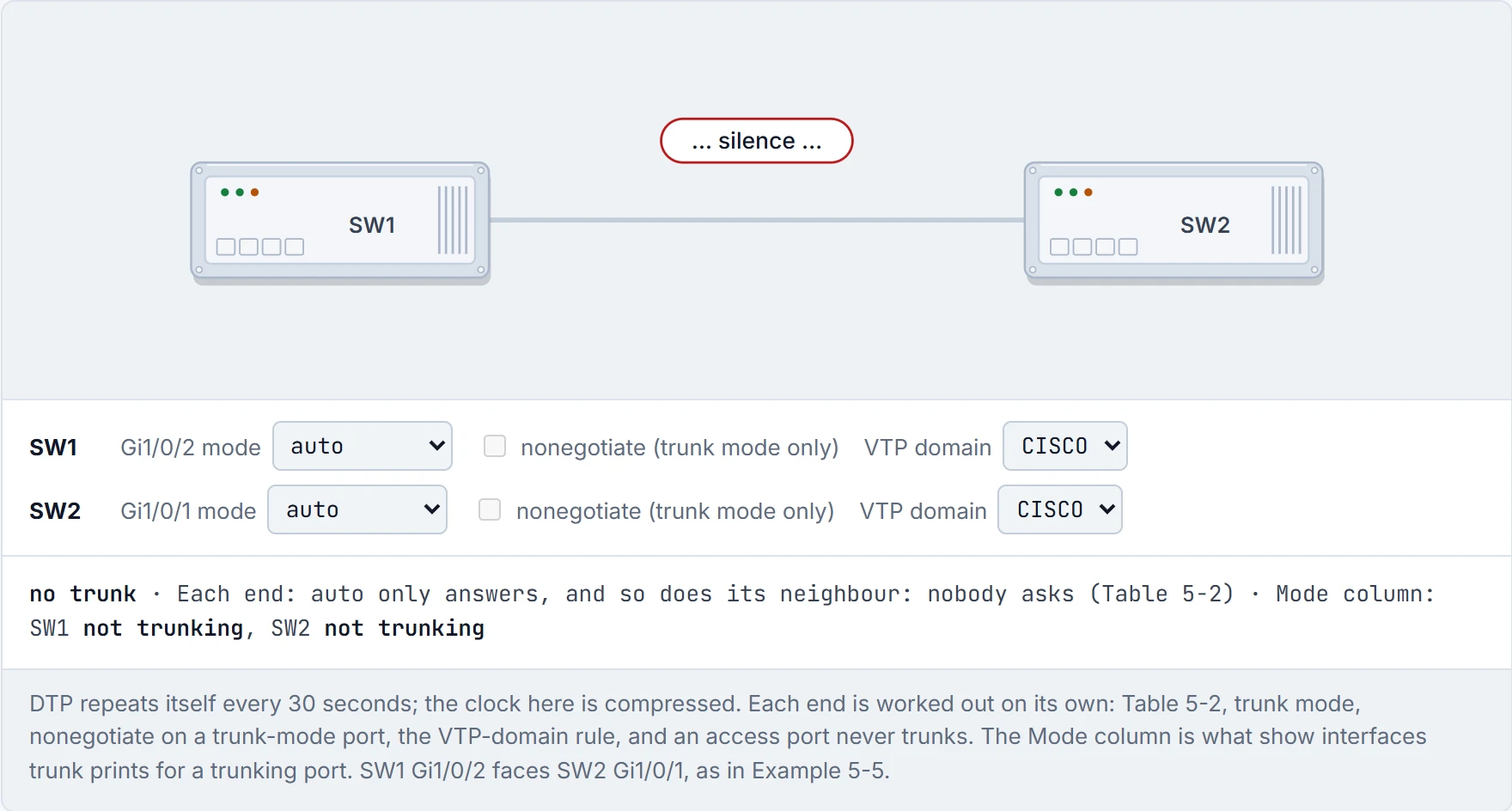
A trunk or desirable port sends DTP every 30 seconds, for as long as the link is up. It's the car-share colleague who never takes silence for an answer.
Now predict: two switches, both ports on dynamic auto. Trunk or not?
Not. Both are waiting for the other to ask. If you've ever had a friend where you're both waiting for the other to text first, you know how that ends: no plans. Every other combination of trunk, desirable and auto forms a trunk; only auto with auto doesn't.
| Trunk | Desirable | Auto | |
|---|---|---|---|
| Trunk | trunk | trunk | trunk |
| Desirable | trunk | trunk | trunk |
| Auto | trunk | trunk | no trunk |
And a port set to access never becomes a trunk, whatever its neighbour says. It isn't in the conversation at all. It's like offering a car share to someone who doesn't drive: however nicely you ask, they're not getting behind the wheel.
Dynamic auto with dynamic auto is the most polite outage in networking. Nobody did anything wrong. Nobody did anything.
To see what happened, show interfaces trunk has a Mode column. A negotiated trunk shows auto or desirable there, depending on which side you look at. A trunk you configured by hand shows on.
01-1 ended with a question: you set the trunk by hand, so why does it keep sending DTP? Because a static trunk's DTP is for the other side's benefit. If the neighbour is on dynamic desirable or auto, those DTP packets are what let it come up as a trunk too. In a way, it's just a courtesy call: "I'm a trunk, in case you'd like to be one too."
If you don't want that, switchport nonegotiate stops the negotiation. After that, the port won't form a trunk with a neighbour that's dynamic desirable or dynamic auto: the neighbour has to be a hard-set trunk too. Check it with show interfaces <if> switchport, where the line reads Negotiation of Trunking: Off.
The guide's advice is the one most engineers follow: set both ends to a fixed mode, switchport mode access or switchport mode trunk, so nobody has to guess what the port will turn into. Just like when you label every jar in the kitchen instead of trusting everyone to remember which white powder is sugar.
Continue the lesson
The whole lesson, with its drawings and its questions. The rest of this section and 9 more after it.