
Steering spanning tree: root placement, cost and port priority
Left alone, the root is whichever switch has the lowest MAC. Place it on purpose: the lowest priority on a core switch, slightly higher on the secondary, and higher still on everything else. Port cost then moves which port blocks, and port priority decides between two cables to the same switch. Prove each change with show spanning-tree vlan.
By Arif, founder of Daveth · Updated
The full 9 min walkthrough is in Daveth Pro (Network). See what the plan opens
What this page answers
How do you configure the spanning tree root bridge?
spanning-tree vlan id priority p sets any value from 0 to 61,440 in steps of 4,096. spanning-tree vlan id root primary sets 24,576, and root secondary sets 28,672 for the backup root. Read it in the lesson
Where should the spanning tree root be?
Ideally on a core switch, with a secondary root chosen in advance, so a failure changes as little as possible. Raise the priority on every other switch too, so none can win by accident. Read it in “4.1 Why leave the tree to luck?”
4.1 Why leave the tree to luck?
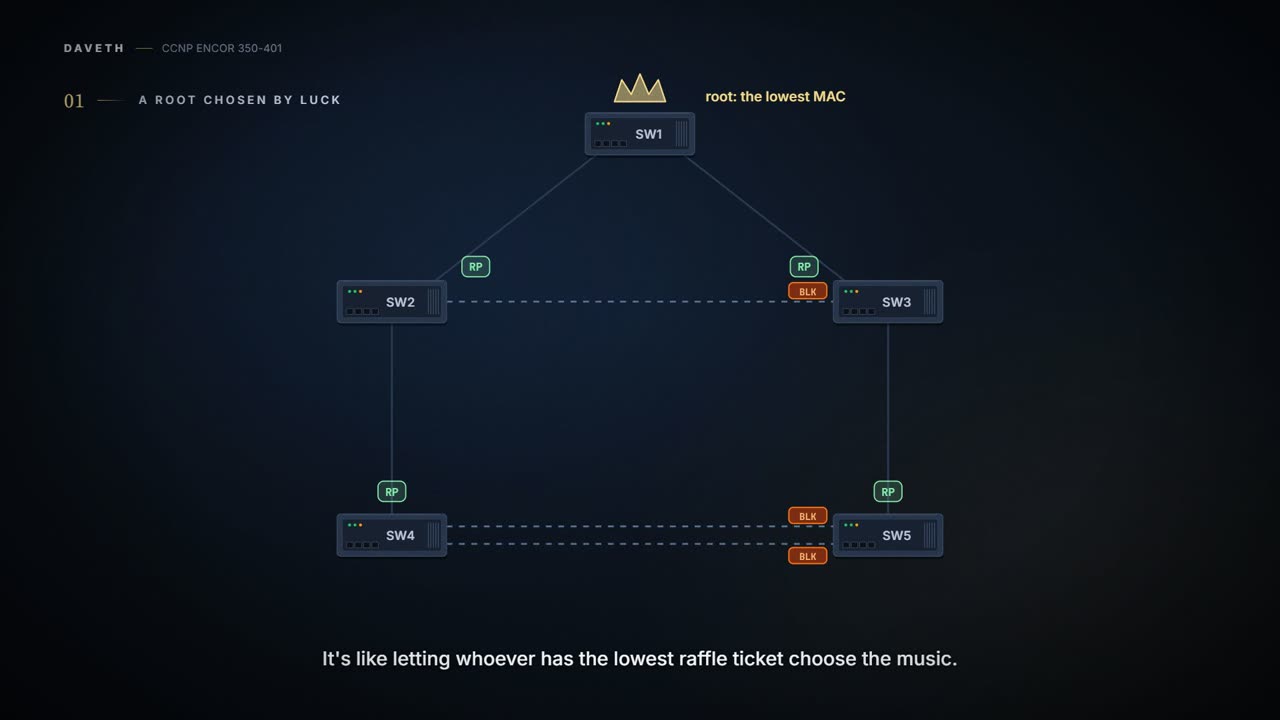
In 01-5 the root was SW1 for one reason: its MAC was lowest. Nobody chose it. It's basically like letting whoever has the lowest raffle-ticket number decide the music. It might work out.
A well-designed network places the root on purpose, and decides which ports forward and which sit as alternates. What drives that choice is the hardware, how resilient you need it to be, and the shape of the network. You can think of it as taking the playlist back: three knobs, each one moving one thing. This lesson keeps the same five switches as 01-5, SW1 to SW5, same MACs, same cables.
The default spanning tree is a democracy where the vote goes to whoever has the lowest serial number.
The root should ideally be a core switch, with a secondary root chosen in advance, so a failure changes as little as possible. The method has three parts: put the lowest priority on the root, a slightly higher one on the secondary, and ideally raise it on every other switch too, so none of them can win by accident. In a way, it's just a household with a named driver and a named backup driver on the car insurance: everyone else is still on the policy, just at the bottom, and only gets the keys if both named drivers are away.
One side effect to expect. Bridge priority doesn't only pick the root: where two switches tie on root cost, it also decides which end of their link is designated (01-5's tie-breakers). So raising priority on the other switches can move blocked ports even though the root stays put. D1 at the end of section 4.6 shows it: raise SW4's priority and its links to SW5 change ends.
Two ways to set it:
SW1(config)# spanning-tree vlan 1 priority 24576
SW1(config)# spanning-tree vlan 1 root primary
SW2(config)# spanning-tree vlan 1 root secondary
spanning-tree vlan <id> priority <p>: any value from 0 to 61,440, in steps of 4,096.spanning-tree vlan <id> root {primary | secondary}: primary sets 24,576, secondary sets 28,672. It's a script that sets values for you, not a special mode.
Why steps of 4,096? You met the reason in 01-5. The 16-bit priority field is 4 bits of priority and 12 bits of VLAN ID, so the priority can only move in the top 4 bits: 4,096 is 2 to the power of 12, the first value the 12 VLAN bits can't reach. If you've ever set an oven that only turns in clicks of 20 degrees, it's the same: you can't ask for 190.
One honest limit. Cisco's 17.9 guide says root primary sets 24,576 if that value makes this switch the root. It doesn't say, on that page, what happens when another switch already sits below 24,576. So don't lean on root primary in that case: set the number yourself with priority, and check the result.
root primary is the set menu of spanning tree: 24,576, no substitutions, and Cisco's page only promises it tastes good when nobody else has ordered something lower.
Always look before and after. On SW1, before the change: Root ID Priority 32769, "This bridge is the root". After root primary: 24577, which is 24,576 plus the system ID extension, 1. The extension is the VLAN number: it "indicates the VLAN that the BPDU correlates to", so VLAN 1 adds 1 and VLAN 10 would add 10. Then on SW2: the root still says 24577, SW2's own bridge ID says 32769, and after root secondary it says 28673. Nothing about the ports changed, because SW1 was already root. That's the point: now it's root on purpose. That's roughly equivalent to finally signing the lease on a flat you've lived in for years: nothing in the rooms moves, but now it's yours by decision, not by accident.
There's also an optional diameter keyword on root primary/secondary. It sets the spanning-tree timers to suit the network's size: Cisco defines the diameter as the maximum number of hops between any two end stations in the Layer 2 network. (The guide words it as hops "between a switch and the root bridge"; this page follows Cisco.) You set it with root primary or root secondary, and only the root's values are used: the other switches don't need changing, because the timers travel inside the root's BPDUs. Have you ever noticed how your phone and laptop fix their own clocks when the clocks go forward? They all read one source, so that's the only one anybody changes. And once a switch is root, Cisco advises you to avoid setting hello, forward delay and max age by hand. It acts kind of like a thermostat: set it at the one control that matters, and stop fiddling with the radiators.
The timers are the one setting in networking where "don't touch it" is the official, documented advice.
Where should the root be? Somewhere that minimises the hops to the furthest switch. Think about where the redundant links are, which ones will end up blocked, and whether the root switch can handle the traffic that crosses it. Generally, the root sits at the Layer 2/Layer 3 boundary: the switches where the VLANs meet the routing. Consider it your house's central heating boiler. Put it in the middle of the house and every radiator gets hot water quickly; put it in the garden shed and the far bedroom is always cold. Frames follow the tree, so traffic between two branches crosses the root; a root in the wrong corner stretches those paths for everyone.
The strongest setting: priority 0 on the primary root, and 4096 on the secondary. Nobody can go lower than 0, so another switch can't take over by being set lower; it could only tie on 0 and win on MAC. Picture yourself holding the very first ticket at the deli counter: nobody can draw a lower one, but if the machine prints a second copy of yours, the counter settles it some other way (for switches, the MAC). Root guard, in 01-7, is the doorman who won't let the second ticket in at all.
Priority 0 is the networking equivalent of putting your name on the milk in the office fridge. Clear, unambiguous, and still not proof against someone with the same name.
Now the second knob. First, the rule it depends on, the one 01-5's quiz tested. When a switch sends a BPDU, the path cost inside it is its own cost to the root. It does not include the cost of the port the BPDU goes out of. The switch that receives it adds the cost of its own receiving port.
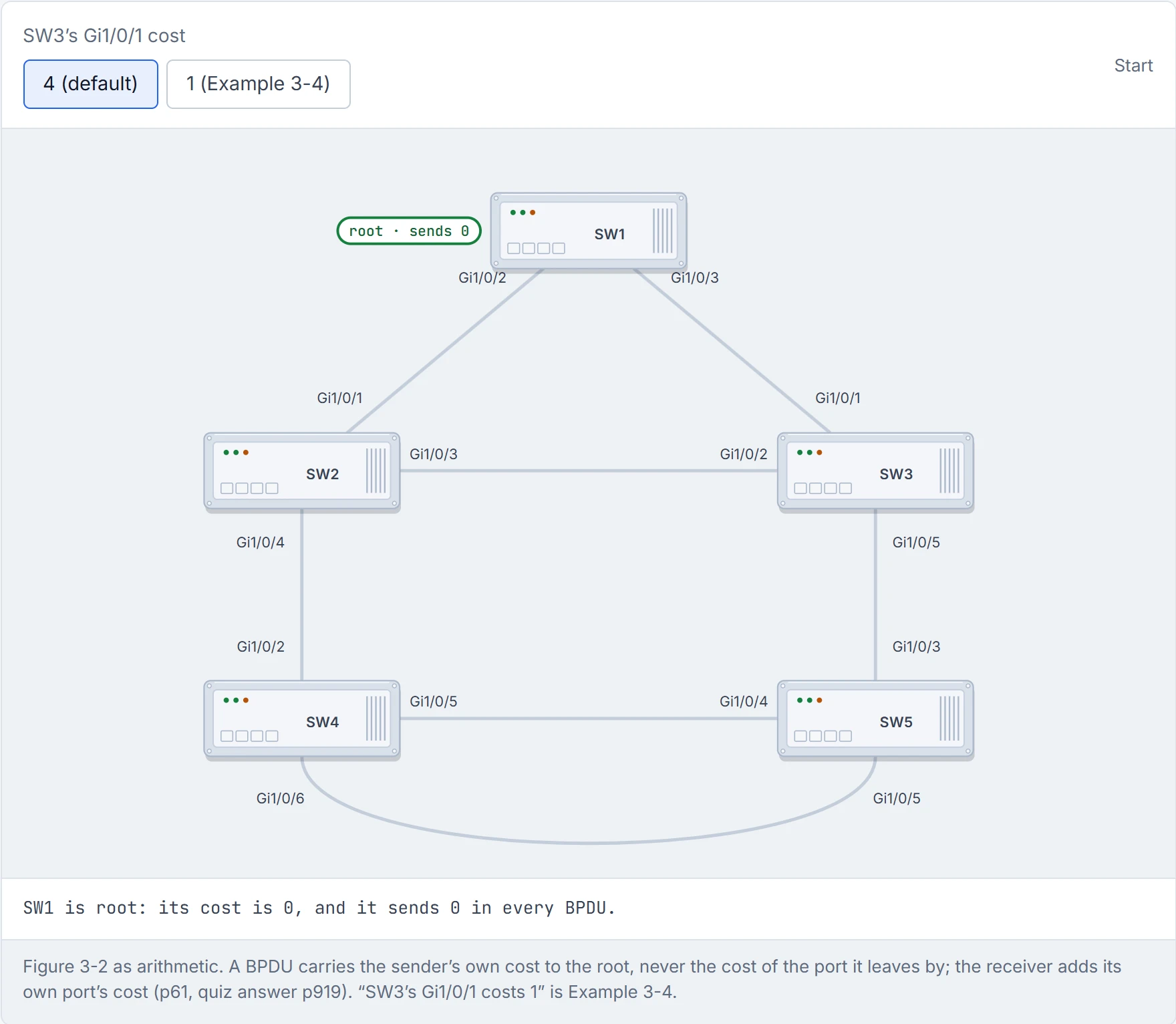
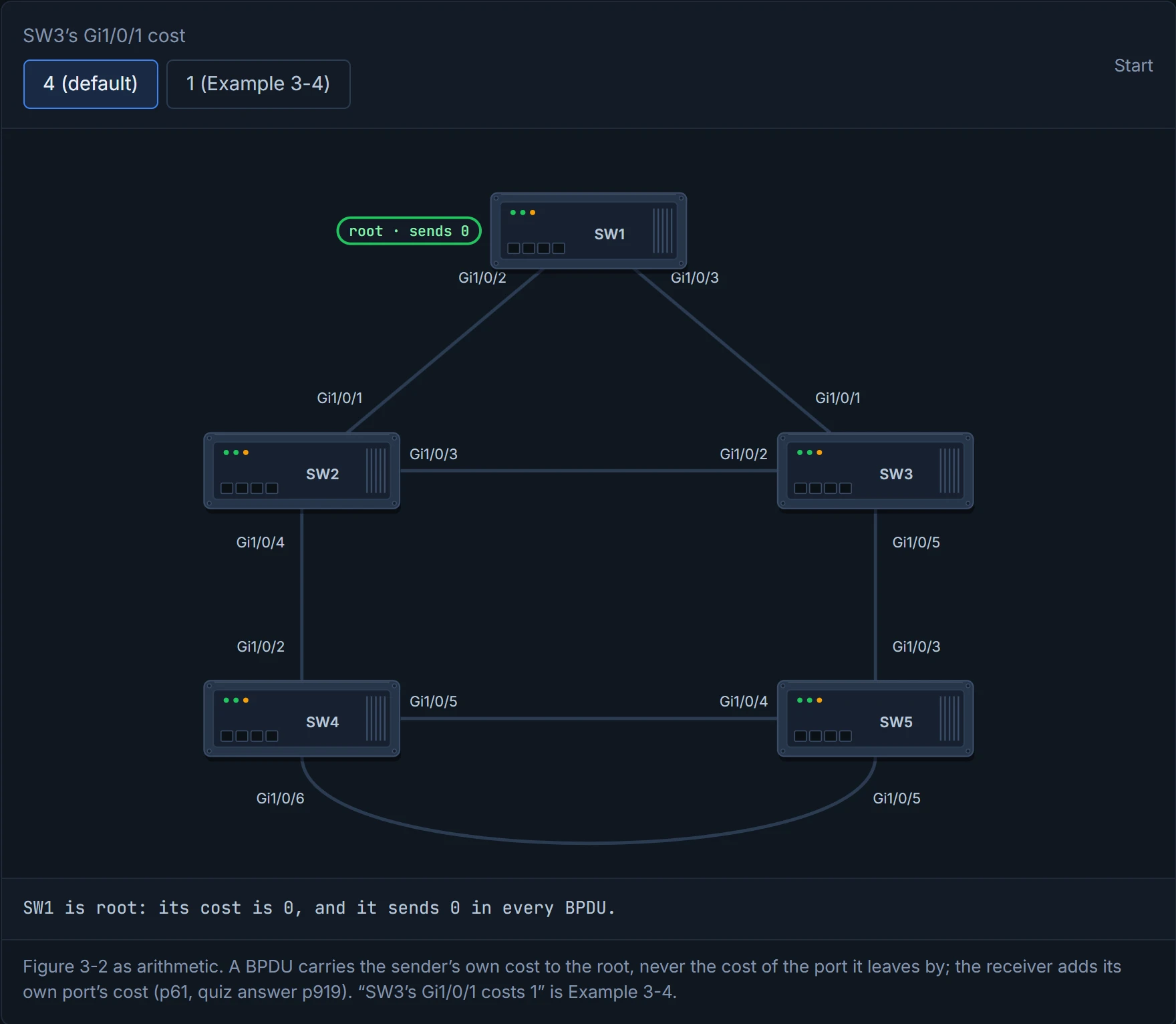
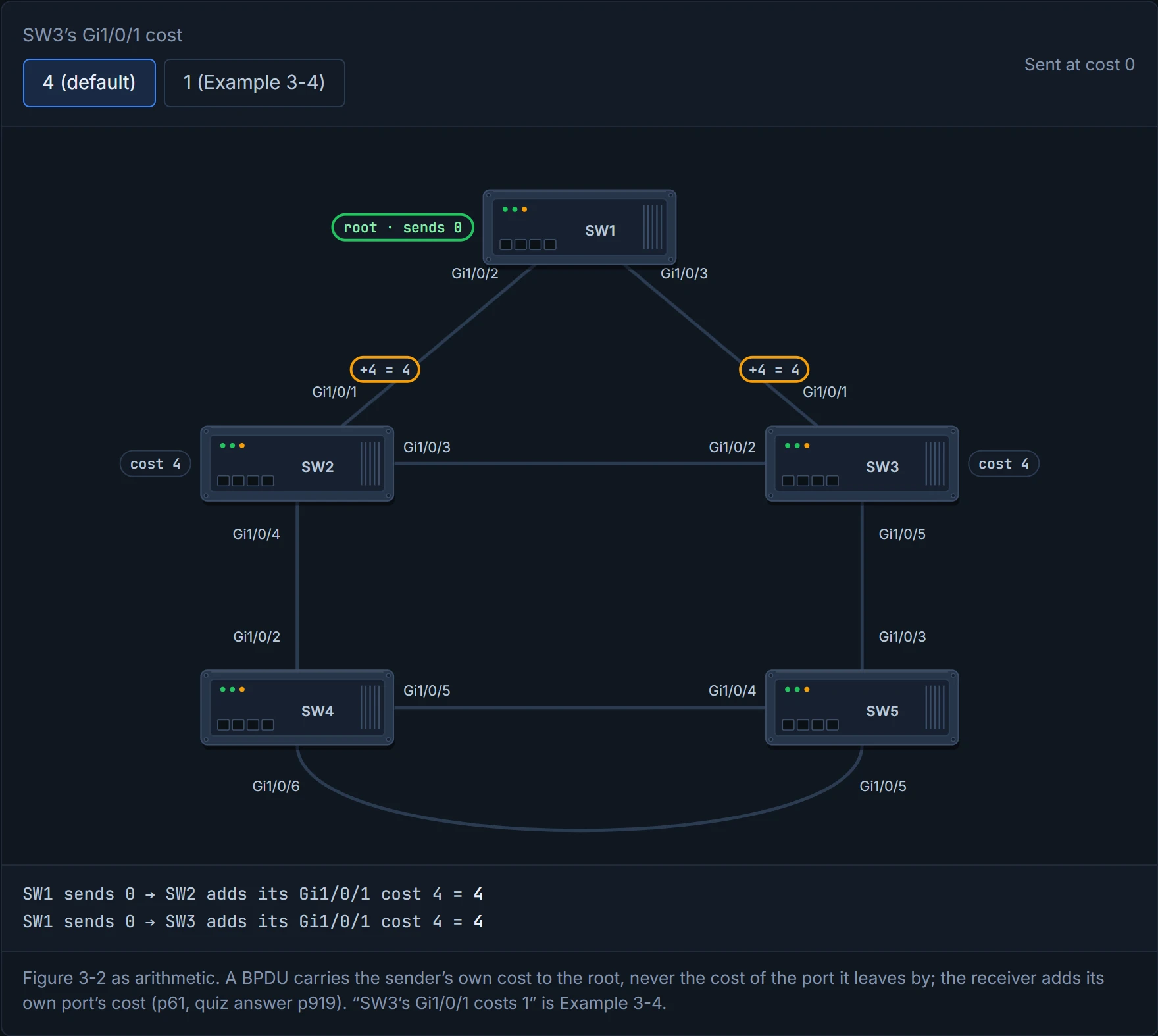
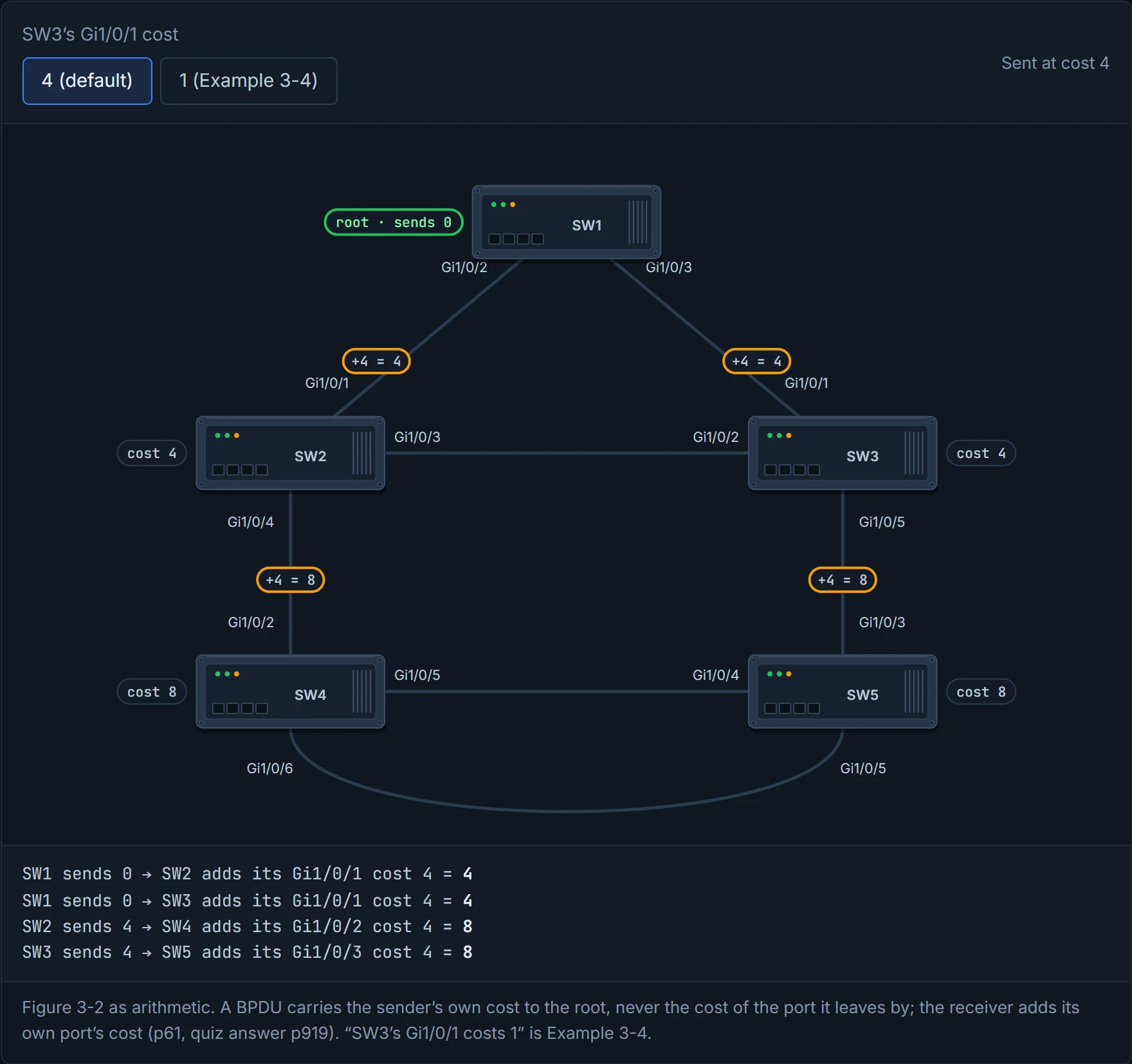
Follow it in Figure 3-2. SW1 is the root, so it advertises 0 to SW3. SW3 adds its port cost, 4, so SW3's cost is 4, and that's what it advertises to SW5. SW5 adds its own 4, for a total cost of 8 via SW3. It's like a relay race where each runner only reports the time since the start, and the next runner adds their own leg.
The output agrees. SW1, the root, shows no cost at all. SW3: cost 4 via port 1, and Gi1/0/2 is Altn BLK. SW5: cost 8 via port 3, and both its links to SW4 are Altn BLK. (Example 3-3's root priority reads 32769, not 24577: the guide seems to start each example from the untouched topology, not from the one before.)
The knob is the port cost:
SW3(config)# interface gi1/0/1
SW3(config-if)# spanning-tree cost 1
spanning-tree [vlan <id>] cost <cost>. Without vlan, it applies to every VLAN on that port. Here's how to think about where to set it. A port's cost only counts where BPDUs are received: it changes which port becomes this switch's root port, and this switch's own cost to the root. That cost is what the switch advertises on its other links, so it decides the designated ports there. Lower the cost on a switch's path to the root, and its other links can win their designated-port contests, which moves the block to the far end. Raising the cost of a port that's already designated changes nothing on that link, because a BPDU never carries the cost of the port it leaves by. (The guide's p62 says a raised cost on a designated port "can end up" blocking; by its own rule on p61, that only happens through a change in root port, so this page teaches the rule.) If you scaled that down to your drive to work, it's a road that gets resurfaced: the sat-nav's travel time for it drops, suddenly it's the way everybody goes, and the old favourite goes quiet. On a 9300 the range is 1 to 200,000,000, and the default comes from the interface speed.
Predict before you read on: SW3's link to SW1 now costs 1. What happens on the SW2–SW3 link, where SW3's end was blocking?
SW3's own cost to the root is now 1. SW2's is still 4. On the link between them, SW3 advertises 1 and SW2 advertises 4: the lower advertised cost forwards, so SW3's Gi1/0/2 becomes designated. And SW2's Gi1/0/3? Through it, SW2's total would be 1 + 4 = 5, worse than the 4 it already has through Gi1/0/1, so it isn't the root port either: it becomes the alternate. (SW3's other way round, through SW2, would total 4 + 4 = 8, so its direct link stays its root port.) The block has moved to the other end of the same link.
D2
Step 1 of 4
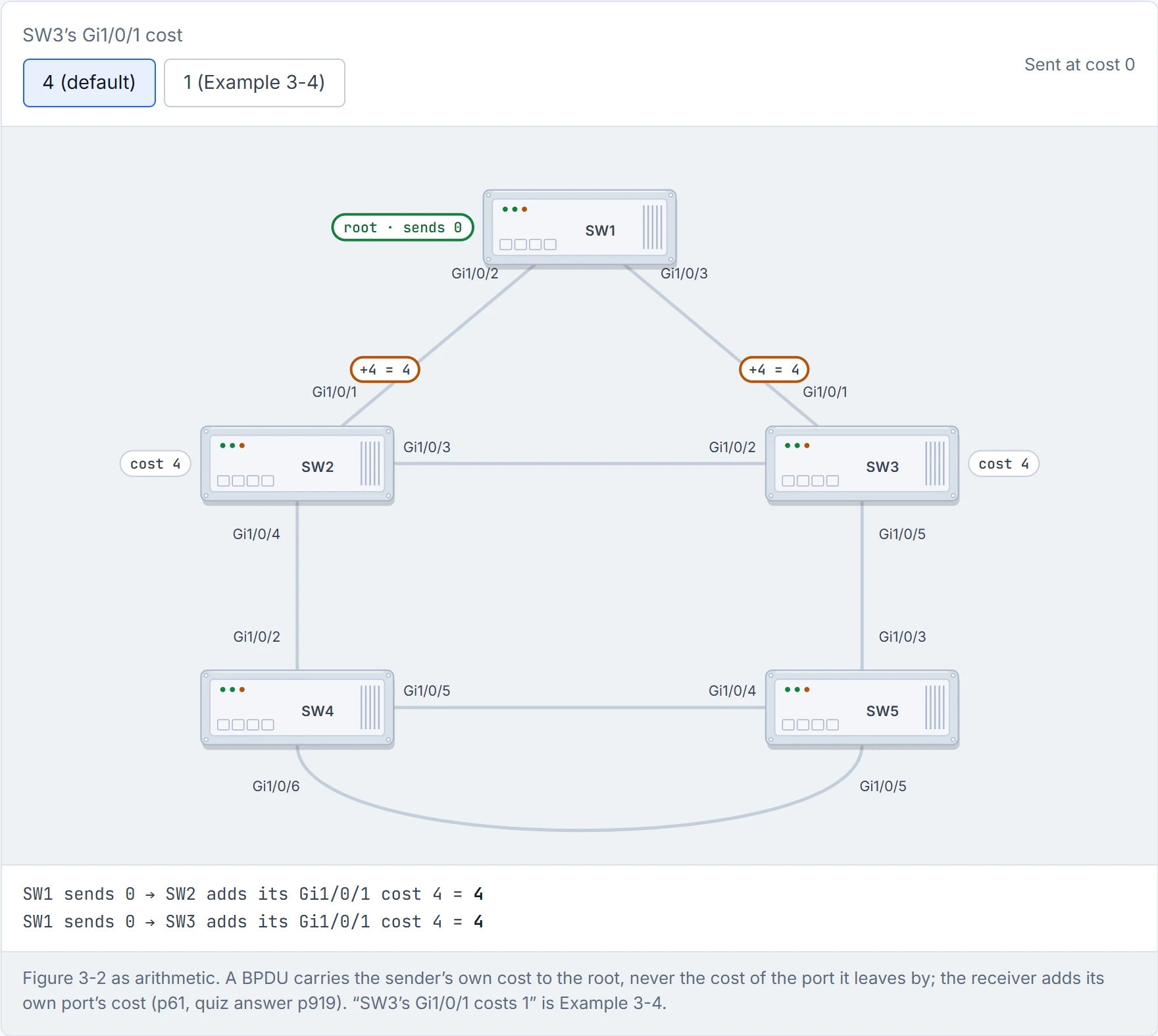
Step 2 of 4 Each receiver adds its own port’s cost to the number in the BPDU, then sends its own total on.
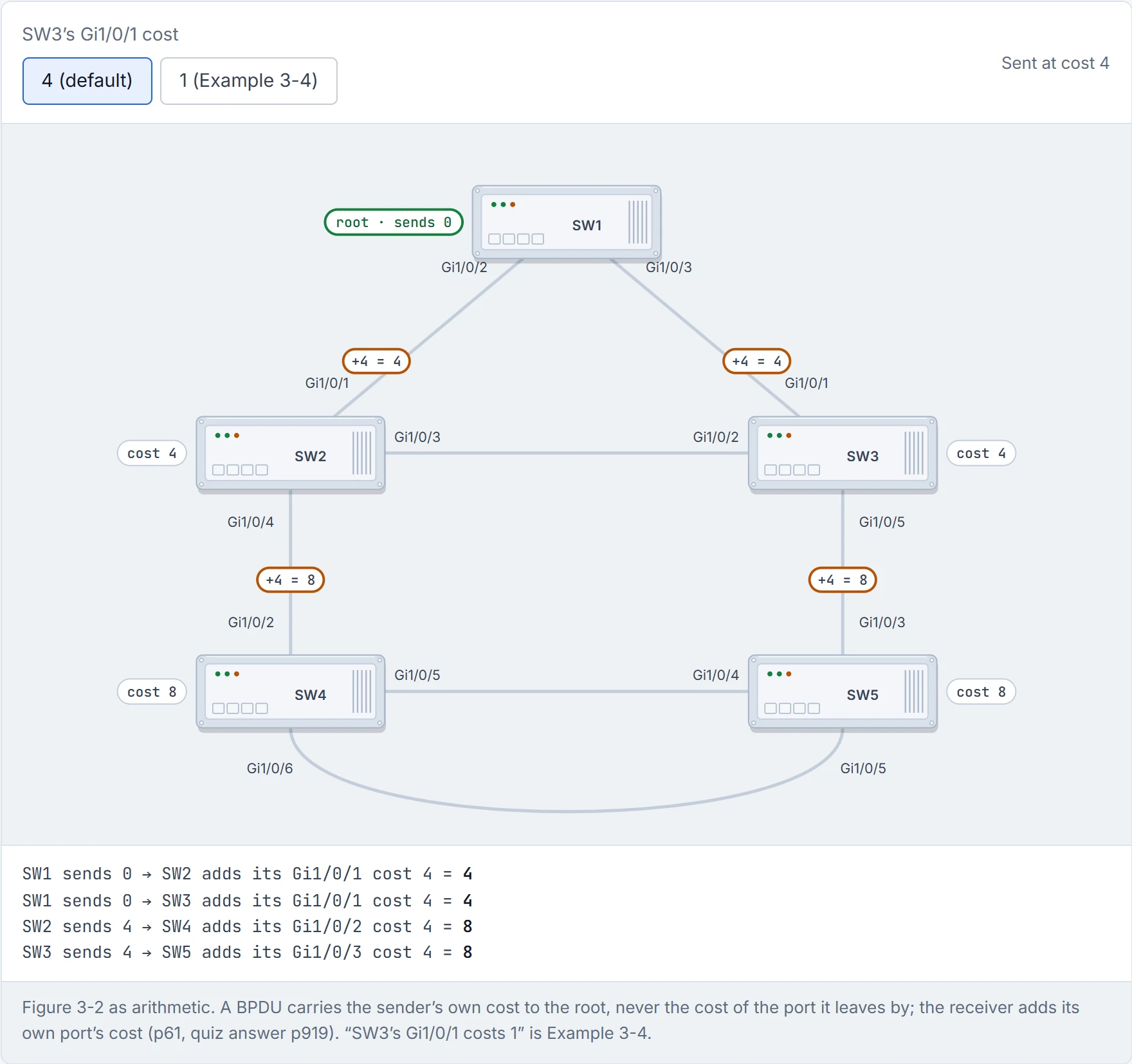
Step 3 of 4 Each receiver adds its own port’s cost to the number in the BPDU, then sends its own total on.
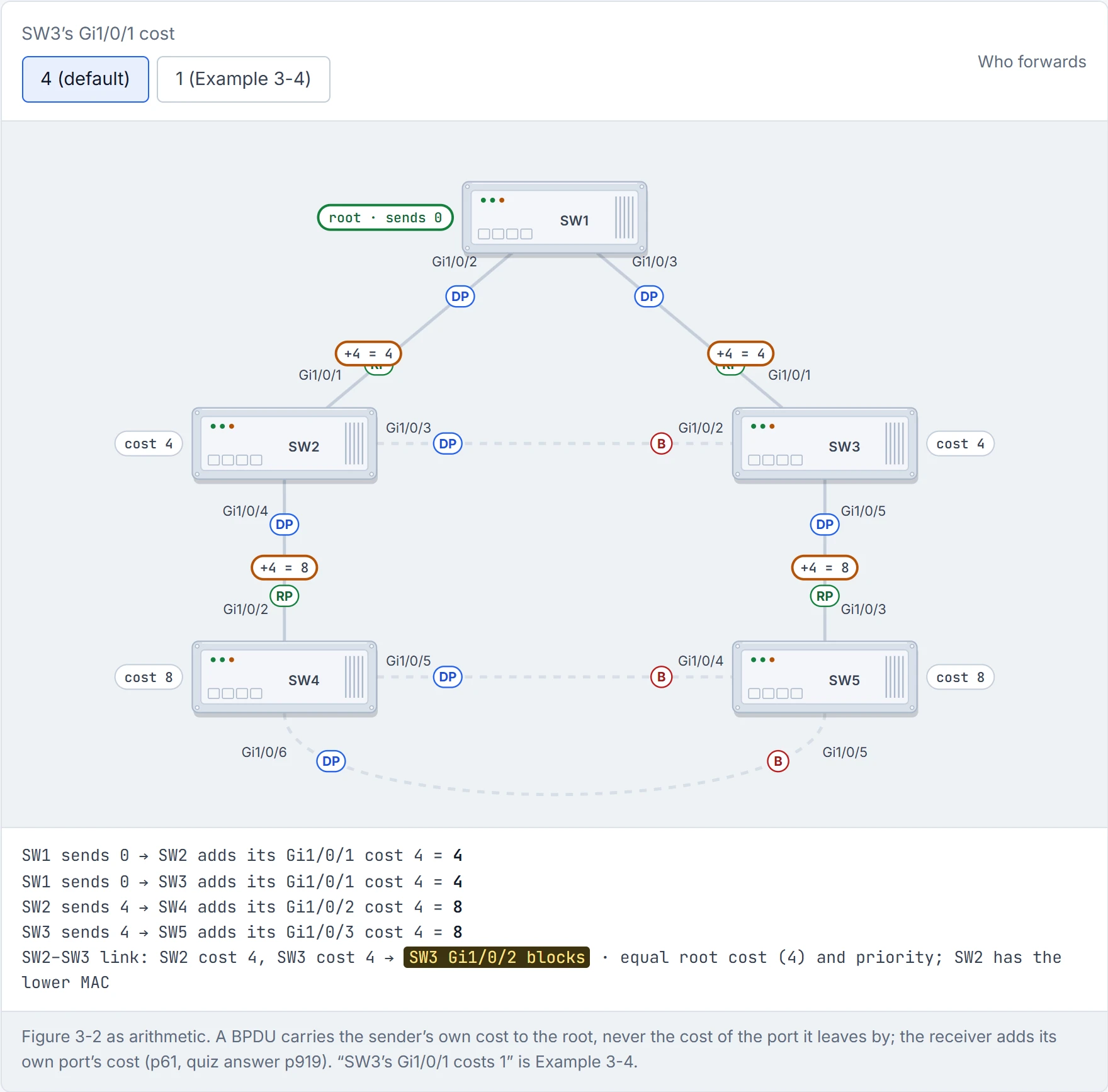
Step 4 of 4 Where two switches meet, the end with the lower root cost forwards; on the SW2–SW3 link they tie at 4, so the lower MAC, SW2’s, wins and SW3’s end blocks.
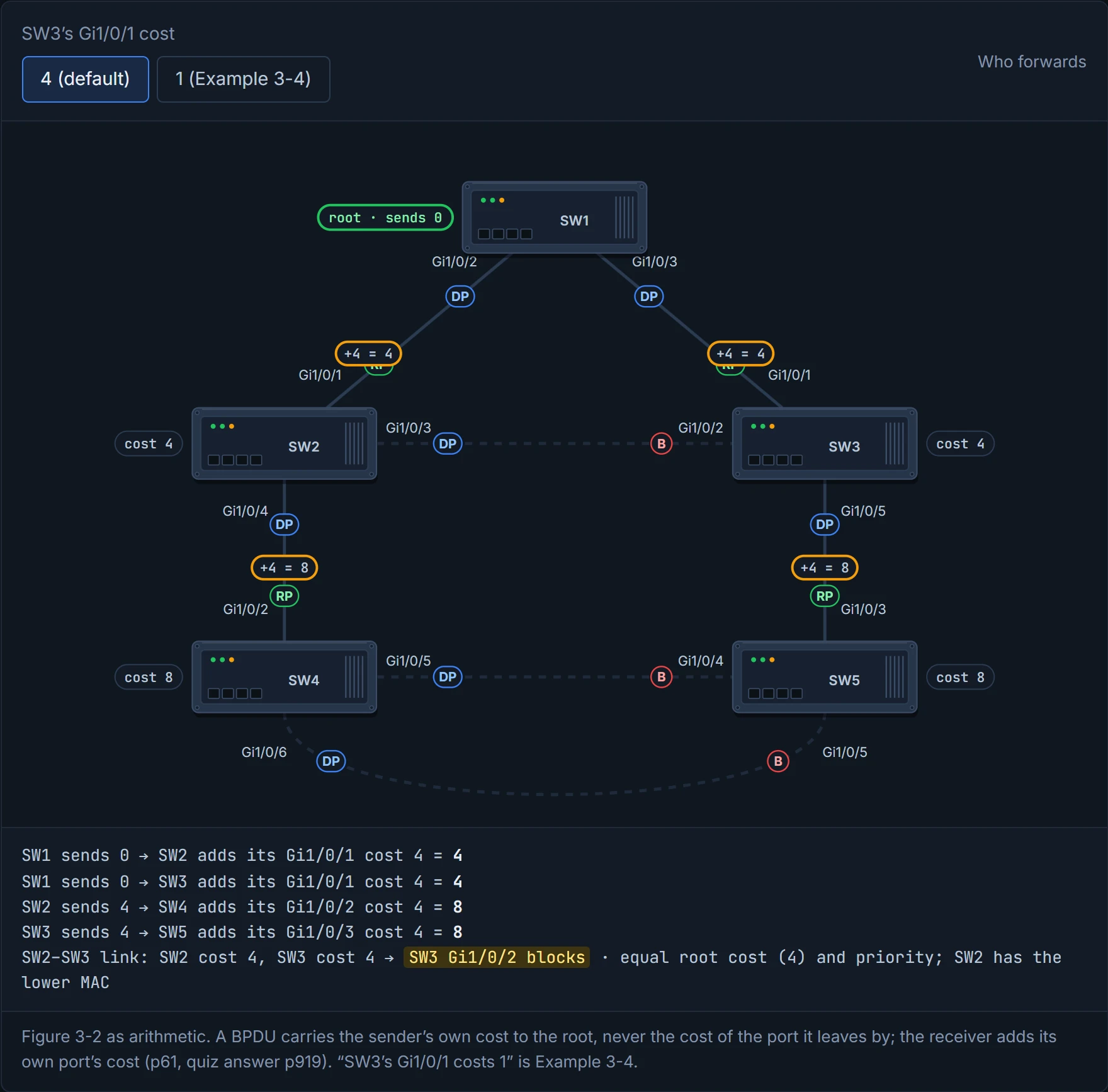
One number changed on SW3, and one of SW2's ports found itself blocked. Spanning tree is the only office where your neighbour's promotion gets you moved to the bench.
The last knob only matters when there are several links between the same two switches. Cost and bridge ID tie, so port priority decides which one is the alternate. (Cost on the downstream switch's own ports would also work, by section 4.5's rule; port priority is the tool the guide uses when the costs are meant to stay equal.)
The guide sets it up: shut the SW3–SW5 link, and SW5 has to reach the root through SW4. It has two cables to SW4, and picks Gi1/0/4 as its root port, at a cost of 12 (SW4's 8, plus 4). Why Gi1/0/4? Same upstream switch, so same bridge ID; same cost. The next tie-breakers are port priority, then port number, and both of them belong to the upstream switch, SW4. It's just like when you're waiting between two lifts: you don't choose by anything about your own floor, you take the one the building has labelled first choice. SW4's Gi1/0/5 goes to SW5's Gi1/0/4, and 5 is lower than 6.
Here's the surprise. Think of it as a pipeline where the downstream switch can only choose between the numbers the upstream one sends it. So to change SW5's root port, you configure SW4:
SW4(config)# interface gi1/0/6
SW4(config-if)# spanning-tree port-priority 64
spanning-tree [vlan <id>] port-priority <p>; with vlan, per VLAN. The lower port priority on the upstream switch is preferred. On a 9300 the range is 0 to 240, in increments of 16, default 128.
After the change, SW4's Gi1/0/6 shows 64.6 in the Prio.Nbr column (priority 64, port 6), against 128.5 on Gi1/0/5. And on SW5, Gi1/0/5 is now the root port and Gi1/0/4 is Altn BLK.
Continue the lesson
The whole lesson, with its drawings and its questions. The rest of this section and 9 more after it.