
EtherChannel tuning and the load-balancing hash
Slow LACP declares a member dead only after three missed packets 30 seconds apart, up to 90 seconds; LACP fast sends every second, so a dead member leaves in 3, and both ends must use the same rate. Min-links takes a bundle down below a safe size, max-bundle keeps standbys ready, and a hash on packet headers, not a queue, picks each flow's member.
By Arif, founder of Daveth · Updated
The full 8 min walkthrough is in Daveth Pro (Network). See what the plan opens
What this page answers
What is LACP fast rate?
LACP packets every second instead of every 30, so a member that stops hearing its neighbour is removed after 3 seconds instead of up to 90. Configure lacp rate fast on the members; both ends must use the same rate. Read it in “4.1 How fast does a dead member leave? LACP fast”
How does EtherChannel load balancing work?
The switch runs a hash on fields in each packet's headers, and the result picks the member, so one flow always uses one member. Because the hash divides traffic in powers of two, active counts of 2, 4 or 8 balance best. Read it in “4.1 How fast does a dead member leave? LACP fast”
4.1 How fast does a dead member leave? LACP fast
LACP has tuning knobs that PAgP doesn't, and they change which members get chosen. (The guide's show pagp neighbor does show fast or slow PAgP intervals, so PAgP isn't timing-blind; it's the member-selection knobs that are LACP's own.)
The first is speed. Original LACP sent a packet every 30 seconds, and a member was only declared dead after three missed packets. That's up to 90 seconds of traffic sent to a member that has stopped hearing LACP from its neighbour. If you've ever waited 90 seconds for a web page, you know that's an age. The amendment, LACP fast, sends a packet every second, so that member is removed in 3 seconds. Notice the condition: missed LACP packets. It's the failure where the link light stays on but the far end has gone quiet that LACP has to catch by itself.
SW1(config)# interface range gi1/0/1-2
SW1(config-if-range)# lacp rate fast
One catch: both switches' interfaces must use the same rate, all fast or all slow, for the bundle to come up. (That's the guide's rule; on 17.9 it's still unconfirmed.) show lacp internal shows it in the Flags column: F means the port is requesting fast LACPDUs, S slow; A is active mode, P passive. Just like when you and a friend agree how often to check in on a long drive: if one of you texts every minute and the other every half hour, somebody's going to panic.
D3
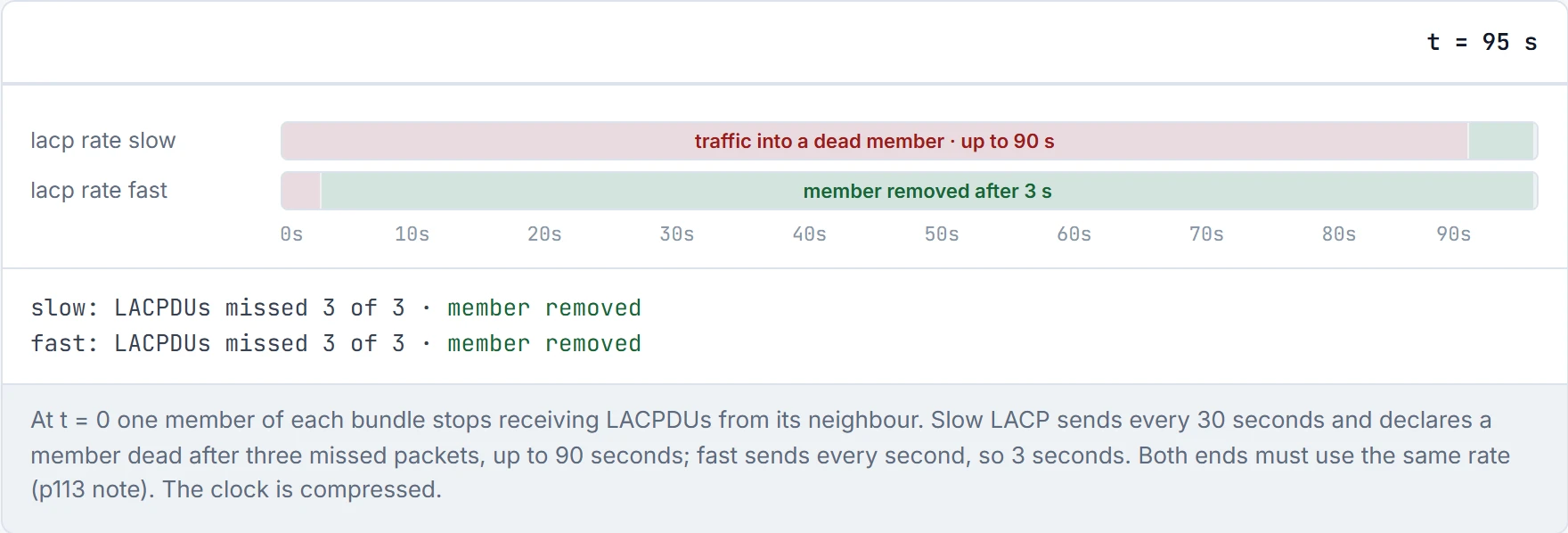
LACP slow is the smoke alarm that waits a minute and a half to be sure it's really a fire.
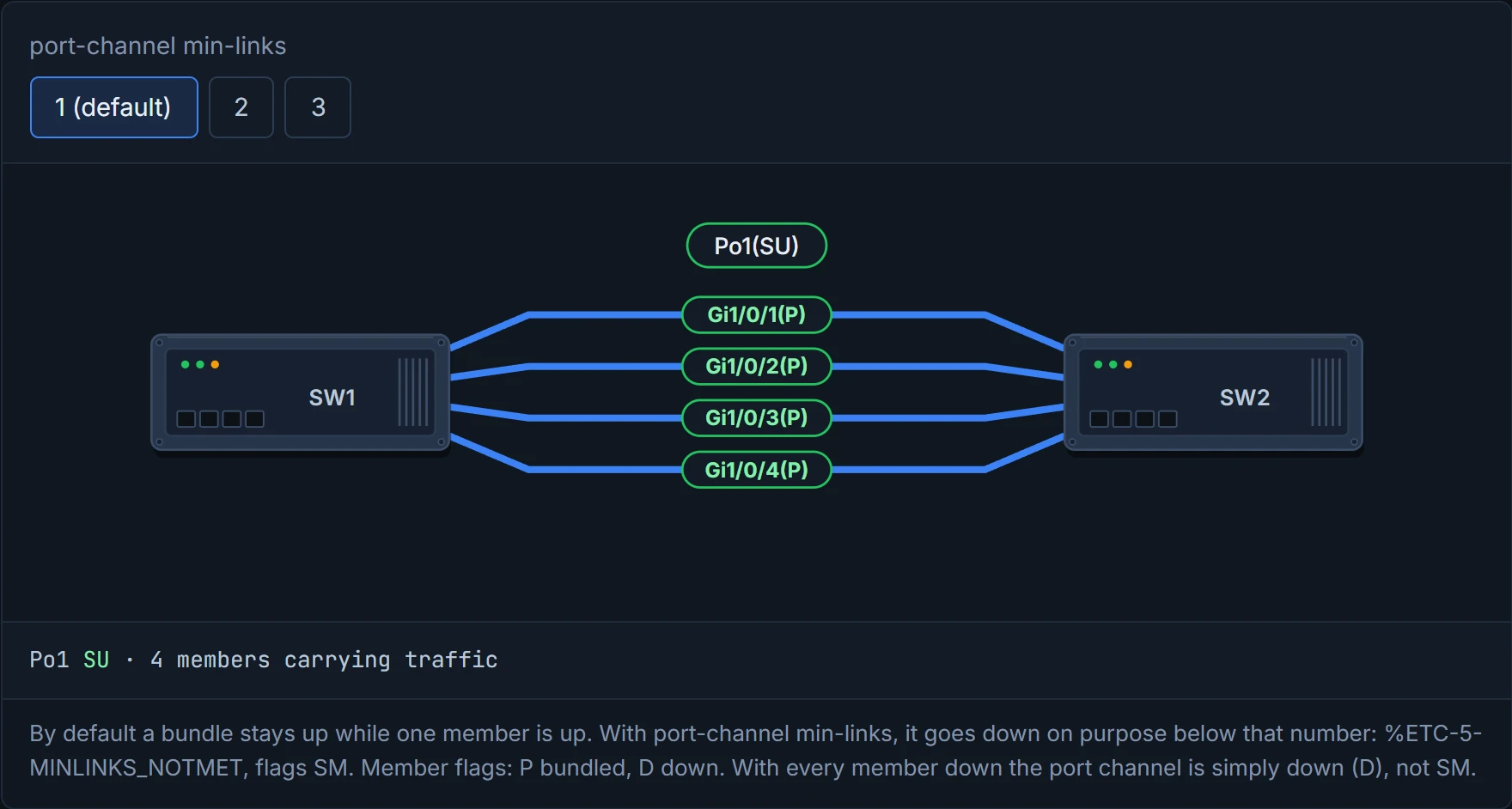
By default, a bundle is up as long as just one member is up. That's usually what you want. But picture yourself running a bundle of two 1 Gbps members that has to carry 2 Gbps: with one member left, the bundle says "up" while it can only carry half of what's offered. port-channel min-links sets the minimum:
SW1(config)# interface port-channel 1
SW1(config-if)# port-channel min-links 2
Drop below it, and the whole port channel goes down, on purpose, even though some members are still up. The guide shuts one of two members: the log says %ETC-5-MINLINKS_NOTMET, and show etherchannel summary shows SM, Layer 2 and "not in use, minimum links not met". It's basically like a restaurant that won't open for dinner with only one chef in: better closed, so bookings go elsewhere, than open and failing everyone.
min-links doesn't have to be set on both switches to work, but set it on both anyway: it saves the next person an hour of confusion.
D2
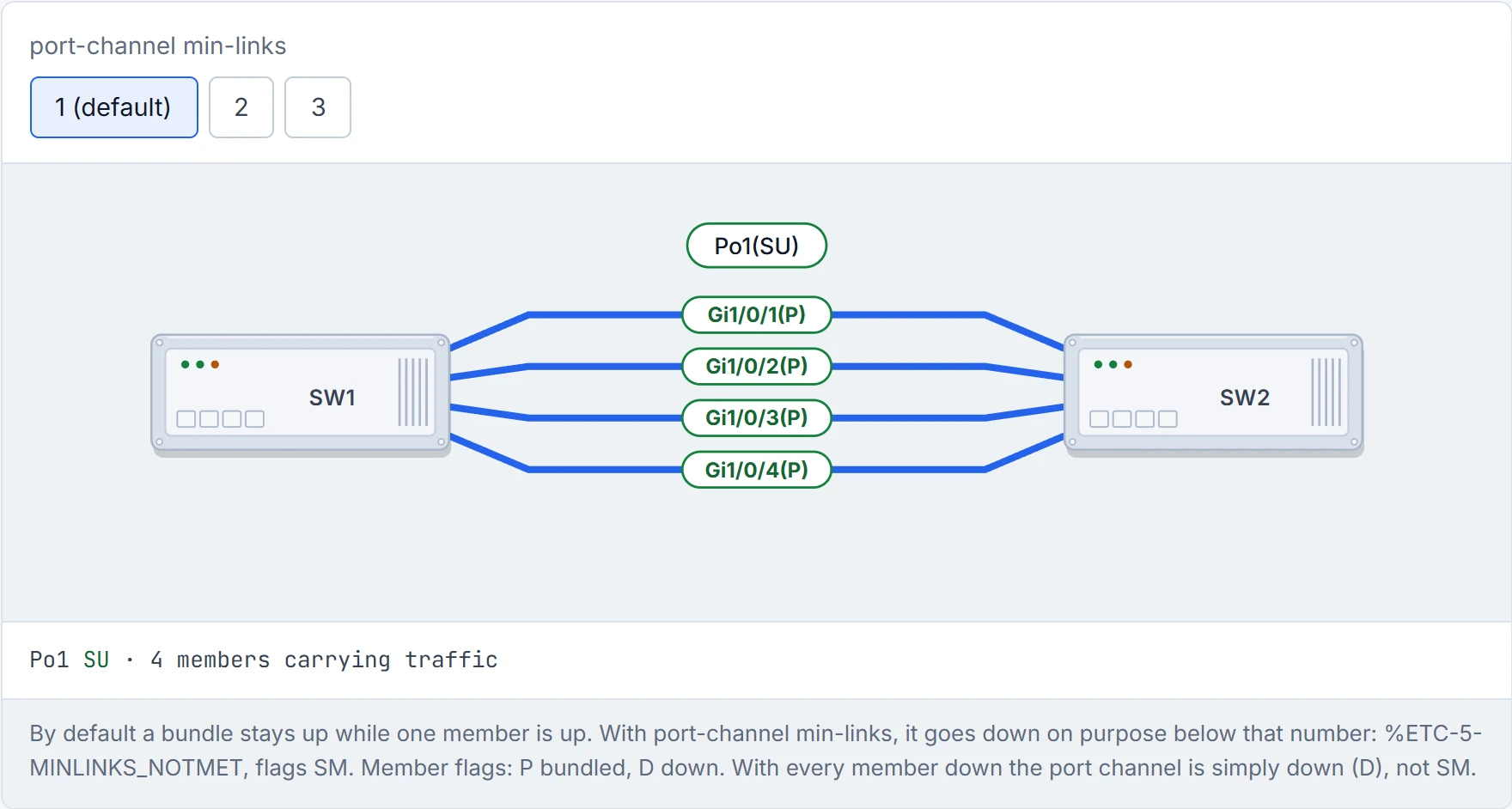
Min-links is the only feature that fixes a problem by turning the link off. Sometimes that's leadership.
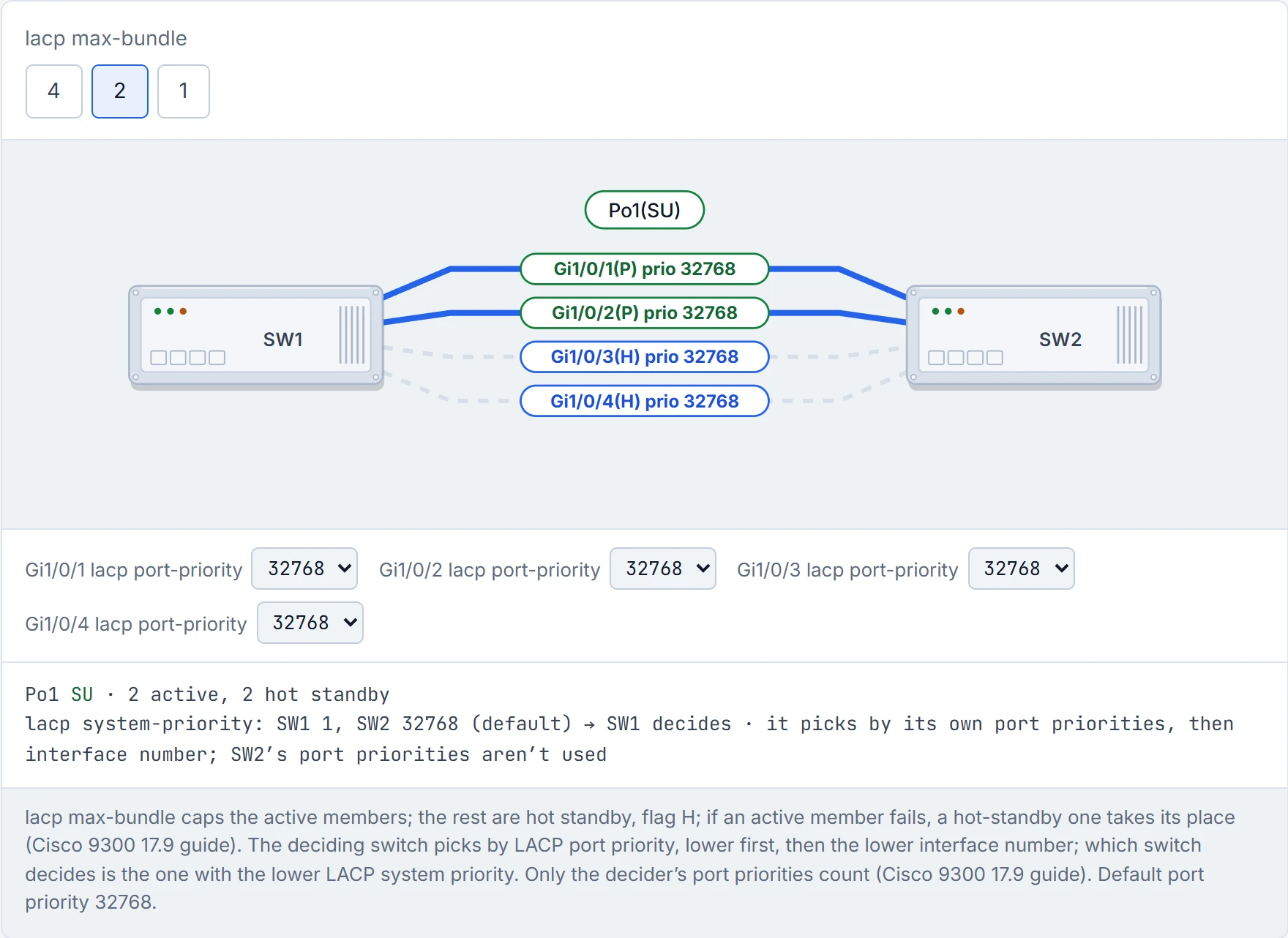
The opposite knob. lacp max-bundle caps the number of active members. Why cap it? One reason the guide gives: to keep the active count at a power of two, 2, 4 or 8, because the hash (section 4.5) divides traffic in powers of two. The bundle ends up like a car park with eight spaces and a sign that says "four cars only": the spaces all exist, you've just decided how many get used.
SW1(config)# interface port-channel1
SW1(config-if)# lacp max-bundle 1
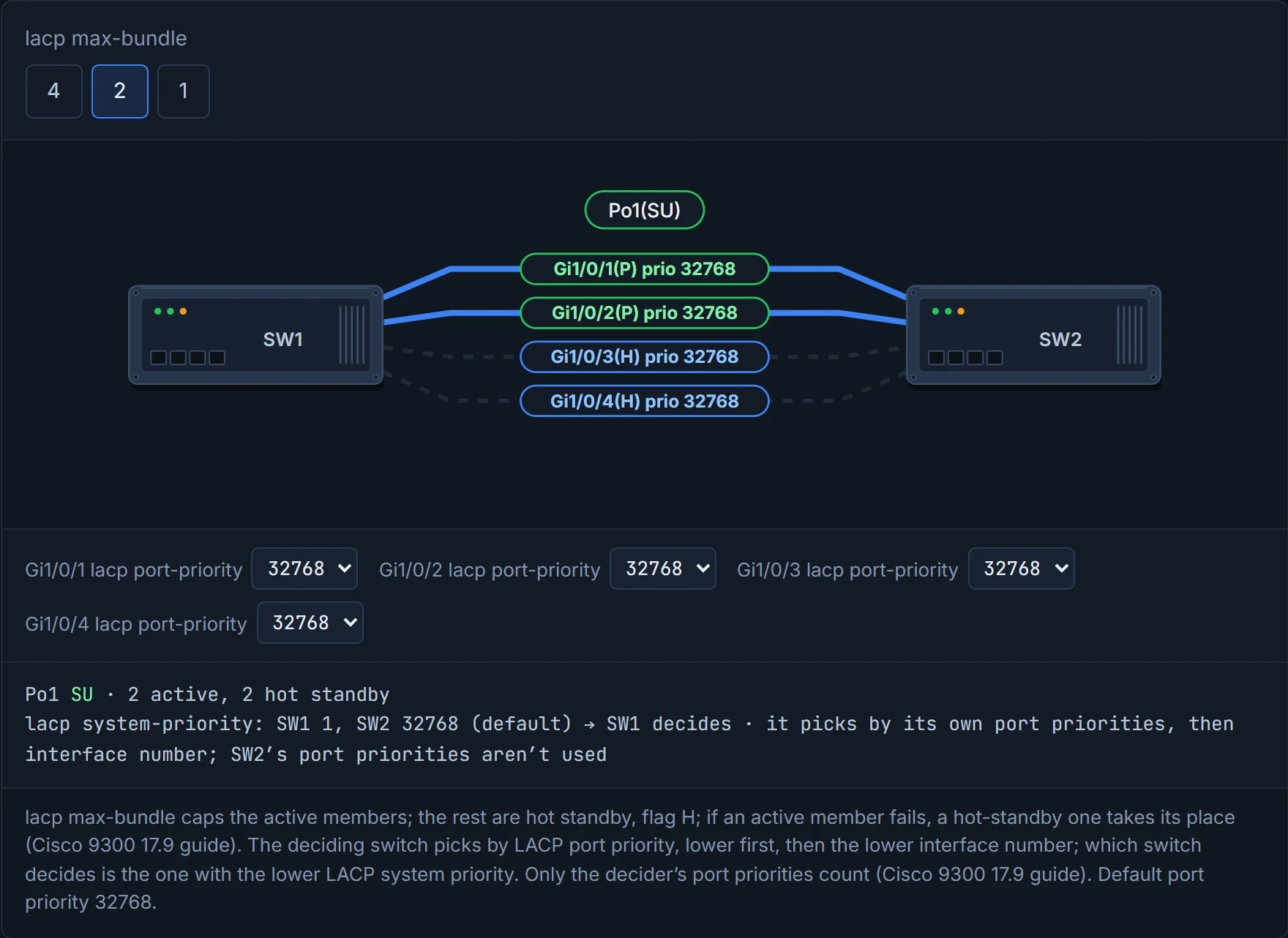
Members beyond the cap don't forward. They show H, hot-standby. And if an active member goes down, a hot-standby one becomes active in its place: Cisco's 9300 guide says so directly. Think of it as the substitutes on the bench: kitted up, warmed up, ready to come on the moment someone's injured. max-bundle only needs configuring on the switch that decides (the guide's master switch, section 4.4), but again, configure both. On a Catalyst 9300 on 17.9, max-bundle takes 1 to 8, and an LACP bundle can hold up to 16 members with up to eight active.
D4
Hot standby is the only job where you get paid to wait for a colleague to fall over.
So which members play, and which sit on the bench? The deciding switch (the guide calls it the master switch) looks at each member's LACP port priority. Lower wins, and if they tie, the lower interface number wins. Just like when you take a ticket at the deli counter: the lowest number gets served first. And this only matters when there are more members than the maximum allowed; with no cap reached, everyone plays.
And which switch is the one deciding? The one with the lower LACP system priority. It's like two captains, and the one with the lower shirt number picks the team. Two sides, one decider, and nobody argues about it, because the rule was set before the argument. If both switches have the same system priority (and out of the box they do: 32768), Cisco breaks the tie with the system ID: "numerically lower system priority and system ID" is placed in charge. The system ID is the priority plus the switch's MAC, so with default priorities the switch with the lower MAC decides.
SW1(config)# lacp system-priority 1
SW1# show lacp sys-id
1, 0062.ec9d.c500
lacp system-priority is a global configuration command; the show runs from exec mode, which is why the prompt changes mid-example. show lacp sys-id shows the priority and the switch's MAC. The default in the guide's output was 32768. Port priority is set per interface with lacp port-priority <n>, and lower is preferred. Its default is 32768 too, the Priority column in the guide's show lacp internal, and the 9300 takes 1 to 65535.
Here's the bit people miss: only the deciding switch's port priorities count. The guide says the interface priority "enables the master switch to choose", and Cisco's 9300 guide is blunter: "The port priority and port number values for the other system are not used". Set port priorities on the switch that isn't deciding, and nothing happens. It's a bit like handing your team preferences to the captain who lost the toss.
The guide's example: max-bundle is 1, and Gi1/0/1 is active while Gi1/0/2 waits (H). Set Gi1/0/2's port priority to 1, and they swap: Gi1/0/2 is P, and Gi1/0/1 goes to H. Careful with that letter: in show etherchannel summary, P means "bundled in port-channel"; in show lacp internal (section 4.1), P meant passive mode. Same letter, two commands, two meanings.
Both LACP priorities are scored like golf: lowest number wins, and a big number just means you're buying the drinks.
Now 01-3's puzzle. Four members, all P, and one cable does 80% of the work. Why?
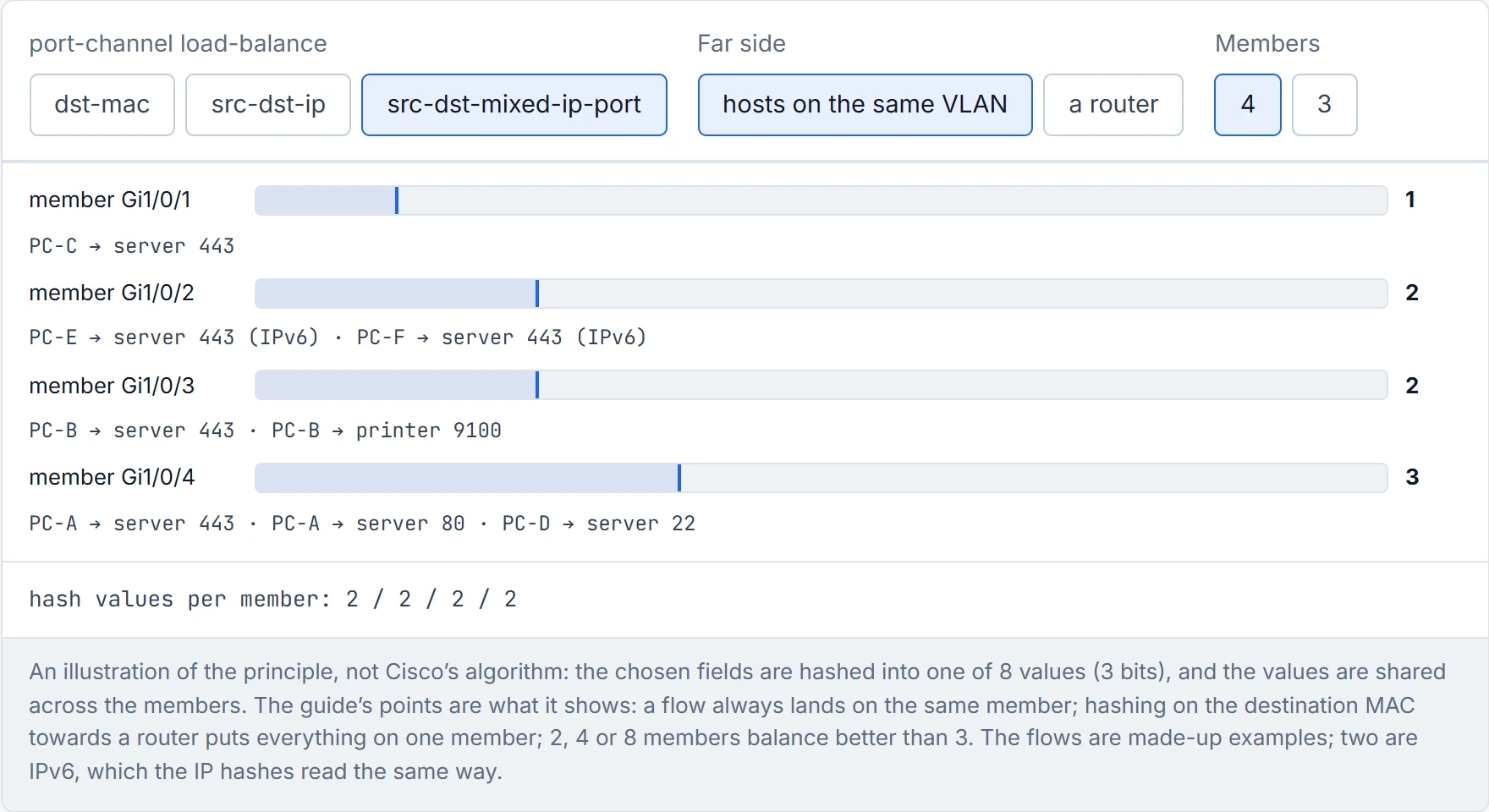
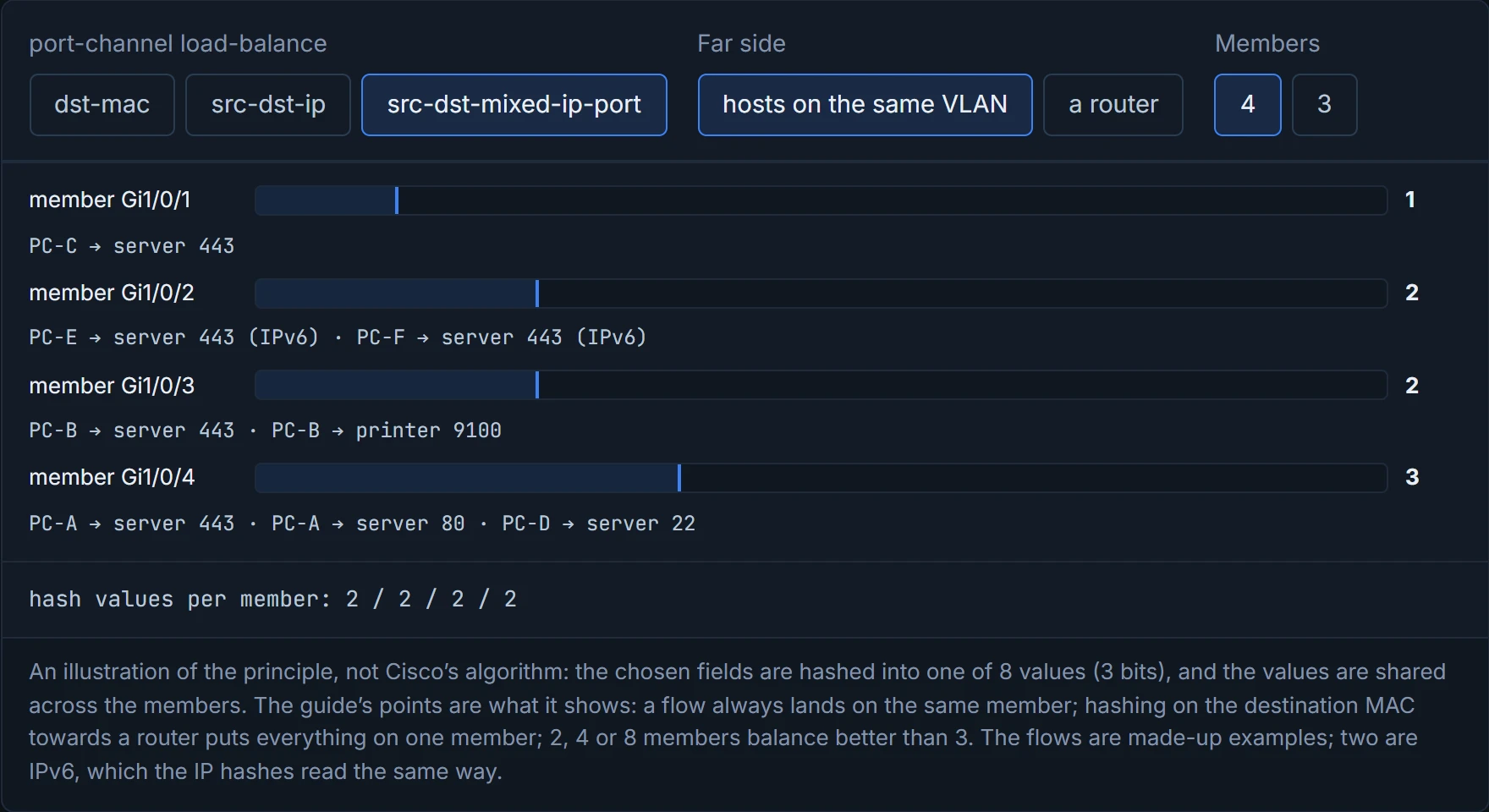
Because a bundle doesn't deal packets out round-robin. The switch runs a hash on fields in each packet's headers, and the result picks the member. The same fields always give the same member, so a conversation stays on one cable. It works behind the scenes just like the supermarket that sends you to a checkout by the first letter of your surname: fast, consistent, and deeply unfair to anyone called Smith.
The hash is set once for the whole switch:
SW1(config)# port-channel load-balance src-dst-mixed-ip-port
The fields you can hash on, grouped by what they read:
- MAC addresses:
dst-mac,src-mac,src-dst-mac. - IP addresses:
dst-ip,src-ip,src-dst-ip. - TCP/UDP ports only:
dst-port,src-port,src-dst-port. - "mixed" = IP address plus port:
dst-mixed-ip-port(destination IP and destination port),src-mixed-ip-port(source IP and source port),src-dst-mixed-ip-port(both addresses and both ports).
The guide also prints src-dest-ip-only, "source and destination IP addresses only". Cisco's own list for the Catalyst 9300 on 17.9 doesn't have it: it has the other twelve plus extended, and says the default is src-mac. So don't count on src-dest-ip-only; src-dst-ip does that job.
So here's the trap. If the bundle leads to a router, the router's MAC never changes: it's the destination of every frame going to the router and the source of every frame coming from it. A hash on the destination MAC then puts everything heading to the router on one member, and any hash that includes MACs can be skewed the same way. It's like sorting post by the house number when everyone lives at number 1. Hash on IP addresses, or on TCP/UDP ports, instead. And remember the 9300's default is src-mac: on the switch next to the router, everything the router sends across the bundle has the router's MAC as its source, so the default puts it all on one member.
show etherchannel load-balance shows what the switch hashes for each kind of traffic: non-IP, IPv4 and IPv6 separately. In the guide's output, IPv4 and IPv6 both use source XOR destination IP plus layer-4 port, and non-IP uses source XOR destination MAC. So the IP keywords read the same fields for both families: IPv6 flows are hashed on their IPv6 addresses and ports, not left to the MAC hash. The spread still depends on the actual addresses. (The guide shows this for src-dst-mixed-ip-port only; check the command on yours for other keywords.)
D1
The hash is completely fair to flows. It just doesn't care about you as a person.
Predict: three members or four, which balances better? Four. A hash is a binary function, so the member count should be a power of two: 2, 4 or 8. A three-member bundle doesn't balance as evenly as two or four. The same logic makes 5, 6 or 7 lopsided too. That's roughly equivalent to cutting a cake into three with a knife that only halves: someone ends up with the big slice.
To see how the load is really spread, show etherchannel port shows each member's Load, in hex, relative to the others. That's your evidence before you touch the hash. You can think of it as weighing each shopping bag before deciding the bags are uneven: look first, then repack.
Continue the lesson
The whole lesson, with its drawings and its questions. The rest of this section and 9 more after it.