
SD-WAN against the traditional WAN: benefits and limitations
Most enterprise traffic now goes to public clouds and the Internet, which traditional MPLS or DMVPN WANs were not designed for: branches reach SaaS through a central data centre, adding latency. SD-WAN answers with four use cases: a secure automated WAN, application performance optimisation, secure direct Internet access, and multicloud. Its central control also has costs to plan for.
By Arif, founder of Daveth · Updated
The full 8 min walkthrough is in Daveth Pro (Network). See what the plan opens
What this page answers
What is SD-WAN?
A WAN run as one overlay across any transport with central control, designed for traffic to SaaS, public IaaS and the Internet. Cisco sorts its benefits into four use cases: a secure automated WAN, application performance, direct Internet access and multicloud. Read it in “4.1 What the traditional WAN struggles with”
What problems does SD-WAN solve compared with a traditional WAN?
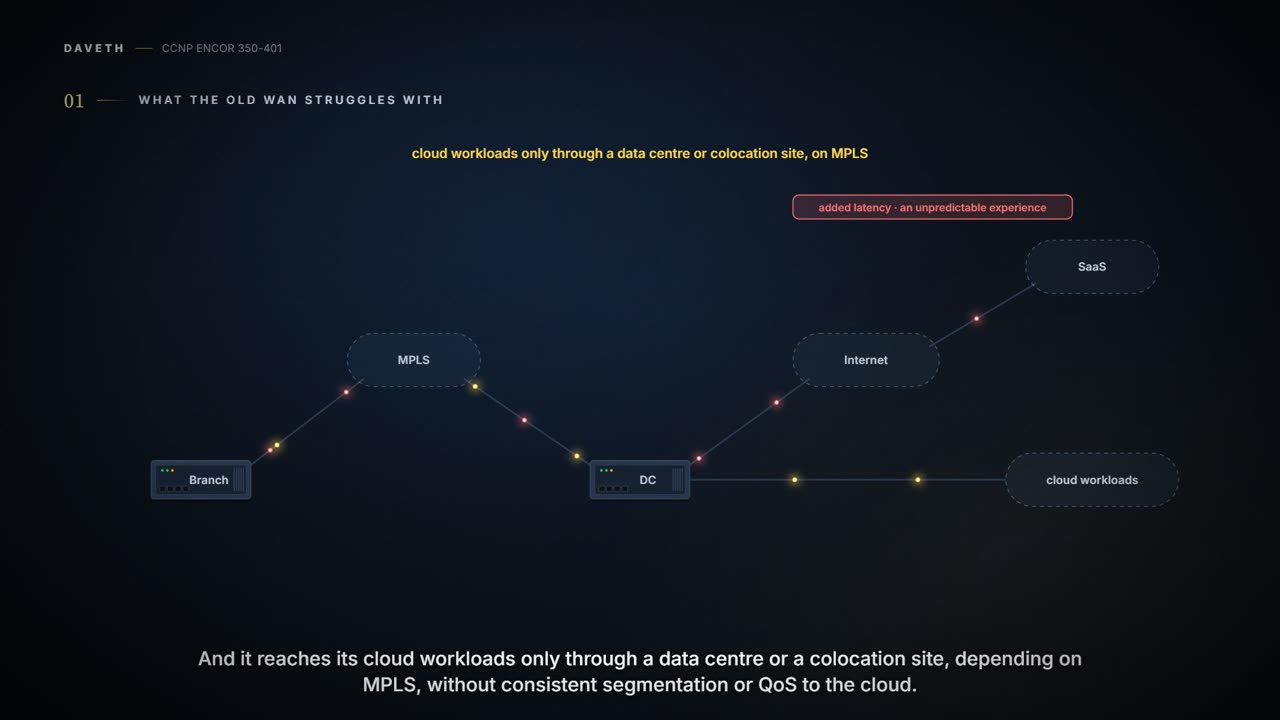
Branches reaching SaaS through central data centres, with added latency and an unpredictable experience, and reaching IaaS only through a data centre, without consistent segmentation or QoS to the cloud. Read it in “4.1 What the traditional WAN struggles with”
4.1 What the traditional WAN struggles with
Traditional WANs connect campuses and branches with MPLS or overlays such as DMVPN or IWAN. But with SaaS such as Office 365 and Salesforce and public IaaS such as AWS, Google Compute Engine and Azure, most enterprise traffic now goes to public clouds and the Internet, bringing requirements for security, application performance, cloud connectivity, WAN management and operations that traditional WANs weren't designed for. Cisco's design guide gives the two typical symptoms: branches reaching SaaS through central data centres, with added latency and an unpredictable experience; and branches reaching IaaS only through a data centre or colocation site, depending on MPLS, without consistent segmentation or QoS to the cloud. It's like having every delivery routed through one national depot even when the customer lives next door to the warehouse.
The guide's drivers for SD-WAN (06-6 went through them) answer them: automation and orchestration, the enterprise extended into public cloud, a better SaaS experience, a transport-independent WAN over any IP network, path control for SLAs, and end-to-end segmentation and encryption. Just like when you switch to a phone that works on any carrier's SIM: the calls are the same, and you stop caring whose network carries them.
Backhauling Office 365 through the data centre is the network's way of making sure everyone's email takes the scenic route.
Cisco's design guide sorts the benefits into four use cases, like a menu sorted by course:
| Use case | What it gives |
|---|---|
| Secure automated WAN | secure connectivity between offices, data centres and public or private cloud over any transport |
| Application performance optimisation | a better application experience for remote offices |
| Secure direct Internet access | Internet traffic offloaded locally at the remote office |
| Multicloud connectivity | SaaS and IaaS reached over the best path, and through colocation or exchange points where security services can be applied |
Behind all four sit the same mechanics (06-6): zero-touch onboarding through the Validator, one Manager for every router, a Controller that applies policy everywhere at once, and IPsec with BFD over whatever transports a site has. You can think of it as a travel agent who sets the company's travel policy once and books whichever airline flies the route that day. Central brain, any road: that's the benefit, and, as section 4.5 shows, the bill.
"Transport independent" means the underlay can be Internet, MPLS, LTE or satellite, which is the first WAN design that's happy to run over whatever the branch could get installed this week.
Cloud OnRamp is a set of functions for reaching SaaS and IaaS: for SaaS it monitors performance across the paths and picks the best on jitter, loss and delay; for IaaS it extends the fabric into public cloud, with more availability and scale. SaaS applications live mostly on the Internet, so the best Internet exit has to be found. With two direct Internet access (DIA) circuits at a site, Cloud OnRamp for SaaS (configured on the Manager for a chosen application) makes the site's router send small HTTP probes to the application through each circuit, measuring loss and latency; it sends the application's traffic out the better one, and keeps probing, moving the traffic if that changes. It works like a sat-nav that keeps checking the live traffic and reroutes you mid-trip.
With one DIA circuit plus the fabric to a regional hub, Cloud OnRamp also runs on the hub, which becomes the gateway; both probe the application with HTTP. Towards the hub the site uses BFD over the fabric, which measures liveness and quality (loss, latency, jitter, and the tunnel's MTU); BFD can't be used over DIA, because there's no SD-WAN router at the SaaS end. The hub reports its own loss and latency to the site in OMP through the Controllers, and the site compares its local DIA with the hub's figures plus the cost of reaching the hub, then sends the application down the best path, like a traveller weighing a direct flight against a connection through a hub, layover included. The result is scored as vQoE (Viptela Quality of Experience), 0 worst to 10 best, visible on the Manager. Cisco's design guide says the same, naming loss and delay: continuous probing of each path, the best one chosen, traffic moved when a path degrades. (The guide calls the fabric leg to the hub a "DTLS session"; the tunnels between WAN Edges are IPsec, as the guide itself says on p634, and DTLS is for the control connections.)
Predict before D1: ISP1 good, ISP2 slow, no gateway. Which circuit carries the SaaS traffic?
D1
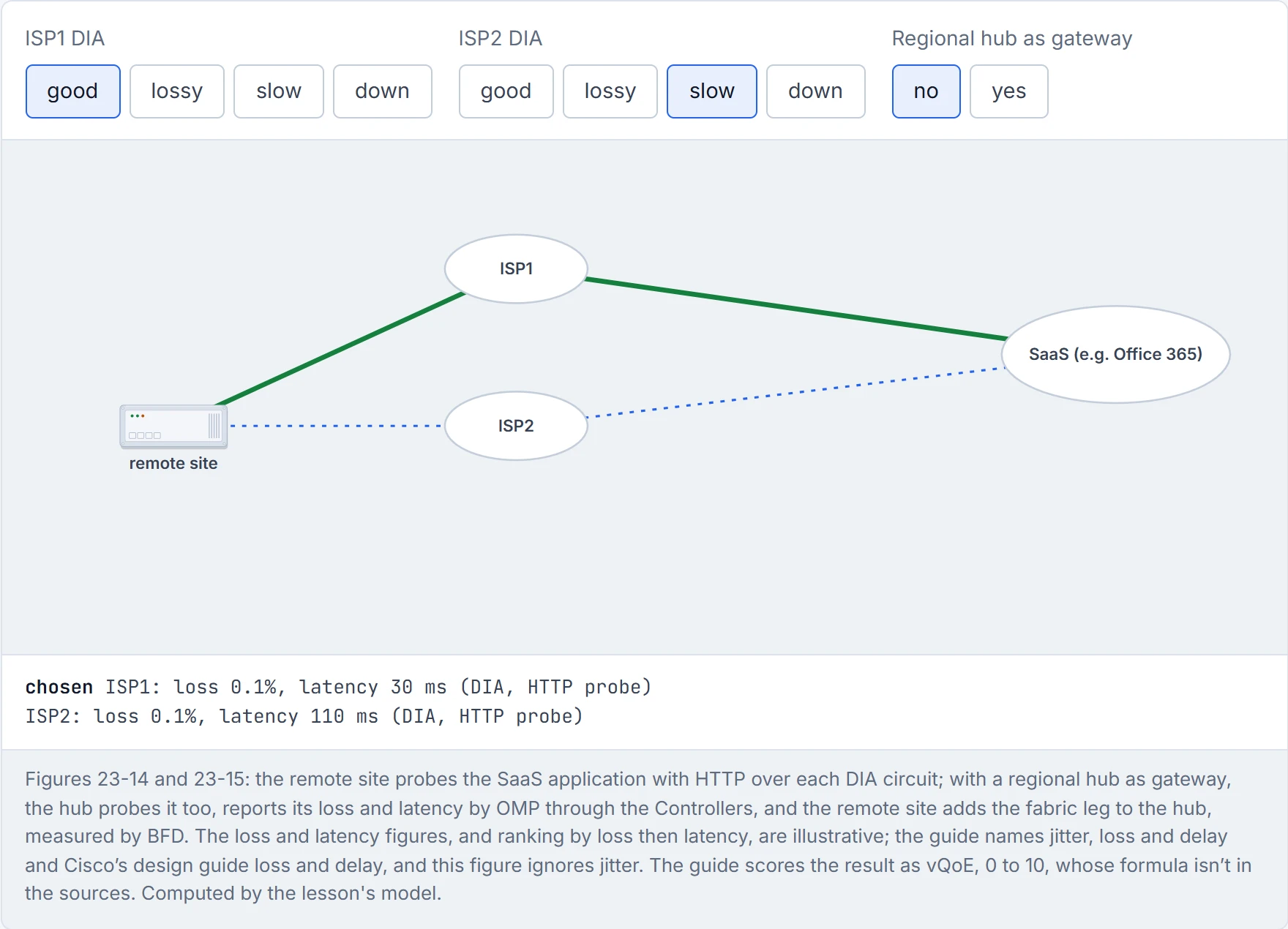
ISP1. Now make ISP1 lossy and turn the gateway on: the hub's path can win even with the extra fabric leg. The figure ranks by loss, then latency, and ignores jitter; the real vQoE formula isn't in the sources.
Cloud OnRamp keeps sending small HTTP probes to Office 365 so your users don't have to send angry emails about it.
Multicloud, in the guide's words, is the new norm: some workloads in private data centres, others in public clouds such as AWS and Azure. Cloud OnRamp for IaaS extends SD-WAN's connectivity, zero-trust security, segmentation and application-aware QoS into those clouds with SD-WAN cloud routers, over any transport: Internet, MPLS, LTE, satellite, or dedicated circuits such as AWS Direct Connect (DX) and Azure ExpressRoute (ER). Figure 23-16 draws the cloud routers inside the AWS VPC and the Azure VNET, with BFD running from the branch, campus and data centre over each transport. It works like a company extending its internal phone system to a new office.
Cisco now calls it Cloud onRamp for Multicloud (formerly for IaaS): it automates connectivity to public-cloud workloads from the data centre or branch, deploying WAN Edge instances in the public cloud that join the overlay; so branch traffic needn't cross the data centre to get there. It's a bit like opening a branch office inside the cloud provider's building, so your staff stop commuting through head office to get there.
Cloud OnRamp for IaaS puts a router in the cloud so the cloud can join the WAN, which is the network finally meeting the cloud halfway.
None of this is free. Cisco's design guide has no single list of limitations (it says "some differences and limitations may be pointed out"); they're spread through its design considerations:
- The control plane is a dependency. A WAN Edge must keep its expected control connections (by default the Manager, each of two Controllers on each transport, and one OMP session to each Controller); if it can't, it's "out of equilibrium" and holds a connection to the Validator until they're back. If it loses every Controller, it keeps forwarding on its last control-plane information only for the OMP graceful restart timer, 12 hours by default. What happens after the timer runs out isn't in the course's sources. It's like a satellite office that keeps working from yesterday's instructions when head office's phones go down, for half a day.
- Tunnels multiply with sites. By default every router tries a tunnel to every remote TLOC; depending on the network's size and the routers, that may be too many, and a hub-and-spoke or partial-mesh topology by central policy limits it, as long as the hubs can take the load: each hub then holds roughly what a full-mesh branch would have. Each platform has to be sized for throughput and tunnel count.
- NAT can block direct tunnels. Two sites both behind symmetric NAT can't form a tunnel; symmetric NAT at one site needs full-cone NAT or no NAT at the other. Sites that can't connect directly should be set up, by policy, to reach each other through a data centre or hub, whose NAT should be full-cone or 1-to-1.
- Platforms differ. vEdge and IOS XE (cEdge) WAN Edges have different features; Cisco says to check the Feature Navigator before planning, and vEdge platforms are end of life (20.6 the last release for vEdge 100 and 1000, 20.9 for the vEdge 2000, 5000 and Cloud). The guide's Table 23-2 already showed cEdge with security vEdge lacks, and noted that URL filtering and IPS weren't on ASR 1000 cEdges at the time of writing.
Predict before D2: 100 sites, full mesh, an mpls and a biz-internet TLOC each, restrict on mpls. How many tunnels does one branch hold?
Continue the lesson
The whole lesson, with its drawings and its questions. The rest of this section and 9 more after it.